Chia-lin Yang, Chien-Hsu Chen (2024). Applying Paper Prototyping to Design an AR Teaching Tool for Novice Woodworkers Practicing Components Arrangement in Material Cutting. In: Training, Education, and Learning Sciences. AHFE Open Access, vol. 155, pp. 185–193. https://doi.org/10.54941/ahfe1005403
This is a study focusing on Taiwanese university students in the field of vocational education. The research observed a woodworking product elective course in the Department of Industrial Design at National Cheng Kung University, where most students lack relevant experience and feel confused when learning about mechanical operations, physical applications, spatial concepts, and other aspects. The "components arrangement" stage is a crucial step from paper design to actual material processing, where students arrange the spare parts of their designs on the wood to be used, in a manner suitable for machine sawing, to achieve smooth, efficient processing, material saving, and aesthetic results. This stage is also where novices spend much time and feel hesitant during practice. Therefore, this study utilized paper prototyping to conduct operational pre-testing for an augmented reality (AR) woodworking cutting and arranging tool, allowing novice woodworkers to simulate AR-assisted tool operations intuitively and gather firsthand feedback to assist novices in arranging components. Experimental records indicate that during the experiment, researchers could quickly observe defects in AR system design and make rapid adjustments. After model updates, participants could focus on task operations. Through participant interviews, it was evident that users provided positive feedback on the AR teaching tool's willingness to increase practice frequency, reduce task completion time, improve satisfaction with wood grain arrangement, and enhance operational confidence. These results align with the real-time and non-destructive nature of AR tools, enabling students to try operations without worries, eliminate spatial cognition uncertainty, and increase practice frequency to reinforce component arrangement assumptions. This study confirms that early implementation of paper prototyping in AR tool design facilitates rapid operational simulation verification and process optimization, enhancing novice woodworkers' willingness to learn and motivation to operate in material cutting and arranging. This lays the foundation for the subsequent development of AR woodworking cutting and arranging teaching tools. The study also proposes some improvements for using paper prototyping in AR simulations to make simulated operations smoother and more immersive.
In vocational education, students spend considerable time engaging in prac- tical exercises to convert acquired knowledge into procedural memory (Lai & Lin, 2017). Although Taiwan has gradually emphasized the importance of vocational education in recent years, societal norms still prioritize tradi- tional academic pathways, with general high schools and colleges remaining the preferred choices for many individuals (Lee & Huang, 2023). Within the curriculum of university industrial design departments, students often need to validate and produce their designs, frequently requiring hands-on fabrication. However, despite a keen interest in hands-on activities, most college stu- dents from general high school backgrounds lack practical experience. While courses may offer practical instruction in model-making techniques, these typically span only one semester, making it challenging for students to become proficient in using of common tools and fabrication techniques. This study focuses on a woodworking product and design practice course offered by the Department of Industrial Design at National Cheng Kung University, where most students are woodworking novices with little to no understanding of woodworking processes, design, fabrication knowledge, or tool operation. The course is designed to complement students’ lack of practical experience in factory equipment operation. For 18 weeks, totaling 54 hours, the objective is to guide over 20 woodworking novices from zero experience to indepen- dently completing finished products. However, the course presents significant challenges in terms of curriculum design, scheduling, and safety maintenance. During instructional demonstrations, students may face barriers such as limited auditory or visual access to the teacher’s on-site demonstrations; prac- tical exercises may be restricted by limited access to equipment, preventing students from gaining proficiency through repeated practice. Additionally, teachers may struggle to provide individualized demonstrations while moni- toring all students’ progress. To address these challenges, this study aims to develop an AR-assisted interactive system to provide instructional support. AR technology enables users to interact with their environment in novel ways, creating new visual experiences (Freitas, Pinho, Silveria & Maurer, 2020). AR technology transcends spatial and temporal constraints with its ability to seamlessly blend virtual objects with the real world and conduct multiple simulated operations without physically altering objects (Billinghurst, 2002). This study focuses on the component arrangement stage before material cut- ting, a critical step bridging design drawings and fabrication operations. In this stage, students must plan and arrange all design components within the material to be cut, ensuring efficient and complete fabrication. By incorpo- rating AR technology, this study anticipates students can avoid irreversible errors discovered after cutting and practice various arrangement possibilities before sawing. However, comprehensive AR software like Unity requires sig- nificant expertise and investment of time and resources, making subsequent modifications challenging (Freitas et al., 2020). Therefore, this study adopts paper prototyping, which is extensively used in UI design, leveraging its low cost and rapid iteration advantages to conduct operational design validation of AR teaching tools and obtain feedback promptly.
Applying Paper Prototyping to Design an AR Teaching Tool for Novice Woodworkers 187
AUGMENTED REALITY TO NOVICE WOODWORKER EDUCATION In recent years, the application of AR technology has become increasingly prevalent and diversified, with many educational applications emerging, pro- viding students with unique learning experiences (Gün & Atasoy, 2017; Yip et al., 2019). Augmented reality refers to the technology that overlays digital content onto physical objects in the real world, making it suitable as an auxiliary tool for technical education courses, with related technolo- gies being applied in classroom teaching (Cuendet et al., 2013). Since skill acquisition requires hands-on practice for students to transform absorbed knowledge into technical proficiency, such courses necessitate more time for observation and practice, consuming more course time and physical space than general academic subjects.
In the woodworking course of this experiment, due to space constraints and students’ unfamiliarity and lack of proficiency with the subject, it is challenging for students to fully observe course demonstrations and engage in maximum practical exercises within the limited course time. For students who are all woodworking novices, the woodworking process involves trans- forming design concepts from 2D drawings to three-dimensional products through hands-on manipulation of tools, making it difficult to imagine the outcome of material manipulation at each step without experiencing the entire process (O’Malley & Fraser, 2004). O’Malley and Stanton Fraser (2004) mention another important aspect of learning: the coupling between cognition and bodily experience. Students in vocational education can train their spatial concepts and abilities to convert 2D to 3D through continu- ous practice. However, students in this course lack these abilities. Using AR instructional systems provides a balance of immersion and real interaction, allowing for the experiential and situational learning described by Manto- vani and Castelnuovo (2003) as the “sense of presence,” which can enhance users’ spatial abilities. Therefore, AR is highly suitable as a tool medium for woodworking instruction and practice for novice woodworkers.
AUGMENTED REALITY AND WOODWORKING COMPONENT ARRANGEMENT Component arrangement for cutting is common in industries involving mate- rial cutting, such as steel, fabric, paper, and plastic sheets. Typically, cutting materials only requires consideration of maximizing the number of com- ponents within a limited area for optimal cutting. However, woodworking presents a unique challenge due to the directional nature of the wood grain, which affects the structural strength. Therefore, in addition to considering the most economical arrangement, the orientation of the wood grain needs to be prioritized (Carnieri, Mendoza & Gavinho, 1994).
AR features the integration of virtual objects with the real environment, allowing users to interact with virtual objects in the real context and observe the relationship between the operation and the real environment. In the woodworking component arrangement phase, the wood to be cut can be considered part of the real environment, where each piece of lumber material is unique, and the patterns and defects on the material display the complexity
188 Yang and Chen
of the real world. On the other hand, the components of the workpiece are relatively regular artificial objects that can be simulated with virtual objects. Through the ability of AR to interact between the virtual and real, learners can observe the relationship between the components arranged on the lum- ber, clarifying the effect of different arrangements on the appearance of the spare parts after cutting.
NOVICE WOODWORKES’ CHALLENGES IN WOODWORKING COMPONENT ARRANGEMENT Novices encounter numerous difficulties, particularly in making cutting dia- grams before cutting, due to the comprehensive considerations required in woodworking, which is an integrative task. Firstly, consideration must be given to the available tools, as the type of tools influences the cutting method, and the thickness of the saw blade affects the extent of material consumption. Next, the arrangement sequence needs to be considered to ensure smooth cutting. Finally, it is essential to consider whether defects in the lumber will affect the appearance of the cut components and to avoid them during the arrangement. Experienced woodworkers typically calcu- late and confirm the dimensions directly on the saw table based on the lumber’s actual condition and the components’ size. Novice woodworkers often need to draw the components on the lumber surface to determine if all components can be cut from the lumber. This process takes time and is difficult to adjust, which makes it challenging to consider the reserved tool thickness. Moreover, encountering defects such as knots or cracks makes quick adjustments difficult. Therefore, this study utilizes the inter- active nature of AR to develop AR woodworking component arrangement tools, aiming to improve student learning outcomes through practice and interactive teaching.
PAPER PROTOTYPING AND AUGMENTED REALITY Existing AR development tools such as Unity require a considerable level of expertise and extensive time investment to complete system development, and a small bug can cripple the entire system (Retting, 1994). For those without professional development skills, using high-fidelity models at the early stages of development is impractical, necessitating a low-cost and rapid method to verify the system’s conceptual feasibility (Freitas et al., 2020). Accord- ing to Freitas et al. (2020), paper prototyping is the preferred method for rapid and low-cost simulation. Paper prototyping was proposed by IBM in the 1980s (Retting, 1994), using readily available office materials such as paper, markers, and scissors to roughly create the operational interface of the system for human-computer interface testing. Despite its rough appear- ance, due to its low production cost and rapid operation, research shows that it is almost as effective as feedback from sophisticated computer-based prototypes (Lim, Pangam, Periyasami & Aneja, 2006; Alkhaldi & Al-Sa’di, 2018; Sefelin, Tscheligi, and Giller, 2003) and is widely used in the early stage of interface design. Today, products for human-computer interaction
Applying Paper Prototyping to Design an AR Teaching Tool for Novice Woodworkers 189
have evolved from fixed devices such as computers to mobile devices such as phones, with wearable devices also beginning to emerge. As wearable devices do not have a fixed interaction range like traditional screen-based devices, interface development and design are much more challenging compared to traditional screen-based devices.
This study uses paper prototyping to quickly assess the operational fea- sibility of the design process, prioritizing smoothness and operability while excluding the influence of factors such as appearance design and aesthetics. Additionally, consideration must be given to how to simulate the interface display of HUD devices and interact with the real environment.
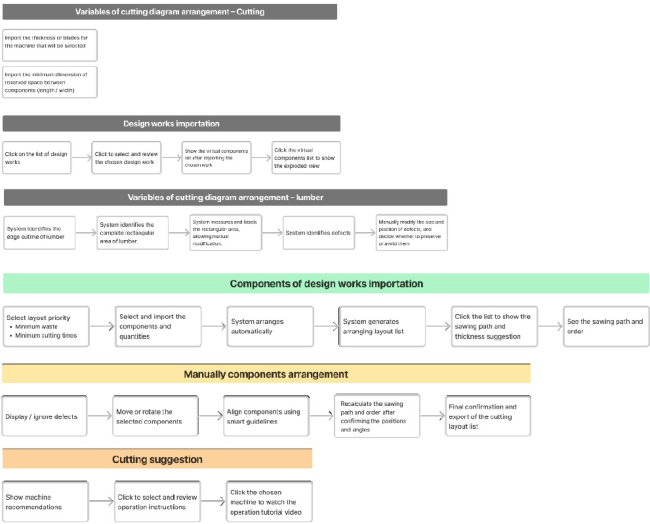
INTERFACE DESIGN AND TESTING In previous research, the researchers decomposed the AR teaching system into five major blocks: sawing parameters input, design work input, material parameters input, manual layout operation, and sawing processing sugges- tions. To conduct simulation testing using paper prototyping, this study organized and summarized the layout tasks and drew a functional flow chart, as shown in Figure 1.
Figure 1: Functional flow chart.
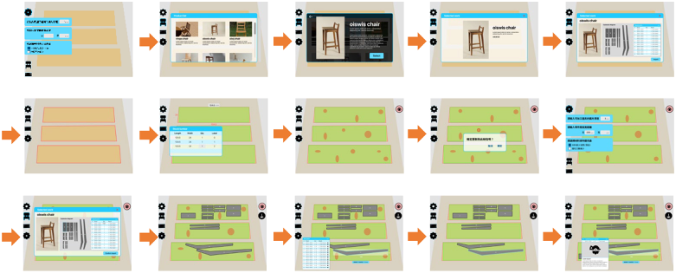
Based on the functional flow chart, the simulation operation process was pre-planned, and a preliminary UI design was conducted to create a preliminary UI operation process, as shown in Figure 2.
190 Yang and Chen
Figure 2: Interface design.
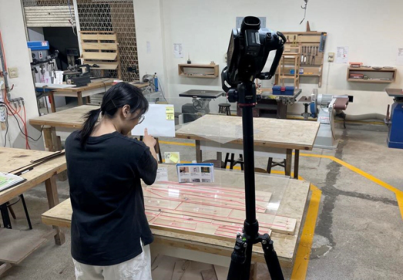
To avoid interference from interface appearance design on operational feedback, the operational components of paper prototyping were presented most simply, eliminating interference from component shapes and colors. To simulate the display effect of head-mounted devices, transparent acrylic was used for the simulated screen of the interactive interface, allowing com- ponents to paste on the acrylic to simulate the situation of seeing virtual components floating in space. Additionally, this study focuses on exploring participants’ operations in arranging design work components; therefore, acrylic was also used to simulate virtual design work components, allow- ing participants to manipulate the components directly. Preparation of the experimental environment included: 1. Placing real wood lumber on the desk- top to represent the actual material to be sawn; 2. Pre-arranging simulated components made of acrylic on a large acrylic sheet to simulate the situa- tion where the system automatically arranges components; 3. Marking the position of wood defects with a red marker on another acrylic sheet cov- ered with Scotch tape; 4. Attaching interface components to another acrylic sheet for participants to operate in a suspended manner. 5. Setting up cam- eras and recording audio to document the operation process. The setup of the experimental environment is illustrated in Figure 3.
Figure 3: Test environment setting.
Applying Paper Prototyping to Design an AR Teaching Tool for Novice Woodworkers 191
DISCUSSION
In this study, students without any woodworking experience from the Depart- ment of Industrial Design at Cheng Kung University were recruited as participants to simulate students with similar backgrounds enrolled in the course. The researcher first simulated course instruction, explaining the purpose and operation methods of layout planning, and then asked the students to simulate using the AR system with paper prototyping for compo- nents arrangement practice. During the operation process, participants were required to verbally describe their actions, such as clicking, dragging, rotat- ing, etc. The experimenters recorded the operation process and any issues encountered, conducted a review after the operation, updated the process or components, and then repeated the simulation. Due to the characteris- tics of paper prototyping, the operational inefficiencies and missing icons were quickly identified during the experiment. Experimenters provided real- time explanations and added components to correct the process, allowing participants to conduct another simulation round within five minutes.
However, in addition to the positive feedback on the AR woodworking cutting diagram layout system observed during the experiment and obtained from participant interviews, several issues were identified: (1) Due to the “what you see is what you get” nature, when all parts can be arranged within the material area, participants may overlook the actual size of the mate- rial. (2) Since paper prototyping applies real-world objects to simulate AR, participants initially cannot distinguish which components represent reality or virtuality. (3) There is still a gap between using paper prototyping and actual operating environments, requiring clear definitions of the meanings of each action during simulated operations, such as using a marker to write representing typing input or voice input. (4) Participants must be encour- aged to bravely try clicking on interface components to trigger all software functions. (5) Using acrylic to simulate AR’s floating display prevents partic- ipants from releasing their hands during operation. (6) Participants may be distracted while operating the floating panel due to concerns about acciden- tally dislodging floating components. (7) Since the simulated part templates use transparent acrylic, participants can see through the material and clearly observe defects on the material, leading to the neglect of the function to dis- play material defects. (8) There is a time delay between participants’ actions and the simulated system feedback, requiring waiting time. (9) Some simu- lated components are more labor-intensive and cannot be modified promptly during testing.
The issues above do not significantly impede the use of paper prototyping to improve system processes, but they may affect the experience of simulating AR operations. Future improvements can focus on addressing these issues to enhance the smoothness of simulated operations.
CONCLUSION
The experiment conducted three rounds of simulated operations. Despite the time required for modifying the fabricated components, through timely adjustments, the overall operational process became significantly refined by
192 Yang and Chen
the end of the third round. Participants were able to simulate system opera- tions smoothly, demonstrating that the application of paper prototyping in preliminary testing of AR systems can effectively optimize the system.
Since AR combines virtual and real-world environments while paper pro- totyping presents in physical form, it’s essential to consider whether the materials used can simulate the AR operating environment. It may be advis- able to familiarize participants with the operation of paper prototyping before conducting actual tests. It is recommended to utilize modular pro- duction way to create components of the AR display interface, reducing the complexity of components and their influence on the user experience. Although using acrylic to simulate the visual effects of the AR display inter- face is visually appealing, it affects operability. Therefore, it is suggested that in the future, a suspension method be used to fix and free the user’s hands for a better experience.
Through the paper prototyping simulated operations in this study, it was also observed that when woodworking novices become familiar with the AR system operation process, they are more willing to try various cutting diagram layout possibilities. Subsequently, based on these findings, the process will be optimized in collaboration with professional software designers to develop a practical woodworking AR cutting diagram layout teaching aid.
ACKNOWLEDGMENT
The authors would like to thank Boyan Hsu, a junior colleague from Ergolab, for his assistance in designing this study’s UI.
REFERENCES
Alkhaldi, A. N., & Al-Sa’di, A. (2018). Gender Differences in User Satisfaction of Mobile Touch Screen Interfaces: University Students’ Service Sites. International Journal of Innovation and Technology Management. Billinghurst, M. (2002). Augmented reality in education. New Horizons for Learning,
12(5), 1–5. Carnieri, C., Mendoza, G. A., & Gavinho, L. (1994). Optimal Cutting of Lumber and Particleboards into Dimension Parts: Some Algorithms and Solution Procedures. Wood and Fiber science. 26(1), pp. 131–141. Cuendet, S., Bonnard, Q., Do-Lenh, S., & Dillenbourg, P. (2013). Designing
augmented reality for the classroom. Computers & Education, 68 (2013), pp. 557–569. Freitas, G., Pinho, M. S., Silveira, M. S., & Maurer, F. (2020). A sys- tem review of rapid prototyping tools for augmented reality. 2020 22nd Symposium on Virtual and Augmented Reality (SVR), pp. 199–209. doi: 10.1109/SVR51698.2020.00041. Gün, E. T., & Atasoy, B. (2017). The effects of augmented reality on elementary school students’ spatial ability and academic achievement. Egitim ve Bilim, 42(191), 31–51. Lai, H.-C., & Lin, H.-C. (2017). The Application of the Flipped Class- room in Woodworking Skill Instructional Design. 科技人力教育季刊. doi: 10.6587/JTHRE.2017.3(4).3.
Applying Paper Prototyping to Design an AR Teaching Tool for Novice Woodworkers 193
Lee, Y. -M., & Huang, Y. -Y. (2023). Preliminary analysis on Taiwan technical and vocational education. Interdisciplinary Research Monthly, 8(6), 8–46. Lim, Y. -K., Pangam, A., Periyasami, S., & Aneja, S. (2006, October). Comparative
analysis of high-and low-fidelity prototypes for more valid usability evaluations of mobile devices. Proceedings of the 4th Nordic Conference on Human-Computer Interaction (pp. 291–300). Mantovani, F., & Castelnuovo, G. (2003). Sense of presence in virtual training: Enhancing skills acquisition and transfer of knowledge through learning expe- rience in virtual environments. In G. Riva, F. Davide, & W. A IJsselsteijn (Eds.), Being There: Concepts, effects and measurement of user presence in synthetic environments (pp. 167–182). Amsterdam, The Netherlands: Ios Press. O’Malley, C., & Stanton Fraser, D. (2004). Literature review in learning with tangible
technologies. Discussion paper. Future Lab. Retting, M. (1994). Prototyping for tiny fingers. Communications of the ACM, vol. 37, no. 4, pp. 21–27. Sefelin, R., Tscheligi, M., & Giller, V. (2003, April). Paper Prototyping - What is it
Good For? A Comparison of Paper- and Computer-Based Low-Fidelity Prototyp- ing. Extended abstracts of the 2003 Conference on Human Factors in Computing Systems (pp. 778–779). Fort Lauderdale, Florida, USA: CHI 2003. Yip, J., Wong, S. -H., Yick, K. -L., Chan, K., & Wong, K. -H. (2019). Improving quality of teaching and learning in classes by using augmented reality video. Computers & Education, 128, 88–101.
LISTED IN THE AHFE DIGITAL BOOKSTORE CATALOGUE
Explore the complete digital volume
Training, Education, and Learning Sciences
Read this individual research paper free through the original publisher, or explore the full digital proceedings book.
ISBN 978-1-964867-31-1
Explore this ISBN in the AHFE Bookstore ↗Listed in the July 2026 bookstore catalogue; search by ISBN to confirm current availability · Digital book purchase optional