Yu Ting Huang, Chien-Hsu Chen (2022). Design interactive teaching tools of programming language for senior high school students. In: Training, Education, and Learning Sciences. AHFE Open Access, vol. 59, pp. 48–55. https://doi.org/10.54941/ahfe1002383
In recent years, with the continuous advancement of technology, modern people live in the context of the digital age, they are proficient in various digital technologies, good at using mobile phones, computers, and smart home appliances, some people call them "digital natives". However, despite their familiarity with digital media, few can independently create new projects to solve life's problems. It’s as if they can read but don’t have the ability to write. Gradually, people began to realize the importance of programming languages. Programming education has become an important part of basic education, and more and more people are beginning to attach importance to computer science, programming logic, and computational thinking. Most countries have cultivated students' programming concepts from an early age, but programming languages begin to become abstract and difficult to understand when they reach a certain level. In high school, programming language courses are a difficult subject for many students. Generally, teaching aids are considered to enhance teaching effectiveness, promote learners’ cognition and make it easier to understand. That can help teachers express the content of the course more clearly when teaching. But sometimes, poorly designed teaching aids can become a more troublesome factor for teachers, such as delays in teaching time, leading to student misunderstandings or more problems, etc. Not every teaching aid is suitable as a classroom-aided learning tool. Therefore, this research will take the programming language courses of high school as the background, focus on the difficulties encountered by students in the classroom and design a set of interactive teaching aids “Pixel Button” for teaching algorithmic thinking. It is hoped that through Pixel Button, students' learning motivation and understanding will be enhanced.
With the continuous progress and evolution of science and technology, ele- ments such as computer science and algorithmic thinking have begun to appear in work types and lifestyles. More and more products becoming intel- ligent, connected devices (Porter, 2015). The OECD has estimated that 14% of jobs are at a high risk of automation (Georgieff, 2021). In the future, most jobs will be replaced by intelligent machines. In that occupational con- text, using computers, information technologies, and technologies in other areas, become an important task in the higher education system. Promoting the development of algorithmic thinking has become an urgent goal for ever- yone (Byrka, 2021). In 2016 the president of the United States initiative calls for “Computer Science For All”, all children from kindergarten through high school need to learn computer science and be equipped with computational thinking skills, making them job-ready on day one (Grover, 2017). In addi- tion, the proportion of other countries that implement programming courses in compulsory education is also quite high.
Design Interactive Teaching Tools of Programming Language 49
However, there are many abstract concepts in computer science education. It is difficult for teachers to convey knowledge through the description, and it is difficult for students to fully understand the operation process through words. Therefore, computer science belongs to a relatively high-level and challenging knowledge level for students. This can also lead to students being easily distracted in class and lacking motivation to learn. Based on the above dilemma, this study explains to design a set of programming aid to assist students in constructing computational thinking through interactive devices with light output and button input.
BACKGROUND RESEARCH Basic Programming as Learning Content
In the process of program compilation, it is necessary not only to understand the syntax of a specific language but also to think systematically and logically. Algorithmic thinking is an important part of Computational thinking. If one wants to write precise instructions, one needs to understand the conceptual underpinnings of how algorithms work. And also need to understand their different building blocks.
If a programmer is not aware of concepts such as loops, data structures, or objects, it would be difficult for the programmer to plan a suitable program structure (Koorsse, 2015). Programming knowledge involves three aspects, first is programming concepts and principles, second is knowledge of com- puters, third is programming language knowledge or syntax. The above three are indispensable, and they are all important basic concepts in computer sci- ence. The teaching aids of this study focus on the learning of programming concepts and principles.
Learning Programming at High School Computer programming skills are one of the core competencies of the engi- neering discipline. To fully understand and use it flexibly, students need a lot of practice. But when they experience repetitive failure in practice, it is easy to lose enthusiasm and interest in learning computer programming. Therefore, the current teaching model of computer programming needs to be improved. Additionally, need special attention to the factors affecting students’ learning motivation. Law et al. sorted out among the six factors that motivate lear- ning, “individual attitude and expectation”, “clear direction”, and “reward and recognition” have the greatest motivating effect on learning (Law, 2010). Using more engaging modes of user interaction is also an effective way to arouse students’ learning motivation (Sorva, 2013).
Although computer science courses have become popular in senior high school education, they are still less than the proportion of time occupied by main subjects. In weekly lectures, teachers do not have enough time to interact with all the students in a class of a lot of students. This is a big problem for both teachers and students (Wang, 2008).
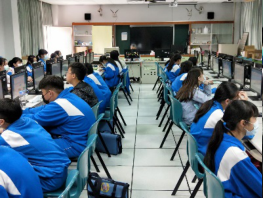
At the beginning of the design process, we visited the Hou-Zong Senior High School (see Figure 1), to understand student learning patterns in the
50 Huang and Chen
Figure 1: The senior high school we visited in Taichung, Taiwan.Table 1. Dilemmas faced by students in learning computational thinking.
Table available in the original PDF paper.
Dilemmas faced by students in learning computational thinking
1. Programming concepts are too abstract to be understood through text descriptions or even diagrams.→teaching material problem 2. Each high school class is only 50 minutes long, and if it is equipped with complex teaching aids, it will take a lot of preparation time.→teaching material problem 3. Class sizes are often large, making it difficult to teach individually on an independent basis.→school management problem 4. The theoretical courses are too dull, resulting in the low motivation of students to learn.→students’ internal problem 5. Programming is mostly a dynamic process, but static teaching materials are often used for teaching activities.→teaching material problem 6. Students lack the goals they strive to achieve, and it is difficult to gain a sense of achievement in the process of learning.→students’ internal problem 7. When using Arduino kits to aid teaching, the variety of parts can cause circuit connection problems and easily affect the focus of learning.→ teaching material problem 8. In addition to learning computational thinking, computer science also needs to have the ability to practically solve problems, which is relatively lacking in high school courses.→curriculum’s problem
classroom. And integrate common problems based on student feedback and teacher comments as our design basis (see Table 1).
As seen from table 1, some problems can be categorized into. The school management problem, curriculum problem, student’s internal problem, and teaching material problem. Among them, the most common part of learning programming is the teaching material problem. Such as lack of supporting media to study programming thus makes students difficult to understand the concept by text and diagram, the complexity of teaching aid, static teaching material, etc. In this study, we will focus on the improvement of teaching material. Solve the learning problems of high school students by designing teaching aids.
RELATED WORKS There are many teaching aids to help students learn programs. Those are offering interesting learning methods to improve students’ motivation and
Design Interactive Teaching Tools of Programming Language 51
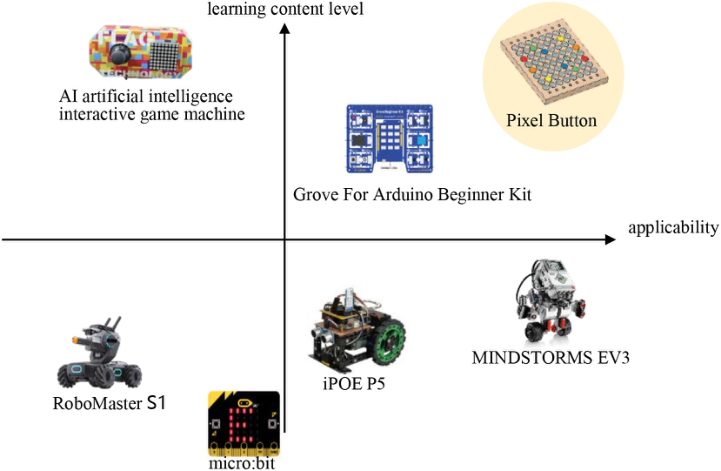
Figure 2: Cross-quadrant distribution map of existing products.
effectively learn. Widely used in teaching field programming aids including development boards type (E.g. Arduino UNO, Micro: bit), and robot-type teaching aids (E.g. EV3 of the LEGO Mindstorms series), both of them are very popular in education. We analyzed the products from the learning content and the level of applicability.
Figure 3, analyzed the products by using the learning content level and applicability level. Learning content levels can be divided based on the user’s ability and content’s complexity. The lowest level is for beginners, such as kids. A common practice is to train the flow of the program through the functional image block. And the highest level applies to seniors such as high school students. Not only do they need to understand a variety of program structures, but they also need to be able to figure out how to solve problems after thinking independently and start coding from scratch. Applicability level represents the diversity that the teaching aid can demonstrate. Due to har- dware limitations, some teaching aids, although very interesting, can only express a simple program structure, so the content that students can learn is relatively limited. From the quadrant (see Figure 2), no product provides advanced learning content for high school students while at the same time can also be applied to multiple program structure cases. So, this research develops the Pixel Button to fill this gap.
DESIGN CONSIDERATIONS AND DEVELOPMENT Design
The following are the design phases of this study:
52 Huang and Chen
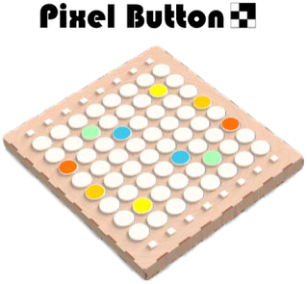
Figure 3: The pixel button.
1. Define problem and solution.
Problem Solution
Visualize abstract concepts.
Abstract concepts are hard to under- stand.
Simplified hardware operation.
Teaching aids are too complex, cau- sing extra time wasted.
Tangible user interface.
Hard to express the dynamic process of the program.
Simplified electronic components.
Too many components cause circuit problems.
2. Develop teaching content and demonstration examples. 3. Design instructional media and circuit sketches. 4. Material selection and testing. 5. Evaluation and development.→Pixel button
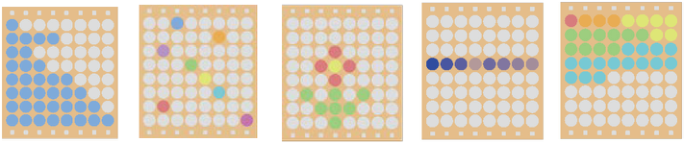
Content Design at the Pixel Button Through tact switch as input and ws2812 LED as output, the components are distributed in a matrix arrangement, allowing the panel to produce variable effects. Visually express complex abstract concepts and build computatio- nal thinking. In the programming course, students can input the examples of the corresponding teaching material units provided by us into the teaching aids and observe the changes of lighting sequence, color, and light, et (see Figure 4). In addition to helping users understand the purpose of each line of code, students can also modify the code themself to achieve the desired effect as an exercise. Applicable program structures include array structure, sequence structure, repetition structure, selection structure, modularization structure, recursive structure, and even sorting and searching algorithms, which can be demonstrated by this teaching aid (see Table 2).
After learning the Program structure, they can also try to create interactive game projects by themselves, Including Othello, ping pong, MineSweeper,
Design Interactive Teaching Tools of Programming Language 53
Figure 4: Presentation of the interactive interface.Table 2. Programming implementation.
Table available in the original PDF paper.
Program structure Specific example One dimensional array Control a single LED and light a specific color. Two-dimensional arrays Control the LEDs on the matrix to light a specific pattern. sequence structure Control the first LED to the last in the sequence. repetition structure (for) Control the first LED to the last one by one and repeat the loop. Read the button state repeatedly. selection structure (if-else) Control the interface display effects through buttons. modularization structure Modularize various functions, such as clear function, canvas function, and mirror function. recursive structure Increment the number of bright LEDs recursively. Bubble Sort Read the number of each line of input and sort the number of input LEDs through an algorithm. binary search Read the number of inputs for each line and find the median value through an algorithm.
memory games, etc. Helps students improve their problem-solving skills in the process.
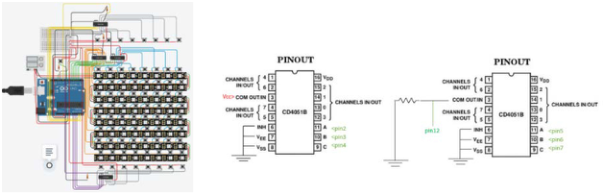
Circuit Configuration We use Arduino UNO, WS2812 RGB led, tact switch, CD4051B IC, and other electronic components to form an array display panel to make a simple prototype. The WS2812 RGB led strip only needs one pin to control the light of each position, but the tact switch of the array needs a total of 16 pins in the row and column direction to read the status of 64 buttons. Therefore, in the face of too many pins, we use the CD4051B IC to convert every 8 pins into 3 pins for wiring (see Figure 5).
DISCUSSION
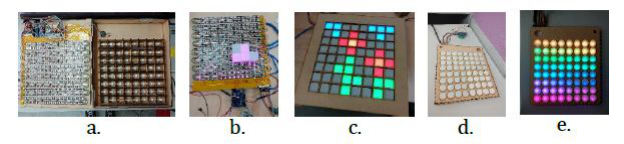
Solve Mechanism Problems In the beginning, we did a quick circuit prototype (see Figure 6a). Functi- onally, it meets the needs of our users, but in addition to functionality, the hardware also needs to have good interface feedback and tactility to keep users engaged. To allow users to observe the effect of input and output at the same time, we have also tried a variety of button mechanisms and interface presentations. As seen in Figure 6, firstly, the initial button mechanism we
54 Huang and Chen
Figure 5: Pixel button circuit diagram.Figure 6: Presentation of the interactive interface.Figure 7: The user uses this teaching aid to make a game of Othello.
use PLA as material and make it through 3D printing (see Figure 6b). But due to the poor lighting effect of the button, we changed it to a combination of MDF and acrylic. However, the method is very complex but works well (see Figure 6c). Finally, we use silicone casting, with a hardware structure and tact switch (see Figure 6d), which not only simplifies the process but also has good color performance (see Figure 6e).
Future Feasibility After user testing, there is input to consider for future development:
1. The weight problem. The supply power takes Pixel Button heavier than it should be. This is because the pixel button needs a lot of power con- sumption to support the LED light, which can be reduced in future designs. 2. Wiring circuit. This will make Pixel Button practical useful and reduce the preparation time in class. 3. Connected among the devices to increase communication and expand the scope of hardware operation.
Design Interactive Teaching Tools of Programming Language 55
CONCLUSION
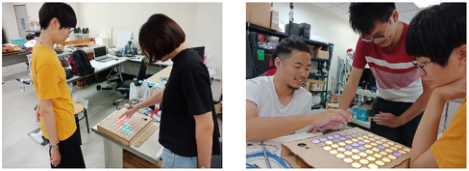
In this paper, Pixel Button is designed to accommodate the advanced level learner, in this case, the high school student. This teaching aid offers pra- ctical usage that can reduce the problem caused by inappropriate teaching materials. Through the tangible user interface, and the course design of vari- ous interactive projects. Makes students able to learn the program structure in algorithmic thinking courses in a fun and specific way (see Figure 7). In the next stage, we will extensively test and promote this set of teaching aids, hoping that this teaching aid can contribute to the field of programming education.
REFERENCES
Byrka, M. F., Sushchenko, A. V., Svatiev, A. V., Mazin, V. M., & Veritov, O. I. (2021).
A New Dimension of Learning in Higher Education: Algorithmic Thinking. Propósitos y Representaciones, 9(SPE2), 990. Georgieff, A., & Milanez, A. (2021). What happened to jobs at high risk of automation?. Grover, S. (2017). Assessing algorithmic and computational thinking in K-12: Les-
sons from a middle school classroom. In Emerging research, practice, and policy on computational thinking (pp. 269–288). Springer, Cham. Koorsse, M., Cilliers, C., & Calitz, A. (2015). Programming assistance tools to support the learning of IT programming in South African secondary schools. Computers & Education, 82, 162–178. Law, K. M., Lee, V. C., & Yu, Y. T. (2010). Learning motivation in e-learning
facilitated computer programming courses. Computers & Education, 55(1), 218–228. Porter, M. E., & Heppelmann, J. E. (2015). How smart, connected products are transforming companies. Harvard business review, 93(10), 96-114. Sorva, J., Karavirta, V., & Malmi, L. (2013). A review of generic program visuali-
zation systems for introductory programming education. ACM Transactions on Computing Education (TOCE), 13(4), 1–64. Verdú, E., Regueras, L. M., Verdú, M. J., Leal, J. P., de Castro, J. P., & Queirós, R. (2012). A distributed system for learning programming on-line. Computers & Education, 58(1), 1–10. Wang, F. L., & Wong, T. L. (2008, August). Designing programming exercises with
computer assisted instruction. In International Conference on Hybrid Learning and Education (pp. 283–293). Springer, Berlin, Heidelberg.
LISTED IN THE AHFE DIGITAL BOOKSTORE CATALOGUE
Explore the complete digital volume
Training, Education, and Learning Sciences
Read this individual research paper free through the original publisher, or explore the full digital proceedings book.
ISBN 978-1-958651-35-3
Explore this ISBN in the AHFE Bookstore ↗Listed in the July 2026 bookstore catalogue; search by ISBN to confirm current availability · Digital book purchase optional