Glenn Taylor, Jeffrey Craighead, Kortney Menefee, Logan Lebanoff, Christopher Ballinger, Stephen Mcgee (2024). An Interactive Virtual Assistant for Flexible Just-in-Time Training. In: Human Factors in Design, Engineering, and Computing. AHFE Open Access, vol. 159, pp. 1882–1888. https://doi.org/10.54941/ahfe1005755
Many situations call for a person to perform tasks in which they are not an expert, and for which the person does not need (or want) to become an expert, but still needs to perform the task in the moment. Simple examples might include home maintenance tasks like changing out a furnace filter or car maintenance tasks such as refilling the wiper fluid. Performing the task might involve consulting a manual or searching the internet for relevant material. However, even when useful content is found, it’s not always easy to refer to these sources while simultaneously performing the task. Looking back and forth between a manual and the thing that needs fixing, or turning pages or typing on a keyboard when hands are occupied with tools makes the process more difficult. It can also be challenging to visually relate a diagram in a manual to the actual system being worked on, especially for non-experts. To help address these challenges, we have been developing an Autonomous Virtual Assistant (AVA) that helps someone perform a task by walking them through step by step. AVA can be thought of as an interactive helper working over the user’s shoulder to help perform the task, using different modalities and tools including mixed reality to convey information. This work has focused on being flexible to the user and the situation, both in terms of providing helpful information to the user and getting input from the user. Given a procedure, AVA determines on the fly how to present information based on what resources are available and what content needs to be conveyed. With a mixed reality setting, this might include showing text or imagery on a virtual heads-up display, or overlaying 3D imagery on the physical object being worked on to help orient the user. To make mixed reality content readily available, the system allows for easy ways of aligning 3D virtual models to the physical objects being worked on. In a situation where speech might be the only modality available, the system will read procedure steps to the user, or help the user navigate to a needed item using speech alone. To suit the user’s situation, the system also affords the user different interaction modalities, such as touching virtual buttons, pointing to objects in the real world, or using voice only in a heads-up, hands-free manner. The user moves through procedure steps and related information and asks questions if they need clarification or more detail. Example interactions include initiating a session (“Okay AVA, start the wiper refill procedure”), requesting visual material related to a task (“What does that look like?” or “Show me that image”), or asking for more information on procedure step (“How do I do that?”). AVA uses the content and resources at hand to help the user complete the procedure. In this paper, we describe the motivation for AVA, the system design, its application in some real-world tasks, user feedback from hands-on evaluations, and future directions.
Many situations call for a person to perform tasks in which they are not an expert, and for which the person does not need (or want) to become an expert, but still needs to perform the task in the moment – a kind of just- in-time training. Simple examples might include home maintenance tasks like fixing a leaking faucet or car maintenance tasks such as refilling the wiper fluid. Performing an unfamiliar task might first involve consulting a manual or searching the internet for relevant material. However, even when useful content is found, it’s not always easy to refer to these sources while simultaneously performing the task. Looking back and forth between a manual and the thing that needs fixing, or turning pages or typing on a keyboard when hands are occupied with tools makes the process even more difficult. It can also be challenging to visually relate a diagram in a manual to the actual system being worked on, especially for non-experts.
To help address these challenges, we have been developing an interactive Autonomous Virtual Assistant (AVA) that helps someone perform a task by
An Interactive Virtual Assistant for Flexible Just-in-Time Training 1883
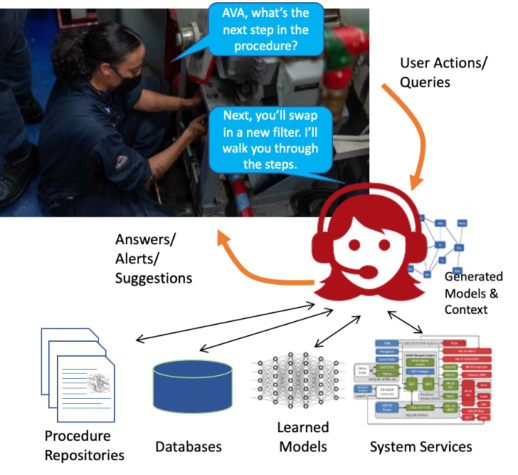
walking them through step by step. AVA can be thought of as a teammate conveying information about the task to user. This paper gives an overview of what AVA does to help a user, a description of its design, and some feedback we have gathered from users. A conceptual view of AVA, connecting a user to procedures and related information, is given in Figure 1.
Figure 1: Conceptual view of AVA.
FLEXIBLE PROCEDURE HELP AVA is designed to help a user work through a procedure step by step, providing related information as the user needs it. AVA is meant to help users of different skill levels, allowing for more or less detail related to tasks (if such information is available). Much of our work has focused on making AVA flexible to the user and the situation, both in terms of how the user can interact with the system and how information is conveyed to the user.
To suit the user’s situation, the system affords the user different interaction modalities, such as touching virtual buttons, pointing to objects in the real world, or using voice only in a heads-up, hands-free manner, depending on the interaction devices available. The user moves through procedure steps and related information and asks questions if they need clarification or more detail. With hands-free operation as one goal, speech is a primary mode of interaction supported by the system. Examples include initiating a session (“Okay AVA, start the wiper fluid refill procedure”), requesting additional material related to a task (“What does that look like?” or “Where is that part?”), or asking for more information on a procedure step (“How do I do that?”). AVA uses the content and resources at hand to help the user complete the procedure. The user can also indicate a preference for types of information
and output modalities if they are available (“Read me that warning.”). We aim to make different input modalities essentially equivalent, though there are multiple ways to verbally accomplish the same task.
When communicating to the user, AVA determines on the fly how to present information based on what resources (interaction devices) are available and what content needs to be conveyed. Because we do not know at design time what is available, AVA considers a few different modalities, devices, and content, as shown in Table 1 below.
Table 1. Information medium and device as considered by AVA.
Table available in the original PDF paper.
Medium /Modality Example Content Device Examples 2D Image Tool photo Visual device: Tablet/Phone, Mixed Reality (MR) Headset Text Location Visual device: Tablet/Phone, MR Speech Step directions Audio device: Speaker (could also be Tablet/Phone, MR) Video Process Visual device: Tablet/phone, MR
Selecting the best device and modality among those available uses a scoring function that considers information about the environment (e.g., noise level), user preferences, the information medium available (e.g., text, imagery). If accessible, it also considers the content of a procedure step. For example, does this step mention tools to perform the task or the location of some piece of equipment? Does this step include a question that the user must find the answer to, or is this a physical activity for the user to perform? AVA performs a shallow parse of the procedure step to attempt to extract relevant content if it isn’t explicitly called out.
As with user input, speech is a natural output modality that requires very little in the way of extra hardware – most devices include a speaker. The system could simply read each step to the user in the sparest of situations, and this could offer help to someone whose hands are occupied on a task. With additional knowledge, the system could also give verbal directions to help the user navigate to a tool or object, based on some knowledge of the target – “Do you see a blue cap on the left side of the engine compartment? That’s the wiper fluid reservoir cap.” If a long part name needs to be communicated (e.g., “P/N 341X84010”), AVA can read the part name in segments to help account for the user’s working memory limitations.
However, if the environment is noisy or there’s a lot of content to convey (which the user must process and remember), an audio-only option might score lower compared to some other modalities such as choosing to put text on a screen – letting the user read a longer passage or a complex part number rather than relying on transient speech. Furthermore, devices that can portray 2D information, such as photographs of parts or a figure about an activity, can provide additional help to the user. AVA considers a basic tablet or phone- like device as one class of device to convey this information, if such a device available to the user.
An Interactive Virtual Assistant for Flexible Just-in-Time Training 1885
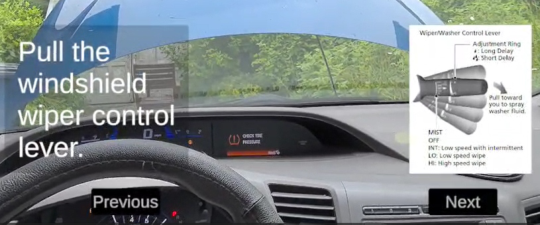
Figure 2: A procedure step and a figure from an instruction manual portrayed in a mixed-reality heads-up display, with the actual car in the background.
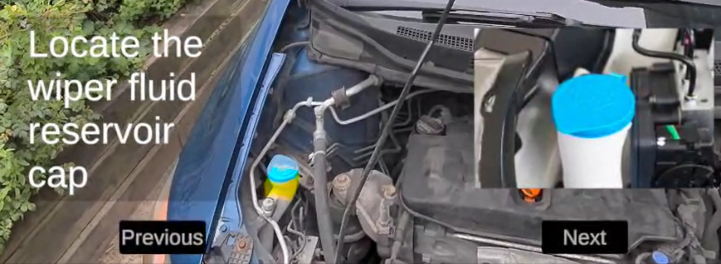
Mixed reality, if it is available, can cover the previously mentioned speech or 2D visual mediums including text. Figure 2 above shows procedure text and a related image from a user manual projected into a heads-up display in a worn mixed reality headset. Mixed reality can also offer a more immersive experience by overlaying information onto objects in the real world. Figure 3 illustrates an example of highlighting the wiper fluid reservoir cap (yellow block) based on a user’s request (“highlight cap”), helping to point the user to the real object of interest.
Figure 3: A mixed reality overlay (yellow block) indicating the real location of the reservoir cap on the car, as well as a 2D image of a reservoir cap.
However, this kind of immersion depends not only on having a mixed reality device but also a fairly accurate 3D model of the object being worked on and a method for accurately (and persistently) aligning the model with the real object. Furthermore, a mixed reality headset might not be usable if the user cannot fit it with other gear such as a hardhat or into tight workspaces. AVA’s task is to pick the right information tool for the job based on the user’s situation.
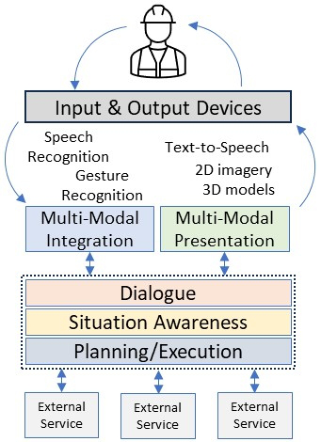
AVA DESIGN AVA was built using the Soar cognitive architecture (Laird, 2012) as its underlying framework, which gives us tools, a methodology, and a language
for building intelligent, goal-directed systems. Soar is especially useful in cases where lots of diverse knowledge needs to be brought to bear to solve a problem. Using Soar, we developed three core, domain-independent functional components:
A dialogue manager for understanding and interacting with the user in context, and here the context is the procedure and related content, as well as the user-system dialogue up to that point
A situation awareness module for tracking the environment, the user, and task execution
A planner/executor that generates and executes plans to perform user requests or to communicate information to the user, possibly over time or across different modalities.
AVA also has domain/application-specific modules for interacting with external components, such as the 3D modelling environment, or for tuning the system to the particular language of the application, especially where the language is heavily jargon-laden. Figure 3 illustrates a high-level view of AVA’s architecture. The components in the dotted box essentially stay the same from one application to another but can be tailored with external knowledge to a particular domain.
Figure 4: High level architectural view of AVA.
Using some software abstraction layers and tools like Unity3D, the system overall is mostly agnostic to components like speech recognizers and mixed reality hardware. Over multiple applications, we have tried to leverage whatever is the best available tools for our use cases. Our current instantiation uses Nvidia’s NeMo Fast Conformer automatic speech recognizer (Rakesh et al., 2023), which we have found works better in noisy
An Interactive Virtual Assistant for Flexible Just-in-Time Training 1887
environments than some other similar tools. For mixed reality, we are using Meta’s Quest 3, which works very well in indoor (even very dim) lighting conditions but does degrade in bright outdoor uses. Two functions get worse in bright lighting: recognizing the user’s hands for clicking on virtual buttons and keeping 3D models steady in place without the use of explicit markers. By giving the headset “sunglasses” of a sort, we have been able to mitigate these tracking issues to some extent. However, as we have mentioned, the flexibility of AVA allows us to still help a user even if some modalities, devices, or content are not available or usable in some settings.
APPLICATIONS AND FEEDBACK We have applied AVA and its earlier versions to a range of domains, originally to control simulations (Taylor et al., 2011), and for many years as a natural interface for controlling robotic systems (Taylor et al., 2012; Taylor et al., 2017). Prior applications focused on the user giving commands to the system which then performed the task. This present use case turns that around to have AVA giving instructions for the user to carry out. AVA’s core functionality is still used, but the system now plays this different role. As a procedure support tool, we have applied AVA to a few different domains including car maintenance (such as shown in the images above), NASA procedures, and others.
We have conducted some informal evaluations of the system with representative users with varying levels of expertise in a couple domains of interest. All users so far have expressed positive comments about the potential utility for AVA. They thought that AVA could help reduce the amount of attention-switching between reading a procedure step and performing the step, and help keep explicit track of the procedure progress, all of which helps to lower the user’s cognitive burden and speed up the task. Even the most basic kind of step-by-step reading helped in this regard. The additional features of AVA – multi-modal interaction, communication rendering to different devices and modalities – only enhance the user experience and open the door for more task efficiencies. Most participants felt that AVA could help novices but could also help experts such as on infrequently performed tasks. We also received helpful feedback on better ways to present and navigate some kinds of information, as well as corrections on procedure content. We also got to observe areas where we needed to smooth out the interactions or to provide a little more training to make interactions more successful. Some of the evaluations were in noisy, outdoor settings which led us to discover some of the challenges described earlier.
FUTURE WORK
Applying AVA to a new domain is currently a manual process of collecting domain materials and formatting them to be system-readable. For example, many instructions or procedure manuals are PDF documents that have idiosyncratic formatting and content that must be extracted for use in AVA. We have so far built some very simple tools to allow a person to reformulate
that content into system-usable forms. One exciting direction to investigate would be to use large language models (LLMs) to find, extract, and format data into appropriate forms. Such a tool, if it can be made to work reliably and in a way that preserves approved procedures, would help us move more quickly to new procedure or new domains. Even if such a tool were not 100% reliable, it might serve as a kind of bootstrapping process for a developer to organize the procedure-related material for AVA.
CONCLUSION
Over the past several years, we have been developing an interactive Autonomous Virtual Agent (AVA) as a kind of virtual teammate to help a user perform tasks in a ‘just-in-time training’ manner – not to make the user an expert, but simply to get the task done now. AVA delivers procedure steps to the user, dynamically computing how best to communicate the information, given the available resources, interaction devices, user preferences, environmental conditions, content to be conveyed, and other factors. We have been applying AVA to a range of physically situated tasks, exercising AVA’s ability to flex to different situations and devices, while also exploring mixed reality as a rich platform for delivering in situ content to the user. AVA’s flexibility is a necessary feature given that just-in-time training might occur in highly variable environments, where users may have access to only some kinds of digital tools, and where the environment itself has a large influence on the devices and modalities that can be used and the way that information can be usefully and effectively conveyed. Our aim is to have AVA help the user in whatever way possible in the current situation to get the task done. Our testing with users so far has shown positive results toward this goal.
REFERENCES
Laird, J. (2012) The Soar Cognitive Architecture, Cambridge, MA: MIT Press. Rakesh, D., Koluguri, N. R., Kriman, S., Majumdar, S., Noroozi, V., Huang, H., Hrinchuk, R., Puvvada, K., Kumar, A., Balam, J., Ginsburg, B. (2023) “Fast Conformer with Linearly Scalable Attention for Efficient Speech Recognition” arXiv:2305.05084 [eess. AS] https://doi.org/10.48550/arXiv.2305.05084 Taylor, G., Stensrud, B. (2011) “Formative Evaluation of an IUI for Supervisory
Control of CGFs”, proceedings of Behavior Representation in Modeling and Simulation (BRIMS), Sundance, UT. Taylor, G., Frederiksen, R., Crossman, J., Quist, M., Theisen, P. (2012) “A Multi- Modal Intelligent User Interface for Supervisory Control of Unmanned Platforms” Collaboration Technologies and Systems Collaborative Robots and Human Robot Interaction Workshop, Boulder, CO. Taylor, G., Quist, M., Lanting, M., Dunham, C., Muench, P. (2017) “Multi-Modal
Interaction for Robotic Mules” SPIE Defense and Security: Unmanned Systems Technology XIX, Anaheim, CA.
LISTED IN THE AHFE DIGITAL BOOKSTORE CATALOGUE
Explore the complete digital volume
Human Factors in Design, Engineering, and Computing
Read this individual research paper free through the original publisher, or explore the full digital proceedings book.
ISBN 978-1-964867-35-9
Explore this ISBN in the AHFE Bookstore ↗Listed in the July 2026 bookstore catalogue; search by ISBN to confirm current availability · Digital book purchase optional