Faith Sowell, Daniel Rodarte, Yiran Yang, Shuchisnigdha Deb (2024). Enhancing User Satisfaction and Accessibility in VR: A Comparative Analysis of Different User Interfaces. In: Human Factors in Design, Engineering, and Computing. AHFE Open Access, vol. 159, pp. 1118–1127. https://doi.org/10.54941/ahfe1005679
In recent years, virtual reality (VR) technologies have improved and become more affordable, leading to an increased adoption of VR in healthcare, manufacturing, education, and other industries. To facilitate further growth, human factors engineers and software developers must work hand in hand to ensure that virtual reality technologies are easy to use by as many populations as possible. This research investigates how different user interfaces can improve a VR user’s experience, with accessibility incorporated into the design. Three interaction modes were tested: traditional VR headset controllers, hand tracking, and gaze interaction. All three interaction modes were tested in a CNC Hybrid Machine training simulation similar to those used in industry. The simulation was created using the Unity game development engine for the Meta Quest 3 VR headset. The satisfaction of the participant with each interaction mode was indicated using presence, usability, and mental workload surveys given after each interaction mode experience. The results of the participants’ surveys indicate that participants liked using controller mode the best. Gaze tracking was the second favorite because of its simplicity, ease of learning, and seamless multitasking with it. Hand tracking was the least favorite due to difficulties interacting with objects. Future development to improve hand tracking technology in the Meta Quest 3 could improve users’ interaction experiences.
Virtual reality (VR) technologies have been demonstrated to be effective in many training and educational settings. In industry, VR is employed as a training aid, enabling employees to gain hands-on experience with new processes and machinery, thereby enhancing their confidence and skill levels prior to interacting with actual equipment. Healthcare practitioners benefit from engaging with virtual patients, allowing them to safely practice administering medicine and making diagnoses in a simulated environment. Additionally, students using VR learn through immersive educational games, which not only enhance knowledge retention but also foster their engagement and motivation for learning. Virtual reality (VR)-based training
Enhancing User Satisfaction and Accessibility in VR 1119
has significant potential for improvement within its current applications and expansion into new areas. To facilitate this growth, collaboration between human factors engineers and software developers is essential to ensure that VR technologies are accessible and user-friendly for diverse populations.
Virtual reality (VR) technologies have evolved significantly, providing various interaction modes such as controllers, hand tracking, voice input, and gaze tracking. Each mode offers unique benefits and challenges. This paper seeks to compare these interaction modes in VR, focusing on their usability, realism, and accessibility. Most VR simulations rely solely on the VR headset’s controllers for input. They provide precise control and haptic feedback, making them suitable for a wide range of applications. However, they also have limitations, particularly in terms of intuitiveness and accessibility. Controllers are often equipped with multiple buttons and joysticks, which can be overwhelming for first-time users. The learning curve associated with mastering these devices can hinder initial user engagement (Dalgleish, 2023). While controllers can simulate various actions, they lack the natural feel of real-world interactions and can detract users from the immersive experience that VR aims to provide (Slater and Sanchez-Vives, 2016). For instance, in industrial training programs, trainees may find it challenging to teleport while holding tools or objects, as both hands are occupied with the controllers. In collaborative VR experiences, users naturally use their hands to interact with each other, highlighting the need for alternative hands-based interaction mechanisms or even hands-free interaction modes (Monteiro et al., 2021). Additionally, the reliance on controllers excludes individuals with physical disabilities, preventing them from fully utilizing this technology. A 2022 interview with an individual suffering from muscular dystrophy revealed that, although she owned a Meta Quest 2 VR headset, she was unable to play most of the available games due to her limited hand mobility (Stoner, 2022). She reported that many VR games required movements beyond her capability and that turning around in the game necessitated physically spinning her wheelchair while holding the VR controllers. A prior research study involving sixteen physically disabled participants identified that holding and moving two VR controllers simultaneously and pressing the buttons can be challenging. Participants in this study indicated that voice input and gaze tracking are viable alternatives to the traditional controller system (Mott et al., 2020).
Another widely adopted interaction mode is hand tracking. In a recent study, nine out of ten participants indicated a preference for hand tracking over controller interactions due to its freedom and natural feeling (Kapsoritakis, 2022). Historically, this technique has been implemented using additional VR accessories to detect hand positions and gestures (Aditya et al., 2018; Khundam et al., 2021). Recent VR headsets, such as the Meta Quest 2, 3, and Pro, as well as the HTC Vive, now enable hand tracking without the need for additional accessories through camera-based detection. However, the current state of hand tracking may still fall short of providing accurate real-time hand detection, resulting in delays in response to user actions (Khundam et al., 2021). Additionally, this technique lacks vibrotactile feedback, a feature provided by controller-based interaction. This
absence of feedback and the limited range of gestures afforded by camera- based interaction create an experience that does not fully resemble real-world hand-based object interaction. Hand tracking can be more accessible than controllers, particularly for users with limited mobility. Nevertheless, it still requires a certain range of motion and dexterity, which may not be possible for all users (Teófilo et al., 2018).
The gaze tracking technique is often more accurate than hand tracking for many of the currently available VR headsets. By monitoring where and how long a user is looking, gaze tracking facilitates interaction with the virtual environment, providing a unique and intuitive interaction method once users become accustomed to it (Plopski et al., 2022). This technique can enhance immersion and learning by simplifying navigation and interactions. However, it does not provide a completely natural way to navigate and interact with VR environments. Importantly, gaze tracking is highly accessible for users with physical disabilities, as it does not require hand or body movement (Huang and Westin, 2020).
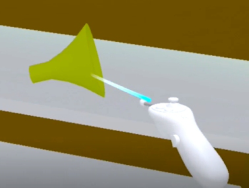
In summary, this research will investigate three distinct interaction modes for VR (see Figure 1): traditional controller input, hand gestures, and gaze tracking. The traditional controller input mode will serve as a baseline for comparison with the other two modes. Hand gesture interaction offers a more immersive and intuitive experience, eliminating the need for manual dexterity. Gaze tracking, on the other hand, is a viable option for users unable to use their hands to interact with VR simulations.
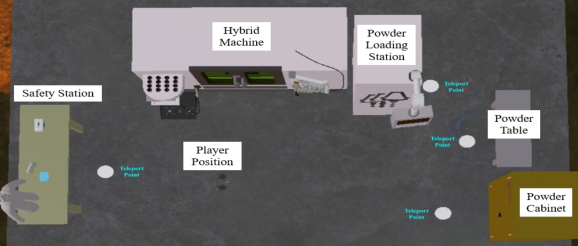
Figure 1: Three interaction modes used in this study. Left: controller tracking. Center: hand tracking. Right: gaze tracking.Figure 2: A virtual additive manufacturing lab.
Enhancing User Satisfaction and Accessibility in VR 1121
METHOD
A virtual additive manufacturing lab (see Figure 2) equipped with a CNC Hybrid Machine was created for training using the Unity game development engine. All 3D models and animations were developed in Blender and transferred into Unity in the.fbx file format. Participants were immersed in the virtual lab wearing a Meta Quest 3 VR headset. The training module included a preparation station with personal protective equipment, a powder storage unit, and a powder hopper station for hybrid manufacturing. The study was approved by the Institutional Review Board at the University of Texas at Arlington (UTA).
Participants Twelve participants (six females, five males, and one transgender) aged 19–24 were recruited from the student population at UTA and the surrounding community. Most participants (83.33%) were high school graduates, with three reporting limited physical abilities. Additionally, 83.33% reported experience with playing video games, and approximately 67% had some exposure to virtual reality. Of the participants with prior VR experience, 87.5% had only informal training. The participants also mentioned having minimal knowledge about hybrid manufacturing, making them ideal candidates for unbiased first-time training exposure. Pregnant individuals and those with a history of severe motion sickness were excluded to prevent VR-induced simulation sickness. The inclusion and exclusion criteria were verified through a screening questionnaire during recruitment.
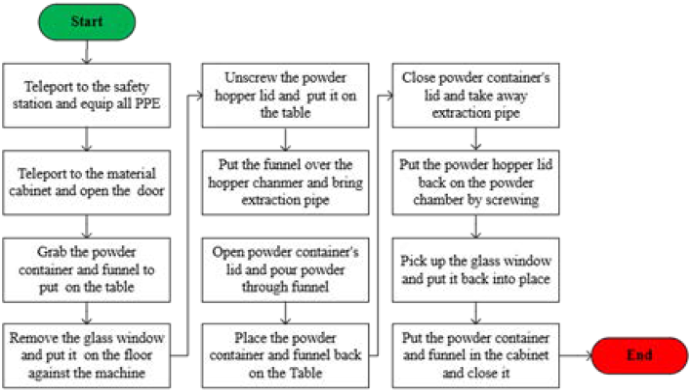
Figure 3: A flowchart showing the steps taken by participants in the hybrid machine simulation.
Study Design A within-subject design was used to evaluate three different user interaction modes. Each participant experienced all three interaction modes, and the order of the modes was randomized for each individual to eliminate any potential bias that could arise from the sequence in which the modes were presented. The training educated participants about the use of correct personal protective equipment (PPE) and provided guidance on safely loading powder into the machine to prepare for printing. Throughout the simulation, participants completed tasks including teleporting, grabbing items, opening doors, and moving items, which are all common tasks in a training simulation. Because the simulation used in this study contains common interactions a user must perform in VR, the findings of this study can be applied to a broad range of VR-based training. The tasks completed for this study are presented in the following diagram (see Figure 3) in sequence.
Survey Instruments A modified Presence Questionnaire (PQ, Witmer, and Singer, 1998) measured participants’ perception of each interaction mode’s efficiency in completing specified tasks within the VR environment. The survey measured how realistic their interactions were in terms of teleporting, grabbing objects, moving objects, opening doors, opening container lids, screwing and unscrewing hopper lids, and getting comfortable with the training. The survey collected their responses on a 7-point Likert scale. They also responded to a usability survey, developed from System Usability Scale (SUS, Brooke, 1996), indicating their satisfaction with each interaction mode on a 5-point Likert scale from strongly disagree to strongly agree. A simulation sickness questionnaire (SSQ, Kennedy et al., 1993) was used to ensure each participant’s health and safety from simulation and motion sickness while participating. The SSQ has sixteen simulation sickness symptoms, which were rated from 0 (none) to 4 (severe). Any individual scoring 5 or higher than 5 on the SSQ was not able to continue the study. The researchers also collected participants’ non-identifying demographic information to test any effect of gender, age, education level, disability status, experience with video games or virtual reality, and familiarity with hybrid manufacturing on their perceptions of the interaction modes.
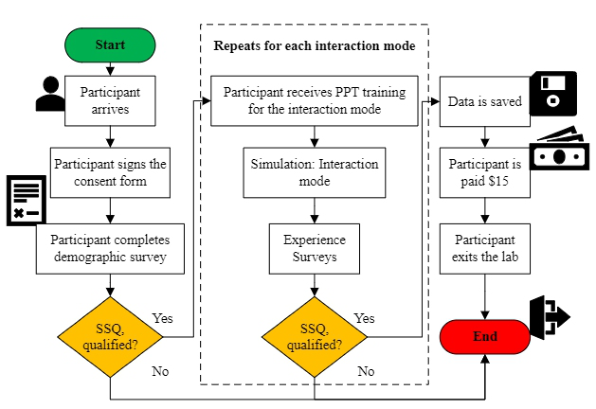
Protocol Upon arrival at the lab, participants were provided with a consent form to read and sign if they agreed to participate. Each participant was assigned an identifier to ensure the randomization of interaction mode assignment and minimize order bias during the trials. Next, they were seated in front of a laptop, provided by the researchers, where a survey link created with QuestionPro was opened for them. Using the survey link, participants completed a demographic survey and the SSQ. At this point, each participant received a 2-minute-long PowerPoint-based demonstration to learn about the functionality of their first interaction mode. Participants then wore the headset and completed the training in VR with that specific interaction mode.
Enhancing User Satisfaction and Accessibility in VR 1123
Following their exposure, they took a 5-minute break to complete surveys describing and quantifying their perceptions, comfort, and any issues they encountered with that mode. They also responded to the SSQ to confirm their fitness for further VR exposure. Participants then repeated the VR training, followed by the PowerPoint-based demonstration, for the rest of the two interaction modes according to their assigned sequence.
Figure 4: A flowchart illustrating the study data collection process.
After completing the tasks and surveys for the last interaction mode, participants were compensated $15 for their time and effort and signed a receipt. They were then escorted out of the lab. Survey responses from all participants were analyzed to address the research questions. The entire study took approximately one hour to complete. The protocol flow chart is shown in Figure 4.
RESULTS AND DISCUSSIONS Descriptive Statistics
Hand-tracking-based interaction was identified as the least realistic, whereas controller-based interaction was the most realistic for performing the majority of training tasks (see Table 1). Participants reported that gaze tracking was the easiest to use for teleporting while holding objects. This outcome aligns with past research findings that hands-free interactions can be useful when both hands are engaged in other activities (Monteiro et al., 2021; Mott et al., 2020).
Table 1. Summary of survey items for presence. A higher score is better, with a maximum score of 7.
Table available in the original PDF paper.
Presence - Mean (Standard Deviation) by Interaction Mode Presence Measure Controller Hand Gaze
The largest disparities in presence scores were observed between controller tracking and hand tracking for grabbing and moving objects. During the study, it was noted that participants often dropped the objects they were attempting to grab or carry in hand-tracking mode, potentially explaining the lower mean score and higher variance associated with hand-tracking. These inaccuracies could be attributed to technical issues with the hand-tracking technology.
The overall usability score (see Table 2) for hand tracking was significantly lower than that for controller or gaze tracking modes. Additionally, hand tracking exhibited the highest variance among the three modes. In the controller mode, participants utilized the thumb-stick on the right controller for teleportation and pressed the side trigger to perform actions such as grabbing, opening doors, and screwing/unscrewing lids. For hand tracking, all interactions were executed using a pinching motion with either hand. In contrast, gaze tracking required participants to stare at the object of interaction for two seconds. Participants clearly found gaze tracking to be the quickest and easiest mode to learn. They felt less likely to need technical assistance and did not require much training to use hand tracking with its pinching motion. Despite this, participants were less confident using hand tracking compared to the other two modes, likely due to inaccuracies in the tracking technique. Although participants reported that hand and gaze tracking were less complex than the controller mode, they expressed a preference for using controllers more frequently. This preference can be attributed to their prior VR experience, which made controller interactions feel more natural and familiar to them.
Enhancing User Satisfaction and Accessibility in VR 1125
Table 2. Summary of survey items for usability. Responses are on a scale from 1 to 5, and the total was calculated by adding all scores and multiplying the sum by 2.5.
Table available in the original PDF paper.
Usability - Mean (Standard Deviation) by Interaction Mode Usability Measure Controller Hand Gaze
3.5 (0.5) 2.50 (0.96) 2.58 (1.19)
I think that I would like to use this interaction mode frequently
3.25 (1.09) 2.67 (1.11) 2.83 (1.34)
I found interaction within VR was unnecessarily complex
3.67 (0.47) 2.92 (1.04) 3.50 (0.65)
I thought the platform was easy to use for learning
3.33 (0.85) 2.08 (1.44) 3.33 (0.75)
I think that I would need a technical person’s support to use the mode
3.08 (1.19) 2.67 (1.18) 3.25 (0.92)
I would imagine that most people would learn to use this interaction very quickly
3.58 (0.49) 2.17 (1.28) 3.67 (0.47)
I felt very confident using this interaction mode for tasks
3.08 (0.95) 2.50 (0.96) 3.50 (0.65)
I needed to learn a lot of things before I could start working with this mode Overall 58.75 (9.92) 43.75 (13.67) 56.67 (7.45)
All three interaction modes showed low mental workload scores (see Table 3). However, participants reported that they had to work harder to achieve the same level of performance using hand tracking than the other modes. Controller mode was the least mentally and physically demanding for the participants.
Table 3. Summary of survey items for. Responses are on a scale from 0 to 100.
Table available in the original PDF paper.
Mental Workload - Mean (Standard Deviation) by Interaction Mode Mental Workload Measure Controller Hand Gaze
Effect of Interaction Modes Analysis of variance (ANOVA) was performed to explore the effects of interaction modes on the presence, usability, and mental workload measures. After testing the assumptions, only the presence and usability measures could be used for ANOVA and showed significant main effects of the interaction modes on these measures. The results are presented in Table 4.
Table 4. ANOVA output for the effects of interaction modes.
Table available in the original PDF paper.
Outcomes Interaction Modes Test Statistics p-Value Controller Hand Gaze
Equation reproduced from the original PDF.
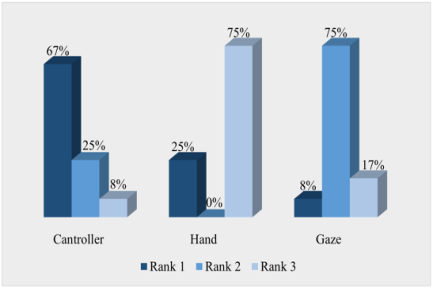
The interaction modes had the main effect on participants’ perceptions of presence and usability scores. Controller and gaze interactions were preferred by the participants significantly more than hand interactions. The ranking of the interaction modes further supports these inferential statistics. Most of the participants ranked controller and gaze 1 and 2, while hand interaction was mostly ranked 3.
Figure 5: Ranking for interaction modes.
CONCLUSIONS
The future of VR interactions is promising, with many different interaction modes in development today. Currently, many virtual reality users are used to and comfortable with the controllers, but as new technologies receive more development attention, the landscape can change, allowing for a range of interactions that people can choose from. Different interaction modes can be used at once to enhance the user’s experience; for example, users can grab and move objects with their hands and teleport using their gaze, freeing up their hands for more seamless interactions. Further research could be done once hand tracking and gaze tracking are more common to see which method users prefer once they are not so unfamiliar.
ACKNOWLEDGMENT
This material is based upon work supported by the National Science Foundation under Grant No. 2202598.
Enhancing User Satisfaction and Accessibility in VR 1127
REFERENCES
Aditya, K., Chacko, P., Kumari, D., Kumari, D. and Bilgaiyan, S., 2018, July.
Recent trends in HCI: A survey on data glove, LEAP motion and microsoft kinect. In 2018 IEEE International Conference on System, Computation, Automation and Networking (ICSCA) (pp. 1–5). IEEE. Brooke, J., 1996. SUS-A quick and dirty usability scale. Usability evaluation in industry, 189(194), pp. 4–7. Dalgleish, M., 2023. Who Can Play? Rethinking Video Game Controllers and
Accessibility. In Disability and Video Games: Practices of En-/Disabling Modes of Digital Gaming (pp. 43–71). Cham: Springer International Publishing. Huang, L. and Westin, T., 2020. A study on gaze control-game accessibility among novice players and motor disabled people. In Computers Helping People with Special Needs: 17th International Conference, ICCHP 2020, Lecco, Italy, September 9–11, 2020, Proceedings, Part I 17 (pp. 205–216). Springer International Publishing. Kapsoritakis, S., 2022. A comparative study of virtual reality hand-tracking and
controllers. Website: https://www.theseus.fi/bitstream/handle/10024/754933/Ka psoritakis_Stefanos.pdf?sequence=2. Kennedy, R. S., Lane, N. E., Berbaum, K. S. and Lilienthal, M. G., 1993. Simulator sickness questionnaire: An enhanced method for quantifying simulator sickness. The international journal of aviation psychology, 3(3), pp. 203–220. Khundam, C., Vorachart, V., Preeyawongsakul, P., Hosap, W. and Noël, F.,
2021, September. A comparative study of interaction time and usability of using controllers and hand tracking in virtual reality training. In Informatics (Vol. 8, No. 3, p. 60). MDPI. Monteiro, P., Gonçalves, G., Coelho, H., Melo, M. and Bessa, M., 2021. Hands-free interaction in immersive virtual reality: A systematic review. IEEE Transactions on Visualization and Computer Graphics, 27(5), pp. 2702–2713. Mott, M., Tang, J., Kane, S., Cutrell, E. and Ringel Morris, M., 2020, October. “i
just went into it assuming that i wouldn’t be able to have the full experience” understanding the accessibility of virtual reality for people with limited mobility. In Proceedings of the 22nd International ACM SIGACCESS Conference on Computers and Accessibility (pp. 1–13). Plopski, A., Hirzle, T., Norouzi, N., Qian, L., Bruder, G. and Langlotz, T., 2022. The eye in extended reality: A survey on gaze interaction and eye tracking in head-worn extended reality. ACM Computing Surveys (CSUR), 55(3), pp. 1–39. Slater, M. and Sanchez-Vives, M. V., 2016. Enhancing our lives with immersive
virtual reality. Frontiers in Robotics and AI, 3, p. 74. Stoner, G. (2022). VR Is Here to Stay. It’s Time to Make It Accessible. [online] Wired. Available at: https://www.wired.com/story/virtual-reality-accessibility-di sabilities/. Teófilo, M., Lucena, V. F., Nascimento, J., Miyagawa, T. and Maciel, F., 2018,
January. Evaluating accessibility features designed for virtual reality context. In 2018 IEEE international conference on consumer electronics (ICCE) (pp. 1–6). IEEE. Witmer, B. G. and Singer, M. J., 1998. Measuring presence in virtual environments: A presence questionnaire. Presence, 7(3), pp. 225–240.
LISTED IN THE AHFE DIGITAL BOOKSTORE CATALOGUE
Explore the complete digital volume
Human Factors in Design, Engineering, and Computing
Read this individual research paper free through the original publisher, or explore the full digital proceedings book.
ISBN 978-1-964867-35-9
Explore this ISBN in the AHFE Bookstore ↗Listed in the July 2026 bookstore catalogue; search by ISBN to confirm current availability · Digital book purchase optional