Inga Müller, Jasmin Henze, Anja Burmann, Rutuja Salvi, Rainer Baum (2023). User-Centred Design of a Patient App for Carotid Artery Monitoring at Home. In: Human Systems Engineering and Design (IHSED 2023): Future Trends and Applications. AHFE Open Access, vol. 112, pp. 35–44. https://doi.org/10.54941/ahfe1004111
1 Fraunhofer Institute for Software and Systems Engineering, Dortmund, Germany; Hamm-Lippstadt University of Applied Sciences, Department 2 Lippstadt, Hamm Germany ↗
2 Fraunhofer Institute for Software and Systems Engineering, Dortmund, Germany ↗
The World Health Organization (WHO) reports that cerebrovascular diseases account for the second highest cause of death in Europe, contributing to 11% of annual deaths. One of the underlying causes is a stenosis, which refers to the blockage or narrowing of the carotid artery due to the accumulation of plaque within the artery. Although stenoses can result in severe health complications such as strokes, early detection can prevent such complications. The BODYTUNE system aims to detect building stenoses in high-risk patients through an AI-supported auscultation device. This device is accompanied by an app that enables users to take independent measurements from home and manages and displays the results. The development of a high-fidelity interactive prototype of this app is the subject of this paper. The app prototype was developed using the Human-centred design process, an approach defined by the International Organization for Standardization (ISO) that places emphasis on the needs and preferences of the user, ensuring that the resulting product meets a high level of usability. To ensure user centricity towards the system's target group a survey of potential at-risk patients for a carotid stenosis was conducted, investigating their needs and abilities, and obtaining design requirements. Inquired points included participants' experience with handling medical systems in home use and their general affinity for technology. The survey revealed that most participants have prior experience with comparable systems such as blood pressure monitors or health and lifestyle apps. However, participants were still concerned about being able to operate the system independently and feared making errors in the measurement process, leading to false results. The survey highlighted the importance of designing an app that is easy to use, instils trust between the system and the users, validates users in their actions, and guides them when problems arise. After the initial research a design was established through several iterations, starting from wireframing to the final design of the interactive prototype. It aims to be trustworthy and professional and convey a positive feel and calming feel. The prototype covers the four following use cases: establishing a connection between the measuring device and the app, taking a measurement, looking up former measuring results and editing profile information. Subsequently to the prototype development a usability test was conducted to assess whether the design met the requirements for the target group and to identify potential usability problems. Six people, representing potential users of the app, participated in the test, and were asked to independently execute each use cases. The tests were observed, and the prototype device was screen recorded. Additionally, an interview was conducted afterwards where participants were asked about their specific struggles and general aspects regarding the app's usability. In total, 24 usability problems were identified from the test, almost two-thirds of which were pointed out by more than one test participant. Despite these issues, participants generally displayed a positive reaction towards the app, stating they feel safe and reassured during use and feeling that the BODYTUNE system would be helpful to them.
The World Health Organization states cerebrovascular diseases to be Europe’s 2nd leading cause of death, counting for 11% of deaths yearly (Townsend et al., 2016). They are caused by occlusions of the carotid arteries (stenosis) and can, at an advanced state, lead to severe complications such as strokes (Liem et al., 2017). In Germany, about 15% of all strokes are caused by such a stenosis, which results in up to 30.000 cases per year (AWMF, 2020). However, the serious consequences of a carotid stenosis could be pre- vented if the calcification in the artery was detected and treated at a stage when it does not yet cause any symptoms (Liem et al., 2017). The research project BodyTune of the IDTM GmbH and the Fraunhofer Institute for Soft- ware and Systems Engineering ISST is dedicated to this preventive approach (Salvi et al., 2021). The project revolves around the development of a measur- ing device that, in combination with a smartphone app, will enable people to independently monitor the blood flow of their carotid arteries from home (Sühn et al., 2020). This would allow people at increased risk, or those already diagnosed with carotid stenosis, to monitor their carotid arteries in a preventive approach without visits to the doctor or the presence of medical staff. This promises an increase in quality of life for those affected due to a
more convenient and independent therapy as well as a helpful opportunity for preventative care.
As stated above, the BodyTune measuring device works in combination with a smartphone app that supports the measuring process and the display of results. This paper focuses on the design of this app and describes the development process with an interactive prototype as the result. The main challenges for the design were to meet the requirements of a target group that centres on people of higher age and thus people with potentially hetero- geneous technological abilities, while still conveying joy of use for users with a higher affinity for technology. Additionally, due to the medicinal nature of this system, the design needs to establish trust in the system and the measur- ing process to enable the users to rely on the significance of the measuring results. Thus, a high degree of usability needs to be achieved by including the target group into the design process and centring the design around their requirements.
METHODS
To achieve this, the design for the BodyTune app was developed using the Human-Centred Design Process published by the International Organization for Standardization (ISO, 2019). It describes an iterative design approach in four phases, which ensures a user centred approach throughout the design process by incorporating the potential users in different stages of the devel- opment. The four phases distributing the process describe (1) gaining an understanding of the context of use, (2) specifying the user requirements, (3) building design solutions based on these requirements and (4) eval- uating the design. Additional to user centricity, the BodyTune app aims towards a high degree of usability by considering the ISO usability guidelines (ISO, 2020).
To meet the requirements of a user centred design approach, different methods were included into the development of the design. First, a user survey was conducted to gather information on the target group’s abilities regard- ing digital applications, their experience with digital medical devices and apps as well as their concerns about potentially using the BodyTune app (Müller et al., 2022). The survey was conducted both online and in a printed-out for- mat to also include people who do not have access to online services. The survey’s participants were acquired through personal contact and over dif- ferent Facebook groups for which the topic of the BodyTune system is of relevance, e.g., stroke patient groups. Based on the results of this survey, two personas were created, describing the target groups in a compact concept, which will serve as a representation of the users’ characteristics throughout the process. Afterwards, the application’s layout was conceptualized.
Therefore, the scope of functions needed to enable users to monitor their carotid arteries using the BodyTune system was developed. Derived from those, a set of the most important use cases was defined and used as a base for the structure and navigation concept of the app. The interactive prototype was then gradually developed by first defining the screen-layouts through wireframes, followed by the creation of two different design drafts for the
User-Centred Design of a Patient App for Carotid Artery Monitoring at Home 37
application. Eventually, a final look and feel was established for the app, serving as the foundation for the development of the interactive prototype.
Afterwards, to evaluate the developed prototype, a usability test with six participants was conducted in which the testers were asked to perform a series of tasks presented to them through different scenarios. Participants were handed a smartphone with the interactive prototype running on it as well as a small rectangular object representing the BodyTune measuring device while sitting at a table to emulate the presumed situation of use as closely as possible. During the completion of the tasks, the participants were asked to report independently when they thought they had completed a task and were also not given any kind of help or commentary by the conductor of the test. The time it took the participants to complete the task was measured and a screen recording was taken to later track the actions of the participants and count the number of misclicks done in each task.
After completing all four tasks, an interview was conducted with each participant, in which they were asked to rank different aspects of the app’s usability on a scale of 1 to 6 (1 being the best) and give their impressions on the overall usage of the app. Individual functions or screens, where test participants expressed or appeared to have comprehension problems, were also debriefed to gain clarity to where and why exactly a problem occurred. The screen recordings and the results from the interviews were used to com- pile a list of usability problems, which were then rated by scope and severity. Thereby, the scope indicates whether a problem has a global effect by affect- ing general ideas or functionalities within the app or whether it is a local problem that only affects a single frame or control element. The severity is rated by numbers reaching from 1 to 4, 1 indicating that the problem pre- vents the user from finishing his task and four being a small issue that has no effect on the performance within the app.
DEVELOPING THE INTERACTIVE PROTOTYPE The app targets people with an enhanced risk for developing a carotid steno- sis and has the purpose of guiding the users through the measuring process with the BodyTune device and displaying the results. Additionally, the user must be able to establish a Bluetooth connection between the smartphone and the measuring device. Since the BodyTune system is a home monitoring solution, the users operate the system without the presence of medical staff, which puts special emphasis on a good usability within the app.
Though the user survey showed that most participants already have prior experiences with similar systems such as blood pressure monitors or lifestyle and health apps, it also revealed that many are concerned about being able to operate the system independently and fear potentially making an error in the measurement process causing a false measuring result. This indicates the importance of creating an application that is easy to understand and use, instils trust between the system and the users, validates them in their actions and guides them when problems arise.
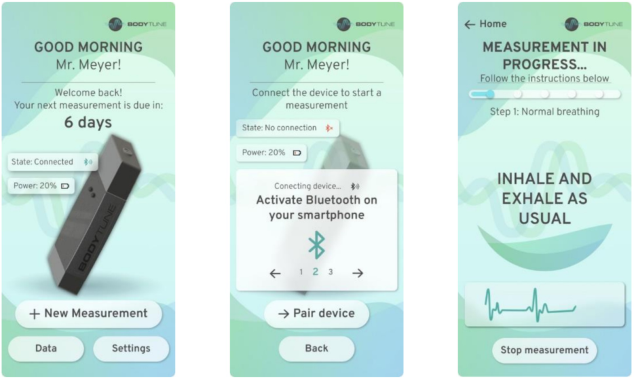
These requirements were incorporated throughout different stages of the prototyping process and consolidated into the final high-fidelity prototype (see Figure 1) as described in the following paragraph.
Figure 1: Selected screens from the final prototype (from left to right: (A) home screen, (B) connecting the measuring device, (C) performing a measurement).
The developed prototype for the BodyTune app allows to establish a Blue- tooth connection between the measuring device and the app, the performance of a measurement, the display of the measurement results and includes a user profile and help section. Since the prototype does not allow actual com- munication with the measuring device, the Bluetooth connection and the measurement process are only simulated.
The final look and feel of the app was developed through three iterations in which a design draft was created and then evaluated based on the assessed requirements. The appearance of the final prototype aims to be reputable and professional but at the same time convey a positive feel. To achieve this, the colours were held in a green-blue spectrum, which on one hand deviated from the logo of the BodyTune system, on the other hand was intended to have a calming and harmonious effect. For the same reason, the shapes are natural and rounded and animations are smooth. A wavelike appearance is incorporated into different aspects of the visual design representing the blood flow in the arteries as well as the visualization of the measuring signal.
To achieve an easy and quick navigation within the app, the user can access these main functions straight from the home screen. The user profile and the help section as well as other options that will be less frequently used are sub- ordinated into a settings function. This way, the user is primarily confronted with the functions that are most important to them and are not overloaded by too much content. To ensure easy and quick navigation as well as control throughout the different processes within the app, every frame contains a navigation area with buttons to progress or step back within a process which
User-Centred Design of a Patient App for Carotid Artery Monitoring at Home 39
is in the lower area of the screen. This allows the user to reach them comfort- ably with the thumb at any time, especially when operating the smartphone one-handed while holding the measuring device in the other. In addition, the buttons are generously sized so that even older users with possible motoric difficulties can click them easily. The top of each screen displays a header, containing information about the current state of the system as well as short instructions on what to do on the specific screen.
To help the users draw the connection between the measuring device and the app, the measuring device is visually represented trough an image on the home screen of the app, which also displays the state of the Bluetooth connection (see Figure 1 (A)). To establish a connection between the measur- ing device and the app, users must click the image to open the connection screen (see Figure 1 (B)) and establish the connection over a button. They also receive step-by-step instructions on how to do so. After a successful con- nection, the connected state is displayed, and users can navigate back to the home screen.
From there, they can start a new measurement over a button, which will only be possible with an existing Bluetooth connection to prevent errors. When starting a new measurement, users are guided though the process step- by-step, explaining the exact procedure of the measurement and the correct handling and placement of the measuring device through text, illustrations, and animations, to make sure that unexperienced users can understand the process and the required actions (see Figure 1 (C)). Since the measurements are intended to be a routine activity that users will repeatedly go through, the instructions can be optionally viewed and are easily skippable, so more experienced users are not obstructed when carrying out a measurement. To gain the users’ trust in the accuracy of their measurement and thus the relia- bility of their results, the app displays a live feed of the signal received by the measuring device during the measurement. This way, users receive immediate feedback on their actions and can easily identify when they have placed the device incorrectly.
Upon finishing the measurement, the users receive an immediate overview of the results of their measurement. Optionally, the users can open further information on their results, which displays a more detailed view of the taken measurement as well as comparisons to previous results. They can also end the measurement process at this point and access the results at any time from the home screen.
TESTING After the development of the interactive prototype, a usability test was con- ducted to assess whether the requirements for the target group are met and to identify specific usability problems which could be approved in further iterations of the design. The usability test specifically aimed to find out whether the participants were able to operate the prototype intuitively and effectively and complete the different tasks within the app. Additionally, the test assessed the users’ impressions and opinions on the design of the app itself.
A total of six people participated in the usability test which were selected based on the previously defined personas and thus represented potential users of the app. Particular attention was paid to the age and the degree of affinity for technology, as these two factors were expected to have the greatest influ- ence on the use of the application. The participants’ affinity for technology was determined by asking them to self-assess their usage of technology based on a series of statements on a Likert scale. Based on the answers an over- all score was calculated, 1 indicating the lowest and 5 the highest affinity for technology, an approach in reference to the TAEG questionnaire by the Tech- nical University of Berlin (Karrer et al., 2009). Table 1 shows an overview of the test subjects:
Table 1. Test subjects’ age and affinity for technology score.
In the test, the participants had to complete four scenarios that described the different tasks that were conceptualized as the use cases. These tasks were:
1. Connecting the measuring device with the app 2. Conducting a full measurement 3. Checking a specific result from a previous measurement 4. Changing a parameter in the user profile Prior to conducting the actual usability test, a test run was arranged to review the testing methodology and eliminate any comprehension errors in the scenarios or the test itself that could potentially impact the results of the actual test. The test run revealed that, during the actual usability test, par- ticipants should receive an introduction about the Figma Prototyping-Tool, which is used to display the interactive prototype on a smartphone. This ensures that UI elements that may appear from the Figma app do not con- fuse the participants while testing the prototype. The test run also showed that, as the actual measuring device was still under development and could not be used during the test, the test participants should receive a placeholder object of similar dimensions. This simulates holding the measuring device and provides them with a better understanding of the overall experience of using the BodyTune system.
After conducting the test with all six participants, the results of the usabil- ity test (Table 2) were compiled, and the screen recordings and interviews were analysed and broken down into a list of distinctive usability problems.
The usability test did not indicate that participants with a higher affinity for technology generally made fewer misclicks than those with a lower affin- ity. No patterns regarding the affinity for technology and the time required to complete the tasks either could be discerned either. The time needed to complete the task was often due to whether the test subject took the time to read through instructions and tutorials or solved the tasks based on trial and error.
User-Centred Design of a Patient App for Carotid Artery Monitoring at Home 41
Table 2. Selected results from the usability test.
Table available in the original PDF paper.
Task Connecting the device
Performing a measurement
Checking previous result
Editing profile
8 3 5 5
Number of usability problems
8 7 2 15
Task completed 6/6 6/6 3/6 6/6 Number of misclicks (sum of all participants)
Overall, the testers stated in the interviews that they were able to com- plete their tasks satisfactorily (Ø2). The lowest rating (2.5) was given by the participant with the lowest affinity for technology, explaining that they had had difficulties in some areas and had not been able to recognize everything “straight away”.
Navigation and finding one’s way within the app were rated 1.5 on aver- age. However, when inquired further, some testers described that they did not always know exactly “what to do” or which action would take them to the next step. The participant with the lowest affinity for technology described finding their way around the app as “[...] taking a bit of time...” and being “[...] a bit slow...”. In general, however, most testers found the app to be clear and logically structured in the arrangement of the individual functions.
The appearance of the app was perceived positively (Ø1.3) by the partici- pants and described as “professional” and “high-quality”. Testers expressed trust in the system, one participant stating they felt “safe and reassured”, another saying they felt like the BodyTune system could be helpful to them. Several testers also expressed positive feelings regarding the appearance of the app, reporting they perceived the application as “lively” and “interesting”.
In addition, the interviews also provided information about further poten- tial for improvement. For example, two test participants stated that exporting the measurement data from the app would be a desirable function. Another indicated that they could imagine a function where, upon receiving a result indicating a potential stenosis, one could contact one’s doctor directly via a telemedicine function. A third tester stated that they missed some kind of introduction that would give them a brief “tour” of the app and its individ- ual functions immediately after opening the application for the first time by briefly introducing the individual areas and functions.
After analysing the screen recordings and statements from the interviews, in total 24 usability problems were identified, which are broken down in Table 3. Almost 2/3 of them were identified by more than one test participant. Only four of the found problems are of a global nature, most of the problems relate to a single frame or a unique control element. Three of the identified problems prevented the participants to fully complete their tasks.
The most problems (8) occurred when the testers tried to establish the con- nection between the measuring device and the app. Though it should be noted that the test results may have been influenced by the fact that the connection could only be simulated and no actual communication between the device
and the app could be tested, the test indicated problems with the usability of the app interface: Several testers expressed confusion on how to establish the connection since clicking on the image of the measuring device seemed not intuitive for them and they expected a labelled button instead. Addition- ally, after the (simulated) Bluetooth connection was established, testers were not sure on how to proceed to taking a measurement since they expected the option to start a measurement directly without navigating back to the home screen. This problem was especially severe for testers with a lower affinity for technology resulting in one tester (P6) needing assistance from the conductor of the test on how to proceed.
Table 3. Discovered usability problems by severity (1-4, 1 being the highest) and scope.
Table available in the original PDF paper.
Severity Local Global
1 2 1 2 5 1 3 10 1 4 3 1
Other problems were caused by the lack of instructions on how to inter- act with certain UI elements, such as panels with scrollable contents (e.g., in the overview of the measurement results) or on different panels display- ing instructions (e.g., Figure 1 (B)). In several cases, different testers clicked on panels only displaying information expecting a certain function, at other times testers did not try to click on panels, not expecting them to have a function and thus not finding certain information or functions within the app.
The measuring process itself resulted in few (3) usability problems of minor severity (3 to 4). It could be observed that the test participants correctly fol- lowed the instructions given during the measurement and seemingly correctly imitated the handling of the measuring device with the placeholder object.
CONCLUSION
This paper describes the design process for an interactive app-prototype, which is intended to assist the measurement of the carotid artery with a mea- suring device from home. It aims to achieve a user-centred result as well as good usability throughout the app, which was examined by evaluating the prototype in a usability test.
The survey conducted in the beginning of the design process was able to provide a base of user requirements that would influence the design towards a greater user centricity by revealing information about target groups’ abili- ties, experiences, wishes and concerns. However, in potential further design iterations the target group should be further expanded in order to also learn more about (especially older) people who rarely or never deal with technical or digital systems and thus be able to take them into greater consideration in the development.
User-Centred Design of a Patient App for Carotid Artery Monitoring at Home 43
Even though a variety of usability problems were discovered during the usability test, participants already stated an overall positive experience throughout the usage of the app regardless of their level of technology affinity. The test showed that the app appeared trustworthy to the users and evoked joy in its use. Participants experienced little frustration when interacting with the app and were able to navigate through the app and completing the tasks in all but three cases. The problems causing participants not to finish the fourth task correctly could be identified as an inconsistency in the design which could be further improved by enhancing the consistency within the app and thus further conforming with the users’ expectations.
When looking at the results of the usability test, it needs to be noted that the communication with the measuring device could only be simulated, so a test with the actual measuring device might uncover more or different problems in the app design. Furthermore, as mentioned above, the usability testing could benefit from including more people with less affinity for technology and of higher age into the test, as well as potentially considering different factors like previous experience with home monitoring devices.
Aside from the enhancements deviating from the test results, the usability of the app could also improve by offering opportunities for individualization within the app to make the app accessible for a broad spectrum of users with different abilities, which has special significance when dealing with a medical application.
ACKNOWLEDGMENT
The authors acknowledge the financial support from the State of North Rhine-Westphalia and the European Union (EU EFRE [LS-2-2-038a]).
REFERENCES
Association of the Scientific Medical Societies of Germany (AWMF) (2020). S3 guideline on diagnosis, treatment, and aftercare of extracranial carotid stenosis. Short version. Available at: https://www.verwaltung.awmf.org/fileadmin/user_ upload/Leitlinien/004_D_Ges_fuer_Gefaesschirurgie/004-028ke_extracranial- carotid-stenosis-diagnosis-treatment-aftercare_2021-04.pdf (Accessed: 05 May 2023). International Organization for Standardization, (2019). Ergonomics of human-
system interaction - Part 210: Human-centred design for interactive systems ISO 9241-210:2019. Geneva: International Organization for Standardization. International Organization for Standardization, (2020). Ergonomics of humansystem interaction -Part 110: Interaction principles. ISO 9241-110:2020. Geneva: International Organization for Standardization. Karrer, K. et al. (2009) “Technikaffinität erfassen–der Fragebogen TA-EG.,” Der
Mensch im Mittelpunkt technischer Systeme 8, 29, pp. 196–201. Liem, M. I. et al. (2017) “Investigations of carotid stenosis to identify vulnerable atherosclerotic plaque and determine individual stroke risk,” Circulation Journal, 81(9), pp. 1246–1253. Available at: https://doi.org/10.1253/circj.cj-16-1284 Müller, I. et al. (2022) “Home monitoring of the carotid arteries using a mobile
auscultation device with app,”Current Directions in Biomedical Engineering, 8(2), pp. 544–547. Available at: https://doi.org/10.1515/cdbme-2022-1139
Salvi, R. et al. (2021) “Bodytune: Multi Auscultation device – personal health parameter monitoring at home,” Current Directions in Biomedical Engineering, 7(2), pp. 5–8. Available at: https://doi.org/10.1515/cdbme-2021-2002 Sühn, T. et al. (2020) “Auscultation system for acquisition of vascular sounds –
towards sound-based monitoring of the carotid artery,”Medical Devices: Evidence and Research, Volume 13, pp. 349–364. Available at: https://doi.org/10.2147/md er.s268057 Townsend, N. et al. (2016) “Cardiovascular disease in Europe: Epidemiological update 2016,” European Heart Journal, 37(42), pp. 3232–3245. Available at: https://doi.org/10.1093/eurheartj/ehw334
LISTED IN THE AHFE DIGITAL BOOKSTORE CATALOGUE
Explore the complete digital volume
Human Systems Engineering and Design (IHSED 2023): Future Trends and Applications
Read this individual research paper free through the original publisher, or explore the full digital proceedings book.
ISBN 978-1-958651-88-9
Explore this ISBN in the AHFE Bookstore ↗Listed in the July 2026 bookstore catalogue; search by ISBN to confirm current availability · Digital book purchase optional