Alessia Brischetto, Ester Iacono (2023). Research Experiences and Perspectives of inclusive Virtual Learning Systems. In: Design for Inclusion. AHFE Open Access, vol. 75, pp. 49–60. https://doi.org/10.54941/ahfe1003326
In contemporary society, the spread of media and online learning has generated on one hand new forms of complexity and opportunities for the development and dissemination of knowledge, on the other, new forms of social exclusion. Learning in the digital age means having user-friendly and interactive systems capable of creating a series of new relationships between man and technology. In this regard, the Design is called to face, more and more strongly, with different disciplines, from the engineering-informatics to the humanistic-social ones. Therefore, it is necessary to adopt a bottom-up multidisciplinary approach, within which the design field interfaces with increasingly complex design dimensions. In recent years, computer accessibility and aspects regarding the use, distribution and visualization of contents, not only informative but also educational, became issues of great importance within the technology market, particularly within the Educational Technologies sector. The objective of this work is the presentation of a design tool useful for the development of an e-learning platform (i.e. Virtual Learning System) for the university educational sector. The work focused on an exploratory analysis phase of the current e-learning systems through the application of Human-Centred Design evaluation methods to identify critical issues and to define design and tools assessment requirements for Inclusive Design studies. In particular, User Observation, Heuristic Evaluation and exclusion calculator were the methods used during the evaluation sessions. The latter involved a sample of 100 users between 19 and 24 years of age, affected by specific learning disabilities (SLD) and visual and hearing disabilities of medium severity. Subsequently, through co-design activities involving users and education experts, functionalities and new design solutions were developed. The final result of the work is to illustrate an operational strategy of evaluation and design and an experimental platform for inclusive learning. The research has highlighted the need to strengthen educational tools in terms of accessibility and usability, and in particular collaborative learning. The assessment of many tools for specific categories of users has led to enhance and develop in key for all integrated functionalities to stimulate and support all students, regardless of their individual condition. Moreover, the research highlighted the need for systems based on social networking, supporting not only accessibility but also autonomy, socialization and the ability to collectively build new meanings.
The spread of media and online learning has generated on one hand new forms of complexity and opportunities for the development and dissemina- tion of knowledge, on the other, new forms of social exclusion. The objective of this work is the presentation of a design tool useful for the development of an e-learning platform (i.e., Virtual Learning System) for the university educational sector.
Learning Management System (blended Learning, E-learning, ecc.), are lar- gely used nowadays as networking environments to promote the integration and guide learning through flexible architectures based on current standards of web accessibility, platforms and content format (Meskhi et al., 2019). With this in mind, here, we investigated how Design and related operational meth- odologies may support the process of analysis and development of complex digital products, which should be as much as possible inclusive (Stephanidis and Savidis, 2001; Miraz et al. 2021; Firmenich et al. 2019). Summarizing, the work is therefore finalized to: (a) assess the actual inclusive potential of technologies by analyzing systems designed to include people with specific learning disabilities as well as visual and auditory impairments; (b) technical aspects: accessibility and use of content; (c) styles of interaction: variabi- lity, transcoding, convergence, multimedia, hypertext; (d) validate theoretical
models on collaborative learning; (e) didactic and pedagogical aspects: teach- ers’ side (organization, creation and sharing of didactic material); (f) teaching and pedagogical aspects: teachers and learners (universal access to infor- mation, organization of the study, teaching strategies, motivation); (g) user experience: how to motivate and encourage socialization; (h) development of possible design scenarios.
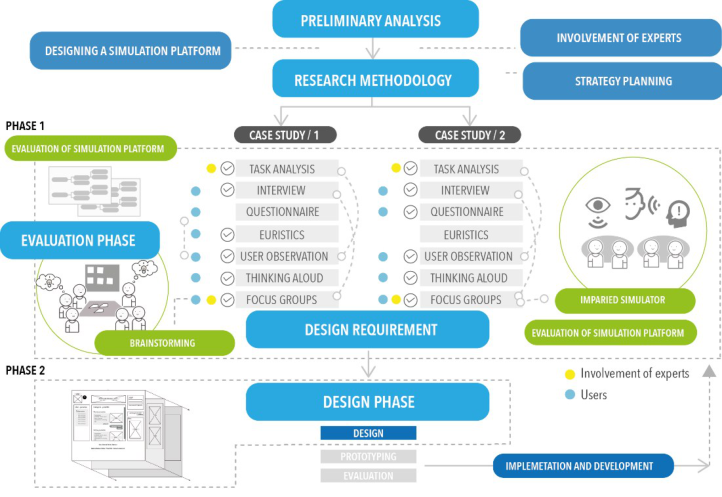
RESEARCH OBJECTIVES AND METHODOLOGY The design workflow was focused on the Human-Centred Design perspective (Giacomin, 2014; Maguire, 2001), according to ISO 9241–210 (2019). The latter defines the criteria for user-oriented design in systems based on human- machine interaction. The main criteria concern a clear knowledge of the user needs, tasks and contexts of use. Moreover, the involvement of users in the design and development phases and the multidisciplinary of skills and per- spectives are further aspects to be considered. The research was structured in two phases: (1) Evaluation phase; (2) Design and predictions (see Figure 1).
The methods applied during the Phase 1 were user observation, an explo- ratory questionnaire, interviews and focus groups (Stanton et al., 2017; Hirai et al. 2007). The tools of the Impairment Simulator developed by the Inclusive Design Center of Cambridge University (Clarkson et al., 2015), were also used. This methodology was applied within two areas of interven- tion, within the school (VL4all) and then in the university training sector using the Moodle platform.
Figure 1: Summary of methodology and related research objectives.
Research Experiences and Perspectives of Inclusive Virtual Learning Systems 51
A strategic step in the evaluation phase was the development of an eva- luation tool that could be used to define the project requirements. The tool is an interface simulator realized with Adobe XD software. The deci- sion to create a platform for the simulation of the activities was aimed at recreating all the best features identified in phase 1 and to verify the real possibility, from a design point of view, to apply the reference technical standards. The evaluation phase was planned according to the following objectives: (a) defining the framework for the most widely used compen- satory and dispensing instruments; (b) evaluating the educational support that these tools can offer and their actual degree of inclusion; (c) measuring the user experience and investigate the organizational and motivational aspe- cts of users (teacher-student-family); (d) identification of critical issues and design solutions.
The Phase 2 (i.e., Design and predictions) was characterized by the deve- lopment of experimental design concepts. These experiments were carried out mainly within the Laboratory of Ergonomics & Design of the Uni- versity of Florence in collaboration with experts working in the field of inclusive training (psychologists, pedagogues and instructional designers). Moreover, the experimentation on e-learning was implemented at univer- sity level within the framework of an EU Programme: Erasmus+ (Action Type - KA203): PUDCAD Practicing Universal Design Principles in Design Education through a CAD-based Game.
EVALUATION PHASE The user evaluation session involved university students in the second year of the bachelor’s degree. They were a total of 120 users between 19 and 21 years old. 8 of them were SLD, 1 hearing impaired subject, and 1 visually impaired subject, 23 among EU and non-EU students and the remaining stu- dents were all Italian. Compared to the group involved in the VL4all case study, the sample considered in this case study is larger and the training acti- vities analyzed were those currently present on the MOODLE course held at the University of Florence in Italy. In this context, students routinely use the platform to follow the training modules of the University’s educational offer. In detail, this population sample attends the course in Industrial Design of the Faculty of Architecture.
The evaluation phase included the dissemination of a preliminary questi- onnaire and then a direct observation phase. Given the number of the sample, group sessions were carried out. Each group consisted of 10 participants and the experimentation lasted two months. The questionnaire was dissemina- ted through the Google Modules application and its objective was to record the following aspects: a) frequency of use; b) perceived and actual student satisfaction; d) multimedia and learning support tools; e) any problems and criticalities; f) advantages and disadvantages of the mobile version of the Moodle platform; h) aspects such as collaboration and knowledge sharing; i) external tools and platforms used for study.
After data processing it was possible defining the main objectives of the evaluation phase. The latter included also direct observation of users and focus groups.
52 Brischetto and Iacono
Step 1: Preliminary evaluation of accessibility (expert evaluation) As for the first case study (i.e., VL4all), the compliance of the Moodle platform with the guidelines and technical standards (Universal Design for Learning - UDL; WCAG and WAI) was verified. In particular, in order to plan the trials with users, interactions were modelled through the Task Analysis (TA) method, either on the teacher and the student sides.
The objective of this phase was to validate the correspondence and poten- tial of the Universal Design for Learning guidelines and the technical and operational standards identified in the phase 1 (i.e., evaluation phase) and to define the objectives of the next phases. In particular, motivation and colla- boration among students, learning styles and their possible personalization were assessed as well as specific learning needs of SLD subjects, foreigners and disabled people. Step 2: User-based evaluation The methods applied were Thinking Aloud, direct observation and focus groups. The object of the evaluation in this phase was first the Moodle platform and then the simulation platform 0.2. Once the macro activities were defined (Table 1), direct observations were made on a small sample of 30 users (8 LSD, 1 hearing impaired, 1 Visually impaired, 20 foreigners). The users, through the Thinking Aloud model, described aloud the operations they were carrying out to achieve the test objectives.
Since this course was built ad hoc, on the basis of the questionnaire the most known functionalities were tested in the first phase (lessons – 8 in total,
Table 1. Macro activities and test objectives with users (students).
Table available in the original PDF paper.
Task Functionality / Sub-task Focus user testing phase
- Accessibility and usability of the platform.
Access to the platform
- Login and settings; - Course enrolment; - Access to the lesson archive; - User profile functionality; - Personal database.
Access to teaching materials
- How to plan and organize the study path; - Check accessibility to sections and definition of interaction styles.
- Consultation tools; - Access to sections; - Access to the organization of teaching activities (calendar, notices, personal communication between student teachers); - Download teaching material; - Organization of verification activities.
- In-depth tools; - Learning support tools.
Consultation of teaching materials
- In-depth tools; - Learning support tools;
- Rating tools/plugin accessories (read aloud, text selection tools).
- Evaluation of the understanding of con- tents of the lesson / exercise; - Evaluate how the student plans and carries out his/her training activities. Production of teaching materials
- Dynamic identification (criticality and benefits) sharing functionality;
Sharing - Content sharing tools (forum, Chat); - Access to the area dedicated to group exercises (workshops).
Verification of learning
- Evaluation tools (type medium verification learning); - Access to personal assessment area.
- Understanding motivational aspects; - Understanding aspects of learning styles.
Research Experiences and Perspectives of Inclusive Virtual Learning Systems 53
1 quiz, didactic calendar) and then, the less known and used ones (i.e., glos- sary, forum, chats, workshop, and the read to speak tools). At the end of each task the user was asked to make some observations, as only some of the people observed used all the platform functionalities. The activities observed were different, some concerned the technical regulatory aspects of accessi- bility, others concerned the learning dimension of the students. Within this work the results that emerged with respect to these activities are reported: a) access to information to be studied; b) understanding of teaching materials (reading, writing, self-organisation); c) processing of information; d) sharing knowledge among colleagues in the course.
At the end of the trial sessions, Focus Groups were conducted with users and individual comparison sessions with Specific Learning Disorder (SLD), Special education needs (SEN) and foreign students. The individual sessions served to further investigate their needs. Within the focus group, thematic discussions on aspects concerning accessibility, the use of content and possible project implementations of the evaluated system were carried out.
The focus group lasted 4 hours and was structured in the following operati- onal phases: Phase 1- presentation of a summary relative to test results, direct observation, and objectives of the focus group; Phase 2 - thematic discussion of user observation results; phase 3 - empathy trials: use of the Impaired Simulator; phase 4 - testing simulation platform 0.2.
Questionnaire Results The questionnaire within this experimentation was managed to define the state of knowledge and frequency of use of the online platform and the mobile dimension of Moodle. The data collected were used to record the aspects of socialization functionalities and to identify which external tools to the platform are mainly used, especially for SLD, students with special needs and foreigners. The nature of the data is not quantitative but simply cognitive.
The responses of the analyzed sample showed a lack of knowledge of the platform tools, an aspect identified as critical because many of the functio- nalities are not pre-set and must be activated by the teacher. The same aspect affects the size of the mobile application and that of the collaborative tools, which were found to be scarcely used (in particular the workshop and forum function).
Almost all of the analyzed samples did not know 70% of the platform’s functionality and accessed it only to consult the presentations and teaching materials uploaded by the teacher in the lessons section. As far as tools such as read to speak are concerned, 90% of the students did not know their existence. Five users said they use software such as Evernote and Notability to organize their study, whereas 100% of declared to use software and platforms to translate text and documents. Almost all students use Youtube and Slide Share to find additional learning materials.
User Observation Results In this paragraph the main results emerged from the tests with users are pre- sented. They involve access to the information to be studied; understanding
54 Brischetto and Iacono
of the teaching material (reading, writing, self-organisation); re-elaboration of information; sharing of knowledge among colleagues in the course. Access and understanding of the information to be studied 30% of the observed users highlighted a difficulty in understanding the course structure: training objectives and verification methods. Only 20% of users use the mobile application, as it does not have all the features of the mother platform. 70% of the students said that there is a lack of tools to customize the platform (text size, layout distribution, etc.). SLD subje- cts and in particular foreigners found the lack of effective communication tools for understanding the training activities (timing, objectives) in relation to the actual path (evaluations, exercises, etc.). The visually impaired stu- dent expressed difficulties in reading the laterally positioned text fields (menu column, news) and in the absence of tools such as text enlarger and voice synthesis (this is an external tool, not internal to the platform). Understanding of teaching materials (reading, writing, self-organization) Approximately 85% of users highlighted the lack of multimedia material (videos with subtitles). The lessons are structured by the teacher and not ever- yone takes care of this aspect. 30% of SLD subjects found the lack of tools for the selection and highlighting of the text. The hearing-impaired student expressed the lack of sign language dictionary and traditional dictionary and translator. These tools are on the hand useful to deepen the learning process and to provide elements for understanding theoretical terms or words that are not known both in Italian and in other languages.
The visually impaired student expressed difficulties in studying due to the lack of tools such as text enlarger and speech synthesis. However, the read- to-speak tool was tested, but a problem related to the possibility of applying this functionality to slides loaded by the teacher emerged. As far as foreign students are concerned, it resulted that they make significant use of external tools for the translation of texts. The read-to-speak test phase, that allows you to reproduce the text, was largely appreciated in order to improve listening and the subsequent learning.
In conclusion, many of the SLD students use external systems for the ela- boration of concept maps as well as compensatory and dispensation tools not included in the platform. Moreover, they often just download the lessons to their computer or Tablet and use other software. Three users exploit Super maps and Microsoft Word features and two other users Tablet applications to take notes, like Evernote, Goodsnotes and Notability). Information processing The 95% of users highlighted the lack of multimedia agents or information processing tools (videos, interactive quizzes), the absence of areas dedicated to annotations or notes-highlighting, and the possibility of export commands for subsequent processing. In addition to slides, courses typically use han- douts and/or textbooks. SLDs and the visually impaired user judged critical also the lack of digital textbooks and audio books in the university sector. They also complained the inability to search by keyword. Sharing knowledge among colleagues in the course Only 40% of the users observed had already used the workshop activity and only 15% the forum. Chat is used by almost all students in a fairly active way.
Research Experiences and Perspectives of Inclusive Virtual Learning Systems 55
As far as the Wiki function is concerned, no student was familiar with it. The simulations proved that, especially for foreign students, the use of Wiki was a great opportunity for building different forms of knowledge, either from a linguistic and cultural point of view. Social channels, especially Facebook, and WhatsApp remain privileged. Within this social channel, students auto- nomously generate groups and exchange ideas about the topics of the course and share their material (e.g. notes, lesson recordings, slides with notes on them and information of convivial nature).
Conclusions of the Testing Phase With Users As stated above, all the students expressed the need of tools to support their studies (reading, organization of their own teaching materials). As regards the verification functionalities, they were very appreciated, as allow perceiving the degree of preparation achieved. Tools such as read to speak proved to be essential and effectively used by foreign students and SLD to increase text compression and their language skills. Foreign students are strictly convinced that this functionality should be enhanced and made accessible by default to all members of the platform.
Another interesting fact concerns the organization of the study activities. SLDs subjects prefer to use applications such as Evernote and Notability to take notes and organize their study path. For example, Notability allows you to record lessons while taking notes. During the study phase you can listen the recordings and the text of the notes is automatically highlighted. This makes it easier to memorise and understand the topic and the exe- rcise. Almost all SLD students also use software to develop concept maps outside the platform and share them among the course students (i.e., colla- borative action). Even non-SLD students adopted this educational tool over time. For the visually impaired student, the fonts resulted poorly readable and the layout setting was perceived to be poorly usable. The student recor- ded all the lessons with the mobile phone and used dedicated assistive tools and technologies. Moreover, the user proposed the lesson recording function, in addition to the lesson presentation and handouts, and the possibility of uploading the teacher’s lesson to the platform in streaming mode.
Another reported aspect was the lack of attention by the teacher to use appropriate fonts and text sizes within the documents, such as lesson pre- sentations and handouts. In particular, complains about the impossibility to modify these documents (lesson presentations are often in non-editable formats, the pdf format is very common) were done. As far as the hearing- impaired user is concerned, when studying at home, it resulted difficult for him to identify the correlations between topics presented orally in the lesson by the teacher and the slides uploaded on the platform. As regards multime- dia and hypertext, the creation of concept maps in an interactive way was very much appreciated by users. Some technical problems emerged about tools for the elaboration and the use of the didactic material both for the teacher and the student. Many of the users stated that they never used some functionality, in particular the glossary functionality and internal tools such as read-to-speak. Other limits regarding the quality of the didactic material were underlined, not about its content but how it was presented graphically.
56 Brischetto and Iacono
Although the University of Florence Athenaeum is very active in the diffu- sion and implementation of training courses and support desks for didactics, one of the most significant data was that almost all teachers did not know the functionalities present on the Moodle platform. Unfortunately, many of these features are perceived as difficult to use because few students are fami- liar with them. Furthermore, the platform does not offer adequate tools for teaching materials (lessons, slides, handouts etc.). Typically, the teacher uplo- ads his lectures to the platform and the teaching material as an external file. Once uploaded it is not editable and students cannot customize the material anymore.
The chat and the forum and the wiki have great potential and were percei- ved positively by students. Likewise, the teachers themselves through these tools can monitor learning (also through other tools within the platform).
The podcasting, even if foreseen inside the platform, is not usable in all con- ditions yet, as equipped classrooms are required. The same aspect concerns the streaming of lessons. Technical gaps have also emerged with respect to technical accessibility and usability of the platform, but in particular the layout was perceived as rigid and not easy to understand. The same with regard UDL.
Focus Group Results At the end of the trial sessions, Focus Groups with users and individual ses- sions with SLD, SEN and foreign students were conducted. The individual sessions served to further investigate the user needs. The Focus Group acti- vity allowed to further explore the aspects that emerged during the evaluation phase (i.e., phase 1). The Phase 2 involved the preparation of a scoreboard organized by themes, which were accessibility, right to study, technological innovation, collaborative learning, residual capacity building. For each the- matic area, the user needs were analyzed in depth. Subsequently, we moved to phase 3. This was used to understand the dimension of individual diver- sity, it was a moment of extraordinary emotional power, as all participants were involved in situations different from their own (auditory and visual impairment). The Impaired Simulator tool was used in this phase to simu- late different conditions and to calibrate them on different levels. Afterwards, the group of users used the simulation platform 0.2 to evaluate the percei- ved advantages and disadvantages. All users appreciated the possibility to customize the workspace, and the map tool linked to the section for the col- lection of your keywords. SLD subjects expressed the possibility to introduce text fonts for dyslexics (in particular EasyReading font), the possibility to modify the line spacing was greatly appreciated both by SLD and by the visually impaired subject who suggested to introduce tools to modify the text size. The voice synthesis and text reproduction functionality, as in the test phase, was appreciated by SLD, the visually impaired subject and forei- gners. The text help toolbar was considered useful by all users, especially the ability to listen parts of the text and the instant translation in the selected text. The hearing-impaired user suggested to introduce additional features such as the sign dictionary and to introduce verification quizzes at the end of
Research Experiences and Perspectives of Inclusive Virtual Learning Systems 57
the reading-study of the written part. Following the previous phases, project brainstorming sessions were developed. Some of the design ideas were discus- sed and elaborated in the form of paper prototypes, regarding the layout and the teacher and student side functionalities.
DESIGN AND PREDICTIONS On the basis of the results achieved during the user observation phase and focus groups new design requirements for the current Moodle platform were identified as well as defined new design concepts. The first consideration concerned the functionality of Moodle. This type of learning environment brings a series of advantages, ranging from its worldwide diffusion within universities (internationally the Moodle user community is the largest), its compliance with technical regulations and the possibility for organizations to customize learning environments at very low cost. In general, these are the main advantages of Moodle.
However, the issues of access and usability of these systems are still underdeveloped (especially in Italy). The user observation and focus groups allowed to define design scenarios that mainly concerned the following aspects:
customization and user-learning system adaptability;
strengthening tools related to multimedia, hypertext dimension, podca- sting and streaming when possible;
enhancement of the mobile app (technical and design aspects of applica- tions and display mode on tablets);
increase the teacher-side functionalities for the design of teaching materials;
enhance student side functionalities for knowledge acquisition, creation and sharing;
introduce codes that support gamification (motivation, generate a positive learning experience, etc.);
monitoring and support of individual and group study;
transversality of learning: from digital to tangible (increasing the diffusion of digital textbooks and their compatibility with e-learning systems).
strengthen the collaborative section so that it can guarantee the exchange and collection of processed materials, rather than dialogue through chat;
inter-connectivity between digital and physical environment (interactive whiteboards, increased dissemination of assistive technologies);
assistive technologies as in UDL should not be demonized but integrated with respect to the objectives and needs of users.
The project ideas interested particularly the design of teaching materials for teachers, and the implementation of current tools for knowledge processing and sharing for students. Another project idea concerned the possibility of taking notes within the platform (perhaps directly next to the topic of the presentation) while the teacher is giving an oral presentation.
Other project ideas were to stimulate collaboration between students and between students and teacher and the possibility of creating individual study material using tools such as concept maps. Furthermore, the possibility to
58 Brischetto and Iacono
highlight unclear parts of the topic and ask to the teacher clarifications through comments or open a debate with your colleagues in the course (through specific icons and collaborative feedback systems). This functiona- lity should be tested so that it can be compatible with the technical dimension of voice and sound input. This functionality could allow the teacher to iden- tify during the training course which topics are less understood and to act immediately by reappraising the topic, or by inserting new thematic insights. Some of these ideas are ongoing and will be further tested with users. TA will also be tested and suitably integrated within the current platform.
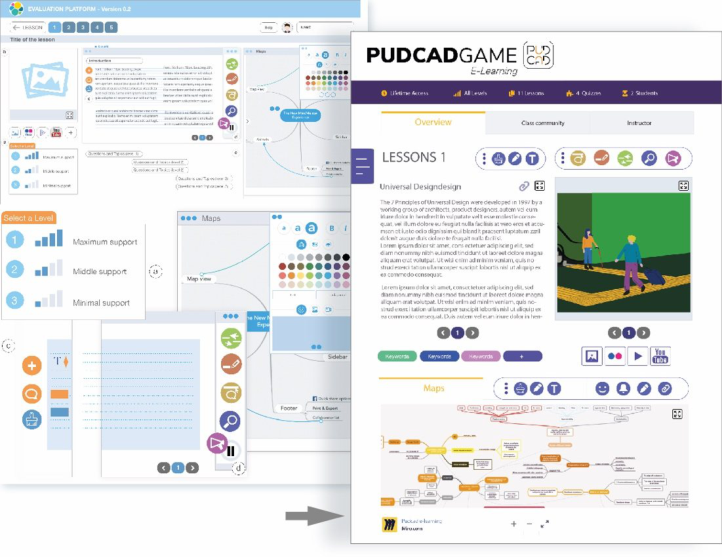
Development of Evaluation Tools: Simulation Platform 0.2 A platform was designed that allowed simulation of the functionalities iden- tified as strategic for learning for all and was used to assess the aspects that emerged during the analysis phase and from the activities carried out with the experts (e.g. UDL Editors, UDIO by CAST). The technical functionalities of open source compensation tools with speech synthesis functions have also been recreated including, Clip Claxon, LeggiXme and Balabolka, to decode the text (Memory for images and words of C.R.E.D and SuperQuaderno of Anastasis, LeggiXme_Jr_SP, etc.) and systems for organization and for the creation of didactic materials, such as conceptual mappers (Super Maps, Cooperativa Anastasis, Super Maps EVO, C-Map Tools), and for the crea- tion of lessons (Facile Facile web platform by C.R.E.D). Figure 2 illustrates
Figure 2: On the left the evaluation tool on the right the beta version of the e-learning course developed within erasmus+ PUD-CAD project.
Research Experiences and Perspectives of Inclusive Virtual Learning Systems 59
some of the functions of the simulation platform created with Adobe XD and the subsequent implementation (experimental version) of the e-learning plat- form developed within the PUDCAD project. The platform is characterized by a sequence of cards, organized on the basis of a given study program. The platform is characterized by the following features: (a) selection of the levels of support to the reading; (b) multimedia resources; (c) link window to select support levels and text line spacing; (d) text help toolbar; (e) table of con- tents. The platform is interactive and can be tested on both computers and tablets, also a horizontal layout has been developed but it can be translated vertically. The tool will allow the functionalities to be validated during the evaluation phase and the learning styles identified in the theoretical analysis phase and with the comparison of the experts.
CONCLUSION AND FINAL REFLECTIONS The theoretical framework and the experimentations presented in this work were aimed at defining innovation scenarios, highlighting the need to increase the attention toward disability and possible stimuli in the field of Ergonomics for Design. As above-reported, the methodological approaches and discipli- nary skills required are manifold. These include, on the one hand, the field of neuroscience, pedagogy and education, and on the other hand, that of software developers, designers and companies that produce and regulate the distribution policies, market trends and consumption of the technology itself. Despite this complexity, new technologies develop quickly, sometimes not following specific technical and ethical guidelines. The collaboration with experts has strengthened the considerations that emerged from the research and, consequently, it appeared that ICT and, in general, digital technologies can represent the preferred way to achieve the objectives of accessibility and flexibility of learning pathways. The disciplinary field of design and in parti- cular the Human-Centred Design approach and the knowledge related to it are therefore able to contribute to the development of effective solutions in terms of usability, effectiveness and satisfaction.
ACKNOWLEDGMENT
The interviews were conducted as part of collateral activities of the LED laboratory of the University of Florence, in collaboration with experts of the C.R.E.D center (Didactic Educational Resource Centre). For the interviews and observation Dr. Gianna Teri, Dr. Claudia Durso - expert pedagogue DSA, Dr. Enrico Rialti - Psycholinguist and Learning Tutor, Gianni Fadda - web designer C.R.E.D and Alessandro Guarducci (social cooperatives Macrame) are kindly acknowledged. Author Contributions: Conceptualization, A.B.; methodology, A.B.; infographics and data curation, A.B and E.I; writing—original draft preparation, A.B, E.I; writing—review and editing, A.B, E.I. Supervision, A.B. All authors have read and agreed to the published version of the manuscript.
Clarkson P. J., Coleman R., Hosking I., Waller S. (2007), Inclusive design toolkit, UK: Cambridge Engineering Design Centre, pp. 2–5. Website: www- edc.eng.cam.ac.uk/downloads/idtoolkit.pdf. Clarkson, P. J., Waller, S. and Cardoso, C. C., (2015). Approaches to estimating user
exclusion. Applied Ergonomics: human factors in technology and society, 46(B), pp. 304–310. Firmenich, S., Garrido, A., Paternò, F. and Rossi, G., (2019). User interface adaptation for accessibility. Web Accessibility: A Foundation for Research, pp. 547–568. Giacomin, J., 2014. What is human centred design?. The design journal, 17(4),
pp. 606–623. Hirai, Y., Morita, Y. and Elokla, N., (2007). Evaluation of usability methodologies in the universal design process. In DS 42: Proceedings of ICED 2007, the 16th International Conference on Engineering Design, Paris, France, 28.-31.07. 2007 (pp. 293–294). ISO 9241-210:2019, Ergonomics of human-system interaction - Part 210: Human-
centred design for interactive systems. Maguire M. (2001), Methods to support human-centred design, International journal of human-computer studies, 55(4), pp. 587–634. Meskhi, B., Ponomareva, S. and Ugnich, E., (2019). E-learning in higher inclu-
sive education: needs, opportunities and limitations. International journal of educational management. Miraz, M. H., Ali, M. and Excell, P. S., (2021). Adaptive user interfaces and universal usability through plasticity of user interface design. Computer Science Review, 40, p. 100363. Stanton, N. A., (2004). Human factors and ergonomics methods. In Handbook of
human factors and ergonomics methods (pp. 27–38). CRC press. Stanton, N. A., Salmon, P. M., Rafferty, L. A., Walker, G. H., Baber, C. and Jenkins, D.P., (2017).Human factors methods: a practical guide for engineering and design. CRC Press. Stephanidis, C. and Savidis, A., (2001). Universal access in the information society:
methods, tools, and interaction technologies. Universal access in the information society, 1(1), p. 40. W3C, Web Content Accessibility Guidelines (WCAG) 2.0 (2008). Website: www.w3.
org/TR/WCAG20. W3C, Web Content Accessibility Guidelines 2.0. Website: www.w3.org/TR/WCAG. Web Accessibility Initiative. Retrieved from: www.w3.org/WAI. Wilson C. (2011), Method 10 of 100: Perspective-Based Inspection, 100User Experience (UX) Design and Evaluation Methods for Your Toolkit. Website: www.dux.typepad.com/dux/chauncey-wilson.html.
LISTED IN THE AHFE DIGITAL BOOKSTORE CATALOGUE
Explore the complete digital volume
Design for Inclusion
Read this individual research paper free through the original publisher, or explore the full digital proceedings book.
ISBN 978-1-958651-51-3
Explore this ISBN in the AHFE Bookstore ↗Listed in the July 2026 bookstore catalogue; search by ISBN to confirm current availability · Digital book purchase optional