Antonio Zingarofalo, Giorgio Giustizieri, Sarah De_Cristofaro, Luca Rizzi (2026). Enhancing XR Interface Design through Immersive AR Co-Design and 360-Degree Photospheres. In: Usability and User Experience. AHFE Open Access, vol. 232, pp. 1–8. https://doi.org/10.54941/ahfe1008030
This paper presents a co-design methodology applied to the development of Mixed Reality (MR) interfaces within the Motivate XR project, targeting industrial training and operational support scenarios. The proposed approach emphasizes a user-centered design process, achieved through the continuous involvement of end users alongside developers, with the objective of improving usability while addressing ergonomic and operational constraints. The design process was structured around a systematic, ergonomics-driven methodology, tailored to the specific use cases of multiple industrial pilots. Insights derived from individual case studies were combined to define a design solution adaptable across heterogeneous real-world environments. A series of co-design workshops were coordinated to iteratively present, evaluate, and refine interface concepts based on direct user feedback, ensuring alignment with operational goals. To validate the proposed designs, 360-degree photos and videos of real industrial environments were used to simulate MR interactions within the actual pilot contexts. Interface layouts and visual elements, such as contrast, spatial arrangement, and content readability, were optimized through the creation of MR mockups, supporting both functional effectiveness and perceptual clarity. The methodology placed strong emphasis on real-time user feedback, enabling rapid iteration and continuous refinement of design decisions. The co-design activities were supported by a combination of UX tools and MR technologies, including 2D prototyping platforms and immersive VR environments, facilitating collaborative evaluation and validation. Results demonstrate that co-design represents an effective strategy for the development of scalable, user-centered XR interfaces in industrial contexts, contributing to improved usability and stronger alignment between technical solutions and end-user needs.
This research activity has been funded by the EU Project n. 101135963 – Motivate XR project that aim to develop an integrated ecosystem of XR tools for supporting industrial training and maintenance across the full experience lifecycle: from content creation to onsite delivery. The project addresses a recurring barrier in real world XR adoption: when multiple
applications and devices are used without a clear and common workflow, inconsistent interaction paradigms and fragmented interfaces can increase cognitive load, slow down onboarding, and ultimately undermine trust in the system, especially for operators who must switch frequently between authoring environments and field experiences.
To tackle this challenge, Motivate XR is designed around a common platform that enables agile access to a set of specialised tools for building XR experiences, while also providing a shared asset repository. This repository acts as a single source of truth for digital content (e.g., documents, media, 3D elements and other training-related resources), so that assets can be created, managed, and re-used coherently across the different tools involved. In this setting, UX (Hartson, 2018) and GUI design are not treated as a layer applied after technical development, but as a unifying backbone ensuring continuity between the authoring side, where content and procedures are structured, and the experiencing side where operators interact with XR guidance in operational contexts.
The project is grounded in different industrial pilot use cases, each representing different operational goals, environments, and user profiles. Such diversity is a strength for validating robustness and generalisability, but it also introduces complexity: requirements, constraints, and expectations may differ significantly across pilots, risking the emergence of pilot-specific solutions that do not scale across the overall platform. For this reason, Motivate XR adopted a participatory, workshop-based co-design approach as the primary mechanism to converge on shared UX principles (Hillman, 2021) and GUI patterns applicable to the entire ecosystem.
Co-design activities were carried out through iterative workshops involving end users, pilot owners, and tool owners. These sessions were structured to jointly define the key aspects of user experience and interface behaviour for both authoring and experiencing, aligning the mental models of stakeholders and making trade-offs explicit early in the process. Workshop exercises focused on mapping user journeys, identifying the critical steps and decision points in the workflow, discussing information architecture and navigation logic, and validating early interface concepts against operational constraints such as device limitations, context of use, and safety-related considerations. This collaborative setting also supported the harmonisation of terminology and visual conventions across tools, reducing the friction generated by heterogeneous UI metaphors and interaction styles.
By combining shared platform assumptions (tool access and asset reuse) with cross-pilot validation, the project aims to deliver XR solutions that are consistent, learnable, and reliable, while remaining flexible enough to support different industrial contexts. The resulting UX process is therefore not only a method for “designing screens”, but a strategy to ensure coherence in a multi-tool XR ecosystem, bridging authoring and experiencing through common patterns, shared content management, and stakeholder-driven alignment.
MATERIALS AND METHODS
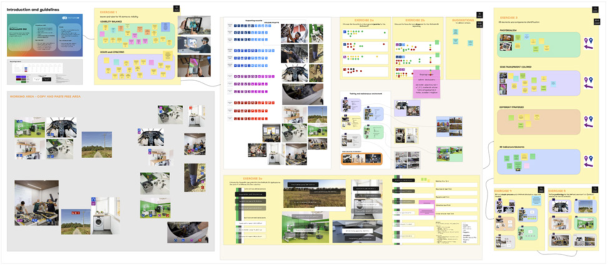
The applied methods were designed to enable distributed, real-time co-design among the Motivate XR project consortium while keeping discussions anchored to realistic industrial contexts. To support synchronous collaboration, a set of structured exercises was prepared on the online platform miro (see Figure 2), allowing participants from different countries and organisations to work simultaneously on shared boards, comment on proposals, and converge on decisions during the workshop sessions. These exercises were built around demonstrative visualisations showing how digital assets (e.g., documents, media, 3D elements, and interface components) could appear and behave within representative scenarios aligned with the common needs emerging from the project’s five industrial applications.
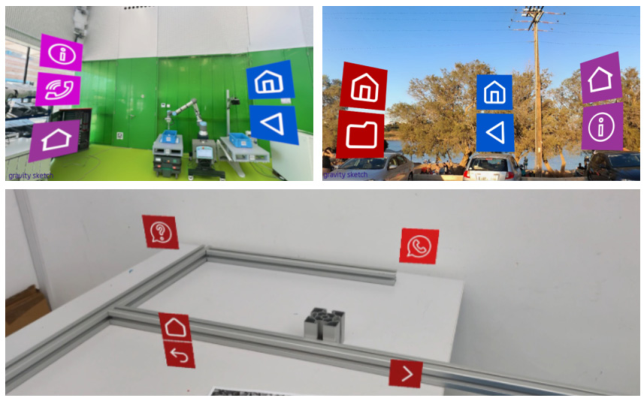
A key methodological choice was to produce mock-ups that could be discussed as close as possible to real use conditions (Hedlund, 2021), rather than being evaluated only as abstract interface sketches. For this purpose, a set of simulated scenes using Gravity Sketch by importing 360° spherical images (see Figure 1) were developed to reconstruct pilot workplaces at full scale. The immersive environments were created and explored through head- mounted displays (Bower, 2021) such as Meta Quest 3, used to run Gravity Sketch, where real contextual elements visible in the 360° imagery were combined with selected assets prepared for the co-design activities, such as 3D models and 2D icons representing GUI elements. Gravity Sketch was selected because it is compatible with multiple XR headsets and supports both see-through and fully immersive VR visualisation modes, enabling rapid switching between mixed and virtual representations of the same scene. From an operational standpoint, the tool offered a particularly agile setup for contextual prototyping: the 360° photo could be set as the default environmental background with minimal configuration, and assets could be quickly introduced, positioned, and adjusted in space. In this study, JPEG images of the candidate icons, replicated across colour variants, were imported and moved within the simulated workplace to emulate user facing interactive cues and to verify contrast, salience, and readability against the real industrial backdrop.
Once the most representative viewpoints and interface placements had been tested within the virtual scene, were captured and stored screenshots and “virtual viewpoints” (i.e., recorded visual states of the environment) and used them as a basis for further detailing and visual refinement.
Collecting these digital and preliminary mock-ups, they were then presented during the co-design workshops. In this way, participants could collectively review, compare, and comment on realistic interface proposals within a shared discussion space (miro). The 360° images used to build the scenes were directly provided from the pilot sites to ensure that the simulated contexts reflected the actual industrial settings where the XR solutions are intended to be deployed. This strengthened the ecological validity of the exercises, because GUI elements were validated in relation to recurring visual and operational characteristics of each environment (e.g., machinery layout, spatial constraints, lighting conditions, typical viewpoints), supporting the
optimisation of UX and GUI choices against pilot needs and requirements while maintaining convergence toward shared patterns suitable for a multi- tool platform.
Figure 1: Simulated scenarios in the Gravity Sketch environment.
UX CO-DESIGN WORKSHOPS The co-design workshops focused on a set of recurring UX and GUI elements that are central to XR “experiencing” applications, where operators interact with AR/VR content to perform training activities or to receive maintenance support in industrial contexts. To make the discussion concrete and comparable across the different industrial applications, a sequence of guided co-design exercises were prepared targeting interface components that are typically shared across scenarios (independently of the specific procedure), such as visual cues, interactive controls, and the way digital assets are presented within the user’s field of view (Contrast minimum, 2022). These exercises were delivered through dedicated miro boards, where materials (Microsoft MR guidelines) were organised so that participants could quickly understand the alternatives, compare options side-by-side, and provide structured feedback in real time.
During the sessions, participants used the miro boards to express judgments, raise concerns, and motivate their preferences, effectively supporting a collaborative selection of the strategies to be adopted. The major topics concerned:
1. the style of iconography intended to be embedded in AR and VR scenarios and used as a primary interaction layer with the user. Participants assessed different icon sets and visual languages by discussing perceived clarity, semantic transparency, consistency across tools, and suitability for industrial users; 2. the definition of colour palettes to be applied to interactive icon backgrounds and related UI elements, with the explicit goal of maximising
Enhancing XR Interface Design Through Immersive AR Co-Design 5 legibility and recognition under heterogeneous visual conditions. Since each industrial application environment presents different dominant colours, lighting conditions, and visual clutter, participants were encouraged to reason not only on aesthetic coherence but on functional readability in context; 3. how 3D assets are visualised and which “recurring elements” should be standardised across experiences, including typical XR guidance components such as arrows, indicators, callouts, pointers, and simple tools supporting spatial orientation and task execution. Participants discussed when 3D objects should be shown as full models versus simplified representations, how persistent or transient cues should be, and which elements should be considered baseline components that users can expect across different procedures and pilots.
In this phase, the preparatory work on 360°-based mock-ups proved particularly valuable for colour and contrast decisions. Using screenshots prepared inside the Gravity Sketch simulated environments and built from 360° spherical images provided by the pilots, participants could place comparable icon sets and interaction elements onto realistic industrial backdrops while switching between the proposed colour variants. This enabled a shared, evidence-driven evaluation of visibility, contrast, and readability for icons “embedded” against real backgrounds, helping validate palette choices in relation to the actual environmental characteristics of each pilot site. Overall, the workshops provided a practical and collaborative mechanism to converge on interaction-ready GUI solutions for XR experiencing, balancing cross-pilot consistency with the need to remain legible and robust in real industrial settings.
Figure 2: Miro board for the experiencing co-design workshop.
RESULTS
The co-design workshops produced a set of concrete, actionable outcomes by transforming a broad set of feasible interface alternatives into shared priorities agreed by the consortium. Rather than identifying a single “correct” solution, the workshop process generated hierarchies among the proposed options, clarifying which combinations of visual and interaction
choices were perceived as more robust and transferable across the project’s heterogeneous industrial contexts. This prioritisation resulted in a curated selection of digital elements, together with their defining characteristics (e.g., style and colour rules), that can be directly adopted as design inputs for AR/ VR experiencing applications within the Motivate XR ecosystem.
These outputs (see Table 1) constitute the foundation for an asset package intended to standardise and accelerate the creation of XR content. In practice, the workshop results inform the development of a shared repository of reusable assets, including interaction 2D elements and representative 3D components, supporting the production of XR manuals and training experiences in a coherent way across tools and pilots. Crucially, the selected solutions reflect the active involvement of pilot representatives and end users, ensuring that design decisions are not only internally consistent but also aligned with real operational preferences and constraints, thereby reinforcing the relevance of the resulting UX for industrial adoption.
Across the evaluated alternatives, the workshops converged on clear specifications for the visual language of core interface components. This includes the iconographic style and colour configuration of interactive elements, together with rules that improve legibility in variable environments. In addition, participants defined preferences for complementary GUI parameters such as typographic choices, the transparency levels of textual panels and overlays, and the preferred approach for representing and producing 3D assets used within XR scenes. Taken together, these results capture a common design direction emerging from a heterogeneous panel of users operating in different industrial domains, and provide a validated basis for implementing a consistent, pilot- informed interaction layer for Motivate XR AR and VR experiences.
Table 1: Samples of co-design workshop outcomes.
Table available in the original PDF paper.
Preliminary Proposed Solutions Consortium Final Selection Icon style (sets 1, 2 and 3 examples) Icon set 2 style
Different values for text and panel background opacity
Black background and white text with opacity 70%
DISCUSSION AND CONCLUSION This work highlights the value of treating GUI definition as a shared design problem rather than a purely technical activity, especially in XR applications where usability is strongly influenced by context, attention demands, and the coexistence of real and virtual stimuli. The adopted methodology, centred on co-design sessions that deliberately mixed technical stakeholders and end users, proved effective in translating subjective expectations into
Enhancing XR Interface Design Through Immersive AR Co-Design 7 implementable interface choices, reducing the risk of “designer-driven” assumptions and ensuring that interaction solutions remain credible for those who will actually rely on them during training and maintenance tasks. Beyond producing a set of selected interface elements, the process strengthened a common understanding (Sova DH, 2010) of what should be considered intuitive, readable, and trustworthy in industrial XR, fostering alignment across different competences and perspectives while keeping the discussion grounded in practical needs.
In addition, this co-design setting provided a concrete advantage for onboarding: by engaging participants directly with XR-driven interface concepts and context-rich examples, the workshops helped introduce mixed-reality capabilities to users with limited prior exposure, making the technology’s potential and interaction logic more tangible and easier to grasp early in the adoption process.
An equally important contribution was the preparatory phase based on digital mock-ups that simulated AR/VR interfaces against realistic backgrounds derived from the pilots’ working environments. By constructing and documenting immersive scenes and then using the resulting visual evidence as a shared reference during workshops, the project enabled more informed decisions than would have been possible through abstract UI sketches alone. Seeing proposed virtual elements “against” the visual complexity of real industrial settings helped stakeholders reason concretely about visibility, visual competition, and the balance between guidance and distraction, as factors that are central to XR comfort and effectiveness but are often underestimated when evaluating interfaces out of context. Overall, combining participatory decision-making with context-rich visual prototyping created a robust pathway for defining GUI elements that are not only coherent and reusable, but also genuinely tuned to the expectations and constraints of final users.
At the same time, a critical aspect that emerged is the intrinsic dependence of co-design outcomes on individual perceptions and personal mental models: if not carefully moderated and supported by clear evaluation criteria, preferences can diverge substantially, making it harder to converge on a single solution that is broadly acceptable and leading to a dispersed “scoring” of results across participants.
Future developments of this approach could further increase scalability and variability handling by integrating generative AI into the prototyping pipeline, for instance, producing AI-generated workplace scenarios that can be imported into Gravity Sketch as contextual environments. This would enable rapid creation of multiple “what-if” backdrops and the immersive validation of virtual elements and layout solutions directly in context, supporting mixed-reality experience design not only for industrial training and maintenance but also for other application domains where contextual realism and fast iteration are key.
This approach can be replicated in other XR ecosystems where the success of adoption depends on the subtle fit between interface language, operational context, and the practical judgement of those who work on the shopfloor.
ACKNOWLEDGMENT
Funded by the European Union. Views and opinions expressed are however those of the author(s) only and do not necessarily reflect those of the European Union or European Commission. Neither the European Union nor the granting authority can be held responsible for them. Maintenance, Support & Operation Training using Immersive Virtual and Augmented Technology for Efficiency with XR (MotivateXR) Project is funded under Grant Agreement No 101135963.
REFERENCES
Bower, David. “Oculus Has VR Accessibility Guidelines Now, but Audio Descriptions Are Missing.” Equal Entry, 28 october 2021. Hartson, R. and Pyla, P.S. The UX book: Agile UX design for a quality user experience.
(2018) Morgan Kaufmann. Hedlund, M. “AR for Everyone: How to Build Accessible Augmented Reality Experiences.” UX Design, 21 of may, 2021. Hillman, C. UX for XR – User Experience Design and Strategies for Immersive
Technologies. (2021) Design Thinking series, Apress. Microsoft. Color, Light, and Materials in Mixed Reality Design. Microsoft: https:// learn.microsoft.com/en-us/windows/mixed-reality/design/color-light-and-materials Microsoft. Design in Mixed Reality. https://learn.microsoft.com/en-us/windows/
mixed-reality/design/design Sova DH, Nielsen J. 234 Tips and Tricks for Recruiting Users as Participants in Usability Studies. (2010) Fremont, CA: NNg/Nielsen Norman Group. University of South Carolina. Virtual Environments Accessibility Guidelines. University
of South Carolina. World Wide Web Consortium. Understanding Success Criterion 1.4.3: Contrast (Minimum). W3C, December 14, 2022.
LISTED IN THE AHFE DIGITAL BOOKSTORE CATALOGUE
Explore the complete digital volume
Usability and User Experience
Read this individual research paper free through the original publisher, or explore the full digital proceedings book.
ISBN 979-8-950676-08-6
Explore this ISBN in the AHFE Bookstore ↗Listed in the July 2026 bookstore catalogue; search by ISBN to confirm current availability · Digital book purchase optional