Furui Sun, Wanzheng Liu, Huiran Sun, Yun Chen (2024). Exploring the optimal proportion range of gesture input keyboard in virtual reality based on human factors engineering. In: Usability and User Experience. AHFE Open Access, vol. 156, pp. 412–422. https://doi.org/10.54941/ahfe1005452
With the rapid development of virtual reality ( VR ) technology, reducing users ' fatigue and cognitive load has become the focus of future attention in this field. At the same time, in virtual interaction, the quality of information input is directly related to the overall experience of users. However, at present, users are facing challenges such as low efficiency and poor experience when wearing head-mounted display ( HMD ) and using gesture recognition for game or text input for interactive experience. We hope to improve this situation through research. This study takes the Chinese youth group as the main research object, reveals the deep-seated causes of the problem through in-depth analysis of the existing VR keyboard and gesture input methods, and seeks solutions through experimental methods. The data comes from the selected youth group wearing the Oculus Quest 2 head-mounted display, and the experiment of finger kneading typing input in the virtual space, and then the heat map technology is used to accurately process and analyze the data to determine the best keyboard length-width ratio and pixel range. By comparing the experimental data, the research conclusion clearly shows the significant advantages of the optimized virtual keyboard compared with the gesture recognition method.In terms of research significance, this study not only provides new insights for the academic community by optimizing virtual keyboard design, but also lays a solid foundation for improving user experience and promoting the wide application of virtual reality technology. It is expected to become an important reference in the field of virtual reality technology in the future.
Human factors engineering, guided by a user-centric design philosophy, places a strong emphasis on enhancing performance and reducing physical strain (ChenShanguang et al., 2021). The pivotal role of human-computer interfaces and human-computer interaction design in shaping user experi- ences is well acknowledged. As virtual reality (VR) technology has evolved from conceptualization to widespread industrial application since the 1930s, it has become an integral part of people’s lives, presenting new challenges and directions for human factors engineering. In recent years, VR has found extensive applications in education, training, remote work, entertainment, and culture (Qing et al., 2021).
Language and text input constitute fundamental elements of human- computer interaction. Interaction methods lacking consideration for human factors can result in muscle tension and physical strain, as evidenced not only in traditional computer keyboard usage (Minglang et al., 2005) but also through feedback from participants in our study. Consequently, there is a growing body of research dedicated to exploring text input techniques in virtual reality environments (Guihe et al., 2022).
Exploring the Optimal Proportion Range of Gesture Input Keyboard 413
Presently, mainstream text input methods in virtual reality include hand- held controllers, gesture recognition, eye-tracking, and more. Gesture recog- nition, capturing body movements and gestures using immersive devices without physical device contact, offers a natural, user-friendly interaction method with rich semantics (Zunjian, 2021). This paper conducts research into the usage of virtual reality keyboards from a human factors engineering perspective, primarily based on the gesture recognition interaction method.
This paper contributes to the field by (1) providing a reference range for virtual reality keyboard design and (2) offering valuable insights and practical recommendations for virtual reality interface design and human-computer interaction.
The remainder of this paper is organized as follows: Section 2 reviews related work. Section 3 describes the experimental approach and process, along with a discussion and analysis of the results. Section 4 validates the results through prototype testing. Conclusions are presented in Section 5.
LITERATURE REVIEW
The future development of virtual reality (VR) technology reflects several notable research trends. Firstly, continuous enhancements in image quality and resolution aim to create more realistic virtual environments, reducing discomfort like motion sickness. Secondly, the next generation of VR devices strives to expand the field of view, providing users with a more immer- sive experience. This development trend eliminates the traditional “window effect” limitations, fostering a more authentic and engaging virtual environ- ment. By broadening the field of view, the new generation of VR devices seeks to offer users a comprehensive and immersive virtual adventure, enhancing interactivity and entertainment value, thus advancing virtual reality technol- ogy (Tao et al., 2017). This innovation is expected to bring revolutionary changes to the future of highly immersive virtual reality experiences.
Since 2020, accelerated breakthroughs in technologies such as 5G,artificial intelligence, big data, and cloud computing, coupled with increased demand for “contactless”solutions due to the COVID-19 pandemic, have created new opportunities for the development of the virtual reality industry. The industry demonstrates a stable and positive development trend, with emerging models and formats. Projections indicate that by 2023, the virtual reality industry market in China will surpass one trillion yuan, and by 2025, China’s virtual reality industry will rank among global leaders.
The “China VR User Behavior Research Report” shows that 68.5% of individuals aged 15 to 39 who are aware of VR products or related knowl- edge have a strong interest in VR.Given the 2014 population of 418 million Chinese aged 15 to 39, the potential VR user base in this group is esti- mated at 286 million. In 2015, 17 million of these individuals had tried VR devices, and 960,000 made purchases. Heavy VR users prefer smartphone- inserted VR glasses, followed by PC-based headsets and all-in-one devices for future purchases. The Oculus Quest, being highly recognized among heavy VR users, was chosen as the experimental research device.
Virtual reality technology’s basic equipment includes hardware such as modeling devices, 3D visual displays, audio devices, and interaction devices. Input devices are crucial for translating real-world data into the virtual envi- ronment, enhancing immersion and improving the experience across different VR devices. Virtual reality technology evolution has diversified input meth- ods, including handheld touch, fingertip pinch, hand tracking, eye tracking, physical controllers, and simulated objects. Airborne text input through pinching is more complex but as accurate as touch-based methods. Pinch Type, a hands-free text input method, enables faster typing speeds in vir- tual reality. Apple’s Vision Pro combines eye tracking, gestures, and voice, marking a significant advancement despite concerns about cognitive load and visual fatigue.
VR keyboard design must consider human factors engineering and user experience for efficiency and comfort in a virtual environment. Tangible VR interfaces aim to provide seamless user interaction by eliminating the gaps found in traditional VR and physical interfaces. An ideal virtual keyboard should feature well-placed keys, a layout similar to traditional keyboards, comfort, haptic feedback, customizability, visibility, hand tracking, and user feedback. Practical guidelines and best practices for virtual reality key- board design are also mentioned in the Oculus Developer Documentation. SHARK utilizes the expressive power of a stylus, bridging visual guidance performance to facilitate learning and recalibration (Abdlkarim et al., 2023).
EXPERIMENT DESIGN To investigate the optimal position and size range of the VR virtual keyboard using gesture recognition input, appropriate data selection is crucial. Unlike studies involving physical keyboards or keyboards with smartphone screens that analyze touch point data, the gesture recognition approach involves hands not directly touching the keyboard. With camera capture, fingers drive the cursor within a smaller range of motion over a larger virtual rendering area (Hart et al., 1988). In this context, the hand’s position influences the cur- sor’s position, representing the contact between the hand and the keyboard. Therefore, this study utilizes cursor position data to analyze the optimal position and size range under ergonomics. User experience experiments are conducted to collect the comfortable range of arm motion for different indi- viduals (38 participants) in their natural state. The movement path of their hands (cursor) is processed and analyzed while completing specified text input. This information is used to generate a heat map of the keyboard points, from which the optimal position and size range of the VR virtual keyboard in the form of gesture recognition input are derived. The study’s validity is assessed by repeating the experiment with five randomly selected participants at the end. A qualitative study is conducted to analyze muscle force gener- ation modes and fatigue levels during virtual input. Correlation analysis of male and female data is performed separately to explore the need for different standard ranges based on gender. The results of the experiment are summa- rized, and examples of virtual keyboard design sizes for Chinese youth are provided.
Exploring the Optimal Proportion Range of Gesture Input Keyboard 415
Thirty-eight students were recruited from a university in Beijing, China, comprising 19 males and 19 females with ages ranging from 19 to 25 years. All participants exhibited a full range of arm and hand movements, had normal or corrected-to-normal vision, were right-handed, and were users of QWERTY standard keyboards. The average arm length for males was 53.47 cm, shoulder width was 40.68 cm, while for females, the average arm length was 49.95 cm, and shoulder width was 35.42 cm. 53% were proficient or close to reaching the level of blind typing, and 42% had prior experience with VR. These demographic details are essential for statistical analysis and interpretation. Participants voluntarily took part in the experiment, signed informed consent forms, and received compensation at its conclusion. Par- ticipants also had the right to halt the experiment if they experienced any physical discomfort or adverse effects.
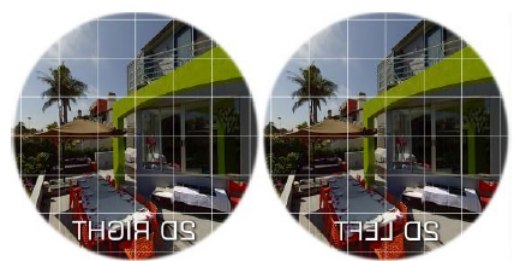
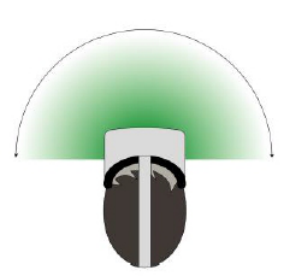
The single-field content comprises a single identical image simultaneously displayed to the left and right eyes in VR. Single-field content in VR does not convey a sense of depth, appearing flat whether in linear 2D or immer- sive 360/180 formats. Single-field 180-degree videos, also known as “2D-180 videos,” consist of a fisheye image with a 180-degree field of view. These videos can be easily captured using traditional cameras and circular fisheye lenses.
The experiment took place in a laboratory environment equipped with an HP i7 laptop computer and an Oculus Quest 2. The Oculus Quest 2 featured a Snapdragon XR2 processor, 6GB of running memory, and 64GB of stor- age memory. Its single-eye resolution was 1832×1920, dual-eye resolution was 3664×1920, with a default refresh rate of 90Hz (adjustable to 120Hz). The CPU was provided by Qualcomm, offering 6GB of RAM and 128GB of ROM. The total weight of the product was 740g, with the headset part weighing 548g.
Participants utilized this equipment in the laboratory to perform desig- nated actions, while video recording of their hand movements was conducted directly in front of them to track their hand activity.
Upon arriving at the experimental location, participants were introduced to the experimental procedure, and instructions were provided. Participants relaxed in a chair without armrests and wore VR devices equipped with ges- ture recognition (Oculus Quest 2). After verifying the proper functioning of the devices, participants engaged in a 2–5 minute free movement test, main- taining their heads level and the Y-axis of their coordinates in the center of their field of view. They freely moved both arms to demonstrate the natu- ral range of hand movements.Following the free movement test, participants were asked to imagine a keyboard at the center position and simulate typing within that area based on prompts from the staff. After completing the typing simulation, they repeated the same content in any other position. Finally, par- ticipants used both hands to draw the desired keyboard shape with a cursor, aiming for the most comfortable design.
Upon concluding the experiment, participants filled out a questionnaire to share their experiences and opinions regarding the experiment.
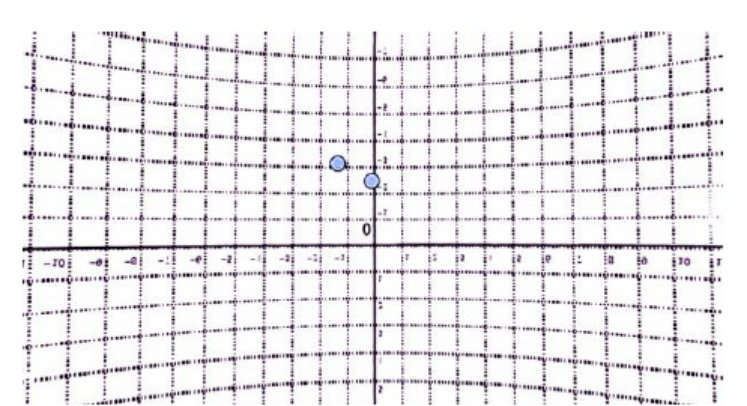
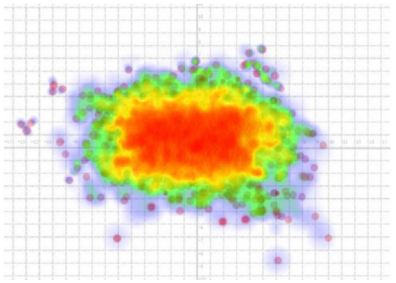
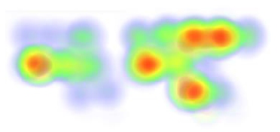
Based on the analysis of the touchpoint heatmap results, the keyboard coordinate range is defined as follows: (−4, 3): (4, 3): (4, −2): (−4, −2) — (−7, 4.5): (−7, −3.5): (7.5, −3.5): (7.5, 4.5).
Exploring the Optimal Proportion Range of Gesture Input Keyboard 417
Figure 4: Analysis results of touchpoint heatmaps.
Discussion
1. The width of the heat distribution for all participants aligns with the initial hypothesis, not exceeding shoulder width. This suggests that the natural hand span is less than shoulder width, resulting in a cursor range within the field of view also less than shoulder width. 2. Without keyboard prompts, the aspect ratio tends to be closer, and the distribution is more concentrated compared to having a keyboard. This indicates that the activity range in this posture is not elongated like a traditional keyboard but forms a focused area with a similar aspect ratio and a central point. 3. Without keyboard prompts, the distribution of high-frequency clicks in the region is generally the same as with a keyboard. This suggests that typing habits formed previously can be continued to some extent in this type of interaction. 4. The touchpoint distribution for repeated letters is more scattered, attributed to factors like controlled precision and memory decay. It also indicates that the mapping of keyboard letter positions in a relaxed state covers a larger area. This underscores the importance of con- sidering the trade-off between key size and obstructed range in future keyboard designs or providing dynamic feedback during input for easier confirmation of position.
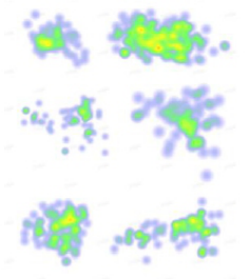
Figure 5: With keyboard prompts.Figure 6: Without keyboard prompts.
The simulation typing results were influenced by participants’ familiarity with the keyboard. The effective samples included 10 individuals proficient in touch typing and 10 individuals who were not fully proficient or unable to touch type. The point positions for their first-time simulation typing were merged and subjected to statistical analysis.
Among individuals who could not touch type, their positions were notice- ably scattered compared to those proficient in touch typing. Proficient touch typists exhibited more concentrated point positions during the simulation typing test, with a higher degree of overlap among their samples. This sug- gests that individuals who have mastered existing typing habits without referencing the keyboard can retain muscle memory. It also indicates that some individuals may achieve touch typing proficiency using this interaction method.
This conclusion challenges the previous assumption that a gesture recog- nition method without physical reference cannot form muscle memory and requires hand-eye coordination. If users can touch type with gestures alone, the extent of hand movement will be more influenced by their own motor factors. This underscores the importance of human factors engineering in keyboard research.
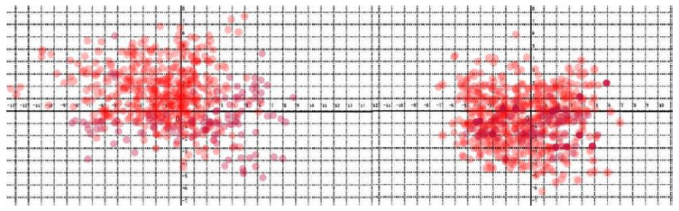
Figure 7: Touchpoint locations.
Many results reveal a leftward bias in touchpoint positions, forming a trapezoid shape with a smaller left and a larger right side. Participants were
Exploring the Optimal Proportion Range of Gesture Input Keyboard 419
instructed to keep the vertical axis in the center of their field of view, yet the positions tended to be biased to the left, as evident in the combined heatmap. Several factors contribute to this phenomenon:
1. Keyboard Layout: The leftward bias could be influenced by the fewer types of keys on the left side of the keyboard layout compared to the right side, impacting the distribution of high-frequency touchpoints. 2. Hand Dominance: Users tend to prefer continuous single-handed opera- tion. Right-handed participants not only use their right hand more fre- quently but also have greater flexibility and a wider range of movement, leading to a more dispersed range on the right side. 3. Cursor Control: The cursor controlled by the right hand tends to point to the left side for interaction, shifting the user’s attention to the left.
Considering the influence of hand dominance on keyboard operation, future designs should appropriately account for this factor. Further research is needed to assess its performance.
Perception matching and visual orientation operation experiments were conducted, and calculations determined that the distance from the system keyboard and coordinate axis image origin to the user’s eyes is 75.0 cm, with each grid in the coordinate image being 3.0 cm. In a virtual environment, the average estimate of distances centered around the self is approximately 74% of the modeled distance. Therefore, the modeled distance from the coordinate axis image origin to the user’s eyes can be estimated as 1m.
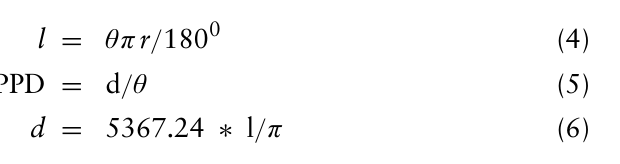
In virtual reality devices, each eye sees an independent image. Considering the independent field of view for each eye, it is common to use the monocular field of view angle to calculate PPD (Pixels Per Degree) for a more accurate estimation of the number of visible pixels per degree when the user is using the device. The monocular field of view angle is directly related to the technical specifications and user experience of virtual reality devices. Calculations can be performed based on the parameters of the experimental equipment system, considering the optical characteristics of the screen imaging.
The maximum diagonal pixel count for monocular imaging is:
Equation reproduced from the original PDF.
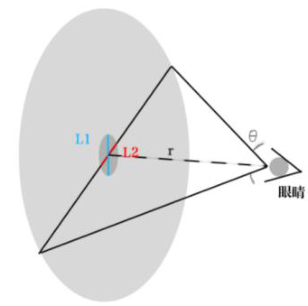
PPD = 29.818 (3) In the vertical field of view direction, the keyboard height is denoted as “l1,” and in the horizontal field of view direction, the keyboard width is denoted as “l2.” The distance from the coordinate axis image origin to the user’s eyes is represented as “r.” The pixel count required to fill the diameter of the field of view is “d,” and the field of view angle (FOV) is denoted as “θ.”
Equation reproduced from the original PDF.Figure 8: Scale symbol diagram.
Based on the optimal keyboard range of (−4,3):(4,3):(4,−2):(−4,−2), the calculated analysis yields a keyboard length (d2) of 240mm and a width (d1) of 150mm, with the value of π (Pi) taken as 3.14.
Equation reproduced from the original PDF.
Based on the comfortable keyboard range of (−7,4.5):(−7,−3.5):(7.5,−3.5) :(7.5,4.5),the calculated analysis yields a keyboard length (d4) of 435 mm and a width (d3)of 240 mm, with the value of π (Pi) taken as 3.14.
Equation reproduced from the original PDF.
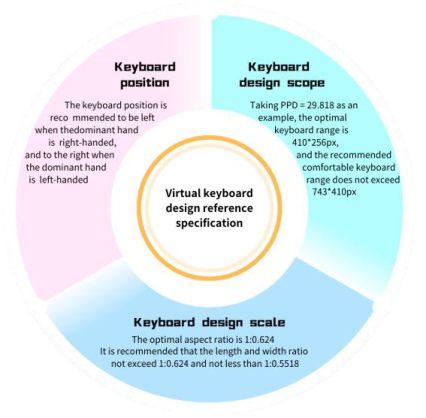
Therefore, the optimal keyboard range is 410x256px with an aspect ratio of 1:0.624, while the comfortable keyboard range is 743×410px with an aspect ratio of 1:0.5518.
RESULTS
Based on the heatmap of text input from the test subjects on the Cartesian coordinate system, we have defined a range that conforms to ergonomics and represents the high-frequency operation area.
The proposed coordinates for the most comfortable use of the virtual key- board: ( −4,3): (4,3): (4, −2): (−4,−2) ∼(−7,4.5): (−7,−3.5): (7.5, −3.5): (7.5,4.5). The pixel range:
410 ∗256px ∼743 ∗410px.
After verification, in VR virtual keyboard design, 410*256px is the best typing range with an aspect ratio of 1:0.624. It should not exceed the comfortable range of 743*410px, with an aspect ratio of 1:0.5518.
Exploring the Optimal Proportion Range of Gesture Input Keyboard 421
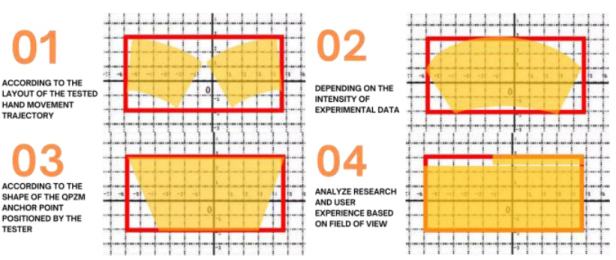
Figure 9: VR typing user requirement characteristic model diagram based on the exper- imental analysis and the most comfortable range defined in the Cartesian coordinate system in this study, layout proposals within this range are suggested.Figure 10: Layout proposal.
CONCLUSION
This study investigates user input methods in virtual reality, with a focus on fingertip pinch gestures, to determine the optimal size and proportions for virtual keyboards. It introduces key design principles, identifying the ideal keyboard size as 410×256 pixels with a 1:0.624 aspect ratio, and a maxi- mum comfortable size of 743×410 pixels with a 1:0.5518 aspect ratio. The research advances understanding of the interplay between keyboard dimen- sions and input methods, providing valuable insights for VR interface and HCI design. It aims to enhance user experience and the effectiveness of virtual keyboards, offering significant contributions to VR technology advancement.
Practically, the findings offer directives for improving virtual keyboard design, ensuring more efficient and comfortable user interactions in VR appli- cations, notably in virtual offices and training environments. By alleviating
cognitive and psychological strain, the study’s recommendations promise broad applicability and potential for real-world deployment.
However, challenges such as addressing diverse and personalized needs, and assessing long-term usage effects, remain. Future research should explore customization based on user variability, evaluate long-duration impacts, and integrate multimodal inputs to enrich interaction and user satisfaction. These efforts are pivotal for evolving VR technology to meet increasing user demands.
REFERENCES
Abdlkarim, D., Di Luca, M., Aves, P. et al. (2023). A methodological framework to assess the accuracy of virtual reality hand-tracking systems: A case study with the Meta Quest 2. Behav Res https://doi.org/10.3758/s13428-022-02051-8 ChenShanguang, Li Zhizhong, Ge Liezhong, J. (2021) “Advances in Human Factors
Engineering Research and Development Recommendations”, Science Founda- tion. 2021, 35(02): 203–212. doi: 10.16262/j.cnki.1000–8217.2021.02.007 (in China). Hart, S. G.; Staveland, L. E. Development of NASA-TLX (Task Load Index): Results of Empirical and Theoretical Research. In Advances in Psychology; Elsevier: Amsterdam, Netherlands, 1988; Volume 52, pp. 139–183. Qin Guihe, Huang Junfeng, Sun Minghui. J. (2022) “Virtual Reality Text Input Based on Dual-Hand Keyboard” 52(08): 1881–1888. doi: 10.13229/j.cnki.jdxbgxb20210159. (in China). Yang Minglang, Yuan Tao. J. (2005) “Keyboard Design Based on Ergonomics
Packaging Engineering” 2005(05): 168–170. (in China). Yang Qing, Zhong Shuhua. J. (2021) “A Review of ‘Development and Evolution Trends in Foreign Virtual Reality Technology”’ Journal of Dialectics of Nature. 43(03): 97–106. doi: 10.15994/j.1000–0763.2021.03.013 (in China). Yang Zunjian. D. (2021) “Research on Intelligent Virtual-Real Interaction Technol-
ogy Based on Gesture Recognition” Qingdao University of Science and Technol- ogy. doi: 10.27264/d.cnki.gqdhc.2020.000721. (in China). Zhang Tao, Hu Jian. (2017). “A Review of Virtual Reality Cognitive Load Research” Acta Electronica Sinica, 45(11), 2601–2611.
LISTED IN THE AHFE DIGITAL BOOKSTORE CATALOGUE
Explore the complete digital volume
Usability and User Experience
Read this individual research paper free through the original publisher, or explore the full digital proceedings book.
ISBN 978-1-964867-32-8
Explore this ISBN in the AHFE Bookstore ↗Listed in the July 2026 bookstore catalogue; search by ISBN to confirm current availability · Digital book purchase optional