Ian Gonsher, Frank Carber, Jesse Gallant, Fuka Ikeda, Chien Lu, Claire Poissonnier (2023). Building a Better Mouse App: New Modalities For Human-Computer Interaction. In: Human Interaction & Emerging Technologies (IHIET 2023): Artificial Intelligence & Future Applications. AHFE Open Access, vol. 111, pp. 508–517. https://doi.org/10.54941/ahfe1004057
The rigid conventions for mouse and keyboard design are ripe for reinvention. We present a collection of new modalities for mouse and keyboard design, which explore possibilities that untether the user from the constraints of surfaces, both screens and tables, and investigate novel relationships to emerging HCI modalities that reconsider how we situate the user in physical and virtual space. We discuss our design process, and present a collection of prototypes that serve as provocations for this and future work. We conclude with a discussion about how these prototypes might provide new opportunities for HCI design in augmented and virtual reality, as well as their application to new possibilities for ubiquitous computing.
Since Douglas Engelbart’s famous demo in 1968—the so-called “Mother of All Demos”—the keyboard, mouse, screen triad has been a fixed convention in interface design (Gonsher, 2021). Our inquiry began by exploring how we might rethink these conventions. This familiar triad is usually tethered to the flat surface of a table or desk. However, as augmented and virtual reality become more widely adopted, and human-computer interfaces become more spatial, experienced in the round, these fundamental assumptions need to be critiqued and radically reconsidered.
Consider the relationship between the keyboard, the mouse, and the screen. The keyboard produces text onto a blank screen. The mouse orients the user as a movable point on a flat surface, which is transposed from the table or desktop on which the mouse moves. But when the two dimensions of a flat surface give way to the volumetric space of virtual and augmented reality, that relationship no longer suffices. The state of the art in VR keyboards requires the user to laboriously poke at each character as if with their index finger on a typewriter. IMU based gestural controls are a bit better, but even so, the old paradigm cannot adapt fully to emerging new possibilities, and what we are left with is VR/AR/MR interfaces that are slow and difficult to use.
Building a Better Mouse App: New Modalities for Human-Computer Interaction 509
So how might we liberate the mouse from a flat surface? How might we reinvent the QWERTY keyboard for use while standing or walking? How might we create a mouse like interface for Mixed Reality applications that allows the user not just to manipulate a cursor on a screen, but projected images into an immersive space? These are just some of the initial questions which catalyzed our design pro- cess. This design process was characterized by the development of a series of prototypes that allowed us to validate a range of different concepts. These prototypes explored ways we might imagine new combinations of the mouse, keyboard, and screen. They allowed us to investigate how we might better design for mobility and Mixed Reality. And they showed us that if we could get beyond the conventions for HCI that we had become so accustomed to, exciting new opportunities were possible.
HISTORY AND BACKGROUND The origin of the traditional QWERTY layout of the keyboard dates back to the 1800s during the initial invention of the typewriter (Stamp, 2013). Early prototypes of the typewriter included complicated and onerous keyboards focused more on the form and efficiency of the machine itself than practi- cal functionality for the user. However, the design of the typewriter that was finally put into practice was influenced by the needs of typewriters during the Civil War, needing to translate Morse code messages quickly without the typewriter jamming. In 1878, the first patented typewriter with a QWERTY keyboard emerged. Researchers at Kyoto University suggested that the design of the QWERTY keyboard was in direct response to the myriad of tele- graph operators at the turn of the century (Yasuoka, 2011) who required a keyboard layout that was efficient for translating letters from the Morse receivers.
While other layouts for the keyboard were developed shortly after the invention of the typewriter, the first major alternative to the QWERTY sys- tem did not emerge until the 1930s, when Dr. August Dvorak introduced a keyboard design that optimized the “home” row of keys where the typer’s fingers normally rest. The Dvorak design did prove to be more efficient, but with millions of users already familiar with the QWERTY, Dvorak’s keyboard fell into obscurity. Even today, the QWERTY layout remains the dominant paradigm for the keyboard, despite the fact that there is no technical need for the system. Modern redesigns like the KALQ system have emerged to try to bring the keyboard into the 21st century. The KALQ attempts to tran- scend the original keyboard layout by using a model of thumb movement, rather than full-hand typing, to increase typing speed (Max Planck Institute, 2013). Researchers at the Max Planck Institute for Informatics used a com- putational approach that minimized the movement of thumbs and increased typing speed by 34%. While the KALQ design of the keyboard is more efficient than the existing QWERTY keyboard and freely available for any user to download, the QWERTY paradigm remains dominant and suggests that to be adopted, alternatives will need to improve not just efficiency, but contribute meaningfully to the experience of the user.
Unlike the development of the keyboard, the history of the mouse begins after the development of the computer. The initial design of the mouse can be traced back to Douglas Engelbart’s seminal 1968 “Mother of All Demos” presentation, where he demonstrated a device that allowed users to navigate a graphical user interface (Edwards, 2008). Engelbart’s mouse featured a single ball and sleeker design than the bulky wooden device of his first prototype. While the presence of Engelbart’s mouse is ubiquitous today, at the time it was a radical invention, one that the computer science community largely scoffed at (Metz, 2008). Despite the hesitance of detractors to take on his ideas, Engelbart had a vision for the future where everything in a computer inter-operated in a rich, immersive environment. While Engelbart’s mouse was a success for computers at the time, its limitations can’t meet the cur- rent capabilities of interfaces. Though the existing paradigm for the mouse is more recent than that of the QWERTY keyboard, little has changed in the ergonomic design and few alternatives have accounted for a more expansive vision of human-computer-interaction. The current design of the mouse sim- ply doesn’t factor in the near ubiquity of touch-screen devices and growing prevalence of immersive-reality.
To realize a new design that takes into account these new spatial and immersive realities, we looked for inspiration outside of the conventional forms of mice and keyboards. Joy-cons, controllers popularly used for video games, integrate a joystick that can move in 360 degrees with an array of but- tons. Joy-cons and joysticks are particularly interesting for new paradigms in mouse design, as they allow the user to situate their movement in three dimensions and move beyond the limitations of flat space. Hand-grip Oculus controllers also offer an intriguing inspiration for new ways to consider the mouse. Oculus and other VR controllers build off of the three-dimensional movement of a joystick, integrating a control stick and set of buttons with hand-movement tracking that not only allows the user to grab, throw and move objects, but also register their real-time gestures and movements in virtual reality. By registering hand and finger movement in virtual reality, Oculus controllers allow the user to turn their physical movements into vir- tual ones and in effect, remove the feeling that there is a controller present at all.
While it is true that little has changed in the design of the keyboard and mouse since their creation, there have certainly been attempts to update their designs, which have been met with varying degrees of disinterest. What about these designs made them unappealing to adopt? What kind of innovation is required in order to propose a design that solves these issues and appeals enough to the public that they are willing to move away from the current paradigm in favor of a novel interface?
DESIGN PROCESS: PROTOTYPES Beginning with these questions, but soon adding others, we developed a series of prototypes, each exploring a new direction in HCI design. Each prototype taught us something new about the ways the aforementioned conventions might be critiqued and subverted, if not transcended.
Building a Better Mouse App: New Modalities for Human-Computer Interaction 511
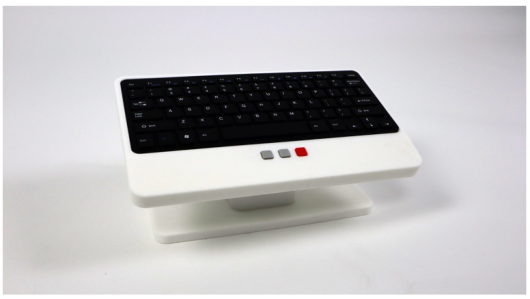
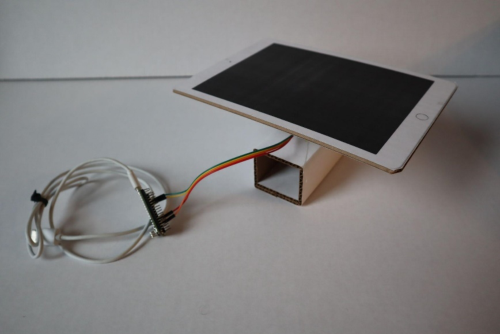
Our early functional prototypes explored the ways we might integrate the keyboard and the mouse into one object. The “mouseless keyboard” has affordances for rocking the keyboard around a pivot, essentially a joystick, to select items that are displayed on the screen [Figure 1]. The left and right buttons work the way any typical mouse does, but the red button gives the user the ability to toggle between “mouse mode” and “keyboard mode.” And if a keyboard, why not a tablet? So we experimented with putting both a touchscreen and touch keyboard on top of a mouse as well [Figure 2].
It was clear that part of the problem we were trying to solve had to do with the way a keyboard and mouse could be used in space, away from the constraints of the horizontal tyranny of a table or desk surface. How might we hold the entire object in the palms of our hands? We drew inspiration from the way someone might hold a ball, fidget toy, or even a small pet like a hamster (or perhaps a mouse) in their hands: rolling it around between their palms, as if petting it, giving the user a sensory experience that goes beyond the less tactile functionality of the typical mouse. By holding the object in the
hands, and not against the surface of a desk, it permits the user a more full range of postures and positions, including standing or walking positions.
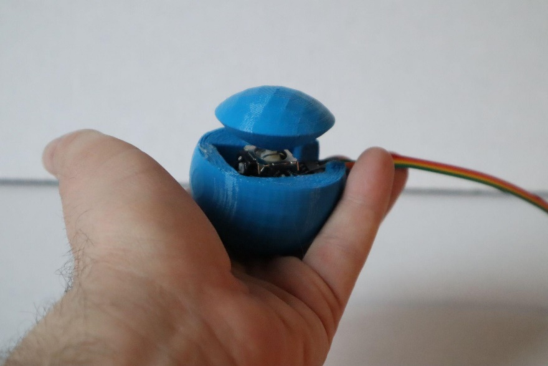
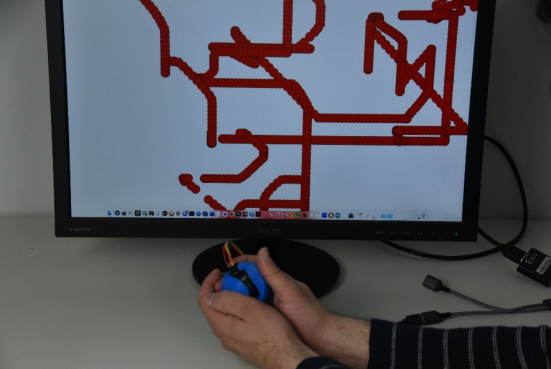
The sphere mouse prototype adapted the joystick control used in the prior prototypes, but placed it between the hands of the user, allowing one hand to push off the other [Figures 3 and 4]. This rolling motion, as one might roll a ball of playdough in their hands, gives the user a great deal of control over the cursor, and the ability to easily select items by pressing the top of the sphere.
Figure 3: Sphere mouse.Figure 4: Experimenting with the sphere mouse.
Liberating the mouse from the surface of the desk, and placing it in the hands of the user led us to develop other hand held interfaces. If you could carry the mouse in your hand, then could you use the entire environment as a screen? And if you could create an immersive experience where the user’s
Building a Better Mouse App: New Modalities for Human-Computer Interaction 513
position orients them in that augmented reality, overlaid onto the physical world, then how might one orient themselves and navigate in that world?
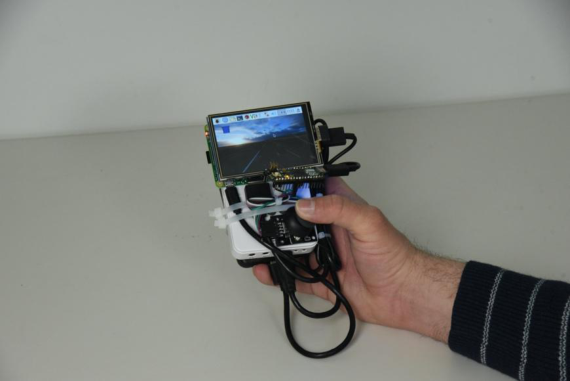
We incorporated a small portable projector into the joystick prototype, later also adding a touchscreen to complement the projected experience [Figure 5]. Powered by a Raspberry Pi, the prototype was able to use a fully functional GUI. This prototype explored several questions: How might we give the user a mouse-like device that projects onto the surrounding environment, and overlays virtual content onto the physical environment? How does the user orient themselves within this augmented environment? How might the user situate themselves in relation to both a small touchscreen and a larger projected field?
Figure 5: Projection mouse with touchscreen.
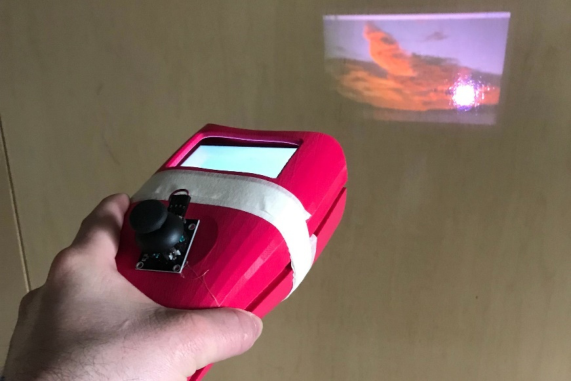
To begin answering these questions, we developed a UI that had both a “locked” and “unlocked” mode. In locked mode, the projector display is fixed, moving all the projected visual content onto nearby surfaces as the user moves their arm. This is the same content that is displayed on the mounted touchscreen. The image follows the gesture in its entirety. In unlocked mode, the projector displays and reveals a small portion of a bigger image; unlocked mode is a spotlight on an otherwise darkened stage [Figure 6].
The implications of this design resulted in exciting possibilities of incorpo- rating augmented-reality as a way to orient oneself in a space. For example, in a wayfinding scenario, the user may navigate using a map, to get a bird’s eye view of the territory. The user might also have wayfinding indications to better understand their position within that territory: both an objective and subjective view, so to speak.
These prototypes also allowed us to rethink the cursor, the virtual coun- terpart to the physical mouse. The cursor orients the user. In traditional flat touchscreens, the cursor is both an orientational mark and a point of control on a flat plane. In volumetric space, the space we live in, the cursor might also
Figure 6: Projection mouse in “unlocked mode”.
be made to orient the user in an augmented or mixed space. The cursor can point to, and interact with, physical features of the environment. The cursor can point to and interact with virtual features of the environment which are overlaid onto the physical features. And of course, the cursor can be used on a flat touchscreen.
This cursor might be more or less attended to, more or less conspicuous. For example, when the user is projecting onto walls from a distance, where the resolution may be lower, a bolder expression may be appropriate. When the projector is closer to the wall, as with the touchscreen, the cursor may be smaller and less conspicuous.
While our early prototypes challenge the modality of the current mouse paradigm, there was little to no consideration of how to revolutionize the keyboard. In general, when the keyboard is detached from the horizontal surface of a table or desk, the user experience generally suffers. Smaller key- boards, such as those found on early flip phones, and later smartphones, are generally not as accurate or easy to use as the traditional desktop configura- tion. Keyboards used in virtual and augmented reality are the equivalent of an untrained typist poking each individual key with their index finger. But, if we can rethink how we type, especially in contexts where mobility and ver- ticality are required, we can imagine radically new paradigms for what the keyboard and mouse could be.
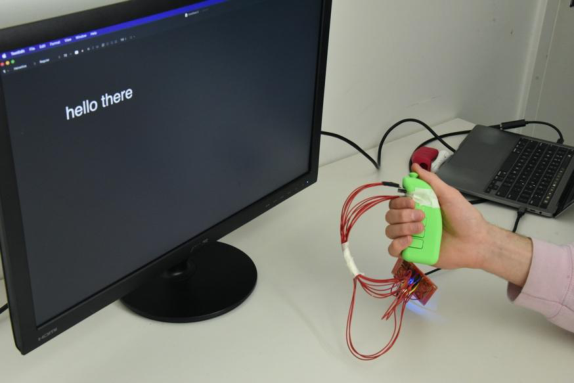
Our final prototype of the series explores ways we might integrate the keyboard into a one-handed device that could be used detached from the typical plane [Figure 6]. This gives the user more flexibility in position and situation when typing and navigating with the cursor. It is ideal for some of the mobile applications explored in prior prototypes.
The goal of this handheld interaction tool is to allow a user to interact with an interface in the same way they might with a keyboard and a mouse. We designed the tool to allow for different input methods. This handheld device
Building a Better Mouse App: New Modalities for Human-Computer Interaction 515
has a joystick that rests under the thumb as well as five buttons. One button is located just short of the joystick and four buttons are located on the side (one button for each finger).
We created three different types of keyboard/mouse interaction paradigms. The first uses the joystick as the mouse and the buttons as the keyboard, the second uses the joystick as the mouse and the keyboard, and the third is a hybrid of the first two.
Figure 7: Combination click mouse.
(1) Our initial thought was to create a 1:1 mapping of all the 26 characters onto a combination of the four buttons, leaving the joystick free for mouse control. In other words, to press ‘E’ for example, you would press the first button and to press ‘B’ you might press the first, third and fifth button. Given we have five available buttons we would be able to type 31 different keys with this arrangement. After some initial testing, we concluded this method might not be the best because it is not ergonomic to type certain keys and gets uncomfortable quickly. That being said, this method is very fast and (if the user learns the arrangement well enough) could be as fast as typing on a regular keyboard.
(2) Our second idea was to use a joystick as both a mouse and a keyboard. The joystick keyboard input is inspired by the Japanese flick keyboard, which is a design praised for its space-efficient style. By having users ‘flick’ the joy- stick in a certain direction, they would be able to input their desired letter. We created a 2D mapping of the keyboard and the user would flick in one of four directions to navigate through the map. Once the user was pointing to the desired letter, they would press down the joystick to select that key. There is also another button on the device that allows the user to toggle between mouse and keyboard control with the joystick. After user testing, we decided this method was not the most time efficient because it often required two or more swipes to access any key. Although it is not extremely fast, it is a very ergonomic option.
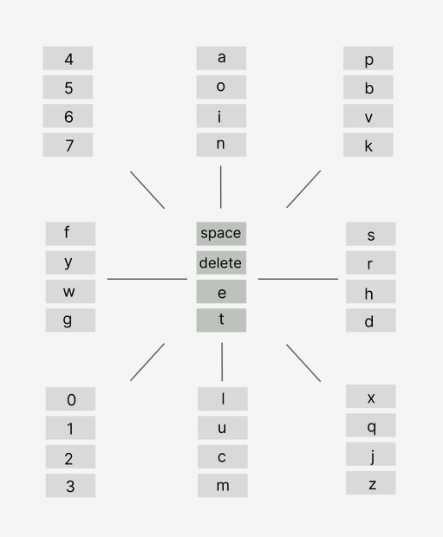
(3) We realized that we could take these two ideas and generate a hybrid idea that might be the best of both worlds. We created a two dimensional map of the keyboard and the user can swipe in any direction to pick a set of five letters. The user can then press one of the four buttons to select which of the four letters they want. This “flick and click” arrangement allows for a total of 36 characters to be pressed: 9 key sets (diagonal and straight directions as well as standard) with 4 letters per key set. This method combines the speed of the first method (each key takes one timestep because you can swipe and press the button at the same time) and the ergonomics of the second method.
Figure 8: “Flick and click” key map.
For example, to type the letter “d” with the flick-and click mouse, the user need only swipe right using the joystick to access the rightmost letter cluster, and then click the fourth button down (the button which your ring finger rests upon while holding the device). The alignment of each button to a different finger when the user is holding the mouse makes typing seamless. While a standard QWERTY keyboard requires the user to rest in the middle row of keys and reach above or below it to access more letters, our prototype circumnavigates this pain, since the user always has immediate access to the buttons they will need without altering their finger placement.
This layout allows for non-confined usage of the mouse, which are par- ticularly useful in VR settings or for extending accessibility in technological devices. Balancing both convenience and efficiency, this layout would rethink the future of the keyboard.
Building a Better Mouse App: New Modalities for Human-Computer Interaction 517
We might be able to further improve the design and layout of this keyboard with more user testing and potential implementation of AI models to stream- line the typing experience. We also might be able to improve the design of the controller by adjusting the button shape to better fit the fingers, rearranging the keyboard layout to be more space/time efficient, and adding specialized functionality such as double letters.
DISCUSSION
HCI design often follows the inertia of convention and habit. Radical breaks with familiar designs face significant challenges for adoption. This inhibits the development of new HCI modalities that offer users new experiences in new and emerging contexts. The prototypes we’ve developed explore new ways to think about an old paradigm, and hopefully offer insight into how we might reimagine some of the most entrenched assumptions about HCI design.
By liberating the mouse and the keyboard from the horizontal surface of a desk or table, we allow the interface to lend affordances for greater mobility. With the wider adoption of VR and AR applications, this need is even more urgent. By shifting from an horizontal orientation to a vertical one, we can offer users a greater range of HCI options for ubiquitous computing.
The prototypes featured here, and the design process from which they emerged, represent an inquiry into ways we might reimagine these deeply entrenched conventions. Each prototype explores a different question, which we hope provokes further questions that challenge our fundamental assump- tions about the keyboard, mouse, and screen.
REFERENCES
Edwards, P. N. (2008). The invention of the first mouse. IEEE Annals of the History of Computing, 30(3), 66–81. doi: 10.1109/MAHC.2008.20) Gonsher, I. (2022). Beyond the Keyboard, Mouse, and Screen: New Paradigms in
Interface Design. In Proceedings of the Future Technologies Conference (FTC) 2021, Volume 1 (pp. 107–113). Springer International Publishing. Jimmy Stamp, Fact or Fiction? The Legend of the QWERTY Keyboard (Smithsonian Magazine, 2013). https://www.smithsonianmag.com/arts-culture/fact-of-fiction- the-legend-of-the-qwerty-keyboard-49863249/ Koichi Yasuoka, Motoko Yasuoka, On the Prehistory of QWERTY (Zinbun no. 42 pp. 161–174, 2011). http://kanji.zinbun.kyoto- u.ac.jp/∼yasuoka/publications/PreQWERTY.html Larry Greenemeier, The Origin of the Computer Mouse (Scientific American, 2009).
https://www.scientificamerican.com/article/origins-computer-mouse/ Metz, Cade (December 11, 2008). “The Mother of All Demos — 150 years ahead of its time”. The Register. London. https://www.theregister.com/2008/ 12/11/engelbart_celebration Oulasvirta, A., Reichel, A., Li, W., Zhang, Y., Bachynskyi, M., Vertanen, K., Kris-
tensson P. O., Improving Two-Thumb Text Entry on Touchscreen Devices (2013 Annual Conference on Human factors in Computing Systems, CHI’13, ACM Press, 2013) https://www.mpg.de/7104427/kalq_keyboard
Read this individual research paper free through the original publisher, or explore the full digital proceedings book.
ISBN 978-1-958651-87-2
Explore this ISBN in the AHFE Bookstore ↗Listed in the July 2026 bookstore catalogue; search by ISBN to confirm current availability · Digital book purchase optional