Ian Gonsher, Yumeng Ma, Ivan Pineda-Dominguez, Matthew Lee, Yuxin Han (2023). The Mixed Reality Passthrough Window: Rethinking the Laptop Videoconferencing Experience. In: Human Interaction and Emerging Technologies (IHIET-AI 2023): Artificial Intelligence and Future Applications. AHFE Open Access, vol. 70, pp. 287–295. https://doi.org/10.54941/ahfe1002954
The growth in remote and hybrid work has resulted in an increased demand for collaborative, videoconferencing experiences that offer a more seamless and immersive transition between virtual and physical environments. The Mixed Reality Passthrough Window (MRPW) addresses this demand by introducing a new paradigm for the integration of augmented/mixed reality into laptop design. The design is characterized by two screens, situated back to back, with two mounted cameras, facing in opposite directions. This creates the effect of looking through a window, upon which virtual content can be augmented and overlaid. This configuration allows local users sitting around the laptop to more easily interact with remote users, who appear on both sides of the Mixed Reality Passthrough Window, giving the sense that all users are sharing the same space in the round. Additionally, these features create affordances for the outward facing screen to serve as a site for presentations (e.g. slide decks) and other sharable content.
It’s a familiar scenario in these post-lockdown days. Perhaps you’re a student or teacher in a class, or you’re at work giving a presentation to a group of co-workers. Some of the participants will be physically present, but some will be joining the meeting or class remotely. The ways in which we gather have fundamentally changed, but by and large the technology has not (Microsoft, n.d.). There is now often an expectation that both physical and virtual options be provided, and while this hybrid between remote and local participation offers a great deal of flexibility and has the potential to radically reshape the ways we balance our working lives and our private lives, the technologies that make videoconferencing possible are ripe for improvement.
Beyond the familiar videoconferencing apps such as Zoom and Skype, there is a dearth of telepresence applications that provide a hybrid videocon- ferencing environment between remote/virtual and local/physical users that is truly equal. Those that do exist often privilege local users over remote users, giving greater voice to those who can be physically present over those who
join remotely. There is much that can be done to improve and enhance the experience. Our prototype looks much like any other common laptop. How- ever, by adding a second outward facing screen, as well as opposing cameras, the videoconferencing experience becomes more seamless and equitable for both telepresent remote users as well as physically present local users, while also offering exciting new opportunities for integrating augmented or mixed reality into the laptop experience.
PRIOR WORK Several experimental projects offer new directions for mixed reality and tele- presence by creating a passthrough effect that can be layered with virtual content. One such project is FacingBoard-2 (Li et al., 2017). This prototype creates an immersive hybrid environment using transparent displays. These transparent displays offer users the opportunity to collaborate on either side of the device. They allow users to directly interact with workspace objects, present different content through a reversal of images, and visually enhance the gestural actions of the person on the other side to better support work- space awareness. However, there are significant limitations to this approach due to its fixed large displays, external projection units, and multiple conne- cted devices. There is a lack of portability, which forces users to work in a designated space in order to enter the immersive environment.
Our current Mixed Reality Passthrough Window (MRPW) laptop pro- totype is directly based on prior work which explored the use of mobile large screens. The Large Screen Mobile Telepresence Robot (LSMTR) employs large, mobile screens to create a more embodied telepresence experience (Gonsher et al., 2022). It is scaled to a standing adult, and can move around an environment, giving a remote user mobility in remote spaces. By giving remote users the opportunity to teleoperate a robot with large screens that mimic the scale of a standing adult, a greater sense of physical presence is achieved.
In addition to the LSMTR prototype, we have explored the integration of projection-based telepresence into furniture (Gonsher & Kim, 2020). tbo is a table that, much like the LSMTR robot, can be teleoperated to move around a remote space. But tbo can also sense its environment using SLAM mapping, and project onto nearby walls, creating an affordance for videoconferencing. When tbo is not facilitating a videoconference, it hides in plain sight as an inconspicuous piece of furniture. By integrating this kind of technology dire- ctly into the built environment, these kinds of robots offer a new paradigm for ubiquitous computing that frees users from carrying their devices with them everywhere they go. They also hold the possibility for the design of infrastructure for telepresence that is closer to a public good than a private object such as a smart phone or laptop.
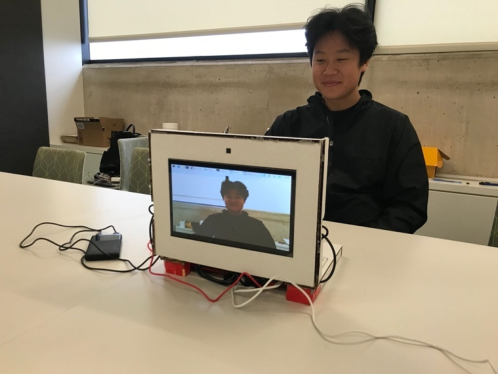
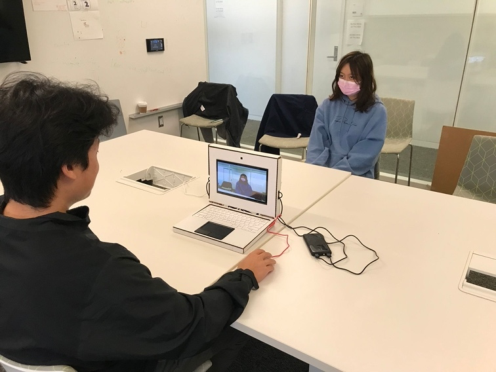
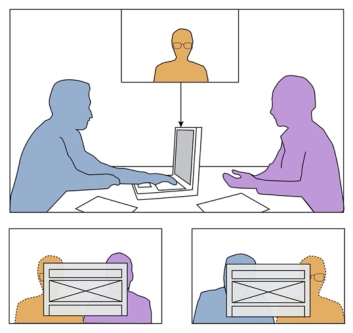
This brings us to our laptop prototype that features what we are calling a Mixed Reality Passthrough Screen (MRPW). The idea is simple. The device features two screens, placed back-to-back, as well as two cameras, facing the opposite direction (Figure 1 and Figure 2). This produces the effect of looking
Rethinking the Laptop Videoconferencing Experience 289
Figure 1: Outward facing screen looking through to laptop user.Figure 2: Inward facing screen looking through to other local user or users.
through the device. The effect is like looking through a window. This offers several improvements to the current videoconferencing experience.
1) The primary advantage of the MRPW is that it offers a new paradigm for augmented reality and mixed reality. Because users can look through the computer from both sides, it allows for the overlaying of additional vir- tual content. This gives the effect of a remote user, for example, actually being in the space when viewed from both sides. In addition to improving the videoconferencing experience, other kinds of content can be overlaid onto the screens from both sides, providing many opportunities for enhanced augmented and mixed reality.
2) The MRPW challenges the convention of a strict unidirectional inter- face typical of current laptops. Instead of a single user looking into a single
screen or projecting onto a larger presentation screen for larger audiences, the Mixed Reality Passthrough Window allows both presenters and audience to participate from both sides, offering a more spatial experience which allows presenters to talk with rather than just talk to an audience.
3) The backside screen of the MRPW can also be used in non-augmented reality applications, such as in the presentation of a slide deck to small groups of people. This portable presentation screen makes setting up group meetings as easy as opening your laptop.
USER SCENARIOS Mixed Reality Passthrough Windows are particularly well suited for laptop applications. Rather than just looking at a screen, users can look through it, allowing both remote and local users to overlay content, enhancing the augmented reality experience. And even when all the participants are local, the backside screen provides a built-in presentation screen making presen- ting slide decks and other related content easy to share, without the need for external projectors, screens, or cables.
The application of telepresence in education and in the workplace are par- ticularly ripe for disruption as more students move into blended classrooms, and more employees work from home. Outlined below are different user sce- narios supported by the MRPW, which enhance the collaborative nature of hybrid learning or hybrid work environments. These use cases are broken down into two broad categories: videoconferencing and in-person collabo- ration. Videoconferencing scenarios focus on the added benefits the MRPW provides users in a videoconferencing context whereas in-person scenarios focus on how the MRPW and its dual sided laptop design can be utilized to improve in-person collaboration through virtual content augmentation or by utilizing the laptops secondary display as an external monitor for content sharing or presenting.
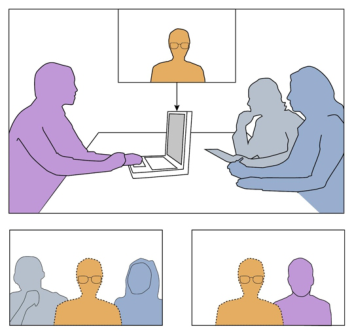
Remote User Virtual Embedding: A cohort of about a dozen students meet to discuss their reading assignment. Most of the students will be able to meet in person, but several will need to join the class remotely. The local stu- dents gather around the table, as does the teacher. The teacher launches the browser-based Mixed Reality Passthrough Window interface, with the same link they have given to the remote students. The remote students immedia- tely appear on both sides of the window, through which the local students can see to the other side. The teacher then pulls up their slide deck, which takes up a part of the screen, and initiates the discussion. The remote students and local students quickly find themselves interacting with each other, asking questions, and sharing perspectives, with everyone contributing to a vibrant discussion.
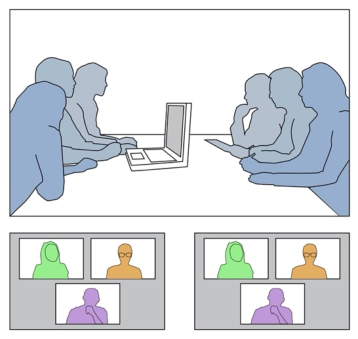
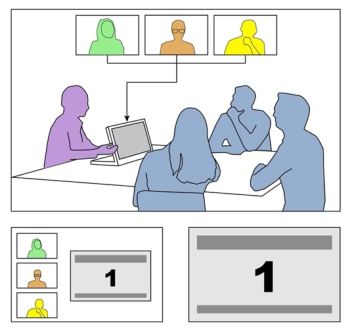
Traditional Video Conferencing: A small company of 5–10 employees are gathering for their monthly all-hands meeting. About half of the employees will be joining the meeting remotely by accessing the virtual meeting room through the Mixed Reality Passthrough Window browser-based application. The other half of the employees will be meeting in the company boardroom which isn’t equipped with audio-visual equipment. The CEO will utilize their
Rethinking the Laptop Videoconferencing Experience 291
Figure 3: Remote User Virtual Embedding with integrated remote and local participants.Figure 4: Traditional Video Conferencing Scenario with remote and local participants.
MRPW laptop to host the meeting. Given that less than five people will be joining the meeting virtually, utilizing the MRPW Virtual User Embedding functionality isn’t practical. Instead, the CEO decides to display the webcam video of the remote users on each side of the MRPW laptop (Figure 4). This allows the local users to see the webcam footage of the remote users from each side of the boardroom table circumventing the need for expensive AV equipment or requiring each employee to individually join the virtual meeting using their personal laptops to interact with remote coworkers.
Screen Mirrored Collaboration: Two UI/UX designers are re-designing the landing page of their company’s e-commerce site. The two designers have decided to meet up at a local café rather than in-office to discuss their upco- ming design changes. At the café, one designer pulls out their MRPW laptop and brings up the design file they will be working on. Upon doing so, they make sure to enable the MRPW screen mirroring functionality (Figure 5).
Figure 5: Screen Mirrored Collaboration Scenario with integrated remote and local participants.
This allows the designer to mirror the content from the primary screen onto the secondary screen of the MRPW laptop. Doing so allows both users to view the same design file on separate screens while they sit across from one another. The designers can now have an engaging face-to-face discussion as they discuss their design changes. Both designers can also utilize the MRPW’s touchscreen displays to edit content from where they are sitting, enabling a more streamlined collaborative session.
Presentation Mode: A small group of students are registered in a university sponsored tutoring program for a newly developed accounting course. This group holds tutoring sessions at the university library which consists of an open floor plan with tables for students to gather at. The tutor needs to present a slide deck to their students but there are no projectors or external monitors which they can use to display their slides (Figure 6). For this reason, the tutor decides to use the presentation mode of their MRPW laptop. This allows the tutor to use the secondary screen of the MRPW to display their slide deck while at the same time allowing them to have their presentation notes open for consultation on the primary display. This functionality allows the tutor to share content with their students effectively without the need of external displays or having to flip their laptop back and forth to share with their students.
SOFTWARE DESIGN The software for the Mixed Reality Passthrough Window Laptop is a web application developed using React and Twilio Video. Twilio Video serves as our backend infrastructure as their cloud-based solution built on top of Web Real-Time Communications (WebRTC) handles the audio and server side of the application and allows us to directly access the video tracks of all users in a conference through the platform’s Software Development kit (SDK).
We utilized the Javascript library under Twilio Video’s SDK to access three distinct user identities: the front side of the laptop (WindowFront), the back
Rethinking the Laptop Videoconferencing Experience 293
Figure 6: Presentation Mode Scenario with remote and local users as well as slide deck.
side of the laptop (WindowBack), and the remote guest (Guest). The Selfie Segmentation machine learning model from MediaPipe was used to separate the remote user from their background by cutting out the guest’s silhouette. This was then overlaid onto both sides of the laptop screens. When the ‘Par- ticipant’ component is mounted, a ‘SelfieSegmentation’ object is created. The frames from the guest’s video stream are continuously sent to the ‘Selfie- Segmentation’ API for segmenting during the video conference. When the identity of the user is not the guest, the segmentation mask returned by the SelfieSegmentation object is used to crop the guest from their background and overlay the guest’s upper body on top of the existing video streams for the front and back screens of the laptop. Essentially, the passthrough effect is achieved by manipulating the different displays of the segmentation for each user so that the WindowBack shows WindowFront with the Guest cutout overlaid on top, WindowFront shows WindowBack with the Guest cutout overlaid on top, and Guest shows both Window Front and Window Back without cutouts.
UX/UI Ease of use was a primary design goal for the project. The design team aspired to make it as easy as possible to “jump into the shared space,” so a browser-based approach was adopted. A website was designed with the goal of providing this simple, user-friendly and accessible experience to accommodate a diverse range of users. The website was implemented with a streamlined user flow featuring a minimal number of buttons and options, all of which are clearly labeled to facilitate ease of navigation.
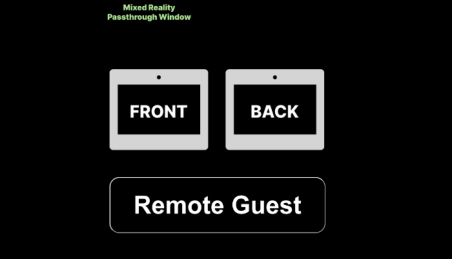
Upon first loading the website, the user is welcomed with a landing page featuring the project’s logo as well as instructions to “click anywhere to start. After clicking on the page, the user is then presented with a choice of three buttons: “Front,” “Back,” or “Remote Guest.” These options respectively represent the two sides of the local laptop screens and the remote user’s view
Figure 7: Landing screen for initiating videoconference on laptop.
(Figure 6). Once the user selects an option, the user is assigned to a corre- sponding identity. The identity is then used in the backend to configure the user’s view throughout the call (Figure 5).
The image of the remote user is separated from their background and inte- grated onto the screen with the other local users in the space. This gives the effect, when looking through the MRPW, that the person is also located in the same space, thus enhancing their telepresence.
DISCUSSION
Videoconferencing, and mixed reality more generally, will play an increasin- gly important role in how we work and collaborate. The flexibility it offers untethers us from the constraints of geographical location and gives us per- mission to reimagine how we might better calibrate the balance between work and life. Collaborating remotely from home with mixed reality has important implications for how we commute, how we collaborate, and how we organize our time and labor against the backdrop of friends, family, and leisure. New modalities for telepresence may allow us to reimagine how we gather, how we learn, and the kinds of meaning we might make from the communities we are a part of (Gonsher, 2022; Thurston & Kuile, 2015).
But in order for these technologies to truly reshape those aspects of daily life, the telepresence experience must be greatly improved. In particular, vide- oconferencing and mixed reality applications must become more equitable. Currently, hybrid videoconferencing tends to privilege physical participation over virtual participation. Often, the contributions of remote users are dro- wned out of the conversation, especially when more people are physically present than remotely present. For a new mother working from home, or for a foreign collaborator working in another country, this can greatly impede the ability to make contributions to the team.
In future work, we plan to continue cultivating questioning about how we might create a more inclusive telepresence experience that is seamlessly integrated into the fabric of our daily lives.
Rethinking the Laptop Videoconferencing Experience 295
REFERENCES
Designing the new hybrid meeting experience-for everyone. Microsoft. (n.d.). Retrieved January30, 2023, from https://www.microsoft.com/en-us/worklab/designin g-the-new-hybrid-meeting-experience Gonsher, I. (2022). The Emergence of Spirit in Extended Reality and the Speculative
Synagogue. Gonsher, I., & Kim, J. Y. (2020, March). Robots as Furniture, Integrating Human-Computer Interfaces into the Built Environment. In Companion of the 2020 ACM/IEEE International Conference on Human-Robot Interaction (pp. 215–217). Gonsher, I., Han, Y., Desingh, K., & Gokaslan, A. (2022). Prototyping Mixed Reality
Large Screen Mobile Telepresence Robots. Li, J., Greenberg, S., & Sharlin, E. (2017). A two-sided collaborative transparent display supporting workspace awareness. International Journal of Human- Computer Studies, 101, 23–44. Thurston, A., and C. Ter Kuile. (Producers). How We Gather. Accessed June 11,
Human Interaction and Emerging Technologies (IHIET-AI 2023): Artificial Intelligence and Future Applications
Read this individual research paper free through the original publisher, or explore the full digital proceedings book.
ISBN 978-1-958651-46-9
Explore this ISBN in the AHFE Bookstore ↗Listed in the July 2026 bookstore catalogue; search by ISBN to confirm current availability · Digital book purchase optional