Anis Jedidi, Faiez Gargouri, Fahmi Bellalouna, Mika Luimula (2022). VR-App for a Virtual Perception of Memory Impairment in Alzheimer’s Patients. In: Human Factors in Virtual Environments and Game Design. AHFE Open Access, vol. 50, pp. 267–277. https://doi.org/10.54941/ahfe1002088
Augmented, Virtual and Mixed Reality Technology (AR / VR / MR) - also known as xR technology - is one of the key technologies of digital transformation. Thanks to the existing powerful immersive hardware systems, complex technical and natural systems can be digitally represented in a realistic virtual environment. This enables users to completely immerse in the virtual environment and to observe and interact with the systems and objects contained therein without major restrictions, or to augment real products and systems with digital data in runtime. This creates new opportunities to present the behaviour and functionalities of complex systems in a tangible and understandable way. Therefore, the xR technology can revolutionize learning and training methods, especially in the qualification of specialists and experts. This paper will introduce the international project “International Cooperation on VR/AR Projects” (IC xR-P). The target of “IC xR-P” is the implementation of a practice-oriented xR training applications in the areas of medical training, rescue and Knowledge transfer in schools and universities and their testing and evaluation with selected experts. “IC xR-P” is an international cooperation between the University of Applied Sciences Karlsruhe from Germany, University of Applied Sciences Turku from Finland and the Higher Institute of Computer Science and Multimedia Sfax from Tunisia. Among the learning projects in the ICxRP, we focus in this paper on the implementation of VR training apps for medical training in this paper, we centred on the Perception of Memory Impairment in Alzheimer’s Patients. Patients with early Alzheimer’s disease may have spatial and time-oriented disorders. The objective is to use immersion in a virtual environment. This allows the user to experience a multisensory experience during which the user can feel and interact naturally and intuitively in real time via sensory interfaces. VR offers different levels of interaction, from the minimum level where the subject remains passive, looking at the environment, to more interactive levels where the subject is active, controlling its movement to the first person in the virtual environment via various interaction tools immersive.Within this project a VR-Training App will be designed and implemented, which fulfill the following functions with different virtual games facilitating the communication of the patient with the virtual environment. This application can develop the creating immersion and feeling of presence in patients. Also, we propose Family/Entourage Show service, it’s a memory stimulation exercise by integrating the family photos. We propose in addition a VR creation of patients’ usual living environment (home, hallway, bedroom…). We improve the valuing specific objects and places in the house to facilitate the orientation and the exploration of the environment. Finally, we propose à musical Training service: it offers a question-answer game that aims to stimulate the patient’s memory. From here, player can choose which exercise they want to play or focused on. We propose the orientation exercise, the memory exercise with the card-game, the recognizing game, and the exercise of leisure activities. These last exercises will also stimulate their memory by singing along to some songs, guessing animals, and making a tasty hamburger following the right steps. For most of the game, there will always be an evaluation of the player’s performance at the end. It will either displays on the television screen or a screen will pop out to show the results.
Augmented, Virtual and Mixed Reality Technology (AR/VR/MR) - also known as xR technology - is one of the key technologies of digital tran- sformation. Thanks to the existing powerful immersive hardware systems, complex technical and natural systems can be digitally represented in a rea- listic virtual environment. This enables users to completely immerse in the
virtual environment and to observe and interact with the systems and objects contained therein without major restrictions, or to augment real products and systems with digital data in runtime. This creates new opportunities to pre- sent the behaviors and functionalities of complex systems in a tangible and understandable way. Therefore, the xR technology can revolutionize lear- ning and training methods, especially in the qualification of specialists and experts. This paper will introduce the international project “International Cooperation on VR/AR Projects” (IC xR-P). The target of “IC xR-P” is the implementation of a practice-oriented xR training applications in the areas of medical training, rescue and Knowledge transfer in schools and universities and their testing and evaluation with selected experts. “IC xR-P” is an inter- national cooperation between the University of Applied Sciences Karlsruhe from Germany, University of Applied Sciences Turku from Finland and the Higher Institute of Computer Science and Multimedia Sfax from Tunisia.
One of the most common of dementia is Alzheimer’s. It is a progressive disease that starts with mild loss of memory and proceeds into a loss of ability to converse and respond to the surroundings. The parts of the brain affected by the Alzheimer’s disease are thought, memory and language. Hereby, it can give a significant impact on a person’s ability to carry out daily tasks. With the current technologies, such as the assistive technologies can support patients with such disease carry out daily tasks. According to research, neurological patients are open-minded and optimistic about using assistive technology to maintain their independence. Therefore, the project perception of memory impairment in Alzheimer’s patients is a 3D virtual reality (VR) exercise in hope of helping patients to improve their cognitive memory and to help them remember how to do normal daily routines.
The objectives of Perception of memory impairment in Alzheimer’s pati- ents are: Helping the patients remember how to complete daily activities, creating immersion and feeling of presence in patients, VR creation of pati- ents’ usual living environment such as bedroom, bathroom, kitchen and etc. Memory stimulation integrating the faces of the loved ones into VR world. And finding a suitable application to help in memory impairment of Alzheimer’s patients.
Characteristics of Alzheimer’s Patients In this section, we discuss expected changes which accompany the (Alzhei- mer’s Disease) AD. In fact, interfaces devoted to AD patients are not that common (Ancient and Good, 2013). The difficulty in using interfaces is one of the reasons why AD patients are not comfortable to use computer or sof- tware (Ancient and Good, 2013). The design of the interfaces should suit the user’s needs (Ancient and Good, 2013; Hunter et al., 2007) to be accessible and easily used. To adapt the interface to their needs; we first must know their main problems. Compared to young healthy people AD patients suffer from AD-related changes and age-related changes.
Disabilities related to AD can be grouped into four groups: memory impairments, cognitive impairments, personality changes and declining lan- guage abilities. Memory impairments - One of the most common symptoms
VR-App for a Virtual Perception of Memory Impairment in Alzheimer’s Patients 269
of AD is memory loss (Ancient and Good, 2013; Moutinho, 2011; Gowans et al., 2007; Wang, 2010), especially short-term memory or forgetting recen- tly learned information. The semantic information is normally preserved in long-term memory (Farage et al., 2012), e.g., history and languages.
Cognitive impairments - The cognitive ability is one of the functions to decline due to AD (Ancient and Good, 2013; Gowans et al., 2007). Cognitive is the ability to generate ideas, to think, to remember and to focus on. AD causes a decrease in cognitive abilities such as the level of intelligence, speed of information processing, ability to learn, reasoning, judgment, attention ability (Jian, 2013), ability to solve problem and concentration ability (Jian, 2013). Personality changes - AD patients experience changes in personality. The National Alzheimer’s Association estimates that up to 40% of patients experience depression. They are anxious about technology (Phiriyapokanon, 2011) and may refuse to learn (Loureiro and Rodrigues, 2014). Declining language abilities - AD patients exhibit declining language abilities (Wang, 2010). Indeed, early-stage AD patients may substitute words that have similar meaning. Moderate stage AD patients have increased difficulty in naming things.
Related Work, An Ontology Visualization Tool for Everyone In this section, we give (Ghorbel et al., 2016) an overview related research work of the MEMO GRAPH ontology visualization tool that is designed to be used by everyone, including ontology experts and users not familiar with ontologies. It provides a user interface that follows the “design-for-all” philosophy. Precisely, it offers an Alzheimer’s patients-friendly user interface. Based on the accessibility guidelines, the authors make the design of MEMO GRAPH. MEMO GRAPH represents OWL/RDF ontology as a graph. The visualization is displayed using a force-directed algorithm. This algorithm presents 3 main advantages: (a) It optimizes the use of screen space. (b) It helps to reflect the relative importance of the classes in the resulting graph since it arranges the nodes in a way that highly connected classes are pla- ced more to the centre of the visualization, while less connected ones are rather placed in the periphery. (c) It tends to increase the readability of the visualization since it tends to avoid edge crossings.
MEMO GRAPH (Ghorbel et al., 2016) visualizes all key elements of the ontology as it displays classes, instances, datatype properties and object pro- perties. The role relations between related nodes are represented, in the graph, using labelled links. In contrast to related work, the MEMO GRAPH onto- logy visualization tool identifies nodes by using pictures and labels. The use of the picture facilitates the comprehension and makes nodes distinguishable from each other. The picture can automatically be extracted from Google by our interface if not provided by users. This tool is developed to be used by everyone and not only by oncologists. It offers a user interface that follows the “design-for-all” philosophy. Precisely, it offers a user interface accessi- ble to Alzheimer’s patients. It also allows showing pictures for each node. Related works are designed only to be used by ontology experts and there is no tool that illustrates the principals of the universal design. Then, we
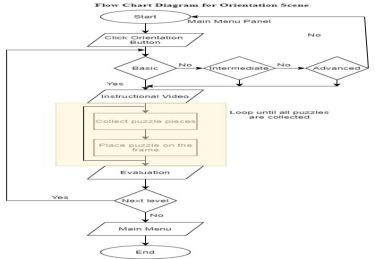
Figure 1: Flow chart for orientation exercise.
discuss the expected changes related to the Alzheimer’s and the aging pro- cess. Based on these changes, we believe that the interface plays a big role to ensure the accessibility of MEMO GRAPH. To accommodate those changes, we propose a set of design guidelines for interfaces to Alzheimer’s patients. Based on these design guidelines, we develop MEMO GRAPH (Figure 1). It is integrated into the ongoing CAPTAIN MEMO (Ghorbel et al., 2016) pros- thesis. MEMO GRAPH has also been applied, as a standalone application, for visualizing a part of the famous DBpedia large-scale ontology. Finally, a user satisfaction evaluation of MOMO GRAPH is carried out with 24 expe- rienced ontology users and 22 Alzheimer’s patients. The results confirm that the developed tool is efficient and user-friendly.
Design and Implementation Activities for Patients The virtual reality exercise starts in a scene called lobby whereby the patient can move around in the house by teleportation. However, in this scene there is no interactable objects. To start using the exercise, the player needs to move to the bedroom and there will be a television (TV) which displays the ‘Main Menu Panel’ of all the exercises. From here, player can choose which exercise they want to play or focused on. The exercises are as follow.
Orientation Exercise Orientation exercise is the main application in this project. This exercise will test the patients’ ability to move around in the house from the bedroom to other parts of the house such as the kitchen and living room. In conju- nction to that, it is a must for the patients to move around due to the exercise which needed the patient to collect puzzle pieces that are scattered everywh- ere. There will be four puzzle pieces placed randomly in the bedroom, kitchen, living room, toilet, and the garden. For this exercise, there will be three diffe- rent levels started from easy, intermediate and ends with an advanced level. The flow chart of this exercise would be shown in Figure 1.
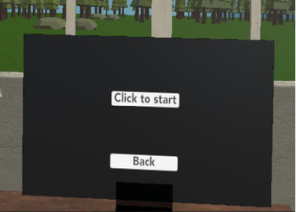
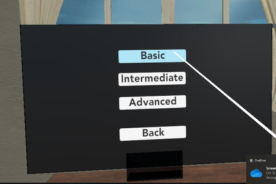
The player can choose any difficulty level they wish by pointing the ray interactor and to the button and pressing the button under their index finger to get to their desired difficulty level. Now, the scene will change to ‘Orien- tation Basic Level’ scene. There will be two buttons displayed on the screen
VR-App for a Virtual Perception of Memory Impairment in Alzheimer’s Patients 271
Figure 2: In game panel.Figure 3: Instructional video.Figure 4: Choosing a level.
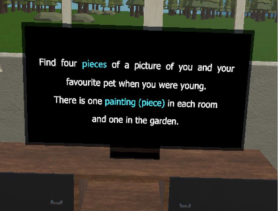
which are <Click to start> and <Back> (see Figure 2). By pressing <Click to start> an instructional video will appear on the television display (refer to Figure 3). Otherwise, if <Back> was chosen, the screen will go back to ‘Levels in Orientation exercise’ (Figure 4). Player must finish watching the instructional video to understand how the exercise can be played.
Following the instructions, the player must collect puzzle pieces of a painting that were scattered in the house. The player can move by using tele- portation and grab objects by using their controllers. There will be four puzzle pieces that needs to be collected and put together on the frame. The difficulty depends on the level chosen. In basic level, the instructional video will play one after another which means the location of the next puzzle piece will only be told after the first puzzle piece is snapped onto the frame and the button <Next> is clicked (see Figure 5). Meanwhile, in intermediate and advanced level, the locations of the paintings have been reshuffled and the video will play only once. In these two levels the first puzzle piece will appear only after
Figure 5: Snapping of a puzzle piece.Figure 6: Evaluation at the end of the advanced level.
the video has ended after which there a timer will also start running. The player is given only a set amount of time to finish these levels.
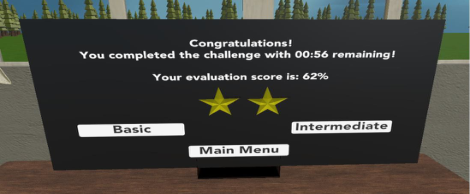
When the player finished collecting and assembling all puzzles, a final eva- luation will be displayed on the TV. In the basic level that is meant to be a tutorial for the player, there is no timer, and the player always receives three stars as the evaluation. However, in the intermediate and advanced levels, the player is evaluated strictly by the time they spent in the exercise (Figure 6) from the moment the instructional video ended until they found all the puzzle pieces and put them into the frame on the wall. This way the player gets to see the evaluation of their own performance. Player can choose to continue playing orientation exercise or go back to the Main Menu Panel.
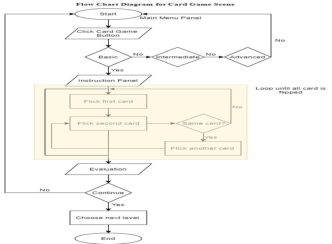
Memory Game – Card Game Like any other card game, this exercise will test the patient’s memory by memorizing the same card to be flicked. This game also has different levels with different difficulties. The same card needs to be flicked consecutively for it to stay turned but if it is not, then both cards will turn back around, and the player needs to play again. The process continues until all cards are turned (see Figure 7).
As in the orientation exercise, once <Card Game> is clicked, three different difficulty level options for card game will appear on the screen. Each level must be finished within a given time frame, which differs according to the level. The number of cards shown also different for each level. In the basic level, there are only 8 cards. In the intermediate level, the number of cards is 12 and in the advanced level the number is 16. When the player starts each level, they are prompted with instructions on how to play the game. To open
VR-App for a Virtual Perception of Memory Impairment in Alzheimer’s Patients 273
Figure 7: Flow chart for card game.Figure 8: Flicking the card.
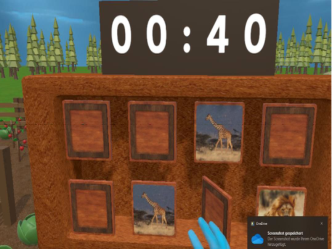
the cards, the player must push their hand model through them. Figure 8 shows that once the hand touched the card, it will flip. The cards will remain turned only if two of the same type of cards are open at the same time. If the second card opened card does not match the first one, both cards will turn back. Player must continue playing until all the cards have been flipped.
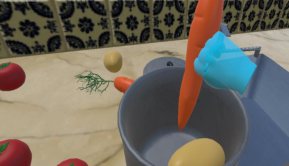
Recognizing Game – Cooking Recognizing game is in the kitchen for which the player needs to follow the instruction on the pop-up panel. There will be few types of vegetables on the table and player needs to pick and place them into the pot based on the instruction. This game also has different levels with increasing difficulties. In addition to that, once the player clicks ‘Check the results’ on the panel, it will say whether the game is rightfully done or not.
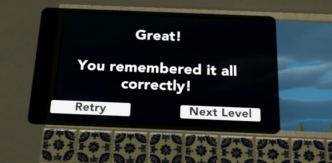
When ‘Cooking’ is chosen in the ‘Lobby Scene’, player will be brought to the kitchen and an instruction will appear on the display. Some ingredients and a pot will appear on the kitchen counter and the instructions will disap- pear. Figure 9 shows the act of picking up an ingredient and putting it into the pot. Once the player has finished, they can press the <Check Results> button to see whether the selected ingredients are correct or not as shown in Figure 10. Then, player can decide whether to play the next level or to retry (if the selected ingredients are wrong).
Figure 9: Picking up an ingredient.Figure 10: Results from recognizing game.Figure 11: Animals scene.
Leisure Activities Leisure activities were created for the patients to interact with the object in the house without stressing about playing with any of the exercise. These exe- rcises will also stimulate their memory in handling simple tools, for instance cooking utensils and managing their daily routine.
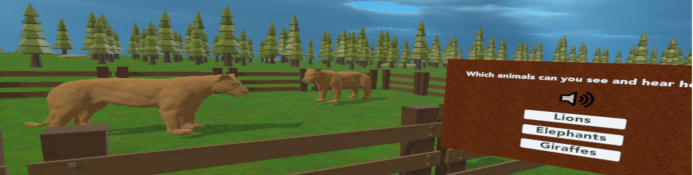
Mini Zoo-Animals This is a guessing game with multiple choice answers on the panel (Figure 11). Player needs to guess the animal either by looking directly at the animal in the cage or by hearing the sound made by the animal itself. This first leisure activity is a very simple game where the player must use their judgement to decide which animals are currently standing inside the fenced area.
To hear what the animals inside the fenced area sound like, the player must point the ray and to press on the speaker icon. With the help of visual and audio clues, the player can choose the correct animal from the multiple- choice button. When a correct choice is made, there will be a ‘bling’ sound confirming that the choice was correct, and the new set of animals appears in the fenced area. There is a total of five different sets of animals. If the player chose.
VR-App for a Virtual Perception of Memory Impairment in Alzheimer’s Patients 275
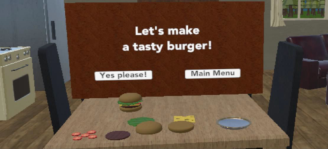
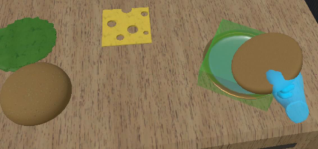
Preparing a Meal-Making a Hamburger For this application, making a hamburger is regarded as a part of a meal preparation. It teaches the patients how to properly arrange the ingredients in making a hamburger. The exercise is very simple and easy to play which could make it entertaining for the Alzheimer’s patients.
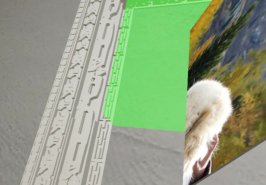
If the <Hamburger> button is clicked in the ‘Lobby scene’, the player is brought into the kitchen with a few ingredients and a ready-made hamburger model in front of them (Figure 12). In the hamburger scene the player can see what it would feel like to construct a tasty looking hamburger using only a few ingredients. When the button <Yes Please> is pressed, the player can start to interact with the ingredients and an instruction panel is presented for them. The green box that indicates that the chosen ingredient is the correct one will appear when the player brings an ingredient near to the dinner plate. In contrast to that, if the green box did not appear when putting the ingredient on the plate (Figure 13) that means the ingredient is not the right one and the player should choose a different one.
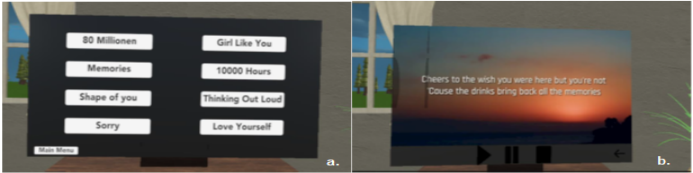
Music Game Music scene is based like the karaoke style. By listening to a song, the patients are familiar with, it might embark their cognitive memory. Not only the is the song played through the VR headphone, but it also displays the song’s lyrics on the TV to enable the patients to sing along to the song. Note that for this application, the songs list is changeable depending on the patients’ preference and the language they used.
Music scene is basically a sing along to the lyric application. Once the button <Start> is clicked, the screen will change to a list of songs as in Figure 14.a. The TV’s control panel as shown in Figure 14.b. consists of four main buttons which known as <Play>, <Pause>, <Stop> and <Back> buttons. These buttons are functioned like its name. Player can choose either to pause the song, stop it and play it again or to go back to the list of songs.
Figure 14: List of songs, Lyrics in parallel to the song and TV control panel.
CONCLUSION
In conclusion, it was a success in building the whole application within time though there were few challenges occurred in the meantime. Working virtu- ally in different time zone has been quite a great a challenge but the team manage to pull it through. The applications applied worked totally fine with VR. However, the effectiveness of whether it really helps Alzheimer’s patients in improving their memory or with their daily routines was unknown. Due to limited sources and current situation (Covid-19), it is not possible to test the application on patients. The first objective of this project which shall help patients to complete daily activities was not achieved. Nevertheless, it is still a success in finding and building one complete application that would help in improving cognitive memory.
ACKNOWLEDGMENT
The discussed working prototype with outcomes were achieved during the project IC xR-P that is part of the program Baden-Württemberg STIPEN- DIUM for University and Students (BWS plus) and funded by the Baden- Württemberg Foundation. The authors would like to thank everyone who have participated in the development of the prototype study.
REFERENCES
Ancient C. and Good A., (2013) “Issues with designing dementia-friendly interfaces,” HCI International 2013, pp. 192–196. Farage M. A., Miller K. W., Ajayi F., and Hutchins D., (2012) “Design principles to
accommodate older adults,” Global journal of health science, pp. 2–25. Ghorbel F., Ellouze N., Métais E., Hamdi F., Gargouri F., Herradi N. (2016) “MEMO GRAPH An Ontology Visualization Tool for Everyone”. Procedia Computer Science, Volume 96, Pages 265–274. Ghorbel F., Ellouze N., Métais E., Hamdi F., Gargouri F., Herradi N. (2016)
“Designing and Evaluating Interfaces for the CAPTAIN MEMOMemory Pros- thesis”. ACHI 2016 : The Ninth International Conference on Advances in Computer-Human Interactions. Copyright (c) IARIA. ISBN: 978-1-61208-468-8; pp 164–169. Gowans G., Dye R., Alm N., and Vaughan P., (2007) “Designing the interface between dementia patients, caregivers and computer-based intervention,” The design journal, pp. 12–23.
VR-App for a Virtual Perception of Memory Impairment in Alzheimer’s Patients 277
Hunter A., Sayers H., and McDaid L., (2007) “An evolvable computer interface for elderly users,” HCI conference on supporting human memory with interactive systems, 2007, pp. 29–32 Jian C., (2013) “Multimodal shared-control interaction for mobile robots in AAL
environments,” Thesis, University of Bremen. Loureiro B. and Rodrigues R., (2014) “Design guidelines and design recommendations of multi-touch interfaces for elders,” The 7th international conference on advances in computer-human interactions (ACHI 2014), pp. 568–574. Moutinho R. J. A., (2011) “A mobile phone navigator for older adults and persons
with dementia,” master’s in informatics and computing engineering. Phiriyapokanon T., (2011) “Is a big button interface enough for elderly users? toward user interface guidelines for elderly users,” Master of computer engineer. Wang B., (2010) “Designing a graphical user interface of an easy-to-use videophone
for people with mild dementia,” Master thesis.
LISTED IN THE AHFE DIGITAL BOOKSTORE CATALOGUE
Explore the complete digital volume
Human Factors in Virtual Environments and Game Design
Read this individual research paper free through the original publisher, or explore the full digital proceedings book.
ISBN 978-1-958651-26-1
Explore this ISBN in the AHFE Bookstore ↗Listed in the July 2026 bookstore catalogue; search by ISBN to confirm current availability · Digital book purchase optional