Lídia Lemos Ribeiro, Micael Gonçalves, Vladimiro Lourenço, António J. Pontes, Álvaro Sampaio, Nelson Costa (2026). Comparative Analysis of Steering Wheel Button Types, Layouts and Functions in the Market. In: Human Interaction and Emerging Technologies (IHIET 2026). AHFE Open Access, vol. 236. https://doi.org/10.54941/ahfe1008138
Modern steering wheels have evolved from simple mechanical steering devices into complex human-machine interfaces (HMIs), incorporating controls for multimedia and communication, navigation, driver assistance systems and comfort features. This proliferation of functions has increased both the number and diversity of physical controls available to drivers. Understanding how different manufacturers currently address this design challenge, namely which button types they favour, how they group different functions, and where they place controls on the steering wheel, constitutes an important step prior to proposing new interface concepts.This paper presents a comparative market analysis of steering wheel button layouts and functions across six benchmark automotive brands. A total of 69 physical controls were analysed and classified according to input type (press, touch, roller, and hybrid combinations), functional category (Multimedia and Communication Control, Navigation and Menu Control, Cruise Control, and Customization and Others), and their spatial location on the steering wheel. The objectives of this study were to (i) identify the button types most commonly used in current production steering wheels and examine their association with the functions they perform, and (ii) analyse the spatial distribution of these buttons on steering wheels to identify current design practices.The brand-by-brand survey was complemented by an infographic-based visual analysis that mapped button types and functional categories onto six anonymized steering wheel layouts. In addition, a survey was produced for each brand, documenting every control identifier together with its associated function, button type, and location (left side, right side, or central spoke).The results reveal a clear predominance of press-type buttons (59% of the sample). Disaggregating button-type distribution by functional category confirms this pattern, showing that press-type buttons are the most frequently adopted solution across all three quantifiable functional categories, with the highest share in Multimedia and Communication Control (65.2%), followed by Navigation and Menu Control (52.9%) and Cruise Control (57.7%). Conversely, touch-type buttons achieve their highest relative representation in Cruise Control (34.6%).Cruise Control also exhibited the greatest consistency in the spatial placement of controls across the different brands, whereas Customization functions showed the lowest degree of standardization.These findings characterize current tendencies within the analysed benchmark sample and provide an empirical foundation for the development of new steering wheel Human–Machine Interface (HMI) concepts capable of balancing driver safety, usability, and innovation.
Recent advances in Advanced Driver Assistance Systems (ADAS), digital instrument clusters, infotainment platforms, and connected-vehicle technologies have considerably increased the number of functions that drivers can access directly from the steering wheel (Donnellan, 2018; Wang et al., 2023; Wang et al., 2025). As a result, steering wheels have become one of the most important human–machine interfaces inside modern vehicles,
requiring careful ergonomic design to balance functionality, usability, and driving safety (International Organization for Standardization, 2019; Rathod & Vyavahare, 2025). Consequently, understanding current market design practices is an essential step towards developing new steering wheel HMI concepts that minimise driver workload while maintaining intuitive interaction, while also complying with emerging safety recommendations for driver engagement (Euro NCAP, 2025).
Modern steering wheels have evolved from purely mechanical steering devices into sophisticated human–machine interfaces (HMIs), integrating controls for multimedia and communication, navigation, driver-assistance, and comfort systems (Wang et al., 2025). This proliferation of functions increases both the number and diversity of physical controls available to the driver, with direct implications for usability, learnability, cognitive workload, and driver distraction (Large et al., 2016; Strayer et al., 2015; Zhong et al., 2024). Human-centred automotive interface design therefore seeks to minimise visual demand while enabling rapid, intuitive, and eyes-free interaction with frequently used functions (Döring et al., 2011). In recent years, steering wheel interaction has progressively expanded beyond conventional push-buttons to include gesture-based and haptic interfaces that aim to improve interaction efficiency while reducing visual demand (Angelini et al., 2014; Hassan et al., 2022; Sarabia et al., 2022; You et al., 2024). Understanding how different manufacturers currently address this design challenge—namely which button types they favour, how they group functions, and where they position controls on the steering wheel—is an essential first step before proposing new interface concepts.
This paper reports a comparative market analysis of steering wheel button layouts and functions, conducted as part of the WP06 – Development and Industrialization of HMI Steering Wheels activity of the GreenAuto project, a collaboration between the University of Minho and ZF Lifetec. The analysis combines a detailed brand-by-brand survey of physical controls with a complementary infographic-based visual analysis of button-type distribution and spatial location. The selected brands include both premium and mass- market manufacturers, providing a representative sample of different HMI design philosophies currently available in the automotive market.
The steering wheel models included in this study were selected in collaboration with the industrial partner ZF Lifetec based on the findings of a focus group conducted during an earlier stage of the GreenAuto project. The analysed steering wheels were required to incorporate the functions identified as most relevant by users, ensuring that the benchmark reflected current interaction needs. Rather than comparing specific vehicle segments, the selection aimed to capture a broad range of steering wheel HMI design approaches across premium, luxury, and mass-market manufacturers. Accordingly, six automotive brands—Porsche, Mercedes, Aston Martin, BMW, Chrysler, and Škoda—were selected. Across these steering wheels, a total of 69 physical controls were identified, catalogued, and classified according to their interaction type, functional category, and spatial location.
Comparative Analysis of Steering Wheel Button Types 635 As the analysed steering wheels may be shared across different vehicle models within each brand, they are identified by manufacturer rather than by specific model throughout this paper. The steering wheel analysed for each brand is presented in Table 1.
Based on this benchmark survey, the study pursued two objectives: (i) to identify the button types most commonly used in current production steering wheels and their association with specific functions, and (ii) to analyse their spatial distribution across steering wheel layouts.
The goal of HSI is to optimize total system performance, accommodating the characteristics of the user population that will operate, maintain, and support the system, and minimize life-cycle costs (Folds et al., 2008). HSI experts work within the Systems Engineering (SE) process to ensure that all human considerations are integrated throughout system design, development, fielding, sustainment, and retirement. The attention to human systems integration in system development programs drove hundreds of human- centered design improvements. Efforts were concentrated to maximize total system performance through improvements in human workload, ease of maintenance, and personnel safety which resulted in a cost avoidance of billions of dollars and prevention of hundreds of fatalities and disabling injuries for the system (Booher and Minninger, 2003).
METHODOLOGY
The study surveyed the steering wheel controls of the same six vehicle brands identified in Section 1. For each brand, one representative model/ trim was analysed using official manufacturer documentation and reference imagery, applying a classification approach informed by prior steering-wheel control taxonomies (Angelini et al., 2014; Euro NCAP, 2025). Each physical control was identified directly from the steering wheel and cross-checked against the corresponding manufacturer’s user manual to ensure correct functional classification. The controls were then catalogued according to three dimensions: (a.) Control input / function — the specific action triggered by the control (e.g., “adjust volume”, “answer call”, “resume cruise control”); (b.) Button type — the physical interaction mode: press, touch, roller, or a hybrid combination (roller and press, touch and press, rocker and press); (c.) Location — the position of the control on the wheel (left command, right command, or central spoke).
Each control was further assigned to one of four functional categories, established a priori to structure the comparison: Multimedia and Communication Control (MCC) — audio, telephone and voice-command functions; Navigation and Menu Control (NMC) — instrument-cluster and menu navigation; Cruise Control (CC) — activation, speed and following- distance adjustment; and Customization and Others — steering-wheel heating, shortcut assignment and similar functions. A total of 69 controls were catalogued across the six brands.
Each button was classified according to its primary function, interaction type, and spatial location. Button classification was performed by a single researcher and subsequently reviewed by the project team to ensure consistency across the analysed steering wheels.
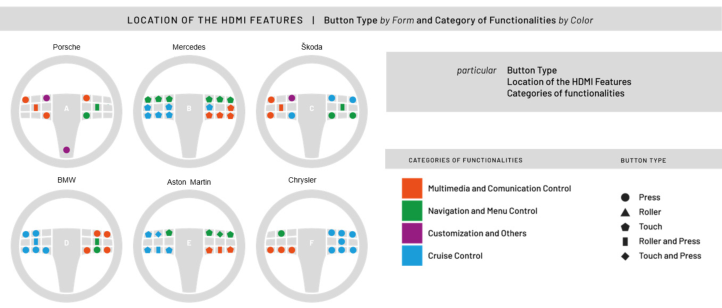
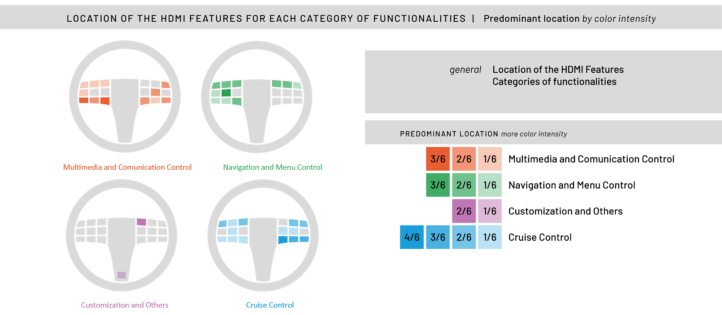
In addition to the brand-by-brand tabulation, a complementary visual/ infographic analysis was performed. Six steering wheel layouts were represented schematically, mapping button type (by icon shape) and functional category (by colour) onto each wheel diagram. This visual analysis also produced frequency bar charts of button type, both overall and per functional category, together with a map-style representation of the predominant spatial location of each functional category across the six models.
RESULTS
Q1
Table to Erro! A origem da referência não foi encontrada. present the full brand-by-brand survey underlying the aggregate analysis, detailing every physical control identified on each of the six steering wheels: its control-input identifier, the specific function it triggers, its button type, and its location on the wheel. Each table is accompanied by a diagram showing the spatial location of the surveyed controls on the corresponding steering wheel.
Table 1: Detailed control survey for Porsche 992 2024.
Table available in the original PDF paper.
ID Control Input / Function Button Type Command
Functional Category
Location Left
1 Adjust the volume and mute the audio source
Roller and Press
Multimedia and communication control 2 Play the next/previous station/track Press Left
3 Answer a call Press Right
4 Open voice command Press Left
Right
Navigation and menu control
5 Navigate and select menu functions Roller and Press
6 Switch between screens Press Right
7 Go back one or more levels Press Right
8 Assign quick access buttons Press Left
Customization and others
9 Steering wheel heater Press Central spoke
Location of the surveyed controls
Table 2: Detailed control survey for Mercedes W213 2023.
Table available in the original PDF paper.
ID Control Input / Function Button Type Command
Functional Category
Location 1 Make/accept calls Touch Right
2 End/reject calls Touch Right
Multimedia and communication control 3 Increase/decrease volume Touch Right
4 Call up telephone favourites Touch Right
Navigation and menu control
5 Home screen button Touch Right and Left
6 Touch control (swipe left/right/up/ down) and OK button
Touch and Press
Right and Left
7 Return to the previous menu Roller Right and Left
8 Starts the MBUX Voice Assistant Touch Right
Cruise control 9 Select the desired speed Touch Left
10 Deactivates cruise control Touch Left
11 Activates cruise control Touch Left
12 Adopts the stored/detected speed Touch Left
13 Cancels cruise control Touch Left
Location of the surveyed controls
Table 3: Detailed control survey for Škoda KAROQ 2022.
Table available in the original PDF paper.
Functional Category
ID Control Input / Function Button Type
Command Location 1 Switch voice control on/off Press Left
2 Switch sound, adjust the volume Press Left
Multimedia and communication control 3 Previous track/station Press Left 4 Switch previous track/station Press Left
Right
Navigation and menu control
5 Switch/set, confirm Roller and Press
6 Control the instrument cluster Press Right
7 Control the instrument cluster Press Right
Cruise control 8 Switch some assist systems Press Right Right
9 Switch between Travel Assist and ACC Travel Assist
Roller and Press
10 Steering wheel heating Press Left
Customization and others
(Continued)
Table 3: Continued.
Table available in the original PDF paper.
Functional Category
ID Control Input / Function Button Type
Command Location
Location of the surveyed controls
Table 4: Detailed control survey for BMW X4 G02 2023.
Table available in the original PDF paper.
ID Control Input / Function Button Type Command
Functional Category
Location 1 Set – volume Press Right
2 Set + volume Press —
Multimedia and communication control
3 Skip songs and change channels Press Right
4 Make calls Press Right
5 Activate voice activation system Press Right
6 Display menu Press Right
Navigation and menu control
Press Left
7 Select configuration menus / cluster head-up display Cruise control 8 Activate/deactivate cruise control Press Left
9 Select the speed-regulation system Press Left
Press Left
10 Set the constant speed when the desired limit is reached
Left
11 Set speed +/– Roller and Press
12 Resume cruise control Press Left
13 Cancel cruise control Press Left
Location of the surveyed controls
Table 5: Detailed control survey for Aston Martin DB12 2024.
Table available in the original PDF paper.
Functional Category
ID Control Input / Function Button Type
Command Location Right Touch and Press
Multimedia and communication control
1 Tap to answer an incoming call / open the last dialled number; press to end or reject a call 2 Adjust volume/mute Roller Right
3 Skip to the next audio track Touch Right
(Continued)
Table 5: Continued.
Table available in the original PDF paper.
Functional Category
ID Control Input / Function Button Type
Command Location
4 Open the instrument cluster menu Touch Right
Navigation and menu control
5 Navigate instrument cluster menu Touch Right
6 Go back one menu level Press Right
7 Activate voice control system Press Left
Cruise control 8 Cancel the set speed Touch Left
9 Adjust following distance Touch Left
10 Resume/adopt speed Touch Left
11 Adjust the set speed for the ACC Roller Left
Touch Left
12 Switch between ACC and variable speed-limiter functions
Location of the surveyed controls
Table 6: Detailed control survey for Chrysler 300S 2022.
Table available in the original PDF paper.
ID Control Input / Function Button Type Command
Functional Category
Location
1 Answer call Press Left
2 Voice-recognition activation Press Left
Multimedia and communication control
3 End call Press Left
4 Instrument cluster display controls Press Left
Navigation and menu control cruise control 5 Fixed cruise control (on/off) Press Right
6 Cancel Press Right
7 Resume Press Right
8 Set + (accelerate) Press Right 9 Set – (decelerate) Press Right
10 Adaptive cruise control (on/off) Press Right
11 Set distance (decrease) Press Right
12 Set distance (increase) Press Right
Location of the surveyed controls
Across the 69 buttons surveyed, press-type controls account for the majority of the sample (59%), followed by touch-type buttons (26%), while roller-and-press (7%), roller (4%), and touch-and-press (3%) controls are used less frequently.
Disaggregating button type by functional category shows that press-type buttons dominate all three major functional categories, although with different proportions. Multimedia and Communication Control (MCC) presents the highest share of press-type buttons (65.2%), followed by Cruise Control (CC, 57.7%) and Navigation and Menu Control (NMC, 52.9%). NMC is also the category with the highest proportion of roller-and-press buttons (11.8%), reflecting the need for precise and confirmable menu navigation. In contrast, Cruise Control exhibits the highest share of touch-type buttons (34.6%), particularly in the Mercedes and Škoda steering wheels, suggesting a growing adoption of capacitive touch interfaces for speed and following- distance adjustment. The Customization and Others category was excluded from this analysis because it comprised only three controls in the entire sample, preventing meaningful comparisons.
Figure 1 presents the infographic mapping of button type (by shape) and functional category (by colour) for the six anonymized steering wheel models (A–F) analysed. The diagrams illustrate that, while all six models place controls symmetrically on the left and right spokes, the specific functional grouping assigned to each side varies considerably between brands.
Figure 1: Infographic mapping button type and functional category onto six steering wheel models.
Figure 2 summarizes the predominant spatial location of each functional category across the six models, expressed as the number of models sharing the same predominant zone. Cruise Control shows the strongest convergence, with a shared predominant location in up to 4 of the 6 models analysed. Multimedia and Communication Control and Navigation and Menu Control follow, each converging in up to 3 of the 6 models. Customization and Others is the least standardized category, converging in at most 2 of the 6 models, consistent with its lower overall frequency in the sample.
Figure 2: Convergence of predominant button location per functional category, by colour intensity.
DISCUSSION
The comparative analysis indicates that, despite differences in steering wheel HMI design approaches across brands, press-type buttons remain the dominant input method, particularly for multimedia and communication functions, while maintaining a strong presence in menu navigation and instrument-cluster control. This predominance is consistent with studies showing that physical controls reduce visual demand and driver distraction during secondary driving tasks (Zhong et al., 2024), highlighting the continued importance of tactile feedback for frequently used functions.
Touch-type buttons are comparatively more common in cruise-control functions, especially in brands with more digital interfaces such as Mercedes. This suggests a gradual adoption of capacitive interaction for continuous adjustments, while activation and confirmation actions continue to rely primarily on physical controls, in line with previous findings (Abbasi et al., 2024). The spatial analysis further indicates greater consistency in the placement of cruise-control functions across brands, whereas customization functions exhibit greater variability, suggesting more design flexibility. Overall, these findings support steering wheel HMI concepts that combine physical controls for frequently used and safety-critical functions with touch or hybrid solutions for continuous adjustments.
CONCLUSION
This study presented a comparative analysis of steering wheel button layouts across six automotive brands, examining 69 physical controls according to interaction type, functional category, and spatial location.
The results show that press-type buttons remain the predominant interaction method across all functional categories, while touch controls are more frequently adopted for cruise-control functions. Cruise Control
also exhibited the highest consistency in control placement, whereas Customization functions showed greater variability across brands.
These findings provide an empirical benchmark of current steering wheel HMI practices and support the development of future interfaces that balance usability, safety, and innovation. Future work will extend this benchmark through user studies evaluating alternative steering wheel layouts in terms of usability, workload, task performance, and visual demand.
ACKNOWLEDGMENT
This work has been supported by the European Union under the Next Generation EU, through a grant of the Portuguese Republic’s Recovery and Resilience Plan (PRR) Partnership Agreement, within the scope of the project GreenAuto: Green Innovation for the Automotive Industry (Project ref. nr. 54- C6448637037-00000013). This work has also been supported by FCT – Fundação para a Ciência e Tecnologia within the R&D Unit Project Scope UID/00319/2025 - Centro ALGORITMI (ALGORITMI/UM) https:// doi.org/10.54499/UID/00319/2025. The publication of this article was financially supported by the Foundation for Science and Technology (FCT), multi-annual funding 2025-2029, UID/05256: Institute of Polymers and Composites (IPC/UM), of its R&D activities, through national funds (OE) and, when eligible, co-financed by community funds.
REFERENCES
Abbasi, E., Li, Y., Liu, Y., & Zhao, R. (2024). Effect of human–machine interface infotainment systems and automated vehicles on driver distraction. Human Factors and Ergonomics in Manufacturing and Service Industries, 34(6), 558–571. https://doi.org/10.1002/hfm.21049 Angelini, L., Carrino, F., Carrino, S., Caon, M., Khaled, O. A., Baumgartner, J.,
Sonderegger, A., Lalanne, D., & Mugellini, E. (2014, September 17). Gesturing on the steering wheel: A user-elicited taxonomy. AutomotiveUI 2014 - 6th International Conference on Automotive User Interfaces and Interactive Vehicular Applications, in Cooperation with ACM SIGCHI - Proceedings. https://doi. org/10.1145/2667317.2667414 Donnellan, P. R. (2018). The future of mobility-Electric, autonomous, and shared vehicles. In IEEE Engineering Management Review (Vol. 46, Number 4, pp. 16–18). Institute of Electrical and Electronics Engineers Inc. https://doi. org/10.1109/EMR.2018.2880987 Döring, T., Dagmar, K., Marshall, P., Pfeiffer, M., & Schöning, J. (2011). Gestural
Interaction on the Steering-Reducing the Visual Demand. Association for Computing Machinery. Euro NCAP. (2025). Safe Driving Driver Engagement Protocol. Hassan, W., Raza, A., Abdullah, M., Hashem, M. S., & Jeon, S. (2022). HapWheel: Bringing In-Car Controls to Driver’s Fingertips by Embedding Ubiquitous Haptic Displays into a Steering Wheel. IEEE Transactions on Intelligent Transportation Systems, 23(10), 18526–18534. https://doi.org/10.1109/TITS.2022.3160496 International Organization for Standardization. (2019). ISO 9241-210:2019
Ergonomics of human-system interaction—Human-centred design for interactive systems. https://doi.org/https://www.iso.org/standard/77520.html
Comparative Analysis of Steering Wheel Button Types 643 Large, D. R., Burnett, G., Crundall, E., Lawson, G., & Skrypchuk, L. (2016).
Twist it, touch it, push it, swipe it: Evaluating secondary input devices for use with an automotive touchscreen HMI. AutomotiveUI 2016 - 8th International Conference on Automotive User Interfaces and Interactive Vehicular Applications, Proceedings, 161–168. https://doi.org/10.1145/3003715.3005459 Rathod, A. B., & Vyavahare, R. T. (2025). Driver Oriented Ergonomic Design for Long Distance Heavy Truck Cabins. https://doi.org/10.21203/rs.3.rs-7262573/v1 Sarabia, J., Diaz, S., Zubizarreta, A., & Perez, J. (2022). Design Requirements
for the Definition of Haptic Messages for Automated Driving Functionalities. International Conference on Computer-Human Interaction Research and Applications, CHIRA - Proceedings, 2022-October, 171–178. https://doi. org/10.5220/0011537700003323 Wang, M., Jah’inaya Parker, Wong, N., Mehrotra, S., Roberts, S. C., Kim, W., Romo, A., & Horrey, W. J. (2023). Human-Machine Interfaces and Vehicle Automation: The Effect of HMI Design on Driver Performance and Behavior. https://orcid. org/0000-0001-7583-5174 Wang, Y., Xue, Z., Li, J., Jia, S., & Yang, B. (2025). Human–Machine Interaction
(HMI) Design for Intelligent Vehicles: From Human Factors Theory to Design Practice. https://doi.org/https://doi.org/10.1007/978-981-97-7823-2 You, F., Li, Y., Fu, Q., & Zhang, J. (2024). Cognitive task analysis-driven intelligent steering wheel interaction design. Journal of Intelligent and Fuzzy Systems, 46(3), 6439–6464. https://doi.org/10.3233/JIFS-233500 Zhong, Q., Zhi, J., Xu, Y., Gao, P., & Feng, S. (2024). Assessing driver distraction
from in-vehicle information system: An on-road study exploring the effects of input modalities and secondary task types. Scientific Reports, 14(1). https://doi. org/10.1038/s41598-024-71226-4
SEARCH THE AHFE DIGITAL BOOKSTORE BY ISBN
Explore the complete digital volume
Human Interaction and Emerging Technologies (IHIET 2026)
Read this individual research paper free through the original publisher, or explore the full digital proceedings book.