Thomas Marinissen, Pavlo Bazilinskyy (2026). Visual Feedback for In-Car Voice Assistants. In: Intelligent Human Systems Integration (IHSI 2026): Disruptive and Innovative Technologies. AHFE Open Access, vol. 200, pp. 735–745. https://doi.org/10.54941/ahfe1007132
This study presents ambient visual feedback for automotive voice assistants to enhance driver interaction and safety through peripheral visual cues. A user interface prototype incorporating ambient colour feedback was evaluated through an online survey (N=151 from 28 countries) and a lab-based study (N=24, Belgium). Survey participants strongly preferred smartphone-integrated user interfaces, such as Android Auto and Apple CarPlay, over built-in manufacturer systems, indicating a desire for consistent digital ecosystems. In the lab, 18 participants favoured the ambient feedback over conventional or no visual feedback, citing improved visibility and assistance. Statistical analysis revealed that ambient feedback improved user visibility, position, and usefulness ratings. However, the need for auditory cues remained evident, confirming the importance of multimodal feedback. These findings suggest that ambient visual feedback is a promising direction for improving the usability of voice assistants and driver satisfaction while supporting safe in-vehicle interaction.
Modern automotive user interfaces (UIs) have evolved beyond physical but tons and touchscreens, integrating natural input modalities like voice recog nition, eye-gaze tracking, and gesture controls (BimmerTech, 2020; Cerence, 2021; Gonçalves et al., 2024). Recent advances in large language models have enhanced voice control, allowing drivers to operate infotainment sys tems while keeping their eyes on the road, thereby improving safety com pared to touchscreens (Naveed et al., 2023; Strayer et al., 2021). However, a study conducted by the British transport consulting and research company TRL found that voice-operated infotainment systems increase driver reaction times (TRL, 2020). Although the improvement in driver reaction times is not as great as when using touch screens, it is worse than the impact of driv ing under the influence of alcohol or drugs (Ramnath et al., 2020). Poorly designed UIs can distract drivers by increasing cognitive load through com plex interactions or overwhelming options, contributing to up to 30% of road collisions in Europe (European Commission, 2015). EuroNCAP’s strict 2026 safety regulations highlight the need for improved infotainment and voice assistant (VA) design (Euro NCAP, 2025).
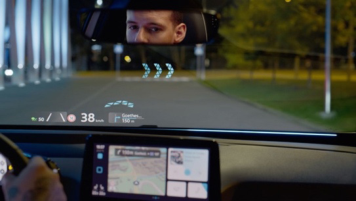
736 Marinissen and Bazilinskyy One solution that has the potential to present visual information without requiring excessive attention is the use of ambient displays and peripheral interactions (Löcken et al., 2017; Pousman and Stasko, 2006). According to Mankoff et al., ambient displays can be defined as “abstract and aesthetic peripheral displays portraying non-critical information on the periphery of a user’s attention” (Mankoff et al., 2003). These displays align with design principles like simplified interactions and context-aware responses (Lentz et al., 2018), and adhere to the Web Content Accessibility Guidelines (WCAG), emphasising perceivability and avoiding reliance on colour alone (e.g., red for critical alerts) (World Wide Web Consortium, 2018). Ambient displays are already common in mobile devices. In iOS 18, Apple’s mobile operating system, the visualisation of their VA Siri will change from an interactive logo to an interactive ambient colour-changing ring around the screen (Apple, 2024). In Apple CarPlay (Ramnath et al., 2020), the “traditional” Siri logo remains. Some cars, such as the 2024 Mercedes-Benz S-Class and the 2024 Volkswagen ID3 (Volkswagen.nl, 2025) (see Figure 1), also use ambient dis plays to give visual feedback to the VA or other functions. Moreover, custo misable VA visualisations may further optimise effectiveness (Jonsson and Dahlbäck, 2009).
Figure 1: Ambient lighting display in Volkswagen ID3. Left: ambient navigation indicators. Right: lighting variations for different functions, such as charging status or VA feedback.
User experience (UX) in cars balances pragmatic (usability) and hedonic (enjoyment) qualities, critical for both utilitarian and emotional appeal (Hassenzahl, 2010; Ostrosi et al., 2020). Infotainment systems, including screens and voice controls, are central to UX, with electronics projected to account for 45% of a car’s cost by 2030 (Car and Driver, 2020). A study by Matthey et al. has found that nearly half of car buyers would not purchase a car without Apple CarPlay or Android Auto, and that of those who have either of these systems in their car, 85% prefer it over the built-in system of the manufacturer (Matthey et al., 2023). This underscores the importance of phone connectivity in shaping UI preferences.
This study investigates the effectiveness and satisfaction of a peripheral ambient feedback visualisation for automotive VA, compared to traditional VA visualisation and no visual feedback. The research questions are: RQ1: How does peripheral ambient visual feedback to automotive voice assistants
Visual Feedback for In-Car Voice Assistants 737 impact driver satisfaction and effectiveness compared to traditional visual feedback methods? and RQ2: What effect do smartphone operating system, usage, and preferences have on user preferences for automotive user inter faces and voice assistants? Overall, this study aims to design ambient visual VA feedback that users prefer over conventional feedback visualisations and can contribute to safer roads.
METHOD
Online Questionnaire The research was approved by the Human Research Ethics Committee of the Eindhoven University of Technology, and the participants gave their informed consent to use their data. To gain insights into people’s preferences for infotainment systems and VA in cars, we created an online questionnaire. Participants were asked about their preferences for and usage of VAs in cars and smartphones, and their preferences for visual feedback from VAs. The full list of questions can be found in the supplementary material. This ques tionnaire was shared using Google Forms (https://docs.google.com/forms) and posted on the Appen crowdsourcing platform (http://appen.com). In Google Forms, no financial compensation was provided to the participants. In Appen, participants received €0.50. A total of 151 people from 28 coun tries answered a questionnaire between July 5 and July 19, 2024. All partic ipants (59 female and 92 male) were older than 18 with a mean age of 34.8 years (SD=13.3, median=29). 24 participants did not have a driver’s license, 26 participants owned a driver’s license for less than five years, and 100 par ticipants owned a driver’s license for more than five years.
User Study A total of 24 people from eight different nationalities (Belgian, Brazilian, Dutch, Greek, Italian, Polish, Spanish, Taiwanese) participated in a user study in July 2024. All participants (11 female and 13 male) were older than 18 with a mean age of 43.1 years (SD=12.9, median=46.5). 23 participants had a driver’s license, one did not. The participants participated in Leuven and Brussels, Belgium.
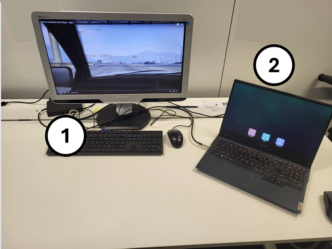
Figure 2 shows the apparatus for the user study in the two closed rooms used as test environments: location A in Leuven, Belgium and location B in Brussels, Belgium. The numbered items represent the following compo nents: (1) primary screen with driving footage AOC 24B1H (23.6" monitor) in location A or Philips Brilliance 235PL (23" monitor) in location B, and (2) secondary (laptop) screen with automotive UI prototype and integrated microphone Lenovo Legion 5 15ACH6H (15.6" monitor). This screen was positioned as close as possible to the position of the infotainment display in a left-hand drive car, offset to the right of the driver. The sound level in these rooms, measured shortly before each participant arrived, varied 35–50 dB in both locations.
Figure 2: User study setup. Left: location A, right: location B.
The primary screen displayed first-person driving footage to simulate a real- life driving scenario in which the user must pay attention to the road. Three videos, recorded while driving according to the speed of traffic in first-person view in an unmodified version of the game Grand Theft Auto V (Rockstar Games, 2024), were shown to the participants. These videos, found in the supplementary material, were shown as videos playing on YouTube (https:// www.youtube.com). The participants were aware that the examiner started the videos through a wireless keyboard. They saw the YouTube UI briefly before and after watching the videos. Each video lasted 5 minutes, consisted of mixed driving conditions (rural roads and highways in the southern half of the game map), and contained audible traffic and engine sound. A screen shot of each video can be seen in Figure 3.
Figure 3: Screenshots of the driving footage shown on the primary screen. Left: nighttime driving (video A), middle: daytime driving (video B), right: driving during sunset (video C).
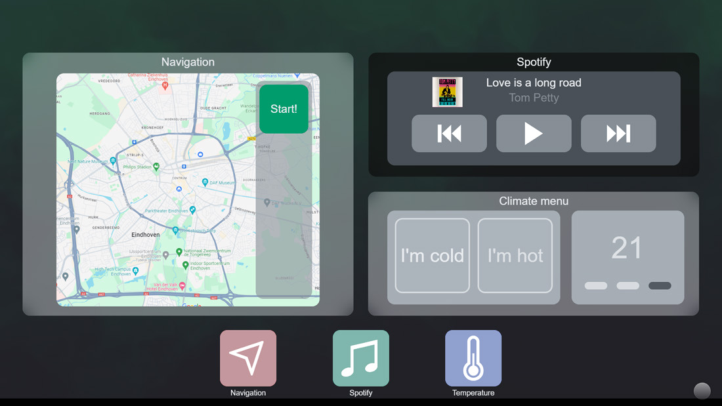
The secondary screen displayed a simple automotive UI prototype, seen in Figure 4. This UI was created in the paid basic subscription version of ProtoPie (https://www.protopie.io). The UI contained three usable appli cations: a navigation app, a music player, and temperature controls. These applications had limited functionality and could only be controlled by voice commands (see Table 1). By pressing a dedicated hotkey, the system was activated to start listening (supplementary material contains hotkey map ping). The standard ProtoPie speech recognition was used for the voice com mands, i.e., only preprogrammed commands were recognised. The standard US English female voice of ProtoPie was selected to give spoken feedback (confirmation when a task was understood or completed correctly) or to answer questions from participants.
401
Figure 4: UI prototype in the passive state with all apps opened simultaneously.
402
403
404
405
406
407
408
409
The UI was created with two variations for the visual feedback of the VA, Concept 2 (C2) and Concept 3 (C3), which could be independently switched on or off through dedicated hotkeys. Turning both off resulted in no visual feedback: Concept 1 (C1). The selected visual feedback was automatically displayed when the space bar hotkey was pressed to start voice recognition. It could also be displayed by the click of another hotkey that did not start the voice recognition. The error and success states could also be triggered by separate hotkeys.
410
Table 1: Voice commands for giving instructions to the prototype during the user study.
Table available in the original PDF paper.
411
Video Command Actions Error A A1 Open navigation & Take me to Brussels no
A2 Give me a traffic update & Close navigation no A3 What is the estimated time of arrival? yes
A4 Open navigation & Take me home no B B1 Open Spotify & Play Michael Jackson no
B2 Close navigation no B3 Play rock music & Close Spotify yes
B4 Open Spotify & Play Michael Jackson no C C1 Open temperature & Temperature 20 degrees no
C2 Set fan speed to medium & Close temperature no C3 Weather forecast & Close Spotify yes
412
C4 Open Spotify & I’m cold no
413
The participants’ task was to give voice commands to the VA prototype. After every one-minute interval, the examiner told the participants which command to give (see Table 1), after which they had to repeat the command
740 Marinissen and Bazilinskyy to trigger the system. Communication between the examiner and the par ticipants was conducted in English, Dutch, or Portuguese, depending on the preferences of the participants, but all voice commands were given exclu sively in English. A “Hey car” command always preceded the voice com mands, as participants were told that was the required trigger for the system to start listening to other voice commands; in reality, the examiner pressed a key on a separate keyboard to trigger the VA to start listening. This happened out of the participant’s eyesight, and they were not made aware of this so as not to break the immersion of the VA. After the trigger command “Hey car”, the prototype accepted commands to control the UI. For Commands A3, B3, and C3, the examiner introduced one false error for the VA: instead of pressing the space bar after the trigger command “Hey car” was given, the hotkey was pressed, which did not start the voice recognition system and only provided the visual feedback of the listening state. This gave the partici pants the impression that the system was listening to their command but did not recognise it. This was done to ensure that each participant experienced an error scenario at least once for each visual feedback variation.
At the same time, participants were asked to complete a secondary task: a list of questions about the driving footage was provided on a printed sheet of paper (see supplementary material). Participants were given as much time as they needed to read the questions before the video started, could reread the questions during the video, and were allowed to write the answers on paper during the video or do it afterwards. The purpose of the secondary task was to create the immersion of driving in a car and to give participants a reason to focus on the primary screen rather than the secondary screen. Participants were free to look at the secondary screen whenever they wanted, at the risk of missing an answer to the driving footage questions found on the primary screen; this mimicked a real-life driving scenario in which drivers can only keep their eyes off the road and on the infotainment screen for a short time. The order in which the visualisation variants were shown was randomised. The order of voice commands and videos was the same for all participants.
The examiner monitored whether the prototype correctly interpreted par ticipants’ voice commands, as it did not log data. Commands understood on the first attempt were marked “pass”, on the second or third attempt as “eventual pass”, and after three failed attempts as “fail”. Answers to driving footage questions were marked “correct” or “incorrect”. Participants filled in questionnaires (supplementary material contains printouts of the forms used): (1) pre-experiment: demographic data (age, gender) and smartphone/ car usage, (2) after each condition: questions on the qualities and rating of feedback, the Acceptance scale (Van Der Laan et al., 1997), and open feed back, and (3) post-experiment: questions on VA usage likelihood and pre ferred visual feedback variant.
Data from both the online questionnaire and the user study were analysed in MATLAB 2024A. The chi-square test or ANOVA test was performed to determine the significance of categorical and numerical data. An alpha level of 0.05 was used.
RESULTS
Results From Online Questionnaire The questionnaire resulted in a total of 286 responses, 79 from Google Forms and 207 from Appen. The results of Google Forms were all accepted as genuine data. On Appen, people from Venezuela were barred from join ing the questionnaire: Onkhar et al. showed an extreme case of Venezuelan people being overrepresented in the participant pool (Onkhar et al., 2022). The ongoing economic crisis there may mean that the primary motivation for participants to participate would be financial compensation, which could lead to people answering questions randomly to reach the end of the ques tionnaire quickly. Not all Appen participants were trustworthy or suitable for the study. The questionnaire was filled out 85 times in two seconds with the same age and nationality. Although the responses came from different IP addresses, it was assumed that these results were not trustworthy and were therefore excluded from the final data set. Furthermore, 122 participants were excluded based on two additional filters: (1) not being able to respond to four test questions and (2) not meeting the age criteria allowed for 18 to 100 years. Among the responses from Appen, 72 met the requirements to be trusted as genuine participant data. After filtering, the online questionnaire resulted in a combined total of 151 participants. Among them, 23 partici pants did not have access to a car, and the remaining 128 did, either their own car or one from others. Out of the 128 participants who have access to a car, 54 participants did not have a VA in their car, and the remaining 74 did. Out of the 74 participants who can use a VA in their car, 25 participants do not use it, and 49 participants do.
Of 77 Android users, 34 prefer Android Auto and 13 prefer the manufac turer’s interface. Of 72 iOS (iPhone) users, 42 preferred Apple CarPlay and 13 preferred the manufacturer’s UI. 33 Android users favoured to use the same VA in the car as they used on their phone, and 13 preferred to use the manufacturer’s own VA. 37 iOS users preferred to use the same VA in the car as they use on their phone, and eight preferred to use the manufacturer’s own VA. Out of 128 participants, in their ideal car, 79 wished to use Apple CarPlay or Android Auto, and 70 wished to use the same VA as on their phone. Table S1 in the supplementary material shows a significant correlation between the participant’s smartphone operating system (OS) and the preferred car UI and VA. When asked how they expect to receive feedback from a VA, 82 participants required both visual and auditory feedback, 49 chose only audi tory feedback, 12 only visual, 3 neither, and 5 had no preference. For visual feedback placement, “context-dependent” (n=49) and “feedback on top of the screen” (n=36) scored the highest, “on the function/app I am using” was chosen by 21 participants, while the background visual feedback scored the lowest (n=12), 33 participants had no preference. The concept of personalis ing the VA was received mostly positively by the participants.
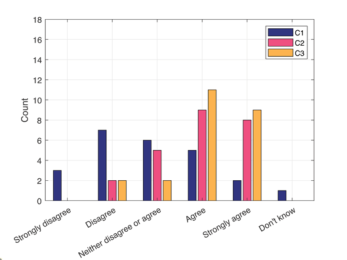
a) The visual feedback of the VA was clearly visible. b) The visual feedback of the VA was located in a well-suited position on the screen.
d) Auditory feedback is necessary with this specific type of visual feedback.
c) The visual feedback of the VA helped me understand what the system was doing.
Figure 5: Participant responses for questions regarding visual aspects of VA visualisations.
The data of all participants were retained. Supplementary material contains all anonymised data. Figure 5 presents the results for the aspects of each visual feedback method, and the Usefulness and Satisfaction scores on the Acceptance scale. C3 is rated higher than C1 and C2 in these three met rics. Table S2 (supplementary material) shows that, on average, C3 scored higher than C1 and C2 for the visibility, suitability of position, helpfulness, grade out of 10, and the Satisfying and Usefulness scores of the Acceptance scale. C3 scored lower than C1 and C2 in the need for auditory feedback. In the categories of visibility, helpfulness, grade, satisfaction and usefulness, C3 scored significantly higher than C1. C3 scored significantly lower than C2 for needing auditory feedback.
Table S2 shows that having some form of visual feedback from the VA (such as in C2 and C3) significantly increases the grade and the Satisfying and Usefulness scores of the Acceptance scale over not having visual feed back (such as in C1). C3 does not improve significantly over C2 for these three metrics. The final question of the user study asked participants to mark their favourite visual feedback method. 18 participants marked C3 as their favourite visual feedback method, 4 responded C2, 1 responded C1, and 1 participant had no preference.
Visual Feedback for In-Car Voice Assistants 743 In open feedback, the visibility and position of the visual feedback were mentioned too: for C2, 4 participants mentioned that the position of the visual feedback should be closer to the driver to better appear in the periph eral vision. Not all changes in colour for the different states of the system were perceived by the participants (mentioned 13 times for C2 and 7 times for C3): the error state (orange flashes) was generally perceived and understood, but the confirmation state was not seen by the participants who made these remarks. The movement of the screen was better detected in the peripheral vision than the colour changes: for C3, some participants did not remember how the system changed visually when switching from the passive state to the listening state, but they were aware that the system had responded to their voice command. One participant wrote: “I did notice something was chang ing when the car was listening, but I was not fully aware of which colour and how it changed on the screen exactly. When the car flashed yellow, I knew I had to repeat my command”. The blinking effect of the listening state in C2 was specifically mentioned as a positive by 3 participants. One participant wrote for C2: “The pulsing animation raised my attention, but the dimen sion of the dot and the position made it not as visible as it was for other feedback”. For C1, 8 participants gave negative feedback on not having any visual feedback: there were mentions of needing auditory feedback as well as visual feedback and that this method might not be safe. One participant wrote: “I need some kind of feedback from the system, which does not stay quiet when it does not understand me. In this way, we can interact better when it did not understand me or if there is a delay”.
DISCUSSION AND FUTURE WORK This study evaluated a novel ambient visual feedback system (C3) for voice assistants (VAs) in cars, compared to conventional visual feedback (C2) and no visual feedback (C1). Addressing RQ1, results showed a strong prefer ence for C3 (n=18) over C2 (n=4) and C1 (n=1), aligning with literature that ambient displays enhance user experience and safety (Pousman and Stasko, 2006). However, an online questionnaire indicated lower popularity for background VA visualisation, contrasting with user study findings. For RQ2, participants favoured Apple CarPlay and Android Auto over proprietary car UIs for their seamless integration and familiarity (Matthey et al., 2023), sug gesting automotive UIs should prioritise smartphone platform compatibility.
C3 outperformed C1 and C2 in visibility, positional suitability, and assis tance value, likely due to its less intrusive nature and integration with periph eral vision. Improvements over C2 were not statistically significant in overall grade, satisfaction, and usefulness, indicating conventional methods remain effective in low-cognitive-load scenarios. It is in alignment with a crowd sourced survey in the context of feedback for automated driving, where 1,692 participants emphasised the need for auditory feedback alongside visual cues, as purely visual feedback lacks the immediacy required when driving where 1,692 participants emphasised the need for auditory feedback alongside visual cues, as purely visual feedback lacks the immediacy required when driving (Bazilinskyy et al., 2018). Thus, ambient visual feedback shows
744 Marinissen and Bazilinskyy strong potential to enhance driver interaction with VAs, but multimodal feedback is essential for effective use.
The prototype’s secondary screen is misaligned with typical infotainment displays, affecting visibility. Limited voice recognition required command repetition, highlighting the need for improved natural language processing. The prototype lacked features of systems like Apple CarPlay, potentially skewing perceptions. The absence of gesture or gaze tracking limited objec tive data. Future studies should incorporate on-road or AR/VR testing, fea ture-complete UIs, and naturalistic settings to simulate real-world driving. Exploring multimodal feedback and VA roles in automated driving is also recommended.
SUPPLEMENTARY MATERIAL The supplementary material containing the questionnaire, videos and analysis code can be found at https://doi.org/10.4121/608d5a43-47a1- 4f12-ba8e-994767218ee5. The ProtoPie prototype: https://cloud.protopie. io/p/4dfbded4fb1d4793a626cf6c.
REFERENCES
Apple, 2024. Siri [WWW Document]. URL: https://www.apple.com/siri Bazilinskyy, P., Petermeijer, S.M., Petrovych, V., Dodou, D., De Winter, J.C.F., 2018.
Take-over requests in highly automated driving: A crowdsourcing survey on au ditory, vibrotactile, and visual displays. Transp. Res. Part F Traffic Psychol. Behav. 56, 82–98. https://doi.org/10.1016/j.trf.2018.04.001 BimmerTech, 2020. BMW gesture control–the next level of iDrive interaction [WWW Document]. URL: https://www.bimmer-tech.net/blog/item/124-bmw-ges ture-control. Car and Driver, 2020. Electronics account for 40 percent of the cost of a new car
[WWW Document]. URL: https://www.caranddriver.com/features/a32034437/ computer-chips-in-cars. Cerence, 2021. How mercedes is creating innovative multi-modal experiences with cerence look [WWW Document]. URL: https://www.cerence.com/newsroom/blog/ how-mercedes-is-creating-innovative-multi-modal-experiences-with-cerence-look. Euro NCAP, 2025. Euro NCAP 2026 protocols [WWW Document]. URL: https://
www.euroncap.com/en/for-engineers/protocols/2026-protocols. European Commission, 2015. Study on good practices for reducing road safety risks caused by road user distractions. https://doi.org/10.2832/88265 Gonçalves, R.C., Goodridge, C.M., Merat, N., Kuo, J., Lenné, M.G., 2024. Using
driver monitoring to estimate readiness in automation: a conceptual model based on simulator experimental data. Cogn. Technol. Work. https://doi.org/10.1007/ s10111-024-00777-3 Hassenzahl, M., 2010. Experience design: Technology for all the right reasons, Synthesis lectures on human-centered informatics. https://doi.org/10.2200/ S00261ED1V01Y201003HCI008 Jonsson, M., Dahlbäck, N., 2009. Impact of voice variation in speech-based in-vehi
cle systems on attitude and driving behaviour, in: Human Factors and Ergonomics Society Europe Chapter (HFES).
Visual Feedback for In-Car Voice Assistants 745 Lentz, A., Schlesinger, B., DiMartile III, J.T., Taubman, G., O’Dell, R., 2018. A logical
layer to interpret user interactions. Löcken, A., Sadeghian, S., Müller, H., Gable, T., Triberti, S., Diels, C., Glatz, C., Alvarez, I., Chuang, L., Boll, S., 2017. Towards adaptive ambient in-vehicle dis plays and interactions: Insights and design guidelines from the 2015 Automo tiveUI dedicated workshop. Springer, pp. 325–348. https://doi.org/10.1007/978- 3-319-49448-7_12 Mankoff, J., Dey, A.K., Hsieh, G., Kientz, J., Lederer, S., Ames, M., 2003. Heuristic
evaluation of ambient displays, in: Cockton, G., Korhonen, P. (Eds.), Proceedings of the Conference on Human Factors in Computing Systems – CHI’03. ACM Press, Ft. Lauderdale, Florida, USA, pp. 169–176. https://doi.org/10.1145/642611.642652 Matthey, A., Rupalla, F., Schneiderbauer, T., Zuyeva, D., 2023. How do consum ers perceive in-car connectivity and digital services? [WWW Document]. URL: https://www.mckinsey.com/industries/automotive-and-assembly/our-insights/ how-do-consumers-perceive-in-car-connectivity-and-digital-services. Naveed, H., Khan, A.U., Qiu, S., Saqib, M., Anwar, S., Usman, M., Akhtar, N.,
Barnes, N., Mian, A., 2023. A comprehensive overview of large language models. https://dl.acm.org/doi/pdf/10.1145/3744746 Onkhar, V., Bazilinskyy, P., Dodou, D., de Winter, J.C.F., 2022. The effect of drivers’ eye contact on pedestrians’ perceived safety. Transp. Res. Part F Psychol. Behav. 84, 194–210. https://doi.org/10.1016/j.trf.2021.10.017 Ostrosi, E., Bluntzer, J.-B., Zhang, Z., Stjepandić, J., Mignot, B., Baume, H., 2020.
Emotional design: Discovering emotions across cars’ morphologies, in: Fukuda, S. (Ed.), Emotional Engineering. Springer, pp. 157–175. https://doi.org/10.1007/978- 3-030-38360-2_10 Pousman, Z., Stasko, J., 2006. A taxonomy of ambient information systems: Four patterns of design, in: Proceedings of the Working Conference on Ad vanced Visual Interfaces, Avi ’06. ACM, Venezia, Italy, pp. 67–74. https://doi. org/10.1145/1133265.1133277 Ramnath, R., Kinnear, N., Chowdhury, S., Hyatt, T., 2020. Interacting with android
auto and apple CarPlay when driving: The effect on driver performance. TRL Limited, Wokingham, UK. Rockstar Games, 2024. Grand Theft Auto V [WWW Document]. URL: https://www.
rockstargames.com/gta-v. Strayer, D.L., Cooper, J.M., McMillin, K., Medeiros-Ward, J.K., Kay, I.S., 2021. The distracted driver: The effects of voice assistant interaction on cognitive work load and driving behavior, in: Proceedings of the Human Factors and Ergonom ics Society Annual Meeting. SAGE Publications, pp. 1868–1872. https://doi. org/10.1177/10711813211062593 TRL, 2020. TRL calls for safer voice-controlled systems in vehicles [WWW Doc
ument]. URL https://www.trl.co.uk/news/trl-calls-for-safer-voice-controlled-sys tems-in-vehicles. Van Der Laan, J.D., Heino, A., De Waard, D., 1997. A simple procedure for the assessment of acceptance of advanced transport telematics. Transp. Res. Part C Emerg. Technol. 5, 1–10. https://doi.org/10.1016/S0968-090X(96)00025-3 Volkswagen.nl, 2025. ID. Light–led’s talk [WWW Document]. URL: https://www.
volkswagen.nl/features/id-light. World Wide Web Consortium, 2018. Web content accessibility guidelines (WCAG) 2.1 [WWW Document]. URL: https://www.w3.org/WAI/standards-guidelines/ wcag.
LISTED IN THE AHFE DIGITAL BOOKSTORE CATALOGUE
Explore the complete digital volume
Intelligent Human Systems Integration (IHSI 2026): Disruptive and Innovative Technologies
Read this individual research paper free through the original publisher, or explore the full digital proceedings book.
ISBN 978-1-964867-76-2
Explore this ISBN in the AHFE Bookstore ↗Listed in the July 2026 bookstore catalogue; search by ISBN to confirm current availability · Digital book purchase optional