Saumick Pradhan, Nathan Wick, Cedrick Kwuimy (2024). Document Sharing without Internet Connectivity during Study Abroad Programs. In: Human Interaction and Emerging Technologies (IHIET 2024). AHFE Open Access, vol. 157, pp. 489–496. https://doi.org/10.54941/ahfe1005508
With the increasing demand for study abroad trips, students and faculty require a streamlined platform to manage assignments and surveys during the trip. It is common for students studying abroad to lack a reliable internet connection, making it challenging to share and access documents efficiently. This is especially true in countries with underdeveloped areas with poor connectivity infrastructure. Our mobile application, UC Transform (originally “Woforo”, linked below) addresses this issue by offering a one-stop-shop platform for accessing all assignments without requiring an active internet connection. Teachers can build courses, create assignments, and track progress using visual graphs. Students simply join with a code and retrieve their course materials online. Once connected to the internet, they can download the assignments and store them locally on their device. Throughout the trip, students can access the materials and provide their responses. Upon regaining a stable internet connection, students can upload their answers for review by professors. We utilized the Flutter and Dart framework for the User Interface deployed on iOS, Android, and Web Platforms, while leveraging Google Firebase for authentication and data storage. In this paper, we introduce the challenges faced by the students and educators, our methodology/ process of designing and developing UC Transform Application as a solution and sample case study exploring the scenario.
In the context of study abroad programs, students and faculty often face significant challenges in managing and sharing academic materials due to unreliable internet connectivity. Our focus is on locations which are underdeveloped in the infrastructure for connectivity. Students and faculty travelling to these remote places for research, field work, social welfare, and educational programs. They face challenges in document sharing.
According to a Michigan Public Policy Survey (Rubin, 2021), “these places with disparities between urban and rural areas based on broadband access, which can lead to a “rural penalty,” a term to describe the increased economic and social burden that rural communities face as a result of their distance from seats of power and centres of commerce.” These challenges are many and impact both students and educators:
1. Connectivity Issues: Talking especially about remote locations, Africa, where the internet penetration rate is 43%). These study-abroad locations frequently have inconsistent or limited internet access, making it difficult for students to download, upload, or even view necessary documents and assignments (Sabzaliev, 2021). 2. Inefficient Communication: Traditional methods of sharing documents via email or cloud storage require a stable internet connection, which is often unavailable or unreliable during international travel. “For example, in Tajikistan, only 3% of the population have a home broadband connection and most students are reliant on mobile data, which costs more than in any other ex-Soviet country”, according to University World News (Sabzaliev, 2021). 3. Course Management Difficulties: Educators struggle to efficiently distribute assignments, collect responses, and track student progress without a centralized and reliable system that functions offline. 4. Student Accessibility: Students need a dependable way to access course materials and complete assignments without relying on continuous internet access. Interruptions in connectivity can hinder their ability to meet academic deadlines and maintain consistent communication with instructors (Workman, 2013). 5. Data Security and Synchronization: Ensuring that students’ work is securely stored and synchronized when an internet connection becomes available is crucial. Without a reliable system, there is a risk of data loss or duplication, leading to confusion and additional workload for both students and educators.
UC Transform was conceived to address these issues by providing a robust platform that ensures seamless document sharing and course management, even in the absence of an active internet connection.
METHODOLOGY AND RESULTS A) Requirements Analysis
Conducted interviews with faculty and students to identify key challenges faced during study abroad trips.
Analysed existing platforms to determine essential features and user preferences.
B) Design
Created wireframes and prototypes to visualize the user interface and user experience.
Ensured designs were intuitive and catered to the needs of both students and faculty.
C) Implementation
Utilized the Flutter framework (Flutter, 2017) to develop a cross- platform application compatible with iOS, Android, and Web
Document Sharing Without Internet Connectivity During Study Abroad Programs 491
platforms. We used the Dart Programming Language (Bracha, Gilad, 2016).
Implemented features such as course creation, assignment management, and progress tracking for teachers.
Developed functionalities allowing students to join courses using code, download assignments, and store them locally on their devices.
D) Backend Integration
Integrated Google Firebase for authentication and real-time data storage (Google, 2011).
Implemented offline data storage capabilities, allowing students to access downloaded materials without an internet connection.
Ensured synchronization of data upon regaining internet connectivity, enabling students to upload their responses for review.
E) Testing
Conducted unit tests to ensure individual components functioned correctly.
Performed integration testing to verify the interaction between different modules.
Executed user acceptance testing with a small group of faculties and students to gather feedback and make necessary adjustments.
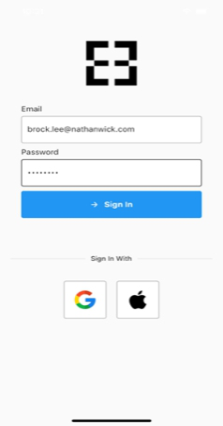
Figure 1: User authentication interface.
Users can sign in with their email and password, Google, or Apple account. New Users are prompted to enter essential information such as their name (see Figure 1).
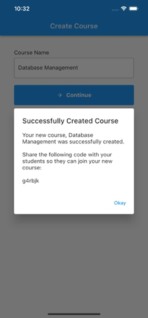
Figure 2: Course creation interface.
Faculty may create a course to share with students. Students can view the courses that they’re apart of or join a course by entering the course code (see Figure 2).
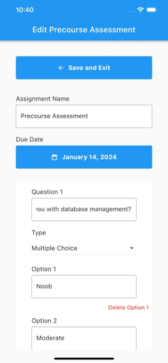
Figure 3: Assignments and graphs interface.
Faculty may create assignments for the students in a course, then view the assignment responses with graphs (see Figure 3). Students can download assignments for a course, complete them while offline, and automatically sync their responses when they’re back online (Flchart.dev, 2024).
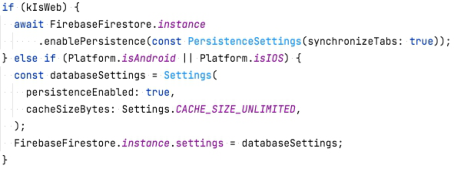
The Flutter app uses Google Firebase’s persistence feature (Firebase, 2022) to automatically cache information such as courses, assignments, etc., from a central database to the user’s local device’s storage (see Figure 4). As the user uses the app offline, their changes are recorded to their local device’s storage. Once a user goes back online, their changes to their local storage are synced with a central database, which the faculty uses to view the student’s responses.
Document Sharing Without Internet Connectivity During Study Abroad Programs 493
Figure 4: Cache settings.
SAMPLE CASE STUDY AND USER STORY
1. Sample Background
The University of Cincinnati offers a study abroad program to Ghana for a group of 30 students. The course, titled “Cultural Studies in Ghana,” requires students to complete various assignments and surveys throughout the trip. Historically, managing these tasks has been challenging due to unreliable internet connectivity in some locations. To address this, we decided to implement UC Transform, an app designed to facilitate offline document sharing and course management, providing a seamless academic experience regardless of internet availability. 2. Pre-Trip Preparation Before departing, the course instructor introduces UC Transform to the students. The instructor explains that the app will streamline their coursework by allowing offline access to assignments and enabling efficient communication.
a. Account Creation and Initial Setup: (i) Signing In: Students download UC Transform and are prompted to sign in using their Google accounts. This provides a quick and secure way to authenticate users. (ii) Profile Setup: On first sign-in, students enter their first and last names, select their role as ’Student,’ choose ’University of Cincinnati’ from a dropdown menu, and input their student ID numbers.
b. Course Enrollment: (i) Course Code Entry: The instructor creates the course “Cultural Studies in Ghana” on UC Transform, generating a unique course code. This code is then shared with the students. (ii) Joining the Course: Students use the course code to enroll in the class within the app, ensuring that only those registered for the study abroad program can access the course materials.
3. Assignment Distribution and Completion
a. Creating Forms: During the trip, the instructor creates various forms and assignments through UC Transform. These include
multiple-choice quizzes, short essay questions, and file upload tasks (images of cultural landmarks, video diaries, and documents summarizing their experiences). b. Offline Access and Data Caching: Students see a list of all their incomplete forms ordered by due date. They download these forms to complete offline, leveraging the app’s ability to cache data locally on their devices. This is crucial given the spotty internet connectivity in some areas they visit. c. Submission of Work: Upon reconnecting to the internet at their hotel or a café, students upload their completed assignments to UC Transform for the instructor to review. The app seamlessly synchronizes cached data with the cloud, ensuring that no work is lost, and all progress is tracked accurately.
4. Data Visualization and Feedback
a. Tracking Progress: The instructor uses UC Transform’s data visualization tools to monitor student submissions and performance. They view summary graphs (histograms, pie charts, etc.) that highlight how students are engaging with the course materials. These visualizations are crucial for quickly assessing overall class performance and identifying trends or areas needing attention. b. Providing Feedback: The instructor downloads tables of student responses for more detailed analysis and provides feedback directly through the app.
5. Additional Features and Security
a. Multiple Authentication Methods: To ensure flexibility, UC Transform supports sign-in via Apple and Microsoft accounts, catering to students with different device preferences. b. Secure Data Storage: All data is securely stored in Firebase, ensuring that student information and submitted assignments are protected both locally (cached) and in the cloud.
6. Potential Benefits
a. Increased Accessibility and Efficiency UC Transform significantly improves the efficiency of managing assignments during the study abroad trip. Students can easily access and complete their coursework offline, avoiding disruptions caused by unreliable internet connections. This functionality, supported by local data caching, leads to timely submissions and better overall academic performance. b. Enhanced Student Experience
Students appreciate the reliability of UC Transform. The ability to download and work on assignments offline meant they could focus on their studies without constant concern about finding
Document Sharing Without Internet Connectivity During Study Abroad Programs 495
an internet connection. This leads to higher engagement and satisfaction with the course. c. Faculty Feedback and Engagement The instructors find the app’s data visualization tools invaluable for tracking student progress and identifying areas where additional support is needed. The ease of creating and managing assignments allows the instructor to focus more on teaching and less on administrative tasks, enhancing the overall educational experience.
7. Conclusion for the Case Study
UC Transform proved to be a transformative tool for the University of Cincinnati’s study abroad program in Ghana. By addressing the challenges of unreliable internet connectivity and providing robust features for course management, offline access, data caching, and data visualization, the app significantly enhanced the academic experience for both students and faculty. The success of this implementation suggests that other institutions with similar challenges could benefit from adopting UC Transform.
FUTURE WORK
This research and product development exercise successfully addressed the significant challenge of managing academic materials during study abroad trips where reliable internet connectivity is often unavailable. By developing the UC Transform mobile application, we have created a robust and streamlined platform that enhances both teaching and learning experiences for faculty and students participating in study abroad programs. Key accomplishments of this project include Offline Access and Data Caching, Real-time Synchronization, User-friendly Interface, and Enhanced Course Management. We also showed a sample case study to explain the working of the product and its impact.
Some Areas for Future Development and Improvement
1. Scalability and Performance Optimization: Enhance the app’s scalability to support larger numbers of users and more extensive data storage requirements 2. Advanced Data Analytics: More advanced data analytics tools for educators to gain deeper insights into student performance and engagement, including predictive analytics. 3. Integration with Educational Platforms: Establish integration with other popular educational platforms and learning management systems (LMS) to provide a more comprehensive academic ecosystem.
The Application can be tested here: https://woforo-app-reu.web.app/#/.
AUTHOR CONTRIBUTIONS Conceptualization, C.K, S.P and N.W.; Solution Design, C.K, S.P and N.W.; Application Development, N.W and S.P.; Application testing, S.P and N.W.; Data Visualization, N.T.; Results, S.P. and N.T.; Writing-Original Draft Preparation, S.P, C.K and N.W.; All authors have read and agreed to the published version of the manuscript.
ACKNOWLEDGEMENT
This work is supported by a National Science Foundation Award NSF EEC-2106229-001.
REFERENCES
Bracha, Gilad (2016), “The Dart Programming Language.” Addison-Wesley. Firebase (2022), “Authentication State Persistence | Firebase.”, Google, Website: firebase.google.com/docs/auth/web/auth-state-persistence. Flchart.dev (2024), “Fl_chart: Flutter Package.” Dart Packages, Website: pub.dev/packages/fl_chart. Flutter (2017), “Build Apps for Any Screen.”, Website: flutter.dev/. Google (2011), Google, Website: firebase.google.com/. Rubin, Julie (2021), “Internet Access and Connectivity across the Urban-Rural
Spectrum.” Center for Local, State, and Urban Policy. Sabzaliev, Emma, et al. (2021), “The Impact of the Digital Divide on Student Mobility.” University World News. Workman, Mike (2013), “Technology Issues for Research in Remote Areas/Developing Regions.” Global Health Training Centre.
LISTED IN THE AHFE DIGITAL BOOKSTORE CATALOGUE
Explore the complete digital volume
Human Interaction and Emerging Technologies (IHIET 2024)
Read this individual research paper free through the original publisher, or explore the full digital proceedings book.
ISBN 978-1-964867-33-5
Explore this ISBN in the AHFE Bookstore ↗Listed in the July 2026 bookstore catalogue; search by ISBN to confirm current availability · Digital book purchase optional