Ian Garcia, Jouke Verlinden (2022). Exploring the use of virtual reality in co-reviewing designs. In: Human Factors in Virtual Environments and Game Design. AHFE Open Access, vol. 50, pp. 73–83. https://doi.org/10.54941/ahfe1002063
Virtual reality (VR) is an upcoming technology that is increasingly used in design environments. In a design process, designers often work together through co-creation. The next step, one that is often overlooked, is co-reviewing in VR. Virtual reality has potential as a valuable decisive step in the creation process, replacing a traditional tool. One tool in the traditional design reviewing processes is the trade-off analysis. In VR, concepts can be reviewed in different sizes and through various perspectives, the products are perceived as more tangible and true-to-scale. To obtain a better view on the use of VR in co-reviewing, a comparison of a traditional method with an immersive method is made in this paper. The participants are eight industrial design master students which did the experiment in pairs of two. The results show that VR offers advantages for reviewing ergonomics of a design, in which traditional 2D screen-based software is more limited in comparison.
For this research we use virtual reality head mounted displays (VR-HMD’s) with immersive modeling software (Gravity Sketch) for the immersive method and a laptop with traditional 3D modeling software (SolidWorks) for the traditional method. The paper explores the comparison of a traditi- onal design method, with a design process in which VR is used to aid in the co-reviewing of office chair designs. Similar studies focus more on the design creation process and less on the reviewing process. The University of Welling- ton investigated the involvement of laypeople in neighborhood design using virtual reality, they found that the non-experts could actively and collectively take part in the early design process (Chowdhury and Schnabel, 2019). The National Yunlin University of Science and Technology compared the advan- tages and disadvantages of the traditional design process (using 3D modelling software) with the VR-aided design process. The participants found that the creative process was more intuitive in VR than it was in 3D software. Ove- rall, they found that it was much easier to quickly explain/visualize 3D design concepts in VR than it is in modelling software (Huang and Lee, 2019). VR can be used in many more aspects of designing. Nowadays VR is mostly used to make a design but does not deliver a specific focus for reviewing
and especially collaborative reviewing, which is a strongpoint of the tech- nology. With this research we aim to find out if the use of VR applied to Industrial Design would improve the experience of co-reviewing 3D models. Users could take advantage of virtual reality characteristics such as intera- ction, immersion, use of perspectives, ergonomics and velocity, making the reviewing process of a design easier (Berg and Vance, 2017). Furthermore, this study investigates how the participants experience the differences betw- een the traditional method and the VR-aided method and tries to reveal the pros and cons of the latter method. The research focuses on the reviewing aspect of a design but also the added values of co-reviewing in a virtual workspace.
METHOD
The method used in this research was based on similar work done by experts in this field (P. Berg and M. Vance, 2017). To determine the added value of using a VR tool to co-review products, we asked a group of participants who are experienced in 3D modelling software to evaluate two office chairs. Firstly, by using the traditional review method of 3D software on the laptop screen, followed by a review method using a VR-HMD, both reviewing meth- ods used a trade-off principle to evaluate the model. Different skill levels determined whether there were differences in the VR experience, based on previous knowledge from CAD software.
The participants were asked to fill in a usability questionnaire after the experiment. The participants were also interviewed before and after the experiment and were asked to give their opinions about the usability of the technology. To evaluate the gathered information, the data was grouped by the pairs that performed the test.
After the contestants have reviewed the two chairs in virtual reality, we asked them to fill in a questionnaire. It contains twenty questions about their experience and insights with VR. Their opinions and insight are being measu- red with a Likert-scale, with score-range: 1–5. For the first questionnaire; 1= strongly disagree, 5 = strongly agree. For the second questionnaire; 1 = not important at all, 5 = very important. To compare the results and use it toge- ther with our observations for conclusions, we take an average of the scores. This is important to note, because we only used eight participants, our sample size is too small to state that these are quantitative results.
Participants, Apparatus and Stimuli Eight participants participated in pairs of two for the co-reviewing experi- ment. We examined the interaction during their product reviewing with the traditional method and the immersive method. The participants were master students who graduated with their bachelor’s degree in product development at the University of Antwerp and had several years of experience with 3D modelling. They were familiar with different design review methods. The tools used in the experiment included hardware to run the software (laptop), and the modelling software (SolidWorks). Two sets of VR systems (Meta
Exploring the Use of Virtual Reality in Co-Reviewing Designs 75
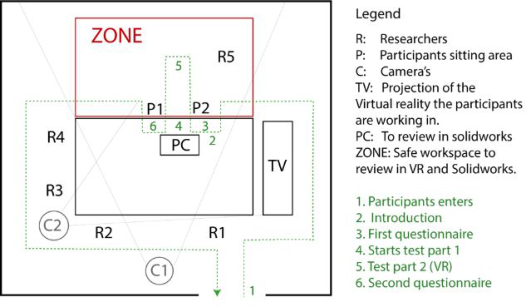
Figure 1: The set-up of the experiment.
Quest 2), 3D software for the VR system (Gravity Sketch). Lastly, two questi- onnaires based on the Likert scale, one placed directly in the VR co-creation room, and one on paper for the preliminary review.
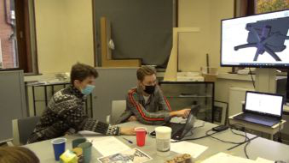
Task Design The experiment consists of three phases. The first phase is an evaluation of office chairs using traditional modelling software (SolidWorks), the partici- pants received two 3D models of office chairs on the laptop screen and were asked to perform a trade-off. The trade-off was filled in on paper and used a Likert scale from 1–7, with 1 being “strongly disagree”and 7 being “strongly agree”.
The second phase of the experiment was the introduction to VR and 3D- modeling software (Gravity Sketch), the participants both were asked to equip their VR headset (Meta Quest 2) and perform certain tasks, this was guided by an observer who talked the participants through the process.
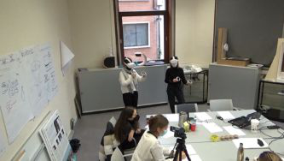
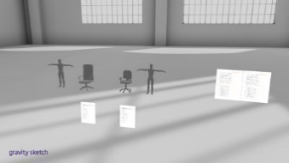
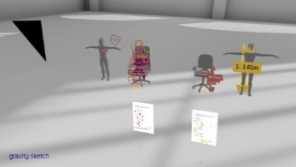
In the third, we use VR modelling software (Gravity Sketch). The partici- pants entered a collaborate room with two models of office chairs (differing from the ones in the first phase). The trade-off forms were accessible beneath the office chairs directly in the virtual space. The participants were asked to fill in the trade-off sheets in VR as this would give them the option to go through the different aspects step by step and evaluate them without having to remove the VR headset. The trade-off used a Likert scale from 1–7, with 1 being “strongly disagree” and 7 being “strongly agree”. After their co- reviewing they were asked to fill in the usability questionnaire in VR, this was done directly in the collaboration space.
Procedures and Data Analysis Before the experiment, the participants were informed about the purpose of the research; they filled in a consent form. First, they were interviewed about their previous experience with 3D modelling and VR. Following the inte- rview, they partook in the three phases of the experiment. During this, two observers took notes related to the body language and certain acts they per- formed. The participants were recorded during the experiment to provide the
Figure 2: Picture of participants doing the co-reviewing in SolidWorks.Figure 3: Picture of participants doing the co-reviewing in Gravity Sketch.Figure 4: Picture of the workspace in VR.Figure 5: Picture of the workspace in VR after the review of group four.
observers with the possibility of rewatching the experiment. To evaluate the experimental data, we transcribed the questionnaires, audio and body langu- age of the experiment. These transcripts were examined, and colour-coded to different categories: Positive aspects for application of VR, Negative aspects for application of VR, Interesting body language, Interesting Insights (about the process) and Skills. Following this, the means of the different categories were comprised out of which we took conclusions.
Exploring the Use of Virtual Reality in Co-Reviewing Designs 77
RESULTS
Qualitative Results Skills Group 1 has never used SolidWorks before; they have experience with CATIA. Groups 2, 3 and 4 have used SolidWorks and stated their scores as followed: group 2 (3.5/5 and 3/5); group 3 (both 3/5); group 4 (3.5/5 and 4/5). Group 3 has one participant who has a one-time experience with VR and in group 4 the duo both has some experience in VR. The rest of the participants have no prior VR experience. All the participants have a solid understanding of 3D modelling.
Behaviour This section provides insight in the observation notes that indicate co- reviewing interaction based on the following subjects: communication, effort and navigation. It is split up in the traditional and immersive part of the experiment.
Group 1 Traditional: The participants initially struggled with the mouse controls, while discussing looking at the same screen. They switched handling the mouse to view the model and inform the other of the detail they were trying to convey. The sitting position in their physical chairs were used as a refere- nce for ergonomics. Not a lot of vocal communication and visible confusion with SolidWorks interface was present. Immersive: Participants used the virtual objects as reference points during reviewing, body movements were copied from real life to mimic the inte- raction with the chairs. During the trade off again more expressive body movement was noticeable, this was either to convey direction or a sense of spatial positioning. The digital avatars were used as main medium to com- municate direction, since the actual movements cannot be seen in VR while wearing the HMD.
Group 2 Traditional: An initial inspection is performed on the overall models in general, in which a comparison is made quite early in the review. The com- munication happens mostly by pointing to the screen, aided with navigation by vocal cues. Some additional questions that were asked are: “can we open the part files as well?” and “what is the mannequin size next to the chair?”, indicating the ergonomic importance and structural composition. Immersive: Its duration was shorter than the traditional part. The Partici- pants had a division of tasks. One examinates all the details and zooms around the 3D-object, while participant two filled in the trade-off. partici- pants went back and forth quite a lot, which resulted in rather long reviews. There is visible confusion about the position of the other participant in the virtual space in relation to the spoken voices in the physical room.
Group 3 Traditional: One participant moves the model whilst the other fills in the form. To verify the ergonomic aspects of the model they used the object in their vicinity and their imagination together with measurements made in SolidWorks to check if the chair angles and handle reach were correct. Immersive: The participants used the draw tool to indicate aspects of the model they wanted to discuss. To examine the model, they both used a com- bination of the object manipulation in the software, as well as moving around the model. A walk-around is performed by one participant to examinate the model’s geometry.
Group 4 Traditional: One participant controlled the computer mouse and the other person filled in the trade-off form. After reviewing the first office chair, they switched tasks and position. The person who was not in control of the mouse, often pointed to the PC screen to indicate certain parts. Additional tools were used such as extra sketches, the measure tool, other materials, the mannequin and PhotoView 360 preview. Occasionally, they used their own bodies to verify ergonomic aspects. Immersive: During the immersive method, the participants communicated through talking and drawings. To evaluate chairs, they used the measure tool, scaled it to true size, zoomed in on details and drew lines to estimate angles and proportions. Both participants had almost no problems using VR. They started experimenting right away, even before everything was explained.
Pros and Cons Group 1 Positive: VR feels more intuitive, although the controls are hard to learn sometimes. VR is more realistic than SolidWorks, because the product is perceived as being right in front of you and you can drag and rotate it. The measurement-tool in VR is easy and quick to use. Negative: participants noted that you are not able to see the other person physically in VR. Participant two needed quite some assistance with the con- trols. “The part of filling in the form was a bit frustrating because you need to move up and down for every trade-off”.
Group 2 Positive: VR gives a more physical understanding of the 3D object. The sca- ling is much easier, and it gives you a realistic image of how it should be in real life. The review in VR was quicker and it is easier to experience all the aspects of the 3D model. Negative: Participant two struggled with the zooming controls. At the end it got more fluent. He said that the controls felt more intuitive. In VR the participant could freely move, but in real life they stood next to each other and sometimes the direction of the voice and the placement of the user in VR didn’t match.
Exploring the Use of Virtual Reality in Co-Reviewing Designs 79
Table 1. First half are the results in average of the system usability scale (SUS) questionnaire with Likert scale. Second half contains the usability questionnaire of VR 3D reviewing average scores with Likert Scale. (both n = 8).
Table available in the original PDF paper.
Question Question statement Average score
4.125
Q1 I think that I would like to use the virtual reality 3D modeling system frequently.
2.125
Q2 I found the virtual reality 3D modeling system unnecessarily complex.
3.5
Q3 I thought the virtual reality 3D modeling system was easy to use.
2.125
Q4 I think that I would need the support of a technical person to be able to use this virtual reality 30 modeling system.
4.125
Q5 I found that the various functions in this virtual reality 3D modeling system were well integrated.
1.75
Q6 I thought there was too much inconsistency in this virtual reality 3D modeling system.
3.875
Q7 I would imagine that most people would learn to use this virtual reality 3D modeling system very quickly.
2.25
Q8 I found the virtual reality 3D modeling system very cumbersome to use.
3.75
Q9 I felt very confident using the virtual reality 3D modeling system.
3.25
Q10 I needed to learn numerous things before I could get going with this system.
4.12S Q11 The lifelike and realistic degree of 3D object rendering in VR modeling. - Presence
4.375
Q12 The degree of interaction with model objects in VR modeling. - Interactivity 4.7S Q13 The degree of smoothness with the tool operation in VR modeling. - Fluency
3.625
Q14 Modeling functions are easy to learn in VR modeling. - Learnability
4.125
Q15 The feedback of appropriate tactile vibration in VR modeling - Vibration
4.625
Q16 3D objects and handheld controllers can be controlled stably in VR modeling - Stability
4.375
Q17 The appropiate field of view and 3D object size ratio in VR modeling. - Perspectives
3.625
Q18 The type and quantity of editing tools in VR modeling. - Versatility
2.125
Q19 The effects of background music or sound in VR modeling. - Sounds effects Q20 User’s immersive effects in virtual environment. - Immersion 5
Group 3 Positive: The participants were surprised that the use of the software and VR was less complex than they anticipated. Evaluating in VR is an advantage because you can scale it 1:1 with the user, this gives a better sense of the ergonomics. As for co-reviewing they noted it is an advantage that you can both look at a specific aspect, instead of being limited by one screen when using a laptop.
Table 2. Questionnaire results translated in preference votes of participants distilled from questionnaire results and behavior patterns. (n = 8).
Table available in the original PDF paper.
Preference parameters Traditional Immersive Ease of use 2 6 Functionality 1 7 Learnability of operation 3 5 3D model presence 0 8 Interactivity with 3D models 1 7 Fluency of operation 0 8 Perspectives and viewing ability 1 7 Visual collaboration communication 2 6 Gestural collaboration communication 8 0 Versatility of functions 2 6 Immersion level 2 6
Negative: The participants found it lacking that there wasn’t an option to measure angles in the software. They also found that making annotations on the virtual form wasn’t that easy, as it’s hard to get a correct sense of depth of field.
Group 4 Positive: When scaling to true size, it’s easier to understand how large the object is. Measuring objects is a lot easier in VR than in SolidWorks. It is really useful that you could draw near or on the object if you wanted to point out something, without having to switch control positions. Reviewing in VR is more intuitive and easier than SolidWorks. Negative: The participants thought it was unfortunate that the chairs had no colours or materials in VR, which made reviewing sometimes more diffi- cult. One participant also stated they think the traditional method is easier, because the communication is more natural since you can see each other’s body language. The participants would not choose the immersive method over the traditional one.
Quantitative Results
DISCUSSIONS The results indicate that the usage of VR has multiple advantages in a design reviewing process. Participants confirm that the immersive method gives a more lifelike feel than the traditional method. This is due to natural move- ment, the ability to scale to true size and the immersive feeling. This is harder to recreate or simulate in SolidWorks. Participants are therefore more likely to mimic certain ergonomic measurements with their own bodies. When revi- ewing designs, the lifelike feeling can play an important role in products with crucial ergonomic measurements, such as office chairs.
Another advantage of VR and Gravity Sketch is the communication. When co-reviewing, each user has his own point of observation, making the pro- cess faster and easier. By indicating parts with highlights, participants quickly
Exploring the Use of Virtual Reality in Co-Reviewing Designs 81
understand what the other person means. While in SolidWorks, only one per- son can control the computer mouse, making participants dependant on each other. For example, participants must switch control positions or point to the screen when making a remark. On the other hand, some participants state that the traditional reviewing method is more personal than the immersive method, because you can see your partner and read their body language.
Also, when co-reviewing in the same room, the position of your partner in VR sometimes differs from the real world. For example, the position of your partner in real life can be in front of you, whereas in VR, your partner is behind you. This sometimes led to disorientation and confusion amongst the participants. However, the immersive method does not require users to be in the same room unlike the traditional method. This also offers users the oppor- tunity of asynchronous contribution without the limitation of geographic location or technical expertise (El-Jarn and Southern, 2020).
Furthermore, the learning curve in Gravity Sketch is not as big as in other modelling software. The interface and usage are more intuitive than in SolidWorks. This can be attributed to the fact that SolidWorks has more features and a complex and extensive interface. This allows non-experts to take part actively and collectively in the early design process (Chowdhury and Schnabel, 2019).
LIMITATIONS Participants who often use SolidWorks in their design process, acknowledged that they were biased in their opinion. They wouldn’t choose the immersive method over the traditional method, but they think it could form a nice addi- tion. Two participants who lacked experience in SolidWorks didn’t feel this way and would choose the immersive method over the traditional method. Some participants struggled with moving and scaling objects in VR, due to a lack of experience, resulting in a less comfortable navigation. Finally, it was not possible to test our results and findings in a quantitative way, because of the small sample size (eight participants).
CONCLUSION
From this study one could conclude that VR is a technology that could be introduced soon in the design process, thanks to the benefits this method provides in the areas of ergonomics, learnability, intuitiveness, immersion, co-reviewing and interactivity, among others. The participants of this project lacked experience in the field of VR and had a good training in Computer Aided Design (CAD) programs, in particular SolidWorks. They have proved that working with this technique has multiple advantages since it makes a representative simulation of the products possible; dimensions, ergonomics and the visual perception are very similar to reality, making the intera- ction possible between the user and the product. Co-reviewing in VR has its benefits, such as the increased spatial awareness and the ability to write annotations directly in context, making it easier to view and understand its relation to the 3D model. However, a big drawback is the lack of physical
presence, this reduces the understanding of each other during a reviewing session.
Users affirmed that they would use VR for reviewing models because of its numerous advantages. Programs like Gravity Sketch allows users at the time of co-reviewing to interact between each other in the virtual environment and observe the models from different points of view without depending on their partner. The participants used the spatial potential during the VR part much more than the traditional part, by looking underneath and around the 3D models. However, one should not forget that there is a small confusion about the position of your colleague in the real environment. VR gives a closer to real-life experience, making the understanding of the ergonomic measu- rements and the evaluation easier as you are standing next to the product. Reviewing in VR has its benefits when it’s possible to make a comparison between the product’s size and the anthropological measurements, having a better estimation of its size.
Ideally, VR should not be a substitute for conventional techniques, but rather complement and enhance the review in the design process to get as close as possible to the real model in the simplest way, saving resources and time before obtaining the final result.
FUTURE WORK
It would be interesting to test the combination of co-creating, co-reviewing and elaborating convenient media as facilitators in the future. Next, testing the value of interface and usability reviewing could be an addition to the current research. The key focus here would be true scale ergonomic testing. Furthermore, nuanced communication opportunities in VR would also have potential, as well as expansion to related design fields such as architecture and automotive design could further enrich the purpose behind this experiment.
REFERENCES
Berg, L. and Vance, J., 2016. An Industry Case Study: Investigating Early Design Decision Making in Virtual Reality. Journal of Computing and Information Science in Engineering, 17(1). Berg, L. and Vance, J., 2017. Industry use of virtual reality in product design and
manufacturing: a survey. Camba, J., Soler, J. and Contero, M., 2017. Immersive Visualization Technologies to Facilitate Multidisciplinary Design Education. Lecture Notes in Computer Science, pp. 3–11. Chowdhury, S. and Schnabel, M., 2019. Laypeople’s Collaborative Immersive Vir-
tual Reality Design Discourse in Neighborhood Design. Frontiers in Robotics and AI, 6. El-Jarn, H. and Southern, G., 2020. Can co-creation in extended reality technologies facilitate the design process? Journal of Work-Applied Management, 12(2), pp. 191–205. Huang, H. and Lee, C., 2019. Factors affecting usability of 3D model learning in a
virtual reality environment. Interactive Learning Environments, pp. 1–14. Huang, H., Lin, C. and Cai, D., 2020. Enhancing the learning effect of virtual reality 3D modeling: a new model of learner’s design collaboration and a comparison of its field system usability. Universal Access in the Information Society, 20(3), pp. 429–440.
Exploring the Use of Virtual Reality in Co-Reviewing Designs 83
Kim, Y., Rhiu, I. and Yun, M., 2019. A Systematic Review of a Virtual Reality System from the Perspective of User Experience. International Journal of Human–Computer Interaction, 36(10), pp. 893–910. Sutcliffe, A. and Kaur, K., 2000. Evaluating the usability of virtual reality user interfaces. Behaviour & Information Technology, 19(6), pp. 415–426. Verlinden, J. and Horváth, I. 2014 Developing an interactive augmented prototyping
methodology to support design reviews. Wolfartsberger, J., 2019. Analyzing the potential of Virtual Reality for engineering design review. Automation in Construction, 104, pp. 27–37.
LISTED IN THE AHFE DIGITAL BOOKSTORE CATALOGUE
Explore the complete digital volume
Human Factors in Virtual Environments and Game Design
Read this individual research paper free through the original publisher, or explore the full digital proceedings book.
ISBN 978-1-958651-26-1
Explore this ISBN in the AHFE Bookstore ↗Listed in the July 2026 bookstore catalogue; search by ISBN to confirm current availability · Digital book purchase optional