Ian Garcia, Janne Huys, Louis Van Bouwel, Alexander Van Volsom, Jouke Verlinden (2025). Augmented Reality for Learning Traditional Wicker Weaving. In: Human-Computer Interaction & Emerging Technologies. AHFE Open Access, vol. 195, pp. 449–461. https://doi.org/10.54941/ahfe1006262
Traditional craft learning methods often fail to effectively convey the tactile and material-specific nuances of practices like wickering. This study explores the use of augmented reality (AR) animations to enhance the instructional process by integrating sensory cues and interactive overlays. By focusing on two common pain points in the early stages of wicker weaving, we developed AR prototypes using Blender 4.2, incorporating visual aids like colors, directional arrows, and guided pauses. A comparative experiment was conducted with two groups: the test group learns via AR and the control group through traditional video tutorials. While the control group exhibited fewer weaving flaws, the test group produced structurally superior baskets and demonstrated better retention of step-by-step actions. Qualitative feedback highlighted AR's potential to engage users, though it also introduced higher frustration levels. Our findings suggest AR's promise in preserving and modernizing traditional crafts, bridging digital tools with physical learning.
Traditional crafts have been part of human culture and have evolved since pre-historic times (Chavez, 2019). Modern tools can be used to preserve the cultural and historical value while enhancing the learning. Existing instructions like video tutorials often lack clarity in demonstrating material behaviour and handling techniques. Augmented reality (AR) overlays anchored to real-world basket components can present a potential solution to enhance the instructional process of wicker work teaching. For this, we need to grasp the intangible knowledge behind the craft. In this paper, we focus on wickering, a process hasn’t been prone to industrialisation; every basket made of natural materials is handmade. The challenge lies in developing and testing AR prototypes to verify their effectiveness in improving the craft learning experience compared to traditional methods. We aim to create a sensory experience in a digital learning environment, encompassing visual, tactile,
and spatial cues designed to simulate the nuances of material handling and movement (Zabulis et al., 2023).
The feeling and intuition that comes from manual labour can’t be taught by only using tangible methods. Knowing how our brains process information and how people develop muscle memory, there needs to be looked at intangible knowledge learning techniques (Garcia & Verlinden, 2024). The sense of the real work can’t be fully replicated in a book or video, combining apprehension and comprehension. Apprehension means mainly taking hold of experience through reliance on tangible, felt qualities of immediate experience; thus understanding through a concrete experience, while comprehension means understanding through reliance on conceptual interpretation and symbolic representation (Kolari, 2004). While finding the right balance between the two, hybrid crafting and blended learning techniques need to be combined as well. Hybrid crafting tries to enhance the physical components with the digital ones to make crafting more engaging (Golsteijn et al., 2014). Blended learning combines traditional hands-on learning with virtual or digital tools (Partarakis & Zabulis, 2024). The student can work with real materials and get virtual guidance by getting feedback overlaid on to their work. Visualisations help everyone, regardless of a person’s learning style, reducing the overwhelmed feeling by not only reading the information but also seeing the process in action and creating more engagement. Animations can show how things move and interact and is a great tool to be integrated in the learning process. Breaking the skills into manageable chunks and smaller tasks, helps build the skills gradually and manage the cognitive load (Partarakis & Zabulis, 2024).
EXPLORATION AND DEVELOPMENT PATH Information Transfer Animations
By using the right animations, the user can see the process unfold and his cognitive load can be reduced. Animations are an asset concerning anything that involves a lot of movement, making the invisible cognitive leaps visible. Low tech visuals can be more effective than a full picture, if you really highlight the core concept. Kalas and Redfield (2022) show that using animations to teach biological processes to make learning more engaging, can be applied more broadly. Complex systems get broken down in simpler ideas and visualised by using different shapes and colours for different types of movements, without oversimplifying the process. This helps the student to rely on physical cues, recognize patterns and experience complex systems (Kalas & Redfield, 2022). The active interface approach in video games grasps the crucial information and shows it only when relevant for the players (Zammitto, 2008). Spatial UI elements use visual projections to make complex actions more comprehensible. For example, guidelines or arrows can show how a twig should be bent to form a basket, or contours can indicate where materials should be placed precisely. Visual feedback, such as colour changes that indicate whether an action has been performed correctly, also plays a crucial role in guiding users.
Augmented Reality for Learning Traditional Wicker Weaving 451
To conduct the experiment on information transfer through animations, the accuracy of these animations is important. Keeping that in mind, there are three main issues with the existing tools: complexity, fragmented workflow & functionality gaps (Nebeling & Speicher, 2018). We chose Blender as it is a versatile and open source software package and a user-friendly platform. Blender version 4.2 provides a range of advanced tools for creating complex animations. Animations intended to communicate physical actions are most effective when they demonstrate the action itself, supported by additional visual elements. For our specific case, which involved demonstrating a basket-weaving technique, an animation needed to be created that accurately replicated the movement of the weaver in relation to the weaving cross.
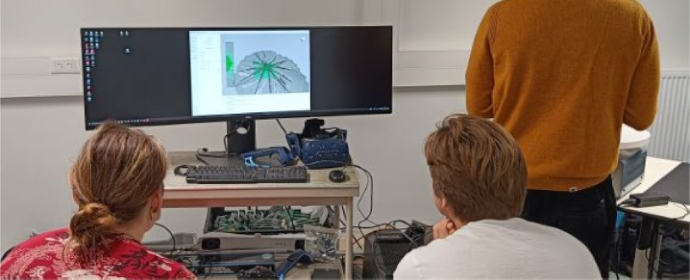
3D Scanning as a Starting Point: Digitizing Wicker Crosses To ensure sufficient accuracy in the digital representation of the braiding process, the choice was made to start from physical models. Two wicker crosses, one for each of the problem sets under study, were constructed by hand from natural material. These objects were then scanned using a handheld structured light 3D scanner, shown in Figure 1. This technique uses projected light patterns recorded by a stereoscopic camera system. Based on the distortion of these patterns across the surface, a 3D point cloud is generated that captures the geometry of the object.
The wicker crosses were placed on an automatically rotating platform during scanning, allowing the surface to be captured along all sides without manual intervention. However, scanning organic materials such as twigs also presents specific challenges: irregularities in texture, shading and reflection can lead to inaccuracies or noise in the raw scan. Therefore, the obtained mesh was further cleaned and simplified in Blender via retopology, which builds a new, more efficient mesh while maintaining the original proportions and material properties.
Figure 1: 3D scanning of wicker cross with Artec Spider.
Motion Analysis via Object Tracking To replicate the behaviour of the wicker crosses in interaction with the hands, a video recording was made of the execution of both problem sets chosen in the braiding process. This recording formed the basis for tracking in Blender. Using motion tracking, landmarks on the object (such as intersections of twigs) were marked and tracked over the video clip. This made it possible to reconstruct the movement of the object in relation to both the camera and the hand position.
The tracking produced a timeline with 2D coordinates, called keyframes, which could be translated in Blender into 3D transformations such as rotation, translation and scaling. While this was not a full motion capture, it provided enough insight to realistically simulate the wicker cross’s movements during braiding.
Using this analysis as a guide, armatures (skeletal structures) were added to the model in Blender, allowing for realistic rotations and bends that match the movements in the original capture.
This paper is part of a greater research, Tracks4Crafts (https://tracks4crafts.eu/), with the following research question: What is the impact of in-context augmented reality animations on knowledge transfer and deeper craft understanding of wicker work? The focus lies on the following sub question: How do animations addressing two specific wicker bottlenecks help beginners to better understand and implement the wicker process?
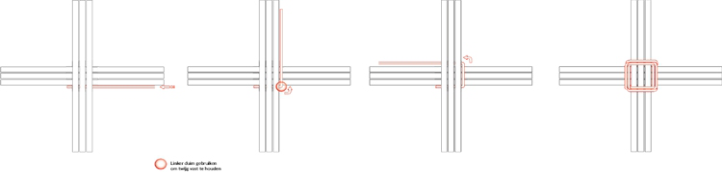
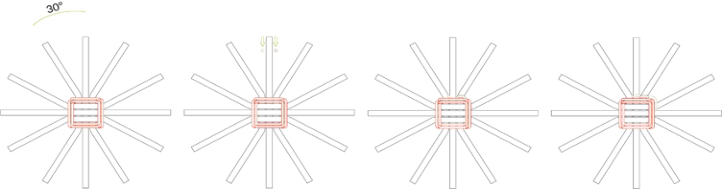
For this, following two bottlenecks in the beginning of the wicker process are taken as starting point, respectively shown in Figure 2 and 3.
Figure 2: Bottleneck 1, setting up the cross, piercing through, and bending the first twig.Figure 3: Bottleneck 2, weaving in.
Augmented Reality for Learning Traditional Wicker Weaving 453
This study has the following research questions. How does augmented assistance compare in performance and experience with traditional teaching, presented here through video? With specifically: How do animations addressing two specific wicker bottlenecks help beginners to better understand and implement the wicker process? And how ready is the current technology and craft context to work together on assistance content creation?
METHOD
Participant Pool, Instruments and Setup Experiment setup iterations were developed in discussion together with the wicker experts. Giving insight and value to the content that will be presented in said experiments. And to make sure the presented information is correct.
For the experiment, the participants were divided in two groups: the test group (TG), who learned wickering via the animations through an iPad, and the control group (CG), who learned wickering by watching a video on a computer. In Table 1, the background information of the participants is listed.
Table 1: Demographic information of participants.
Table available in the original PDF paper.
Test Group (TG) Control Group (CG) Total Nr of participants 5 5 10 Age (years) 22,2 21,8 22 (average) Gender 60% male 40% female 40% male 60% female 50% male 50% female Other crafts 40% yes; 60% no 40% yes; 60% no 40% yes 60% no
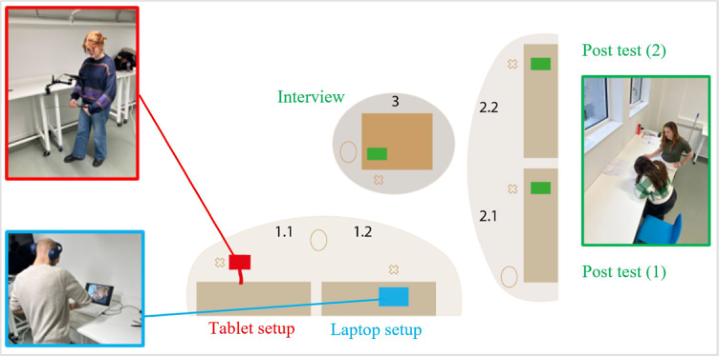
The test was conducted as follows. The test subject enters in the top left of Figure 4 and is guided to the table with the consent forms (2.1). These are reviewed and signed. Then they are guided to either the test position (1.1) or the control position (1.2), depending on the group they are assigned to. At the test setup, a legend is briefly introduced to help the participants better understand the animations. Next, the test subject is positioned behind the iPad (1.1), and the accompanying researcher adjusts the height of the clamp arm to match the test subject’s height. The subject is given the wicker cross, and the test begins by tapping on the screen of the iPad, by the researcher, so the animation starts. At the control setup, the subject is positioned in front of a laptop (1.2) and given a brief explanation. The headphones are put on, and the subject is handed the appropriate wicker cross. The video starts when the researcher presses play.
In the analysis phase consists of both quantitative and qualitative techniques. The first part is the quantitative part and encompasses of error counting and post-test questionnaires. The qualitative part was a debriefing interview. In both setups, the subject follows the steps to the best of their ability. They execute the steps for both the first and the second problem. The test is video recorded, and the researcher takes additional notes on any observations and later takes a photo of the woven cross to enable comparisons and count the number of errors. After completing the test, they fill out the post-trial questionnaire with included NASA Task Load Index
(TLX) (2.2), capturing the participant’s experience. NASA TLX measures the workload of the system by defining the different dimensions and outline six workload factors. These factors are scaled on a twenty-point scale from very low to very high. When looking at the task load, a lower number is more desired. The subsequent questionnaire was focused on the feelings of the participants towards the use of AR for wickering and if they developed a deeper understanding with this learning method. After completing the survey, they are interviewed (3) by a third researcher to get more qualitative information and to reveal underlying additional insights of the test results. The sessions were done in Dutch since all our participants were Flemish (Dutch-speaking).
Figure 4: Illustration of the test setup.
Augmented Reality Build Up Modeling and Animation of Twigs After modeling the cross itself, we proceeded to add the individual twigs. These were each modeled using segmented cylindrical shapes that contained enough subdivisions to allow for complex bending, seen in Figure 5. Each twig was assigned its own armature (bone structure) to allow controlled deformations. This took into account the material properties of willow twigs: their ductility, thickness gradient, and natural tension. Each twig was made as a mesh geometry, subdivided by loop cuts (up to 100 segments per twig) to allow smooth bending.
To avoid intersections between twigs or the model, manual correction was used. This involved checking each movement for visual credibility. The animation itself was constructed using keyframes where the action was simulated step by step. Armatures were used to achieve natural movements, such as pulling down a twig in an arc.
Augmented Reality for Learning Traditional Wicker Weaving 455
Figure 5: Animation creation in blender and transfer to adobe aero.
The temporal structure of the animation was largely derived from the tracking video. From this, the average duration and sequence of actions could be measured. However, a conscious decision was made to extend the timing slightly to allow users sufficient time to cognitively process the process. This extended timing supports the didactic goal of the project: to promote understanding of the weaving process, rather than exact imitation of speed or rhythm.
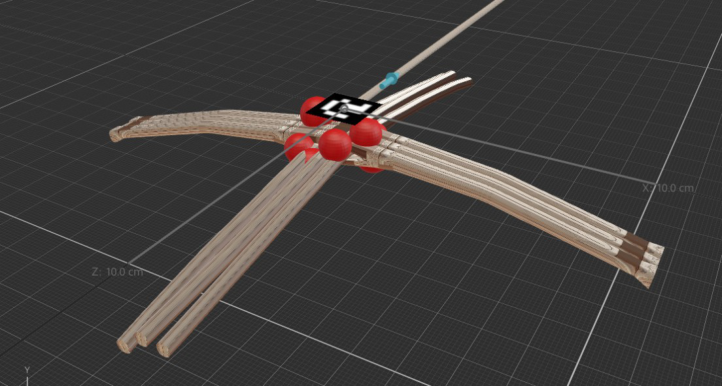
Overlay Elements for User Guidance As a final step, visual guidance elements were added over the animation as a function of AR integration. These visual cues help orient the user in the action path. Two main types of overlay were implemented. Firstly, a blue directional arrow, which consistently points north relative to the user. This arrow helps position the spinning head correctly and gives direction to the rotational motion. Secondly, red pulsating spheres, placed at specific locations where force needs to be applied, such as by the thumb. The pulsing effect attracts the user’s attention without disturbing.
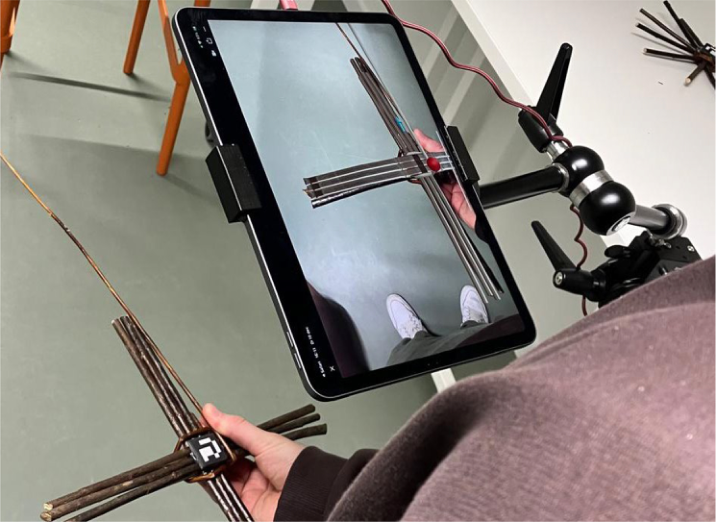
Adobe Aero is a software application that makes it easy to prototype augmented reality (AR) experiences. With no programming knowledge required, it allows designers to place 3D models, animations and interactive elements into the real world via a smartphone or tablet. In our case, we chose to link the animation to an ArUco marker. ArUco markers are specially designed “QR codes” to be properly recognized by recognition software. In this way, we ensured that during the experiment, the iPad would always be able to keep tracking the physical cross properly, allowing Aero to project the animation onto the physical basket, as shown in Figure 6.
To be able to fully understand the results, clarification of the terms Weaving Flaw (WF) and Missed Actions (MA) are necessary. In the category “weaving flaw” we could notice the mix up of the right cross weaving movement. These kinds of flaws don’t make a basket more unstable, but it
is more of an aesthetics problem, the two techniques used in the experiment are displayed in Figure 7 and 8.
Figure 6: ArUco tracker recognition and showing animation on iPad in adobe aero.Figure 7: Over-under weaving.Figure 8: Cross weaving.
Augmented Reality for Learning Traditional Wicker Weaving 457
The category of missed actions has a notable characteristic. When the user misses the first step of the weaving process, or when they miss the step of weaving back, there is an inherent issue with the construction of the basket, and it will be way more unstable.
RESULTS
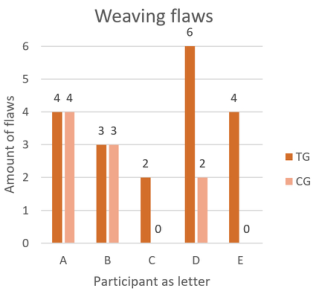
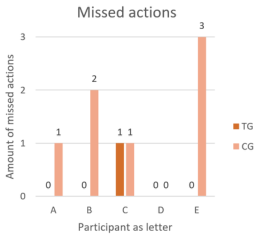
Test Observations In Table 2, we can see that the experimental setup revealed minimal differences between the test and control group. The test group (TG) had a higher total number of errors compared to the control group (CG), and the number of weaving flaws was significantly higher, primarily consisting of minor mistakes in the weaving motion. Even though the control group exhibited only half the number of weaving flaws compared to the test group, the test group performed better in missed actions, averaging only 0.2 errors, indicating fewer skipped or incorrect steps, as visually showcased in Figure 9 and 10. Baskets produced by the test group were consistently stronger and more aesthetically pleasing, as they lacked significant structural errors.
Table 2: Quantitative analysis of test results and flaws.
Table available in the original PDF paper.
TG WF MA Total CG WF MA Total T1 4 0 4 C1 4 1 5 T2 3 0 3 C2 3 2 5 T3 2 1 3 C3 / 2 2 T4 6 0 6 C4 1 0 1 T5 4 0 4 C5 0 3 3 Total 19 1 20 Total 8 8 16 Mean 3,8 0,2 4 Mean 2 1,6 3,2
Figure 9: Graph of weaving flaw results.Figure 10: Graph of missed actions.
Post Test The NASA TLX questionnaire results and averages for each group are presented in Table 3. Mental and physical demands were similar for both groups (9,2; 8,8) and considered negligible. Performance scores were also identical (10,4), indicating respondents felt equally successful in accomplishing their tasks. Significant differences were observed in frustration levels (53,65), which were higher in the test group (10,7) than in the control group (7,8). Temporal demand was higher in the control group (15,4), where respondents reported feeling hurried or rushed during the task. They also reported exerting more effort to achieve the same performance level as the test group.
Interviews The participants were interviewed to gain insights into their experiences with traditional video and augmented reality (AR) teaching methods. They found the video method familiar and effective overall, while challenges included difficulty in following complex steps. One remarked, “I am used to learning something through video”. Some participants felt disengaged during the learning process. Most of their attention was focused on following the video and keeping up with the entire process. This leaded to being less engaged in the process of wicker weaving.
Participants appreciated the AR method for its user-friendly animations and interactive nature. A key critique was the lack of transparency in the animations, which made tracing gestures difficult. One participant stated, “The colourful elements caught my attention and were very useful”.
Augmented Reality for Learning Traditional Wicker Weaving 459
Both groups affirmed they had learned from the experience and believed their performance could have improved if shown the finished product beforehand. Further research is needed to determine if the finished product needs to be a digital or physical product.
DISCUSSION
From the overall results we can see that the test group has higher frustration levels than the control group, but possibly not only due to the presented content within the animations. In these cases, there were also comments from the participants stating issues with the transparency of the virtual content on their physical basket bottom – i.e. a visualisation problem limited by the Aero software. Another remark is the physical and fixed positioning of the iPad provides a static experience throughout. However, it was not necessarily a bad thing to have the tablet fixed since it allows to share anchor positions to other participants, instead having to move along with the physical object.
The major difference between the missed actions and the weaving flaws is remarkable. Where there is a suggestions towards higher individual task focus in the tablet setup as opposed to the traditional video following, regarding the missed actions. However, we see more weaving flaws in the test group (AR), meaning the accuracy of the execution might be better on the traditional video due to giving more direct context on how to perform certain actions rather than more abstract representations of the said meant actions.
LESSONS LEARNED The wicker experts guided us along the way with their experience and knowledge, their individual perspective, their diverseness of interpretations is also something to keep in mind. Considering their input in potential content ends up being crucial for the results and the progress itself. The technology had some limits, especially in the development part, it is fruitful even for a product development student profile, to be able to make AR content without prior programming skills. The complexity of the tools for AR and virtual reality (VR) development, creates a barrier of entry. On top of that, there is a need to deal with a fragmented workflow and the gaps in functionality between digital tools. For example, making animations in Blender is only the initial digital step, but to show it as an overlay in a real time physical world, Adobe Aero is required. This creates said fragmented workflow and causes functionality loss, since transparency in Blender can not be brought over in Adobe Aero.
CONCLUSION
This study highlights the complementary strengths and limitations of video- based and AR teaching methods. The AR animations effectively convey broader steps, producing structurally superior baskets, while traditional video excels in detailing fine motions, reducing errors. Both methods evoke positive emotions: animations foster engagement but can cause nervousness due to novelty, while videos offer familiarity and confidence but lack inspiration. Participants preferred videos for their familiarity,
though this didn’t always reflect efficacy or engagement. Videos offer clarity and structure, while AR enhances interactivity, engagement, and real-time feedback. Both methods face challenges, such as disengagement with videos and unclear gestures in AR animations.
Augmented assistance in comparison to traditional training differs in performance and experience with traditional teaching, however not significant and is not only dependent on the content. A second important factor is the setup and how it affords interaction, regarding to the orientation and the fixation of the tablet. As a whole, the technology is partially ready to provide an independent manner on building up parts of the AR setup. However there is need for instructions on when to use which features, and what the barriers are specifically for working with Adobe Aero, in this ‘no programming’ approach.
Looking at future research, a hybrid approach leveraging the strengths of both methods could enhance learning outcomes. Refinements like improving AR animation transparency, incorporating final product demonstrations, and addressing user feedback are participant-supported and mentioned pathways to explore. The shared observation regarding performance suggests a need to incorporate demonstrations of the final product into both teaching methods for improved outcomes.
ACKNOWLEDGMENT
The authors acknowledge the experts who shared their artisan knowledge of wicker weaving and provided the necessary materials for the tests. We are grateful to all participants who generously contributed their time and insights to this study. This publication is part of the Horizon Europe project Tracks4Crafts. This project is funded by the European Union under grant agreement No 101094507.
REFERENCES
Chavez, Y. (2019). Basket Weaving in Coastal Southern California: A Social History of Survivance. Arts, 8(3), 94. https://doi.org/10.3390/arts8030094 Garcia, I., & Verlinden, J. (2024). Immersive assistive technologies for knowledge
transfer of crafts: Exploration and technical challenges. AHFE, 2024, 2024. https://doi.org/10.54941/ahfeXXXX Golsteijn, C., Van Den Hoven, E., Frohlich, D., & Sellen, A. (2014). Hybrid crafting: Towards an integrated practice of crafting with physical and digital components. Personal and Ubiquitous Computing, 18(3), 593–611. https://doi.org/10.1007/ s00779-013-0684-9 Kalas, P., & Redfield, R. J. (2022). Using animations to teach biological processes and
principles. PLoS Biology, 20(11). https://doi.org/10.1371/journal.pbio.3001875 Kolari, S. (2004). Visualisation Promotes Apprehension and Comprehension*. Nebeling, M., & Speicher, M. (2018). The Trouble with Augmented Reality/ Virtual Reality Authoring Tools. Adjunct Proceedings - 2018 IEEE International Symposium on Mixed and Augmented Reality, ISMAR-Adjunct 2018, 333–337. https://doi.org/10.1109/ISMAR-Adjunct.2018.00098
Augmented Reality for Learning Traditional Wicker Weaving 461
Partarakis, N., & Zabulis, X. (2024). Applying Cognitive Load Theory to eLearning of Crafts. Multimodal Technologies and Interaction, 8(1). https:// doi.org/10.3390/mti8010002 Zabulis, X., Partarakis, N., Demeridou, I., Doulgeraki, P., Zidianakis, E.,
Argyros, A., Theodoridou, M., Marketakis, Y., Meghini, C., Bartalesi, V., Pratelli, N., Holz, C., Streli, P., Meier, M., Seidler, M. K., Werup, L., Sichani, P. F., Manitsaris, S., Senteri, G., … Krivokapic, J. (2023). A Roadmap for Craft Understanding, Education, Training, and Preservation. Heritage, 6(7), 5305– 5328. https://doi.org/10.3390/heritage6070280 Zammitto, V. (2008). Visualization Techniques in Video Games. http://www.sfu.ca/ ∼vzammitt
Read this individual research paper free through the original publisher, or explore the full digital proceedings book.
ISBN 978-1-964867-71-7
Explore this ISBN in the AHFE Bookstore ↗Listed in the July 2026 bookstore catalogue; search by ISBN to confirm current availability · Digital book purchase optional