Ryosuke Okubo, Yukiko Tanikawa, Shin’ichi Fukuzumi (2022). Proposal for a Method to Clarify Customer Needs Using HI (Human Interface) Patterns. In: Advances in Ergonomics In Design, Usability & Special Populations: Part II. AHFE Open Access, vol. 19. https://doi.org/10.54941/ahfe1001251
We have been developing methods of clarifying and describing customer needs for usability on the basis of human-centered design (HCD) processes. This paper proposes a method of clarifying customer needs in requirements definitions through prototype creation. This method helps system engineers (SEs) without expertise to create and evaluate suitable prototypes by offering prototype components based on the classification of customer needs. These components are defined as HI (human interface) patterns that have four layers of screen transitions, screen layouts, screen elements, and color combinations. This proposed method is assumed to solve problems with previous prototypes such as those where it was not easy for unskilled SEs to create prototypes that reflected customer needs. We confirmed the effectiveness of this method and found additional problems by applying it to a system development project.
The time, cost, and quality of system development are generally managed by dividing it into working processes, viz., planning and proposals, requirement definitions, external designs, internal designs, coding, testing, and operation (ISO/IEC 12207, 1995). Risks in time delays, cost overruns, and poor quality are often caused by insufficient knowledge about customer needs regarding usability that should be extracted in upper processes (from planning and proposals to requirements definitions) (Zimmermann and Grotzbach, 2007) (Paech and Kohler, 2003) (Metzker and Offergeld, 2001). For example, ambiguous information about customer needs regarding interactions and navigation causes requirements definitions to run over, and recognized differences between customers and system vendors on the usability of systems causes backtracking to earlier phases or building a trick-to-use system.
An effective way of resolving these issues is for usability experts to participate in clarifying customer needs in system development projects (Goransson, Gulliksen and Boivie, 2003) (Paech and Kohler, 2003) (Memmel, Gundelsweiler and Reiterer, 2007). However, the numbers of usability experts are limited, and not all the projects can afford to commission experts. This is especially pronounced in enterprise systems (that are businesses in companies systematized by IT), which we have mainly engaged in.
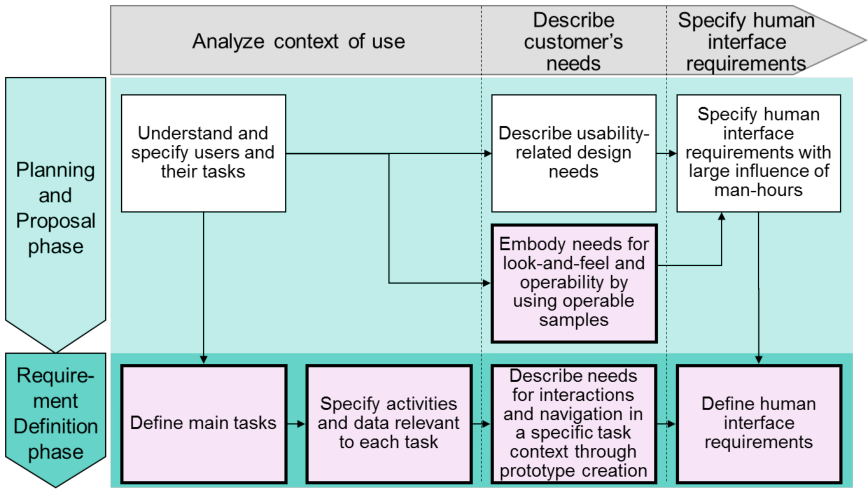
We have been developing methods and software tools that define development processes and specific activities to describe customer needs and make them reflect designs on the basis of a human-centered design (HCD) concept (Tanikawa, et al., 2012). The HCD’s concept is that design and development from the user’s perspective will create a usable system (ISO 9241-210, 2010). As we can see from Figure 1, our method specifies design activities based on
HCD (horizontal axis) for each development phase (vertical axis). Customer needs are gradually specified in our method through two phases, i.e., the planning and proposal phase to the requirements definition phase.
Planning and proposal is a phase where the goals and concepts of a system should be agreed and shared with customers before they place orders. We proposed and verified a method of offering samples on a screen for each targeted usability concept (e.g., the screen for a beginner in IT) so that requirements to estimate costs by ordering were derived (Okubo, et al., 2012). As a result, it became obvious that assistance with requirements definitions was also urgently required. This assistance was needed to extract concrete customer needs for a human interface (HI) to carry out specific tasks, viz., interactions and navigation through prototype creation.
Thus, this paper proposes a method of clarifying customer needs for HI (human interface) through prototype creation with a enterprise system for PCs. The proposed method helps System engineers (SEs) without expertise to create and evaluate prototypes by offering HI elements for prototyping that are developed on the basis of classifying customer needs.
Figure 1: Steps defined in human-centered design process support environment
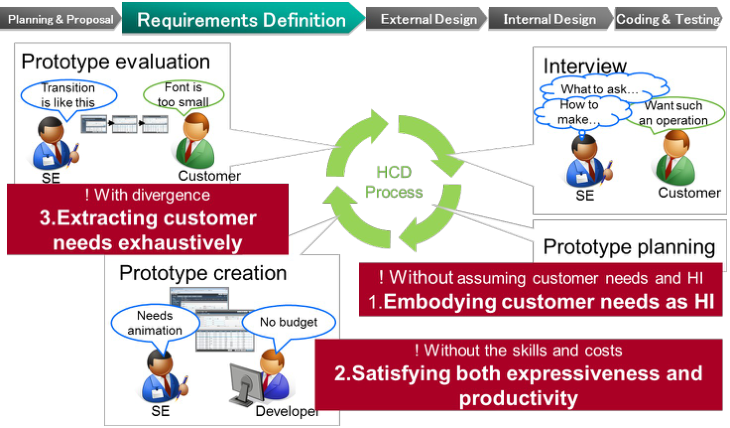
PROBLEMS Customer needs for HI can be clarified by effectively analyzing the users and tasks of a system, creating prototypes, and presenting their operability and look-and-feel to customers (Moscove, 2001). These are defined as specific steps in our method that was described in the introduction. They involve interviewing customers to specify users and their tasks, making plan for prototyping, creating the prototype, and evaluating it. They also need to be iterated. However, when SEs without expertise try to execute these steps accurately, problems arise, as shown in Figure 2.
1. Embodying customer needs as HI: It is difficult for unskilled SEs to assume customer needs and embody the assumed needs as an HI of prototypes.
2. Satisfying both expressiveness and productivity: It is necessary for the prototype to have as an HI that is as expressive as that of an actual system so that it can represent abstract customer needs. Thus, the costs, time, and skills to create prototypes are necessary in upper processes.
3. Exhaustively extracting customer needs: If SEs present prototypes to customers without telling them what they need to discuss about them, the discussions often degenerate into specific issues such as font sizes on the screen. Discussions on more important issues such as business processes and HI structures are rarely carried out due to this limitation. Consequently, the identification of customer needs that should be extracted in the requirements definition phase fail.
Figure 2: Problems with clarifying customers' needsTable 1: Comparison of previous prototyping methods
Table available in the original PDF paper.
Although many previous methods of creating prototypes and extracting customer needs have been proposed and put into practice, they have advantages and disadvantages regarding the three problems in requirements definitions listed in Table 1. For instance, paper prototyping is a method of manually drawing rough screens on paper in front of customers. Its main advantage is that the paper prototype can be modified to reflect customer needs on the spot. Its main disadvantages are that it cannot express operability, interactions, or look-and-feel. Moreover, the system generation tools represented by Genexus also have advantages and disadvantages. Its main advantages are that the tools can provide interactions and look-and-feel as good as actual systems to customers without the need for programming. However, its main disadvantage is that it cannot necessarily provide an HI that corresponds to customer needs at once.
Here, we propose a method for SEs without expertise to create and evaluate prototypes that are suitable for customer needs to solve these three problems.
AN APPROACH TO THREE PROBLEMS This section explains our approach to these three problems.
We targeted enterprise systems for PCs with keyboards and mice as was mentioned in Section 1. Here, we explain our refinements to enterprise systems into routine and nonroutine enterprise systems. Routine enterprise systems are mainly managed through registering, browsing, and data editing operations (e.g., worktime management and ordering system). Nonroutine enterprise systems are mainly managed through analyzing and data monitoring operations (e.g., business-analysis and operational-management systems) (Lillrank, 2003). We targeted routine systems since they are the great majority of enterprise systems out of these two types.
When we focused on customer needs for usability in routine enterprise systems, we discovered common traits regarding needs according to our experience with project support. For example, needs such as “want to retrieve, while changing search terms without screen transitions” and “want to input characters more efficiently” were common in several system developments. Moreover, we also discovered common traits on HI fulfilling these common needs. For example, a screen layout, two panels of search conditions and a search results list, is common for the need to “want to retrieve, while changing search terms without screen transitions”.
According to this thinking, we classified customer needs regarding usability, and built patterns for an HI such as screen transitions and screen layouts on the basis of these classifications. We defined these patterns for the HI based on the classification of customer needs as “HI patterns”.
We assumed that this approach would resolve the three problems in the previous section by SEs tracing the classifications and conducting suitable HI patterns to resolve problem 1: “embodying customer needs as HI”, where SEs combine HI patterns with the implementation languages of actual systems to resolve problem 2: “satisfying both expressiveness and productivity”, and where SEs discuss the prototype with customers for each HI pattern that comprise the prototype to resolve problem 3: “exhaustively extracting customer needs”.
METHOD
This section explains the proposed method from the viewpoint of how to solve these three problems to clarify needs in requirements definitions according to the approach mentioned in the previous section.
Provide HI patterns based on customer needs (Problem 1: Embodying customer needs as HI) This method provides SEs with HI patterns based on the classification of common customer needs regarding usability in the development of routine enterprise systems, as was previously stated. SEs can refine and find suitable HI patterns, by identifying categories of customer needs that correspond to the actual customer needs obtained from interviews. SEs are assumed to obtain an HI that fulfills customer needs in this way.
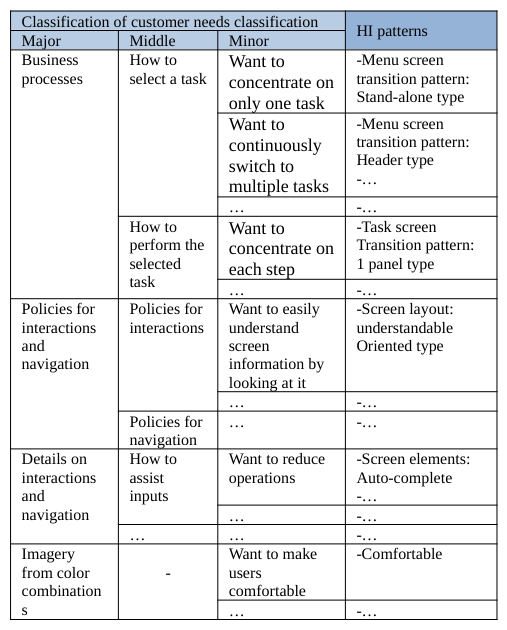
We will now explain how we classified customer needs and how we defined HI patterns based on the classifications with this method. Table 2 shows an example of how customer needs were classified and HI patterns were defined based on the classifications.
First, four major categories were selected from broad business processes to detailed interactions and navigation to address customer needs regarding usability from broad to detailed categories in sequence.
• Business processes [Equation or mathematical symbol available in the original paper PDF] Policies for interactions and navigation
• Details on interactions and navigation [Equation or mathematical symbol available in the original paper PDF] Imagery from color combinations
Table 2: Example of classifications of customer needs and derivations in HI patterns based on classifications Classification of customer needs classification HI patterns Major Middle Minor Business processes
Next, these major categories of customer needs were subdivided into more specific ones. For example, “business processes” were subdivided into “how to select a task” and “how to perform the selected task” as middle categories. Moreover, “how to select a task” was subdivided into “want to concentrate on only one task” and “want to continuously switch to multiple tasks” as minor categories.
HI fulfilling each customer need in this hierarchical classification was specifically figured out and developed as HI patterns. For example, the major needs category “business processes” corresponds to the HI patterns of screen transitions since business processes are expressed as multiple screen combinations as HI in the instance above. The following middle needs category of “how to select a task” corresponds to HI patterns of screen transitions especially concerning menu screens, since system users select a task from a menu screen as HI. Moreover, the following minor needs category of “want to concentrate on only one task” corresponds to an HI pattern of a specific screen transition where the menu screen is separated from the task performance screen. As these examples illustrate, SEs are assumed to obtain HI patterns that correspond to customer needs by tracing the classification of customer needs from major to minor categories, and to construct a suitable prototype by combining these patterns.
We outlined HI patterns and provided some examples. The details will be explained in the latter section.
Provide HI patterns with source codes (Problem 2: Satisfying both expressiveness and productivity) This method provides SEs with HI patterns with implementation codes for actual development systems so that they can easily develop a prototype that is as expressive as an actual system by combining HI patterns. Thus, all HI patterns have source codes of the screen or screen elements.
Source codes of HI patterns can easily be combined by copying and pasting them. SEs are able to combine and customize these source codes in their own development environment (e.g., by adding and deleting input items and rewording labels), which are assume to make it easy to develop a prototype that is suitable for customers and their businesses.
We surveyed frequently-used implementation languages for system development by interviewing SEs in this research. As a result, HTML5 and Silverlight were selected as the source codes provided with HI patterns.
Provide process to evaluate prototypes (Problem 3: Exhaustively extracting customer needs) It is important to check customer needs from broad business processes to detailed interactions and navigation one step at a time when discussing prototypes with customers. The main reason for this is that if the discussion digresses to specific issues concerning screens from the start, needs are inexhaustively extracted. This method provides SEs with a discussion process with prototype and a means to make customer needs clearly-stated.
The former discussion process is used to trace the classification of customer needs to define HI patterns. As previously stated, the classification of customer needs was developed from broad business processes to detailed operations and navigation. SEs are able to proceed to a discussion by checking HI patterns that comprised the prototype along with the classifications, when SEs showed the prototype to customers.
The latter means is used to make needs clearly-stated to reverse customer needs categories from HI patterns. This method enables SEs to exhaustively confirm customer needs that involve potential needs by reversing customer needs from HI patterns that comprise prototypes. Moreover, it enables stakeholders to share extracted needs in words concerning system developments through all development phases.
Use of proposed method
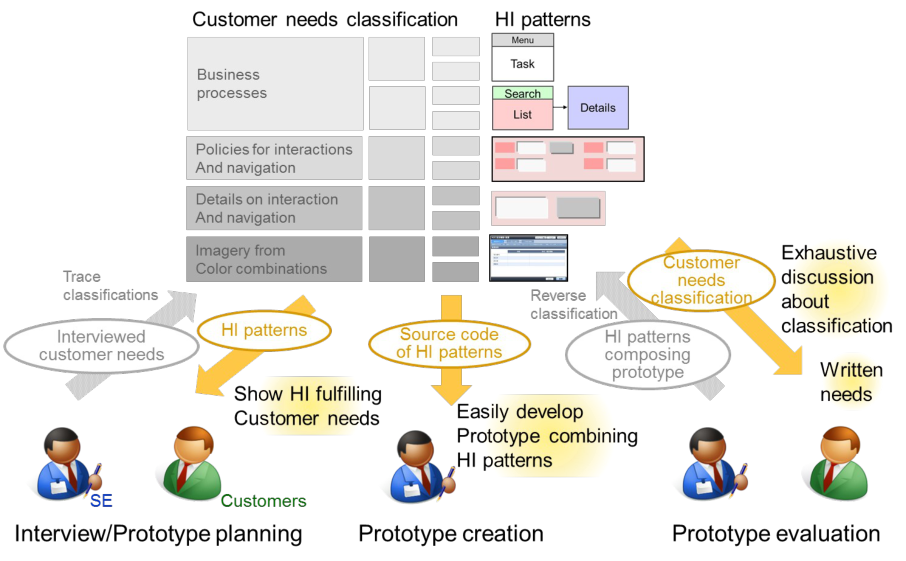
Figure 3 outlines how this method can solve the three problems of clarifying customer needs regarding usability in the requirements definition phase, as was previously explained.
First, when SEs interview customers and plan prototypes they trace the classification of customer needs, find categories that correspond to needs they found from interviews, and select suitable HI patterns from the categories. SEs are thus assumed to present customers with an HI that fulfills their needs.
Next, when SEs develop prototypes they can combine and customize the source codes of HI patterns. SEs are thus assumed to have effectively developed expressive prototypes.
Finally, when SEs and customers evaluate prototypes, they check HI patterns that comprise prototypes and correspond to customer needs. SEs are thus assumed to extract essential customer needs without deviating from these. Moreover, SEs reverse customer needs categories out of HI patterns that comprise prototypes. SEs are thus assumed to clearly state needs and to share them with customers.
Figure 3: Uses of proposed method
DETAILS ON METHOD This section explains the structure of HI patterns, which are a core part of this method. As stated in the previous section, HI patterns consist of the four layers below according to the classification of customer needs.
• Patterns for screen transitions [Equation or mathematical symbol available in the original paper PDF] Patterns for screen layouts
• Patterns for screen elements [Equation or mathematical symbol available in the original paper PDF] Patterns for screen color combinations
Patterns for screen transitions define how each screen that has a certain function transits from one to the next. They are patterned on the basis of the customer needs category of “business processes”. For example, these patterns involve a screen transition that changes the screen to search the screen for lists and a screen transition that has screens for searches and lists on one screen.
Patterns for screen layouts define what screen elements are combined and how they are arranged on a screen for typical users and tasks. They are patterned on the basis of the customer needs category of “policies for interactions and navigation”. For example, these patterns involve screen layouts for beginners in a task, and screen layouts for infrequent tasks.
Patterns for screen elements define reusable components of screens such as input and output items and interactions. They are patterned on the basis of the customer needs category of “details on interactions and navigation”. For example, these patterns involve auto-complete inputs and tabs.
Patterns for screen color combinations define sets of combined colors on a screen for users’ imagery provided in color. They are patterned on the basis of the customer needs category of “imagery from color combinations”. For example, these patterns involve a set of colors that provides users with a sense of comfort.
About HI patterns we described above, we developed had four layers of patterns for screen transitions, screen layouts, screen elements, and screen color combinations. The following sections explain the details on the HI patterns of each layer.
Patterns for screen transitions Screen transitions were patterned on the basis of the major needs category of “business processes”. Customers generally select and perform intended tasks from several that concern routine businesses, which are the targets in this method. Thus “business processes” are subdivided into the middle needs categories of “how to select a task” and “how to perform the selected task”. Patterns for screen transitions are subdivided into menu screen transitions and task screen transitions and they correspond to these needs categories. Menu screen transitions represent a pattern of screen transitions to select a task from a menu. Task screen transitions represent a pattern of screen transitions to perform the task.
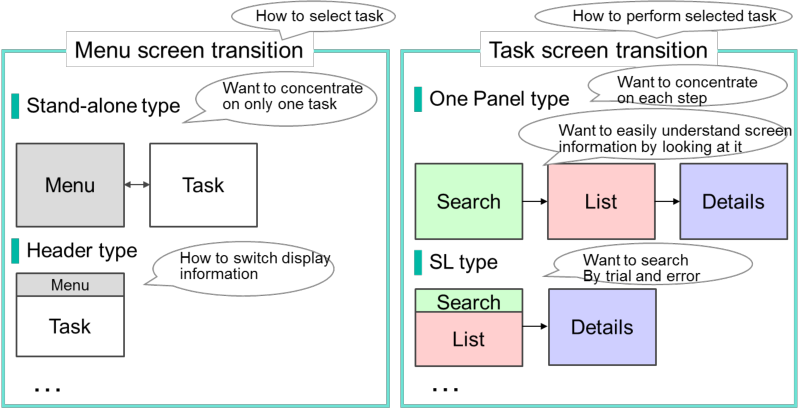
The four patterns of menu screen transitions are defined corresponding to the minor needs categories subdivided from “how to select a business”. For example, as shown in Figure 4 (a), the pattern for the menu screen transition “stand-alone type”, transitions between screens separated by the menu to select tasks and tasks to perform, corresponds to the minor needs category of “want to concentrate on only one task”. The pattern for the menu screen transition of “header type”, transitions between screens to perform tasks with a common menu in their header area, corresponds to the minor needs category of “want to switch multiple tasks continuously” The seven patterns of task screen transitions correspond to the minor needs categories subdivided from “how to perform the selected task”. For example, as shown in Figure 4 (b), the pattern for task screens transition “one panel type”, transitions between screens separated by each step of the tasks, corresponds to the minor needs categories of “want to concentrate on each step” and “want to simultaneously view as many data as possible”. The pattern for task screen “SL type”, transitions to a screen that has controls to search and list, corresponds to the minor needs category of “want to search by trial and error”. Unlike both examples, one customer needs category does not always corresponds to one HI pattern, but it is often the case that multiple customer needs categories correspond to one HI pattern or one customer needs category corresponds to multiple HI patterns.
(a) Example of menu screen transitions (b) Example of task screen transitions
Figure 4: Example of screen transitions
Patterns for screen layouts Patterns for screen layouts define what screen elements are combined and how they are arranged on a screen for typical users and tasks of routine enterprise systems.
Screen layouts are patterned on the basis of the major needs category of “policies for interactions and navigation”, which has an effect on the broad structure of screens. “Policies for interactions and navigation” generally vary from user profiles and their task characteristics such as users’ experience with tasks and the frequency of tasks. For example, an HI made along the policy for unskilled users or infrequent tasks needs to invoke fewer operational mistakes and to be easily understood by looking at the screen. However, an HI made along the policy for skilled users or frequent tasks needs to be performed with fewer operational steps (Okubo, et al., 2012). There are other characteristics, viz., users’ experience in IT and the length of time required to perform tasks, and these are also related to certain patterns for screen layouts.
Thus, “policies for operations and navigation” are subdivided into minor categories such as “do not want to mistake operations” and “want to easily understand screen information by looking at it”, which lead to understandability by users, and into other minor categories such as “want to reduce operations” and “want a simple view”, which lead to users becoming more efficient. The two task patterns for screen layouts, understandable-oriented and efficient- oriented types, are defined according to these minor needs categories classified above.
• Understandable-oriented type: Screen layouts with intuitive operations and simple views, which are suitable for unskilled users doing tasks [Equation or mathematical symbol available in the original paper PDF] Efficient-oriented type: Screen layouts with few operations to complete tasks, which are suitable for skilled users doing tasks
Figures 5 (a) and (b) explain what screen elements each screen layout pattern has and how they are arranged in each pattern as examples.
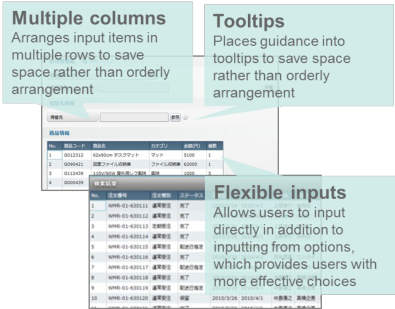
Figure 5 (a) shows an example of a screen for the understandable-oriented type. This screen arranges input items and their labels in orderly rows rather than to save space (a single column). It arranges guidance advice right next to the items, which helps users understand screen information (guidance advice right next to the target). It prefers inputs out of options to direct inputs, which prevents users from hesitating to make inputs (inputs from options).
Figure 5 (b) shows an example of a screen for the efficient-oriented type. This screen arranges input items in multiple rows and places guidance advice into tooltips to save space rather than to make it orderly (multiple columns and tooltips), which avoids scrolling operations. It allows users to make direct inputs in addition to making inputs from options, which provides users with more effective choices (flexible inputs).
(a) Example of screen layout: Emphasizing comprehension (b) Example of screen layout: Emphasizing efficiency
Figure 5: Example of screen layout
Patterns for screen elements Patterns for screen elements define reusable components of screens such as input and output items and interactions. They are patterned on the basis of the major needs category of "details on interactions and navigation", which includes minute needs outside the scope of screen transitions and screen layouts, such as “want to save character inputs” and “want to hide optional information”. The major needs category of “details on interactions and navigation” involved especially frequent customer needs selected from our experience with project support, and they were then organized using examples from indexes and content from published HI guidelines (Apple Computer, 2014) (Android open source project, 2012) and internal guidelines we had developed in the past.
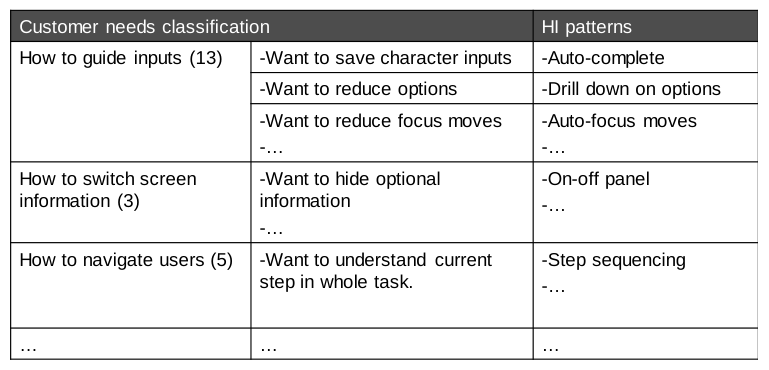
Table 3 summarizes examples of patterns for screen elements that correspond to categories subdivided from the major needs category of "details on interactions and navigation". We also have middle needs categories such as “how to guide inputs” and “how to switch display information”. Moreover, we subdivided them into minor needs categories such as “want to save character inputs” and “want to hide optional information”. According to these minor categories, patterns for 25 screen elements are defined, such as auto-complete input and an on-off panel.
Table 3: Examples of screen elements Customer needs classification HI patterns
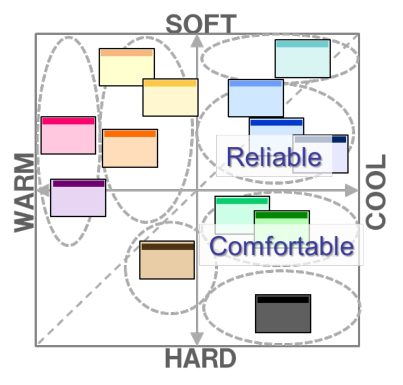
Patterns for screen color combinations The patterns for screen color combinations define sets of combined colors on a screen for users’ imagery provided in color. They are patterned on the basis of the major needs category of "imagery from color combinations". Thirteen imagery keywords given in color especially related to routine enterprise systems were extracted by brainstorming with several experts on usability and design on the basis of “Color Image Scale” (Kobayashi, 1991), which explains the relation between color combinations and common imaginary people conceive in regard to color. For example, these imagery keywords were “comfortable” and “reliable”. These imagery keywords were defined in the minor needs categories subdivided from the major needs category of “imagery from color combinations.”
Thirteen patterns for screen color combinations were constructed by coloring a screen of a typical routine enterprise system for all imagery words that took usability into consideration. We then defined usability through color combinations that minimally fulfilled the three aspects of accessibility, resistance to eye fatigue, and color harmony (Yano, et al., 2012). Figure 6 (a) outlines the relations between the thirteen imagery keywords and patterns for screen color combinations. Figure 6 (b) is an example of a screen color combination.
(a) Relations between patterns of color combinations (b) Example of pattern for color combinations
Figure6: Example pattern for color combinations
Application to a project We applied this method to a system development project in the requirements definition phase. As a result, the effectiveness of this method was confirmed since more needs were extracted than ever before. However, this resulted in additional problems to solve in the future. For example, it was often difficult for common SEs to customize prototypes without coding skills in the requirements definition phase. Thus, we need to provide tools to assist them to customize prototypes. We also need to provide other HI patterns to create easy-to-customize wireframes. Moreover, although the targets for the method were systems for PCs with keyboards and mice, we found it urgently needed to support systems for smart devices for which there is currently less know-how in development.
CONCLUSIONS
The proposed method helped SEs without expertise to easily create suitable prototypes and clarify customer needs regarding usability by using HI patterns based on customer needs in the requirements definition phase. We assumed that the proposed method could resolve the three problems below.
• It could provide HI patterns based on the classification of customer needs so that SEs without expertise could create prototypes that reflected customer needs by combining HI patterns.
• It could provide HI patterns with actual implementation codes so that SEs could efficiently create expressive prototypes.
• It could provide a process of evaluating prototypes by dissolving the prototypes into HI patterns and deriving customer needs from the HI patterns so that SEs could exhaustively clarify essential customer needs without deviating from these.
We confirmed the effectiveness of this method and found additional problems by applying it to a system development project. We intend to expand the scope of applications for this method in the future concerning users, development conditions, and devices by developing new HI patterns and support tools by applying and evaluating this new method in actual projects.
REFERENCES
Android open source project (2012) “Design, Android”, https://developer. android. com/design/index. html Apple Computer (2014) “iOS Human Interface Guidelines”, http://developer.apple.com/documentation/UserExperience/Conceptual/OSXHIGuidelines/index.html Goransson, B. Gulliksen, J. Boivie, I. (2003) “The usability design process - integrating user-centered systems design in the
software development process.”, Software Process: Improvement and Practice Volume 8, Issue 2: pp.111-131 ISO 9241-210: Human-centred design for interactive systems. 2010 ISO/IEC 12207: Systems and software engineering - Software life cycle processes. 1995 Keshlaf, A.A. Hashim, K. (2000) “A model and prototype tool to manage software risks”, Quality Software, 2000. Proceedings.
First Asia-Pacific Conference on pp. 297-305 Kobayashi, S. (1991) “Color Image Scale”, Kodansha International Lillrank, P. (2003), “The Quality of Standard, Routine and Nonroutine Processes”, Organization Studies February 2003 vol. 24 no. 2 pp.215-233 Memmel, T. Gundelsweiler, F. Reiterer, H. (2007) “Agile human-centered software engineering” BCS-HCI '07 Proceedings of
the 21st British HCI Group Annual Conference on People and Computers: HCI...but not as we know it - Volume 1 pp.167- 175 Moscove, S. A. (2001) “Prototyping: An Alternative Approach To Systems Devleopment Work. Review Of Business Information Systems” Vol. 5, No. 3 pp.65-72. Okubo, R. Tanikawa, Y. Fukuzumi, S. (2012) “UX Embodying and Systematizing Method to improve user experience in system
development -applying to planning and proposal phase”, Proceedings of 4th International Conference on Applied Human Factors and Ergonomics (AHFE 2012), 21-25 July, San Francisco Paech, B. Kohler, K. (2003) “Usability Engineering integrated with Requirements Engineering”, ICSE’03 International Conference on Software Engineering pp36-40 Tanikawa, Y. Okubo, R. Fukuzumi, S. (2012) “Proposal of human-centered design process support environment for system
design and development”, Proceedings of 4th International Conference on Applied Human Factors and Ergonomics (AHFE 2012), 21-25 July, San Francisco Yano, N. Okubo, R. Tanikawa, S. Fukuzumi, S. (2012) “Structure of screen color combination patterns to design color combination with suitable customer needs”, Human Interface Symposium (in Japanese) 3312L Zimmermann, D. Grotzbach, L. (2007) “A Requirement Engineering Approach to User Centered Design” HCI'07 Proceedings of
the 12th international conference on Human-computer interaction: interaction design and usability pp.360-369
LISTED IN THE AHFE DIGITAL BOOKSTORE CATALOGUE
Explore the complete digital volume
Advances in Ergonomics In Design, Usability & Special Populations: Part II
Read this individual research paper free through the original publisher, or explore the full digital proceedings book.
ISBN 978-1-4951-2107-4
Explore this ISBN in the AHFE Bookstore ↗Listed in the July 2026 bookstore catalogue; search by ISBN to confirm current availability · Digital book purchase optional