Janine Tasia Stang, Verena Wagner-Hartl (2025). Concept and development of a user interface for human-robot collaboration during a safety briefing. In: Intelligent Human Systems Integration (IHSI 2025): Integrating People and Intelligent Systems. AHFE Open Access, vol. 160, pp. 1–9. https://doi.org/10.54941/ahfe1005805
Collaboration between humans and robots - also known as human-robot collaboration (HRC) - is revolutionizing the way we work and produce and will become increasingly important in the future. The basic idea of HRC is to combine the strengths of humans and robots. Regarding this future field, a considerable amount of attention is being paid to collaborative robots, so called cobots. These robots are intended for direct human-robot interaction within a shared space respectively defined collaboration space (e.g., EN ISO 10218-2). Direct collaboration can be controlled in different ways, for example via user interfaces. Today, graphical user interfaces are often chosen for this. In the presented paper, the question should be highlighted whether there are also situations in which a cobot itself operates a user interface. This seems to make particular sense if the cobot can offer added social value, for example in the areas of service, care or education. In elderly care, for example, a cobot can increase people's independence and accessibility by helping them to operate a cell phone or a tablet to stay in contact with their beloved or receive telemedical support. Using a cobot within this interaction, the cobot could show the person how to achieve their goal or choose the correct steps, instead of controlling the application directly via programming commands which can be challenging for the user. Hence, in this case the cobot acts as a tutor or friend together with the user. However, there is currently a gap in literature regarding this topic. For this reason, a user interface that is operated directly by a cobot was designed and investigated. The user interface is a newly developed short serious game called “SafetyBot”, which conveys safety instructions in a playful way. The idea was, that a social robot, which is positioned opposite the user, operates the game together with the user. During the developmental processes we faced various challenges regarding choosing the right robot and how to interact together on one user interface. These challenges and the resulting solutions, which then served as the basis for the evaluation in an experiment with users shall be described in more detail in this paper. The insights gained within this process provide a basis for future research on this topic and help with the integration of cobots into everyday life.
Collaboration between humans and robots - also known as human-robot collaboration (HRC) - is revolutionizing the way we work and manufacture and will become increasingly important in the future (Arents et al., 2021). It is predicted, that these collaborative systems will not only offer their strengths in an industrial context but also in our everyday life for example as social robots in healthcare or learning. The basic idea of HRC is to combine the strengths of humans and robots (Gervasi et al., 2020). Regarding this future field, a considerable amount of attention is being paid to collaborative robots, so called cobots. These robots are intended for direct human-robot interaction within a shared space respectively defined as collaboration space (e.g., DIN EN ISO 10218-2, 2011).
Direct collaboration can be controlled in different ways, for example via speech-based or graphical-command based user interfaces (Angleraud et al.,
2021; Ajoudani et al., 2017). Today, graphical user interfaces are often chosen for this. In the beginning of human-robot interaction, it was common practice that humans and robots perform separate tasks without a real active collaboration between them (e.g., Gosh & Helander, 1986). Nowadays, intense interaction, cooperation and even collaboration between humans and robots is widespread in a wide variety of areas such as production, care and the private sphere (Wagner-Hartl et al., 2023a; 2023b; Gleichauf et al., 2022; Rodríguez-Guerra et al., 2021; Ajoudani et al., 2017; Olaronke et al., 2017).
In the presented paper, the question should be highlighted whether there are also situations in which a cobot itself operates a user interface. This seems to make particular sense if the cobot can offer added social value, for example in the areas of service, care or education. In elderly care, for example, a cobot can increase people’s independence and accessibility by providing support (Sawik et al., 2023; Gleichauf et al., 2022) for example by helping them in their daily routines, by operating a cell phone or a tablet to stay in contact with their beloved or to receive telemedical support. Using a cobot within these interactions, the cobot could show the person how to achieve their desired outcome or select the appropriate steps in an intuitive manner, as opposed to requiring the user to directly control the application through the use of programming commands. It is easy to imagine that using programming commands within such situations can be challenging for the user. In this instance, the cobot assumes the role of a tutor or companion, working in collaboration with the user to address the problem at hand. However, there is currently a gap in literature regarding this topic.
For this reason, a user interface that is operated directly by a cobot was designed and investigated. The user interface is a newly developed short serious game called “SafetyBot”, which conveys safety instructions in a playful way (e.g., Zhonggen, 2019). The idea was, that a social robot, which is positioned opposite the user, operates the game together with the user. Furthermore, the robot should communicate with the user and provide either motivating or neutral feedback.
METHOD – STUDY PREPARATION Development of “SafetyBot”
The short serios game called “SafetyBot” was developed to experience and learn safety instructions in a playful way. The game was developed for a special content, the Engineering Psychology/Human Factors Laboratory, a specialised laboratory at Furtwangen University, Campus Tuttlingen were university staff and students work on different engineering psychology- and human factors-related projects using XR-equipment, or prototyping tools like 3D-printer or laser cutter. The serios game “SafetyBot” consists of four different levels: (1) Fire behaviour, (2) amok behaviour, (3) working with a 3D printer and (4) using VR glasses. The content of both levels (1) and (2) are also part of the general safety instruction instructed at Campus Tuttlingen, whereas level (3) and level (4) were newly developed for the presented study. The content is based on the requirements of the laboratory used as experimental setting. The game
Concept and Development of a User Interface for Human-Robot Collaboration 3
was presented on a Wacom Cintiq Pro 24 Display (Wacom, o.d.) which was positioned between the user and the robot. It was planned that the robot should start with a short introduction regarding each respectively level and afterwards the participants should begin to answer a short test. This should be repeated for each of the four different levels. For example, the appropriate sequence of safety-related actions in the event of a fire should be prescribed in the correct order by the participant in collaboration with the robot used (see next section for more details regarding the robot). Afterwards, the knowledge acquired should than be tested in two fictitious hazardous situations on the Wacom display. In the before mentioned example regarding the behaviour in an event of fire, the potential hazards presented are: firstly, (a) a small wastepaper basket fire in the laboratory, and secondly, (b) a large fire in the centre of the laboratory. Regarding the second level (2) behaviour in case of amok the first fictitious dangerous situation involves (a) hearing gunshots in the building and the second situation was described by (b) receiving a message about someone running amok outside the building. The 3D printer and VR goggles levels (3, 4) tested more device-specific instructions for the used lab. Here, the participants were asked to select the correct hazards with the appropriate safety measures for the respective device after a brief introduction by the robot.
Selection of the Robot During the developmental phase of the experiment, prior to the beginning of the study, it was necessary to select an appropriate robot, establish the communication between the robot and the users, and program the interaction between the robot and the user interface. Firstly, the criteria for selecting the robot for the study included are described in Table 1.
Table 1. Criteria for selecting the robot.
Table available in the original PDF paper.
Factor Requirements Battery life The total time of the study was planned with approx. 60 minutes, of which around 40 min. were spent playing SafetyBot together with the robot. The robot should therefore have a battery life of at least 40 min. in active use and 20 min. in idle mode. Movement The robot should have sufficient degrees of freedom to precisely control the entire graphical user interface (Wacom display; Wacom, o.d.). Furthermore, the robot must be equipped with a gripper arm or arms and hands to securely hold the Wacom Pro Pen 2 to enable the operation on the used display. Fine motor skills and accuracy
The robot must be able to perform movements with high accuracy in order to precisely control even small areas of the graphical user interface, such as buttons. A high degree of accuracy is required so that the same area of the graphical user interface is reliably hit during repeated movements without major deviations or misclicks.
(Continued)
4 Stang and Wagner-Hartl
Table 1. Continued Factor Requirements
Table available in the original PDF paper.
Programmability Programmability is a crucial aspect of the robot’s functionality. It must be adaptable in order to adapt both, its movements and its linguistic behaviour. Movement sequences such as controlling the arm and holding the pen should be customisable and repeatable. Additionally, the voice and audio output must also be configurable to enable the robot to play predefined texts or audio files. Voice and audio output
As the robot assumes the function of a safety officer, it must be able to communicate with the user and provide acoustic feedback. It should therefore be equipped with integrated loudspeakers to output voice or audio files of up to 5 minutes in length.
Furthermore, two optional criteria were derived: Speech recognition and visual processing. Their requirements are presented in Table 2.
Table 2. Optional criteria for selecting the robot.
Table available in the original PDF paper.
Factor Requirements Speech recognition The utilisation of voice recognition technology enables the recognition and response to voice commands via microphone input. During the study, the robot can be signalled to continue talking without the study examiner having to intervene. Visual processing
An optional camera can be used to analyse and process the graphical user interface. However, this is not necessary in the context of the presented study, as the behaviour of the robot is completely pre-programmed. Nevertheless, it is recommended that a camera shall made available for the potential future use of a robot that operates different graphical user interfaces.
The use of two different robots were tested for the presented study: Firstly, the so-called ClicBot from KEYi Tech (o.d.) and secondly the social robot NAO from Aldebaran (a part of United Robotics Group, o.d.). The first robot, the ClicBot is a smart modular programmable educational robot. As the ClicBot can be used with different modules its battery life depends on the modules used. In the context of the study the required battery life (see Table 1) was reachable by the ClicBot without any problems. Furthermore, the criteria programmability was met. The behaviour of the ClicBot can be adapted using blockly drag-and-drop programming, and audio files can also be recorded and played. It should be noted, however, that the maximum length permitted for these is 10 seconds. This is the reason why the speech and audio output criterion only partially applied. Furthermore, the extent of the freedom of movement cannot be fully confirmed. Although the ClicBot can be constructed in a very modular way, the joints are not very flexible. This makes it difficult to control the entire graphical user interface on the Wacom display. In addition, the ClicBot’s gripper was not able to grip and hold the
Concept and Development of a User Interface for Human-Robot Collaboration 5
Wacom Pro Pen 2 firmly enough to operate the display. Since voice and audio output and freedom of movement were two very decisive factors, the ClicBot was not considered as suitable for the use of the planned experimental study without checking the additionally described criteria of fine motor skills and accuracy (see Table 1 for more details).
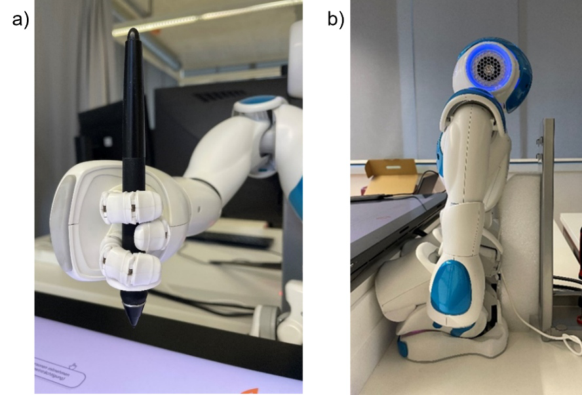
Consequently, the second robot NAO was examined as an alternative, regarding its suitability for the planned study. The social robot NAO is often used in education and research, but also as an assistant to companies and healthcare facilities. A total of 25 motors controls the behaviour of the NAO. This gives the NAO a very high degree of freedom of movement. Furthermore, the humanoid appearance (arms and hands with three fingers each; see Figure 1 part a) allowed it to grip and hold the Wacom Pro Pen 2 with great dexterity. Furthermore, NAO is programmable, as it can be controlled via its own programming environment, Choregraphe. In Choregraphe, both movements and speech behaviour can be adapted. With the help of text-to-speech blocks, predefined texts can be used without specifying a maximum length, thereby fulfilling the criterion of speech and audio output. Additionally, NAO is able to recognise and respond to voice commands with the help of a microphone. Although, according to the product description, NAO should have a battery life of 60 minutes in active use, the NAO used had a significantly lower battery life (about 50 minutes in idle mode), which may be due to its advanced age. However, this was easily remedied as the robot can also be used when permanently connected to the charging cable. The last criterion, fine motor skills and accuracy, could not be confirmed. The NAO’s movements were very jerky and repeated movements did not reliably hit the same area.
To sum it up, as the criteria of battery life, fine motor skills and accuracy are easier to circumvent than the voice and audio output and freedom of movement of the ClicBot, the NAO was considered sufficiently suitable for the study. Nevertheless, also for this choice, some precautions had to be taken before the NAO could finally be used in the study. As mentioned before, the NAO was permanently tethered to the charger to conserve battery life, which meant that it was therefore not completely free to move. With regard to fine motor skills and accuracy, the graphical user interface in Figma (o.d.) has been adapted by increasing the click area of the implemented buttons. This should enlarge the possibility that the button could still be clicked in the case of movements with larger deviations. But, however, even with this precaution, the GUI was not reliably hit by NAO. Therefore, a further interaction option had to be integrated within the prototype: It was decided to use the Wizard of Oz method (WoZ; Kelley, 1984 as cited in Kelley, 2018) for the planned experimental study. To follow a Wizard of Oz approach, the experimenter must have the possibility to simulate the robots’ clicks on the button. This was implemented in the setup and results in an additional possibility to trigger the buttons at the display between the robot and the participant, by pressing the ‘W’ key on the experimenter’s keyboard.
Furthermore, we faced another problem, that some of the small motors of the robot (e.g., within his leg) were running hot during the approach. To ensure a comparable collaboration for all experimental trials, the robots’
6 Stang and Wagner-Hartl
movements had to be reduced as much as possible without being experienced as static trainer or partner within the “SafetyBot”-tasks. A wide variety of variants to solve this problem were tried out. Finally, the robot was used in the position presented in Figure 1 part b), with his hands free to move and click on the display and supported by a pillar behind him. In this position, it was possible to switch off the motors after each movement to prevent them from overheating. In addition, the support provided the robot with sufficient stability to prevent it from tipping backwards.
Figure 1: Robot within the experimental setup: a) Using the Wacom Pro Pen 2, b) Support for the robot (Stang, 2024).
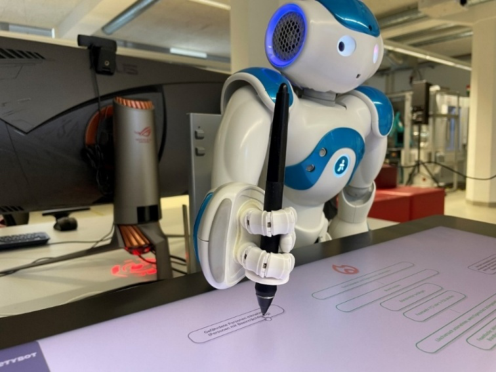
Communication and Interaction With the Robot The next step regarding the study preparation was to design the communication of the robot. It was decided that NAO firstly had to introduce the study procedure, followed by the content and explanations for each of the four respectively levels of the serios game “SafetyBot”. Furthermore, it should be able to address hints regarding the hazardous situations experienced in the first and second level and provide acoustical feedback e.g., if answers were given correct or incorrect. Based on the experimental design the voice output of the robot was developed in two different stages: on the one hand providing motivating feedback and on the other hand providing neutral feedback. The different feedbacks were evaluated using expert assessments. In addition, NAO’s speech recognition enabled users to communicate directly with the robot. This meant that users could command the robot to continue speaking using the word “continue” without the need for the study examiner to perform an appropriate behaviour in the software in the background. In addition, to create a realistic setting of communicating with the robot as possible, the transitions of the frames in Figma were adapted to the duration of the robot’s statements. This should improve the participant’s experience of a direct connection between the game and the robot (see Figure 2). However,
Concept and Development of a User Interface for Human-Robot Collaboration 7
due to technical restrictions, the transitions could only be implemented with a maximum delay of 20 seconds, so to enable a smooth as possible transition, the frames always changed while the robot was still talking.
Figure 2: Interaction of NAO with the short serious game “SafetyBot” (Stang, 2024).
Programming the Robot In the final step, the robot’s behaviour was programmed and implemented using the Choregraphe software. Choregraphe is a graphical programming environment for creating NAO’s animations and behaviours. So-called robot applications contain the packaged and installed behaviours on the connected robot and can be played or stopped individually. In order to realise the planned study and enable a realistically perceived collaboration with the robot, a total of 35 of such robot applications were implemented. The implemented robot applications contain of both, the voice output of the predefined texts and the movements of NAO, so that the robot was principally able to physically operate the Wacom display although it was not really necessary due to the used Wizard of Oz approach.
DISCUSSION
During the developmental processes various challenges were faced regarding choosing the right robot and how to interact together on one user interface. These challenges and the resulting solutions, and especially the insights gained within this process, provide a basis for future research on this topic.
Based on the different developmental steps presented before, one of the lessons learned was that the chosen approach to derive functions and their requirements, which is based on the ideas that are well known from the so- called user-centred design process (DIN EN ISO 9241-210) has been proven to be a very helpful and successful approach. Based on the basic and optional functions and their respectively requirements we were able to categorize and
8 Stang and Wagner-Hartl
determine the fitting of the available robots for study implementation. The results show that neither of the both available robots were able to meet all the requirements. Based on the evaluations, it turned out that the NAO had a better fit than the ClicBot in the functions that were more important for conducting the study. For this reason, the NAO was selected for the subsequent study and the conditions were adapted as well as possible to compensate for possible deficits. Where an adaption was not possible it has been decided to use a Wizard of Oz approach to simulate the robots behaviour of clicking the button.
Especially regarding the perceived experience of the robots’ movement, speech and collaborative behaviours the importance of pre-testing should be emphasized. These parameters were adjusted based on expert assessments during the developmental process in an iterative way. Furthermore, the characterization of the different feedback types (motivating or neutral) was evaluated using expert assessments.
In summary, the solutions presented for the different challenges that had to be solved during the development process served as a stable basis for the evaluation in an experiment with 25 users. The experimental study had just been carried out, but it can be reported that the developed experimental setup using the NAO as collaborative partner to perform the newly developed serios game “SafetyBot” worked well. The next step will be to analyse the results of the experimental study which shall represent a further step regarding the integration of cobots into everyday life.
ACKNOWLEDGMENT
The authors would like to acknowledge Hanna Schumm, Jonas Birkle, Katharina Gleichauf and Horst Leiber for their support with the implementation as well as Elmar Cochlovius, Maja Temerinac-Ott and Michael Dörflinger for their support regarding the social robot NAO and the possibility to use it for the study.
REFERENCES
Ajoudani, A., Zanchettin, A. M., Ivaldi, S., Albu-Schäffer, A., Kosuge, K., Khatib, O.
(2018, first published 2017). Progress and prospects of the human–robot collaboration. Autonomous Robots Volume 42, 957–975. Aldebaran, a part of United Robotics Group (o.d.). NAO Website. https://corporat e-internal-prod.aldebaran.com/en/nao Angleraud A, Mehman Sefat A, Netzev M and Pieters R (2021). Coordinating Shared
Tasks in Human Robot Collaboration by Commands. Frontiers in Robotics and AI 8:734548. Arents, J., Abolins, V., Judvaitis, J., Vismanis, O., Oraby, A., Ozols, K. (2021).
Human–Robot Collaboration Trends and Safety Aspects: A Systematic Review. Journal of Sensor and Actual Networks Volume 10, No. 48. DIN EN ISO 10218–2 (2011). Robots and robotic devices — Safety requirements for industrial robots, Part 2: Robot systems and integration. International Organization for Standardization.
Concept and Development of a User Interface for Human-Robot Collaboration 9
DIN EN ISO 9241–210 (2019). Ergonomics of Human-System Interaction—Part 210: Human-Centred Design for Interactive Systems (ISO 9241-210:2019). International Organization for Standardization. Figma (o.d.) Figma Website: https://www.figma.com/ Gervasi, R., Mastrogiacomo, L., Franceschini, F. (2020). A conceptual framework
to evaluate human-robot collaboration. International Journal of Advanced Manufacturing Technology Volume 108. Gleichauf, K., Schmid, R., Wagner-Hartl, V. (2022). “Human-Robot-Collaboration in the Healthcare Environment: An Exploratory Study”, in: Lecture Notes in Computer Science, Volume 13519, Kurosu, M., et al. (Eds.). pp. 231–240. Springer, Cham. Gosh, B. K. & Helander, M. G. (1986). A Systems Approach to Task Allocation of
Human-Robot Interaction in Manufacturing. Journal of Manufacturing Systems Volume 5, Issue 1, 41–49. Kelley, J. F. (2018). Wizard of Oz (WoZ)—A Yellow Brick Journey. Journal of User Experience, Volume 13, No. 3, 119–124. KEYi Tech (o.d.) ClicBot Website: https://keyirobot.com/pages/products-page Olaronke, I., Oluwaseun, O., Rhoda, I. (2017). State of the art: a study of human-
robot interaction in healthcare. Int. J. Inf. Eng. Electronic Bus Volume 3 No. 3, 43–55. Rodríguez-Guerra, D. Sorrosal, G., Cabanes, I., Calleja, C. (2021). Human- Robot Interaction Review: Challenges and Solutions for Modern Industrial Environments. IEEE Access, Volume 9, 108557–108578. Sawik, B.; Tobis, S.; Baum, E.; Suwalska, A.; Kropi´nska, S.; Stachnik, K.; Pérez-
Bernabeu, E.; Cildoz, M.; Agustin, A.; Wieczorowska-Tobis, K. (2023). Robots for Elderly Care: Review, Multi-Criteria Optimization Model and Qualitative Case Study. Healthcare, Volume 11, 1286. Stang, J. T. (2024). Photos of the used robot within experimental setup. Faculty Industrial Technologies, Furtwangen University, Germany. Wacom (o.d.) Wacom Website: https://www.wacom.com/ Wagner-Hartl, V., Nakladal, S., Koch, T., Babajic, D., Mazur, S., Birkle, J. (2023a).
“Influence of Movement Speed and Interaction Instructions on Subjective Assessments, Performance and Psychophysiological Reactions During Human- Robot Interaction”, in: Lecture Notes in Computer Science, Volume 14054, Kurosu, M., et al. (Eds.). pp. 461–475. Springer, Cham. Wagner-Hartl, V., Gleichauf, K., Schmid, R., & Dewald, N. (2023b). “The Impact of the COVID-19 Pandemic on attitudes towards Human-Robot Collaboration in the Healthcare Environment”, in: Human Systems Engineering and Design (IHSED 2023): Future Trends and Applications. AHFE Open Access, Volume 112, Waldemar Karwowski, Tareq Ahram, Mario Milicevic, Darko Etinger and Krunoslav Zubrinic (Eds.) pp. 397–406. AHFE International, USA. Zhonggen, Y. (2019). A Meta-Analysis of Use of Serious Games in Education over a
Decade, International Journal of Computer Games Technology, 4797032.
LISTED IN THE AHFE DIGITAL BOOKSTORE CATALOGUE
Explore the complete digital volume
Intelligent Human Systems Integration (IHSI 2025): Integrating People and Intelligent Systems
Read this individual research paper free through the original publisher, or explore the full digital proceedings book.
ISBN 978-1-964867-36-6
Explore this ISBN in the AHFE Bookstore ↗Listed in the July 2026 bookstore catalogue; search by ISBN to confirm current availability · Digital book purchase optional