Christian Bergman, Dan Högberg, Gunnar Bäckstrand, Lena Moestam (2022). A Library Based Tool to Assist the Generative Activity in Workstation Design. In: Advances in Ergonomics In Design, Usability & Special Populations: Part II. AHFE Open Access, vol. 19. https://doi.org/10.54941/ahfe1001235
Workstation design processes are seldom as rigorous as product design processes. Instead, workstations are often “just built”. This commonly results in workstations that suffer from problems related to ergonomics, flexibility, logistics, productivity etc., in turn leading to reductions in human wellbeing and/or economics. The problem is seldom a lack of information, about ergonomics or other relevant areas, in itself. The problem is rather knowledge of how to find, interpret and use the information proactively in the design of workstations, e.g. in the definition of a complete set of goals for a successful design, or in the generation of design solutions that fulfil these goals. Moreover, the evaluation of a workstation design is typically performed on actual workstations, or physical mock-ups representing near-completed proposals. This paper argues that workstation design processes could gain from utilizing product design methodologies. In line with this, a novel and structured way of establishing a library of verified design solutions that fulfil certain requirements is presented in this paper. This would help the designer to select and generate solutions for the design task at hand, thus speeding up the design process and reducing the risk of redesign and rebuild, due to not fulfilling set requirements.
It can be argued that workstations seldom are designed following as rigorous design processes as utilised in product design and development. The study by Bäckstrand et al. (2013) gave that workstations are often just “built” rather than purposefully designed with user and task requirements in mind. Weber (2005) also supports this. Even if such an unrefined design process may work well in some cases, it commonly results in workstations that suffer from design flaws, leading to problems related to ergonomics, flexibility, logistics, productivity etc., in turn leading to Ergonomics In Design, Usability & Special Populations II reductions in human wellbeing and/or economics.
Commonly it is not the lack of ergonomics information in itself that is the main problem in workstation design. The problem is rather how to access and utilize this information when setting requirements for a successful design, and in using this information in the generation of design solutions that fulfil set goals (Meister, 1982; Porter and Porter, 1999). Involvement of ergonomics in workstation design processes often relates to evaluative activities, i.e. the design is assessed in the perspective of whether it fulfills ergonomic requirements or not (Simpson and Mason, 1983; Burns and Vicente, 2000). In addition, these requirements are sometimes unknown or vague to the designer in that they are not explicitly specified, but rather implicitly communicated by experts performing the assessment (Haslegrave and Holmes, 1994). Also, the ergonomics evaluation is often made in a reactive manner in the sense that evaluations are done by assessing ergonomics late in the design process, or even after a workstation has been built (Porter et al., 1995). Consequently, when assessing ergonomics or conditions that support a lean production, the evaluation is typically performed on actual workstations, or on physical mock-ups representing almost completed design proposals. This indicates opportunities for enhanced proactivity and refined design processes in respect to workstation design.
Hence, workstation design processes would arguably gain from being inspired by methodologies used in product design and development. One argument is that there is a call for earlier and better intervention of ergonomics and design features that support a lean production in the design process. Another argument is that there is need to assist the workstation design activity in all fundamental steps in the workstation design process, i.e. both in explorative, generative, evaluative and communicative activities (Cross, 2008).
Based on these needs, this paper describes an approach to assist the workstation design process, especially within the commonly less supported generative activities. By facilitating a novel and structured way to establish a library of design solutions that fulfil certain requirements, the designer gets easy access to existing appropriate design solutions, hence gets inspiration for the selection and generation of solutions for the design task at hand. This approach would help to gather, store and spread understanding, knowledge and experience throughout the workstation design and assessment team. It would also speed up the design process and increase the chance to end up with a solution that meets defined expectations on the workstation; both regarding ergonomics but also factors that enable a lean production. In turn this reduces the risk that the workstation would require later redesign and rebuild.
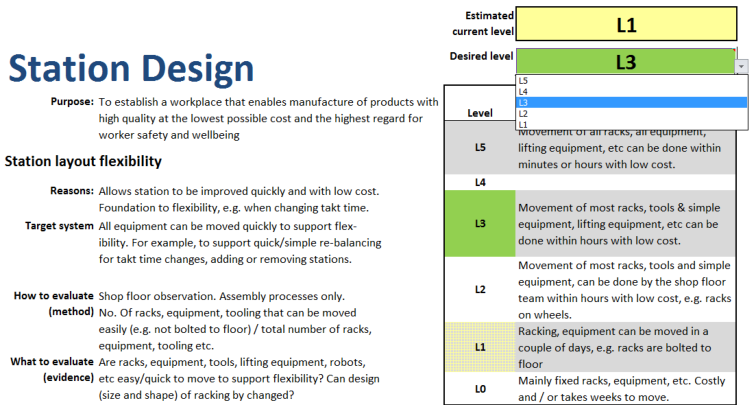
ASSESSMENT TODAY - A REACTIVE APPROACH The current approach, at the company involved in this research, is that an audit usually is done some time after a workstation is built. At the audit, an expert group assesses various aspects of workstation quality including ergonomics using an evaluation checklist called xPS Assessment System (Bäckstrand et al., 2013). The xPS Assessment System is a working material from Volvo Group, inspired by the Toyota Production System and the SwePS evaluation method (Harlin et al., 2008). The xPS Assessment System is a combination of lean principles and the Volvo Group’s overall manufacturing strategies concerning ergonomics, material supply (internal logistics) and personnel strategies. It is used to analyse work procedures and workstations to assess whether they follow for example ergonomic guidelines and lean production principles. Each assessment item is given a maturity level score, from L0 to L5, with clear criteria for each level.
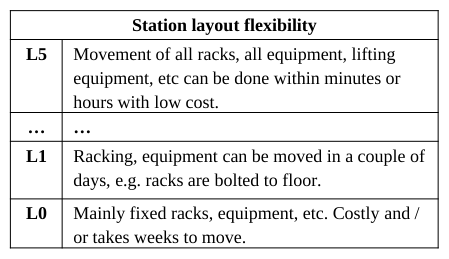
A study on the possibility to use this assessment system proactively gave that approximately half of the 57 xPS items, concerning both lean production and ergonomics, were possible to address proactively in the workstation design process (Bäckstrand et al., 2013). These 21 items can be used as design requirements as well as evaluation criteria within the design process, i.e. before building the workstation. Hence, these items provide valuable information to the designer to convey workstation design objectives and guidelines for how to actually design the workstation (see examples in Table 1). Unfortunately, today this information is rarely passed on to designers for proactive use when designing workstations.
Table 1: Example levels of assessment items “Station layout flexibility” and “Environmental care: packaging”.
A PROACTIVE APPROACH Shukla (2005) discusses how business performance increases over time when companies go from a reactive management of process elements to a proactive management. This suggests benefits from adopting a more proactive approach towards achieving lean principles and ergonomics objectives, basically by designing solutions that meet these principles and objectives already from the start, reducing the risks for problems and corrective actions required. This would follow the Toyota Production system principles Right first time and Reduction of waste (Liker, 2004). A workstation carefully designed with lean principles in mind can also lead to better ergonomics, as shown by Womack et al. (2009).
The studied case (Bäckstrand et al., 2013) indicated that senior product developers did use some ergonomics and lean parameters during the design process, but not in a structured way. During interviews with senior product developers, it was made clear that their experiences from previous design projects had made them aware of problems that could occur in later stages of the workstation’s life cycle, but these experiences were not stored or communicated to other designers.
The objective of the work described in this paper is to develop a support system that assists workstation designers to work proactively with ergonomics and lean principles. The proactive approach aims at reducing total losses in production by supporting design of workstations that meet ergonomics requirements and lean production principles already from the start. In general terms, losses are reduced by solving problems before they occur; thereby reducing the need for corrective measures.
The underlying idea is that, if a workstation could be designed using a similar method as when designing a consumer product, where workers are regarded as users of the product, requirements regarding ergonomics and lean production can be proactively addressed through guidelines and best practices from previous projects. Advantages would be a more efficient and ergonomic workstation, and a more efficient design process with built-in learning and documentation. The system should help the designer ask the right questions, gather useful information, define requirements, assist in decision-making and support evaluation of goal fulfilment.
The three major purposes of the support system are:
1. Assist in creating workstations that offer better ergonomics and a more efficient production. The tool can be used both for developing new workstations or upgrading existing workstations.
2. Educate users: Novice designers will learn the process and learn from examples.
3. “Institutionalise knowledge”: The knowledge about the evaluation system and what makes a workstation good or bad from a specific perspective, should be passed on from evaluators to designers. Also, any workstation designed or evaluated using the system could be automatically documented so that successful designs can be reused for other workstations.
THE WORKSTATION DESIGN TOOLKIT A system of three components make up the Workstation Design Toolkit, as seen in Figure 1: the Android app “xPS Tagger” (1) documents workstations to make them searchable in a regular image organizing software (2), which provides input and inspiration to the designers that generate workstation solutions. The spreadsheet file “Workstation Design Navigator” (3) acts as a guide through the design process, and handles the connection between user needs, xPS requirements and workstation examples. The toolkit is available for free download1.
Figure 1: A system of three components make up the Workstation Design Toolkit: The app “xPS Tagger”, an image organizing software and the Spreadsheet file “Workstation Design Navigator”.
Figure available in the original PDF paper.
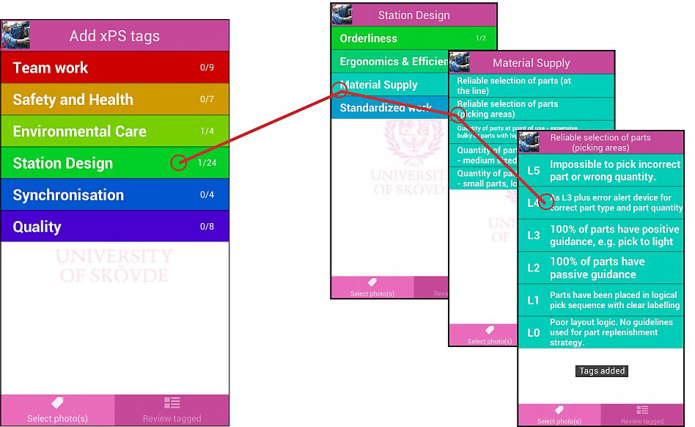
Populating the example library: “xPS Tagger” To make sure that the knowledge and information from the assessment is passed on from evaluators to designers and help documenting the evaluation results, an Android app, “xPS Tagger”, has been developed. During assessment of existing workstations, they are photographed and “tagged”, meaning that the app adds metadata to each picture with codes corresponding to each assessed level for every xPS item that is evaluated. This makes the photos searchable using standard image organizing software. To illustrate this feature, Figure 2 shows how a picture of a workstation is tagged with level 4 for the item “Reliable selection of parts (picking areas)”.
1 The Workstation Design Toolkit is available for download at http://www.ngps.se/tool.aspx?tid=6. The tools are in English, but instructions are so far in Swedish only. All feedback is appreciated. Ergonomics In Design, Usability & Special Populations II
Figure 2: A screenshot of the xPS Tagger app, showing the xPS system hierarchy. A series of photos of a workstation are taken and tagged with corresponding quality level for each item assessed.
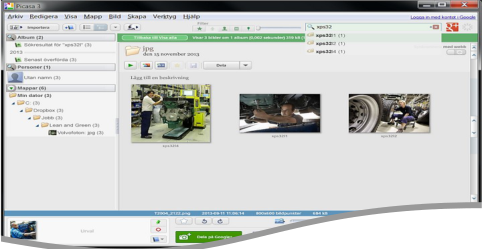
Picture library search engine As the JPG pictures are “tagged” using standard format for this metadata, a vast array of free or commercial software for organizing images can be used to find pictures of workstations that correspond to a desired xPS level for any assessed item. For example, to search for workstations where the xPS item “Assembly Ergonomics” (item number 32) is “The process is designed to minimize ergonomic strain…” (Level 4), one enters the search string XPS22L4. All photos of workstations that meet this criterion will appear. Figure 3 illustrates this feature, here using the free software Google Picasa 3.
Figure 3: Using image organizing software to search for photos of workstations tagged with the assessment item Assembly ergonomics, XPS32. Search results for all levels show until the desired level (L4) is added to the search string.
Design Process Guide: “Workstation Design Navigator” The core of the support system is the “Workstation Design Navigator” (WDN), a spreadsheet workbook that guides the user through a suggested design process. Forms and tools helps the user to:
Define the purpose of the workstation
Identify various users of the workstation and their needs
Identify work procedures and necessary equipment
Set requirements using the xPS Assessment system
Find examples of workstations that fulfil the set requirements (provides search codes)
Compare and evaluate design suggestions
THE DESIGN PROCESS The core of the suggested workstation design process is to identify user needs early, matching them against xPS items to create a list of requirements and enable the search for examples that fulfil these xPS related requirements.
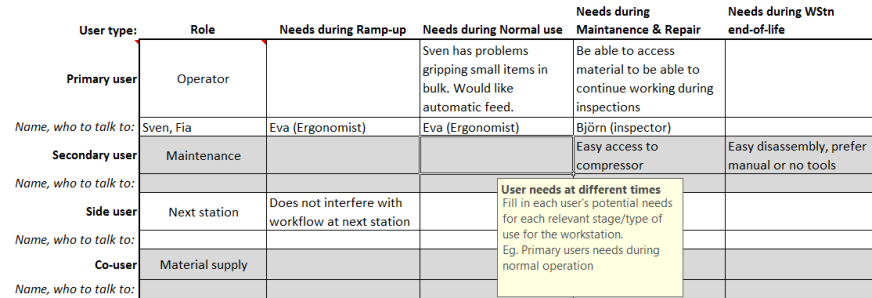
Identifying users and their needs In the process of identifying relevant users and their needs, WDN displays a matrix dividing users into four categories: primary users, secondary users, side users and co-users (Janhager, 2005) and on the other axis, the phases of the life cycle of the workstation are presented (Figure 4).
Figure 4: The navigator helps to identify many user types and their needs at different times.
The objective is to support the designer to see “the user” in a broader context and identify more stakeholders and needs. However, user needs are often expressed in ways that makes them intangible and difficult to quantify (Ulrich and Eppinger, 2012) (“I want it to be more comfortable”), which makes it difficult to know how to address them or evaluate if they have been met by the design. The workstation examples are instead indexed and searched for using the objective xPS system. To be able to find examples of workstations that might fulfil the identified user needs, a connection between these needs and the xPS items must be made. A needs-metrics-matrix (Ulrich and Eppinger, 2012), that connects expressed user needs to measurable metrics, inspired the creation of the matrix shown in Figure 5. The matrix facilitates the establishment of links between user needs and xPS items. The workstation designer should pay extra attention to what level of the identified xPS items would likely fulfil a user need, and then search for example solutions of the corresponding xPS item at this level.
Figure 5: Mapping expressed user needs to xPS items enables the possibility to find existing workstation examples that might fulfil these needs.
Figure available in the original PDF paper.
Setting requirements The applicable xPS Assessment items are used proactively to create the list of requirements for the workstation (Figure 6). The reason for each assessment item is clearly defined, giving the designer a good understanding of the item and a sense of purpose for fulfilling the item by the workstation design. In cases where an existing workstation is to be improved, the assessment of current levels serves as a benchmark. This feature highlights current and desired levels of workstation design requirements, and designers can possibly discuss the desired level for each assessment item with management. This since it is likely that a balance is needed between expectations on the workstation and the associated costs, or other resources, to fulfil these expectations. For example, the highest level might not always be the most suitable level to aim for, since it may require both large investments and organisational capability. In some cases it may even be unsuitable to aim for high levels; heavy machinery might have to be securely attached to the floor, thus making the workstation less flexible, but still being the appropriate design solution.
Figure 6: The xPS Assessment items let the designer set a desired level for the new workstation.
Finding and selecting examples In general, setting up a list of design requirements is not that difficult, but the creative activities of the design process are likely to be the most difficult actions to try to automate or support, i.e. what is here referred to as the generative activity in workstation design. The aim in this work is not to try to automate this activity but rather on giving valuable assistance to workstation designers when utilising their creativity, competence and experience. Hence, the rationale is that, by facilitating easy access to workstation design examples and checklists, a designer can experiment with sub- solutions and the workstation layout, and identify a successful overall solution. The library in the workstation design toolkit can possibly also be populated with unsuccessful design solutions, i.e. contain solutions to avoid.
The next process step in WDN (Figure 7) is a tool that allows the user to perform selection and evaluation of example solutions. The tool combines a list of requirements based on the xPS Assessment system, with a search code to find solutions that meets these criteria in the solution library. Solutions are imported and evaluated.
For the evaluation of the workstation design, the xPS Assessment is used once again, as criteria in a combination of a concept combination table (also known as morphological chart)(Cross, 2008) and a concept selection table (Ulrich & Eppinger, 2012), where suggested design alternatives are compared to each other and evaluated against each other.
A traditional morphological chart is used to divide problems into a handful of sub-problems or functions for a product, where different solutions for each sub-problem can be combined into a complete solution. This tool instead consists of 28 assessment items that has no direct relation to the purpose or function of the workstation.
If the solutions are chosen from the database of verified designs, all solutions should meet the evaluation criteria. The evaluation of different design suggestions would here rather be focusing on how fit the solution is for the intended purpose and use of the workstation. Also, all combinations might not work well together, hence the need to evaluate the full workstation. As seen in Figure 7, alternative solutions are evaluated based on how suitable they are for the workstation at hand on a scale 1 to 3 (best). The solutions are transferred manually, so solutions that are obviously unsuitable should never be imported to the spreadsheet.
Figure 7: Evaluation of alternative solutions against requirements defined by xPS Assessment and user needs.
Figure available in the original PDF paper.
CONCLUSIONS & DISCUSSION A toolkit has been developed to minimize costly workstation rebuilds due to late discovery of poor ergonomics and other problems caused by an ad hoc design process. The toolkit allows for documentation and indexing of successful workstation examples that can be directly implemented or used to inspire new solutions. Further, it facilitates a knowledge deployment from evaluators to workstation designers.
Companies could likely improve their workstation development processes by using evaluation items proactively as requirements and creating designs from successful examples. Some companies have also appreciated the toolkit’s ability to increase effectiveness during audits of their existing industrial processes.
One problem is that many successful workstation designs must first be built and assessed to enable the creation of a library. Of course, solutions to all possible problems are not likely to exist in the database, in which case a more traditional process can be utilised. If companies would be willing to collaborate and share their own examples and create a common database, this could provide an excellent starting point for new users of the toolkit.
There are many other possible applications for this method of documenting evaluated solutions. Any problem area where criteria for a good solution can be identified, and solutions can be evaluated from these criteria, might be a candidate for this approach to finding solutions. Another positive side effect of this method is that it may rationalize the systematic analysis and improvement of the working environment, as a related study gave that many of the xPS items have a connection to items in the Swedish working environment legislation.
The indexing of pictures is today solely based on the xPS Assessment system, but could easily be extended to cover more information that could give a more precise search result, e.g. by including keywords for the type of work that is done at the workstation. In addition to photos, other kinds of files or documents could also be associated in the library, e.g. tagged with links to communicate with a Product Data Management (PDM) system to get CAD files and text specifications.
The suggested working method and the toolkit are now to be evaluated at different workplaces. Several companies have expressed interest in further use and adaptation of the toolkit and its methods, but no testing has yet been reported.
ACKNOWLEDGEMENTS
This work has been made possible with the support from VINNOVA in Sweden, within the FFI programme, and by the participating organisations. This support is gratefully acknowledged.
REFERENCES
Bergman, C., Bäckstrand, G., Högberg, D., Moestam, L. (2013), ”A tool to assist and evaluate workstation design”. In: Proceedings of NES 2013, 45th Nordic Ergonomics & Human Factors Society conference, Iceland.
Burns, C. M. and Vicente, K. J. (2000), “A participant-observer study of ergonomics in engineering design: how constraints drive design process”. Applied Ergonomics, 31(1): 73-82.
Bäckstrand, G., Bergman, C., Högberg, D., Moestam, L. (2013), ”Lean and its impact on workplace design”. In: Proceedings of NES 2013, 45th Nordic Ergonomics & Human Factors Society conference, Iceland.
Cross, N. (2008), “Engineering Design Methods: Strategies for product design”. Chichester: Wiley.
Harlin, U., Moestam Ahlström, L., Medbo, L. & Svenningstorp, J. (2008), ”A Production System Assessment Approach within Swedish Automotive Industry”. In: Proceedings of The Swedish Production Symposium, SPS 2008. Stockholm, Sweden.
Haslegrave, C. M. and Holmes, K. (1994), “Integrating ergonomics and engineering in the technical design process”. Applied Ergonomics, 25(4): 211-220.
Janhager, J. (2005), “User Consideration in Early Stages of Product Development – Theories and Methods”. Doctoral thesis, KTH Royal Institute of Technology, Stockholm, Sweden.
Liker, K.J. (2004), “The Toyota way. 14 Management Principles from the World´s Greatest Manufacturer”. New York: McGraw-Hill.
Meister, D. (1982), “The role of human factors in system development”. Applied Ergonomics, 13(2): 119-124.
Porter, J.M., Freer, M.T., Case, K. and Bonney, M.C. (1995), “Computer aided ergonomics and workspace design”. Evaluation of Human Work: A Practical Ergonomics Methodology. D. R. Wilson and E. N. Corlett, Eds. London, Taylor & Francis: 574-620.
Porter, S.C. and Porter, J.M. (1999), “Designing for usability: input of ergonomics information at an appropriate point, and appropriate form, in the design process”. Human Factors in Product Design. W. S. Green and P. W. Jordan, Eds. London, Taylor and Francis: 15-25.
Shukla, A. (2005), “FAT Results from Lean Implementation: A Rational Process Approach to Lean Success”. Princeton: Kepner- Tregoe, Inc. Available at http://www.kepner-tregoe.com/PDFs/Articles/FAT_Results.pdf [2013-07-08]
Simpson, G. C. and Mason, S. (1983), “Design aids for designers: an effective role for ergonomics”. Applied Ergonomics, 14(3): 177-183.
Ulrich, K.T., Eppinger, S.D. (2012), “Product Design and Development”. New York: McGraw-Hill.
Weber, A. (2005), “Lean Workstations: Organized for Productivity”. Assembly Magazine. Available at http://www.assemblymag.com/articles/84001-lean-workstations-organized-for-productivity [2013-07-08]
Womack, S.K., Armstrong, T.J. & Liker, J.K. (2009), “Lean job design and musculoskeletal disorder risk: A two plant comparison”. Human Factors and Ergonomics in Manufacturing & Service Industries. 19(4): 279–293.
LISTED IN THE AHFE DIGITAL BOOKSTORE CATALOGUE
Explore the complete digital volume
Advances in Ergonomics In Design, Usability & Special Populations: Part II
Read this individual research paper free through the original publisher, or explore the full digital proceedings book.
ISBN 978-1-4951-2107-4
Explore this ISBN in the AHFE Bookstore ↗Listed in the July 2026 bookstore catalogue; search by ISBN to confirm current availability · Digital book purchase optional