Vidya Vaidyanathan, Daniel Rosenberg (2018). “Will Use it, Because I Want to Look Cool” A Comparative Study of Simple Computer Interactions Using Touchscreen and In-Air Hand Gestures. In: Advances in Physical Ergonomics and Human Factors: Part I. AHFE Open Access, vol. 1. https://doi.org/10.54941/10010
The Xbox Kinect and now the Leap Motion Controller have brought about a paradigm shift in the way we interact with computers by making the recognition of 3D gestures affordable. Interfaces now understand natural user interfaces, integrating gestures, voice and various other kinds of multi-modal input simultaneously. In this paper we attempted to understand in-air gesturing better. The purpose of the study was to understand differences between touchscreen and in-air gesturing for simple human computer interactions. The comparison of the gestures was done in terms of Muscle effort/fatigue and Frustration, Satisfaction and Enjoyment We have also tried to study the learnability of in-air gesturing. In our research we found that in-air gesturing was significantly superior with respect to muscle effort and fatigue when compared with touchscreens. We also found that in-air gesturing was found to be more fun and preferred because of its “coolness factor”. Lastly, in-air gesturing had a rapid learning curve.
Gone are the days when user interfaces were based entirely on buttons, joysticks, keyboards and mice. Today the world has advanced into direct manipulation devices such as touchscreens and smart phones. An external device that maps onto the x-y co- ordinate system of a computer control is no longer required. The future of the computing world lies in interfaces described in the press as gesture controlled, motion-controlled, direct, controller- less and natural. The most popular gesture controlled devices that exist in the market today are gaming devices such as the Nintendo Wii, the Microsoft Kinect, the Sony EyeToy and the Leap Motion. Smart phones and tablets are joining the trend of using gestures. They primarily map human movement in 3D space into 2D spaces in graphical, virtual and immersive environments using 3D spatial input. Accelerometers and motion sensors are used to sense 3D motion, while an infrared camera is used to sense the direction pointed at. In virtual and immersive environments, sensor data is used to determine where one is looking so as to combine virtual information and objects within the real world field of view.
Fig. 1. Showing gestural interfaces using the Wii and the Microsoft Xbox Kinect
The importance of gestures Gestures form a means of human expression, in ways which speech possibly cannot (Bianchi-berthouze, Kleinsmith , 2003). Kendon (1983) claims that non-verbal communication is a separate field of study. He also states that at times non-verbal communication can be far more effective than speech. Morris et al (1979) showed that non-verbal communication, primarily gestures are a better indicator of emotional states than verbal communication. Vinayagamoorthy et al (2002) showed that 93% of direct communication in humans is nonverbal, out of which 55% was shown through body language, while only 38% attributed to tone alone
What is Gesture Recognition?
Gesture recognition mainly concerns with identifying, recognizing and making meaning of movement by a human. The human body parts involved can be the hands, arms, face, head or the body (Acharya, Mitra, 2007). Kendon (2004) says that amongst all human body conveying gestures, the hand gestures are the most natural and universal. They form a direct and instant form of communication. Hand gestures are therefore the most used method for interaction with technological systems (Kendon, 2004). According to a researcher at Carnegie Melon University, Dr. Harrison, the human hands alone are capable of tens of thousands of gestures, individually and in combination. Some tasks hinder the use of hands to interact with devices, such as checking email while driving a car (Atia et al, 2010). Atia et al showed that in such cases certain applications use face and body related gestures. They also showed that using the leg to gesture was limited due to the spatial constraints.
Background and Related Work Machines are easier to use if they can be operated through natural language or gesture recognition (Freeman, Weissman, 1995). People produce gestures while they speak (Perzanowski et al, 2001). Gestures maybe categorized as meaning-bearing, superfluous or redundant ((Perzanowski et al, 2001). In a survey, where Americans were polled for the top two inventions that improved their quality of life, “television remote” and “microwave oven”, emerged as the winners (Freeman, Weissman, 1995). Freeman and Weissman (1995) explored the control of a television using gesture recognition. They compared voice and vision as the two candidates for equipment control. Voice had the advantage of having an established vocabulary, while was not appropriate for the context. Gestural control was more appropriate for the context, but lacked a natural vocabulary (Freeman, Weissman, 1995 Perzanowski et al (2001) explored the possibility of building a multi-modal interface based on voice and gestures. Their interface used natural gestures especially those made using the arms and hands. They made use of meaning- bearing gestures that were associated with locational cues for a human-robot interaction. The meaning-bearing gestures mainly included indication of distances (by holding the hands apart) or directions (tracing a line in the air). When a user says “go there”, alongside of the voice interpretation, the gesture signaling the direction was essential to make sense of the verbal command. Perzanowski et al (2001) observed that in noisy environments, gestural are largely used to compensate for lack of comprehensible auditory input. Atia et al (2010) conducted experiments to validate a technique called the “Smart Gesture Sticker”, to make user interactions with everyday objects in a ubiquitous environment, more natural and intuitive. Users were provided with three scenarios (a media player and a smart mirror) and had to come with gestures to interact with them. They measured user satisfaction especially when gestures were created from scratch. Any part of the human body could be used to gesture for an operation. This facilitated the study of most gestures that were most natural and intuitive. The results of their experiment showed that 76% of users create hand gestures without much conflict, while 16% had at least one conflicting gesture. They showed that when users had to create their own gestures from scratch or sometimes adapt to known gestures, they exhibit faster and more accurate interaction with the object in consideration. Their users quoted that gestures do need some time to be learned, but once learned, their usage become synonymous to real life situations. Apple Corporation designed 3D gestures for their Ipad with a pre- set option for novices. Kela et al (2006) in their Smart Gesture Sticker experiment showed that for a VCR controlling task, different users had different gestures for the same operation, hence personalization of gestures in a gesture recognition system was important. The idea of using “free hand” gestures as an input medium is based out of a “put that there” experiment conducted in 1979. This experiment used primitive gestural input. Three main verticals which were looked at were
Virtual Reality Systems: Here the user directly manipulates the objects in the application. Use of hand gestures was predominant
Multi-modal interfaces: These natural user interfaces use various forms of human communication other than gestures, such as speech and gaze.
Gestural languages: Here primarily task control was done using gestures. Sign language interpretation is one of them. Some other examples are where Sturman (1992) presented a gestural command system to orient construction cranes, while Morita et al (1992) showed the use of gestural commands in an orchestra.
Naturalness of gestures In gesture recognition, it becomes imperative to match the right gesture to its intent, giving way to some degree of error (Harrison, 2012). To develop gesture recognition systems that are in line with basic ergonomic principles such as memorability, learnability and ease of use, it becomes essential to study gestures that people perform naturally and intuitively (Urakami, 2012). Urakami (2012) also claims that human gestures are best identified by letting the human perform them freely without imposing any technological constraints. Studies show that using natural gestures enhances performance and the user experience with a product. Humans become instantly comfortable using a device that can be controlled using natural gestures. The learning curve is minimal as gesturing is intuitive (Kendon, 2004). Moderately natural gestures can prove detrimental to the user experience and cause “gesture overwhelm” (Bowman et al, 2012). Further, less natural gestures can provide performance but rate low on entertainment value. Naturalism of a gesture depends both on interaction technique and the task context, for example a steering wheel metaphor (gesturing the hands similar to the way one operates a steering wheel) is valid for a driving exercise, while it may be totally out of place in environment that requires shooting with guns (gesturing with the hands with folded fingers to indicate a gun).. Sometimes non-natural gestures are mapped to functionalities where natural gestures are not available, such as the “shake” gesture in the Wii games. Bowman, Mcmahan and Ragan attempted to address the following questions about naturalness in gesture recognition [5].
“Are 3D UIs more natural than existing UIs?”
“Do natural UIs promise better engagement, performance and learning?”
“In the absence of natural mapping, can hyper-natural mapping prove to be better than a traditional UI”? The more natural a gesture is to its context and the more coherent in its mapping to human performance, the higher its interaction fidelity will be (Bowman et al, 2012). Bowman et al conducted a series of experiments to answer the questions they posed. They found that increased “interaction fidelity” has an increasingly positive experience on the user performance and efficiency of user tasks. Natural gestures were especially beneficial when the tasks were more complex. Users perceived that interactions with a higher degree of interaction fidelity were more fun, engaging and had higher immersive value. Considering learnability of a NUI, Wigdor and Wixon claim that a NUI is one that provides a quick and enjoyable learning experience from novices to skilled users (Widgor, Wixon, 2011). This rapid learnability occurs due to practice. They also define an NUI to be extremely enjoyable.
Social acceptability of gestures Beyond recognizability, the acceptability of gestures is also critical. Certain cultures have politeness conventions for gestural use (Kita, 2007). For example, pointing with the left hand is considered impolite in the country of Ghana. Receiving and giving with the left hand is also considered taboo (Kita, Essegbey, 2001). Hand gestures might have some drawbacks, such as acceptance or rejection in a public space (Atia et al, 2010). Atia et al (2010) found that it was threatening to public when a user performed a gesture of a large round circle in a public place. They also found in the course of their experiment, some users made actions like throwing in the air, which can be threatening in a public space. Ronkienen et al (2007) studies the usability of hand gestures in different generic environments, especially public places. Ronkienen et al (2007) conducted “tap gesture” based experiments where they presented to participants, gesture based scenarios and quizzed on their willingness to use the gesture in various situations. Responses were Boolean, in the form of yes and no and they tried to understand user willingness to perform a gesture, such as “Yes, this looks useful” or “No, this looks silly.” No further investigation was done to find the reasons as to why such responses were elicited. It was observed that social acceptability of performing a gesture was dependent on where it is performed and who it is performed before and that certain gestures can be viewed as threatening in public spaces. Rico and Brewster (2010) took Ronkienen’s experiment forward and examined the social acceptability of eight common gestures, example wrist rotation, foot tapping, nose tapping, shoulder tapping, etc. They examined participants from the United States and the United Kingdom alone. They defined audience into 3 categories, alone, friends and family and strangers. Different locations taken into account were home, pavement, public transport, workplace and a pub. They showed that acceptability depends on the combination of audience and workplace. For example in the US, nose tapping was acceptable when the performer was alone at home, or in a pub among strangers, but not when alone in a workplace or in front of friends and family.
Drawback of gestures Baudel and Beaudouin-Lafon (1993) extensively explored the limitations of any gesture recognition system. Fatigue was found to be one the key limitations. Gestural communication used more muscular activity than simple keyboard interaction, mouse interaction or speech. The wrist, fingers, hands and arms all contributed to the commands. In order for the gestures to be of minimal effort, they had to be concise and fast. Over time they may induce fatigue in the user (Baudel, Beaudouin-Lafon, 1993). Among the more recognized tools to measure muscle fatigue is the Electromyographic (EMG) analysis (Christova et al, 1999). The surface EMG has limitations related to electrode placement, skin impedance and cross-talk (McQuade et al, 1998). In spite of the limitations, the surface EMG has been shown to be a valid and reliable tool to identify muscle fatigue (Christova et al, 1999).
EXPERIMENTAL DESIGN Weidmeyer claims that offering compelling user experiences has become the be-all and end-all of user interfaces today (Weidmeyer, 2012). She states that compelling designs are those that evoke positive emotions, both as a methodology and as an end result. She claims that positive emotions are evoked when users are engaged completely immersed in using the product. She describes it as the “zen” concept when during engagement, users do not realize time has passed and experience the activity as more real than virtual. This has been taken into account by video gamers and gamified applications. The end result of an experience with the software product means it elicits a subjective feeling of “goodness” or “benefit”. Among all successful user interfaces, gesture recognition tops the list in terms of its immersive quality (Weidmeyer, 2012). Computers and interfaces can be controlled by means of gestures in conjunction with the keyboard, mouse and direct manipulation methods. Since humans use gesturing implicitly and explicitly during communication, harnessing the power of gesture recognition can give a completely natural and immersive interface. The purpose of our study was to understand differences between touchscreen and in-air gesturing for simple computer interactions. Gestures were used to select from a series of tiles displayed on a computer screen. The comparison of the gestures was done in terms of measuring
Muscle fatigue/effort
Frustration, satisfaction and enjoyment
Learnability of in-air gesturing, as a measure of the time component was also measured Hypothesis
We hypothesized that in-air gesturing would be preferred to a touchscreen for interacting with a computer and that users would easily learn to use in-air gesturing during the experimental period Limitations
Age: Ideally the target population should be people of both genders and varied ages. This experiment was conducted with Pysch1 students of the Dept. of Psychology of San Jose State University (SJSU), hence the wide ranges of ages could not be addressed.
Culture: Culture plays an important role in defining the gestures that individuals understand and perform. Participants from varying cultures were included in the target population but not controlled for.
Collaboration The experiment was conducted with hardware and software provided by a startup located in Sunnyvale, CA. The startup is currently developing next generation natural user interfaces for mobile and desktop devices. They provided a Non-disclosure agreement (NDA), the experimental software and the software for gesture recognition.
Participants Thirty-two participants (SJSU) students taking the course Psych 1 and a few volunteers) were recruited to perform the tasks for this study. The participant pool was coordinated with the SJSU Psychology Department. The mean age of the participants was 20 years old and ranged from 18-29 years old. Fourteen participants were male and eighteen were female. Recruitment of the participants was entirely voluntary and scheduling was done online using SONA (human-subject pool management software).
Twenty-six participants were recruited through SONA and were undergraduate students, while six were volunteers (graduate students) from the Human Factors program.
Participants with active musculoskeletal disorders were excluded. This information was elicited by asking the participant about any disorders. All participants, except two were right handed. These two were ambidextrous and conducted the experiment using their right hand. All participants had used a smart phone or tablet with a touchscreen for at least one month. The study was approved by the SJSU Institutional Research Board (IRB). A consent form, a photo consent form and an NDA was signed by each participant before beginning the testing session.
Apparatus and Instrumentation A Dell AIO with an 3rd generation Intel Core i7-3770S processor 3.10 GHz with Turbo Boost 2.0 up to 3.90 GHz configured with 8GB Dual Channel DDR3 SDRAM at 1600MHz was used to conduct the study. Its’ display was a 27.0” diagonal widescreen native resolution (FHD) with tilt base and the following characteristics
Touchscreen
Native support for 1080p content
16:9 aspect ratio
1920x1080 pixel screen The system ran software that emulated the Windows 8 64 bit (Metro) home screen in English. Surface EMG sensors and software provided by Biometrics Ltd. (http://www.biometricsltd.com) was utilized. A range of surface EMG pre amplifiers was used with either the Biometrics DataLink DLK900 or DataLOG P3X8 for monitoring, storing and analyzing muscle electrical activity.
Tasks The tasks mainly consisted of selecting a highlighted tile using the touchscreen and in-air gesturing. The experimental software ran the tasks to be performed. The input screen emulated a Windows 8 metro application. The screen consisted of a collage of “Metropolitan” like tiles of four different sizes. The sizes were
310 x 150 pixels - rectangle shaped tile
150 x 150 pixels - square shaped tile
390 x 150 pixels - rectangle shaped tile
60 x 60 pixels - square shaped tile The first two sizes were the native Windows 8 desktop icons. The third size was from an email client, a highly used application. The last size was one of the smaller sized tiles prevalently used in Windows 8. Tiles were separated uniformly by a 10 pixel gutter. Tiles were highlighted in a pre-determined fashion every three seconds. The colors were randomized.
Fig. 3. Input screen with varying tile sizes
Three tasks were performed. Tasks 1 and 3 used the same tile layout as seen above in Figure 4. Task 2 used a different tile layout, but the tile sizes and number of tiles (total and of each individual size) remained the same.
Procedure
Learnability section: Task 1 Learnability section: Task 1 All participants completed a learnability task. This task helped familiarize the participant with the equipment (interfaces) and the gestures used to perform the task. This task helped determine if the gestures were easy to learn and remember.
The participant was seated upright (back firmly against backrest) on a comfortable chair with armrests. Armrest height, seat height and distance from the screen were adjusted so to be consistent relative to each participant’s body size and reach. In preparation for the in-air gesturing, the participant wore a yellow tag on his right index finger. This helped the recognition algorithm detect the finger for in-air gesturing more robustly.
Fig. 4. Tile selection using touch screen and in-air gesturing.
In this task, tiles lighted up in a pre-determined order every three seconds and participants selected the highlighted tile. Tiles of any size would highlight by showing a black blinking border around the tile. This task was repeated for both the touchscreen and in-air interface. Participants tapped the screen in a touchscreen interface and moved a finger in free space for in-air gesturing to perform a “selection gesture”. The selection gesture was a “Hold to Click” gesture, where the pointer controlled by the finger was held motionless for about 1.5 seconds on a tile to indicate selection. Less than the 1.5 second hold would result in unsuccessful selection of the tile. On selection of a tile, a graphic was displayed on the software to provide selection feedback. The tile remained highlighted until successful selection of the tile was complete, after which the next tile was highlighted. The hand moved from the resting position (which is the position where the participant is comfortably seated, with no hand lifted up) to the relevant point of selection. The participants selected a total of 20 tiles during the task. The software running the task measured the following factor: Duration: Response time from the point of tile highlight to selection. Questionnaires were administered to elicit subjective data about the experience for the touchscreen and in-air gesturing interface.
EMG Setup The surface EMG transducers were placed parallel to the muscle fiber at three locations on the dominant side of the body. They are the Upper trapezius, Anterior deltoid and Extensor digitorum (the center of the dominant posterior forearm at approximately 30% of the distance from the elbow to the wrist). The muscle was palpated to detect the exact point of muscle activity when the participant extended his fingers. The ground electrode was connected to the left ankle. The participant was prepared for the EMG recording portion of the session by shaving hair on the forearm, shoulder, and upper back areas as required (prior approval given on the consent form). The placement locations were then cleaned using 70% isopropyl alcohol.
Fig. 5. EMG Transducers fixed to the 3 positions in the body
Maximal Voluntary Electrical (MVE) activation measurements were performed against manual resistance to normalize the EMG signals from each location. When performing MVEs, participants gradually built up to a maximum exertion and held it for three seconds. The MVE recordings were taken with the participant seated with head upright and untwisted. Two recordings were obtained for each muscle group with a rest period of at least 2 minutes between efforts.
Task 2 Next, the participant performed Task 2. In this task, tiles of a fixed size lighted up in a pre-determined order every three seconds and participants selected the highlighted tile. For the touchscreen interface, they were told to tap the screen. For in-air gesturing, participants performed a selection gesture (previously described) by moving their finger in free space. Each task took approximately 1-2 minutes. EMG data was recorded for each task. The order of the tasks was randomized to reduce order effects. As with Task 1, the participant was seated upright (back firmly against backrest) on a comfortable chair with armrests. Armrest height, seat height, and distance from screen were adjusted to be consistent relative to each participant’s body size and reach.
Task 3 Next, Task 1 of the experiment was repeated. The duration was measured and compared with the initial session. The comparison helped us understand to what extent learning happened. The same questionnaires were administered once again and later analyzed for any change in subjective measures. Subjective ratings on discomfort and ease of use of the touchscreen and in-air gesturing interface was elicited by means of self-report questionnaires. This was done at the end of task 1 and 3. The questionnaires consisted of check boxes, semantic differential scales and open ended questions. The semantic differential scales used 7 points ranging from very high to very low with a center point of neutral stance.
ANALYSIS OF DATA Learnability Task
The time taken to perform the Learnability Task 1 and Learnability Task 2 for in-air gesturing alone were compared. Of 32 participants, 26 showed an improvement in speed in the second session. That made up about 81.25% of the participants. A paired samples T-test was conducted to compare the mean differences between the times taken for the two learnability sessions for in-air gesturing alone. The mean time for Learnability 1 was 142.40 seconds while the mean time for Learnability 2 was only 128.36 seconds. The mean difference was found to be statistically significant, M=14.04, SD= 16.82, t (31) =4.722, p<0.05, Cohen’s d=0.83. This shows a large effect in the mean difference. When 1.5 seconds of hold to click time and three seconds between highlights (82.5 seconds) was reduced from each participant’s time, we found a statistically significant result with the same t and p values.
EMG Setup Each EMG signal was subjected to 3 filters: Add to zero, Rectify and RMS. The participants were subjected to four trials each with one of the four tile sizes. There were eight tiles in each category in all of the permutations. Three filters were applied to the measurements recorded for the three muscles points. The values were then exported to an Excel file. Muscle effort for each tile size was segregated by means of a marker which recorded a different value when exported to an Excel file (value = 30). For each muscle point, the value was divided by the maximum value obtained during maximal contractions and then averaged into one single value. The value of rest during the three second interval between tile highlights was included in the recordings as it mimicked the real life movement of user using a touchscreen either through touch or in- air gesturing. Hence for each participant, six values were obtained. Average value for upper trapezius, anterior deltoid and extensor digitorium for touchscreen and in-air gesturing. Figure 7 shows the values for participant 18’s upper trapezius values for a touchscreen and in-air gesturing after application of filters. The spikes show activity in the upper trapezius as it moved to select a tile. Five Markers can be seen. The first and last indicate the beginning and ending of activity. The intermediate three markers split the muscle effort into four parts indicating the four tile sizes. We barely see any activity in the second graph, showing that in-air gesturing requires less effort when it comes to the upper trapezius.
Fig. 6. Filtered Signals for Upper Trapezius for touch screen and in-air gesturing Similarly we saw barely see any activity showing that in-air gesturing requires less effort for the anterior deltoid. The spikes in the touchscreen were attributed to every time the participant stretches out his arm to touch the screen.For the Extensor Digitorum, some activity was seen with the in-air gesturing when compared to touch screen. The spikes in the touchscreen were attributed to every time the participant closes the wrist to point to the screen.
Three Repeated measure ANOVAs were conducted to compare the muscle effort of the Upper Trapezius, Anterior deltoid and Extensor Digitorum immaterial of the tile size. The independent variable was Interface type and the dependent variable was Muscle fatigue/effort. Significant results were obtained for Upper Trapezius and Anterior deltoid. Very small significance was obtained for Extensor Digitorum.
Fig. 7. Comparing means values for the 3 muscle points for touchscreen and in-air gesturing Even though the mean values for extensor digitorum were higher for in-air gesturing than for touchscreens, the mean difference showed barely any significant results. The muscle effort was lowest for in-air gesturing for the anterior deltoid and highest for in- air gesturing for extensor digitorum. Six repeated measure ANOVAs were conducted to compare the muscle effort for each tile size for the upper trapezius, anterior deltoid and extensor digitorum independently for touchscreen and in-air gesturing. The independent variable was tile size and the dependent variable as muscle effort/fatigue.
The analysis showed no statistically significant difference between the four tile sizes for touchscreens. There was statistical significance between the four tile sizes for in-air gesturing. It was found that tile size 4 was the most difficult to manipulate in in- air gesturing.
Fig. 8. Comparison of mean values for Tile sizes versus Muscle point for In-air gesturing Subjective Questionnaire Analysis
Familiarity with In-air gesturing: To begin with, 10 out of 32 participants were familiar with in-air gesturing either through Xbox Kinect etc. while 22 were unfamiliar. About 69% of the participants were unfamiliar with in- air gesturing Interface Preference: Of the 30 participants, 27 preferred touchscreen at the end of both learnability sessions. Three participants preferred in-air gesturing to begin with. Two participants changed their preference from touchscreen to in-air gesturing. One participant changed preference from in air to touchscreen. One participant’s preference with respect to in-air gesturing remained the same.
Analysis of Individual Questions: Touchscreen data reported represents data recorded after the first learnability session. In-air data represents data from both learnability sessions. All data reported is an average of the individual ratings given by the 32 participants.
How mentally demanding was the interface? (1=very low, 7=very high) - Touchscreen was found to be the least mentally demanding at a rating of 1.96. After the first learnability session, in-air gesturing rated near average at 3.15, but the rating subsequently went down after the second session to 2.78 How physically demanding was the interface? (1=very low, 7=very high) - Once again the touchscreen rated best for physical demand at a mean value of 2.22. In-air gesturing rated at 3.66 after the first session, but the rating came down to 3, a value much below mean after the second session.
How successful do you think you were using the interface? (1=very high, 7=very low) - Participants rated themselves successful with the touchscreen interface at a mean value of 1.66. The success rate was around the mean at 3.53 during the first session of in-air gesturing. Subsequently they found more success at achieving the tasks after the second session at a mean value of 3.
How irritated, stressed or annoyed were you while using the interface? (1=very low, 7= very high) - Participants found it least stressful to work with the touchscreen interface at a mean value of 1.5. Stress and irritation mounted to around mean at 3.31 after the first session, while it fell to a low of 2.34 after the second learnability session.
How enjoyable and fun was using the interface? (1=very high, 7= very low) The participants found the touchscreen to be the least enjoyable at a mean value of 2.9. In-air gesturing rated high after the first session at a value of 3.06 and further increased after the second to 3.13.
Fig. 9. Comparing above 5 questions for touchscreen, in- air gesturing session 1 and in-air gesturing session 2.
Did you feel silly or embarrassed while using the interface? - No participant felt silly or embarrassed to use the touchscreen. Nine participants felt so using in-air gesturing after the first session. The number fell to four after the second session.
Degree of embarrassment - For in-air gesturing, the degree of embarrassment was 4 (around mean) after the first session, but fell to a low 2.75 after the second session.
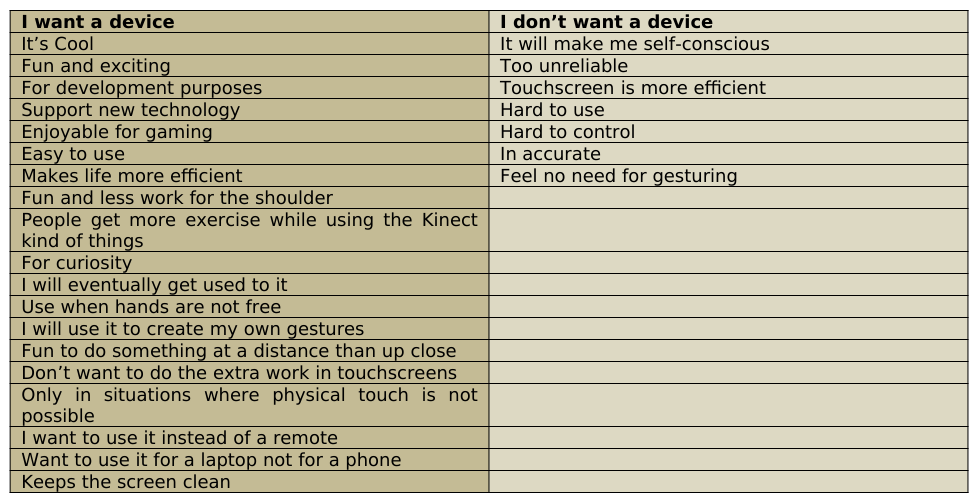
How easy was it to learn in-air gesturing? (1= very easy, 7=very hard) - Participants found it initially easier in the first session at a value of 2.84 than in the second session of in-air gesturing, with a value of 3.13 Would you use the device in a public place? - All 32 participants said they would use the touchscreen in a public place. 9 said no to in-air gesturing after the first session, which came down to 7 after the second session. 2 participants changed their preference to yes. Among the 9 participants in the first session, 6 found it silly to use in-air gesturing. 3 were ready to use it in a public place even though they found it silly. After the second session, only 2 out of the 7 found it silly to use in-air gesturing. The number increased to 5 for those people who found it silly but still would use it in a public place. Would you want to own a device capable of in-air gesture recognition? Why and Why not? - After the first session, 5 participants didn’t want to own a device, while after the second session, the number increased to 2. 5 participants who found in- air gesturing silly, wanted to own a device after the first session. After the second session, 3 who found it silly wanted to own a device. Further, 2 people who found it silly and didn’t want to use in-air gesturing in a public place, still wanted to own a device. The various reasons people wanted and didn’t want to own a device were multifold. The number of reasons to own a device outnumbered the ones that were against owning a device as seen in Table 1.
Table 1: Participant Opinions I want a device I don’t want a device It’s Cool It will make me self-conscious Fun and exciting Too unreliable For development purposes Touchscreen is more efficient Support new technology Hard to use Enjoyable for gaming Hard to control Easy to use In accurate Makes life more efficient Feel no need for gesturing Fun and less work for the shoulder People get more exercise while using the Kinect kind of things For curiosity I will eventually get used to it Use when hands are not free I will use it to create my own gestures Fun to do something at a distance than up close Don’t want to do the extra work in touchscreens Only in situations where physical touch is not possible I want to use it instead of a remote Want to use it for a laptop not for a phone Keeps the screen clean
Some other positives about in-air gesturing that were expressed during probing were (quoted verbatim)
In-air gesturing is useful for people with shoulder injuries
Gesturing should be supplementary to touchscreen
Second time around, realized touchscreen is more annoying Some thoughts about touchscreen and in-air gesturing that were expressed during probing were (quoted verbatim)
Touchscreen is less frustrating, in air is frustrating, took longer to calibrate and I kept going out of zone
Touchscreen is faster
Gestures are harder as one has to hold up the hand and be accurate
Touchscreen is simple and more precise
Air gesture is not steady and is made too sensitive especially for small tiles
In-air was extra work, have to wonder if I got it right
In-air, distance from screen matters
Prefer touchscreen for quick access
Touchscreen is easier to navigate especially the end corners
Touchscreen is preferred, as I felt weird moving hand in the air
Gesturing was harder as the cursor was lost and I had to move the hand a lot more
Hold to click causes more delay
Gestures are loopy, it is hard to find where the mouse is when you begin
Gesturing was harder as I had to manipulate the wrist a lot
Touchscreen was more secure
Gesturing is good for fun but not on a daily basis
In-air finger to distance mapping was hard to master
Touchscreen is more straight forward
I didn’t bring back hand to rest position as I thought there might be a timing issue in in-air gesturing.
DISCUSSION
The primary goal of the study was to elicit preference between two interfaces, the touchscreen and in-air gesturing. A secondary goal of the study was to understand the learnability of in-air gesturing as it is a new and upcoming technology, especially given its limitations. The learning curve for in-air gesturing needed to be understood. Data was collected by two methods
Analytics via a software task and EMG recordings
Self-report through subjective questionnaires EMG recordings very clearly showed that in-air gesturing was a more ergonomic methodology of interacting with the computer when compared to touchscreen. Statistically significant results were found for two of the critical muscle points, the Upper Trapezius and Anterior deltoid. For the Upper Trapezius, this can be mainly attributed to the fact that the shoulder blade is moved every time the participant extends his hand to touch the screen. For the Anterior deltoid this can be mainly attributed to the fact that the Upper arm is moved every time the participant extends his hand to touch the screen. The mean value of muscle effort/fatigue was higher for the touchscreen than for the in-air gesturing, but statistical significance was found for the data. This shows by a small degree in-air gesturing uses up more muscle effort than touch screen. For the Extensor digitorum this can be mainly attributed to the fact that the wrist was retained in a clasped position during gesturing even after participants being encouraged to return to rest position. A more through study on the Extensor digitorum alone should be conducted which will be very valuable to understand the degree of muscle effort when the action becomes near natural. EMG recordings also showed that muscle effort increased significantly when the size of the target decreased. Among the 4 tile sizes uses, tile size 4 was found most difficult to select during in-air gesturing and differed statistically significantly from the other 3 sizes. Tile sizes did not matter for the touchscreen interface.
The experiment session lasted for about 1 hour 15 minutes, approximating about 1 hour of time between the first learnability and second learnability sessions. That accounts for a total of 8 minutes maximum of in-air gesturing. It was found that there was a statistically significant improvement in the time taken to perform the two similar sessions. Mean value of the time taken decreased by 14.04 seconds. This was found to be a large effect. Note that 69% of the participants were using in-air gesturing for the first time in their lives during the experiment. This shows that significant learnability happened over a period in in-air gesturing within an hour of time. This suggests that the learning curve is very minimal.
Subjective questionnaire analysis showed a similar trend throughout. Touchscreen always rated better for almost all the questions over in-air gesturing. But between the two sessions of in-air gesturing, ratings after the second session were always found better than the first. It is evident that with time and practice, in-air gesturing is comparable to touchscreen eventually for almost all the following factors measured. The only factor that saw a higher rating in the second session was the “ease of use” of in-air gesturing.
Majority of participants did not find it silly to use in-air gesturing and were ready to use it in a public place. There were some conflicting answers such as, some participants who found it silly, were ready to use it in a public place. Some participants who found it silly and were not ready to use it in a public place still wanted to own a device. Majority of participants wanted to own a device capable of in-air gesturing. The most classic observation was that around 90% of the participants preferred touchscreen to in-air gesturing when asked, but around 78% of participants wanted to own a device capable of in-air gesturing. The most popular reason was because they found it cool, among various other relevant reasons.
The “hold to click” gesture definitely qualifies as a free hand gesture which is defined as the most popular gesture in the history of UI of gestures.
In this experiment we have addressed only one vertical of the three main purposes of gestures, which is selection. We know from the literature that as of today, there is no natural vocabulary existent for gestures. We also know that gestures are dependent on the culture from which they emanate. The “hold to click” gesture that was used in this experiment has become popular because it has been defined by the Kinect PlayStation. The naturalness of the gesture can be questioned.
According to Harrison’s definition, the gesture does not directly indicate its intent because in real life, “hold to click” does not indicate selection (Harrison, 2012). It is interesting to note that though this gesture is not very intuitive for selection purposes, the learning curve was found to be very easy and showed statistical significance. This goes against the literature that claims that it is the naturalness and intuitiveness of a gesture that defines the learning curve (Kendon, 2004). This proves that user defined gestures and symbolic gestures are also easy to learn. As far as drawbacks of this gesture are concerned, this hyper natural gesture seemed to be learnt quickly and definitely saw some fatigue. Some of the participants reported tiring of the arm, and the wrist showed more muscular effort when compared to the touch screen.
Bowman et al defined the “interaction fidelity” of a gesture as a mapping of its naturalness to the context. We can extend the definition of “interaction fidelity” to learnability too and claim that if a gesture is learnable as in the case of the experiment, it has high “interaction fidelity”.
We learnt in this experiment that “social acceptability” does play a role. Many a people may refuse to use in-air gesturing due to the fact they find it silly to wave their hands in the air, especially in a public place. But this experiment has also shown that this self-consciousness of people actually fades away with time and people would want to use a device because in-air gesturing is considered more technologically advanced. It overrides the social taboo of in-air gesturing.
CONCLUSION
In-air gesturing definitely emerged as a winner during the period of the experiment. Participants clearly showed that it was easy to learn the technique of interacting with the interface and the subjective attributes were comparable to that of the current reigning touchscreen with the passage of time. The reasons why participants preferred in-air gesturing outnumbered the reasons why participants preferred the touchscreen and the reasons were variant and spread across a large spectrum. In-air gesturing emerged as the winner ergonomically when compared to touchscreen. This experiment has shown what Steve Jobs once quoted that touchscreen computers are “ergonomically terrible”. It has also been shown that participants prefer the in-air gesturing to touchscreen because of the coolness factor associated with new technology. This is possibly due to the immersion quality in in-air gesturing as quoted by Wiedmeyer, because gesturing is most real and natural to humans (Wiedmeyer, 2012). Further in-air gesturing has a “feel good” factor associated with it.
REFERENCES
Acharya, T. & Mitra, S. (2007) Gesture recognition: A survey, IEEE Transactions on Systems, Man, and Cybernetics, Part C: Applications and Reviews 37(3), 311- 324 Atia, A., Takahashi, S., Tanaka, J., (2010) Smart gesture sticker: Smart hand gestures profiles for daily objects interaction, In
proceedings of: 9th IEEE/ACIS International Conference on Computer and Information Science, IEEE/ACIS ICIS 2010, 18-20 August 2010, Yamagata, Japan. Bianchi-berthouze, N. & Kleinsmith, A., (2003) A categorical approach to affective gesture recognition, Epigenetic Robotics: Modelling Cognitive Development in Robotic Systems, 15(4), 259-269. Baudel, T., Beaudouin-Lafon, M., (1993) Charade: Remote control of objects using free-hand gestures. Communications of the
ACM – Special issue on computer augmented environments, back to the real world, 36 (7). Bowman, D., McMahan, R., Ragan, E., (2012) Questioning naturalism in 3D user interfaces, Communications of the ACM, Sept, 55(9), 78-88. Christova P, Kossev A, Kristev I, Chichov V. (1999) Surface EMG recorded bybranched electrodes during sustained muscle
activity. J Electromyogr Kinesiol, 9:263–76. Harrison, C., (2012) “Meaningful gestures.” Retrieved March 3, 2012 from http://www.economist.com/node/21548486. J. Kela, P. Korpipaa, J. Mantyjarvi, S. Kallio, G. Savino, L. Jozzo, and D. Marca., (2006) “Accelerometer-based gesture control for a design environment,” Personal Ubiquitous Comput., vol. 10, no. 5, pp. 285–299. Kendon, A., (1983) Gesture and speech: How they interact, in nonverbal interaction, Beverly Hills: Sage Publication. Kendon, A., (2004) Gesture: Visible action as utterance, Cambridge UK: Cambridge University Press, 326-355 Kita, S., (2007) Theoretical issues in nonverbal behaviors. [Presentation Slides]. Retrieved from
http://ling75.arts.ubc.ca/cogs//cogs401 Kita, S. & Essegbey, J., (2001) Pointing left in Ghana: How a taboo on the use of left hand influences gestural practice, Gesture, 1(1), 73-95 Kita, S., Danzinger, E., Stolz, C., (2001) Cultural Specificity of Spatial Schemas manifested in spontaneous gestures. Cambridge:
MIT Press. McQuade, KJ., Dawson , J., Smidt, GL., (1998) Scapulothoracic muscle fatigue associated with alterations in scapulohumeral rhythm kinematicsduring maximum resistive shoulder elevation. JOSPT; 28(2):74–80 Morris, D., Collett, P., Marsh, P., and O’Shaughnessy, M. (1979) Gestures, their origin and distribution, New York: Stein and
Day Morita, H., Hashimoto, S. and Ohteru, S., (1991) A Computer Music System that Follows a Human Conductor. IEEE Computer, July 1991, pp.44-53 Perzanowski., D, Schultz, A., Adams, W., Marsh, E., Bugajska, M., (2001) Building a multimodal Human-Robot interface
Rico, J. & Brewster, S., (2010) Usable gestures for mobile interfaces: Evaluating social acceptability, Proceedings of CHI’10, 887-896 Rico, J. & Brewster, S. (2010). Usable gestures for mobile interfaces: Evaluating social acceptability, Proceedings of CHI’10, 887-896. Ronkainen, S., Hakkila, J., Kaleva, S., Colley, A., Linjama, J., (2007) Tap input as an embedded interaction method for mobile
devices. In Proceedings of TEI 2007, ACM Press, 263-270
Sturman, D., (1992) Whole-hand input, Ph.D thesis, Media Arts & Sciences, MIT Press Urakami, J., (2012) Developing and testing a human-based gesture vocabulary for tabletop system, The Journal of the Human Factors and Ergonomics Society, 54, 636 Vinayagamoorthy, V., Slater, M., Steed, A., (2002) Emotional personification of humanoids in immersive virtual environments.
Technical Report Equator-02-029, Department of Computer Science, University College London.
Weidmeyer, C., (2012) “What makes for compelling user experiences” Retrieved March 8, 2012 from http://www.zanthus.com/blog/?p=330 Weissman, C., Freeman, W. (1994) Television control by hand gestures, IEEE Intl Workshop on Automatic Face and Gesture
Recognition, June Wigdor, D., Wixon, Dennis (2011) Brave NUI World (1st. Ed.). Morgan Kaufmann, Burlington, MA
ACKNOWLEDGEMENTS
My special thanks to Dr. Louis Freund and Dan Rosenberg of San Jose State University whose guidance remained from start to end of the experiment. My thanks also go to the employees of the startup who made possible the experiment. I would like to acknowledge Joyce Kii and all the participants who made valuable contributions to the research. I would also like to thank my family who have been my stronghold through this journey.
LISTED IN THE AHFE DIGITAL BOOKSTORE CATALOGUE
Explore the complete digital volume
Advances in Physical Ergonomics and Human Factors: Part I
Read this individual research paper free through the original publisher, or explore the full digital proceedings book.
ISBN 978-1-4951-2104-3
Explore this ISBN in the AHFE Bookstore ↗Listed in the July 2026 bookstore catalogue; search by ISBN to confirm current availability · Digital book purchase optional