Sandra Dietsch, Anja Naumann (2022). Increasing the Vocational Action Competences of Rail Traffic Controllers by Creating a Virtual Learning Environment for Trainees. In: Advances in Human Aspects of Transportation: Part III. AHFE Open Access, vol. 17. https://doi.org/10.54941/ahfe100732
In Germany railway operations underlie a vast number of complex rules and regulations. Therefore rail traffic controllers, who are responsible for save and hitch-free railway operations, need a profound knowledge and action competencies to consider the regulations in everyday work. Before being able to work as rail traffic controllers, they have passed an apprenticeship of three years. In addition, because of local characteristics of tracks and infrastructure, a rail traffic controller needs an instruction phase for a couple of months, just to be able to work at one single signal box. To cope with the high demands of the job, a virtual learning environment for trainees was created to increase their vocational action competences, to enhance their knowledge and to ease the passage to job. A prototype of the software was created using a usability engineering approach. A strong collaboration with rail traffic controllers and potential users ensured the usability of the system. The final concept and prototype of the learning environment will be presented in this paper. It consists of three different learning sections and one test section, where trainees can check their knowledge.
Rail traffic controllers are responsible for save and hitch-free railway operations. Their main challenge is to ensure the rail operation efficiency while coping with occurring operating interruptions. They set up signals and switches and monitor shunting. The workplace at a signal box and the respective tasks can vary significantly, due to technologies in use. There are older signal boxes (e.g., mechanical lever frames), where physical effort is needed to do the job, and newer versions based on computer technology, where the work consists of interacting with a software on a computer screen. The new electronic interlocking consists of assistance technology that ensures safety by taking over tasks like automatic route setting.
The rail human factors group at the German Aerospace Center analyses the rail traffic controller’s workplaces. Aim of the research is to understand users’ cognitive processes while working to improve the human-machine- interaction. This understanding could be used to evaluate existing interlocking systems and create new concepts for future technologies (Naumann et al., 2013). As a part of this research, the interaction of rail traffic controller with electronic interlocking was examined to gain a better understanding of their behavior and problems while handling the software. Difficulties were identified regarding interactive menu control and usability. This is not only due to design faults. There are underlying factors which also have a great impact. One main difficulty identified is due to shortcomings during apprenticeship.
In Germany trainees have to complete three years of vocational education and phases of practical training to become a trained rail traffic controller. Although the quality of the apprenticeship is high, trainees are not able to work autonomously and take full responsibility of their actions during the first months of their work. That is because there are numerous complex regulations that have to be considered, and rail traffic controllers have to take into account the regional characteristics and operational details of the area they are working in. Some regulations change yearly, so knowledge needs to be up to date. Handling infrequent incidents is also a big challenge, both for inexperienced and experienced rail traffic controllers. This shows that the apprenticeship sets high demands on trainees. All the knowledge needs to be build up completely in three years. And knowledge is not the only challenging factor. Trainees report of difficulties to build up vocational action competences. Practical training at a signal box is mostly “learning by doing” without specific instructions and material to learn at home isn’t provided.
Looking at the carriers of former rail traffic controllers, a lack of knowledge wasn’t an issue. Most of them started as point operator or other jobs which required less expertise and worked their way up. That’s why they gained a lot of experience in the rail sector before even becoming a rail traffic controller. Because they learned the job while working with mechanical lever frames or relay interlocking where actions and reactions of the system are more visible, the knowledge about railway operations had a better basis. Today most of the trainees work with electric interlocking systems which run mostly automatic and need more supervision than action. The problems of mode error and awareness (Sarter & Woods, 1995) can also occur here.
This indicates that changes need to be done in apprenticeship, providing additional opportunities to learn and practice besides training in school and give the trainees supplementary sources of information. The goal should be to strengthen the action competences of trainees. Regulations should be presented in everyday language, and specific directives should be given.
CREATING THE LEARNING ENVIRONMENT Aim
Aim of the presented project was to create a virtual learning environment for trainees aspiring to become rail traffic controllers. The contents of the learning environment shouldn’t replace teaching materials at vocational school, but support trainees when they want to on their own. Materials about training contents should be included in the same amount as interactive games and exercises. Former research showed that this increases learning success, which should be achieved (Gee, 2003). The vocational action competencies should be improved and the knowledge about rail operations should be advanced. Through good design which meets usability-criteria, the ease of use must be considered. Ease of use is a main factor regarding the success of e-learning tools (Sun, Tsai, Finger, Chen & Yeh, 2008). This will be ensured by using a usability engineering (Nielsen, 1994) which includes feedback of users and experts in the whole design process.
Approach The virtual learning environment was developed in cooperation with nine students of FH Erfurt (University of applied sciences). All of them are either trained rail traffic controllers or worked in other fields of rail operation. They have knowledge about current apprenticeship and also work experience in rail industry. Because their local signal boxes were allocated nationwide, a wide range of experiences could be included in the process.
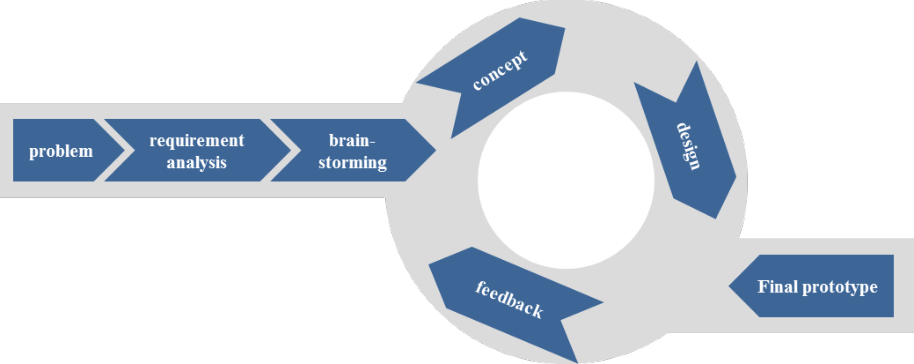
The focus of the project was not primarily on content. Methodology and usability of the learning environment were important as well, in order to get a tool with an ease of use. An overview of our usability engineering approach used in the project is shown in Figure 1. Every step will be explained in the following sections.
Figure 1: usability engineering approach used in the project
1. Problem definition
The definition of the problem was done before the project started. The starting point were the claims and assumptions stated in the section “Aim” of this paper.
2. Requirement analysis
For analyzing the requirements of potential users, at first the target group needed to be defined. As the goal of the project suggests, young trainees were claimed as target group. They need to be attending a three years apprenticeship for rail traffic controller and be motivated to learn on their own, in their spare time. The learning environment should mainly focus on young trainees, who just finished school and have no deeper knowledge of railway operations. The range of age considered is 16- 25, because this is the common age of this trainees.
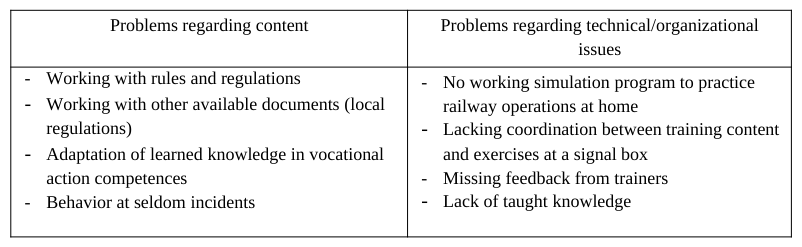
As a first step, training contents were identified that caused problems while learning. Either because they were hard to understand, or trainees would have needed additional help. To explore these contents, 15 trainees from three different local stations were asked for their experience. Also the members of the project group recapped their own experiences at apprenticeship. The result was a sorted collection of critical contents as a basis for further work. Table 1 shows an overview of the results. As additional information, it was asked where and how trainees learned for tests. This was used in brainstorming to generate ideas.
The next step was to become familiar with e-learning methodology and look for ideas, how the learning environment should look like and which tools can be included. Research had been done to identify methods, which could be used in an e-learning environment for rail traffic controllers. Increasing action competences through interactive exercises had been a focus of this research.
The brainstorming technique was used as a method to create ideas in a group (Roozenburg & Eekels, 1995). In a creative session of four hours, the nine project members of the group generated ideas regarding the look and contents of the future e-learning environment under the supervision of an usability-expert. As basis for brainstorming, the results from the requirement analysis were used to have a pool of requirements of current trainees. Also the e-learning methodology was considered in this process.
A collection of ideas was gathered regarding a set of questions, e.g., the following example questions:
How do trainees practice right now? How do they want to practice?
Which medium would they like to work with? Are there technical requirements that need to be considered?
Which kind of practical training can be included in the learning environment?
How trainees want contents to be presented?
How should the tool look like, e.g., which buttons are needed?
Based on the ideas generated in this process, a concept was drawn up.
4. Concept
In the concept phase, a common understanding of the topic and the learning environment was build and concept definitions were made out of the ideas gained throughout the brainstorming. This contains the contents included, the interaction elements needed, and also which framework conditions such as context of learning should be considered.
As a result from brainstorming, the learning environment will be created for the use in web browsers to be shown at a PC. It was envisaged to have a version for mobile use on smartphones, but regarding to the size of the display and the contents that can be shown there, this idea was discarded.
The extent of use and the possible duration of learning were not defined at this point of the project.
The content was set up to deal with railway operations, signals and engineering. This decision was based on the results of the survey for requirements engineering (see table 1). Small interactive exercises should be included in every section. However, mainly the content should be described verbally in an easier way than it is written in the regulations. Contents should be related to practice and include pictures, animations and videos. As an example, the learning environment may include videos of generic operational situations, which are shown from two views. One is the view of a rail traffic controller who might communicate a command to the train driver. The other view of the video shows the train diver who receives and executes this command. This should improve the understanding of the situation and the chronology of events occurring. It is assumed that this should also improve the traffic controllers’ situation awareness in their work live, because of extended knowledge of a situation from different perspectives (Endsley, 1988).
Also an additional test section needs to be included. The idea is to split the test section into two modes, one for practicing alone, and one as an informal test to control the progress of learning. To save the progress, a personal profile is necessary. This profile seemed also necessary to control the access to the system. Because it will be programmed as a website and will include sensitive data and information group directives, a secure sign-on needs to be guaranteed.
The concept also includes the definition of interaction elements and features which should be included. Besides the determinations regarding the content, some interaction elements the tool needs were defined. A menu bar with a home button, a search function, and a help should be built-in.
5. Design
Out of the first concept a design was be created. For gaining a higher amount of ideas, the group of nine members was divided into three groups with three members each. Each group made different design drafts regarding the layout for the main und sub menus, a menu bar and interaction elements. For designing a combination of the methods paper prototyping (Snyder, 2003) and creating an interactive prototype with the program Microsoft PowerPoint was used.
Figure 2 shows a result of this phase. The drafts demonstrate how the main menu could look like. The example of the design of the main menu will be exemplary for the prototype in this paper. The left picture shows a paper version. The topics (operations, engineering, signals) are visualized in pictures. The test section is included in every topic. The picture in the middle includes three content sections and one test section on the main menu. The right picture of the third group shows a different approach. There are differently colored sections without any pictures and the test area is in the main focus.
After the three groups had worked separately, they came together to discuss the drafts. At this point, no external feedback was considered, only an internal evaluation of the results within the project group was performed. As an internal evaluation of the three drafts, the best parts of every draft were noted and discussed.
Other points of discussion were the structure of the test section, the look of the navigation bar and other features that might be included. However, the first concept is mostly regarding design and to a lesser extent the content.
Figure 2: Three drafts for the design of the main menu.
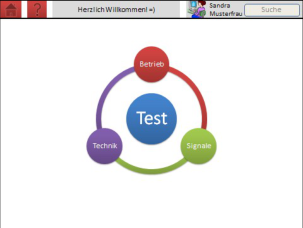
So, out of three preliminary drafts and the following discussion, one first design prototype was built. An exemplary screen shot is shown in Figure 3. It illustrates the different states of design very well because it includes several aspects of every draft created. For the main menu, the idea of four separate section was used (see Figure 2, center), every section with a different color (see Figure 2, right). The color coding is continued in sub menus, so the remarkability is improved. The idea of showing illustrations for every section (see Figure 2 left and center) will be included, too.
The navigation bar now consists of a home button, a help function, a search function and a link to the personal profile. To navigate through the system, the navigation at the bottom can be used.
Figure 3: First prototype of the main menu with navigation bar on top and different colored sections
6. Feedback
For a first external feedback, twelve trainees from different locations and different stages of apprenticeship were asked. The aim of this feedback was to get the impression of users’ attitudes towards the idea of this learning environment and design features. A questionnaire was build up, concerning the following aspects:
- look and structure of the menus - opinions on diagrams and pictures - games - scroll or browse at large contents - colors As a result of this feedback, aspects which were good and those who weren’t were identified. This led to a better understanding of users’ needs and problems with the system. One question was ’What was missing in the software, which functions should be implemented?’. Exemplary answers had been ’references to regulations and legal requirements‘, ‘online function while gaming’, or ‘forum’.
Many interviewed trainees had similar problems regarding the main menu. It was noted that the headline of the three content sections was inaccurate. Trainees tend to misunderstand the meaning of the headlines (especially ’engineering‘) because of their different expectations. Because no better wording was found, it was decided that in addition to the headlines, there will be an explaining text for every section, realized as a mouse over function. Also pictures will be included in order to visualize what the topic in the specific section is.
After discussing the feedback and possible solutions, the prototype was refined.
7. Concept , design, feedback
The loop of conceptual engineering, design and feedback was performed three times. Aim of this process is the refining of the prototype and its content, the integration of users’ needs and ensuring the usability of the system. After every feedback, the results were discussed and changes in content, concept or design were made. The prototype was adapted every time after feedback. In every loop, different trainees were involved.
As a final extern feedback, dialogue principles were rated by potential users. Thus, the German questionnaire ISONORM (Pümper, 1997) which enquires criteria for good dialog design regarding the norm EN ISO 9241- 110 (1996) was executed. Twelve trainees (3 female, 9 male) were interviewed. Their mean age was 22 years. Overall they rated the tested version of the prototype good (6.1 out of 7 points). The best results were shown especially in suitability for learning (6.2/7), suitability for the task (6.4/7) and conformity with user expectations (6.2/7). Because of the good rating, only minor changes of the prototype were made in the final feedback loop.
8. Final prototype
After the last revision, a final prototype was created. It will be presented in the next section.
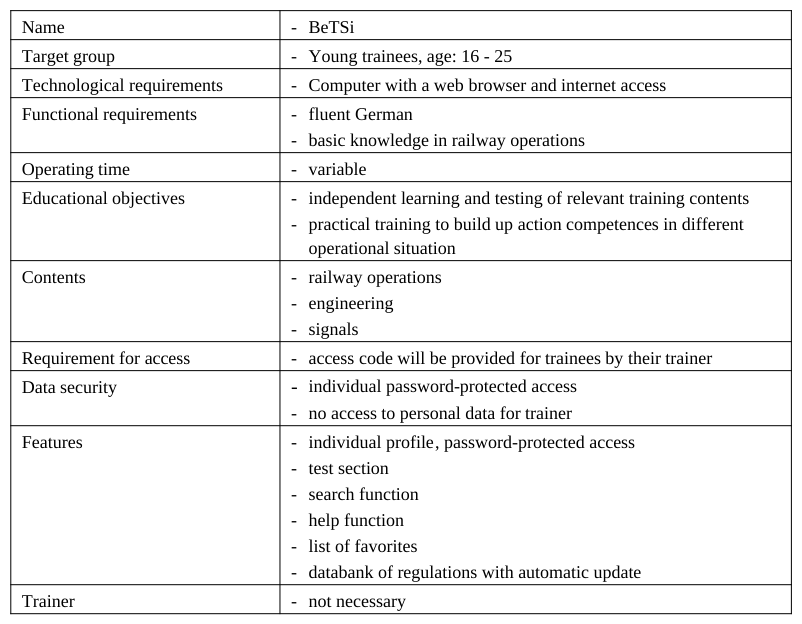
THE VIRTUAL LEARNING ENVIRONMENT A prototype of the learning environment was created for trainees who want to become for rail traffic controller. It should support independent learning and practicing at home without a present trainer. A summary of the systems’ characteristics is described in table 2.
The learning environment got the name BeTSi. This is an acronym of the three main topics (“Betrieb” – operations, “Technik” - engineering, “Signale” - signal). It is designed for the use in a web browser, so no additional program needs to be installed to use the tool.
Table 2: Descriptive summary of the learning environment Name - BeTSi
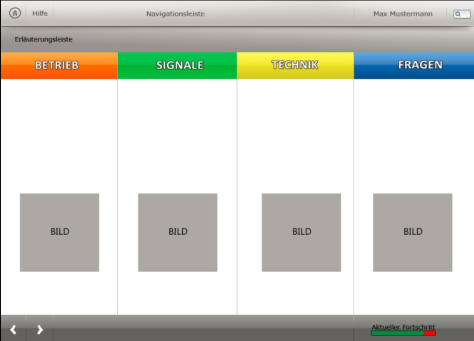
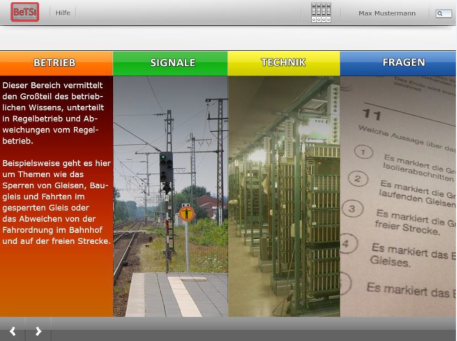
Content sections consist of the learning contents regarding to the three main topics: railway operations, engineering, and signals. To illustrate this, figure 4 shows the main menu of the prototype. Every section has an individual color scheme (orange, yellow, green), which also includes the sub menus and test section, which is consistently held in the color blue. Based on the results of the first feedback loop, the names of the sections are now enriched with pictures and descriptions. The descriptions are a dynamic mouse-over function shown in Figure 4 (right).
Figure 4: Final main menu (left), mouse over on first section (right)
Besides the design, the way of presenting the contents needs to be explained. As noted before, every section is divided into subsections to have a better overview of all contents. A better understanding of regulations will be provided by explaining operational details, local characteristics and directions for action in conversational language. If useful, the text provides hyperlinks to other sections or the specific rules. Trainees should get prepared for day-to- day railway operations, which consist mainly of regular operation but also of unforeseeable events. So the focus of the contents lays on general knowledge on the one hand but also on specific problems and infrequent incidents on the other. Knowledge will be presented by text, pictures, animations and videos. The interaction with this media should be possible, for example to name parts of a switch.
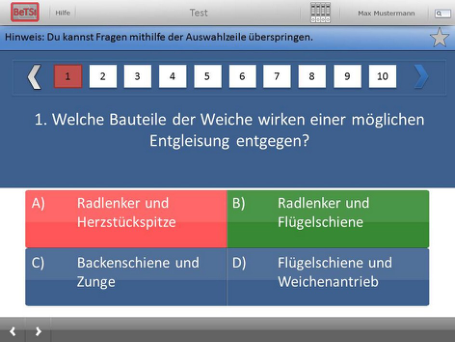
One main feature of BeTSi is the test section. It consists of two types of questions. Trainees can either only answer questions of one special section they choose, or questions that occur out of every section chosen by random selection. The test section features two modes, a training mode and a test mode. In both modes questions will be asked similar to the TV game show ’Who wants to be a millionaire?’. Every question is multiple choices with four answers given. One of them is correct. The correctness of the answer will be shown directly after the reply in the training mode. This direct feedback should improve the awareness of the correct answer and the direct examination of the content. One example screenshot out of the training mode is presented in Figure 5.
There will be no direct feedback in the test mode. Here the evaluation will take place after each of the 15 questions is answered. This evaluation will be divided in strengths and weaknesses, so advances learning of the problematic section will be possible. Showing a score of the successful answered questions will provide a good assessment of the learning process.
Figure 5: Example of a question in the training mode after selecting the wrong answer (answer A; marked in red). Answer B
(marked in green) would have been the right answer.
CONCLUSIONS AND OUTLOOK A prototype of a virtual learning environment was created using a usability engineering approach and support of rail traffic controllers. The results show that the integration of experts and the feedback of users had a positive effect of the usability of the resulting prototype. After several loops of evaluation, the final prototype could be shown in this paper. The next step is to implement the prototype in a working system. Therefore some work needs to be done addressing the contents. Every topic and subsection needs to be filled with useful contents and different interactive elements. The contents also need to be checked for correctness by an expert. Also additional questions must be worked out.
After having a working system with useful contents, the success of learning also needs to be tested in a long term study.
The good results in the usability score showed that usability engineering provides a useful approach for developing new software, even in the rail domain.
The prototype hasn’t all of his final functionalities yet. Many ideas came up while working on this project, but not every idea was developed further, due to a limitation of time. There were some additional ideas, which are not includes so far but will be presented in a next step.
To have a better representation and to increase the transferability in practice, the idea of visualizing a simulated workplace of a rail traffic controller should be implemented in the software. Having all elements (regulations, computer, keyboard etc.) implemented means that the task performance can be much more realistic. Having a functional simulation of electronic interlocking, practice of larger exercises will be possible. Right now, there are only test functionalities in the test section or interactive games in the learning section. An operational simulation will complete the learning environment. The work on real world problems should be possible. This aspect addresses to the setup of vocational action competences without working at a real signal box, where limitations of time and availability to practice exist.
Right now, there is only one type of questions asked in the test section. In addition, different types of questions will be added in a later version in order to have diversity. It would be possible to have other quiz games included (e.g. Trivial Pursuit or Memory), or to provide pending questions. Here, an extended profile will be useful. The possibility to add friends should be given, that multiplayer gaming can be possible. The success of such an approach is shown with the mobile application “quiz game” used by 15 million players by the end of January 2014 (FEO Media, 2014), playing with or against each other to compare their knowledge all over the world.
To strengthen the social media aspect, a moderated forum will be included in the learning environment. So an informal communication about contents and problems can take place. Previous results show that this can improve motivation and therefore success of learning (Benson Soong, Chan, Chua & Loh, 2001). Trainees can stay in contact via this platform, although they work at different signal boxes all over Germany.
To sum up the possibility of providing additional contents for trainees to learn and practice at home seems to be an option to be well accepted, as the feedback of trainers and trainees indicates. Today there are limited opportunities to practice at home. By having such an additional tool as BeTSi, also the trainers can be supported by working with prepared and motivated trainees in their classes.
ACKNOLEDGEMENTS Special thanks go to Prof. Raimo Michaelsen und the students of FH Erfurt (listed in alphabetical order), who supported this project with their expert knowledge and created all pictures: Marcus Dahlke, Justin David, Felix Dietz, Maximilian Gampfer, Daniela Haas, Jens Heeren, Markus Königs, Martin Stams and Corina Wabersich.
REFERENCES
Benson Soong, M.H.; Chan, H.C.; Chua, B.C.,& Loh, K.F. (2001). "Critical success factors for on-line course resources", Computers & Education, Vol. 36, no. 2, 101-120. Endsley, M. R. (1988). “Design and Evaluation for Situation Awareness Enhancement“, Proceedings of the Human Factors and
Ergonomics Society Annual Meeting, vol. 32, no. 2, 97-101. FEO Media (2014). “15 000 000 players”, http://feomedia.se/15-000-000-players/ Gee, J. P. (2003). “What Video Games Have to Teach us About Learning and Literacy”. New York: Palgrave Macmillan ISO 9241-10 (1996). “Ergonomic requirements for office work with visual display terminals (VDT ́s)”, Part 10: Dialogue principles Naumann, A., Grippenkoven, J., Giesemann, S., Stein, J., & Dietsch, S. (2013). „Rail Human Factors - Human-centred design
for railway systems”. 12th IFAC Symposium on Analysis, Design, and Evaluation of Human-Machine Systems, Las Vegas, August 2013. Nielsen, J. (1994). “Usability Engineering”, Morgan Kaufmann.
Prümper, J. (1997). „Der Benutzungsfragebogen ISONORM 9241/10: Ergebnisse Zur Reliabilität und Validität Fragebogen ISONORM 9241/10“ In: Software-Ergonomie '97, Usability Engineering: Integration von Mensch-Computer-Interaktion und Software-Entwicklung, 253-261, Teubner, Stuttgart. Roozenburg, N. F. M. & Eekels, J. (1995). „Product design: fundamentals and methods”, John Wiley & Sons. Sarter, N. B. & Woods, D. D. (1995). “How in the World Did We Ever Get into That Mode? Mode Error and Awareness in
Supervisory Control”. Human Factors: The Journal of the Human Factors and Ergonomics Society, vol. 37, 5-19. Snyder, C. (2003). “Paper Prototyping: The Fast and Easy Way to Design and Refine User Interfaces”. Morgan Kaufmann. Sun, P.-C., Tsai, R.J., Finger, G., Chen, Y.-Y., & Yeh, D. (2008). “What drives a successful e-Learning? An empirical investigation of the critical factors influencing learner satisfaction, Computers & Education”, vol. 50 , no. 4, 1183-1202.
LISTED IN THE AHFE DIGITAL BOOKSTORE CATALOGUE
Explore the complete digital volume
Advances in Human Aspects of Transportation: Part III
Read this individual research paper free through the original publisher, or explore the full digital proceedings book.
ISBN 978-1-4951-2099-2
Explore this ISBN in the AHFE Bookstore ↗Listed in the July 2026 bookstore catalogue; search by ISBN to confirm current availability · Digital book purchase optional