Lisa Rebenitsch, Muhammad Shaharyar, Minati Alphonso, Diego Akantuge (2025). Creating a Lightweight Unity Interaction Package. In: Human Factors in Design, Engineering, and Computing. AHFE Open Access, vol. 199, pp. 904–914. https://doi.org/10.54941/ahfe1006903
This project proposes a lightweight interaction system for VR in the Unity game engine. The Unity VR start up project is ~2GB in size upon creation, while our proposed system is currently ~350MB. It also shrink the needed components by half, while still support most of the same functionality of Unity XR Toolkit. The new system is designed with the goals of supporting non-coders while allowing extensions for coders and following well established GUI event paradigms for familiarity. The project currently focuses on grab base interactions and navigation.
In a virtual reality (VR) research lab, ramping up students in VR code development is time consuming. Personal experience estimates that students with only basic graphical user interface (GUI) backgrounds require 2–3 months of training before actual tasks can begin. This is partially due to a change in coding environment, but also due to the lack of basic, pre-made, interactions in VR engines that developers expect from GUI frameworks. As such, a support framework was begun where repeated needs occurred during work on other projects.
Unity, a game engine that supports VR, had officially released a VR interaction toolkit after this work had been in progress for nearly 2 years. However, the Unity framework had some notable issues for development. The first issue is that the framework is large. The Unity VR start up project is ∼2GB in size upon creation. Next, there were a few lab tasks that were not well supported with Unity’s interaction framework such as mixed Oculus and Vive hardware.
When the lab’s interaction framework began, there was a clear goal of balancing ease of use for non-coders while making extensions easy. This meant interactions were focused on, “selecting what responses this grab can do.” If another response is needed, a new class is made and added to the responses, ideally, with as few lines of code as possible.
There are a few notable sources of challenges this project attempts to overcome. Unity, Unreal, and Godot all use an entity-component structure
Creating a Lightweight Unity Interaction Package 905
that lends itself to monolithic classes or piecemeal coding. To compensate, many of the components needed more advanced editor control.
Many of the techniques were also simplified to integrate into a local VR Development course, and later into an associated book. Success of the techniques was studied in class with IRB approval. Some students attempted to use the Unity version rather than the provided framework which allowed for some cross comparison of use. Exam results on using the framework, plus extending the framework, showed promising results.
MOTIVATION AND BACKGROUND Desktop and mobile platforms have well-established interaction conventions, such as button clicks. In contrast, VR has yet to standardize its interaction methods. Consider the button click—one of the most fundamental interactions in a desktop application. Typically, this involves registering a callback for the button and handling the resulting action.
In VR, grabbing is one of the most fundamental interactions. Coming from a traditional GUI paradigm, a developer might expect a similar process: register for a grab event, then respond to it. One would reasonably assume that detecting such an event would be handled by the engine, and that common tasks like placing an item into the user’s hand would be pre- implemented. Unfortunately, this is not the case. Even something as basic as detecting a button press has undergone multiple changes over recent years, leading to inconsistent and unreliable support. There is still no standardized grab event that developers can rely on.
Creating a robust GUI framework for VR is not a trivial task. Previous students in the author’s lab experimented with various toolkits to handle grab events and menus. Some early efforts used the now-outdated VR Toolkit (Wikipedia, 2025). However, any project built with that toolkit typically broke within six months due to a lack of long-term support. Newer toolkits, such as OpenXR (OpenXR Toolkit, 2023) and the SteamVR Toolkit (Valve Corporation, 2024) also tended to break within a year. Meta, in particular, has made this landscape more difficult by restricting interoperability through its OVR plugin. Since the lab needs to support a variety of systems—not just Oculus—a generic and durable toolkit was necessary.
Development of the lab’s toolkit began before Unity’s XR Toolkit was out of beta or widely available. The goals of the framework were threefold:
1. Mimic the familiar desktop GUI development paradigm 2. Be usable by non-coders for common interactions 3. Remain highly extensible for developers by focusing on separation of concerns while still providing defaults for very common tasks.
As a result, one of the core design principles of the toolkit was to focus on “What does the user want to do?” rather than how to do it.
When Unity’s XR Toolkit was officially released, the lab paused development to evaluate whether it could meet their needs. However, several major shortcomings were identified early on, leading to the decision to continue with in-house development. One of the largest issues was simply
the size. The official Unity VR template using XR Toolkit was 2 GB on first run—a significant issue given that many students’ computers were already running low on memory. In contrast, the lab’s current solution was roughly 350 MB. There was also the level of complexity of setup up. Just supporting a user’s right hand to both poke buttons and teleport via the XR Toolkit involves 13 separate components spread across 6 Game Objects. Thus, the lab framework was still deemed necessary.
OUR FRAMEWORK: CORE INTERACTION GROUPS For consistency and brevity, Unity’s XR Toolkit (base structure is available here: (Unity, 2025)) and their VR template will be referenced as the “XR Toolkit.” The lab system discussed here will be the “lab framework.”
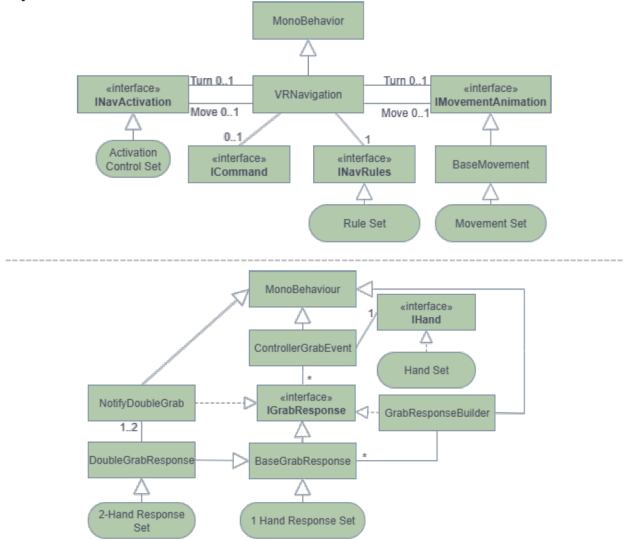
Figure 1: Figure class diagram of core components. Top: navigation. Bottom: interaction.
The lab framework began by asking a fundamental question: What are the key groups of tasks users typically need to achieve VR interaction? This led to the identification of four core categories. 1) Processing and handling grab events 2) Grab responses, 3) Navigation, and 4) Menus. Menus are still under developments, so our class structure diagram shown in Figure 1 excludes Menus.
CONTROLLER HANDLING AND EVENT PROCESSING One of the most fundamental components of any VR interaction system is how it handles the controllers. For simplicity, physically tracked hands will be considered another controller type. While VR controllers usually include
Creating a Lightweight Unity Interaction Package 907
the standard buttons found on gamepads, they also support more complex interaction types—such as proximity-based events (e.g., tap or hover), grab events for picking up items, and selection events often used in menus.
Since one of the lab framework’s primary goals was to offer an approach similar to desktop GUI button events, the controller system needed to support callback events across various interaction stages. In a standard desktop GUI, for example, a button might trigger OnEnter, OnExit, and OnClick events. In VR, we aimed for a similar structure, with our Controller Grab Event component, and supported events such as On Register\On Deregister, Grab\Release Event, and Hover.
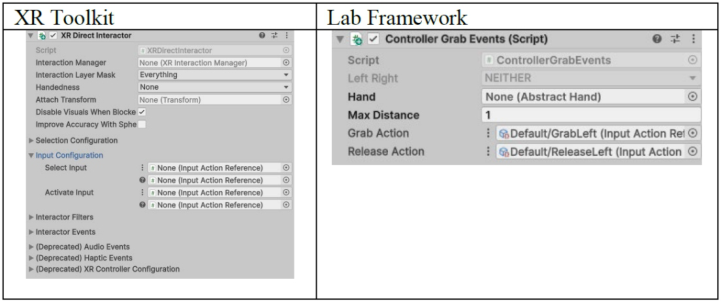
The XR Toolkit component most similar to our system would be the Direct Interactor. However, by making Controller Grab Event focus largely on just events, it becomes much smaller as shown below in Figure 2. The lab framework is admittedly grab-focused, and very little else is added to the controller processing—aside from assigning a hand reference and a distance indicating when an object should be forcibly to be deregistered.
Figure 2: Controller processing.
Consider the XR Tooklit’s XR Poke Interactor as a contrast. In addition to supporting callbacks, it also handles hand size definitions, depth thresholds for poking, and more. This level of responsibility begins to pollute the class’s purpose.
To support customization and extension, several of the processing functions in Controller Grab Event are marked as overridable (e.g., GetGrabCallbackSet(), CanGrab(), etc.). This allows developers to implement more complex behavior where needed. For example, a specific application may want to forward events to multiple objects within range. Overriding the GetGrabCallbackSet() does not violate the class’s core purpose, as it simply forwards events, just to a broader set of targets. The XR Toolkit has similar functionality with Interactable Filters.
Hand Interface and Separation of Concerns One reason our processing component remains relatively small is that we sectioned out the hand into its own interface. The IHand interface was
designed to act as a data source responsible for determining and managing whether an item can be placed in the hand.
The Controller Grab Event communicates with the hand interface through a core set of methods, such as: CanHold, PutInHand, Drop, etc. which informs the grabbing or releasing events. At present, only a simple single- object hand implementation exists. This is also where poke functionality would be placed, if implemented.
INTERACTION RESPONSES AND SEPARATION OF BEHAVIOR In the XR Toolkit, interactions triggered by Interactors (or controllers) are handled through Interactables. These Interactables are used for both navigation and object grabbing. In the lab framework, however, we considered these functionalities. Given that one of our core goals was to make the system accessible to non-coders, we designed this group of functionality with an emphasis on what the user wants to happen, rather than how it should happen.
For example:
Want a hover effect? Just add a hover response.
Want an object to disappear when grabbed? Add a disappear-on-grab response.
Our grab responses are built on an interface called IGrabResponse, though the primary class used in practice is a GrabResponseBuilder component. This builder was designed to be as simple and declarative as possible by adding pre-made grab responses to a list. All registered responses are then called sequentially in response to controller events. Currently, registration is based on proximity triggers: when an object enters a controller’s trigger zone, it is added to the callback list; when it leaves, it is removed.
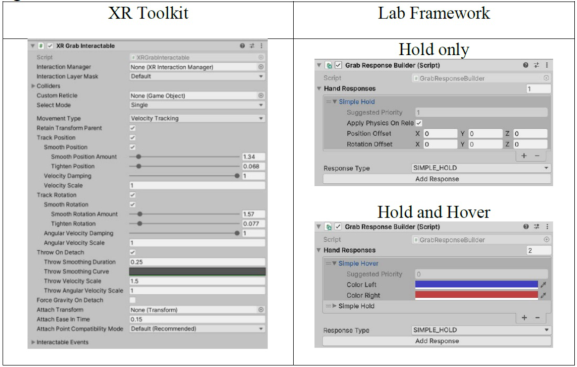
Figure 3: Grab interactions.
Because certain responses (e.g., destroying an object) can interfere with later ones, each response is given a priority, a technique used in other GUI libraries. Additionally, responses can return true or false to indicate whether
Creating a Lightweight Unity Interaction Package 909
the event has been consumed—preventing it from being forwarded to the next response in the list.
This significantly simplifies individual components. Consider grabbing as shown in Figure 3, below. The XR Toolkit XR Grab Interactable component attempts to handle all possible grab behaviors within a single monolithic component. If hover indication is desired, this requires multiple extra components and setup involving Affordances. In contrast, our framework state if you want grabbing and hovers, simply add both to this list as shown in Figure 3, in the bottom right.
Two-Handed Interaction Support Our framework also supports two-handed interaction, allowing both one- handed and two-handed grabs. This is implemented via a special grab response called Double Grab Response that add component during run time to forwards the grab events to the core builder. Currently, one pre-made two-handed interaction is included in the framework: a 6-degree-of-freedom (6DoF) manipulation, where the object is aligned and positioned dynamically between the two hands.
If both hands are active and interacting with the same object, the two- handed grab response takes control, overriding the one-handed behavior. This is handled using the existing priority system, where the two-handed response signals that event processing should stop at its stage—effectively preventing one-handed responses from executing.
NAVIGATION SYSTEM DESIGN (UNITY INTERACTOR WITH PROVIDER) In our framework, navigation is built around the standard components commonly used in VR environments. The most prevalent navigation methods in VR games are teleportation and steering (or smooth locomotion), where the user slides through the environment
When analysing these systems, we can break navigation down into these parts:
1. The VR body – The game objects involved in navigation 2. Animations – Visual effects for teleportation or steering 3. Rules – Define where the user is allowed or restricted from moving 4. Activation control – Determines whether movement is triggered or not 5. A way for these components to communicate.
While functional with the same parts, the XR Toolkit system does not align with our design philosophy of “tell the system what you want to do, not how.” Moreover, the Character Controller component being used as the rules was very problematic as it assumes the camera and the body are aligned. In VR the tracking center and the camera can easily be over 10 feet resulting in sever clipping.
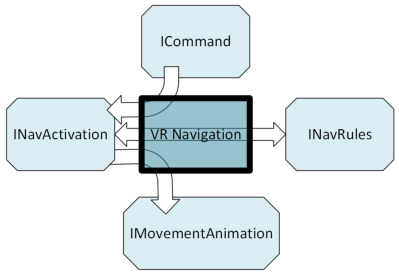
Our Approach: A Central Navigation Hub To better support this philosophy, our framework introduces a core navigation hub component called VR Navigation that acts as a mediator
between the various components (rules, animations, input). The lab framework provides a custom inspector, allowing these components to be managed from a single, cohesive interface.
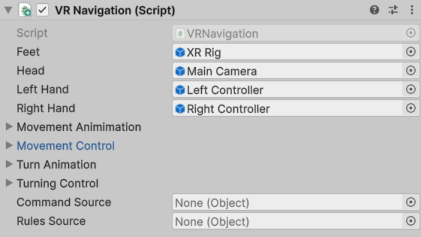
Figure 4: VR navigation communication hub, and associated components.
From this inspector, users can either, 1) select common pre-made components (e.g., snap-turning, teleport), or 2) link to custom components that provide the same functionality as demonstrated in Figure 4, left, movement type. So, while we still use multiple underlying components, only one inspector needs to be checked to view the navigation configuration as demonstrated in Figure 4, right.
Some components, such as the rules, are separated by convention. For example, the movement rules component is separate because systems like Unity’s Character Controller are typically separate objects. To enable these components to work together seamlessly, we defined a series of interfaces:
INavRules – Validates whether a proposed movement is allowed.
IMovementAnimation – Handles different phases of a movement animation, including start, animation, and end phases.
INavActivation – Manages input activation, selection, and cancellation.
ICommand – An optional interface to support connection into the VR Navigation core component, and provide auto enrollment by searching.
This results in the following interaction model between components:
Figure 5: Navigation control flow diagram.
Creating a Lightweight Unity Interaction Package 911
MENUS The XR Toolkit currently offers more thorough support for menus than our framework. However, it requires multiple interdependent components to function correctly, and these must be maintained in parallel with the desktop GUI system, which adds complexity.
Evaluation of these components raises concerns about long-term maintainability. For example, the Tracked Device Graphic Raycaster includes hardcoded cases for certain XR Toolkit interactors. This tight coupling implies that extending or modifying interaction logic in the future could break compatibility with XR menus.
Due to these concerns, the lab framework intends a future implementation.
INITIAL SETUP FOR NEW USERS The lab aimed to make the initial setup process quick and straightforward for new users. While the lab currently uses an internal Unity template (which will be published publicly in the future), if starting from scratch, the recommended process would be:
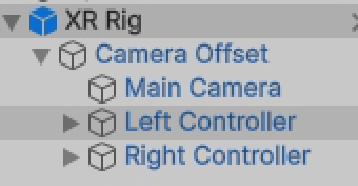
1. Download the 3D Built-in (for size) Rendering Pipeline Template. 2. Add the XR Interaction Package 3. Create an XR Rig: The lab provides its own prefab for this, structured similarly to Unity’s default as shown in Figure 6 4. Add a Player Input Component: Attach the Player Input component to the XR Rig to handle input mapping.
Figure 6: Starting XR Rig.
Then, the scene is ready for interactions and navigation.
SUPPORTING GRAB INTERACTIONS To enable general grab interactions, follow these steps:
1. Add the Process Controllers Component: Attach this component to both hand controllers and configure the actions as preferred (shown in Figure 2).
2. Make Objects Grabbable: For each GameObject you want to be grabbable, add a Grab Effect Builder component and specify the desired grab responses. (shown in Figure 3).
At this point, the ability to pick up and interact with objects is supported.
SETTING UP NAVIGATION To enable navigation in your scene, complete the following:
1. Add a Navigation Component: Attach to GameObject. 2. Assign References: Set the XR Rig’s feet and the Main Camera (representing the player’s head) in the Navigation component to indicate the player’s body. 3. Select Animation and Selection Options: Choose the desired animation and selection behaviors from the provided list. 4. Add a Rules Component: Attach this to the same GameObject to define where navigation is allowed. 5. Add a Command Component: This component handles activating and deactivating navigation based on input commands.
When completed, it should be similar to what is shown in Figure 4, and navigation is now ready.
HOW TO EXTEND Adding a new response is a three-step process. First, the developer has to make the script of that particular response. Second, add that response enum in the GrabResponseType.cs. Lastly, add that response in the editor in GrabResponseBuilder.cs. New movement animation script work very similarly.
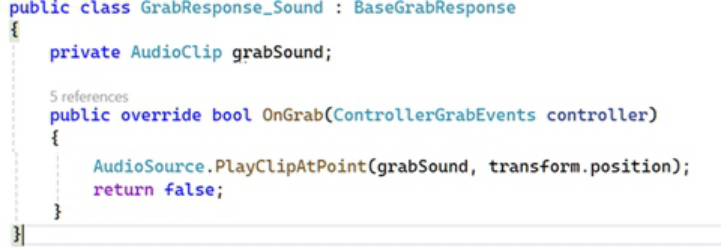
For example, if you want to play sound on grab. First create the sound play script derived from GrabResponse. Only the OnGrab event needs to be overridden as shown Figure 6 below.
Figure 7: Example grab response for playing a sound.
Creating a Lightweight Unity Interaction Package 913
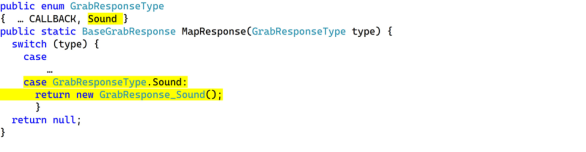
Second, add the enum in the GrabResponseType.cs as highlighted below.
Figure 8: Example grab response integration into the builder.
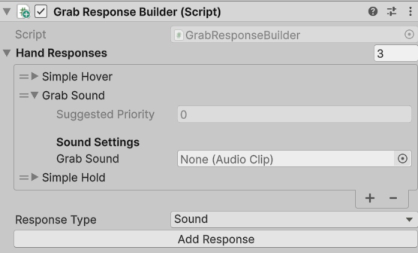
Finally, add the sound response in the using the Builder component in the Unity editor on which you want to play the sound during grab as shown below.
Figure 9: Sound response result in the inspector.
APPLICATION IN A CLASSROOM
The principal investigator (PI) authored a textbook (Rebenitsch, Rebenitsch & Loveland, 2025) and ran a course that used a simplified version of our custom framework. This course focused on teaching VR development fundamentals and deliberately avoided Unity’s Interaction Toolkit as one key goal was to enable students to create their own interaction systems, making it easier to transition between platforms like Unity and Unreal. The main differences in the simplified version included the removal of the custom editor window and the use of multiple components instead of a factory builder pattern. Despite these changes, the core paradigms remained the same, and the controller script purpose was largely unchanged.
Students had several opportunities to demonstrate success and preference for this toolkit over Unity’s. For example, in the first practical exams that focused on response handling (“effects” in the course), ∼80% of the students who used the custom toolkit succeeded in a creating a new response in
about 20 minutes. In a later practical exam focused on navigation, all except two students were able setup teleporting although there was issue on rule application on banned locations.
In a semester-long project (some of which, with student permission, are available here (Rebenitsch, May)), a few students attempted to learn Unity’s XR toolkit—though it was not prohibited—none succeeded in fully implementing the required tasks. In contrast, all except two students who used the custom toolkit successfully completed their projects, and one of those needed a advance 2-handed grab functionality to succeed.
CONCLUSION
Unity’s new system is quite large and duplicates several existing features. It also suffers from blurred boundaries between responsibilities and lacks clear explanations of how different components interact, making it difficult to use. Just supporting a user’s right hand to both poke buttons and teleport via the XR Toolkit involves 13 separate components spread across 6 Game Objects.
The SDSMT VR lab began developing its own toolkit before Unity’s toolkit was out of beta. The focus was on usability for non-coders by prioritizing what the user wants to do, while still providing extensibility for coders. Although there is some overlap with Unity’s toolkit, our framework has a much flatter structure and clearer connections between components.
Currently, the library is being updated for Unity 6 and will be released once this process is complete. Several features—such as improved menu and inventory support, inventory-style hand, joint-based grabs with animation— are still missing but are planned for future integration.
ACKNOWLEDGMENT
The authors would like to acknowledge the several master students in the lab that contributed to various pieces via their own projects.
AI notice: AI was used only for proofreading.
REFERENCES
OpenXR Toolkit. (2023, 3). Retrieved 10 2, 2025, from https://mbucchia.github.io/ OpenXR-Toolkit. Rebenitsch, L. (May, 2025). VR Textbook and Course. Retrieved from https://sites.google.com/sdsmt.edu/south-dakota-mines-rebenitsch/ vr-textbook-and-course?authuser=0. Rebenitsch, L., R. L., & Loveland, R. (2025). A Practical Introduction to Virtual
Reality: From Concepts to Executables. Morgan Kaufmann. Unity. (2025). XR interaction Toolkit. Retrieved from Unity Manual: https:// docs.unity3d.com/Packages/com.unity.xr.interaction.toolkit@3.0/manual/ extending-xri.html. Valve Corporation. (2024, 1 17). SteamVR Plugin. (Steam) Retrieved 10 2, 2025, from https://assetstore.unity.com/packages/tools/integration/steamvr- plugin-32647. Wikipedia. (2025, 4 2). OpenVR. (Wikipedia) Retrieved 10 2, 2025, from https://
en.wikipedia.org/wiki/OpenVR.
LISTED IN THE AHFE DIGITAL BOOKSTORE CATALOGUE
Explore the complete digital volume
Human Factors in Design, Engineering, and Computing
Read this individual research paper free through the original publisher, or explore the full digital proceedings book.
ISBN 978-1-964867-75-5
Explore this ISBN in the AHFE Bookstore ↗Listed in the July 2026 bookstore catalogue; search by ISBN to confirm current availability · Digital book purchase optional