Janelle Wilson, Duha Ali (2025). Usability Testing of Healthcare Portals for Individuals with Mental and Physical Disabilities: Assessing Accessibility and User Experience (UX). In: Healthcare and Medical Devices. AHFE Open Access, vol. 171, pp. 151–161. https://doi.org/10.54941/ahfe1006201
As healthcare continues to become more digital, patient portals have become essential tools for patients in their healthcare experience, including but not limited to accessing electronic healthcare records (EHR), scheduling appointments, and messaging healthcare providers. Despite widespread use of these tools, challenges with accessibility continue to exist, disproportionately impacting individuals with cognitive and physical disabilities. This study investigates the usability of healthcare portals for this population with usability mixed-methods tests with individuals experiencing cognitive or physical disabilities to assess how well their needs are met with online patient portals. Ten participants completed nine tasks representative of routine healthcare interactions. Quantitative results indicated that participants with physical impairments took three times longer to complete tasks such as scheduling appointments and locating lab results. Qualitative data revealed shared frustrations across all participants, with many expressing confusion over inconsistent terminology. Emotional hesitation was common, driven by fear of making an irreversible mistake. The findings suggest that task-specific improvements such as simplified navigation and real-time feedback cues are beneficial to ensuring equitable digital health access for users.
For many users, navigating a healthcare portal is a frustrating task. For users with disabilities, online portals can be a barrier to essential care (Lyles et al., 2020). A disability, whether cognitive or physical, can impact how someone interprets and interacts with digital information (Yale University, n.d.). According to the Centers for Disease Control and Prevention (CDC), as of Spring 2023, more than 27% of U.S. adults live with a disability including physical, cognitive, sensory, and self-care related. According to the Worldwide Health Organization (WHO), about 16% of the world’s population, which is over 1 billion people, are estimated to have some form of disability Organization (WHO, 2023). These individuals are more likely to experience medical needs yet experience more barriers when seeking and receiving care (Clemente et al., 2017). As digital interfaces become
more prevalent as points of access, accessibility becomes a matter of critical importance.
While laws like Section 504 of the Rehabilitation Act aim to protect qualified individuals from discrimination based on their disability (U.S. DHHS, 2006), digital healthcare platforms often fall short of truly delivering accessible experiences for all. In practice, many healthcare portals remain difficult to navigate, overly complex, or incompatible with assistive technologies such as screen readers or voice input (Moncy et al., 2023). Individuals with low health literacy or disabilities are repeatedly excluded from the full benefits of patient-centered technologies (Lyles et al., 2017).
The usability problem has become increasingly relevant as health systems move to digital-first models of care, relying on patients to start their care through digital means such as apps, websites, or other telehealth platforms (Lyles et al., 2020). The Web Content Accessibility Guidelines (WCAG) is considered the model example for accessible design (World Wide Web Consortium, 2018). However, meeting these technical requirements does not guarantee that systems are translated into usable formats for individuals with disabilities (World Wide Web Consortium, 2016).
A content analysis performed by Al-Azawei et al. (2016) investigated the impact of Universal Design for Learning (UDL) on learning differences based on individual differences. UDL focuses on designing and delivering accessible content to better the learning experience regardless of the individual’s abilities. The analysis found that users with disabilities frequently encountered higher error rates and lower satisfaction when using systems that lacked inclusive design principles. However, UDL-based curriculums reduced the learning barriers between disabled students and abled students. Extending this to electronic healthcare tools, this study emphasizes the importance of focusing on accessible designs to ensure that the tools implemented encourage inclusivity while preventing further discrimination or isolating people with disabilities.
A study by Dobransky and Hargittai (2006) highlights an additional layer of complexity when addressing accessibility which is access to the technology itself. The study finds that people with disabilities are significantly less likely to live in households with computers, are less likely to use computers, and are less likely to be online. Even though online healthcare portals present a more available and technically accessible tool, this digital divide emphasizes how many individuals with disabilities are still excluded due to systemic inequalities. The combination of limited connectivity and interface barriers increases the risk of disproportionate participation in health systems that are relying more on digital interaction.
Digital health technologies can either reduce or reinforce existing discrepancies (Yao et al., 2022). According to Lawerence in the National Academies of Science (2022), digital health tools have the power to improve healthcare experiences and utilization but can also intensify inequities if not developed with equity-centered design principles. The concept of digital determinants of health (DDOH) has developed to describe how a person’s experience with digital technology, through access, confidence, skills, and even trust, can impact their healthcare outcomes and interactions. Systemic
Usability Testing of Healthcare Portals for Individuals With Mental and Physical Disabilities 153
challenged such as limited access to broadband, poor digital literacy, or inaccessible interfaces, combine with longstanding social determinants of health (SDOH) to contribute to further disparities in healthcare access and outcomes. The importance of integrating health equity into every phase of digital health development, from design and deployment to evaluation. Ensuring accessibility, usability, and representation across stakeholder groups can better prevent the unintended creation or emphasis of imbalances.
In summary, there is a noticeably persistent gap between ideas that appear accessible in theory and tools that are truly usable in real-world settings. Systems can create significant issues when not designed with the end user in mind. This is extremely problematic in healthcare, where delays and errors in accessing information can have severe consequences. This paper presents findings from structured usability testing conducted with individuals who have disabilities. Through observing participants perform healthcare tasks in a patient portal, this study aims to highlight the specific aspects that prevent access and clear understanding. The results not only emphasize where digital health systems underperform but also how user-informed design can bridge the gap between availability and accessibility.
METHODOLOGY
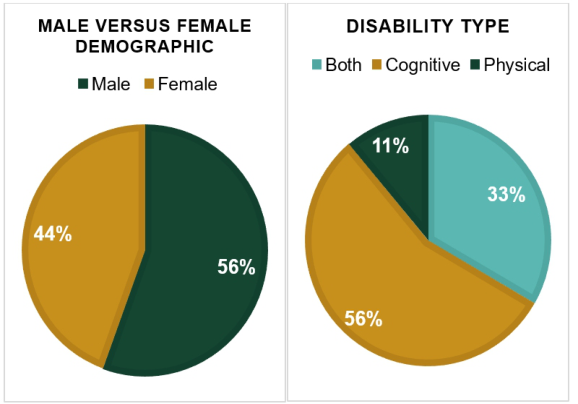
Participants Ten participants were recruited in collaboration with VTC Enterprises in Santa Maria, CA. Participant ages ranged from 24 to 46. All participants identified as having a disability including 56% Cognitive, 11% Physical, and 33% Both. The participant demographic was 44% female and 56% male. All participants had experience using the internet but varied in confidence in regard to navigating online healthcare systems.
Figure 1: Participant demographics.
154 Wilson and Ali
Procedure Sessions were conducted in a room with minimal distractions with 60 minutes for each participant. Prior to the tasks, participants were asked a series of questions to assess their experience, comfort, and confidence with using online patient portals. Participants were then given a fifth generation iPad Air tablet measuring 9.74 inches (247.6 mm) in height, 7.02 inches (178.5 mm) in width, and 0.24 inches (6.1 mm) in depth (Apple Inc., 2024). The Solismed patient portal demo was used for participants to complete a series of tasks to assess the learning and efficiency of the patient portal.
The learning tasks were: 1) Schedule an appointment; 2) Open and check lab results; 3) Send a message to your healthcare team; 4) View the bill summary; 5) Fill out a Patient Satisfaction Survey and save it as a draft.
The efficiency tasks were: 1) Reschedule an appointment; 2) Submit the Patient Satisfaction Survey; 3) Check messages from the healthcare provider; 4) Review the visit and discharge summary. These tasks were chosen based on common patient portal functionalities to simulate real-world use cases. A think-aloud protocol was used, where participants narrated their thoughts and actions to the best of their abilities. Observations were recorded, and follow-up interviews were conducted including the questions: 1) Overall, what would make the portal easier to use; 2) Which task felt the hardest to complete; 3) What did you think of the design overall; 4) Were there any colors, fonts, or layouts that were hard to read or navigate; 5) Is there anything visually distracting or confusing; 6) How did you feel about clicking buttons and navigating the portal; 7) Were the touch targets (e.g., buttons) the right size for you; 8) Was scrolling or navigating between sections easy or frustrating? to provide further clarification and feedback on the portal design and functionality.
RESULTS
Qualitative Qualitative data collected was further analyzed using thematic coding. Key usability issues were grouped together based on frequency.
Pre-Task Survey Before participants started performing the various tasks, they were asked questions to evaluate their experience and confidence level using online patient portals. The questions included: 1) Do you currently use any online portals to manage your healthcare; 2) What are some challenges you’ve experienced when using technology for healthcare; 3) How confident do you feel about using this portal today? The third question will be further discussed in the quantitative section of this paper. Fifty percent of participants reported experience using an online patient portal prior to this study. Challenges mentioned by participants included issues in remembering log in information, glitches on the portal, and overall anxiety about filling in the wrong information.
Usability Testing of Healthcare Portals for Individuals With Mental and Physical Disabilities 155
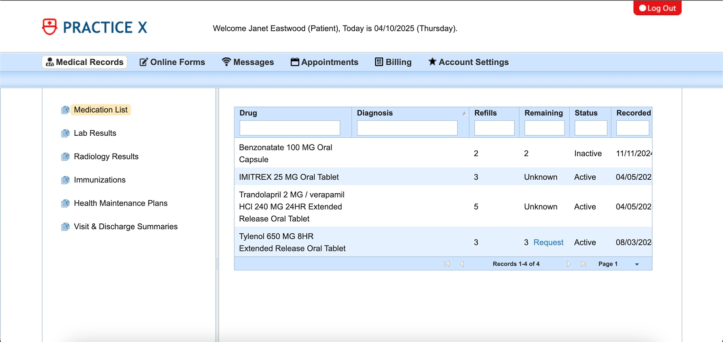
Common Usability Issues There were several challenges related to navigating the portal including ambiguous labels, unresponsive buttons, and confusing layouts. Several participants were unable to interpret menu labels such as “Online Forms” and further differentiate between “Downloadable Forms” versus “Electronic Forms.” This was especially prevalent when participants were searching for the “Patient Satisfaction Survey,” leading to a lot of frustration and confusion when performing the task. Furthermore, the buttons on the survey responded inconsistently, leading to further feelings of annoyance. The search boxes located at the top of the tables on each page brought forth more confusion as there was no clear label of their purpose. This led to many participants mistakenly filling in these boxes.
Figure 2: Patient demo portal (adapted from Solismed, 2024).
Another issue arose from the cognitive load participants were placed under. Some tasks were more complex leading users to miss important information and key steps. Noticeably some terminology was difficult for users to understand leading to further cognitive overload. Additionally, the barriers to accessibility included the lack of clear visual cues and assistive features such as larger fonts leading to hesitation from the participants. Many individuals hesitated before clicking links or buttons, due to fear of making a mistake they could not undo.
Quantitative Participants during the pre-task survey were asked, “How confident do you feel about using this portal today?” Responses were categorized using a five-point scale from 1 (low) to 5 (high), based on common qualitative descriptors. The average scaled confidence score across participants was 3.6 out of 5. A few of the responses included descriptors such as “nervous” or “kind of confident,” indicating some emotional hesitation despite having some familiarity. These insights support the broader observation that even users who felt confident experienced some difficulty when interacting with the system.
156 Wilson and Ali
Of the 10 total participants, 8 consented to being recorded for quantitative data collection. One participant, aged 63, was a consistent outlier across multiple tasks. For statistical analyses presented, this participant’s data was excluded to prevent distortion of group averages. However, their experience is still acknowledged in the qualitative observations and discussion to ensure inclusive representation.
The tables above summarize the average task completion times and standard deviations across all participants, both with and without the inclusion of the outlier. This comparison helps contextualize the impact of the outlier.
Task Time by Sex
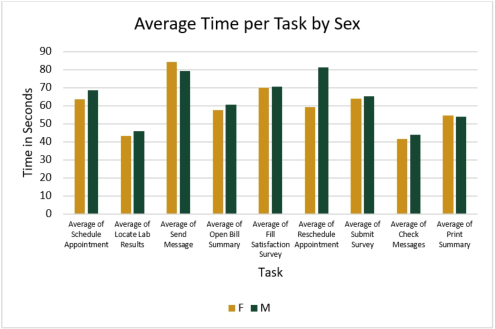
Figure 3 presents average task completion times by participant sex. Male participants took slightly longer on average across most tasks, particularly when rescheduling appointments. Female participants had shorter completion times in scheduling appointments, locating lab results, and submitting the survey, though the overall differences were modest. These findings add subtle distinctions to the analysis by highlighting how gender may intersect with interface usability, although still not the most influential factor across groups.
Figure 3: Average time per task by sex.
Usability Testing of Healthcare Portals for Individuals With Mental and Physical Disabilities 157
Task Time by Disability
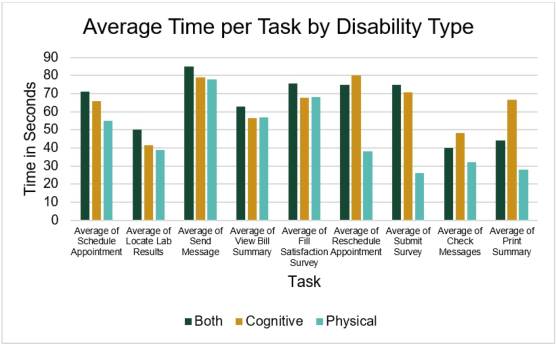
Figure 4 shows the average time per task by disability type. Participants with both physical and cognitive disabilities had the longest average completion times across most tasks including scheduling appointments, locating lab results, sending messages, viewing the bill summary, filling out the survey, and submitting the survey. Participants with physical impairments demonstrated the lowest average completion times across almost all tasks. These results suggest that cognitive load, rather than motor impairment, play a more significant role in determining task efficiency in this sample.
Figure 4: Average time per task by disability type.
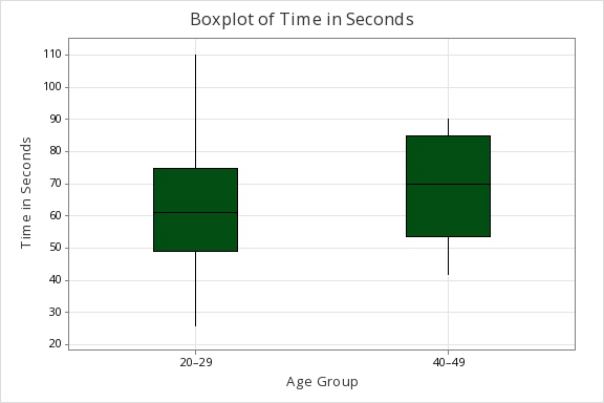
Variability of Time Based on Age To further understand how performance varied with age, Figure 5 displays boxplots of task completion times grouped by decade-style age brackets (20–29, 40–49). This visualization highlights the time variation across age groups. These visualizations highlight how task duration varied across younger age brackets more meaningfully. Participants in the 40–49 group exhibited higher median times and a narrower interquartile range, suggesting slower but more consistent performance relative to the 20–29 group. The younger group displayed greater variance. With the minimal difference between groups, these patterns suggest that usability struggles were not uniformly age related but rather more dependent on how interface elements interacted with users’ processing. Given the small sample size, these trends are more exploratory, and it is best to interpret these results as indicative rather than conclusive.
Together these visual analyses support earlier qualitative observations that interface consistency and clarity are influential, but age or diagnosis could have some influence on determining task success. Due to the small sample size, these boxplots and visualizations are not intended to suggest statistical significance. Instead, they offer a visual illustration of variability and highlight patterns, such as age-related outliers and task times, that warrant further investigation in larger studies.
158 Wilson and Ali
Figure 5: Boxplot of time in seconds based on age group.
DISCUSSION
Qualitative Pre-Task Survey The participants’ reported confidence levels initially suggested moderate ease with the system, but behavioral patterns revealed higher levels of hesitation. This discrepancy supports Zhou et al. (2019), who found that users’ self- perception of technological ability does not always align with actual task completion. Their mHealth study emphasized the need for design that reinforces confidence through intuitive guidance feedback, particularly in health-related systems where hesitation may delay critical care.
Common Usability Issues Issues such as ambiguous language, inconsistent layouts, and a lack of visual or auditory feedback were not limited to one user group, they appeared across all disability types. These findings align with Dobransky and Hargittai (2006), who highlight that people with disabilities are significantly less likely to have access to computers or the internet. This lack of access is a primary barrier to digital participation. When access is compounded by confusing or inconsistent interface design, the effect is exclusionary even for user who manage to get online. Furthermore, Lawerence (2022) emphasizes that inclusive feedback loops are critical, yet frequently missing from digital healthcare environments.
Quantitative Task Time by Sex The minimal differences between average times between males and females align with Zhou et al. (2019), who emphasized that system usability is
Usability Testing of Healthcare Portals for Individuals With Mental and Physical Disabilities 159
strongly tied to feedback clarity and procedural simplicity which are features that may be interpreted or leveraged differently by users depending on their interaction style. Although the small and unbalanced sample size limits the generalizability, the trends observed support the broader idea that usability challenges stem more from the system design rather than user demographics.
Task Time by Disability Participants with both cognitive and physical disabilities required the most time per task. The combined impact of cognitive overload and motor coordination challenges appeared to amplify interface barriers. This outcome reinforces the idea that navigation and layout issues have a compounding effect on users with motor and cognitive impairments. WCAG 2.1 guidelines (World Wide Web Consortium, 2018) offer technical standards but do not directly address detailed usability barriers like click path complexity, falling short in addressing real-world consequences. These findings suggest that universal design must move beyond compliance and embrace strategies that accommodate layered needs.
Variability of Time Based on Age While the data suggested that older participants took longer to complete tasks, visually the correlation is not strong. This aligns with Al-Azawei et al. (2016), who found that design quality, not age, predicts learning and interaction outcomes in digital systems. Younger users also struggled when designs violated their expectations. Therefore, targeting accessibility efforts solely based on age misses the broader need for consistency and predictability across interfaces.
Together, these insights reinforce the broader idea that system-wide clarity and consistency are extremely impactful, yet it is important to consider other user traits such as age or diagnosis. The results of this study reinforce persistent concerns about accessibility in digital health. Although participants demonstrated the desire and motivation to use the system, the design itself created significant barriers. Inclusive, equity-centered design cannot rely on technical standards alone. Designs must reflect lived user experience. They also reinforce existing literature emphasizing the need for these designs in health technology
RECOMMENDATIONS The usability issues observed in this study support several concrete and user- informed recommendations for healthcare portal design. First, task labels should be action-oriented and clear. Participants frequently misinterpreted labels such as “Records” or “Forms,” causing unnecessary detours or incomplete actions. Replacing these with phrases like “View My Lab Results” or “Fill Out Patient Survey” would reduce confusion and better match user expectations.
Navigation complexity emerged as a barrier, particularly for users with physical disabilities. Multi-step tasks, such as scheduling, should be streamlines with few clicks and larger touch targets. Consistent placement
160 Wilson and Ali
of menus and buttons across the interface would also reduce disorientation reported by participants.
Several participants hesitated before submitting forms due to the absence of confirmation messages or visual indicators. Immediate feedback for completed actions, such as a “Submission Successful” prompt can provide further reassurance and reduce fear of making irreversible mistakes.
Participants also expressed a desire for in-portal assistance. Optional walkthroughs, embedded icons, or contextual hints can assist users in real time. This could be particularly beneficial for tasks that had longer task times.
Finally, data from outliers, such as Participant 2, should be retained and analyzed, not discarded. Their performance may seem anomalous in small sample sizes, but it highlights critical gaps in accessibility and reflects the lived experiences of those most affected by poor interface design.
CONCLUSION
As the world continues to digitize, healthcare portals become more prevalent. These online tools hold the promise of improving access to care, but only when they can be used by everyone. This study emphasizes and demonstrates that many of the barriers faced by users with disabilities are not caused by individual limitations but rather oversights in digital interface designs. To address these challenges, a shift in design philosophy is required to transition from one-size-fits-all systems to platforms that truly reflect the realities and needs of diverse users.
Designing for accessibility is not simply about checking boxes on a list of requirements. It is about building systems that respect and respond to the experiences of those who rely on them most.
ACKNOWLEDGMENT
The authors would like to acknowledge the staff and participants at VTC Enterprises in Santa Maria, CA for their time and insight.
REFERENCES
Al-Azawei, A., Serenelli, F. and Lundqvist, K. (2016) ‘Universal Design for Learning (UDL): A content analysis of peer-reviewed journal papers from 2012 to 2015’, Journal of the Scholarship of Teaching and Learning, 16(3), pp. 39–56. Apple Inc. (2024) iPad (10th generation) - Technical Specifications. Available at:
https://support.apple.com/en-us/111887. Centers for Disease Control and Prevention (2023) Disability impacts all of us infographic. Available at: https://www.cdc.gov/ncbddd/disabilityandhealth/ infographic-disability-impacts-all.html (Accessed: 10 April 2025). Clemente, K. A. P. et al. (2022) ‘Barriers to the access of people with disabilities
to health services: a scoping review’, Revista de Saúde Pública, 56, p. 64. https://doi.org/10.11606/s1518-8787.2022056003893. Dobransky, K. and Hargittai, E. (2006) ‘The disability divide in internet access and use’, Information, Communication & Society, 9(3), pp. 313–334. Lawrence, K. (2022) ‘Digital Health Equity’, in Digital Health, pp. 121–130.
Usability Testing of Healthcare Portals for Individuals With Mental and Physical Disabilities 161
Lyles, C. R., Fruchterman, J., Youdelman, M. and Schillinger, D. (2017) ‘Legal, practical, and ethical considerations for making online patient portals accessible for all’, American Journal of Public Health, October. Available at: https://www.nc bi.nlm.nih.gov/pmc/articles/PMC5607665/#bib27. Lyles, C. R., Sarkar, U., Ralston, J. D., Adler-Milstein, J., Schillinger, D., Allen, J.
and Bates, D. W. (2020) ‘Patient Portal Barriers and Group Differences: Cross- Sectional National Survey’, Journal of Medical Internet Research, 22(9), p. e16219. Available at: https://www.ncbi.nlm.nih.gov/pmc/articles/PM C7530687/. Moncy, M. M., Pilli, M., Somasundaram, M., Purkayastha, S. and Fulton, C. R.
(2023) ‘Evaluation of accessibility of open-source EHRs for visually impaired users’, arXiv preprint arXiv:2311.02531. Available at: https://arxiv.org/abs/2311. 02531. Solismed (n.d.) MyHealth patient portal demo. Available at: https://www.solismed.c om/demo/myhealth.php. U.S. Department of Health and Human Services (2006) Your rights under Section
504 of the Rehabilitation Act. Available at: https://www.hhs.gov/sites/default/file s/ocr/civilrights/resources/factsheets/504.pdf. World Health Organization (2023) Disability. Available at: https://www.who.int/ne ws-room/fact-sheets/detail/disability-and-health. World Wide Web Consortium (2016) Accessibility, usability, and inclusion. Available
at: https://www.w3.org/WAI/fundamentals/accessibility-usability-inclusion/. World Wide Web Consortium (2018) Web Content Accessibility Guidelines (WCAG) 2.1. Available at: https://www.w3.org/TR/WCAG21/. Yale University (n.d.) Types of disabilities and how they affect people. Usability &
Web Accessibility. Available at: https://usability.yale.edu/web-accessibility/article s/types-disabilities. Yao, R., Zhang, W., Evans, R., Cao, G., Rui, T. and Shen, L. (2022) ‘Inequities in Health Care Services Caused by the Adoption of Digital Health Technologies: Scoping Review’, Journal of Medical Internet Research, 24(3), p. e34144. Available at: https://www.jmir.org/2022/3/e34144/. Zhou, L., Parmanto, B., Saptono, A. and Silva, E. (2019) ‘The mHealth App Usability
Questionnaire (MAUQ): Development and validation study’, JMIR mHealth and uHealth, 7(4), p. e11500. Available at: https://mhealth.jmir.org/2019/4/e11500/.
LISTED IN THE AHFE DIGITAL BOOKSTORE CATALOGUE
Explore the complete digital volume
Healthcare and Medical Devices
Read this individual research paper free through the original publisher, or explore the full digital proceedings book.
ISBN 978-1-964867-47-2
Explore this ISBN in the AHFE Bookstore ↗Listed in the July 2026 bookstore catalogue; search by ISBN to confirm current availability · Digital book purchase optional