Aijun Wang (2024). Design of fire escape system for children based on VR technology. In: Human Factors in Design, Engineering, and Computing. AHFE Open Access, vol. 159, pp. 1139–1148. https://doi.org/10.54941/ahfe1005681
Fire is one of the disasters that threaten people's lives and property safety, and mastering correct fire escape skills can greatly reduce the casualties caused by fire. Most of the traditional fire escape education is carried out in the form of fire escape drills, lectures, etc. Although it has played an educational effect to a certain extent, it can't build a safe and experiential interactive platform for people. In view of this, the design scheme of fire escape system based on VR technology is proposed, and the process and framework of the system are given at the same time; the key technologies in the platform are discussed and researched; and the logical idea and realization method of the interactive function using C# language in Unity 3D are elaborated in detail.
Among various disasters, fire is one of the main disasters that most frequently and universally threaten public safety and social development (Chen Shengming, 2017). From the statistics, more than 35,000 fire accidents are caused by children every year, and 15% to 20% of all fire accidents are victimized by children. Children have become a high-risk group among fire victims (Guangdong Education, 2023). In fire accidents, because children do not master the correct methods of fire evacuation and escape, they often fail to react correctly when encountering unexpected situations, which is an important cause of greater casualties in fire accidents. According to a survey conducted by the Global Child Safety Network, nearly 40% of children have at least one burn experience in their daily lives. More than 30% of children have easy access to matches, lighters and other ignition devices at home. 40% of students have played with fire. 51.8% of students have not yet mastered basic knowledge of fire fighting and self-rescue, and 33% of students lack awareness of the dangers of fire. Among the residential students, 37.01% of them have not thought about fire escape for the environment of their dormitory (People’s Daily Online, 2016). Therefore, it is of great significance to construct a fire escape education platform based on VR technology to continuously strengthen children’s fire escape safety education in order to enhance their awareness of fire escape techniques.
Virtual Reality technology, is a computer simulation system that can create and experience the virtual world (Zhang Yi, 2018), by wearing devices
such as virtual reality helmets, handles, etc., the user can be immersed in virtual scenes or environments and human-computer interactions with virtual environments (Aijun Wang et al., 2018). VR technology is now widely used in gaming, tourism, medical, education and other industries (Liangli Zhang et al., 2015). Through the development of fire escape VR system platform, and gradually promoted to schools, shopping malls and other daily safety education activities, let children bring VR equipment, that is, can be immersed in a way to obtain the knowledge of safe escape in fire accidents, and at the same time, through human-computer interaction to deepen the impression of the safe escape and enhance their awareness of emergency treatment of fire safety emergencies.
HOLISTIC DESIGN Tools and Methodology
This platform uses 3Dmax, MAYA and other software to complete the scene production, and exported to FBX format files, and then imported into the Unity 3D software (YaHua Li et al., 2016), and finally C# script to complete the system design of the fire escape platform. In this project, in order to create a more realistic virtual environment, the model scale and material selection fully simulate the home environment, and part of the model is produced in 1:1 simulation. In this platform, it is assumed that the kitchen on the 3rd floor of a building causes a fire, and thus a virtual escape drill is carried out.
Hardware Configuration The development of this platform is based on the HTC Vive hardware device, in which the interaction script design is very different from the PC-side platform, in order to ensure that the experience of this system platform, the specific hardware accessories parameter recommendations (see Table 1).
Table 1. Hardware requirements for running virtual reality (VIVE.2024).
Table available in the original PDF paper.
Installations Illuminatios Parameters CPU ntel ® Core™i5-4590 / AMD Ryzen 1500 equivalent or better Display card (computer) Maintenance/installation time to complete RAM NVIDIA ® GeForce ® GTX 1060 / AMD Radeon RX 480 equivalent or higher. Video interface 8GB RAM and up USB interface 1 USB 3.0 port or newer Computer operating system Supports Windows® 10 and Windows® 11 operating systems
System Design Using 3dmax, maya and other software to complete the production of all the models of the scene in the platform, and then import all the models into Unity 3D to complete the scene construction and lighting baking, and then use C# script to complete the design of the interaction events. The specific running plot design and interaction process of this platform is: firstly, enter the living room scene of a 3-floor residential building, the experiencer is facing the
Design of Fire Escape System for Children Based on VR Technology 1141
camera, set a focal point hanging on the character, after 3 seconds the focal point animation loading is completed, and then the child experiencer’s point of view is switched to the character’s first-person point of view. Then, the fire alarm sounded downstairs, and then the character began to do towards the door and open the door, the building emits a lot of smoke and open fire, at this time, the pop-up choice to ask a question dialog box, “now start to escape?” The options are “Yes, right away” and “Wait, let me do the protective preparations”, at this time, the character chooses to focus on one of the options and triggers the focus animation, to be focused on the completion of the animation triggers the next logical step. Logic 1: Choose “Yes, right now”, the interaction is to focus on the “Yes, right now.” option, after the alignment progress bar is loaded (about 3 seconds), the character starts to run to escape, walks to the elevator entrance, opens the elevator button and enters the elevator, a red flash effect appears on the character’s body, and a warning sound is triggered. A red flash effect appears, a warning sound effect sounds at the same time, a text alert box pops up showing “escape failed”, and after 3 seconds, a text dialog box pops up showing the text: “In case of fire, do not take the elevator, use a wet towel to cover your mouth and nose, and go through the safe passageway, bending down to go forward (Oulu Education, 2016). Logic 2: Select “Wait, let me do the protective preparations”, the interaction is focused on the “Wait, let me do the protective preparations” option, after the focus animation is loaded (about 3 seconds), the character closes the door, enters the room, picks up the wet towel on the table, covers his mouth and nose, and walks forward from the safe passage. Towel, cover the mouth and nose, then open the door, then pop-up dialog box whether to escape immediately, pop-up options “Yes, immediately”, “choose to wait”. Select “Yes, immediately” will begin to escape, the characters by the safe passage signs, stooping forward until out of the residential building, this time the pop-up dialog box “escape successfully”, 3 seconds after the pop-up fire safety escape tips text dialog box and display text: “In case of fire, please don’t take the elevator, use wet towel to cover your mouth and nose, and walk forward from the safe passage with your head down”. Complete all logic and return to the Enter Scene screen (see Figure 1).
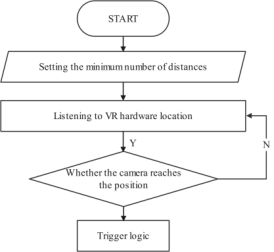
Figure 1: Realization of collision detection system flowchart. (Dirancang oleh Aijun Wang et al., 2023).
1142 Wang
Operational Test After completing the scene construction and system interaction design of this platform, there is still an important testing session, which mainly includes three parts: unit testing, playing scene, and packaging. Unit testing refers to the detection and verification of the smallest testable unit in Unity software, usually, a function in the code can be verified, unit testing is crucial in the development, which can avoid some errors at the early stage of development to improve the quality of the system code. The playback scene test is specifically embodied in this system as a real-time preview based on the HTC Vive peripheral, which is required during the process of scene construction and system interaction design in order to perfect the platform operation effect. Packaging test is the final part of the system, using SteamVR plug-in in Unity, it can be directly packaged and released as a program.
SYSTEM DESIGN Collision Detection
In the operation of the VR escape platform in many places to use the collision detection, for example: when the child character in the escape process to open the door, close the door, use the elevator, take a wet towel and other interactive action occurs, are involved in the application of collision detection interaction technology. The specific setup method is: add a collision detector to the corresponding object in the virtual scene. According to the real-time position value of HtcVive to determine whether to trigger the corresponding logic, that is: when the distance between the child character and the collision detector is less than the set value, the next logic will be triggered. For example, when the child character hears the fire alarm from downstairs, he walks to the entrance door and then opens the door. The specific design method is: here also use the official HTC component SteamVR Plugin, complete the installation of the SteamVR Plugin component, drag the CameraRig object to the component, in order to obtain the device Head Left and Right values, and then create a control script, the script code will be mounted on this component, in the Right option Then create a control script, mount the script code on this component, select the object under the Right option and set it to be the entry door, then you can realize: snapping the right handle of the HtcVive touches the door handle and completes the action of opening the door (see Figure 2).
Design of Fire Escape System for Children Based on VR Technology 1143
Figure 2: The first person perspective effect map. (Created by Aijun Wang et al., 2023).
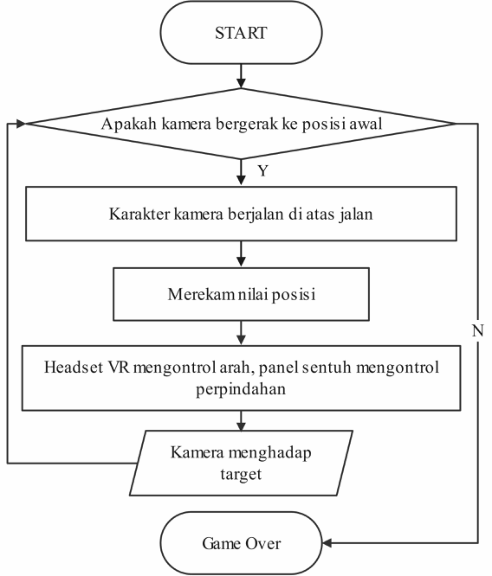
Character Roaming In order to create a more realistic escape atmosphere for children, a first- person perspective is used in this platform to develop a virtual environment for mobile interaction. Children can use the HTC Vive handle to realize spatial displacement, and wear a helmet to realize the control of direction. It is important to note that children with VR devices experience a little bit of vertigo when moving through the virtual environment, and this vertigo will become more and more intense as the speed of movement increases. Therefore, in order to minimize the discomfort of the experiencer in the process of using this station, we adopt the HTC Vive parabolic instantaneous displacement scheme in the selection of the displacement method. That is, by tapping the ray displayed on the HtcVive handle instantly jump to the end of the parabola. This requires calling the official HTC components: Vive Nav Mesh, Parabolic Pointer, and Vive Teleporter. The Vive Nav Mesh component is used to control the conversion of Unity’s NavMesh system to a renderable mesh and to calculate the boundaries of the NavMesh, so that it can be displayed when the user selects the teleport location. Displayed. The Parabolic Pointer component is used to generate an indicator mesh and sample it from the Vive Nav Mesh. The Vive Teleporter component is used to control the actual teleportation mechanism (HTC VIVE China, 2016). It is realized in Figure 3.
1144 Wang
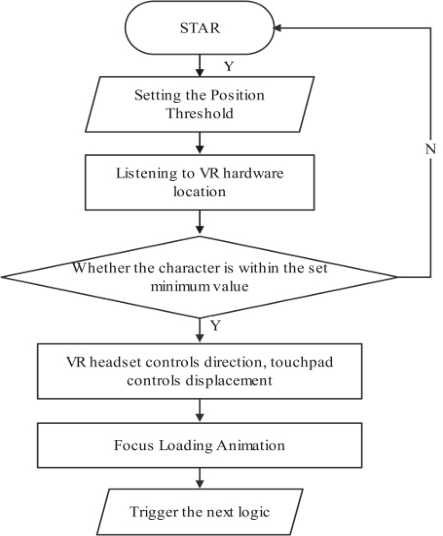
Figure 3: The first-person viewpoint implementation design process. (Created by Aijun Wang et al., 2023).
To realize the control of orientation when using a headset that can be displaced, you need to call the SteamVR Plugin, an official component of HTC. First add a control script in Unity 3D to get the movement of the head in the x and z axes as well as the rotation in the y-axis direction, and then assign this information to the object bound to the control script, so that when the experiencer wears the device and runs the scene, they have a first-person view (see Figure 4).
Figure 4: The first person perspective effect map. (Created by Aijun Wang et al., 2023).
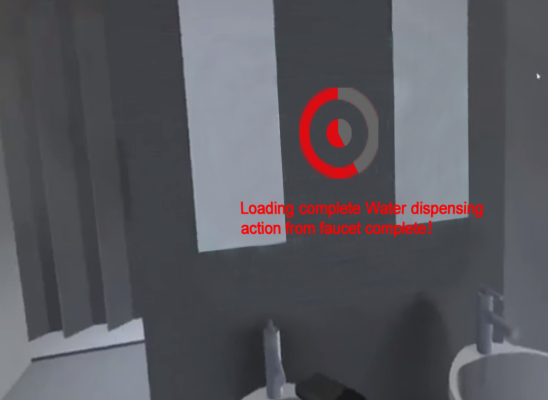
Focus Animation After running the platform, there are two actions to run the focus animation. The specific flow of the first focus animation run is: when the child
Design of Fire Escape System for Children Based on VR Technology 1145
experiencer enters the scene, his vision first focuses on the character, at this time, the focus bar hanging on the character begins to load and lasts for 3 seconds, and after loading is complete, the next logic begins to run. If the child experiencer’s (Htc helmet glasses) focus point is not matched on the character (at a specific location), the next logic is not run. The second focus animation loading occurs when the character opens the door to the room and a choice question dialog pops up, “Do we start the escape now?” At this point, the Htc helmet glasses’ focus matches on the corresponding option, and the hanging loading bar on the corresponding option starts to load for 3 seconds before starting to run the next logic (see Figure 5).
Figure 5: Focus animation effect. (Created by Aijun Wang et al., 2023).
To complete the collimation focus and realize the effect of gaze loading, you need to add script control for the camera and specific objects, the specific approach is: Step 1: Create a script and name it “Cameramoves”, mount it on the camera, its role is to listen to the collimation point (camera) Postion value, when the collimation point (camera) matches to a specific location, the next logic can be triggered.
Step 2: Create a script named “Focusing”, mount it to a specific object, when the previous logic finishes (the camera Postion value is within the set range), it will trigger the execution of the centering progress bar loading, after the centering is loaded for 3 seconds, the next logic will be triggered (see Figure 6).
1146 Wang
Figure 6: The first person perspective effect map. (Created by Aijun Wang et al., 2023).
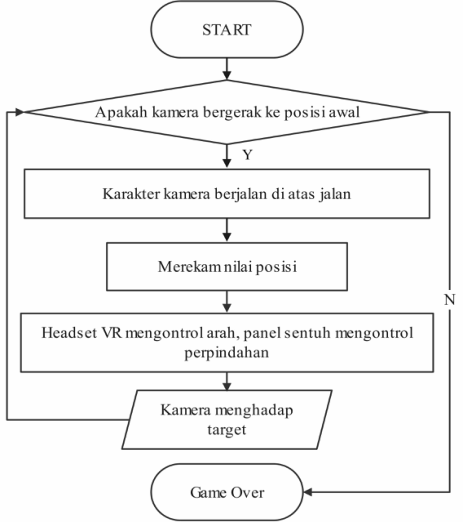
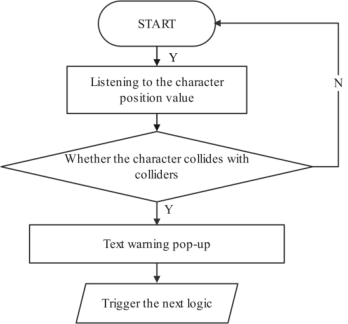
Textual Warning In the escape platform operation, there were two times when the text warning dialog box appeared. One is that the escape experiencer chose the wrong escape method I. The experiencing character reaches the virtual elevator entrance, opens the elevator button and enters the elevator, at which point the system recognizes it as the character’s escape failure. In turn, a text warning pops up: “Do not take the elevator in case of fire.” The second pop-up text warning is when the escape experiencer chose the correct escape mode two, the character chose to run the system designed to prepare for fire escape door: into the room to pick up a wet towel on the table, cover the mouth and nose, then open the door, and choose the safe passage by the signs, bend forward until out of the residential building, then pop-up dialog box “escape successful! “. At this point, the system recognizes the role of escape success, and then pop-up text warning tip: “Do not take the elevator in the event of fire”. The above two text warning dialog box pop-up event system design process is the same, we set the virtual elevator and a residential building outside the object capsule collision body, when the role of the collision with the capsule collision body to produce collision, you can run the next logic (pop-up warning dialog box). Here you need to add a script control for listening to the value of the character Positon, and hang it on the virtual character (see Figure 7).
Design of Fire Escape System for Children Based on VR Technology 1147
Figure 7: Text warning system design process. (Created by Aijun Wang et al., 2023).
Its specific realization of the idea is: The first step: when the experiencer chooses to enter the elevator, i.e., collision with the elevator collision capsule body has occurred, at this time you can run the next logic, that is, the pop-up text warning tip: “in the event of a fire, do not take the elevator”.
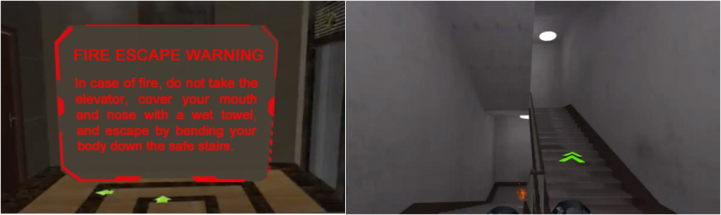
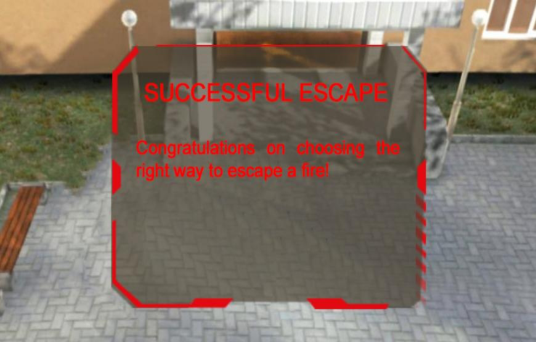
Step 2: When the virtual character executes a successful escape route and walks out of the residential building, the “Escape Successful” pop-up will appear, followed by a textual warning tip: “In case of fire, do not take the elevator...”.. Here we first create a transparent Box, and at the same time set up a collision capsule for it, and place it in the residential building at the hallway, the size of its volume is the same as the building, when the virtual character performs a successful escape path and reaches the residential building hallway, it will have a collision with the transparent Box, and then the next logic can be triggered (pop-up dialog box with text warnings) (see Figure 8).
Figure 8: Text warning effect. (Created by Aijun Wang et al., 2023).
1148 Wang
CONCLUSION
In the context of the development of virtual simulation technology, the author introduces the technology into the simulation training of children’s safety escape, puts forward the concept of immersive, experiential, safe and repeatable platform design, and takes fire escape in residential buildings as an example to design a prototype system for children’s VR experiential escape, and the experimental results show that: the system can better realize the simulation simulation effect of fire escape in residential buildings, and through the The operation of human-computer interaction events enhances the effect of platform application and deepens the impression of child users. It is worth mentioning that this platform is mainly based on the simulation design of the escape system for individual children, and it will be the author’s next research direction for how to complete the simulation of group escape behavior based on the emotional factors and environmental factors in the group escape system, as well as to complete the effective planning of the escape path of the global crowd in the group escape process.
REFERENCES
Aijun Wang, Zhongyong Li, Shibo Yan. (2018) Research on the application of VR technology in red tourism display interactive system. Journal of Chifeng University (Natural Science Edition). Volume 34, No. 12. Chen Shengming. (2017) Design of regional fire alarm and fire linkage control system
for centralized control building of power plant. Sichuan Architecture. Volume 37, No. 02. Guangdong Education. (2023) National Fire Prevention Day. This is a handy fire safety tip. HTC VIVE China. (2016) Recommended PC Configurations for VIVE VR. Liangli Zhang, Zhuhe, WangBin. (2015) Development of experimental platform
for electrical engineering based on virtual reality technology. Experimental Technology and Management. Volume 32, No. 2. Oulu Education. (2016) Ways to escape from fire in public places. People’s Daily Online (PRC newspaper)(2016) What to do with children in case of fire. YaHua Li, Niandong Yin. (2016) Design and realization of virtual robot simulation
system based on Unity3D. Volume 31, No. 05. Zhang Yi. (2018) A study on the governmental affairs reporting of Zhejiang Daily’s new media matrix--a case study of the event of running most once. (Dissertation, Zhejiang Media College). Master. No. 07.
LISTED IN THE AHFE DIGITAL BOOKSTORE CATALOGUE
Explore the complete digital volume
Human Factors in Design, Engineering, and Computing
Read this individual research paper free through the original publisher, or explore the full digital proceedings book.
ISBN 978-1-964867-35-9
Explore this ISBN in the AHFE Bookstore ↗Listed in the July 2026 bookstore catalogue; search by ISBN to confirm current availability · Digital book purchase optional