Aaron Crandall, Daniel Olivares, Kole Davis, Kevin Dang, Alan Poblette (2023). "Fall PreNoSys": Augmented Reality-based Tripping Hazard Notification System and Initial User Feedback Study. In: Augmented, Virtual and Mixed Reality Simulation. AHFE Open Access, vol. 118, pp. 88–98. https://doi.org/10.54941/ahfe1004444
Falls and falling remain a significant problem for people as they age. This work proposes a mobile augmented reality (AR) based system called “Fall Prevention via Notification System” (Fall PreNoSys) to detect likely tripping hazards around the wearer and provide notifications to help them avoid safety problems, along with two phases of user feedback to improve the system design. Blending mobile technologies and human-computer interaction requires significant work on human interface components to become an effective, calm, and useful tool in daily life. A series of studies involving human participants was conducted to gather feedback on the Fall PreNoSys interface design, its utility, and its underlying concepts. Current AR research in gerontechnology and in-home assessments represents a nascent field, and Fall PreNoSys offers a novel approach to fall prevention.Fall PreNoSys uses a Microsoft HoloLens v2 to gather real time 3D models of the space around the user. These models are segmented to identify potential tripping hazards, and the HoloLens scene understanding library is employed to classify objects using an AI classifier. The combination of the Fall PreNoSys algorithm for object segmentation and scene understanding results in a list of objects that can trigger notifications as the user moves around a room.To evaluate notifications style and to get feedback from possible users of the system, two pilot user studies were performed. These studies provided early-stage feedback, initial impressions, guided the continued design of notifications, tested the object detection algorithm's robustness, and evaluated user reactions to static and dynamic notification types developed for Fall PreNoSys.Notifications took the form of 3D visual objects projected onto the HoloLens' AR screen within the wearer's field of view. These notifications were shaped as arrows or OSHA safety-style triangles and were placed on or near identified potential hazards. Based on user feedback from the first phase of the user trial, notifications became interactive, changing color, bouncing in place, and reacting to the participant's relative location to orient their attention to hazards.The study used walking tracks with likely in-home tripping hazards, a combination of machine learning-based detection algorithms, and multiple styles of visual hazard notifications. Study data was collected through two phases of interviews, user feedback of their experiences with the technology, and measurements using the System Usability Study scale to help guide further development of Fall PreNoSys and similar systems in the future. Future work on Fall PreNoSys includes a series of studies with older adults after the latest user feedback from this study is incorporated into the interface design. Additional work includes using eye gaze notification acknowledgements, user path estimations, and out-of-view edge notifications to help people interact with notifications, adapt to the user's walking path, and handle issues with the AR screen's field of view limitations.
According to the US Centers for Disease Control, around one in four of all US adults aged 65 and over fall each year as of the 2020 data and calculates a fall death rate of 78 per 100,000 older adults as of 2021 data (“Older Adult Falls Data | Fall Prevention | Injury Center | CDC,” 2023). The cost of these falls accounts for 0.1% of all healthcare costs in the United States annually and up to 1.5% of healthcare costs in European countries. The number one reason older adults have increased care needs is due to falls and fall related injuries.
The home is the most common location for seniors experiencing falls. Around 55% of all fall related injuries occur in the home (Pynoos et al.,
HazARd Fall PreNoSys Augmented Reality-Based Tripping Hazard Notification System 89
2010), and 35% to 40% of those falls are directly related to environmen- tal factors. New approaches to preventing, detecting, and assisting in fall management are of utmost importance to the clinical community.
During prior work by Zulas and Crandall in gathering clinical needs for senior care focused smart home technologies, nurses often cited the need for help with several common topics related to falls, clutter hazards, and home safety features (Zulas et al., 2014; Zulas and Crandall, 2014). When it came to falls, nurses normally focused on two major targets: clutter on the floors and hoarding.
In similar research, family members of seniors spoke of dealing with trip- ping hazards, in-home walking safety, and needing to keep the home orderly (Zulas et al., 2012). This demonstrates a need for proactive detection of haz- ards and notification to alert older adults of these issues as they move about their homes.
This work proposes and implements a real time, notification-oriented sys- tem that provides the home assessment process and performs real time hazard notifications to help prevent falls through automatic means called the Haz- ARd “Fall Prevention via Notification System” (Fall PreNoSys). The Fall PreNoSys is a suite of algorithms using in-home 3D models gathered through sensor systems to provide real time notifications of tripping hazards. The overall goal was to alert the wearer to a potential tripping hazard so they could more easily avoid it. While an initial prototype of Fall PreNoSys has been developed, this work reports on a series of user interface and feedback tests to refine and improve the tool.
RELATED WORKS While the Occupational Safety and Health Administration (OSHA) regula- tions (United States Department of Labor, 2021) speak to tripping hazards as an issue in clearing walkways and workspaces, as well as defining the required sizes for safe walking areas, it does not clarify many details about what would be considered a tripping hazard in a living space. To help better quantify whether a living/workspace is reasonably safe, approaches such as modeling fall risk and generating heat maps of fall risks in clinical environments have been developed (Novin et al., 2021).
Virtual Reality (VR) and Augmented Reality (AR) are both being used in healthcare for a wide variety of purposes. An example of using VR in care for older adults is using the technology to help train people learning to navigate with electric wheelchairs (Naves et al., 2016). In a similar setup, but with an AR style platform, Gaukrodger and Lintott (Gaukrodger and Lintott, 2007) demonstrated several applications of AR as an assistive technology. Pillai et al. (Pillai et al., 2022) used the Microsoft HoloLens AR system to gam- ify upper limb injury rehabilitation, which allowed therapists to track the patient’s therapy compliance and recovery trajectory. These clinical applica- tions are similar to approaches used by Fall PreNoSys, just applied to different needs.
Fall PreNoSys is a state-of-the-art contribution that uses 3D models of the area around the user, object detection with classification, and providing real
time notifications to help orient the user to possible hazards around them. This work reports on both the technology and how users perceive the system while being tested in a lab environment.
METHODS
Fall PreNoSys Technology Design The Fall PreNoSys system uses a 3D mesh model of the physical objects nearby as gathered by a Microsoft HoloLens v2 worn by the user. This Augmented Reality device both senses the physical environment as well as provides a multi modal set of interfaces to interact with the wearer. The device then allows for 3D virtual objects to be placed in the 3D AR space. These objects are rendered in front of the user’s vision using an augmented reality style interface.
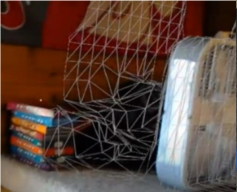
Figure 1: Visualizing the AR mesh and Fall PreNoSys basic hazard notifications. (a - left) HoloLens 3D mesh visualized. (b - right) Augmented reality interface screenshot as seen by the user during the experiment.
The HoloLens 3D mesh provides a spatial mapping of a home through a combination of infrared, vision, and depth mapping algorithms (Weinmann et al., 2021). This mesh is then interpreted for a combination of safe walking spaces and likely hazards. The current Fall PreNoSys system provides the real time alerts of possible hazards to the wearer via the AR interface screen.
The 3D mesh data is represented as points in three-dimensional space which are connected into triangles as a point cloud to provide an estimated surface area over the area around the user. A sample rendering of this mesh is shown in Figure 1a. Fall PreNoSys uses a combination of the HoloLens Scene Understanding toolkit and rules about physical size to decide if an object should be considered a tripping hazard and be given a notification for the user to see. The hazard classification algorithm determines that any object shorter than 0.9m (3ft) which is also resting on the floor to be included in the set of tripping hazards. The Fall PreNoSys interface used two kinds of 3D objects as visual notifications during the user testing. These were a tra- ditional OSHA-style tripping symbol (United States Department of Labor, 2021) and a hovering arrow. A screen capture of these notifications is shown in Figure 1b.
HazARd Fall PreNoSys Augmented Reality-Based Tripping Hazard Notification System 91
The notifications drew upon several principles for user interface design for older adults (Boot et al., 2020). The colors were chosen for high con- trast, movement of the notifications in the system was kept to a minimum, and the number of user interface elements was kept to under four to reduce working memory load (“Short-Term Memory & Working Memory | Def- inition, Duration & Capacity,” 2019). Further, interface design research suggests “recognition rather than recall” (Experience, n.d.) to take advan- tage of already familiar interface elements rather than having to recall or learn the meanings of less familiar designs.
This is especially important when the familiar meaning matches the intended meaning in the user interface (Johnson, 1987).
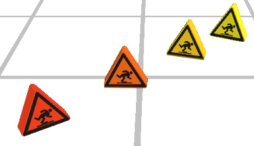
Figure 2: Fall PreNoSys Phase 2 notification colors at varying distances from wearer.
Phase 2 of the Fall PreNoSys interface design made these notifications reac- tive to the user’s position and orientation to the possible tripping hazards. The visual notifications were changed so that the distance from the hazard would make them both change in color as well as to move when the wearer got very close to the object. These color variations are shown in Figure 2, and according to Johnson (Johnson, 2020), having high contrast, easily visible color changes increase attention and perception of alert levels, so the col- ors chosen for the symbol were the American National Standards Institute (ANSI) standard signage colors. The symbol also “bounced” up and down once when the user reached the close distance to help orient their attention to the possible hazard (Hillstrom and Yantis, 1994). The addition of varied colors and the bouncing motion were the key user interface differences being evaluated between the Phase 1 and Phase 2 feedback studies.
Iterative User Interface Design An iterative design process was used during the development of the work presented in this paper. Currently, two design phases have been performed with additional design iterations planned for future work. Smaller iterative- style design phases were used for the user interface development and involved breaking down the process into focused cycles, each refining specific elements based on continuous (user-centered) feedback, adaptation, and improvement (Nielsen, 1993).
Participants To gather desires, perspective, and feedback on the Fall PreNoSys user expe- rience design, a total of fifteen participants were interviewed during the
feedback study over the two design phases. Informed consent was obtained from each participant and the university institutional review board approved the study.
Phase 1: Ten of the participants were undergraduates between the ages of 18 and 23. One was a university staff member. Participants were 7 men and 4 women with an average age of 22 years of age and a range from 19 to 34. Phase 2: All four of the Phase 2 participants were undergraduates between the ages of 19 and 20. Participants were 2 men and 2 women with an average age of 19.25 years of age.
Participant Recruitment: Participants recruited in these initial phases of the study were chosen to gain early prototype design feedback while the Fall PreNoSys interface is in the pilot stages of design. The participants recruited were selected to drive design choices before deployment with the eventual target audience of older adults.
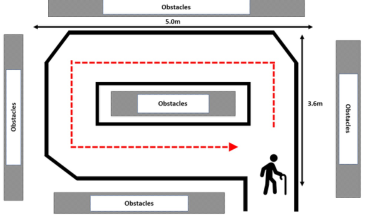
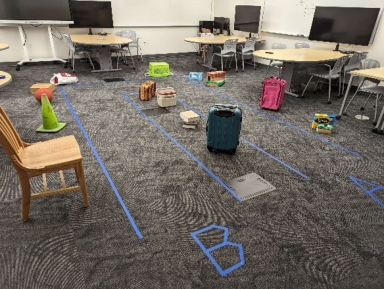
Figure 3: Fall PreNoSys Phase 1 feedback study. (a - left) HazARd Fall PreNoSys walking circuit diagram. (b - right) Participant walking the Phase 1 testing circuit.
Materials
Phase 1: Interviews took place in a research lab. The room was staged with a walking circuit for the participant to wear the headset as they walked past and around objects that could be classified as either tripping or non-tripping hazards. Figure 3a shows the general layout of the walking circuit. Overall, the circuit was 3.6m x 5m in size and outlined with blue painter’s tape to show the participants where to walk while the notifications were shown over the objects in the areas marked “Obstacles.” The participants did not have to walk through the obstacles for safety reasons.
Items placed around the walking circuit were selected as general in-home or everyday living items. These were a variety of colors, sizes, and shapes as shown in Figure 3b. The HoloLens v2 was able to detect and note most of the items for classification by the HazARd Identification Algorithm. Items smaller than 20cm wide are too small for the Fall PreNoSys algorithm to dif- ferentiate, mostly due to the resolution of the mesh provided by the Hololens (Weinmann et al., 2021). Roughly 15 notifications appeared with each walk of the circuit.
The participants were provided with a pre-walk and post-walk question- naire. The pre-walk questionnaire included demographic and background
HazARd Fall PreNoSys Augmented Reality-Based Tripping Hazard Notification System 93
information about the participants related to their experiences and per- ceptions of AR/VR technologies, falls and falling with older adults. The post-walk questionnaire included the System Usability Scale (SUS), open questions about their perceptions of the technology, and other places the technology could be deployed. The SUS is a 10-item questionnaire with a 5-point Likert-like scale that assesses the ease of use and understandability of a system (Brooke, 1996). Scores are modified for reversal questions and then totalled and multiplied by 2.5 to give a score out of 100.
Figure 4: Fall PreNoSys Phase 2 walking circuit.
Phase 2: Changes made for Phase 2 were to use the new user interface with the reactive and attention-getting notifications, as outlined in the Fall PreNoSys Technology Design section above. The participants were given the same set of instructions as in Phase 1. The Phase 2 walking circuit shown in Figure 4 was designed to demonstrate the distance-based dynamic notifica- tions, including the “bouncing” notification to move a notification into the AR device’s field of view.
Procedures The procedure remained the same for both phases of the design study. Prior to experimentation, participants were provided a description of the experi- ment, their role, and informed consent. Once informed consent was given, the experimenters started an audio recording and administered the pre-walk questionnaire.
After being shown how to use the headset and where to walk, once the participant completed the first circuit, the researchers changed to the HNI arrow style of notifications, and the participant was instructed to walk the other direction around the circuit. After both walking circuits were com- pleted, the participant was given the post-walk questionnaire. To wrap up, any concluding thoughts were recorded, and the participant was released.
Analysis As with the procedures, the same process was followed for analysis of both phases of the study. Recordings were transcribed into text and reviewed
by multiple observers for inter-rater reliability. Observers placed topics into groups and sorted by frequency seen during the interviews. Topics that were more frequent and therefore emphasized by the participants were then included here as the main themes in this paper’s results.
RESULTS
Overview: Both Phase 1 and Phase 2 of the Fall PreNoSys participant feed- back studies were completed successfully. All data in written and recorded forms were available for processing by the reviewers.
Phase 1 Results: Interviews were completed successfully, and the system was generally well received. Participants stated that the system was “cool,” “very interesting,” and “I wish I could have this all the time.”
Of this research project’s participant sample, 9 of 11 had prior VR expe- rience and 4 of 11 had AR experience. This is in line with the popularity of the two kinds of technologies. Mobile AR style systems have less market penetration and less use for entertainment and training, so fewer people have experienced them.
Among the group, 6 of 11 had provided at least some care for family mem- bers while 9 of 11 reported that at least one family member had recently had trouble with falls or falling. None of the group had experience as a formal caregiver in a clinic or other medical facility.
The results of the SUS varied greatly with a score as low as 40/100 and as high as 90/100, with an average score of 74.6. Higher scores did not necessar- ily correlate with greater prior experience with AR/VR technologies. Women rated the technology marginally better than men at 78.7 vs. 73.2.
Several themes began to emerge from the interviews that helped guide ideas about how the technology should move forward. Notably, the nega- tives centered around the intrusiveness of the notifications and the size of the headset for daily use. Other themes focused on possible situations and future development trajectories for the work.
Phase 2 Results: Like Phase 1 results, the system was generally well received with statements asserting that features of the system were “kind of cool” or “I really like it. It’s really cool” and “definitely useful.”
Of this research project’s Phase 2 participant sample, 3 of 4 had prior VR experience and only 1 of 4 had AR experience while 3 of 4 had at least some informal care for family members. This remains in line with the popularity of the AR technologies and informal senior care experiences we saw with Phase 1.
The results of the SUS for this phase varied significantly less than in Phase 1 with a score as low as 75/100 and as high as 85/100, with an average score of 80. Higher scores did not necessarily correlate with greater prior experience with AR/VR technologies. In this Phase 2, we saw the opposite to Phase 1 when comparing the responses based on gender. Women rated the technology marginally worse than men at 76.25 vs. 83.75.
Overall Excitement Among the participants’ responses, all of them were positive in various ways about the technology. The most common statements were “cool” and “I’d
HazARd Fall PreNoSys Augmented Reality-Based Tripping Hazard Notification System 95
like this in daily life.” After experiencing the Fall PreNoSys applications, most participants were excited about the possibility posed by the AR-based tech- nologies. They could see how it would provide extra information to someone navigating a home, or outside, especially an older adult who may not be as quick to notice objects.
Conveying How Much Risk Is in View Several participants noted that all tripping hazards get the same treatment regarding how notifications are displayed, regardless of how the wearer per- ceived the relative risk of the object. The symbols used did not scale for some kind of risk measure, size of the object, or distance. It was noted that scaling the symbols by distance would help the user gauge the risk level themselves.
Type I Errors - False Positives The current Fall PreNoSys algorithm generated false positives during the tests. Participants noted that some symbols ended up on the floor or desks. This led to discussions of what constitutes a tripping hazard for different people.
Type II Errors - False Negatives Some objects that were clearly tripping hazards were not flagged as such. These were often smaller and darker shaded objects which the HoloLens v2 mesh was not detecting effectively. Participants often noted these limitations.
Notification Style Participants received the different types of notifications in various ways. Most of them were most appreciative of the OSHA style tripping hazard symbol. This was a clearer notice of what kind of hazard was there as compared to the arrows.
Two participants noted that in the test environment there were a lot of objects that should be flagged with notifications. This led to a “sea of notification symbols,” which is a common problem in busy information envi- ronments. Here, a cleaner home with less clutter would be visually emptier while a cluttered home would end up with many more notifications while the person navigates. Users who spoke about the quantity of notifications noted that they ended up being distracting.
Several participants spoke to the notifications being more consistent about their placement to the hazards. They wanted the visual notification to be placed so that they could always avoid the object in the same way instead of having to inspect the hazard and pick their own route. Similarly, partic- ipants also spoke about the notifications possibly encircling the hazardous area instead of hovering over the object. They wanted the notification to highlight where to not walk instead of just noting the object’s existence.
Differences Between Phase 1 and Phase 2 The implementation of object detection and notification rules meant that par- ticipants in Phase 2 experienced notably fewer Type I and Type II errors. This
led their comments to be more about the ideas behind the technology, how the notifications reacted, and their experiences with the AR system itself.
Participants also noted the color changes on the notifications often, imply- ing that it was gathering their attention, though a couple noted a lack of color contrast. The authors feel that the standard ANSI attention colors are not rendered as effectively as necessary by the HoloLens AR screen, so more work is needed to ensure the varying notifications are more distinct in both color and style.
CONCLUSION
Healthy aging and supporting mobility impaired individuals shall continue to be a valuable field of research efforts. Building novel tools and approaches to identifying safety issues and hazardous situations should be a key contributor to helping people age in place, live safely at home, and to help caregivers be more effective. The HazARd project’s Fall PreNoSys augmented reality-based approach to real time tripping hazard notification demonstrates a means of reducing falls in mobility impaired individuals. Because it is a mobile platform with a combination of world modeling, machine learning, and user interface design there are many questions to resolve to make it able to handle many real-world situations, how it might be integrated into daily life as a mobile ubiquitous computing system, and its effectiveness at truly reducing falls.
This work’s evaluation of Fall PreNoSys centered around people’s percep- tions of the system, the concepts and ideas behind the tools, and features of the human computer interaction dynamic. The participants universally felt that this kind of technology could be helpful in numerous ways and that the improvements made from Phase 1 to Phase 2 of the project did indeed help the users orient to hazards near their walking route. The higher SUS scoring results in Phase 2 compared to Phase 1, though not a basis for any statis- tically significant claims due to current sample sizes, is an encouraging sign that the use of an iterative user-centered design process can help stimulate positive design changes. Their feedback suggests that improvements to the design of the visual notifications, location and quantify of the notifications, and how to handle out of view hazards would be key improvements to future implementations.
FUTURE WORK
Future work on augmented reality-based tripping hazard systems could include additional rating and heuristics of possible objects as hazards to improve the utility of notifications, the use of eye tracking so users can remove notifications once they have seen a given hazard, and to use more vision processing approaches to classify objects nearby to increase the rich- ness of the hazard rating system. These improved object detection and classification algorithms should also contribute to projects that focus on clutter and walking space analysis.
These kinds of Fall PreNoSys systems should also be tested in larger scale real-world environments. The evaluation should include hazards seen in
HazARd Fall PreNoSys Augmented Reality-Based Tripping Hazard Notification System 97
outdoor and non-in-home situations where a user is visiting other homes, offices, or other locations. Testing the hazard detection algorithms, and then evaluating the effectiveness of the notifications should be an ongoing effort to bring these mobile everyday supports to the wider world.
ACKNOWLEDGMENT
Funding support provided by Jack McElroy Student Research Fund, RW Gillette Challenge Fund, and the Bollier Center for Integrated Science and Engineering.
REFERENCES
Boot, W., Charness, N., Czaja, S. J., Rogers, W. A., 2020. Designing for older adults: Case studies, methods, and tools. CRC Press. https://doi.org/10.1201/b22187 Brooke, J., 1996. SUS-A quick and dirty usability scale. Usability evaluation in
industry 189, 4–7. Experience, W. L. in R.-B. U., n.d. Memory Recognition and Recall in User Interfaces [WWW Document]. Nielsen Norman Group. URL https://www.nngroup.com/ar ticles/recognition-and-recall/ (accessed 8.11.23). Gaukrodger, S. J., Lintott, A., 2007. Augmented reality and applications for assistive
technology, in: Proceedings of the 1st International Convention on Rehabilita- tion Engineering & Assistive Technology: In Conjunction with 1st Tan Tock Seng Hospital Neurorehabilitation Meeting, I-CREATe ‘07. Association for Computing Machinery, New York, NY, USA, pp. 47–51. https://doi.org/10.1145/1328491. 1328504 Hillstrom, A. P., Yantis, S., 1994. Visual motion and attentional capture. Perception & Psychophysics 55, 399–411. https://doi.org/10.3758/BF03205298 Johnson, J., 2020. Designing with the Mind in Mind: Simple Guide to Understanding
User Interface Design Guidelines. Morgan Kaufmann. Johnson, J., 1987. How faithfully should the electronic office simulate real one?
SIGCHI Bull. 19, 21–25. https://doi.org/10.1145/36111.36113 Naves, E. L. M., Bastos, T. F., Bourhis, G., Silva, Y. M. L. R., Silva, V. J., Lucena, V. F., 2016. Virtual and augmented reality environment for remote train- ing of wheelchairs users: Social, mobile, and wearable technologies applied to rehabilitation, in: 2016 IEEE 18th International Conference on E-Health Net- working, Applications and Services (Healthcom). Presented at the 2016 IEEE 18th International Conference on e-Health Networking, Applications and Services (Healthcom), pp. 1–4. https://doi.org/10.1109/HealthCom.2016.7749418 Nielsen, J., 1993. Iterative user-interface design. Computer 26, 32–41. https://doi.or
g/10.1109/2.241424 Novin, R. S., Taylor, E., Hermans, T., Merryweather, A., 2021. Development of a novel computational model for evaluating fall risk in patient room design. HERD: Health Environments Research & Design Journal 14, 350–367. https://doi.org/10. 1177/1937586720959766 Older Adult Falls Data | Fall Prevention | Injury Center | CDC [WWW Document],
2023. URL https://www.cdc.gov/falls/data/index.html Pillai, A., Sunny, M. S. H., Wang, I., Rahman, M., 2022. Innovative Mixed Reality Based Rehabilitative Tool for Upper Limb Injuries Utilizing HoloLens 2. Archives of Physical Medicine and Rehabilitation 103, e71. https://doi.org/10.1016/j.apmr .2022.08.611
Pynoos, J., Steinman, B. A., Nguyen, A. Q., 2010. Environmental assessment and modification as fall-prevention strategies for older adults. Clinics in geriatric medicine 26, 633–644. https://doi.org/10.1016/j.cger.2010.07.001 Short-Term Memory & Working Memory | Definition, Duration & Capacity,
2019. URL https://human-memory.net/short-term-working-memory/ (accessed 8.14.23). United States Department of Labor, 2021. Occupational Safety and Health Administration (OSHA) Law and Regulations. Weinmann, Martin, Wursthorn, S., Weinmann, Michael, Hübner, P., 2021. Efficient
3D Mapping and Modelling of Indoor Scenes with the Microsoft HoloLens: A Survey. PFG–Journal of Photogrammetry, Remote Sensing and Geoinformation Science 89, 319–333. https://doi.org/10.1007/s41064-021-00163-y Zulas, A. L., Crandall, A. S., 2014. Assessing Professional Caregiver Needs In Assistive Smart Homes, in: Handbook of Smart Homes, Health Care and Well-Being. Springer International Publishing, pp. 1–10. https://doi.org/10.1007/978-3-319- 01904-8_14-1 Zulas, A. L., Crandall, A. S., Schmitter-Edgecombe, M., 2014. Caregiver Needs
from Elder Care Assistive Smart Homes: Children of Elder Adults Assessment, in: Human Factors and Ergonomics Society, HFES. pp. 634–638. https://doi.org/ 10.1177/1541931214581150 Zulas, L., Crandall, A. S., Schmitter-Edgecombe, M., Cook, D. J., 2012. Caregiver Needs from Elder Care Assistive Smart Homes: Nursing Assessment, in: Human Factors and Ergonomics Society.
LISTED IN THE AHFE DIGITAL BOOKSTORE CATALOGUE
Explore the complete digital volume
Augmented, Virtual and Mixed Reality Simulation
Read this individual research paper free through the original publisher, or explore the full digital proceedings book.
ISBN 978-1-958651-94-0
Explore this ISBN in the AHFE Bookstore ↗Listed in the July 2026 bookstore catalogue; search by ISBN to confirm current availability · Digital book purchase optional