Peter Thorvald, Magnus Holm, Mattias Strand, David Romero (2023). The Augmented Welder Profile: Augmenting Craftmanship with Digital and Collaborative Tools. In: Augmented, Virtual and Mixed Reality Simulation. AHFE Open Access, vol. 118, pp. 9–18. https://doi.org/10.54941/ahfe1004436
More and more applications of Augmented Reality (AR) in manufacturing industries are introduced every day and while recent research has shown that one of the more popular applications, high volume assembly instructions, might not offer the best setting for this technology, many other applications exist that do. For assembly, remote guidance or training, rare assemblies, low takt time and high mix production, do still show promise. This article introduces the role of the Augmented Welder, a role utilizing AR technology for the programming of a welding robot. An operator support system in the form of a custom application programmed in Unity and visualized with a pair of Hololens2, connected to an ABB robot through RobotStudio. The robot is equipped with a welding gun dummy. The operator can, through the Hololens2, set safety boundaries, introduce work pieces, place targets in a 3D space, simulate the robot path, send the program to the robot, and activate the physical robot, among other things. We performed a modified pluralistic walkthrough to evaluate the operator support system both with respect to our application but also to search valuable insight to the general use of AR in the use of such applications. Results showed that while the subjects were generally positive towards the support system, several issues were identified and raised by various degrees of severity. The primary issues arose around the navigation and interaction with 2D menus and 3D objects in a 3D Mixed Reality (MR) space. The absence of physics confused the subjects as they could not interact with the virtual objects as they would have with physical objects. The lack of physics simply meant that they didn't act the same. Furthermore the interaction with 2D menus in a 3D space was both reported and observed as being very difficult as the 2D representations probably led to problems with depth perception. The general results of the debriefing indicated that using AR for robot programming was challenging although some of this can be attributed to the fact that this was the participants first use of such a system. The users indicated that the menus were appropriate and that the interaction was intuitive while the navigation within the system was not experienced as natural which confirms the above-mentioned issues with menus disappearing from the line of sight and feedback around generated target points being absent.
Operators on the shopfloor are facing increasing demands to perform com- plex tasks (Holm, 2018). Despite the trend towards automation, manual tasks still play a significant role in value-adding activities in manufactur- ing (Feng et al., 2022). Shop-floor operators face increasing demands and challenges such as fixed cycle times, quality requirements, increased prod- uct variety, and small batch sizes on a daily basis. To address these demands and challenges, a more flexible, efficient, and effective approach is needed, and one contemporary approach gaining increased interest is the use of Augmented Reality (AR) technology (Feng et al., 2022).
AR technology emerged in the late 20th century, and seminal works by Azuma (1997) marked the beginning of further research on the challenges and possibilities of this technology. The emerging AR technology was fur- ther explored by other pioneers addressing the challenges faced by manual welding operators to create manual welds of high quality. A welding hel- met was developed by combining camera technology and AR functionality on a closed-view head-mounted display (Tschirner et al., 2002). A similar approach was also demonstrated by Aiteanu et al. (2003). A welding train- ing system (Fast et al., 2004), notably using the terminology “Mixed Reality (MR)”, takes the concept further enabling the user to afterwards review the welding process in a virtual environment. Design and evaluation of a weld- ing training system using AR-technology is also done by Park et al. (2007). They conclude that even though graphics and display technology constantly improve the possibility of coordination of hand – eye it is still a problem during manual welding using video see-through displays.
With increasing computing power and decreasing prices, along with grow- ing research interest, research on AR-based systems gained momentum. Several AR-based systems supporting manual welding tasks and training, using different AR devices and approaches, have been presented in the sci- entific literature (Antonelli & Astanin, 2015; Okimoto et al., 2015; Doshi et al., 2017; Quandt et al., 2018).
An early approach indicating the “Augmented Welder” is presented by Ni et al. (2017). The authors developed an intuitive User Interface (UI) that uses AR for remotely programming welding robots. Their results indicate that the user-friendly interface developed can assist users in performing accurate welding paths. Later research showcasing an AR-based system for program- ming welding robots is presented by Ong et al. (2020). The further developed system allows its users to define welding points (i.e., robot targets) including the orientation of the welding gun quickly and intuitively.
The evolution of AR-technology over the past 25 years has been remark- able, with today’s head-worn AR-goggles offering performance that exceeds previous forecasts. These modern AR-goggles are lightweight, wearable units that are easy to operate, and they have found several applications in vari- ous industries, including manufacturing and assembly operations. Research on AR-technology for these mentioned operations has grown exponentially from 2000 to 2020, indicating that AR-technology has transitioned from being a “hype”to becoming industry-ready (Gattullo et al., 2020; Wang et al., 2022). The advancement of AR-technology has not only improved the perfor- mance and usability of AR-goggles, but it also has the potential to transform the shop floor and the way of working in manufacturing industries. How- ever, despite the progress made, AR-technology has not yet fully integrated into everyday work-life on the industrial shop floor to realize the concept of an Augmented Operator (Romero et al., 2016). Further research and development are needed to address challenges and barriers to the large- scale adoption of AR-technology in the manufacturing sector (Lorenz et al., 2022).
The Augmented Welder Profile: Augmenting Craftmanship With Digital 11
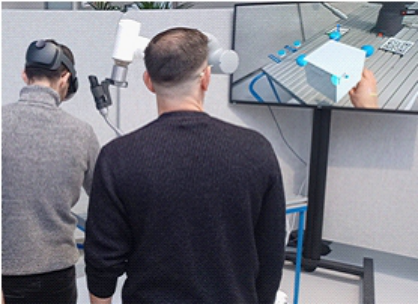
The Operator Assistant System (OAS) The evaluated OAS has been developed together with ABB Robotics and the company Skandia Elevator situated in Sweden. R&D from ABB has been involved in setting the aim and limitations of the project. They have also been engaged throughout the project. Skandia Elevator produces systems for conveying grains. The initial steps in their factory are to process sheet metal which later in the production process is supplemented with “welding” and “assembly”. Many of the complex parts are to be welded which historically at Skandia Elevator has been a manual process. Some years ago, a collabora- tive welding robot was installed as a complement to manual welding. The aim of the installation was dual, to learn about new technology and its capabili- ties and also to be able to execute repetitive welding tasks with less manual effort. The AR welding system evaluated uses products from Skandia Elevator (see Figure 1).
Figure 1: One subject working with the AR welding system and the other observes.
Hardware and Software Used for the Developed OAS The evaluated OAS uses MR-goggles, Microsoft Hololens2, and the AR weld- ing application has been programmed in Unity. ABB RobotStudio Suite was used to run the virtual robot controller on a laptop computer connected through a wire to the real robot controller and the real robot. The laptop is connected through a Wi-Fi network to the Hololens2 MR-googles.
Safety Configurator Safe Move is an in-built function in ABB RobotStudio Suite. The evaluated safety configurator is a MR-extension to the Safe Move tool in RobotStudio. The original Safe Move tool can be used to configure safety zones around the robot, encapsulating the upper arm of the robot manipulator including the tool attached. Based on the configuration made, a safety file can be gen- erated to be signed and acknowledged by appointed staff to be a “certified safety configuration”. Through the developed safety system, the safety zones created are visualized in AR and it enables the user to create, reconfigure,
and program them further. In addition, the developed safety system enables the user to include virtual sensors in the MR-system. These virtual sensors can have a fixed position or be attached to a moving object (e.g. a tool to be used by the operator – the operator’s hand). Also, these virtual sensors can be given any function through Unity programming.
METHOD
To evaluate the OAS developed, a modified version of a “pluralistic walk- through” was carried out (Bias, 1994; Thorvald et al., 2015). A pluralistic walkthrough is characterized as an inspection method – focusing on usabil- ity, where a group of stakeholders with varying competence levels (viz. users, managers, and developers) gather to review a design. The original pluralis- tic walkthrough has the following five defining characteristics (Bias, 1994; Thorvald et al., 2015):
1. Involvement of different competences in the same walkthrough. 2. The scenario is presented in the same order in which it would appear in the final product design. 3. The participants should assume the role of the intended user. 4. Each participant writes down, in as much detail as possible, what they would do for each step in the presented scenario before any common discussion. 5. The discussion always starts with the user representative(s), and when his/her/ their comments are exhausted, the human factors (usability) experts and solution developers are allowed to present their opinions.
After an initial briefing and establishing instructions and ground rules, a product expert offers a brief overview of the product design to be evalu- ated. After that, the evaluation begins with a scenario where an action is required. Each participant individually writes down their responses followed by a discussion led by the evaluator. After the “correct” action is identified, the walkthrough continues until all tasks/scenarios have been covered. Prod- uct experts or designers are to keep quiet during these discussions and only speak if invited to do so. This way, user responses are minimally affected by the product designers although it might be seen as difficult or uncomfortable for the user representatives to put forward negative feedback about the prod- uct design while the designers are present. The positive, open, and welcoming attitude of the product designers is therefore of utmost importance.
Evaluation Procedure The evaluation was carried out in the form of a modified pluralistic walk- through as defined by Thorvald et al. (2015). It was modified to fit a physical manufacturing environment and involved three end-user representatives, two product experts, two project managers (observers only), and the evaluation leader. The three end-user representatives were all around 40 years of age with some manufacturing experience but no experience using any kind of AR/VR/MR. They were familiar with robot programming but this way of interacting with robots was new to them. The evaluation started with a quick
The Augmented Welder Profile: Augmenting Craftmanship With Digital 13
introduction to the evaluation and a tutorial on the AR welding system inter- action capabilities such as how to bring up the main menu, how to move items around by pinching them, etc. The evaluation then commenced with one end-user representative wearing the AR headset for each scenario and the other evaluation participants watching the interaction on a large screen directly behind the workpiece. This way, only one of the participants saw and interacted through the AR welding system but the others could easily see what the other was seeing and doing through 2D rather than in 3D. After each scenario, the user wearing the AR headset was changed until all three end-users had worn it for one scenario. For each action to be performed, all participants were encouraged to think about what their response would be and then the evaluator invited discussion on the action before revealing the correct one and moving on.
A traditional pluralistic walkthrough focuses on local issues in the interface and therefore, the debriefing discussion held after the walkthrough focused on larger, global, and contextual issues. This was a very open and unstruc- tured discussion which included questions about previous experiences, gen- eral thoughts about the navigation of the AR system, and comfortability with working in AR both from a physical and a psychological perspective.
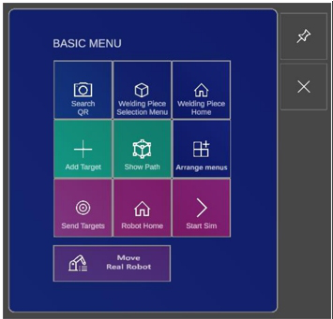
Testing Scenarios Three scenarios in the developed AR welding system were evaluated by apply- ing the modified pluralistic walkthrough. The three participants (end-users) were given a short introduction to the evaluation and the scenario at hand by the leader of the evaluation. This introduction included basic navigation of the AR system and its interaction possibilities. The basic menu as seen in Figure 2 is opened when the operator looks at the opened left hand, palm upwards. The basic menu holds the functions used in the three scenarios.
Figure 2: Left: the basic menu as it appears when the user opens their flat hand towards.
the AR Headset. Right: The Robot Menu as it is Used to Send the Target Points to the Robot Scenario #1 – Placing Robot Targets in the 3D-Space When programming a welding robot, so-called “robot targets” are placed next to the product to be welded. The variables for each robot target indicate in which way the robot should move, at what speed and at what angles. Rele- vant welding parameters can also be specified for each robot target. Together these robot targets form a robot path along which the robot tool is moved when executing the robot program.
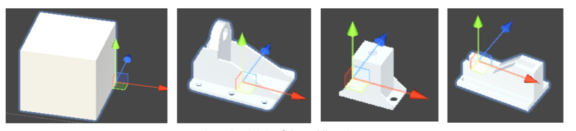
In this first scenario to be evaluated, the operator should generate and place a cube in front of the robot (see Figure 3). Then, generate and position four robot targets on the top plane of the cube simulat- ing a welding path for the robot. When initiating the scenario, the user is asked to choose the cube as the piece to use in the scenario. This is done by tapping the button “Welding Piece” – Selection Menu, in the Basic Menu. Another menu now opens giving four different options. The welding piece is chosen by clicking the arrows in the menu. The welding piece to be used in Scenario #1, is the cube to the far left in Figure 3. The coordinate system in Figure 3 represents the origin of each welding piece.
Figure 3: Selection of workpiece.
The user was then asked to add targets to the scenario and then position them at each of the four top corners of the previously generated cube. A target is created by tapping Add Target in the Basic Menu. A sphere, representing a robot target, is then generated to the right of the robot when Add Target is tapped. When pinched, the sphere can be moved and positioned by the operator. When the targets have been placed at the four corners, Scenario #1 is finished.
Scenario #2 – Simulation of the Robot Path The robot targets generated in Scenario #1 form a “robot path” which is used in Scenario #2. The user is asked to download the targets to the robot. This is done by tapping Send Targets in the Basic menu. During the 3–4 sec- onds it takes to download the targets into the virtual robot controller, the MR-application is off.
Next, the user was tasked to start the simulation which is done by opening the Robot Menu by tapping Robot Home in the Basic Menu which in turn opens the Robot Menu (see Figure 2). After that, the user taps Start Sim on the Robot Menu. The virtual robot now moves along the path created in Scenario #1.
The Augmented Welder Profile: Augmenting Craftmanship With Digital 15
Scenario #3 – The Real Robot moves along its Defined Path After the movement of the robot is simulated and checked in Scenario #2, the real robot is the next in line. In Scenario #3, the real robot performs the movement along the path programmed in Scenarios #1 and #2. The button Move Real Robot is used to download the program to the real robot and start the movement.
RESULTS
The results described are the collated view of primarily the evaluation sub- jects and the evaluation leader who is highly experienced in human-based manufacturing and industrial human-machine interaction.
System Menus The menus of the AR welding system were reported as difficult to find and it was also reported as difficult to judge which menu does what. As there are different sub-menus related to simulation and targets-generation, safety options, and communication with the physical robot, it was unclear what menu should be accessed in each scenario. Furthermore, some of the menus could not be disabled and would not disappear from the line of sight making them intrude on the interaction with the AR system.
Feedback One of the biggest issues that arose during the evaluation is attributed to the lack of feedback in the AR system other than purely visual. This was most vividly seen when generating target points in Scenario #1. The user generated targets correctly through the menu but since the action space was so big, could not see where these target points were generated which was outside of the line of sight. This resulted in the generation of multiple targets that the user was unaware of until he moved about the action space and discovered them.
Navigation and Interaction It was reported as “difficult” to navigate in the 3D-space, and this seemed to be connected to the fact that the menu items to interact with were presented as 2D menus in a 3D-space, resulting in difficulties in depth perception. Fur- thermore, the users reported that it was “fairly easy” to understand how the menu items in the AR system should be manipulated but it was “difficult” to actually do it. Target points, menus, safety barriers, and workpieces could all be manipulated through a pinching movement but this pinching move- ment had to be both “precise” in execution, as well as having to take place “in sight” of the front-facing camera on the AR-googles to be recognized. Thereby eliminating all opportunities for any sort of covert action.
The absence of “physics” in the AR welding system also led to some inter- action difficulties. When the users were asked to simulate a workpiece on the workbench, the lack of physics in the AR system meant that each surface had to be manipulated in detail to assure the correct placement of the work- piece. In a physical interaction with a physical workpiece, this would not have
been an issue as the physical boundaries of the workbench along with grav- ity would have simplified this interaction. This issue could also have been mitigated by the use of some kind of “snap-to-grid” or “snap-to-surface” function, as is seen in most CAD software, and which is available in the AR system but was not activated for this particular instantiation.
Debriefing Results The debriefing results indicated that using AR for robot programming was challenging although some of this can be attributed to the fact that this was the participants’ first use of such a system. The users indicated that the menus were appropriate and that the interaction was intuitive while the navigation within the AR system was not experienced as natural which confirms the above-mentioned issues with menus disappearing from the “line of sight” and “real-time feedback” around generated target points being absent.
DISCUSSION AND CONCLUSION AR-shopfloor approaches require further research and development to effec- tively leverage the potential of AR-technology in the manufacturing indus- tries. While significant progress has been made, there is still a need for continued innovation, refinement, and exploration of AR-technology to fully unlock its potential in manufacturing and assembly operations – highlighting in this paper the case of welding operations. The issues raised in this AR weld- ing system evaluation largely relate to the navigation and interaction with the AR environment rather than with the graphical design of it. It would seem that for an AR system of this kind to be successful, it needs to better mimic the interactions that humans undertake in their physical environment and supply proper feedback and physics simulation so that virtual objects behave relatively similarly to the physical counterparts that they represent.
In widening the discussion concerning the application of AR/MR solutions for manufacturing and assembly operations in general and “welding opera- tions” in particular, this work has also shown promising results concerning broader social sustainability aspects. Following the Industry 5.0 proposi- tion by Breque et al. (2021), novel technologies must not only be considered for purely economic reasons but should also be addressed from a “human- centric” perspective, for instance, novel technologies must also be examined for the potential of putting human needs and interests at the heart. In the case of manual welding operations, health risks, as well as safety risks, are well understood, including burn injuries, complications due to exposure to magnetic fields, respiratory complications, and skin problems (HSE). In col- laboration with Skandia Elevator, it also became evident that these types of modern, digital solutions may alleviate problems related to the work envi- ronment of professional welders, in that the work content of welders may become altered. With this new solution, the welder may instead become a more advanced operator, combining his/her intangible welding skills, with novel digital and collaborative solutions, turning the work content from a repetitive, potentially hazardous operation, into programming the robot, changing components in fixtures and certifying the quality of the welding
The Augmented Welder Profile: Augmenting Craftmanship With Digital 17
process. In doing that, the AR solution presented in this paper also serves as a very concrete example of a changed narrative around the industry operator and how he/she interacts with novel technologies.
Breque et al. (2021) promote the importance of considering the emerg- ing Industry 5.0 paradigm as a means to allow companies as well as their operators to develop technology in a socially responsible way and where the operators are considered as an investment instead of a mere cost.
ACKNOWLEDGEMENT
Thanks to Antonio, Erich, and Miguel for your participation during the AR welding system evaluation. The work was done at ASSAR Industrial Innovation Arena in Skövde, Sweden.
REFERENCES
Aiteanu, D., Hillers, B., & Graser, A. (2003). A Step Forward in Manual Welding: Demonstration of Augmented Reality Helmet. Proceedings of the 2nd. IEEE and ACM International Symposium on Mixed and Augmented Reality. Antonelli, D., & Astanin, S. (2015). Enhancing the Quality of Manual Spot Welding
through Augmented Reality-Assisted Guidance. Procedia CIRP, 33, 556–561. Azuma, R. T. (1997). A Survey of Augmented Reality. Presence: Teleoperators & Virtual Environments, 6(4), 355–385. Bias, R. G. (1994). The Pluralistic Usability Walkthrough: Coordinated Empathies.
In J. Nielsen & R. Mack (Eds.), Usability Inspection Methods, pp. 63–76, John Wiley & Sons, Inc. Breque, M., De Nul, L., & Petridis, A. (2021). Industry 5.0: Towards a Sustainable, Human-centric and Resilient European Industry. Luxembourg, LU: European Commission, Directorate-General for Research and Innovation. Doshi, A., Smith, R. T., Thomas, B. H., & Bouras, C. (2017). Use of Projector-
based Augmented Reality to Improve Manual Spot-Welding Precision and Accu- racy for Automotive Manufacturing. Advanced Manufacturing Technology, 89, 1279–1293. Fast, K., Gifford, T., & Yancey, R. (2004). Virtual Training for Welding. Proceedings of the 3rd. IEEE and ACM International Symposium on Mixed and Augmented Reality. Feng, S., He, W., Zhang, S., & Billinghurst, M. (2022). Seeing is Believing: AR-
Assisted Blind Area Assembly to Support Hand–Eye Coordination. Advanced Manufacturing Technology, 119(11-12), 8149-8158. Gattullo, M., Evangelista, A., Uva, A. E., Fiorentino, M., & Gabbard, J. L. (2020).
What, How, and Why are Visual Assets Used in Industrial Augmented Reality? A Systematic Review and Classification in Maintenance, Assembly, and Train- ing (from 1997 to 2019). IEEE Transactions on Visualization and Computer Graphics, 28(2), 1443–1456. Holm, M. (2018). The Future Shop-Floor Operators, Demands, Requirements and Interpretations. Journal of Manufacturing Systems, 47, 35–42. HSE. Health Risks from Welding. Health and Safety Executive, United Kingdom
Retrieved from https://www.hse.gov.uk/welding/health-risks-welding.htm.
Lorenz, M., Knopp, S., Brade, J., Klimant, P., & Dix, M. (2022). Industrial Augmented Reality: Lessons Learned from a Long-term On-site Assessment of Aug- mented Reality Maintenance Worker Support Systems. 2022 IEEE International Symposium on Mixed and Augmented Reality Adjunct. Ni, D., Yew, A., Ong, S., & Nee, A. (2017). Haptic and Visual Augmented Real-
ity Interface for Programming Welding Robots. Advances in Manufacturing, 5, 191–198. Okimoto, M. L. L., Okimoto, P. C., & Goldbach, C. E. (2015). User Experience in Augmented Reality Applied to Welding Education. Procedia Manufacturing, 3, 6223–6227. Ong, S., Nee, A., Yew, A., & Thanigaivel, N. (2020). AR-assisted Robot Welding
Programming. Advances in Manufacturing, 8, 40–48. Park, M., Schmidt, L., Schlick, C., & Luczak, H. (2007). Design and Evaluation of an Augmented Reality Welding Helmet. Human Factors and Ergonomics in Manufacturing & Service Industries, 17(4), 317–330. Quandt, M., Knoke, B., Gorldt, C., Freitag, M., & Thoben, K.-D. (2018). General
Requirements for Industrial Augmented Reality Applications. Procedia CIRP, 72, 1130–1135. Romero, D., Stahre, J., Wuest, T., Noran, O., Bernus, P., Fast-Berglund, Å., & Gorecky, D. (2016). Towards an Operator 4.0 Typology: A Human-centric Perspective on the Fourth Industrial Revolution Technologies. Proceedings of the International Conference on Computers and Industrial Engineering, Tianjin, China. Thorvald, P., Lindblom, J., & Schmitz, S. (2015). Modified Pluralistic Walk-
through for Method Evaluation in Manufacturing. Procedia Manufacturing, 3, 5139–5146. Tschirner, P., Hillers, B., & Graser, A. (2002). A Concept for the Application of Augmented Reality in Manual as Metal Arc Welding. Proceedings of the International Symposium on Mixed and Augmented Reality. Wang, Z., Bai, X., et al. (2022). A Comprehensive Review of Augmented Real-
ity -based Instruction in Manual Assembly, Training and Repair. Robotics and Computer-Integrated Manufacturing, 78, 102407.
LISTED IN THE AHFE DIGITAL BOOKSTORE CATALOGUE
Explore the complete digital volume
Augmented, Virtual and Mixed Reality Simulation
Read this individual research paper free through the original publisher, or explore the full digital proceedings book.
ISBN 978-1-958651-94-0
Explore this ISBN in the AHFE Bookstore ↗Listed in the July 2026 bookstore catalogue; search by ISBN to confirm current availability · Digital book purchase optional