Yihung Hsu, Chien-Hsiung Chen (2023). Usability Study on the User Interface Design of Streaming Service Applications. In: Usability and User Experience. AHFE Open Access, vol. 110, pp. 232–240. https://doi.org/10.54941/ahfe1003196
Streaming service applications allow users to watch programs across devices anytime and anywhere, and their share is increasing. In order to understand the usability of existing streaming service applications, this study selected three representative streaming service Applications in the market, namely IQIYI, Netflix, and Disney+. Download the paid version of the streaming service applications for the Android platform. Six operation tasks are designed according to users' common functions, namely, selecting the film, playing the fast-forward function, adding the film to the playlist, finding the recorded history, confirming the user’s account, and downloading the film. The experimental equipment was Xiaomi Tablet Pad5, the operating environment was a general university classroom, the participants were invited by convenience sampling. A total of 31 participants (M=19.7; SD=2.54), 16 males and 15 females, were enrolled in the university departments of Chinese Culture University and National Taipei University of Education. The experiment was conducted by filling out basic information, System Usability Scale (SUS), and subjective scale after tasks. The experimental results were divided into qualitative and quantitative parts, and the quantitative part was checked by one-way ANOVA. All the generated results are summarized as follows: (1) The search window is based on the user's needs, so do not set the keywords of the advertisement and do not push the advertisement window during the operation process to avoid affecting the user's experience. (2) Video download button can be set under the video preview window, and the width of the button can be set to the same width as the preview window for the convenience of the participant. (3) The interface can be customized to add or remove items and categories that users like. (4) For unknown functions and buttons, simple icons or explanations can be provided to facilitate participants to fully utilize the available functions on the interface. (5) Future work can increase the number of participants or conduct A/B tests on the uncorrected version of the interface after the correction to verify the effect of the correction.
With the rise of streaming video and audio, users can overcome the limitati- ons of time and space to watch streaming video and audio services on mobile devices or traditional TV devices anytime and anywhere, especially during
Usability Study on the User Interface Design of Streaming Service Applications 233
the epidemic. Streaming service applications are growing rapidly. (González et al., 2020). Netflix is the most iconic audio and video platform, founded in 1997 by Reed Hastings, Mitch Lowe and Marc Randolph, and was originally established to provide online movie rentals. In 2007, Netflix launched a stre- aming media service that allows users to watch shows and movies on their personal computers and. Since 2013, it has introduced self-produced content, with service tiers based on the number and resolution of devices available for viewing. It also boasts an ad-free video and audio service that uses a unique algorithm to guess which videos users are interested in (Burroughs, 2019). The main design concept of the interface is minimalism with multiple lan- guages, audio tracks, and subtitles. A limited color palette is the core of the design, with three colors - black, red and white - repeatedly used (Vieželyt˙e, 2022). Disney+ is an audio and video streaming platform provided by Disney, providing audio and video services for its movie content. The most popu- lar videos are cartoons and animations, and different users within a single account can be set to adjust the viewing privileges so that children can access the appropriate audio and video service content, which is a very popular audio and video platform. IQIYI is a video platform developed in mainland China, providing video content with a focus on Eastern culture. The Korean variety shows, Chinese movies, and TV dramas as the core, IQIYI is diffe- rent from European and American streaming platforms such as Netflix and UsersTube. The system does not personalize recommendations for individual users, and almost every user sees the same thumbnail and interface for most of the recommended movies. Personalized information is mostly stored in the account information option. Compared to other internationalized streaming video and audio, the interface design of IQIYI is more informative and has a high operational information load for users, and its positioning also increa- ses the concept of TV platform (Wang & Lobato, 2019). Human-computer interaction (HCI) design is the core of digital TVs, tablets, cell phones, and car devices in different usage contexts to provide users with different user experiences. However, the size of the interface is different, the amount of information on the page, the size of the buttons, and other parameters will affect the user’s operation, and all audio and video platforms use graphical interface design. A good graphical user interface system should have the follo- wing characteristics: (1) interface visualization, (2) pointing and selection, (3) object orientation, (4) manipulation guidance, (5) relying on discrimination rather than relying on memory, (6) Pay attention to the user’s application, and (7) be able to approach the user’s point of view, allowing the user to adjust the interface according to his or her own needs (Hu et al., 2020). Thus, a graphical user interface makes the computer more user-friendly than forcing the user to become a computer. Usability measurement for general and effe- ctive evaluation of user interface ease of use issues. For the evaluation of ease of use, there are ten general rules for inspiring ease of use assessment, which are: (1) Visibility of system status. (2) Match between system and the real world. (3) User control and freedom (4) Consistency and standards. (5) Error prevention. (6) Recognition rather than recall. (7) Flexibility and effi- ciency of use. (8) Aesthetic and minimalist design. (9) Help users recognize, diagnose, and recover from errors. (10) Help and documentation (Nielsen,
234 Hsu and Chen
2005). The above-mentioned usability evaluation criteria and interface design principles have been synthesized to understand the close relationship between interface design, usability evaluation, and graphical interface, and the impor- tance of designing an interface that meets users’ needs and enhancing their experience. The purpose of this study is to understand the usability and pre- ferences of streaming video and audio platforms, and to provide suggestions for improvement in areas where users have difficulties in operation.
RELATED WORK
In a pilot test, some university students were interviewed to decide on streaming service applications, namely Netflix, Disney+, and IQIYI. The experiment was designed to set up a monthly payment policy and complete the preparation for the experiment after logging in their personal informa- tion in advance. Six operation tasks are designed according to users’ common functions, namely, selecting the film, playing the fast-forward function, adding the film to the playlist, finding the recorded history, confirming the user’s account, and downloading the film. The default language selection is Traditional Chinese. Table 1 shows the main interface of the three streaming service application samples, and Table 2 shows the six tasks.
Table 1. The three streaming service application samples for the experiment.
1 Selecting the film The main function of streaming service Applications 2 Playing the fast-forward function 3 Adding the film to the playlist Let the user make a favorite film list 4 Finding the recorded history. Users operate streaming service applications, many times using the trivial time to watch 5 Confirming the user’s account Check the account of personnel information and member condition. 6 Downloading the film Sometimes the network quality may not be stable, pre-download the video and then play it to avoid lagging during playback or the need to use an extra mobile network.
Usability Study on the User Interface Design of Streaming Service Applications 235
EXPERIMENTAL TASKS For the six operation tasks in different streaming service application have different operation methods, according to the order of the tasks are described below:
Task 1: Selecting the film. The streaming media provides movies, variety shows and series, which is the first step to operate all the video media.
IQIYI: The navigation bar is on the top of the main page, users can bro- wse to find movies, or use the search function on the top right to search for movies by text input. But when users click the search box without text input, the system will pop up the current popular search keywords, and users can remove or ignore the displayed content and input the search content directly. After selecting a video, a video pre-play page will appear, providing video information, including release date, cast, total episodes, etc. The video will be officially played only after clicking play.
Netflix: The video search function is set at the top right of the magnifying mirror icon, click on it and a text search box appears, enter the video name to find it. Users can also slide the main page to browse and find the content users want to watch by browsing.
Disney+: Set up a search window at the bottom of the main page, and search by movie title to find a movie. If the movie title does not match the movie title, the result of “No movie found” will be displayed and the system will not recommend it. Disney+ is different from other streaming platforms in that Disney+ itself is a video distribution provider, and it provides icons for different video series on the top half of the main page, so that users can guess the type of video according to the characteristics of the provider.
Task 2: Playing the fast-forward function: Users may not always watch the video from the beginning to the end, some users will select the clips they are interested in watching. This part will be used to fast forward or multiplier projection, but not every video platform provides multiplier projection function (Disney+ does not have multiplier projection function), so it is not suitable for comparison, so the task is designed for the fast forward function only.
IQIYI: During video playback, click on the outer area of the video to acti- vate hidden functions, including fast-forward, pause, subtitle selection, etc. In the fast-forward function, users can use the fast-forward 10 seconds function on the right side of the screen, or use the progress bar at the bottom of the video to stretch the progress for playback adjustment. Most users are more used to using the progress bar at the bottom of the video for fast-forward playback.
Netflix: The progress is displayed at the bottom of the video while the video is playing. Users can move the red dot showing the current progress of the video to slide it, or touch any point on the video page to trigger the hidden function while the video is playing. Depending on the user’s situation, the function can be operated in different ways.
Disney+: It provides hidden function when playing video. The middle of the page is for play and pause, and the left and right sides are for playback and fast forward 10 seconds. The bottom provides progress bar, and users can
236 Hsu and Chen
slide the black progress bar to adjust to the user’s target progress according to his/her needs.
Task 3: Adding the film to the playlist. In the video playback, someti- mes users will select the videos they are interested in watching first and then download them to watch later.
IQIYI: There are three icons in the middle of the screen below the video being played, with a box with a check mark as a symbol.
Netflix: When users click on a video, it will show the video description. Before it is shown, the tool below will show the play and download icons, and three functions are provided below the play and download icons, namely “My List”, “Rating”, and “Share”. “My list” can be used to collect all the videos users are interested in for future viewing or filtering.
Disney+: Clicking on a video will bring up the pre-play page, providing video information and playback, download, trailer playback, Group Watch and “My List” functions. Click “My List” and users can find the collected list in the personal information bar at the bottom right of the main page.
Task 4: Find the past playback history. Some users will use some time, such as commuting or class time, to watch videos. Currently, the streaming media will record the progress of the last time a user watched a video, so as long as users find the viewing history, users can continue to play the previous viewing position.
IQIYI: Click on “my” at the bottom right corner of the main page to display the membership status and viewing history.
Netflix: The playback history will appear at the bottom of the main page, displaying the user name, with a bar listing the movie title and time left, and with related auxiliary functions on both the left and right sides of the video.
Disney+: Shows the past playback history at the bottom of the main page, users can select it by sliding left and right. In the video bar, there is a play button at the bottom left of the video.
Task 5: Confirming the user’s account. Streaming media usually provide more than one user to watch videos on the same account, and offer monthly, quarterly, and annual payment plans according to the marketing strategy. Therefore, users occasionally need to confirm the account user and payment plan and expiration information to decide whether to continue to pay or cho- ose a different subscription plan. In addition, some streaming video platforms offer a wide variety of videos, and special topics are not suitable for underage users, so children’s accounts are provided to facilitate management.
IQIYI: Click on “my” at the bottom right corner of the main page to display the account page, which includes viewing history, language settings, function settings, etc. The sequence of this operation is the same as finding the playback history.
Netflix: The “More” option at the bottom right of the main page displays a list of users, with “My List”, “App Settings”, and description functions below. The account information includes phone number, email, subscription plan and other information.
Disney+: The main page provides a personal avatar icon at the bottom right of the main page, and the user list is displayed at the top of the page
Usability Study on the User Interface Design of Streaming Service Applications 237
after clicking on it. User images and names can be modified according to user preferences.
Task 6: Downloading the film. Many users sometimes watch videos with- out internet or with poor internet quality, so downloading videos they are interested in before watching them is the way many users use.
IQIYI: The download function means that on the watch video page, there is a download image at the bottom left. Click on it to download the video.
Netflix: After clicking on a video, there will be a pre-play screen, and the download option is provided at the bottom of this screen.
Disney+: Clicking on a video will display the pre-play screen and the download option is provided in the column below the video information.
METHODS
A total of 31 participants (M = 19.93; SD = 3.23), 16 males and 15 fema- les, aged 18 to 30, were selected by convenience sampling. The experimental equipment was a Mi Pad5 11” tablet. The procedure was described as fol- lows: before the experiment started, the participants were informed of the experimental procedure and then the experiment started. The participants followed the instructions to perform six operational tasks, and the time taken to complete each task was recorded during the experiment. Intervi- ews were conducted with some of the participants, and interactions between the participants and the interface were observed during the experiment.
RESULTS AND DISCUSSION
In the results section pertinent to task completion time, two of the six tasks were found to be significant by one-way ANOVA, namely Task 1 and Task 6. The one-way ANOVA result of Task 1 revealed a significant difference between the three Apps (F = 3.362, P = 0.049<0.05). Among them, par- ticipants’ task performance of IQIYI (M = 13.52, SD = 4.20) was worse than Disney+ (M = 9.18; SD = 3.09). In addition, the one-way ANOVA result of Task 6 illustrated significant differences amount the three Apps (F = 3.93, P = 0.031<0.05). More specifically, participants’ task performa- nce of IQIYI (M = 15.13, SD = 9.3) was worse than Netflix’s (M = 7.67, SD = 3.44). There was no significant difference among the results of Task 2 (F = 0.386, P = 0.683>0.05), Task3 (F = 1.70, P = 0.20>0.05), Task4 (F = 0.83, P = 0.44>0.05), and Task5 (F = 1.4, P = 0.26>0.05). The results generated from the one-way ANOVA of all six tasks are shown in Table 3.
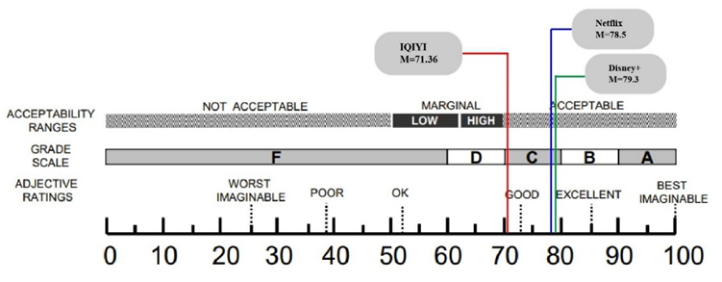
In terms of the System Usability Scale (SUS) result, the SUS is a tool com- monly used to review the usability of the interface (Brooke, 1996). The results were not significantly different when examined by One-way ANOVA, with SUS results higher than 68 for IQIYI (M = 71.36; SD = 12.00), Netflix (M = 78.5; SD = 9.51), and Disney+ (M = 79.3; SD = 14.53). The corresponding results refer to Figure 1 (Bangor et al., 2009).
238 Hsu and Chen
Table 3. The one-way ANOVA results of all six tasks (in second).
Equation reproduced from the original PDF.Figure 1: The 3 sample’s SUS results with acceptability ranges.
Regarding the results of subjective evaluations, the subjective rating scale was used to evaluate the participants’ like, satisfaction, fluency, anxiety, acce- ptability, pleasure, and attention. Concentration of each sample, and then assessed on a 7-point Likert scale. In the pleasure part, Netflix was found to be superior to IQIYI, and the participants were found to have a prefere- nce for the videos provided by Netflix after the interviews. The results of the examination are shown in Table 4.
Participants provided the following feedback on operational processes and platform preferences and suggestions for improvement. During the operation of IQIYI, a window would pop up randomly with advertisements for recom- mended movies or variety show content, and the participants disliked this design. In addition, when users want to use the search function before cli- cking on the search window to enter the search text, the search window will immediately display the system pushing the suggested content. Some parti- cipants were confused and most of them would pause for a while before proceeding. In response to the above problems, the participants felt that they should remove random ad windows and provide correct search suggestions in the search window instead of popular search terms or paid ad keywords.
In terms of overall quantitative results, there were two operational tasks with significant differences, namely, Disney+ is better than IQIYI in the task of selecting a movie and Netflix outperformed IQIYI in the task of downloading a movie, while there were no significant differences in SUS.
Usability Study on the User Interface Design of Streaming Service Applications 239
Table 4. The one-way ANOVA results of the subjective evaluation scale.
Table available in the original PDF paper.
Netflix IQIYI M(SD) M(SD)
Disney+ M(SD) F P Post Hoc (LSD)
2.237 0.125
Like 4.0 (2.14)
5.3 (1.33)
5.2 (0.91)
0.936 0.404
Satisfaction 4.63 (1.43)
5.3 (1.41)
5.3 (0.95)
2.70 0.085
Fluency 4.81 (1.25)
5.6 (0.96)
5.8 (0.78)
1.85 0.17
Anxiety 2.63 (1.69)
1.7 (0.48)
2.0 (0.82)
1.94 0.16
Acceptability 4.9 (1.86)
5.9 (1.28)
6.0 (0.82) 3.50 0.044* Netflix>IQIYI
Pleasure 4.36 (1.85)
5.8 (1.03)
5.4 (0.51)
0.44 0.64
Attention 4.63 (1.62)
5.1 (1.10)
5.1 (1.10)
Equation reproduced from the original PDF.
Netflix outperformed IQIYI on the subjective rating scale. In comparison to previous studies, participants did not suggest any improvements to the sub- title selection function, so it is likely that Netflix has been optimized. During the interviews, participants were generally unhappy with IQIYI’s randomly popping up of advertising windows, which they felt affected their operating experience. The content of the interview also echoes past research (Huang et al., 2021). Participants hope that the streaming service applications can provide personalized options so that participants can adjust the interface and levels according to their own habits. There is not enough information about the video evaluation section. Compared to past research and experimental versions, the current Netflix version has only three additional options: like, super like and not recommended (Eiband et al., 2019). There is no way to see other users’ opinions and the feedback is not diverse enough.
CONCLUSION
Summing up the results of the discussion, five points were concluded.
(1) The search window should be based on the user’s needs. Do not set up keywords for advertisements, and do not push the advertisement window during the operation process to avoid affecting the user’s experience. (2) The video download button can be set under the video preview window, and the width of the button can be set to the same width as the preview window for the convenience of the participant. (3) The interface can be customized to add or remove items and categories that users do not like. (4) For unknown functions and buttons, simple icons or explanations can be provided to facilitate the participant to fully utilize the available functions on the interface.
240 Hsu and Chen
(5) Future work can increase the number of participants or conduct A/B tests on the uncorrected version of the interface after the correction to verify the effect of the correction. In addition, we can conduct tests for different levels or tasks, and we can also study the user experience of the platform for a long time.
REFERENCES
Bangor, A., Kortum, P., & Miller, J. (2009). Determining what individual SUS scores mean: Adding an adjective rating scale. Journal of usability studies, 4(3). pp. 114–123. Brooke, J. (1996). SUS-A quick and dirty usability scale. Usability evaluation in
industry, 189(194), 4–7. Burroughs, B. (2019). House of Netflix: Streaming media and digital lore. Popular Communication, 17(1), 1–17. Eiband, M., Völkel, S. T., Buschek, D., Cook, S., & Hussmann, H. (2019). When
people and algorithms meet: User-reported problems in intelligent everyday appli- cations. Proceedings of the 24th international conference on intelligent user interfaces, González, C., Membiela-Pollán, M., & Cuns, M. (2020). Relationship marketing and brand community: the case of Netflix. Redmarka. Revista de Marketing Aplicado, 24(2), 251–274. Hu, T.-W., Feng, C.-S., Liu, C.-Y., & Hsu, C.-C. (2020). Research on self-
management experience of audio-visual streaming platform takes NETFLIX as an example. Proceedings of the 2020 the 3rd International Conference on Computers in Management and Business, Huang, Y., Lv, Z., & Sui, Z. (2021). Where Should Existing Video Streaming Platforms Improve: A Comparative Analysis of Netflix and IQiyi. 2021 International Conference on Public Relations and Social Sciences (ICPRSS 2021), Nielsen, J. (2005). Ten usability heuristics. In: https://www. nngroup. com/articles/ten-usability-heuristics/(acc-essed …. Vieželyt˙e, K. (2022). Media transformation in the age of Netflix: user interface and
user experience trends of svod platforms Kauno technologijos universitetas]. Wang, W. Y., & Lobato, R. (2019). Chinese video streaming services in the context of global platform studies. Chinese Journal of Communication, 12(3), 356–371.
LISTED IN THE AHFE DIGITAL BOOKSTORE CATALOGUE
Explore the complete digital volume
Usability and User Experience
Read this individual research paper free through the original publisher, or explore the full digital proceedings book.
ISBN 978-1-958651-86-5
Explore this ISBN in the AHFE Bookstore ↗Listed in the July 2026 bookstore catalogue; search by ISBN to confirm current availability · Digital book purchase optional