Julien Barbier, Franck Gechter, Sylvain Grosdemouge (2022). Augmented Reality Application for HoloLens Dedicated to the Accuracy Test: Evolution and Results. In: Healthcare and Medical Devices. AHFE Open Access, vol. 51, pp. 45–50. https://doi.org/10.54941/ahfe1002097
Augmented Reality (AR) proposes new ways to visualize and to interact with virtual objects. Depending on the target interaction modality and the application requirements, different type of devices can be chosen. If AR on smartphones can propose a Graphical User Interface without impacting the immersion, AR headset procures a more immersive experience, the interaction modality relying mainly on hand gesture control even if various types of interactions modalities have been explored in literature. One of the most widespread headsets is the Microsoft Hololens which offers a documentation about the set-up of interactions between the users and virtual entities. However, the ergonomic of the proposed hand gesture needs to be learnt and is not intuitive for most people and cannot be well fitted depending on the type of application.The goal of this paper is to test, in a medical application perspective, the ergonomic of different types of human machine interface in AR, the impact of changes made by the return of the users and the usability of the final human machine interface. An application dedicated to the accuracy test of the headset has been made. This application has been tested by different users who never had any previous experience with AR headset before. The virtual object used inside this application is a simple cube to simplify the interaction with the virtual entity as much as possible. After that, a users’ return of experience protocol has been propose. It has been used to feed proposals for changing interaction modalities in the application. This return of experience is based on the estimation of the ease to place the virtual entity relatively to elements of the real world, the estimation of the ease to orientate the entity and the estimation of quality of the visualization. At the end of the protocol, the final human machine interface is tested, and a comparison is made between the different types of interaction modalities proposed.Among the proposed solutions, the one without any graphical user interface artifacts (i.e. using only hand tracking to interact with the cube) results in bad comprehension and manipulation that can lead to prevent the use of this application. One explanation can be tied to the lack of precise hand tracking which can result in bad hand pose. The second solution, based on the addition of a 3D plane GUI, demonstrates a more precise appropriation of the AR context. However, the GUI plane must be positioned manually by the user to have better result. Besides, results shows that the cube must be rendered with boxes to delimit the edge and thus helping the user to make the cube closer to his/her perception expectations.These experiments showed that the use of world anchored graphical user interface for high accuracy application is needed to provide a better understanding for newcomers and can be considered as an intuitive way to use the application. If for most entertainment applications the hand interaction can be sufficient, the hand tracking is not accurate enough for the moment to allow a high precision positioning of virtual entities for medical application.
The conception and the design of human interface are one of the most impor- tant parts of the software. It is the part that allow users to perform actions inside the software to obtain a given results. Currently, graphical user inter- face (GUI) is the type of human interface mostly used. It allows a clear and simple way to interact with the software. (Bastien & Scapin, 1993) defines in 1998 ergonomics criteria which help programmers to define their GUI to be the more comprehensible as possible for the users. If GUI is mainly used for desktop software or smartphone application, GUI is less used when appli- cation is running on Virtual Reality (VR) or on Augmented Reality (AR) devices. In the case of these technologies, research focuses more on haptic return (Zhu, et al., 2020), gesture interaction (Memo & Zanuttigh, 2018), (Cha, et al., 2019) and speech command (Papadopoulos, et al., 2021).
AR is a technology allowing users to interact with virtual entities using a blending of reality and virtual world by adding virtual entities inside the physical environment. If physical entities can be placed using the hand of the users, the interaction with virtual ones is more challenging. Depending on the support of the AR experience, the user interface can change radically. AR systems companies are providing inside their documentation or their exam- ple applications, explanation to design easy and intuitive human interface. The interaction with gestures is favored to interact with virtual entities to obtain a better immersion and allowing to interact with virtual entities such as physical ones. The current state-of-the-art AR headset is the Microsoft Holo- Lens 2. This headset allows hand tracking, eye tracking and vocal commands to interact with the application (Microsoft, n.d.).
A lot of proofs of concept using Augmented Reality are made for medi- cal applications (Chen, et al., 2017). Different applications of Augmented Reality have been conceived with different type of user interface: from world anchored graphical user interface to no graphical user interface. This human interface depends on the goal of the application and the device used to realize the experience. Even if Microsoft presents a guideline to AR human interfa- ces and best practice which helps creating application (Microsoft, n.d.), in some case, this guideline does not fit quite well and need to be adapted.
In this paper, we will present you different types of user interface to posi- tion a virtual cube on a wooden physical cube as well as an evaluation of the quality of the interaction returned by users. First, we present the method of the realization of the different human interactions, secondly the results of the different test and finally we conclude.
EARLY WORKS (Iannessi, et al., 2018) presents different types of interaction for radiothe- rapy applications coming from 2D interfaces to AR/VR interfaces. For this paper, AR/VR can be a very interesting support to visualize and interact with scanner images, but they do not present good interfaces for these techno- logies. (Papadopoulos, et al., 2021) presents different types of interaction possible with AR devices. It defined these interactions inside 4 catego- ries which are Visual-Based, Audio-Based, Haptic-based and Sensor-based.
Augmented Reality Application for HoloLens Dedicated to the Accuracy Test 47
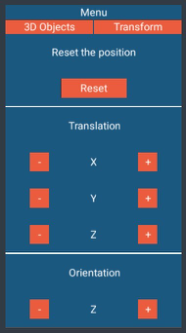
Figure 1: GUI designed in shine engine. (Koreng & Krömker, 2021) presents different types of human interfaces for AR applications in the industry. The paper focuses essentially on world anch- ored GUI and interactions with it. They conclude that focus interaction is preferred to gestures interaction due to the omnipresence of certain types of ergonomics standard.
Different papers were made to define new types of interfaces for AR. (Cha, et al., 2019) proposes a solution to provide facial gestures interface. This type of gesture using wink allows the user to close and open their eyes to realize mouse click on 2D graphical user interface but can be expand for other purpose. (Kim, et al., 2021) presents a new way to drive drone in VR/AR with brain computer interface. (Zhu, et al., 2020) presents haptic gloves to allow better feeling when interacting with virtual objects and allow a good restitution of the hand movements.
METHODS
To test the quality of the interaction for an application requiring high accuracy, an application is realized. This application is implemented with the proprietary 3D engine Shine Engine and its driver OpenXR developed parallelly.
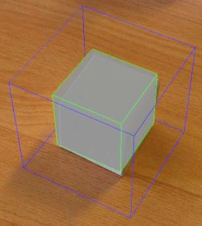
This application consists in positioning and orienting a virtual cube. It is represented first by an unlit white cube has specified on the HoloLens 2 documentation. However, a pure white cube can present some disadvantage to see the edge and thus to correctly position it. Hence, a green bounding box fitting perfectly the cube has been added to allow a better comprehension of the virtual cube (Figure 3).
In this application, different types of user interfaces have been implemen- ted. First an interface with no GUI is implemented. To position the virtual cube, the users must grab it with its hand and place it where they want. To orientate, a boxing box is displayed, and the users must take one of the edges and move their hand to realize the rotation. This type of human interaction is the one we can experience inside the example application of the HoloLens 2 headset and is one of many types of interaction describe in
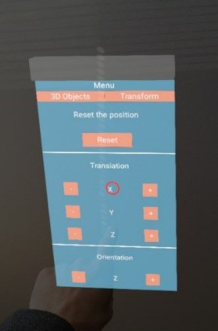
Figure 2: GUI rendered inside the HoloLens 2 with the 3D red cursor.Figure 3: The virtual cube rendered inside the HoloLens 2.
(Papadopoulos, et al., 2021). Secondly, a GUI which follows the users is reali- zed (Figure 1 and Figure 2). This interface contains buttons to move the cube along the x-axis, y-axis and z-axis and two button allowing the users to rotate the cube only on the z-axis. This interface graphics try to respect the same constraints than 2D GUI in terms of ergonomic such as presented in (Bastien & Scapin, 1993) and will follow the users when too far of them. The virtual cube can be grabbed to position approximatively and after the translation buttons allow more accurate positioning. Finally, a world anchored GUI is created with the same interface as the second one. But the users can move it where they want.
The interaction with the GUI is achieved with hand tracking and the rea- lization of a 3D cursor to represent the interaction spot for the user. This cursor avoids problem with depth perception and so an easier interaction. The user just needs to push with its finger the virtual button to realize the action of the button. A visual return when the button is clicked is rendered. This solution is similar to the one presented in (Papadopoulos, et al., 2021).
For each iteration of the user interface, the users use it for an accuracy protocol and make returns on the quality of the interaction. User feedbacks is made by interview and questions are asked about the ease of positioning of the virtual cube on the physical cube, the ease of rotating the virtual cube to match the orientation of the physical cube and finally the quality of the visualization.
Augmented Reality Application for HoloLens Dedicated to the Accuracy Test 49
Table 1. Statistical results of ergonomics tests (scores on 10).
Table available in the original PDF paper.
Ease of positioning the cube Ease of rotating the cube Visualization Unlit Green No GUI GUI manually
To measure the quality of each user interface, each user scores the ease of posi- tioning and rotating the virtual cube and the comprehension of the geometry on 10. The number of users that test and participate to the development of this application is 3. These users test it during 3-4 months in total. Other 10 users have tested the different human interface. 5 users have small experie- nce in AR/VR, 4 users have experience with VR applications and 1 user have experience with HoloLens 1. The result of the ergonomic tests is presented in the Table 1.
The average note for the first human interface without any GUI presents a very low rate of approbation with an average score of 3.62 (average score of 4.38 for the position, 2.85 for the rotation) and a standard deviation of 1.98. This low rate of approbation comes to the fact the users show difficulties to position accurately the cube and so multiple iteration are needed to finalize the operation. Moreover, it is not possible to position the virtual cube inside the physical cube and accurate orientation is difficult.
The second human interface presents significant improvement for the approbation with an average score of 6.58 for positioning the cube and 5.73 for orientating the cube, with a standard deviation of 1.22 and 1.92 respe- ctively. The final average score of this interface is 6.15. The main drawback is the auto-placement of the GUI which can significantly perturb the vision of the users during the tests by position it automatically near or on the vir- tual cube. And when the GUI is not near of the cube, it is no more on the viewpoint of the headset and so it is not possible to see the cube and the GUI.
The last human interface presents the highest approbation with an average note of 8.08 in positioning the cube and 6.92 in orientating the cube. The final average score is 7.5. One user comments that for the second and the last human interface, the rotation of the cube is difficult to handle and produces a non-accurate orientation. This can come from the lack of settings to define the rotation step which can be beneficial for this application.
Concerning the visualization of the cube, a perfectly lit white cube is totally discouraged due to the missing edge information which results in bad com- prehension (average score of 3.54). Adding color on the edge allows a better comprehension of the form and thus a better manipulation (average score of 8.25).
CONCLUSION
The most approbate human interface to manipulate accurately a virtual entity is the use of a manually movable world anchored GUI. This type of human interface allows a better positioning and a better rotation of the virtual cube by the users. The grab interface is interesting to position approximatively the virtual cube but cannot be used alone for accurate positioning. The pro- tocol to test the different human interface presents some drawbacks. The driver OpenXR inside the proprietary engine Shine Engine was implemen- ting at the same moment than the creation of the different human interface, which results on bad stability and accuracy error on some measure (particu- larly on the hand of the users). The interaction between the users and us has been made orally and not with a specific support. A specific support which categorizes all the modifications recommended by the users must be inclu- ded on our tests to observe a progression on the development of the human interface. The number of users is too small to conclude on the quality of the human interface but can guide us to use more GUI when the application has as goal to be the more accurate as possible. More tests are needed to validate our hypothesis.
REFERENCES
Bastien, C. & Scapin, D., 1993. Ergonomic criteria for the evaluation of humancomputer interfaces, s.l.: s.n. Cha, J., Kim, J. & Kim, S., 2019. Hands-Free User Interface for AR/VR Devices
Exploiting Wearer’s Facial Gestures Using Unsupervised Deep Learning. Sensors, January, Volume 19, p. 4441. Chen, L., Day, T. W., Tang, W. & John, N. W., 2017. Recent Developments and Future Challenges in Medical Mixed Reality. s.l., s.n., p. 123–135. Iannessi, A. et al., 2018. A review of existing and potential computer user interfaces
for modern radiology. Insights into Imaging, August, Volume 9, p. 599–609. Kim, S. et al., 2021. P300 Brain–Computer Interface-Based Drone Control in Virtual and Augmented Reality. Sensors, January, Volume 21, p. 5765. Koreng, R. & Krömker, H., 2021. User Interface Pattern for AR in Industrial
Applications. Information, June, Volume 12, p. 251. Memo, A. & Zanuttigh, P., 2018. Head-mounted gesture controlled interface for human-computer interaction. Multimedia Tools and Applications, January, Volume 77, p. 27–53. Microsoft, n.d. Instinctual interactions - Mixed Reality. [Online] Availa- ble at: https://docs.microsoft.com/en-us/windows/mixed-reality/design/interactio n-fundamentals [Accessed 21 January 2022]. Papadopoulos, T. et al., 2021. Interactions in Augmented and Mixed Reality: An
Overview. Applied Sciences, January, Volume 11, p. 8752. Zhu, M. et al., 2020. Haptic-feedback smart glove as a creative human-machine interface (HMI) for virtual/augmented reality applications. Science advances, Volume 6, p. eaaz8693–eaaz8693
LISTED IN THE AHFE DIGITAL BOOKSTORE CATALOGUE
Explore the complete digital volume
Healthcare and Medical Devices
Read this individual research paper free through the original publisher, or explore the full digital proceedings book.
ISBN 978-1-958651-27-8
Explore this ISBN in the AHFE Bookstore ↗Listed in the July 2026 bookstore catalogue; search by ISBN to confirm current availability · Digital book purchase optional