Yourim Kim, Sangeun Park, Wonseuk Jang (2022). User Interface Evaluation of Wireless Ultrasound Solution for Point-of-Care Applications. In: Usability and User Experience. AHFE Open Access, vol. 39, pp. 524–532. https://doi.org/10.54941/ahfe1001750
Recently, interest in a point-of-care diagnosis using portable ultrasound images that can provide information in real time at the patient's bedside is increasing. Especially, as interest expands to POC applications out-of-hospital emergencies and in-hospital rounds, usability and safety are required, and the application of mobile devices such as smartphones and tablet PCs to increase accessibility is also required. This study aims to develop a wireless ultrasound solution that obtains images from wireless ultrasound probes and communicates wirelessly with ultrasound scanners and smart IT devices, and to improve the usability and safety of medical devices through UI evaluation from the initial design stage by applying the Human Factors Engineering Process based on the IEC62366-1 standard. We designed a user interface (UI concept, design sketch) for smart IT devices, wireless ultrasound scanners and probes reflecting user requirements collected from advisory panels of five clinical departments. The UI concept was evaluated through two focus group interviews, and the revised UI concept was additionally evaluated through a survey afterwards. In addition, user preferences of design sketch were surveyed among 22 experts in the echocardiography room and 8 members of the emergency imaging society. User requirements of advisory panel included sterilization possibility, small space occupancy, equipment durability, and smart phone linkage. Through the focus group interviews, opinions were collected on the menu structure, unnecessary functions. In the survey, most of the GUI designs were satisfied except for pictograms and font sizes. In the preference survey, the wireless ultrasound scanner type B with easy access to the operation buttons and the streamline design probe design type B had the highest preference.Through iterative UI evaluation, the user requirements were derived and the user interface was designed reflecting this. Future research should continue the usability engineering process, developing the actual software and performing usability test.
Recently, interest in a point-of-care diagnosis using portable ultrasound images that can provide information in real time at the patient’s bedside, ambulance, and emergency room is increasing (Pilsu et al. 2014). Especi- ally, as interest expands to POC applications out-of-hospital emergencies and in-hospital rounds, usability and safety are required, and the application of mobile devices such as smartphones and tablet PCs to increase accessibility is also required (Yeongnam et al. 2014, JeeHoo et al. 2014). In this study, we develop a wireless ultrasound solution that obtains images from wireless ultrasound probes and communicates wirelessly with ultrasound scanners and smart IT devices. UI evaluation was repeatedly performed at the initial stage of the design cycle by applying the Human Factor Engineering Process based on the IEC62366-1 standard. The Human Factor Engineering Process makes it possible to achieve appropriate usability in terms of safety, efficiency, and user satisfaction (IEC, 2015)
User Interface Evaluation of Wireless Ultrasound Solution for Point-of-Care Applications 525
DEVELOPING WIRELESS ULTRASOUND SOLUTION FOR POINT-OF-CARE APPLICATIONS We designed a graphical user interface (UI concept) for wireless ultrasound scanners and smart IT devices (smartphone or tablet PC) reflecting user requirements collected from advisory panels of five clinical departments, and designed user interfaces (design sketches) for wireless ultrasound scanners and probes as well.
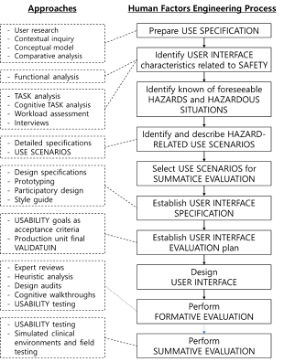
Establishing Human Factors Engineering Process Producer Human factors engineering process principles are applied to promote the development of safe and effective medical devices (IEC, 2016). This process enables early detection of user interface design flaws that need to be fixed and leads to the development of user-friendly and intuitive products (IEC, 2016). A device user interface includes all points of interaction between the user and the device (FDA, 2016). The most effective strategies to employ during device design to reduce or eliminate user-related hazards involve modificati- ons to the device user interface (FDA, 2016). To the extent possible, the “look and feel” of the user interface should be logical and intuitive to use. A well designed user interface will facilitate correct user actions and will prevent or discourage actions that could result in harm (use errors) (FDA, 2016). It is expected that formative evaluation occur iteratively so that the manufactu- rer can identify user interaction problems and implement effective solutions. (IEC, 2016). Interviews and surveys can be conducted as recommended meth- ods for developing the use specification, the first step in the process (IEC, 2016). interviews and surveys help to gain insight into the user’s knowledge, perceptions or opinions (IEC, 2016), Focus groups can be conducted early in the user research phase of a medical device’s development, or during design conceptualization. Formative evaluation data can include a customer prefe- rence survey responses and focus group participants’ comments (IEC, 2016). In some cases, especially when carrying out long-term and significant deve- lopment projects, it is possible to convene an advisory panel with a different perspective on a medical device under development to gather a deeper level of insight (IEC, 2016).
Configuring Advisory Panel to Derive User Requirements Five departments that can use wireless ultrasound solution usefully were sele- cted (see Table 1), and an advisory panel of clinician was formed to collect user requirements according to the use environment. The selected depar- tments are Medical Cardiology, Intensive Care Unit, Emergency Medicine, Radiology, and Anesthesia (Operating Room). In the five selected depar- tments, the POC diagnostic device can be a solution for identifying the need for detailed examination, overcoming space limitations and fast diagnosis, reducing the time between procedures and lowering the risk of infection (see Table 1).
Figure 1: Human factors engineering process (IEC, 2015).Table 1. Reasons for the selection of the medical departments.
Table available in the original PDF paper.
Departments Description Medical Cardiology solution to check the patient’s condition and identify the need for detailed examination during outpatient and ward rounds. Intensive Care Unit
solution to a quick diagnosis on the spot.
provide a more accurate treatment response and a solution to space constraints. Emergency Medicine Radiology solution to further lower the preparation time and the risk of infection exposure during interventional procedures. Anaesthesiology solution to further lower the risk of infection exposure.
Analyze User Environment and Requirements through Advisory Panel Reviews The user environment and requirements were analyzed through the review of the advisory panel. User requirements derived through the review of the advi- sory group included the possibility of sterilization, small space occupancy, durability of equipment, and possibility of interlocking with smartphones. (See Table 2).
ANALYSIS AND EVALUATION OF USER INTERFACE
METHODS
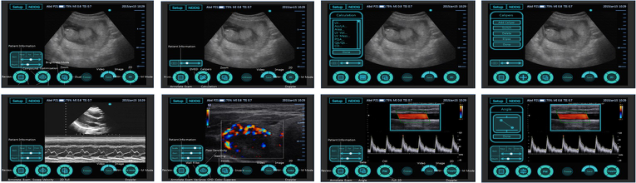
Focus Group Interview and Survey of UI Concept The focus group interview and survey were conducted for medical engineers, nurses and advisory panels composed of clinicians. In the first focus group interview, an structed interview was conducted on the designed GUI of the wireless ultrasound scanner. GUI is designed based on 20 functions such as
User Interface Evaluation of Wireless Ultrasound Solution for Point-of-Care Applications 527
Table 2. User requirements according to department and environment.
Table available in the original PDF paper.
Departments Environments User Requirements Medical Cardiology Ward (Rounds) It should be convenient to use by linking with the wireless probe by downloading a program such as an application to an existing smart device. After saving the image, it must be possible to transmit or print it to a program in the hospital Intensive Care Unit
Intensive Care Unit
When connecting the Ultrasound Scanner and Wireless Probe, there should be no interference from various devices. The space occupancy of the diagnostic equi- pment should be reduced. A sterilization set dedicated to the wireless probe should be provided to reduce the risk of infection. Emergency Medicine
Emergency Room
Since various areas need to be inspected, curved, linear, and sector probes must be con- figured. As the risk of breakage must be reduced, the durability of the diagnostic device must be good. Time should be reduced by using shortcut keys for each function from power on to scanning Radiology Intervention Room
A sterilization set dedicated to the wireless probe should be provided to reduce the risk of infection. When connecting an external monitor, the dif- ference in image quality with the Ultrasound Scanner should be reduced Anaesthesiology Operating Room
A sterilization set dedicated to the wireless probe should be provided to reduce the risk of infection. Probe sterilization should be possible. The space occupancy of the diagnostic equi- pment should be reduced.
2D mode, caliper, calculation, M mode, sweep velocity, color mode, doppler CW, PW, gate, angle and freeze (see Figure 2).
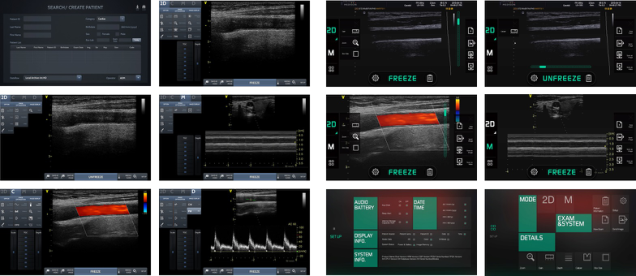
In the second focus group interview, an unstructured interview was con- ducted on the modified wireless ultrasound scanner GUI by reflecting the results of the first focus group interview, and also the smart IT devices GUI (see Figure 3). The modified GUI is designed based on the 2D mode, color mode, M mode, and doppler mode functions, and the options for each mode, image optimization, and image display detailed function buttons are desi- gned. The smart IT device GUI is designed based on the 2D mode and M mode functions, and the color function is automatically executed when the box
Figure 2: UI concept of wireless ultrasound scanner.Figure 3: Modified UI concept of wireless ultrasound scanner (left), UI concept of smart IT device (right).
size is selected without a separate color mode. 2D mode has gain, zoom, and box size functions, and M mode provides only the viewer function without detailed control functions.
In the survey, satisfaction and necessity were analyzed by evaluating the screen composition of the modified wireless ultrasound scanner GUI and the GUI of smart IT devices (see Figure 3), appropriateness of specific functions, content recognition and ease of use, and necessity of specific functions as Yes or No.
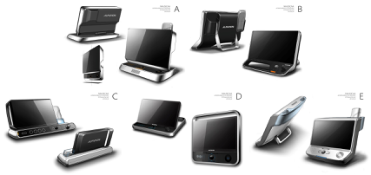
User Preference Survey of Design Sketch The user preference survey was conducted for wireless ultrasound scanner and probed. The users gave rankings and subjective evaluations of the five design sketch proposals from Type A to Type E (see Figure 5). According to the number of votes for the first place in preference, the overall preference ranking was synthesized and the opinions of the selection were analyzed. In the first user preference survey, 22 people with at least 2 years of experience in ultrasound in the echocardiography room of Severance Hospital participated. In the second user preference survey, 8 full-time lecturers and professor level executives of the Emergency Imaging Society participated.
User Interface Evaluation of Wireless Ultrasound Solution for Point-of-Care Applications 529
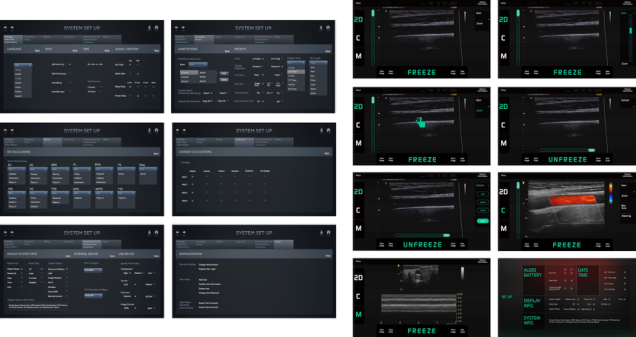
Figure 4: System set up UI concept of wireless ultrasound scanner (left), UI concept of modified smart IT device.Figure 5: Design Sketch of Wireless Ultrasound Scanner and Probe.
RESULTS
Focus Group Interview and Survey of UI Concept Through the focus group interviews, opinions were collected on the menu structure, unnecessary functions. In the first focus group interview, it was confirmed that the situation in which it is difficult to use the touch screen function should be considered, and it was found that it is more efficient to configure the sub-buttons for each ultrasound mode than to configure the buttons for each function.
In the second focus group interview, opinions on unnecessary and neces- sary functions for each mode, depth adjustment menu location, Omission of patient detailed information field and deactivation of Needle guide were col- lected. The necessary functions in the GUI of the wireless ultrasound scanner are Gain, Zoom, Steering, Color Scale, and Auto TGC of color mode. The unnecessary functions include color detailed image adjustment (Sensitivity, PRF Scale, Color Suppress, Wall filter, Variance), Spectrum Doppler detai- led image adjustment (Angle, Wall filter, Sweep Speed, Live Trace), and M mode detailed image adjustment function. GUI of smart IT device had posi- tive feedback about the overall menu being organized at a glance, the depth adjustment function being placed vertically next to the image to increase intuition, and the addition of the image transmission function. In addition, there was an opinion that it is unnecessary to place a button in the center of
Figure 6: Satisfaction of wireless ultrasound scanner UI concept design.Figure 7: Satisfaction of smart IT device UI concept design.
the screen because the Patient Information function and the Setup function are not used well.
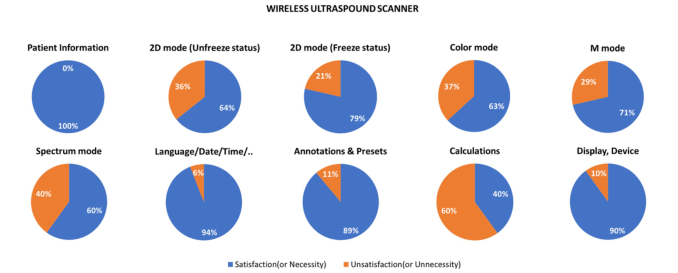
As a result of conducting a survey on the GUI, the overall satisfaction rate for the dedicated terminal was 73%. Most of them were satisfied with the exception of the fact that the pictogram of the menu was not intuitive and the font size was small, making it difficult to recognize the menu, the size and use of the input text field was not convenient, and the location and input method needed to be changed similarly to that of a smartphone. In addition, it was found that the Calculations function is not required for cardiac exam and the frequency of use is low (see Figure 6).
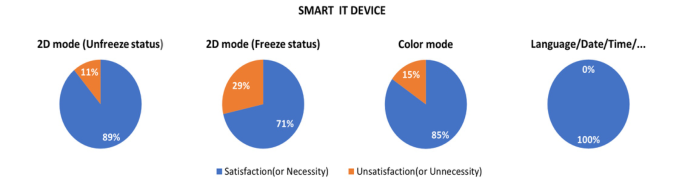
In the case of smart IT device, the overall satisfaction rate was 84%, and most of them were satisfied except for the fact that accurate measurement using a caliper was difficult because of the touch screen (see Figure 7).
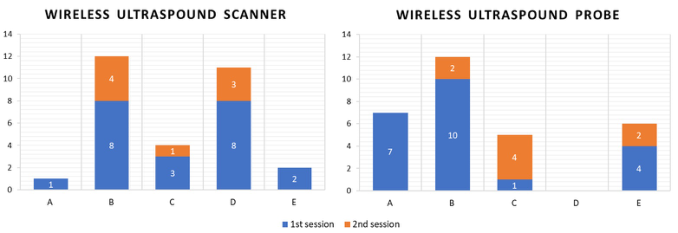
User Preference Survey of Design Sketch As a result of the user preference survey for the wireless ultrasound scanner and probe external design sketch, the user preference for the B, which has a large screen and easy access to operation buttons with a curved panel, was the highest.
In the case of the probe, the user preference was highest for the B, which can be used regardless of whether the probe is left-handed or right-handed and has improved grip with a streamlined design (see Figure 8).
User Interface Evaluation of Wireless Ultrasound Solution for Point-of-Care Applications 531
Figure 8: Preference of Wireless Ultrasound Scanner and Probe Design Sketch.
CONCLUSION
In this study, user requirements for wireless ultrasound solutions were identi- fied, satisfaction with the UI concept designed through UI evaluation and opinions for improvement were confirmed, and preferences for external design sketches were confirmed. User requirements derived from advisory panels include small space occupancy and durability. environmental use con- ditions include the room be full of equipment or clutter or busy with other people and activities, making it difficult for people to maneuver in the space and providing distractions that could confuse or overwhelm the device user (US FDA, 2016). Considering the environment in which the medical device will be used can help determine the optimal user interface design (US FDA, 2016). Users prefer the simplified menu structure so that could be operated at once, large image screen and large text. From the user point of view, the best design has to be intuitive and less stressful during its operation and handling (Andreoni et al. 2015). In addition, for the UI design sketch, an easy-to-access panel and a probe with a good grip are preferred. A probe with improved grip should be developed to prevent scanning fatigue and work-related muscu- loskeletal disorders (Andreoni et al. 2015). Considering usability from the initial design stage for user-centered design conducted in this study can lead to not only usability improvement but also ultimately safety improvement of medical devices (Van der et al. 2012). In the future, it is necessary to con- tinue the usability engineering process, performing additional research into the design of new wireless ultrasound solutions, developing real software and testing usability.
ACKNOWLEDGMENT
This study was conducted as part of the industrial core technology develo- pment project (MOTIE/KEIT 10048528) of the Ministry of Trade, Industry and Energy and the Korea Evaluation Institute of Industrial Technology.
REFERENCES
Andreoni, G., Mazzola, M., Matteoli, S., D’Onofrio, S., and Forzoni, L. (2015) “Ultrasound system typologies, user interfaces and probes design: a review”, Procedia Manufacturing, pp. 112–119
IEC, I. (2015) 62366-1 Medical Devices – Part 1: Application of usability engineering to medical devices. International Electrotechnical Commission (IEC). IEC, I. (2016) TR 62336-1 Medical Devices – Part 2: Guidance on the applica-
tion of usability engineering to medical devices. International Electrotechnical Commission(IEC). Kim, J. H., Lee, Y. H., Kang, J., and Yoo, Y. (2014) “A Real-time Realization of an Automatic Dynamic Range Adjustment Method on a Smart Mobile Device for Point-of-Care Ultrasound Imaging”, Proceedings IEEE Ultrasonics Symposium, pp. 1229–1232 Kim, P.S., Kang, J., Lee, J.J., Kim, G.D., Yoo, Y., and Song, T.K. (2014) “A new non-
linear zone-based beamforming method for point-of-care ultrasound imaging”, Proceedings IEEE Ultrasonics Symposium, pp. 2137-2140 Lee, Y. N., Kang, J., Yeo, S., Lee, J.J., Kim, G.D., Yoo, Y., and Song, T.K. (2014) “A New Smart Probe System for a Tablet PC-based Point-of-Care Ultrasound Imaging System: Feasibility Study”, Proceedings IEEE Ultrasonics Symposium, pp. 1611–1614 US Food and Drug Administration. (2016) Applying Human Factors and Usabi-
lity Engineering to Medical Devices: guidance for industry and Food and Drug Administration staff. Van der Peijl, J., Klein, J., Grass, C. and Freudenthal, A. (2012) “Design for risk control: the role of usability engineering in the management of use-related risks.”, Journal of biomedical informatics, pp. 795–812
LISTED IN THE AHFE DIGITAL BOOKSTORE CATALOGUE
Explore the complete digital volume
Usability and User Experience
Read this individual research paper free through the original publisher, or explore the full digital proceedings book.
ISBN 978-1-958651-15-5
Explore this ISBN in the AHFE Bookstore ↗Listed in the July 2026 bookstore catalogue; search by ISBN to confirm current availability · Digital book purchase optional