Karsten Kluth, Erwin Keller (2018). Rollermouse vs. Standard Computer Mouse –Electromyographic and Subjective Assessment of the Usability in Applications with Graphical User Interfaces. In: Advances in Physical Ergonomics and Human Factors: Part I. AHFE Open Access, vol. 1. https://doi.org/10.54941/10028
The positioning of the hand-arm-shoulder system while computer-aided data entry, text processing or mouse operations – due to the kinematical chain’s own weight – represents an important risk factor for musculoskeletal complaints such as RSI syndrome as well as PC-work-induced carpal tunnel syndrome. A new system to control the mouse cursor by a rollerbar promised beneficial support and a more comfortable working with a standard keyboard. 24 subjects – classified by gender and age – were part of standardized working tests to proof the ergonomic quality of the rollerbar mouse. The hypothetically expected relief of the hand-arm-shoulder muscles was measured with electromyographic methods. Subjective assessments based on the work experiences were obtained in order to enhance the evaluating of the product’s ergonomic quality. The rollerbar system was rated more favorably than the standard mouse. There are some differences along age and gender lines with regard to the strength of preference, but the rollerbar was the unequivocally preferred input device. Unfortunately, the results of the measurements do not support as strong an endorsement for either of the two products. The reason is that the level of physical strain is simply not high enough. But the conclusion of establishing the rollerbar mouse as an ergonomically promised product could be confirmed.
The gradual development of the tertiary economic sector as well as continuing technical advances have led to humans’ increased use of personal computers (PC), both in their professional and personal lives. In 2011, an average of 53% of employees in the European Union (27 countries) used a PC at their place of employment. That percentage was even higher in Germany (61%), Finland (72%), Sweden (71%), and Norway (71%), (BITKOM, 2012). Input devices such as keyboards and computer mouses represent the physical interface between humans and the PC. Even when flat keyboards and office furniture which meets ergonomic and safety requirements (e.g., screens with positive display that are arranged in height and tilt according to the relaxed visual axis, height-adjustable tables, and optimized swivel chairs which allow dynamic sitting that exceeds existing standards) are used, extended typing during data entry and text processing or during graphical applications can lead to muscle fatigue and muscle tension.
The reason is that the positioning of the hand-arm-shoulder system in writing position or during the operation of the mouse by itself – due to the flexible kinematical chain’s own weight – represents a work-physiological bottleneck for certain muscles because of a lack of motion. Even a workplace whose individual aspects have been optimized oftentimes has the potential for further improvements from a systemic point of view.
As a result of rather inadequately designed PC workplaces, working on a PC is an important risk factor for musculoskeletal-related complaints (Bergqvist et al., 1995 and Gerr et al., 2002) and by now is the leading disease in the EU, which results in high direct (cost of treatment) and indirect (loss of production) costs (PEROSH, 2012). As a further distinction in the context of PC work, the term “RSI Syndrome” (Repetitive Strain Injury) is used separately from “musculoskeletal-related complaints.” When used to describe the complaint that results from computer work, the term “mouse arm” is used. Mouse arm is a manifestation of Repetitive Strain Injury (RSI), and can be caused not only by working with a mouse but also through other actions that overload the hand and arm area. Mouse arm is a modern form of classical tennis elbow. Small movements that are constantly repeated can lead to ailments in the upper and lower arm.
Caused by developments in the software industry, the mouse has gained in importance relative to the keyboard over the last few decades. Electromyographic (EMG) measurements document that working with a PC mouse activates the suboccipital muscles (neck muscles) more than working with a keyboard does (cp. Laursen et al., 2002). In many respects, operating with a mouse places high demands on the motor control (Laursen et al., 2001). Firstly, precision requirements are high since a task cannot be executed if the mouse is just a fraction of a millimeter away from the required position. Secondly, the execution speed must be sufficiently high, in particular when double-clicking for which the clicks must be carried out within a very short period of time. Thirdly, activities of different hand and shoulder muscles must be coordinated, e.g., when an object on the screen must be “selected” or “dragged.” To accomplish that, the mouse button must be held down while the mouse is being moved. Fourthly, working with a mouse requires a high degree of hand-eye coordination. For example, when drawing on a PC, precise movements of the mouse are necessary while the movements on the screen must be observed.
Even though a connection between the use of a PC mouse and the RSI syndrome is apparent, little is known about the impact of different input devices on the activation of various muscle groups in the upper extremities (Laursen et al., 2002). Therefore, one must be careful not to be misled by advertising messages and premature opinions when it comes to a reliable assessment of the ergonomic quality of work equipment.
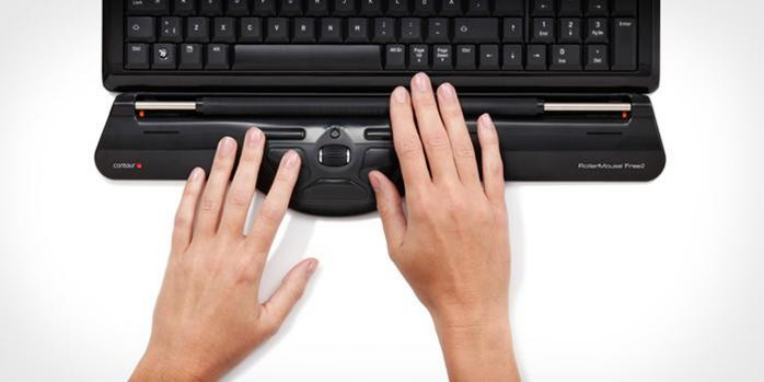
A rollerbar system to control the mouse cursor (cp. Fig. 1) promises beneficial support of the hand-arm-shoulder system and a more comfortable work experience with a standard keyboard. It allows the clicking and execution of various commands commonly used in text processing programs via a small number of integrated buttons. As an optional feature, it can be combined with a soft-cushioned wrist support. The rollerbar mouse serves as a replacement for a conventional PC mouse and is intended to counteract musculoskeletal-related complaints such as RSI syndrome as well as PC-work-induced carpal tunnel syndrome. The rollerbar mouse achieves those goals by eliminating unnecessary movements and by allowing movements to be executed from one point in front of the keyboard, which prevents a strenuous arm position while operating the mouse. Furthermore, the central arrangement is designed to relieve back, neck, and shoulders since it permits controlling of the mouse with both hands via the rollerbar. In addition, the optional wrist support provides relief for the wrists. Due to its design, the test object fits perfectly with straight standard keyboards, and the height in the front is adjustable to suit a user’s needs.
The tasks that nowadays need to be accomplished by graphic input devices such as the test object or a standard mouse are of a remarkable variety. The combination of two-dimensional tasks and the clicking of a button can be seen as standard in all applications which use a graphical user interface (GUI). A closer look, however, reveals that the apparent variety is reduced to a few fundamental elements.
The simplest task is the positioning of the pointer on a specific point. Only slightly more complicated is the combination of “positioning and clicking the button” where the left mouse button (for right-handed individuals) is used most often. Another task that is handled with the mouse is “selecting”: starting at the point of origin, the mouse is moved to the point of destination while the left mouse button is being held down. The selection process is completed by releasing the mouse button. A common option on a today’s computer mouse is a scroll wheel which allows vertical scrolling through the information on the screen. More advanced solutions for special applications such as CAD were not part of the investigation.
Figure 1. Rollerbar system for mouse control in front of a standard keyboard
The rollerbar mouse is intended mainly for typical office applications ranging from normal text processing to desktop publishing. As a result, the following tasks that are common in everyday work are considered:
Entering text
Positioning of the mouse pointer
Operating the scroll wheel
Clicking of the mouse button
Selecting items with the mouse pointer This investigation describes the ergonomic quality of a rollerbar mouse. In order to obtain statistically significant results, a collective of 24 subjects was part of the study. Additionally, the subjects were classified in subgroups by gender and age. Using a well-established method (cp. Keller and Strasser, 1996), the hypothetically expected relief of the muscles in the hand-arm-shoulder system were measured with electromyographic methods in standardized work tests. The above tasks were part of the test design. In addition, the subjects’ subjective assessments which were based on their work experiences were obtained in order to enhance the ratings of the product’s ergonomic quality.
METHODS
Test Objects The following objects were examined in this comparative study:
Rollerbar mouse with attached wrist support which was connected to a standard keyboard according to manufacturer instructions.
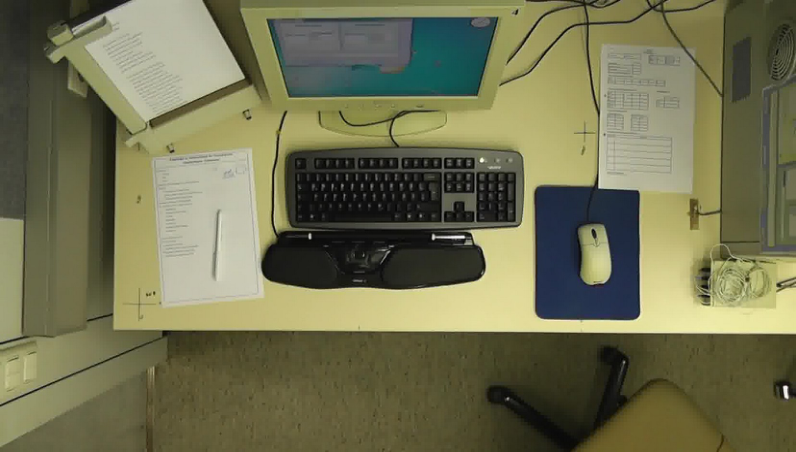
Optical wheel mouse with left and right buttons and a scroll wheel. The mouse was placed on a mouse pad which was located to the right of the standard keyboard (cp. Fig. 2).
Test Procedure The workplace was situated in a shielded laboratory in order to ensure constant optical, acoustical, and climatic conditions. The 17” flat-screen monitor was aligned according to the relaxed optical axis and the height of the workplace was 72 cm in accordance with ergonomic standards. The chair was equipped with a compatible assignment of functional and anatomical joints according to the synchronous technique (cp. Strasser, 1990, 1995).
For the purpose of carrying out the study, a simulation program was developed. The program ensured reproducible test procedures and allowed the realization of the variable input tasks in accordance with the test design. In addition, the simulation program registered the timing of every single keystroke with high precision.
Figure 2. Rollerbar mouse with wrist support in front of a standard keyboard and optical wheel mouse on a mouse pad next to the keyboard.
The examined objects were integrated into an ergonomic workplace with computer monitor. The tests were carried out alternatingly with the rollerbar mouse (with wrist support) and the standard mouse. In accordance with manufacturer instructions, the rollerbar mouse was situated centrally in front of the keyboard. The standard mouse was operated on a regular mouse pad to the right of the keyboard. A text sample was presented on a document stand to the left of the keyboard.
The tasks in the study were carried out alternatingly with the rollerbar mouse with a traditional QWERTZ keyboard and a standard mouse with the same keyboard. The text was entered by transcribing the sample text into the input mask. The text sample used was the German poem “Das Lied von der Glocke” (English title: “The Song of the Bell“) by Friedrich Schiller. The easily readable text was placed to the left of the keyboard on a type of ubiquitously used document stand.
In a second task, the subjects were required to alternate between the rollerbar mouse and the standard mouse to move the cursor to a single graphic object. As soon as the cursor reached the object, it moved to another position. The order of the object’s movements was random so that no learning effects regarding the position could occur. Another task required the subjects to click on the object with the left mouse button.
Another operating element on a mouse is the so-called scroll wheel. It is usually used to scroll the screen content or to move a “slider” in vertical direction. During this task, all scroll actions were registered. Graphical input devices are often needed to select particular areas. That task was simulated with red graphic objects in an otherwise grey “field of objects”. An area had to be selected from top left to bottom right. In order to do so, subjects had to position the mouse cursor in the “top left” position, then click the left mouse button and keep it depressed while moving the cursor to the “bottom right” position after which the mouse button could be released. After every such selection process, the picture changed.
Such manual tasks are common at a computer workplace and the use of the test objects to carry them out can – at least hypothetically –be expected to show some effects. To simulate the tasks, the subjects had to repeatedly enter text “blindly” using the ten-finger touch typing system on a standard QWERTZ keyboard. Subsequently, the subjects had to use the mouse for clicking, positioning, and selecting according to a predetermined program as can be seen in Table 1. Continuous work segments of 15 minutes each were separated by a 10-minute break. For both the rollerbar mouse and the standard mouse, the test procedure was carried out 4 times. Every test subject completed a work test of almost 4 hours duration.
Directions for the tests and proper placements of electrodes on the muscles as well as the time required for the electrode paste to take effect took approximately 30 minutes. After the electrical aligning of the measurement amplifiers (for the simultaneously measured muscles), the manual tasks were practiced, the measurement chain was checked once more, and the resting activity EA0 in work position for all muscles was recorded during a 10-minute break. Then the work tests shown in Table 1 were carried out and the electromyographic activity of the 6 muscle groups was recorded continuously. The movements of the right and left hand-forearm system and hence all input activities, i.e., keystrokes during text input and movements of the rollerbar mouse or standard mouse, were simultaneously registered and checked via an ultrasound recording system during the course of the entire test. In order to make the movements of the hand-forearm system during the use of the test objects visible, almost weightless ultrasound markers were stuck to the wrists.
Table 1. Test procedure with preparation, 8 work segments (total duration of 120 minutes), and test completion
Table available in the original PDF paper.
The collective of test persons consisted of 24 right-handed individuals who were classified by gender (12 males, 12 females) and age (12 individuals 20 - 30 years of age and 12 individuals 45 - 65 years of age). The overall substantially larger number of subjects produced statistically significant results. The subjects’ characteristics (age, gender, physical activity) were recorded before testing began and are shown in Table 2.
The work course determined the same “manual” work output. The study examined whether differences in muscle strain between the rollerbar mouse and the standard mouse could be explained by the use of the different devices. Furthermore, details of the workplace and the test objects were evaluated subjectively via a questionnaire in order to determine whether any changes that could be objectified via electromyographic methods were also noticeable subjectively in a systematic way. Since maximum voluntary contractions can cause uncontrolled extended fatigue in a muscle – which could have distorted the results – the measurements of the maximum activity EAmax took place at the end of the test series.
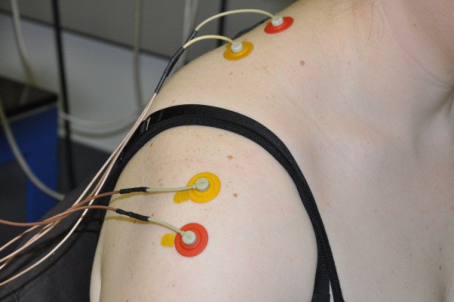
Test Variable “Electromyographic Measurements“ In order to objectively quantify the expected differences in muscle strain, the test design included continuous electromyographic recordings during the work tests according to well-established methods (cp. overviews by Strasser, 1996, 2007). Throughout the entire test, the electromyographic activity (EA) with the rollerbar mouse and the standard mouse was recorded via bipolar conductors (cp. Fig. 3) and saved in a stationary storage device.
Since amplitudinal values from electromyographic derivations cannot directly be interpreted as strain data (cp. Böhlemann et al., 1994; Kluth et al., 1994; Strasser et al., 1994), the electromyographic activity (EA max) was measured with the help of maximum voluntary contractions (MVC). Using that information along with the recorded resting activity EA0 in work position, the standardized electromyographic activity could be calculated for all work phases.
Table 2. Characteristics of the right-handed subjects classified by age and gender
Table available in the original PDF paper.
Figure 3. Derivation of the muscle activity by means of surface electrodes in the shoulder area (left) and on the upper and forearm (right)
Since the position at a computer workstation mainly puts strain on the muscles of the right arm (assuming a right-handed individual) and shoulder, the following 6 muscle groups were included into the study: Muscle group Function
m. extensor digitorum Finger extensor, scrolling and operating of the scroll wheel m. flexor carpi ulnaris Ulnar finger flexor, text input and movement of the roller bar
m. pronator teres Inward rotator of the forearm, forearm torsion m. biceps brachii Flexor and outward rotator of the forearm, m. deltoideus pars acromialis Bracing, i.e., lateral abduction of the upper arm m. trapezius pars descendens Lifting of the shoulder, bottleneck muscle for sitting activity Test Variable “Subjective Assessment Methods“
Special questionnaires were used to evaluate the subjective sensations during work with the input devices and to assess the work equipment’s quality. The subjects had to complete three standardized questionnaires:
Before the start of the test, all subjects provided personal data, their level of experience with PC keyboards, the use of input devices, and their familiarity with writing with a typewriter.
The workplace’s layout as well as certain characteristics of the rollerbar mouse and the standard mouse were rated via a proven questionnaire with a bipolar rating scale (cp. Strasser et al., 2004; Kluth and Strasser, 2006). The responses could be used to quantify the subjective assessment using numbers from “-4” (extremely unfavorable) to “+4” (extremely unfavorable). This questionnaire was completed by the subjects both prior to and after the test.
The physical strain of the hand-arm-shoulder system was also evaluated prior to and after the test with the help of a scale from “0” (no strain) to “4” (very heavy strain) (cp. Strasser, 2000).
RESULTS
Effects on Muscle Strain Even at first glance, it is noticeable that there are only minor differences between the values for the normalized electromyographic activity of the 6 muscles for input activities with the rollerbar mouse and those for activities with the standard mouse. While the rollerbar mouse exhibits lower activity levels more frequently than the standard mouse, the results vary a good deal from muscle to muscle with respect to the increase or decrease in effort. Moreover, the overall level of muscle strain is generally low.
It should be mentioned that the number of subjects per age group (6 males and 6 females) is too low to obtain statistically reliable strain results. In any case, a statistically reliable analysis requires a minimum of 12 subjects. Even with mean values over all 24 individuals (Table 3), neither of the two input systems could be shown to be superior due to the low levels of strain and the small differences in strain. Only for the m. deltoideus pars acromialis is the lower strain from using the rollerbar mouse statistically significantly different from the results of the standard mouse.
Table 3. Significance analysis for different activities and muscles over all subjects (n = 24) to validate advantages of strain for the rollerbar mouse
Table available in the original PDF paper.
The main function of the shoulder lifter m. trapezius pars descendens during work on a PC is the usually static holding of the respective arm. That can be identified via the standardized electromyographic activity during text input. Test results for all 24 subjects show that the differences between the two test objects are small. Contrary to expectations, use of the rollerbar mouse resulted in slightly higher electromyographic activity than use of the standard mouse. A priori, it had been assumed that the wrist rest of the rollerbar mouse for the heel of the hand would make the new product advantageous. The largest effect was observed during the clicking of the mouse button, a result that was oftentimes confirmed for the age and gender subgroups. The use of the rollerbar mouse resulted in 123% muscle activity relative to the standard mouse. The smallest difference between the test objects was observed for the “selecting items with the mouse pointer” task.
When the differences between genders are analyzed, the difference in the use of the scroll wheel is most noticeable. The muscle activity during the use of the rollerbar mouse is substantially lower among males than among females. The comparisons between the two age groups show lower muscle activity among older subjects for the positioning of the mouse and the selecting of items with the rollerbar mouse compared to the standard mouse. While it appears as if the rollerbar mouse is less advantageous than the standard mouse with respect to the activity of the m. trapezius pars descendens for all subjects combined, certain tasks for some subgroups of individuals showed advantages for the rollerbar mouse.
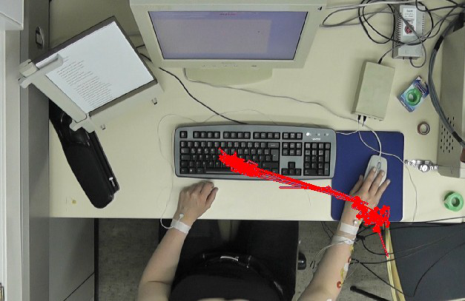
The acromial part of the deltoid (m. deltoideus pars acromialis) helps with the lateral abduction of the arm away from the body. For all tasks, the muscle activity is lower for the rollerbar mouse than for the standard mouse, which is a positive result. The reason for that result is the substantially different position of the arm during the operation of the rollerbar mouse. The two colored tracks in the photographs in Figure 4 show the respective areas of movement, which is clearly larger for the right arm in the case of the standard mouse.
For the group of male subjects, the lower muscle activity with the rollerbar mouse relative to the standard mouse is more pronounced than for the female subjects. In a comparison by age, the differences even become significant. For all tasks, the physiological strain of the m. deltoideus p. acromialis from using the rollerbar mouse is less among the older subjects. A detailed analysis of males and females confirms that result. Older men as well as older females exhibit the lowest physiological strain of that muscle.
Figure 4. Movement when using the standard mouse (red track, left) and the rollerbar mouse (yellow track, right).
The m biceps brachii is a very strong muscle of the upper arm and responsible for the forearm flexion. Its standardized electromyographic activity was the lowest in the test, which did not come as a surprise since no heavy weights had to be carried and only the forearm had to be positioned. In 3 of the 5 tasks, slightly lower muscle activity was recorded with the use of the rollerbar mouse compared to the standard mouse. “Transcrisbing text” and “Operating the scroll wheel” resulted in such minor differences that it would not be meaningful to discuss an increase or decrease in strain from the use of the test objects. Just like in the case of the m. deltoideus pars acromialis, the documented decrease in effort is due to the substantially different positioning of the arm when the rollerbar mouse is used. The areas of movement in the previously referenced photographs in Figure 4 illuminate the substantially longer distances which are required with the use of the standard mouse. The corresponding longer periods of holding of the unsupported arm during those movements explain the increase in physiological effort with the standard mouse.
Surprisingly, the least muscle activity during the use of the rollerbar mouse compared to the standard mouse for the m. biceps brachii in males was measured while operating the scroll wheel, which clearly demonstrates the advantage of using the rollerbar mouse. In females, the activity was substantially higher relative to the standard mouse. Beyond that, there were no substantial gender differences.
Clearly pronounced differences in muscular strain are only noticeable in the comparison between younger and older subjects. Just like in the case of the m. deltoideus pars acromialis, the results were more favorable for the rollerbar mouse in older subjects while the standard mouse is preferable for younger individuals. A detailed analysis shows that especially older females contribute to this result.
Anatomically speaking, the finger muscles are located in the forearm, but the muscles’ force is conducted to the fingers via tendons through narrow channels in the wrist, which can cause RSIs or carpal tunnel syndrome. It can only be registered by the m. extensor digitorum as the antagonist to the m. flexor digitorum. Using the rollerbar mouse reduces the physiological effort during the use of the scroll wheel. Conversely, positioning and selecting tasks are associated with an increase in physiological effort.
With the exception of the female subjects, the results are comparable for the different subgroups. The detailed analysis confirms that increased levels of strain were detectable in the m. extensor digitorum when using the rollerbar mouse for both the younger and the older females.
In terms of the m. pronator teres, there are only minor differences in the results. Only for the “Operating the scroll wheel” task does the rollerbar mouse exhibit slightly increased electromyographic activity relative to the standard mouse for the pronator teres muscle. That is due to the possibility of including the forearm in the operation of the scroll wheel on the rollerbar mouse, a motion that is not possible with the standard mouse.
While the result is supported by the separate results by gender, the electromyographic values demonstrate that the increased strain levels during the use of the scroll wheel are observable in the younger age group. For all other tasks, no meaningful advantage of one input device over the other can be determined.
Similar to the m. deltoideus p. acromialis, the relativized and standardized electromyographic activity of the ulnar hand flexor m. flexor carpis ulnaris were lower with the rollerbar mouse compared to the standard mouse. The greatest decreases were observed during the initial and repeat test phases in which subjects had to select something with the mouse.
The electromyographic values make it clear that there exists a pronounced difference between the two age groups in the “Operating the scroll wheel” test phase. While the older subjects experienced a reduction in muscle strain, younger subjects exhibited substantially increased levels of strain when they used the rollerbar mouse. Specifically, substantial differences in strain for the “Operating the scroll wheel” task between rollerbar mouse and standard mouse were observed in younger males. Contrary to that, the value for the operation of the scroll wheel on the rollerbar mouse relative to the standard mouse was significant lower for older males, which favors the use of the rollerbar mouse. The latter result is confirmed by the group of older females. Overall, the rollerbar mouse is preferable to the standard mouse for this muscle in terms of the measured strain.
Subjective Assessments The characteristics and previous experience of subjects and their assignment to one of four age-by-gender groups have already been presented in the context of the test design in Table 2. The overall mean number of fingers that the subjects indicated that they use for typing was 8.7 with a standard deviation of 0.7, which can be assumed to ensure fluid typing. The mean number of years of experience with computers was 15.3 (standard deviation of 6.1). The minimum was 4 years and the maximum was 30 years. The subjects’ previous experience with various input devices was largely limited to the standard mouse. Some subjects indicated that they sometimes use touch pads as they are commonly found in laptop computers. The – limited – experiences with touch screens are mostly due to recent developments in cell phones as well as the increasing popularity of tablet PCs. It can be assumed that the above figures will show a shift towards the use of touch screens over the next few years.
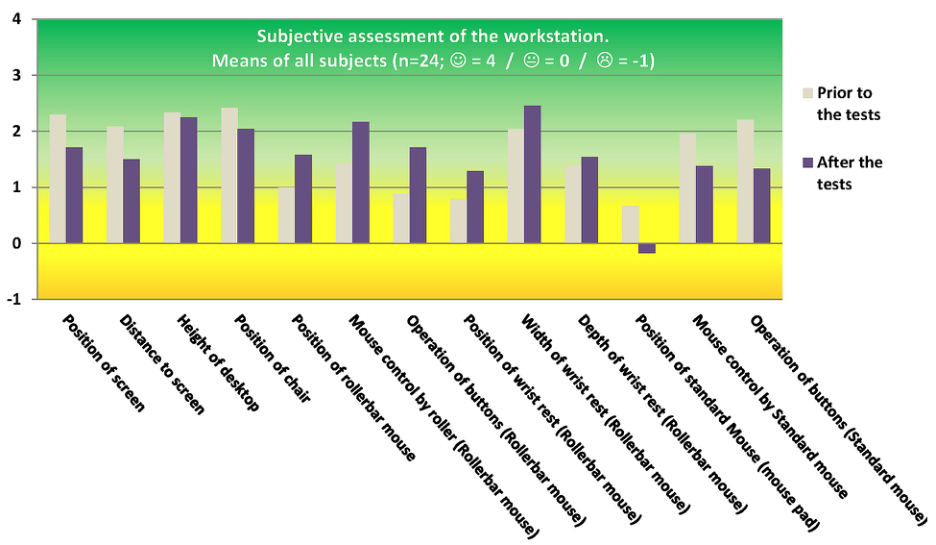
Since aside from a small number of exceptions the ratings of the workplace and of the work with the rollerbar mouse (with wrist rest) and the standard mouse – using a bipolar scale from -4 (“extremely unfavorable”) to +4 (“extremely favorable”) – are generally positive, the negative side of the scale in the Figures was truncated at a value of -1. Figure 5 shows the results of the subjective rating of details of the workplace as well as various characteristics of the rollerbar mouse and the standard mouse prior to and after the test. Ratings for the position of the screen, the distance to the screen, the height of the desktop, and the position of the ergonomic chair with synchronous mechanism are generally positive prior to the test with a rating of “rather favorable.” Less-than- optimally designed work conditions, however, led to lower ratings of only “slightly favorable” after the test on those four rating criteria. It should be mentioned that the subjects generally exhibited a critical and skeptical attitude towards the work situations in a laboratory setting, which is not uncommon in studies of this kind.
The subjective assessment of the workplace revealed some differences along age and gender lines. Overall, females collectively gave lower ratings for the workplace than men, both prior to and after the test. The differences in subjective assessments were even greater between younger and older subjects. The latter group’s perception of the workplace was generally less favorable than the former group’s. A possible explanation is that older individuals are oftentimes less familiar with PCs, which may make them somewhat insecure when they are required to work with a PC. In addition, the rollerbar mouse is an input device with which the subjects were not familiar. Younger users are more familiar with a variety of input devices than older users (especially females) who are predominantly used to a standard mouse. Such differences between the 4 age-by-gender groups become noticeable in the assessment of the workplace. The ratings from older subjects, both male and female, are lower throughout than those from both groups, male and female, of younger subjects.
Figure 5. Subjective assessment of the workstation in the laboratory prior to and after the test. Mean values of 24 subjects The rating of the elements dealing with the position of the rollerbar mouse, the operation of its rollerbar, and the use of its buttons prior to the test clearly reflected the skepticism towards the new input device relative to a standard mouse. In the ratings prior to the test, the highly significant difference for the use of the buttons is especially noteworthy. Interestingly, the ratings after the tests were quite different. The mean rating for the use of the buttons of the rollerbar mouse was 1.71, which compares favorably to the respective value of 1.33 for the standard mouse. It can be concluded that the advantages of the rollerbar mouse became apparent to the subjects during the course of the test, which caused the reversal of the ratings. The same phenomenon could be observed for the position and operation, which was reflected in the highly significant difference in the rating of the positioning and the also more highly rated operation of the rollerbar mouse relative to the standard mouse after the test, which was weakly significant.
Among male subjects, the subjective assessment of the rollerbar mouse after the test was less positive than the female subjects’ assessment, especially with respect to operation and the use of the buttons. More specifically, neither of the two input devices was clearly preferred by the male subjects. Females, on the other hand, were very skeptical towards the rollerbar mouse prior to the test, but then evaluated the rollerbar mouse clearly better than the standard mouse on all three criteria after the end of the test series.
The results were similar in a comparison of the assessments by age group. While the younger subjects were indifferent between the two devices prior to the test, the rollerbar mouse was assessed as the clearly superior input device on all three criteria after the test. The older subjects clearly preferred the standard mouse in terms of the operation of the scroll wheel and the buttons prior to the test. For the latter criterion, their preference stayed the same after the test, albeit with a smaller difference. For mouse control and positioning, however, the assessment of the rollerbar mouse was much more positive in this scenario as well.
The subjective assessment of the workplace was completed by the evaluation of the position, width and depth of the rollerbar mouse prior to and after the test. As was the case for the other criteria, the rollerbar mouse was rated better after than prior to the test. That is especially true for the particularly good result for the product’s width. For that criterion, it is once again the case that the older subjects’ ratings were lower than the younger subjects’ on all three criteria. The difference between younger and older subjects’ ratings of the characteristics of the rollerbar mouse is especially pronounced among males. Overall, however, it appears that younger individuals – based on their subjective assessment – are substantially more inclined to accept new equipment than older individuals.
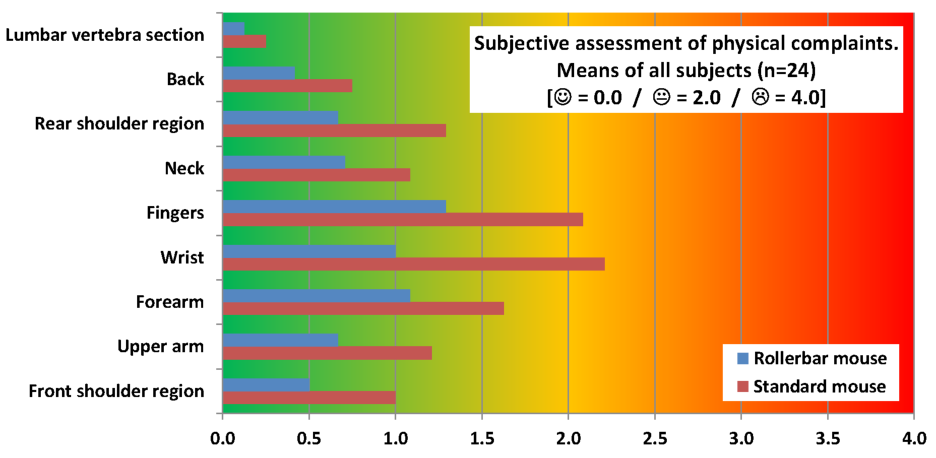
The third part was the assessment of the effects of work. A monopolar scale from 0 (“none”) to 4 (“very heavy strain”) was used. After the conclusion of the test, the subjects had to indicate the level of strain on various regions of the upper part of the body and the hand-arm system due to work with the rollerbar mouse and the standard mouse. Figure 6 shows that the overall mean levels of strain as well as the means for the respective subgroups is higher with the standard mouse than those for the R rollerbar mouse, albeit at levels for most body regions that can be described as “minor” to “medium” strain. The most noticeable difference was registered for the wrist with medium strain for the standard mouse (mean value 2.21) and minor strain for the rollerbar mouse (mean value 1). Similarly, a substantial reduction in strain for the fingers was achieved by the use of the rollerbar mouse (mean value 1.29) relative to the standard mouse (mean value 2.08). In the other body regions, the values for the rollerbar mouse are noticeably lower than those for the standard mouse. Critical areas are predominantly the forearm, wrist, and finger areas. The same results could be seen for the individual four age-by-gender subgroups of subjects.
The large differences in the subjectively assessed strain in the wrist and fingers are mainly due to the different handling of the two input devices. Many subjects indicated that operating the scroll wheel on the standard mouse was very uncomfortable because it virtually requires the one-finger use with the index finger alone which quickly fatigues the finger muscles. Contrary to that, the rollerbar mouse allows the varied operation of the scroll wheel, e.g., with the thumb or by moving the entire hand over the scroll wheel.
The operation of the rollerbar provides relief for the wrist since the movement that is necessary for the operation of the rollerbar can be accomplished with the forearm or via a distribution of force to both hands. Due to its design, the standard mouse requires the operation from the wrist since moving the entire hand-arm system would quickly lead to user fatigue. Hence, users of the standard mouse have the tendency to carry out movements while the forearm is supported in resting position.
Figure 6. Subjective assessment of the effects of work with the rollerbar mouse and the standard mouse on different body regions.
Mean values of 24 subjects
CONCLUSION
The rollerbar mouse achieved positive results in this comprehensive study. It is rated more favorably in all of the subjective assessments than the comparison standard mouse. There are some differences among the 24 subjects along age and gender lines with regard to the strength of preference, but the rollerbar mouse is the unequivocally preferred input device over the standard mouse.
Unfortunately, the results based on objective strain data do not support as strong an endorsement for either of the two products. The reason is that the level of physical strain from working with such input devices is simply not high enough. Hence, while some of the results are rather strong relatively speaking, they are based on such low overall levels of muscle strain that no meaningful difference between the rollerbar mouse and the standard mouse could be ascertained.
Overall, however, it could be confirmed that the results establish the rollerbar mouse as a successful product development from an ergonomics point of view.
REFERENCES
Bergqvist, U., Wolgast, E., Nilsson, B., Voss, M. (1995), “Musculoskeletal disorders among visual display terminal workers: individual, ergonomic, and work organizational factors”, ERGONOMICS Volume 38. BITKOM (2012), “IT-Nutzung an deutschen Arbeitsplätzen nur noch Mittelmaß”, Berlin: Pressemitteilung, 23.08.2012. Böhlemann, J., Kluth, K., Kotzbauer, K., Strasser, H. (1994). „Ergonomic assessment of handle design by means of
electromyography and subjective rating“, APPLIED ERGONOMICS Volume 25 No. 6. Gerr, F., Marcus, M., Ensor, C., Kleinbaum, D., Cohen, S., Edwards, A., Gentry, E., Ortiz, D.J., Monteilh, C. (2002), “A prospective study of computer users: I. Study design and incidence of musculoskeletal symptoms and disorders”, AMERICAN JOURNAL OF INDEPENDENT MEDICINE Volume 41 No. 4. Keller, E., Strasser, H. (1996), “Ergonomic Evaluation of an Armrest for Typing via Electromyographic and Subjective
Assessment”, in: Advances in Occupational Ergonomics and Safety I, Mital, A., Krueger, H., Kumar, S., Menozzi, M., Fernandez, J.E. (Eds.), Amsterdam: IOS Press, pp. 1-8. Kluth, K., Böhlemann, J., Strasser, H. (1994). „A system for a strain oriented analysis of the layout of assembly workplaces“, ERGONOMICS Volume 37 No. 9. Kluth, K., Strasser, H. (2006) “Ergonomics in the Rescue Service – Ergonomic Evaluation of Ambulance Cots”,
INTERNATIONAL JOURNAL OF INDUSTRIAL ERGONOMICS Volume 36 No. 3 Laursen, B., Jensen, B.R., Garde, A.H., Jorgensen, A.H. (2002), “Effect of mental and physical demands on muscular activity during the use of a computer mouse and a keyboard”, SCANDINAVIAN JOURNAL OF WORK, ENVIRONMENT & HEALTH Volume 28 No.4. Laursen, B., Jensen, B.R., RATKEVICIUS, A. (2001), “Performance and muscle activity during computer mouse tasks in young
and elderly adults”, EUROPEAN JOURNAL OF APPLIED PHYSIOLOGY Volume 84. Partnership for European Research in Occupational Safety and Health (PEROSH) (2012), “Sustainable workplaces of the future – European Research Challenges for occupational safety and health”, Brussels. Strasser, H. (1990), “Ergonomie im Bürobereich”, ZENTRALBLATT FUER ARBEITSMEDIZIN, ARBEITSSCHUTZ,
PROPHYLAXE UND ERGONOMIE Volume 40 No. 5. Strasser, H. (1995), “Ergonomic Efforts Aiming at Compatibility in Work Design for Realizing Preventive Occupational Health and Safety”, INTERNATIONAL JOURNAL OF INDUSTRIAL ERGONOMICS Volume 16 No. 3. Strasser, H. (1996), “Electromyography of Upper Extremity Muscles and Ergonomic Applications”, in: Electromyography in
Ergonomics: Fundamentals, Applications and Case Studies, Kumar, S., MITAL, A. (Eds.). London: Taylor & Francis, pp. 183-226. Strasser, H. (2007), “Assessment of the ergonomic quality of hand-held tools and computer input devices”. Amsterdam: IOS Press. Strasser, H. (2000), “Ergonomische Qualität handgeführter Arbeitsmittel – Elektromyographische und subjektive
Beanspruchungsermittlung”. Stuttgart: Ergon GmbH. Strasser, H., Lauber, M., Koch, W. (1990), “Produkt-ergonomische Beurteilungsmethoden für handbetätigte Arbeitsmittel”, ZEITSCHRIFT FUER ARBEITSWISSENSCHAFT Volume 44 No. 4. Strasser, H., Wang, B., Hoffmann, A. (1994), „Electromyographic and subjective assessment of mason’s trowels equipped with
different handles”, in: Advances in Industrial Ergonomics and Safety VI, Aghazadeh F. (Ed.). pp. 553-560 Strasser, H., Kluth, K., Keller, E. (2004) “A Computer-based System for the Use of Electromyographic Methods for the Measurement of Physiological Costs Associated with Operating Hand-held Tools and Computer Input Devices”, OCCUPATIONAL ERGONOMICS Volume 4 No. 2.
LISTED IN THE AHFE DIGITAL BOOKSTORE CATALOGUE
Explore the complete digital volume
Advances in Physical Ergonomics and Human Factors: Part I
Read this individual research paper free through the original publisher, or explore the full digital proceedings book.
ISBN 978-1-4951-2104-3
Explore this ISBN in the AHFE Bookstore ↗Listed in the July 2026 bookstore catalogue; search by ISBN to confirm current availability · Digital book purchase optional