With the technological advancement of integrated modular avionics, touch interaction has gradually replaced traditional key-based operations in aircraft human-machine interaction. Pilots often operate in dynamic environments and under high-load operational tasks, making it difficult to maintain precise and efficient control, thereby increasing the risk of human errors. This study aims to optimize the anti-mistouch design of touch elements in human-machine interaction (HMI) of aircraft cockpits. Fifteen pilots with more than 200 flight hours were recruited as participants. Based on task analyses of typical aircraft operations and research on factors affecting touch interaction performance, a design optimization strategy for aircraft HMI interfaces was developed. Rapid prototyping tools for HMI interfaces were adopted to develop interactive interfaces with different indicator characteristics. In a dynamic flight simulation environment, HMI ergonomics evaluation software was used to accurately record performance data of typical operations, and rating scales was applied to assess user satisfaction. The results show that the touch interface with the anti-mistouch design mechanism reduced the average task completion time by 12.5%, decreased the operation error frequency by 15.4%, and improved the user usability evaluation by 8.5%.
With the development of multi-channel interaction technologies in the aerospace industry, touch interaction has been increasingly adopted in aircraft cockpits due to its advantages in interface simplicity, flexible layout, and operational efficiency (Lim Y et al., 2018). Unlike the sector of consumer electronics, aircraft operations are continuously subject to dynamic environmental factors such as turbulence and airflow disturbances. The high workload and specialized postures involved in touch-based operations significantly increase the risk of unintended touches (Barbe et al., 2013). In contrast to static ground scenarios, pilots’ hands are prone to involuntary tremors caused by muscle fatigue and sympathetic nervous system activation Received February 5, 2026; Revised April 8, 2026; Accepted April 23, 2026; Available online July 20, 2026
in dynamic environments. Additionally, pilots must simultaneously attend to multiple tasks, such as flight attitude control and route parameter adjustments, often requiring them to operate touch interfaces with their non-dominant left hand. These factors frequently lead to accidental touches, disrupting operations, increasing cognitive load, and potentially causing incorrect command inputs that compromise flight safety (Li, Q.B., 2023).
Studies have confirmed that vibration environments significantly increase touch operation error frequency (Lin et al., 2010). Current touchscreen designs in aircraft cockpits are mostly developed based on operational logic in static environments, with anti-mistouch strategies largely borrowed from consumer electronics, including secondary confirmation, complex gestures, enhanced feedback, and fault-tolerant design. While these approaches reduce the likelihood of accidental touches to some extent, they are not fully suited to the dynamic, high-workload context of aviation. For instance, delayed confirmation prolongs response time for critical commands, while complex gestures increase operational difficulty during emergencies (Mertens et al., 2012). Most usability evaluations are still conducted in static environments and fail to account for the comprehensive impact of variables such as aircraft attitude changes, varied operational movements, and task complexity on the effectiveness of anti-mistouch designs. As a result, there is a lack of research on touch interaction element design under dynamically coupled environmental factors, and current anti-mistouch strategies remain insufficiently adapted to pilots’ dynamic operational contexts (Zhao, 2021). Furthermore, pilots have reported in post-flight debriefings that touch interaction is faced with problems including overly small touch elements, insufficient feedback to confirm operation outcomes, and unintended dual-digit input from a single tap.
Research in avionics HMI display and control technology has increasingly focused on optimizing cockpit human-machine ergonomics in dynamic environments. Some scholars have attempted to investigate the impact of touch component design on operational performance using methods such as event-related potentials; however, most studies remain at the stage of single-technology validation. Others have addressed interference through dynamic parameter adjustment and interface contrast optimization, but a comprehensive research framework encompassing touch elements, multidimensional anti-mistouch strategies, and scenario-adaptive optimization has yet to be established in the field of human factors engineering (Alapetite et al., 2013). This paper aims to investigate the anti-mistouch design and usability evaluation of touch-based aircraft HMI in dynamic environments. By integrating flight dynamics with pilot operational behavior, it develops a touch anti-mistouch design strategy suited to dynamic, high-workload scenarios. The findings are expected to provide theoretical support and empirical evidence for the optimal design of aircraft cockpit touch interfaces, helping to enhance the safety, efficiency, and comfort of interactive flight operations in dynamic environments (Kaminani, 2011).
In touch-based HMI displays, interaction is primarily achieved through touch keys. Beyond the inherent display and control performance of the screen, from a human factors perspective, the design elements of touch
Anti-Mistouch Design and Usability Evaluation 385 interaction keys include display-control size, interface layout, feedback type, activation duration, and others (Dong et al., 2021). In general, effective touch interaction element design requires the well-matched between hot zone size and pilots’ hand movements, the layout areas avoid vibration-prone, and the feedback be distinctly recognizable to facilitate operational confirmation (Tao et al., 2016).
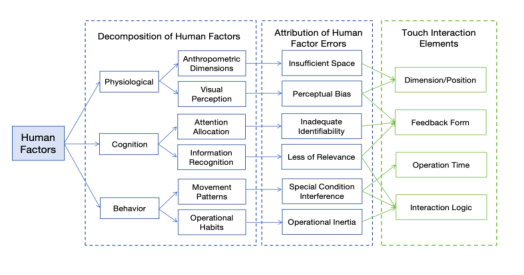
Based on the physiological-cognitive-behavioral model of human factors engineering, strategies for anti-mistouch design of aircraft touch human- machine interaction can be centered on collaborative intervention at three hierarchical levels, which match the operational characteristics of pilots and dynamic aviation scenarios to avoid the risk of accidental touches (Zhang et al., 2022). Among them, the physiological level serves as the foundation: it adapts to the physiological characteristics of pilots’ left-hand operation and airframe vibration interference, optimizes the perceptual experience of touch key dimensions, and reduces unintentional touches caused by limb tremors and contact point deviations. The cognitive level acts as the core: combined with the characteristics of high flight workload and concurrent multi-tasking, it strengthens cognitive recognition through visually differentiated design and reduces misjudgments arising from distracted attention and memory confusion. The behavioral level functions as the output and feedback: based on pilots’ operational habits and error patterns, it designs anti-mistouch interaction logic, identifies invalid touch operations, and corrects behavioral deviations (see Figure 1).
Figure 1: Anti-mistouch design framework based on human factors.
To address the above research gaps, this study designed four controlled experiments to explore the optimal design parameters of aircraft touch interfaces, and further verified the effectiveness of the anti-mistouch design scheme through a comparative experiment.
METHODS AND MATERIAL Based on the research objectives and human factors engineering theory, a controlled experimental method was adopted to investigate the effects of key size, feedback mode, operation duration, and anti-misoperation interval on the touch operation performance of fighter pilots in a dynamic flight
simulation environment. The experiment employed a simulation-based approach, combining objective performance measurements, operational data collection, and subjective evaluation methods to comprehensively assess the impact of touch interaction elements on interface ergonomics in dynamic environments. Prior to the formal experiment, multiple pre-experiments were conducted to ensure stable environmental conditions and reliable data connectivity among the six-degree-of-freedom flight simulator, the interface prototype subsystem, and the interface evaluation subsystem, as well as to verify the appropriate distribution of the experimental independent variables.
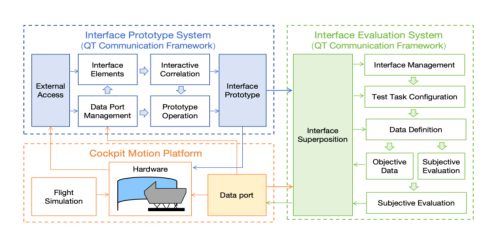
Experimental Platform Experiments were conducted in the environment of a dynamic simulation HMI evaluation system, where the experimental setup consisted of a six- degree-of-freedom motion platform simulation cockpit with a dynamic performance range of approximately ±25°/0.4 m. The experimental human- machine interaction interface was designed and prototyped by the rapid prototyping tool subsystem developed on the Qt development engine, which generated an interface prototype in “.exe” format. This prototype was connected to the dynamic simulation test platform and the interface evaluation subsystem (also developed on the Qt development engine), enabling data interconnection and interoperability, as well as the setting of key operation trigger points and the recording and statistical analysis of task performance parameters (see Figure 2).
Figure 2: Test environment and tool software architecture for usability evaluation.
Participants Fifteen pilots were recruited for this study, aged between 28 and 50 years, each with more than 200 flight hours on either flight simulators or actual aircraft. All participants had proficient operational skills on flight simulators, met standard pilot anthropometric dimensions, were right-handed, had normal visual acuity, and had no red-green color blindness. During the experiment, the relative positions of participants’ seated postures and eye points relative to the display and operation interface were maintained to match the dimensional layout of actual aircraft cockpits.
Anti-Mistouch Design and Usability Evaluation 387 Experimental Procedure
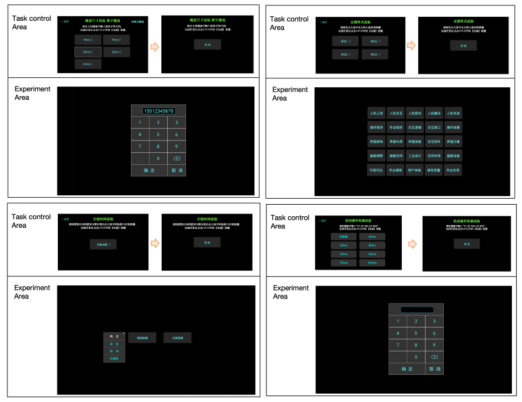
Before the formal experiment, participants underwent training and practice sessions, with dedicated time allocated to familiarize them with the operations and experimental environment, ensuring a full understanding of the experimental requirements. During the experiment, participants performed a continuous route flight task, during which the cockpit experienced dynamic deflection due to yaw and pitch adjustments. Meanwhile, the display and control interface presented corresponding operational procedures and prompts according to the experimental objectives, including task content and start/end indicators for each task (see Figure 3). Upon task completion, the interface evaluation subsystem displayed a questionnaire with relevant subjective evaluation items. Sufficient rest was provided between task groups to prevent fatigue-induced errors. During each task, the interface evaluation subsystem recorded participants’ task completion time, error frequency, and subjective evaluation scores.
Figure 3: Prototype of the touch key test interface.
Experimental Design Task 1: Touch Key Size
Key size was set as the sole variable. Based on actual aircraft key dimensions, key sizes in the experiment were set to 14 mm, 16 mm, 18 mm, 20 mm, 22 mm, and 24 mm. Participants were required to complete numeric input tasks using each key size as quickly as possible after takeoff. To increase input length and reduce relative measurement error, the task involved entering an 11-digit number. The procedure was as follows: select the key size in the task area, click the “Start Experiment” button, enter the 11-digit number, click the “Complete” button, and complete the 7-point Likert scale for subjective usability evaluation. This experiment assessed the impact of different key sizes on task performance.
Task 2: Feedback Style Feedback style after key tapping was set as the sole variable. Based on actual aircraft key feedback styles and relevant industry specifications, the feedback styles were set as no feedback, wireframe stroke, key color change, and 3D effect. Participants first familiarized themselves with the positions of words on the interface and then tapped the 10 words provided by the experimenter as quickly as possible after takeoff. The procedure was as follows: click the “Start Experiment” button in the task area, tap the target words, click the “Complete” button, and complete the subjective usability evaluation scale. This experiment assessed the impact of different feedback styles on task performance.
Task 3: Touch Operation Duration This experiment used statistical testing methods, with key operation type as the measured variable and short-press and long-press durations as the measured objects. Participants performed both types of key operations separately to record their touch operation duration ranges. A secondary selection box would pop up after the participant’s tap to indicate a successful click. The procedure was as follows: click the “Start Experiment” button in the task area, tap the short-press and long-press keys sequentially according to operational habits, click the “Complete” button after task completion, and repeat the process three times.
Task 4: Anti-Mistouch Mechanism for Single Key Tapping The variable in this experiment was the anti-mistouch interval between two consecutive key taps, evaluated by task completion time and task success rates. Based on relevant industry specifications and pre-experiment results, the anti-mistouch intervals were set to 20 ms, 50 ms, 80 ms, 110 ms, 140 ms, 170 ms, and 200 ms; successful operation was not achievable when the interval exceeded 200 ms. The procedure was as follows: click the “Start Experiment” button in the task area, input the number sequence “1112233344555” in the test area as quickly as possible, and click the “Complete” button after task completion.
DATA COLLECTION AND RESULTS DISCUSSION As the samples were independent and met the assumptions of normal distribution and homogeneity of variance, a one-way analysis of variance (ANOVA) was employed to analyze intergroup differences across the independent variables. Statistical analyses were performed using SPSS Statistics software, with post-hoc multiple comparisons conducted using the Student– Newman–Keuls (SNK) method, and the confidence level was set at 0.05.
An analysis of task efficiency under different touch key sizes was conducted, and the results are presented in Table 1. Specifically, the user’s operation time exhibited a trend of first decreasing and then increasing with the increase in key size, with the optimal operational performance achieved at key sizes of 18 mm and 20 mm. The results of the analysis of variance (ANOVA)
Anti-Mistouch Design and Usability Evaluation 389 indicated a significant interaction effect between operational performance and key size (where p represents the significance level, p = 0.0012 < 0.05).
Table 1: Performance of the key size experiment.
Table available in the original PDF paper.
Group Key Size Mean Time (s) Standard Deviation Mean Standard Error 1 14mm 5.97 0.3582 0.0924
6 24mm 5.54 0.4783 0.1236 An analysis was conducted on the usability satisfaction under different touch key sizes, with the results presented in Table 2. User satisfaction exhibited a trend of first increasing and then decreasing as the key size increased, with the highest level of user satisfaction achieved at a key size of 18 mm. The results of the ANOVA indicated a significant interaction effect between user satisfaction and key size (where p represents the significance level, p = 0.000 < 0.05).
Table 2: Key size satisfaction.
Table available in the original PDF paper.
Group Key Size Mean Value Standard Deviation Mean Standard Error 1 14mm 5.46 0.6203 0.1066
6 24mm 5.13 0.7088 0.1829 An analysis was conducted on user performance across different key feedback styles, and no significant differences in user performance were observed for this task. An analysis of user preference for touch keys with different feedback styles was also carried out ( see Table 3). The color- changing style and wireframe style achieved significantly higher user satisfaction ratings. Results of the ANOVA indicated a significant interaction effect between user preference and key feedback style (where p represents the significance level, an indicator for measuring differences; p = 0.000 < 0.05).
Table 3: Feedback style satisfaction.
Table available in the original PDF paper.
Group Feedback Style Mean Value Standard Deviation Mean Standard Error 1 No Feedback 4.80 0.7483 0.1932
For the statistical analysis of users’ operation durations for short press, long press and double click on keys, defined as the time from when the finger touches the screen to when it lifts off. The results showed that the short press duration ranged from 0.062 to 0.144 s with a mean value of 0.103 s; the long press duration ranged from 0.499 to 0.976 s with a mean value of 0.603 s; and the interval between the start time points of the two finger taps for double click ranged from 0.182 to 0.199 s with a mean value of 0.188 s.
An analysis was conducted on the setting of the anti-mistouch mechanism for single key press and its correlation with user operational performance (see Table 4). User operation duration exhibited a trend of first decreasing and then increasing as anti-mistouch interval between two consecutive taps increased, with the optimal operational performance achieved at the anti-mistouch intervals of 110 ms and 140 ms. The results of the ANOVA indicated that the interaction effect between operational performance and anti-mistouch interval settings was not significant (where p represents the significance level, p = 0.346 > 0.05). This non-significance was attributed to the small sample size and large random errors in the experiment. Regarding the user operation error frequency, two participants made operational errors in the trials with the 80 ms and 170 ms intervals, and no participants were able to operate successfully in the trials with an anti-mistouch interval exceeding 200 ms.
Table 4: Performance of the anti-mistouch mechanism experiment.
Table available in the original PDF paper.
Group Anti-Mistouch Time Mean Time(s) Standard Deviation Mean Standard Error 1 50ms 7.41 1.8375 0.6497
DESIGN VERIFICATION Finally, the optimal touch key elements were summarized based on the above experimental performance and user satisfaction results, forming an optimized touch key scheme for anti-mistouch design. The specifications are as follows: a key size of 18 mm, the addition of a color-changing visual feedback effect upon tapping, a single-click recognition duration of 0~0.300 s (to distinguish from long presses), and in combination with the double-click operation interval, an anti-mistouch mechanism for single clicks where a second tap is identified only if the interval from the previous tap exceeds 140 ms. For the control group, the key size was set to 14 mm with no visual feedback upon tapping; all non-long press taps were recognized as single clicks, and no time- based anti-mistouch mechanism was applied for single clicks.
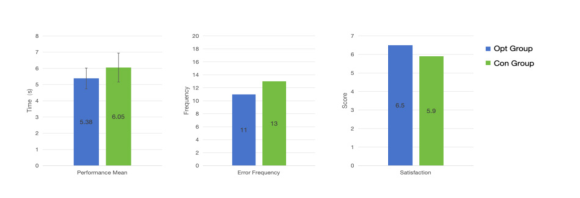
Anti-Mistouch Design and Usability Evaluation 391 Another 8 participants were recruited to perform an 11-digit input task, with each participant completing 5 sets of random numeric input for data statistics. The experimental results (shown in figure 4) demonstrate that the touch interface with the anti-mistouch design mechanism reduced the average task completion time by 12.5%, decreased the frequency of operational errors by 15.4%, and improved the usability evaluation by 8.5%.
Figure 4: Comparative experiment results of touch anti-mistouch design.
CONCLUSION
The above experimental results reveal the optimal design parameters of aircraft touch interfaces in dynamic environments, and the underlying mechanisms are analyzed in combination with pilot physiological characteristics and aviation operational scenarios as follows. This study constructs a research framework for interaction elements based on multi-dimensional coupling of physiology, cognition and behavior. The research results confirm the positive effects of key size control, feedback style design and temporal anti- mistouch mechanism setting on user experience and operational efficiency, providing an optimized reference for the human-machine interaction design of touch displays. The sample size of this study is relatively small, and the experimental scenario simulated only a single level of vibration, without considering task variations across different flight phases or real-world flight conditions. Future research should expand the sample size, include pilots with different experience levels as variables, simulate multi-level turbulence, dynamic environments across various flight phases, and explore the coupling effects between touch interface layout and anti-mistouch design under tasks of varying complexity. Furthermore, physiological indicators such as eye tracking could be incorporated to enable deeper investigation into human- computer interaction mechanisms.
REFERENCES
Alapetite, A., Andersen, H.B. & Fogh, R., 2013. A deported view concept for touch interaction. In: International Conference on Advances in Computer-Human Interactions, pp. 22–27. Barbe, J., Wloff, M. & Mollard, R., 2013. Human centered design approach to
integrate touch screen in future aircraft cockpits. In: International Conference on Human-Computer Interaction: Interaction Modalities and Techniques. Berlin: Springer, pp.429–438.
Dong, L., Xiang, C.Y., Zhao, C.X., et al. (2021). Comprehensive ergonomic evaluation of touch display systems in civil aircraft cockpits. Acta Aeronautica et Astronautica Sinica, 42(6), 64–78. Kaminani, S. (2011). Human computer interaction issues with touch screen interfaces
in the flight deck. In Proceedings of the 30th Digital Avionics Systems Conference, pp. 641–647. Li, Q.B., Ng, K.H., Yiu, C.Y. et al., 2023. Securing air transportation safety through identifying pilot’s risky VFR flying behaviours: An EEG-based neurophysiological modelling using machine learning algorithms. Reliability Engineering and System Safety, 238, p.109449. Lim Y, Gardi A, Sabatini R, ed. (2018). Avionics human-machine interfaces and
interactions for manned and unmanned aircraft. Progress in Aerospace Sciences, 102, pp. 1–46. Lin, J., et al. (2010). The effects of vibration on touch screen interaction performance.
International Journal of Industrial Ergonomics, 40(6), 531–538. Mertens, M., Damveld, H.J. & Borst, C., 2012. An avionics touch screen based control display concept. In: Proceedings of SPIE-The International Society for Optical Engineering, 83830L, pp. 1–13. Tao, D., Yuan, J., Liu, S., Qu, X.D. & Chen, X.Y., 2016. Effects of touch screen
key characteristic factors on the usability of keyboard input operations. Chinese Journal of Ergonomics, 22(5), pp. 1–6. Zhang, X., Sun, Y.C. & Zhang, Y.J. (2022). A task modeling method of intelligent human-computer interaction in aircraft cockpits based on information load flow. IEEE Transactions on Aerospace and Electronic Systems, 58(6), pp. 5619–5634. Zhao, X.Z., 2021. Design and research of touch screen in airborne display system.
Read this individual research paper free through the original publisher, or explore the full digital proceedings book.
ISBN 979-8-950676-09-3
Explore this ISBN in the AHFE Bookstore ↗Listed in the July 2026 bookstore catalogue; search by ISBN to confirm current availability · Digital book purchase optional