As the core tool of industrial product design, computer aided design (CAD) software mainly adopts the traditional mouse and keyboard (MK) interface, which limits the naturalness and intuitiveness of the CAD modeling process. Recently, the emerging multimodal interface combined with hand gesture and eye tracking (HE), provides a natural and efficient interaction method. The use of this novel interface for CAD modeling has become an important development trend. This study aims to analyze the effects on user performance in a practical application where an experimental comparison between HE and traditional MK interfaces is set based on a CAD modeling system. With this prototype HE interface system for CAD modeling, users are able to complete drawing, moving, zooming, rotating of models by hand gesture and selecting of target models by eye tracking. To assess the practical efficacy of HE interface in CAD modeling, a user experiment was conducted involving 16 participants. They were tasked with performing specific CAD commands, including model drawing, selecting, moving, zooming and rotating. Each of them needed to use both interfaces (i.e., HE and MK interfaces) separately to complete specific modeling tasks. Metrics recorded included task operation time, accuracy and user preference. The results indicate that HE interface reduces operation time compared to the traditional MK. For instance, the average operation time is almost reduced by more than 10% with a corresponding increase in operation efficiency. However, average operation accuracy is slightly compromised with a decrease less than 1% in precision when using the HE interface.
The proliferation of computer science technology within the industrial sector has rendered computer aided design (CAD) an indispensable element in the product design continuum. Its ubiquity extends across various industrial domains, including automotive, aerospace engineering and so
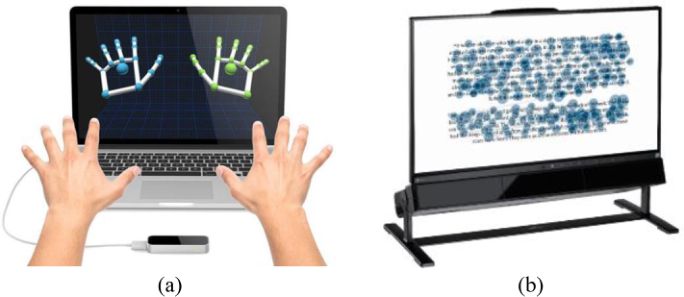
on. However, the current reliance on the traditional windows, icons, menus, pointer interfaces and the conventional “mouse and keyboard (MK)” interface for CAD operation presents several limitations in human computer interaction (HCI). One such limitation is the requirement for users to navigate extensive menus and toolbars, which interrupts the natural flow of design intent. Additionally, users are compelled to perform complex cognitive transformations between 3D modeling manipulations and 2D input devices, thereby increasing cognitive load. Consequently, there is a pressing need to develop innovative and user centered HCI technologies that facilitate more intuitive and natural CAD modeling processes. Fortunately, a spectrum of novel interaction paradigms has emerged in the HCI research community, including hand gesture, eye tracking and so on, as shown in Figure 1. These physiological signal based interaction modalities offer a more natural and intuitive alternative to the conventional MK interface. The construction of multimodal interfaces integrating various modalities has become a significant research trend in HCI, aiming to enhance the accuracy and robustness of intention recognition. In the realm of modeling, implementation such as “hand gesture and eye tracking (HE)” is under exploration.
Figure 1: Devices for multimodal interfaces, (a) leap Motion hand tracker, (b) Tobii spectrum 150 eye tracker.
In existing researches, there is a gaze and finger control interface getting developed, which can finish translation, rotation, scale and point selection (Song et al., 2014). In addition, a fixer-grasp pose interface technique in 3D virtual space is proposed (Ryu et al., 2019). Besides, someone set up a new remote collaboration platform based on gestures and stares that enables experts to collaborate with workers during assembly or training tasks (Wang et al., 2022). It can be found that most studies have combined hand gesture and eye tracking interface, in which hand gesture is for manipulation and eye tracking is for selection. This method utilizes quick position of eye tracking for object indication and intuitive input of hand gesture for manipulation. However, few studies directly involve CAD modeling. It is not clear how HE interface will affect CAD modeling and whether it is really applicable. Therefore, this paper uses the behavior observation method to evaluate the
Effects of Computer Aided Design Modeling System With Hand Gesture 431
usability and efficiency of HE interface by analyzing the specific behaviors of users in the interaction process.
CAD MODELING BASED ON HAND GESTURE AND EYE TRACKING INTERFACE In the interactive application of CAD software, existing researches have given some applicable definitions of interaction gestures and HE collaborative mechanisms. On this basis, a set of CAD modeling system with HE interface got developed. Through this system, users are able to use the combination of hand gestures and eye movement fixation to complete the common CAD modeling commands, including model drawing, selecting, moving, zooming and rotating.
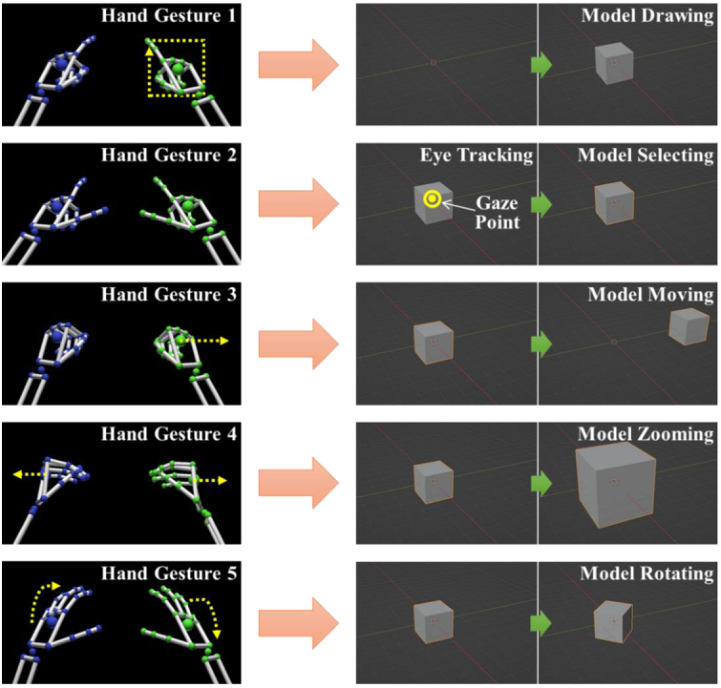
Figure 2: Computer aided design modeling system with hand gesture and eye tracking interface.
As shown in Figure 2, a total of 5 types of interaction gestures were defined. Combined with the fixation gaze point coordinates from eye movement tracking, the following 5 types of common CAD modeling commands can be completed respectively:
(1) The index finger of both hands gets extended, the left hand keeps still and the index finger tip of the right hand draws square track, which is used to generate a cube model; (2) The thumb and index fingers of both hands are stretched out at the same time, which is used to activate the model selecting command. Then, the eyes gaze at the target model to realize the final selecting of the target model; (3) Both hands make fists, the left hand is still and the right hand moves in the three dimensional space, which is used to move the selected model; (4) Kneading the five fingers of both hands, moving the left and right hands outward or inward at the same time, which is used to enlarge or reduce the size of the selected model; (5) Open the fingers of both hands, rotate the palms of the left and right hands relative to each other. This gesture is used to rotate the selected model.
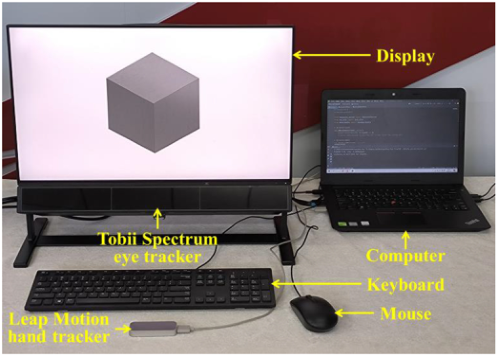
USER EXPERIMENT DESIGN To study the effects of HE interface on CAD modeling, a user test experiment was designed on the basis of the above prototype interaction system. It is to compare and analyze the user performance of traditional MK and new HE interfaces. The experiment platform was set up as shown in Figure 3. There were totally 16 users selected for the study. All of them are with no prior information about the HE, neither no CAD modeling experience.
Figure 3: Platform for user experiment, the hand and eye trackers are for HE interface, the mouse and keyboard are for MK interface.
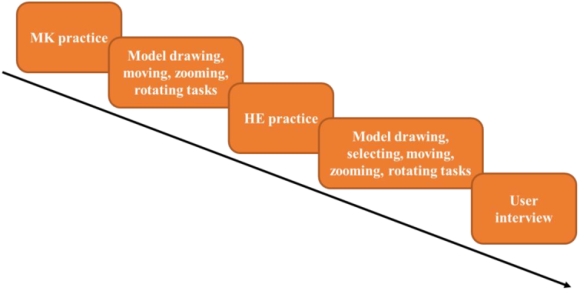
Each of these 16 users was required to complete a series of specific CAD modeling tasks in two ways, namely MK and HE interfaces respectively. Before formal task, the users were pre-trained and practiced until they could complete the modeling task independently. Finally, a subjective evaluation was investigated through interview communication. Figure 4 illustrates the detailed process of the experiment.
Effects of Computer Aided Design Modeling System With Hand Gesture 433
Figure 4: User experiment process flowchart.
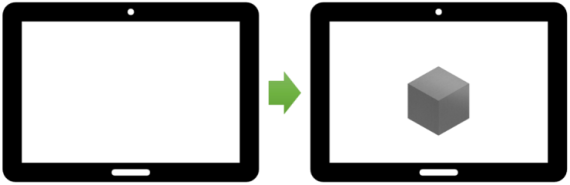
The CAD modeling tasks involved include model drawing, target object selecting and moving, zooming, rotating operations. As the users completes the modeling tasks, their task operation time and operation accuracy will be recorded. The specific requirements and data records for the modeling tasks are shown below: (1) Model drawing task
Figure 5: Model drawing task diagram.
Operation requirements: The user draws the cube model 3 times according to the experimenter’s instructions; Data records: The time taken for each operation to draw the model. (2) Model selecting task (This task is only for HE interface)
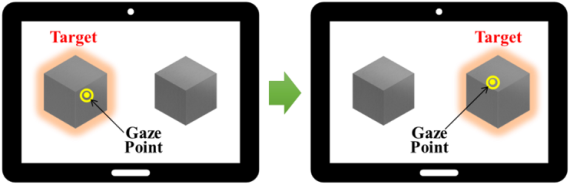
Figure 6: Model selecting task diagram.
Operation requirements: The user selects the target cube model in the order prompted by the experimenter in 2 seconds; Data records: Whether the target object is selected in 2 seconds, then the accuracy equals the percentage of the number of successful selections of the target model divided by the total number of selections.
(3) Model moving task
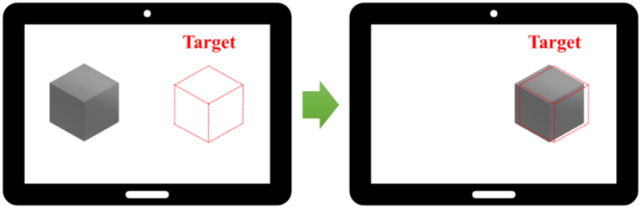
Figure 7: Model moving task diagram.
Operation requirements: The user moves the cube to match the target frame line as quickly and accurately as possible; Data records: 1) Operation time of moving model; 2) The distance between the reference point of the cube and the corresponding point on the target frame line, then the accuracy equals 100% minus the distance divided by the percentage of cube edge length.
(4) Model zooming task
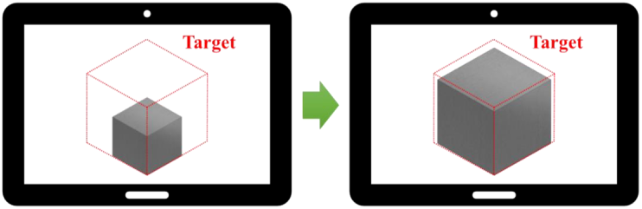
Figure 8: Model zooming task diagram.
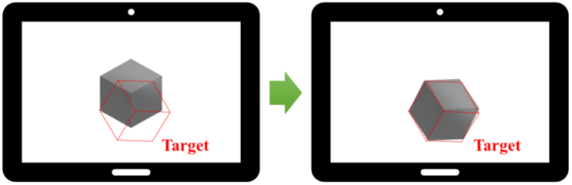
Operation requirements: The user zooms the cube to match the target frame line as quickly and accurately as possible; Data records: 1) Operation time of zooming model; 2) The difference between the final actual size of the cube and the corresponding size of the target frame line, then the accuracy equals 100% minus the difference divided by the percentage of frame line length.
Effects of Computer Aided Design Modeling System With Hand Gesture 435
(5) Model rotating task
Figure 9: Model rotating task diagram.
Operation requirements: The user rotates the cube to match the target frame line as quickly and accurately as possible; Data records: 1) Operation time of rotating model; 2) The difference between the actual rotation angle of the cube and the corresponding rotation angle of the target frame line, then the accuracy equals 100% minus the difference divided by the percentage of target rotation angle.
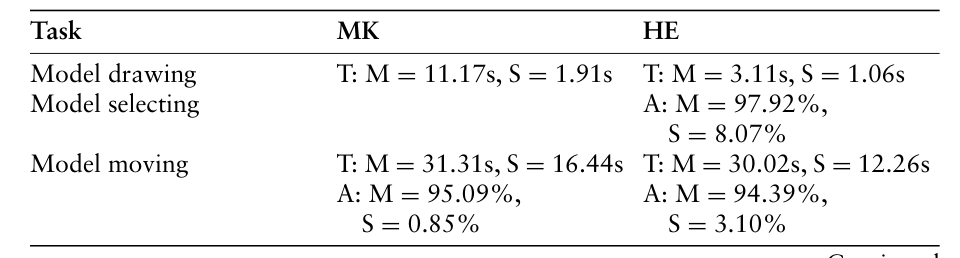
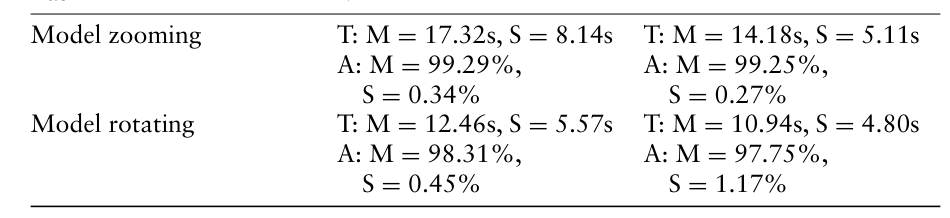
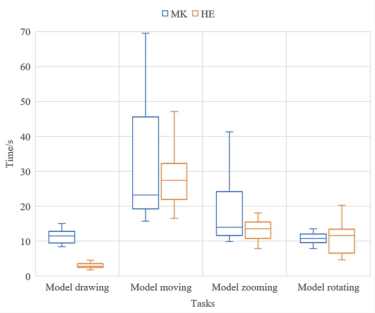
USER PERFORMANCE ANALYSIS According to the above experiment design process, the 16 users’ performance of the CAD modeling tasks in two interactive methods is compared, which mainly includes two indexes of task operation time and accuracy. The calculation results are shown in Table 1. In terms of mean value, in model drawing, moving, zooming and rotating tasks, the operation time of HE interface is lower than that of MK interface, namely the efficiency of HE interface is higher. Compared with MK interface, the operation time of HE interface drop by 8.05s, 1.29s, 3.14s, 1.52s with percentage reduction of 259%, 4%, 22%, 14%. In the tasks of moving, zooming and rotating, although HE interface is lower than MK interface in terms of operation accuracy, the difference is 0.70%, 0.04%, 0.56%. It is said that the difference between HE and MK interfaces is almost negligible. As for standard deviation, the data distribution of HE interface in terms of operation time is more concentrated while the accuracy is generally relatively discrete. Figure 10 (a) and (b) respectively show the data distribution of operation time and accuracy in two interfaces under specific modeling tasks.
Table 1: Data list of 5 modeling tasks.
Table available in the original PDF paper.
Equation reproduced from the original PDF.Table 1: Continued Task MK HE
Table available in the original PDF paper.
Equation reproduced from the original PDF.
Note: T: time, A: accuracy, M: mean value, S: standard deviation.
(a) (b)
Figure 10: (a) Operation time of 4 modeling tasks, (b) Operation accuracy of 3 modeling tasks.
Experiment analysis results show that compared with traditional MK interface, the new HE interface enables users to complete model drawing, moving, zooming and rotating operations in a shorter time. In addition to model moving task, the interaction efficiency gets improved by more than 10%. Although the operation accuracy is generally lower than MK interface, the difference is little, just less than 1%. In the model selecting task, over 97% positioning accuracy can be achieved within 2 seconds by using HE interface. Finally, through the user interview survey, it is found that users think that the new HE interface is with advantages of intuitive, natural and efficient. They generally tend to choose HE interface to complete the CAD modeling tasks.
CONCLUSION
This paper focuses on the effects of CAD modeling system with HE interface. Setting up a user experiment to analyze the user performance of traditional MK and novel HE interfaces. The findings demonstrate that HE interface has greater efficiency compared to conventional MK interface. Despite this, the difference in accuracy is not substantial enough to hinder the overall performance. Besides, the user preference test shows that HE interface is much more intuitive and natural. These results fully verify the feasibility of HE and is of great theoretical and practical significance for the design and
Effects of Computer Aided Design Modeling System With Hand Gesture 437
development of hand gesture and eye tracking interaction systems for CAD modeling. This finding underscores the potential of HE interface systems to enhance the CAD user experience and suggest a promising direction for future research and development in the field of CAD modeling.
ACKNOWLEDGMENT
This work is supported by National Key R&D Program of China (2021YFB1714500), Foundation Strengthening Project (2022-JCJQ-JJ- 0858) and National Ministry Projects of China (50923010201).
REFERENCES
Babicsné-Horváth, M., and Hercegfi, K. (2023). Methodological Challenges in Eye-Tracking based Usability Testing of 3-Dimensional Software–Presented via Experiences of Usability Tests of Four 3D Applications. Periodica Polytechnica Social and Management Sciences, 31(2), 144–152. Deng, S. (2018). Multimodal interactions in virtual environments using eye tracking
and gesture control (Doctoral dissertation, Bournemouth University). Fechter, M., Schleich, B., and Wartzack, S. (2022). Comparative evaluation of WIMP and immersive natural finger interaction: A user study on CAD assembly modeling. Virtual Reality, 26(1), 143–158. Friedrich, M., Langer, S., and Frey, F. (2021). Combining Gesture and Voice Control
for Mid-air Manipulation of CAD Models in VR Environments. In VISIGRAPP (2: HUCAPP) (pp. 119–127). Jowers, I., Prats, M., McKay, A., and Garner, S. (2013). Evaluating an eye tracking interface for a two-dimensional sketch editor. Computer-Aided Design, 45(5), 923–936. Li, Y., Hedlind, M., and Kjellberg, T. (2015). Usability evaluation of CADCAM: State
of the art. Procedia CIRP, 36, 205–210. Niu, H., Van Leeuwen, C., Hao, J., Wang, G., and Lachmann, T. (2022). Multimodal natural human–computer interfaces for computer-aided design: A review paper. Applied Sciences, 12(13), 6510. Ryu, K., Lee, J. J., and Park, J. M. (2019). GG Interaction: A gaze–grasp pose
interaction for 3D virtual object selection. Journal on Multimodal User Interfaces, 13(4), 383–393. Shankar, S. S., and Rai, R. (2014). Human factors study on the usage of BCI headset for 3D CAD modeling. Computer-Aided Design, 54, 51–55. Song, J., Cho, S., Baek, S. Y., Lee, K., and Bang, H. (2014). GaFinC: Gaze
and Finger Control interface for 3D model manipulation in CAD application. Computer-Aided Design, 46, 239–245. Sun, J., and Jiang, A. (2024). Multimedia Interaction and Intelligent Optimization Algorithm of CAD Model Based on Augmented Reality. Turkmen, R., Gelmez, Z. E., Batmaz, A. U., Stuerzlinger, W., Asente, P., Sarac, M.,
and Barrera Machuca, M. D. (2024, May). EyeGuide and EyeConGuide: Gaze- based Visual Guides to Improve 3D Sketching Systems. In Proceedings of the CHI Conference on Human Factors in Computing Systems (pp. 1–14). Wang, Y., Wang, P., Luo, Z., and Yan, Y. (2022). A novel AR remote collaborative platform for sharing 2.5 D gestures and gaze. The International Journal of Advanced Manufacturing Technology, 119(9), 6413–6421.
Yang, X., He, H., Wu, Y., Tang, C., Chen, H., and Liang, J. (2016). User intent perception by gesture and eye tracking. Cogent Engineering, 3(1), 1221570. Zhang, H., and Liu, M. (2025). Empirical Study on the HCI Characteristics of
Business Model Innovation Based on AI-Powered CAD. Zhu, J. (2025). Application of E-commerce Human-Computer Interaction Based on AI-Powered CAD and Big Data Analysis in Sustainable Agriculture.
Read this individual research paper free through the original publisher, or explore the full digital proceedings book.
ISBN 978-1-964867-71-7
Explore this ISBN in the AHFE Bookstore ↗Listed in the July 2026 bookstore catalogue; search by ISBN to confirm current availability · Digital book purchase optional