Ziyue Zhang, Yuan Xiang, Xinyi Gao, Wei Wang, Ye Sun, Jieli Kang (2025). Evaluating Soft Keyboard Parameters for Tablet Productivity: Usability-Centric Layouts. In: Usability and User Experience. AHFE Open Access, vol. 194, pp. 120–134. https://doi.org/10.54941/ahfe1006674
The increasing diversity in tablet form factors and their use in productivity scenarios presents considerable complexity in soft keyboard design, necessitating updated guidelines for layout parameters to ensure usability across varying screen orientations. This study investigates how two core soft keyboard layout parameters, key size and key aspect ratio, influence user input performance and subjective experience on tablets across different screen sizes and orientations (portrait vs. landscape) in productivity-focused multilingual typing tasks. Two within-subjects experiments (N=20) were conducted using a portrait-mode Surface Pro 9 and a landscape-mode ASUS ZenBook 17-Fold OLED, testing five levels of key sizes (8-14mm portrait; 15-20mm landscape) and five levels of key aspect ratios (0.6:1-1:1 portrait; 1:1-1.4:1 landscape) respectively, collecting both objective performance data (WPM, TER) and subjective ratings (5 dimensions). Results indicate that while objective performance measures showed no significant differences for the tested parameters, subjective ratings strongly favored specific configurations: approximately 12mm keys in portrait mode and 17mm keys in landscape mode were preferred for key size, and aspect ratios of 0.9:1 (portrait) and 1.1:1 (landscape) were most favored, primarily driven by perceived comfort and usability. These findings underscore the critical role of context-dependency and subjective user experience in soft keyboard layout optimization for tablets, providing concrete, data-driven recommendations for designing more usable and contextually appropriate interfaces for productivity tasks.
Tablets and emerging foldable devices are increasingly pivotal in productivity scenarios such as office work and education, valued for their portability and versatility (Isoqovich et al., 2024). Effective soft keyboard input is thus crucial for user performance and satisfaction in these contexts (Norman, 2013). However, existing soft keyboard designs often struggle to adapt to the diverse device sizes, screen orientations (portrait/landscape), and complex input demands (e.g., text editing, bilingual input) inherent in
Evaluating Soft Keyboard Parameters for Tablet Productivity: Usability-Centric Layouts 121
productivity workflows (Reyal et al., 2015). Many current soft keyboards still mimic physical keyboard paradigms, which can lead to inefficiency and a fragmented user experience on touchscreens (Kim et al., 2019).
A key challenge is optimizing fundamental UI design parameters. While issues like screen occlusion by large soft keyboards are recognized (Kim & Lee, 2018; Sun et al., 2019), core layout parameters such as key size and key aspect ratio remain critical for usability, yet their optimal values for diverse tablet scenarios, especially considering screen orientation, are underexplored. Existing research on key size spans a wide range (e.g., 6mm- 23mm) (Chaparro et al., 2014; Kim, Aulck, Thamsuwan et al., 2014), but conclusions vary and often lack systematic consideration of different tablet screen sizes and orientations (Colle & Hiszem, 2004; Park & Han, 2010). Similarly, while key shape influences typing experience, research on varying key aspect ratios (beyond simple square vs. rectangle comparisons) in different screen orientations is scarce. This necessitates new, empirically- grounded guidelines.
This study addresses the identified gaps by systematically evaluating the impact of two core layout parameters: key size and key aspect ratio, on user experience and performance. We investigate these factors across different tablet-like device sizes and screen orientations (portrait and landscape) within productivity related text input tasks. The research aims to answer the following questions: RQ1: How do key layout parameters (specifically key size and key aspect ratio) influence user performance (e.g., typing speed, error rate) and subjective experience (e.g., comfort, usability, satisfaction) on tablet soft keyboards across different screen orientations and device sizes?
RQ2: What are the user-preferred ranges for key size and key aspect ratio under these varying conditions, and what drives these preferences?
Overall Goal: Do these findings suggest a need for adaptive soft keyboard layouts based on usage context to enhance tablet productivity?
By refining these layout parameters, this study seeks to provide empirically- backed guidelines for developing more intuitive, efficient, and user-centered soft keyboards for tablets in productivity scenarios.
RELATED WORK
Optimizing soft keyboard design for tablets, especially in productivity scenarios where efficient text entry and editing are paramount, requires careful consideration of fundamental layout parameters. This section reviews existing research on two critical parameters, key size and key aspect ratio. Highlighting the specific gaps this study aims to address concerning their application on tablets across different usage contexts.
Key Size Key size is a foundational parameter in soft keyboard design, directly impacting touch accuracy and typing speed, with Fitts’s Law providing a theoretical basis (Fitts, 1954). Studies have explored a wide range of key sizes; for instance, Park and Han (Park & Han, 2010) found 7-10mm optimal
for single-handed phone typing, while Tao (Tao, 2016) suggested 17.5mm for general touchscreens. For tablets, Kim believes that the key size less than 16mm can negatively affect typing speed (WPM) (Hung et al., 2011; Kim, Aulck, Thamsuwan et al., 2014). 13, 16, 19, and 22 mm on each side with 2-mm between-key spacing.13mm is the lowest subjective comfort and preference ratings (Kim, Aulck, Thamsuwan et al., 2014).
Despite these insights, conclusions vary, and a critical gap exists in systematically evaluating key sizes specifically for tablets considering their diverse screen dimensions and, importantly, the distinct usage contexts of portrait versus landscape orientations which are frequently encountered in productivity tasks. Existing standards for key size (e.g., ANSI/HFES 100-2007; ISO 9241-9; Paterson, 1992) also show discrepancies and may not directly apply to all tablet scenarios, underscoring the need for context-specific empirical investigation, particularly for optimizing typing performance and user comfort during sustained productivity activities.
Key Aspect Ratio and Adaptive Strategies for Screen Orientation Key shape, often defined by its aspect ratio, influences the touchable area and user experience. Tao (Tao, 2016) found square keys (1:1) to outperform rectangular keys of golden ratio in input time. Current tablet soft keyboards exhibit a variety of aspect ratios depending on the device and orientation (e.g., Microsoft Surface Pro 9 at 1:1, iPad Pro at 1.07:1), often as a result of adaptive strategies.
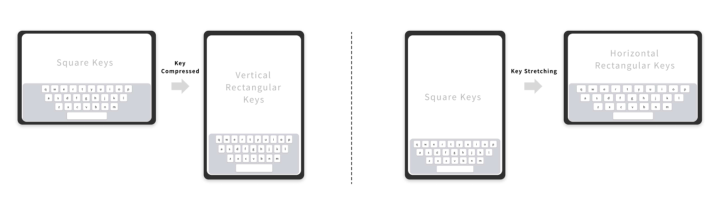
A critical challenge in tablet soft keyboard design is adapting the layout to changes in screen orientation. Existing adaptive strategies primarily involve: Altering Key Shape (Aspect Ratio Modification): As illustrated in Figure 1, a common strategy is to change the key shape. For example, keys might be square in landscape mode but become vertically elongated rectangles when the device is rotated to portrait mode. This directly impacts the key aspect ratio.
Figure 1: Key aspect ratio changes during switching between landscape and portrait screen modes.
Proportional Scaling of Keys: Another strategy is to maintain a consistent key shape (e. g., square) and proportionally scale the key size. Research indicates that key size significantly affects usability (Chen et al., 2013;
Evaluating Soft Keyboard Parameters for Tablet Productivity: Usability-Centric Layouts 123
Chourasia et al., 2013), and hit rates primarily depend on the touchable area (Jung & Im, 2015).
Changing Key Spacing: Adjusting the spacing between keys is a less common primary strategy for orientation changes, though key spacing itself is an important parameter, with around 3mm often preferred (Hung et al., 2011). While these adaptive strategies are employed, systematic research on how different key aspect ratios particularly those resulting from such orientation- driven adaptations, affect user experience and performance on tablets is limited. Most existing strategies appear to be based on heuristics rather than comprehensive user data from varied contexts. The interplay of these adaptive strategies with key size and the resulting impact on both objective performance and subjective user perception in distinct tablet orientations forms a key focus of this study.
This study, therefore, focuses on empirically evaluating key size and key aspect ratio across distinct tablet screen orientations (portrait and landscape) to provide data-driven guidelines for more usable and contextually-aware soft keyboard layouts, specifically aiming to enhance user experience in tablet-based productivity tasks.
EXPERIMENT DESIGN To investigate the impact of soft keyboard layout parameters on user experience and performance in productivity scenarios on tablets, two experiments were conducted. These experiments focused on two core design variables: key size (Experiment 1) and key aspect ratio (Experiment 2), examining their effects across different screen sizes and orientations.
Variable and Hypothesis Based on literature review and formative user research (which identified inconsistencies in guidelines for tablet-specific contexts), key size and key aspect ratio were selected as primary independent variables. These were deemed highly perceivable and impactful on user experience, yet lacked clear, context-dependent design recommendations for tablets. Other factors like key spacing were controlled (fixed at 3mm based on (Hung et al., 2011; Tao et al., 2016)).
The following hypotheses were formulated for the layout parameter experiments: H1: Key Size: Key size will significantly influence user’s objective typing performance (speed and error rate) and subjective experience (comfort, usability, satisfaction, etc.) on tablet soft keyboards, with optimal ranges expected to differ across screen orientations (portrait vs. landscape) and device sizes.
H2: Key Aspect Ratio: Key aspect ratio will significantly influence user’s objective typing performance and subjective experience, with user preferences for specific ratios varying with screen orientation.
Preliminary Experiment and Level Selection A preliminary study (N = 6) was conducted to refine the range and levels for key size and key aspect ratio for the formal experiments, following a ’coarse- to-fine’ strategy. Based on subjective evaluations and qualitative feedback from this pilot, variable levels for the main experiments were narrowed to focus on the most promising values identified.
Key Size Pre-experiment: Based on market analysis (tablet key sizes ranging from 9mm to 19mm) and literature (7.5mm minimum, 16mm performance threshold, 17.5mm optimum, 22–23mm ergonomic standards (Kim et al., 2014; Paterson, 1992), a broader range of key sizes was initially tested with a 2mm increment: Portrait (Surface Pro 9, max key height 15mm, aspect ratio 1:1): 7mm, 9mm, 11mm, 13mm, 15mm. Landscape (ASUS X Fold, aspect ratio 1:1): 15mm, 17mm, 19mm, 21mm, 23mm. Key Aspect Ratio Pre-experiment: With key height fixed at 15mm (a common and practical height observed), and considering existing literature (square vs. golden ratio (Tao et al., 2016) and market products (ratios from 0.6:1 to ∼1.8:1), the following levels were tested with a 0.2 increment (approximating a 3mm width change for a 15mm high key):
Portrait (Surface Pro 9): 0.4:1, 0.6:1, 0.8:1, 1:1. Landscape (ASUS X Fold): 1:1, 1.2:1, 1.4:1, 1.6:1, 1.8:1. Subjective evaluation data (5 dimensions: comfort, subjective speed, subjective accuracy, ease of use, satisfaction) and qualitative feedback from the pre-experiment were analysed. The remaining levels with overall positive feedback guided the selection for formal experiments. For key size, the pre-experiment indicated optimal subjective experience around 13mm for portrait and between 15mm and 19mm for landscape. For key aspect ratio, 0.8:1 and 1:1 were favoured in portrait, while 1:1 and 1.2:1 were favoured in landscape. This led to a narrowed range with finer increments (1mm for size, 0.1 for aspect ratio) for the main experiments, focusing on these more promising values.
Main Experiment Design and Variables Both formal experiments employed a within-subjects design.
Experiment 1 (Key Size): A 2 (Screen Orientation: Portrait on Surface Pro 9 vs. Landscape on ASUS X Fold) × 5 (Key Size) design. Portrait Levels: 8mm, 10mm, 11mm, 12mm, 14mm (aspect ratio fixed at 1:1). Landscape Levels: 15mm, 17mm, 18mm, 19mm, 20mm (aspect ratio fixed at 1:1).
Experiment 2 (Key Aspect Ratio): A 2 (Screen Orientation: Portrait on Surface Pro 9 vs. Landscape on ASUS X Fold) × 5 (Key Aspect Ratio) design, with key height fixed at 15mm.
Portrait Levels: 0.6:1, 0.7:1, 0.8:1, 0.9:1, 1:1. Landscape Levels: 1:1, 1.1:1, 1.2:1, 1.3:1, 1.4:1. Dependent Variables for both experiments included:
Evaluating Soft Keyboard Parameters for Tablet Productivity: Usability-Centric Layouts 125
Objective Performance: Typing Speed (WPM) (Hung et al., 2011; J. H. Kim, Aulck, Thamsuwan, et al., 2014) and Total Error Rate (TER), calculated based on methods by Soukoreff and MacKenzie (Soukoreff & MacKenzie, 2003) adapting for mixed Chinese-English input.
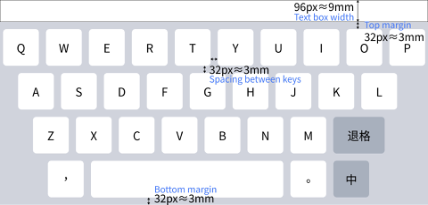
Subjective Experience: Measured using a 7-point Likert scale for Comfort, Subjective Speed, Subjective Accuracy, Ease of Use, and Satisfaction (Brooke, 1996; Lewis, 1995). Controlled Variables: Key spacing (3mm), margins, character appearance, and overall QWERTY structure were controlled (see Figure 2 for keyboard layout and controlled variables).
Figure 2: Keyboard Layout and controlled variables in experiment 1 and experiment 2.
Participants Twenty participants (10 female, 10 male; M age = 33.24 years, SD = 9.7) with at least two years of tablet typing experience and no reported upper extremity musculoskeletal disorders were recruited. Hand dimensions were representative of the general adult population (GB/T 10000-2023). Each participant completed both experiments, with counterbalanced condition order and a minimum 5-day interval between experiments to minimize fatigue and learning effects.
Apparatus and Experimental Prototype Devices: A Microsoft Surface Pro 9 (13-inch, portrait mode) and an ASUS ZenBook 17-Fold OLED (17.3-inch unfolded, landscape mode) were used, representing typical small-to-medium and large screen tablet-like experiences.
Experimental Prototype: A web-based application presented adjustable soft keyboards (see Figure 3) and administered typing tasks. It recorded keystrokes, input text, and timing, supporting mixed English/Chinese (Pinyin) input with a standard QWERTY layout (see Figure 4).
Figure 3: Web page in portrait orientation and landscape orientation on experiments 1 and 2.
Figure available in the original PDF paper.
Figure 4: Keyboard layout and functions in experiments 1 and 2.
Figure available in the original PDF paper.
Test Conditions Our experimental equipment and environmental settings are based on ANSI/HFES standards: the height of the chair needs to be adjusted so that the subject’s feet can rest comfortably on the floor. The height of the table was set to approximately 2 cm below elbow height, with an elbow angle of approximately 90
. The soft keyboard was placed flat in the center of the subject’s body, 7 cm from the front edge of the work surface.
Procedure After informed consent and hand measurements, participants were familiarized with the setup. For each experiment, they performed a 5-minute timed transcription typing task for each of the 10 conditions (2 orientations × 5 levels). Condition order was counterbalanced. Subjective evaluations were completed after each task. Semi-structured interviews were conducted post-experiment.
Evaluating Soft Keyboard Parameters for Tablet Productivity: Usability-Centric Layouts 127
Typing Tasks Participants transcribed mixed Chinese-English texts (Flesch-Kincaid grade 5.1–5.7 (Solnyshkina et al., 2017) to ensure readability and control cognitive load. Different texts were used per condition. Pinyin input (single character, no phrase association) was used for Chinese.
Data Analysis Objective (WPM, TER) and subjective data were analyzed using SPSS 26.0. Repeated measures ANOVA, post-hoc tests (e.g., Tukey HSD), and Pearson correlations were employed. Qualitative data were thematically analysed (Braun & Clarke, 2006). Significance was set at α = 0.05. Normality assumptions were checked.
Table 1: Five subjective evaluation dimensions and semi-structured interviews.
Table available in the original PDF paper.
Interview questions
Individual variable level interviews Overall variable level interviews How do you feel about the typing Can you describe the difference in typing experience just now?
experience when using keys of different sizes/aspect ratios? Did you encounter any problems during Do you feel any significant difference in the typing process? Compared with your previous
experiences in the experiment, which level felt better? What are the differences?
typing speed and accuracy when using keys of different sizes/aspect ratios? Which key size/key aspect ratio satisfies you the most? Why?
RESULTS
This section presents the results from Experiment 1 (Key Size) and Experiment 2 (Key Aspect Ratio), focusing on both subjective perceptions and objective input performance. ANOVA was used for statistical analysis, with significance set at α = 0.05.
Key size (8mm, 10mm, 11mm, 12mm, 14mm) had a statistically significant effect on Ease of Use (F(4, 95) = 3.226, p = 0.016) and Satisfaction (F(4, 95) = 3.576, p = 0.009). No significant effects were found on Comfort (p = 0.104), Subjective Speed (p = 0.359), or Subjective Accuracy (p = 0.355).
Descriptively, 12mm keys were most favored, with users describing them as “comfortable” and facilitating flexible two-handed typing. 8mm keys scored lowest subjectively. Participants anecdotally favoured the 12mm key size, often describing it as “comfortable” and “just right,” facilitating a shift towards more flexible two-handed typing. “The range covered by hands is more flexible at 12mm.”
Landscape Mode (Larger Screen - ASUS X Fold): Key size (15mm, 17mm, 18mm, 19mm, 20mm) did not have a statistically significant main effect on any of the five subjective evaluation dimensions (all p > 0.05).
Descriptively, the 17mm key size consistently received the highest mean scores across all five subjective dimensions (e.g., Comfort M = 4.80, Ease of Use M = 5.20), suggesting a user preference, although not statistically significant in this tested range. The 20mm keys generally received the lowest scores. Users often described the 17mm keys as feeling “natural” and “comfortable,” akin to a physical keyboard experience. “Less movement is required with 17mm, similar to typing on a physical keyboard.” Detailed mean scores and standard deviations are presented in Table 2.
Table 2: User subjective perceptions of key size on smaller portrait screens and larger landscape screens.
Table available in the original PDF paper.
Comfort Speed Accuracy Usability Satisfaction Key Size N Mean SD Mean SD Mean SD Mean SD Mean SD
Input Performance Key size had no statistically significant effect on Total Error Rate (TER) or Typing Speed (WPM) in either portrait or landscape mode (all p > 0.05). Descriptive trends showed minor variations (Portrait: 8mm lowest TER, 10mm highest WPM; Landscape: 19mm lowest TER, 15mm highest WPM), but these were not statistically significant. This suggests users might adapt typing strategies for different key sizes, maintaining comparable objective performance, potentially at the cost of subjective comfort as indicated by subjective ratings.
Figure 5: Error rate and WPM for different key sizes in portrait screen.
Figure available in the original PDF paper.
Evaluating Soft Keyboard Parameters for Tablet Productivity: Usability-Centric Layouts 129
Figure 6: Error rate and WPM for different key sizes in landscape screen
Figure available in the original PDF paper.
Key Aspect Ratio (Experiment 2) Subjective Perceptions Portrait Mode (Smaller Screen - Surface Pro 9):
Key aspect ratio (0.6:1, 0.7:1, 0.8:1, 0.9:1, 1:1) had a statistically significant effect on all five subjective dimensions: Comfort (F(4, 95)=2.969, p = 0.023), Subjective Speed (F(4, 95)=4.225, p = 0.003), Subjective Accuracy (F(4, 95)=3.078, p = 0.020), Ease of Use (F(4, 95)=7.954, p<0.001), and Satisfaction (F(4, 95)=6.377, p<0.001).
The 0.9:1 aspect ratio (keys slightly taller than wide) received the highest mean scores across all five dimensions, indicating a strong user preference. Users described this ratio as “visually harmonious” and “comfortable for finger touch.” Landscape Mode (Larger Screen - ASUS X Fold): Key aspect ratio (1:1 to 1.4:1) significantly impacted four subjective dimensions: Comfort (p = 0.004), Subjective Speed (p = 0.03), Ease of Use (p = 0.007), and Satisfaction (p = 0.035); no significant effect on Subjective Accuracy (p = 0.186). The 1.1:1 ratio (keys slightly wider) was most favoured, often likened to physical keys. Detailed mean scores and standard deviations are presented in Table 3.
Table 3: User subjective perceptions of key aspect ratio on smaller portrait screens and larger landscape screens.
Table available in the original PDF paper.
Comfort Speed Accuracy Usability Satisfaction Key Aspect Ratio N Mean SD Mean SD Mean SD Mean SD Mean SD
Input Performance Key aspect ratio had no statistically significant effect on TER or WPM in either portrait or landscape mode (all p > 0.05). Descriptive trends showed minor, non-significant variations. The dominance of subjective preference in the absence of objective performance differences is a key finding.
Figure 7: Error rate and WPM for different key aspect ratio in portrait screen.
Figure available in the original PDF paper.
Figure 8: Error rate and WPM for different key aspect ratio in landscape screen
Figure available in the original PDF paper.
Evaluating Soft Keyboard Parameters for Tablet Productivity: Usability-Centric Layouts 131
DISCUSSION
This study investigated the impact of key size and key aspect ratio on user experience and performance with tablet soft keyboards across different screen orientations (portrait and landscape) and device sizes, specifically within productivity contexts.
Optimal Key Layout Parameters are Context-Dependent The results confirm that optimal soft keyboard layout parameters are not universal but are strongly contingent on the usage context, primarily defined by screen orientation and associated device size.
Key Size: In portrait mode (smaller screen), users subjectively preferred approximately 12mm keys, a size perceived as facilitating comfortable two- handed typing strategies. This refines prior work by pinpointing a context- specific optimum (Tao et al., 2016; Kim et al., 2014). In landscape mode (larger screen), a descriptive preference for 17mm keys was noted, aligning with a “natural feel” akin to physical keyboards.
Figure 9: User experience variations with key size on screens of different sizes and modes.
Figure available in the original PDF paper.
Key Aspect Ratio: This parameter had a profound and statistically significant impact on subjective user experience, though not on objective performance. In portrait mode, a 0.9:1 aspect ratio (keys slightly taller than wide) was overwhelmingly favoured. In landscape mode, preference shifted to a 1.1:1 aspect ratio (keys slightly wider than tall). These findings extend previous research by systematically evaluating various aspect ratios in distinct tablet orientations.
Figure 10: User experience variations with key aspect ratio on screens of different sizes and modes.
Figure available in the original PDF paper.
The Primacy of Subjective Experience in Soft Keyboard Design A key overarching insight is the dominant role of subjective user experience in shaping user preferences for layout parameters, especially when objective performance differences are minimal or non-significant. Users’ perceptions of comfort, ease of use, and satisfaction often determined their preferred configurations. This “decoupling” of objective performance and subjective preference suggests users may employ compensatory typing strategies with suboptimal layouts, potentially at the cost of increased cognitive load or reduced comfort. This underscores the necessity of a usability-centric approach that gives significant weight to subjective feedback in soft keyboard design (Nielsen, 1994; Norman, 2013). Therefore, designers should not solely rely on objective performance metrics but must give significant weight to subjective feedback.
CONCLUSION
This study demonstrates that optimal soft keyboard layout parameters (key size and aspect ratio) for tablets are highly context-dependent, with users subjectively preferring approximately 12mm keys and a 0.9:1 aspect ratio in portrait mode, and approximately 17mm keys and a 1.1:1 aspect ratio in landscape mode. These preferences were primarily driven by subjective experience, even when objective performance differences were not statistically significant. This research provides concrete, data- driven recommendations for these core layout parameters, underscoring the importance of prioritizing subjective user experience and designing for specific contexts to create more usable and comfortable interfaces for tablet-based productivity tasks.
Limitations and Future Work While providing foundational insights, this study’s limitations include a relatively small participant sample and simulated experimental setting. Future work should expand sample diversity, explore dynamic real-world usage contexts, and investigate a broader range of layout and interaction parameters, including touch-native or AI-assisted methods. Longitudinal studies on learning effects and the integration of finer-grained ergonomic measures would also offer a more holistic understanding, complementing the development of interactive prototypes based on our recommendations.
REFERENCES
Braun, V., & Clarke, V. (2006). Using thematic analysis in psychology. Qualitative Research in Psychology, 3(2), 77–101. https://doi.org/10.1191/ 1478088706qp063oa Brooke, john. (1996). SUS: A “Quick and Dirty” Usability Scale. In Usability Evaluation In Industry. CRC Press. Chaparro, B. S., Phan, M. H., Siu, C., & Jardina, J. R. (2014). User Performance and
Satisfaction of Tablet Physical Keyboards. 9(2). Chen, K. B., Savage, A. B., Chourasia, A. O., Wiegmann, D. A., & Sesto, M. E. (2013). Touch screen performance by individuals with and without motor control disabilities. Applied Ergonomics, 44(2), 297–302. https://doi.org/ 10.1016/j.apergo.2012.08.004
Evaluating Soft Keyboard Parameters for Tablet Productivity: Usability-Centric Layouts 133
Chourasia, A. O., Wiegmann, D. A., Chen, K. B., Irwin, C. B., & Sesto, M.
E. (2013). Effect of Sitting or Standing on Touch Screen Performance and Touch Characteristics. Human Factors, 55(4), 789–802. https://doi.org/10.1177/ 0018720812470843 Colle, H. A., & Hiszem, K. J. (2004). Standing at a kiosk: Effects of key size and spacing on touch screen numeric keypad performance and user preference. Ergonomics. https://doi.org/10.1080/00140130410001724228 Da Tao, Juan Yuan, Shuang Liu, Xingda Qu and Xingyu Chen 2016. The
impact of touchscreen button feature factors on the usability of keyboard input operations. Human Ergonomics, 22(5), 1–6. https://doi.org/10.13837/ j.issn.1006–8309.2016.05.0001 Fitts, P. M. (n.d.). The Information Capacity of the Human Motor System in Controlling the Amplitude of Movement. Hung, Y.-S., Yang, S., Vance, S., & Kang, N. E. (2011). Mobile QWERTY
User Research. In A. Marcus (Ed.), Design, User Experience, and Usability. Theory, Methods, Tools and Practice (Vol. 6769, pp. 583–592). Springer Berlin Heidelberg. https://doi.org/10.1007/978-3-642-21675-6_67 Isoqovich, A. A., Ravshanovna, X. L., & Xasanovich, X. R. (2024). Advancements in Digital Device Technologies: A Comprehensive Review. Central Asian Journal of Multidisciplinary Research and Management Studies, 1(6), Article 6. https://cyberleninka.ru/article/n/advancements-in-digital-device-technologies- a-comprehensive-review Jin, Z. X., Plocher, T., & Kiff, L. (2007). Touch Screen User Interfaces for Older
Adults: Button Size and Spacing. In C. Stephanidis (Ed.), Universal Acess in Human Computer Interaction. Coping with Diversity (Vol. 4554, pp. 933–941). Springer Berlin Heidelberg. https://doi.org/10.1007/978-3-540-73279-2_104 Jung, E. S., & Im, Y. (2015). Touchable area: An empirical study on design approach considering perception size and touch input behavior. International Journal of Industrial Ergonomics, 49, 21–30. https://doi.org/10.1016/j.ergon.2015.05.008 Kim, H., Kwon, S., Heo, J., Lee, H., & Chung, M. K. (2014). The effect of touch-key
size on the usability of In-Vehicle Information Systems and driving safety during simulated driving. Applied Ergonomics, 45(3), 379–388. https://doi.org/10.1016/ j.apergo.2013.05.006 Kim, H., Yi, S., & Yoon, S.-Y. (2019). Exploring touch feedback display of virtual keyboards for reduced eye movements. Displays, 56, 38–48. https://doi.org/ 10.1016/j.displa.2018.11.004 Kim, J. H., Aulck, L., Thamsuwan, O., Bartha, M. C., & Johnson, P. W. (2014).
The Effect of Key Size of Touch Screen Virtual Keyboards on Productivity, Usability, and Typing Biomechanics. Human Factors: The Journal of the Human Factors and Ergonomics Society, 56(7), 1235–1248. https://doi.org/10.1177/ 0018720814531784 Kim, S., & Lee, G. (2018). Design and Evaluation of Semi-Transparent Keyboards on a Touchscreen Tablet. Proceedings of the 2018 ACM International Conference on Interactive Surfaces and Spaces, 155–166. https://doi.org/10.1145/ 3279778.3279801 Lewis, J. R. (1995). IBM computer usability satisfaction questionnaires: Psychometric evaluation and instructions for use. International Journal of Human-Computer Interaction. https://doi.org/10.1080/10447319509526110 Nielsen, J. (1994). Usability engineering. Morgan Kaufmann. Norman, D. A. (2013). The design of everyday things (Rev. and expanded edition).
MIT press.
Park, Y. S., & Han, S. H. (2010). Touch key design for one-handed thumb interaction with a mobile phone: Effects of touch key size and touch key location. International Journal of Industrial Ergonomics, 40(1), 68–76. https://doi.org/ 10.1016/j.ergon.2009.08.002 Paterson, B. (1992). Standards for Keyboard Layouts—The Origins and Scope of
ISO/IEC 9995. Reyal, S., Zhai, S., & Kristensson, P. O. (2015). Performance and User Experience of Touchscreen and Gesture Keyboards in a Lab Setting and in the Wild. Proceedings of the 33rd Annual ACM Conference on Human Factors in Computing Systems, 679–688. https://doi.org/10.1145/2702123.2702597 Solnyshkina, M., Zamaletdinov, R., Gorodetskaya, L., & Gabitov, A. (2017).
Evaluating Text Complexity and Flesch-Kincaid Grade Level. Journal of Social Studies Education Research, 8(3), 238–248. Soukoreff, R. W., & MacKenzie, I. S. (2003). Metrics for text entry research: An evaluation of MSD and KSPC, and a new unified error metric. New Horizons, 5. Sun, K., Yu, C., & Shi, Y. (2019). Exploring Low-Occlusion Qwerty Soft Keyboard
Using Spatial Landmarks. ACM Transactions on Computer-Human Interaction, 26(4), 1–33. https://doi.org/10.1145/3318141 Yi, X., Liang, C., Chen, H., Song, J., Yu, C., & Li, H. (n.d.). From 2D to 3D: Facilitating Single-Finger Mid-Air Typing on QWERTY Keyboards with Probabilistic Touch Modeling. 7(1). Yu, S., Jin, S. H., & Kim, K. (2019). Haptic Soft-Keyboard for Tablet-Sized
Read this individual research paper free through the original publisher, or explore the full digital proceedings book.
ISBN 978-1-964867-70-0
Explore this ISBN in the AHFE Bookstore ↗Listed in the July 2026 bookstore catalogue; search by ISBN to confirm current availability · Digital book purchase optional