Ali Hassan, Gunho Sohn, Scott Mackenzie (2023). Comparison of One-handed and Two-handed Text Entry in Virtual Reality Using Handheld Controllers. In: Human Factors in Virtual Environments and Game Design. AHFE Open Access, vol. 96, pp. 101–111. https://doi.org/10.54941/ahfe1003872
Current consumer virtual reality (VR) systems rely heavily on handheld controllers for input. To this end, numerous methods have been developed and investigated since the emergence of VR in order to improve the user experience for interactions such as gaming or text entry while wearing a head-mounted display (HMD) and using handheld controllers [1, 2]. Although several novel text entry methods have been proposed, there is little research comparing the methods using virtual keyboard interfaces evaluated as experimental conditions. This would allow for a more focused and specialized comparison.Statement of Objective:This work presents the design and empirical evaluation of a split and standard virtual keyboard for text input in virtual environments using handheld controllers. There are numerous applications, including games, for example, entering a gamer’s name or messaging other gamers. An experimental evaluation of two virtual keyboards using VR handheld controllers will be conducted. (Note: As the experiment is ongoing, this abstract is written in the future tense. The final submission will transition to the past tense.) The focus will be on entry speed, accuracy, and efficiency. Both keyboards will be QWERTY-based, but with different organizations. Similar to most physical keyboards, the “standard” keyboard will have all the keys in one arrangement. However, the “split” keyboard will display keys in a split pattern on each side of the screen. For the standard keyboard, users will operate one handheld controller in their preferred hand. For the split keyboard, users will operate one controller in each hand. Thus, a significant point of comparison in the present research is one-handed input vs. two-handed input for the same task. Description of Methods:This research follows an experimental methodology. There will be a total of 14 participants recruited from the local university campus. The study will be a 2 × 5 within-subjects design with the following independent variables and levels:• Keyboard (standard one-handed, split two-handed)• Block (1, 2, 3, 4, 5)The order of testing the keyboards will be counterbalanced to offset learning effects.Five phrases of text will be entered for each block, with phrases selected at random from a standard phrase set [3]. Thus the total number of trials will be 14 participants x 2 keyboards x 5 blocks x 5 phrases/block = 700. The following are the dependent variables in the study:• Entry speed (wpm)• Error rate (%)• Keystroke per character (KSPC)The Unity 3D game engine is used to create the text-input interface installed on the Meta Quest 2 VR headset. Participants will use the Meta Quest handheld controllers to input text. Input uses raycasting, in which the handheld controller casts a virtual line or ray. The virtual ray is positioned on a key on the virtual keyboard, wherein the user presses the trigger on the handheld controller to select the character indicated by the ray.Significance of the Proposed Presentation:The work is significant due to its presentation of the design and experimental evaluation of novel text entry input methods for virtual environments The work pushes the limits of contemporary devices (Meta Quest 2 VR headset) and platforms (Unity 3D game engine) into a design space of particular interest to research in virtual environments.Discussion of Results:Statistical tests, such as the analysis of variance, will be used to identify statistically significant differences between the keyboards for entry speed (wpm), error rate (%), and efficiency using KSPC. Tests for improvement in performance over the five blocks of testing will be included, as well. Regression models will be built using the power law of practice to model the pattern of learning over the blocks of testing. Design implications and suggestions will be offered, as will opportunities for future work. Full details are to be included in the final submission.
Advancements in virtual reality (VR) hardware have led to an increase in the adoption and demand for VR headsets. Currently, consumer VR systems rely heavily on handheld controllers for input, including text input, which can be a tedious and error-prone process that requires users to coordinate multiple inputs (McGill, 2015). In response, researchers have investigated alternative methods for improving text input in VR, including a physical and virtual keyboard, predictive typing, and gesture-based input (Bowman, 2002; Dube, 2019; Boletsis, 2019). These techniques have been developed and studied since the emergence of VR to enhance the user experience for activities such as gaming or text entry while wearing a head-mounted display (HMD) and using handheld controllers.
Researchers have also employed traditional physical Qwerty keyboards for use in VR (Walker, 2017; Grubet, 2018), but this approach is not practi- cal due to the need for wireless VR headsets that allow users to move freely without being tethered to a desk. In addition, using a physical keyboard while wearing an HMD can be challenging as users are unable to see the keys. Alth- ough speech-to-text input has improved with advances in speech recognition, this approach raises concerns about privacy as users may not feel comforta- ble speaking aloud sensitive information. Other studies have proposed using
dwell-based gestures for input, but these gestures require significant body movement and may cause fatigue (Yu, 2017).
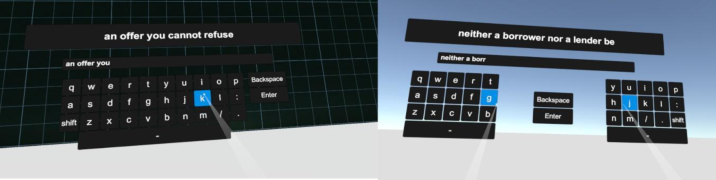
Handheld controllers in VR typically use raycasting, where the controller casts a virtual ray with targets selected using an aim-and-shoot principle see Figure 1. For text entry, techniques include soft keyboards, drum-like keybo- ards, gesture- or dwell-based input, and split keyboards. However, there is little experimental research comparing keyboard interfaces for VR. The pre- sent study aims to address this gap by presenting an empirical evaluation of split two-handed and standard one-handed virtual keyboards for text input in VR systems using handheld controllers. Both the split two-handed and standard one-handed virtual keyboards were specifically designed and eva- luated for VR text input, with potential applications such as enabling users to enter their gamer names or messaging with other gamers.
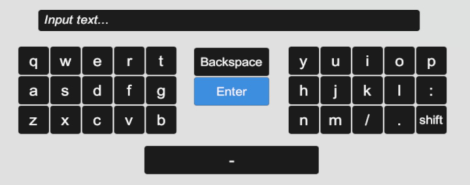
Split Keyboards The split keyboard (see Figure 2), originating in the 1960s, offers an ergo- nomic alternative to a standard Qwerty setup and reduces the risk of repetitive strain injuries (Rempel, 2008). Additionally, split keyboards reduce muscle strain on the shoulders and neck through physical adjustments of the keyboard assembly (Smith, 2015). They are commonly used in office settings.
Related Work
With reference to Table 1, there are various methods for inputting text in VR, each with pros and cons. Many consumer VR systems, such as the HTC Vive, Oculus Rift, Samsung Gear, and Playstation VR, come equipped with interactive features like hand-held controllers, eye and head tracking, which have been used in various studies to explore different VR text input methods.
Figure 1: VR text entry techniques compared: standard (1H) and split (2H) keyboards.Figure 2: Qwerty split keyboard layout.
Comparison of One-Handed and Two-Handed Text Entry in Virtual Reality 103
Table 1. Text entry research and methods in VR.
Table available in the original PDF paper.
Study Short Description np1 ns2 Entry Speed (wpm)
Error rate (%)
Walker et al. (2017)
24 2 41.2, 43.7 11.8, 8.4
Occluded keyboard in VR: with auto-correct, without auto-correct
24 1 26.3, 11.6 2.1, 2.7
Grubert et al. (2018)
Physical keyboard, virtual keyboard McGill et al. (2015)
16 1 36.6, 38.5 10.4, 9.2
Typing in enhanced virtuality: partial physical, full physical keyboard Speicher et al. (2018)
24 1 10.2, 15.4, 12.7, 9.8, 5.3, 8.4
1.2, 0.97, 1.9, 7.6, 2.8, 2.2
Handheld controller techniques in VR: head pointing, controller pointing, controller tapping, freehand, discrete cursor, continuous cursor
12 5 52.6, 42.3, 42.8 11.5, 2.1,
He et al. (2022)
Gaze gestures with disambiguation on VR: Qwerty, TapGazer without and with word completion Eye gaze for text input in VR: dwell, click
16 4 9.4, 10.2 0.02, 0.07
3.4 Rajanna & Hansen (2018)
10 1 16.4, 9.6 0.12, 0.24
Chen et al. (2019)
Gesture-based input for text input in VR: controllers, touchscreen 1np = number of participants; 2ns = number of sessions
Walker et al. (2017) looked at the use of a completely occluded keyboard for typing in VR. The study involved 24 participants, and the average text entry rate ranged from 41.2 to 43.7 words per minute (wpm) with a mean character error rate of 8.4% to 11.8%. These error rates were reduced to approximately 2.6% to 4.0% when the typed input was auto-corrected using a decoder. Typing in VR can be difficult for users because they cannot see their hands while wearing a head-mounted display (HMD), which can affect speed and accuracy (Grubert et al., 2018).
Grubert et al. (2018) conducted a study to investigate the effect of various hand representations on text input in four different scenarios: no represen- tation, animated hands, fingers, and video inlay of the hands. They found that accuracy with video inlay and fingers was significantly higher, but the representation of the hands did not significantly affect input speed. McGill et al. (2015) compared typing on a desktop keyboard in enhanced virtuality using a complete keyboard view in VR, no keyboard view, partial view, and full blending conditions in reality.
Text input in VR can also utilize head pointing, which is a built-in intera- ction featured in many consumer VR headsets. The main distinction is that
with the head pointing the cursor is controlled with head movement rather than hand movement using controllers. To input a character, users first move the cursor to the desired key and then select the appropriate character by either dwelling on it for a predetermined time or using a trigger press (Spei- cher et al., 2018). Many modern VR headsets also have eye trackers, allowing for the use of eye movement as a text input method. Rajanna and Hansen (2018) examined eye gazing as a text input method in VR and found that users performed better when the complete keyboard was in view and when they were stationary, rather than moving. They also found that the gaze+click interaction was superior to dwell-only interaction.
He et al. (2022) proposed a technique that used gaze gestures to disambigu- ate text input as users typed by tapping their fingers in a specific location. This allowed users to tap anywhere as long as their finger identity was easily reco- gnizable. This prototype achieved an entry speed of 79.2% of users’ Qwerty typing speed, but it had limitations such as word prediction based only on word frequency and no auto-correction.
Another technique for improving text input in virtual reality (VR) is gesture-based input, which allows users to input text by making hand gestu- res. However, this method can be difficult for users to learn and may not be suitable for all types of text input tasks (Chen et al., 2019).
Currently, handheld controllers are a common method for text input in consumer VR systems. Speicher et al. (2018) studied various techniques for using handheld controllers for input, including controller pointing, controller tapping, discrete or continuous cursor movement, and trigger-press selection.
The present study focuses on handheld controllers as a text input method, comparing the efficiency and effectiveness of controller pointing and control- ler selection techniques. The goal was to determine which technique is better for text input in VR.
In summary, text input in VR using handheld controllers remains a chal- lenging task, and more research is needed to identify the most effective and efficient methods for inputting text in virtual environments.
Method
An empirical evaluation of two virtual keyboards using VR handheld con- trollers was conducted to compare their text-entry speed, accuracy, and efficiency. Both keyboards were Qwerty-based with different layouts. The standard one-handed keyboard had all the keys in a single location, like most physical Qwerty keyboards. On the other hand, the split two-handed keyboard had keys on both sides of the screen, divided into two separate sections.
Participants Students from a local university were voluntarily recruited to participate in the study. A total of 14 participants were recruited, including 7 males and 7 females. The mean age was 28.0 years (SD = 5.0). The volunteers had to be present in person to participate in the study. Participation was entirely voluntary, and no financial compensation was given.
Comparison of One-Handed and Two-Handed Text Entry in Virtual Reality 105
Apparatus This study used Meta Quest 2 as a VR headset, along with its stock hand-held controllers. Meta Quest 2 is a lightweight (285 g) consumer VR headset that does not require a computer to be connected to it. The interfaces were deve- loped using the Unity3D game engine with the input cursor disabled. Text phrases were selected randomly from the MacKenzie and Soukoreff (2003) phrase set. C# scripts tracked keystrokes and timings while users entered the phrase. These values were recorded in a text file and later used to determine the entry speed, accuracy, and efficiency of both text-entry methods.
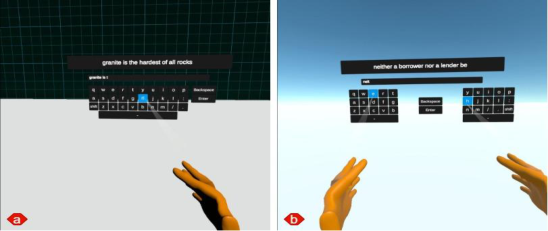
Both VR text-input techniques had similar typing environments. A text entry box with a phrase appeared in the center of the screen. The standard one-handed keyboard was placed directly beneath the text box. In the case of split two-handed keyboards, the right and left portions of the keyboard were placed on the right and left sides of the text-entry area, as shown in Figure 3.
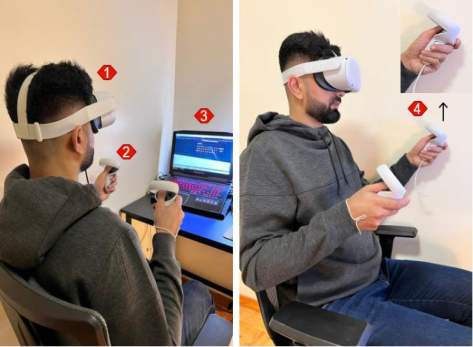
Procedure Participants were directed to take a seat at a desk equipped with a computer and a Meta Quest 2 VR headset, as shown in Figure 4.
They were informed about the goals and objectives of the study and cauti- oned about the potential risks associated with VR, including motion sickness and dizziness. To participate, participants were required to sign informed consent forms. A demographic questionnaire was administered to gather information about the participants’ experience with VR, allowing for the differentiation between VR novices and more experienced individuals.
Prior to being presented with the first text input method, participants were given time to practice the text input process. They were then divided into two groups to mitigate any potential learning effects.
The formal experiment included five blocks of trials for each text input method, each block comprising five phrases from the MacKenzie and Sou- koreff (2003) phrase set. During each trial, only one phrase was displayed at a time and remained visible for the duration of the trial. Participants were instructed to proceed at a quick but comfortable pace and to fix errors if noti- ced and as they occurred using Backspace. There was a brief break between
Figure 3: Text input using ray-casting with virtual keyboards. (a) Standard keyboard using a single controller, (b) Split keyboard utilizing both left and right controllers.Figure 4: Setup. (1) User wearing Meta Quest 2 HMD, (2) Meta touch controllers, (3) optional PC connected to Meta HMD, (4) user clicks trigger to select a letter from virtual keyboard.
each input method, during which participants were informed and presented with an information screen to move on to the next keyboard.
When finished, participants were asked to complete a questionnaire eva- luating the quality of both text input methods and their overall experience. An informal interview was also conducted at the end of the experiment to gather the participants’ feedback on their experiences.
Design This study was a 2 × 5 within-subjects design with the following independent variables and levels:
Keyboard (standard one-handed, split two-handed)
Block (1, 2, 3, 4, 5) The following dependent variables were used:
Entry speed (wpm)
Error rate (%)
Keystroke per character (KSPC) While entry speed and error rate are self-explanatory, KSPC is the number of keystrokes, on average, to generate each character of text in each langu- age using a given text entry technique (MacKenzie, 2002). As a performance metric, KSPC relates to efficiency since it includes the overhead in keystrokes to correct errors, when errors were noticed and corrected by participants.
In addition, data were collected through a questionnaire administered before and after testing. The questionnaire gathered demographic data, inclu- ding the user’s age, sex, and frequency of VR use (on a scale of 0 to 10). A post-trial questionnaire was used to gauge user preference for keyboard type. Users rated both text input techniques on a scale of 1 to 10, with 10 being the best.
Comparison of One-Handed and Two-Handed Text Entry in Virtual Reality 107 In an effort to balance the testing sequence and eliminate learning effects, participants were divided into two groups. The first group was tested with a standard one-handed keyboard first and then with the split two-handed. The order of testing was reversed for the second group.
Each participant went through five blocks of trials, with each block inclu- ding five phrases. Testing lasted around 40 minutes for each participant. The total number of trials was 14 participants × 2 keyboards × 5 blocks × 5 phrases = 700.
Result and Discussion
Some participants accidentally pressed the ENTER key during a trial. This caused the trial to end prematurely and potentially compromised the data. Trials with an incomplete phrase and with >50% error rate were deemed outliers. Eleven such trials (1.6%) were identified and removed from the analyses.
The results of the study indicated that the group (i.e., the order in which the text input methods were tested) did not significantly affect entry speed (F1,12 = 2.07, p > .05). This suggests that counterbalancing, which aimed to offset any potential learning effects, was successful.
The data on entry speed, error rate, and KSPC (keystrokes per character) are presented in the following sections and are depicted in the corresponding figures.
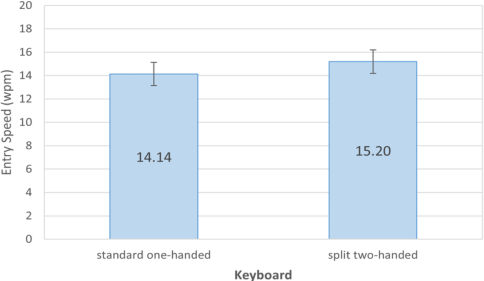
Entry Speed Across all 700 phrases, the grand mean for entry speed was 14.7 wpm. The standard one-handed keyboard had an average entry speed of 14.1 wpm, which was 7.5% slower than the split two-handed keyboard, which had an average entry speed of 15.2 wpm. See Figure 5. The difference was statistically significant (F1,12 = 19.1, p <.001).
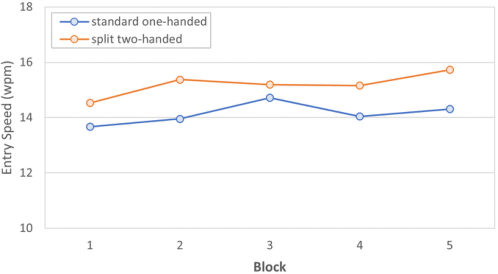
Even though the standard one-handed keyboard was slower, both key- boards demonstrated a similar learning progression over the 25 phrase iterations, which were divided into five blocks. It was noted that the one- handed keyboard showed a positive peak in performance around the third
Figure 5: Entry speed (wpm) by keyboard. Error bars show ±1 SD.
block, while the split two-handed keyboard showed a slight decline in entry speed around the same time. However, both keyboards eventually returned to an upward trend that continued until the end of the last block. Overall, the standard one-handed keyboard saw a 4.8% increase in entry speed from block 1 to block 5, while the split two-handed keyboard experienced an 8.2% increase. Despite these differences in performance, the effect of the block on entry speed was not statistically significant speed (F4,48 = 1.94, p > .05). The learning trend is seen in Figure 6.
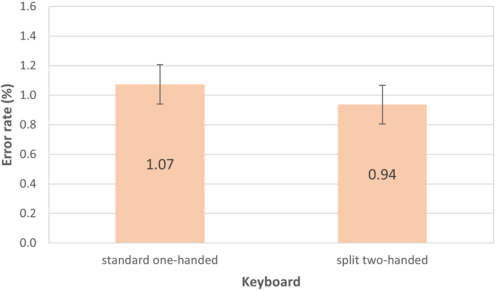
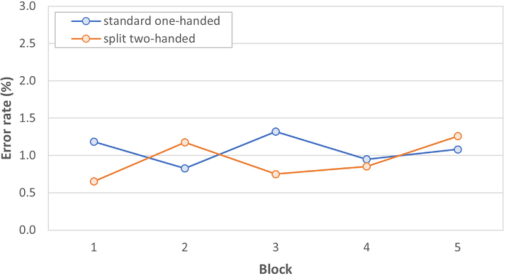
Error Rate The study compared the error rates of two keyboards: a standard one-handed keyboard and a split two-handed keyboard. The grand mean for error rate was 1.00%. The standard one-handed keyboard had an error rate of 1.07%, while the split two-handed keyboard had an error rate of 0.94%. Comparing block 1 to block 5, the error rates for the standard one-handed keyboard were relatively consistent with values of 1.18% (block 1) and 1.08% (block 5). The corresponding error rates increased for the split two-handed keyboard, from 0.65% (block 1) to 1.26% (block 5). See in Figure 8. The difference in error rates between the two keyboards was not statistically significant (F1,12 = 0.46, ns).
The standard deviation for the standard one-handed keyboard was 2.49, while the standard deviation for the split two-handed keyboard was 2.40, as shown in the error rate bars in Figure 7. This indicates variance in the error rates for the participants using these keyboards, with some participants making significantly more errors than others. It is possible that the higher standard deviation could be attributed to the participants’ individual typing abilities, or the difficulty of the tasks. Further research is needed to fully understand the factors contributing to the variability in error rates across participants.
Figure 6: Entry speed (wpm) by block.
Comparison of One-Handed and Two-Handed Text Entry in Virtual Reality 109
Figure 7: Error rate (%) by the keyboard. Error bars show ±1 SE.Figure 8: Error rate (%) by block.
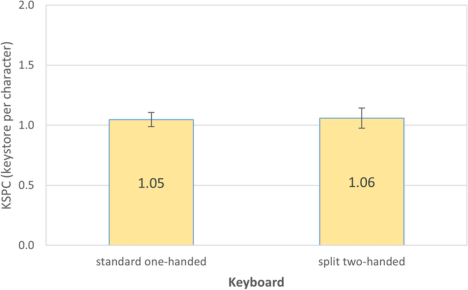
Keystrokes Per Character (KSPC) The KSPC for the standard one-handed keyboard was 1.05 while it was similar at 1.06 for the split-two handed keyboard. See Figure 9. The values reflect a small overhead in keystrokes to correct errors.
Participant Feedback The questionnaire asked participants to indicate their preferred keyboard and the favourability of each keyboard. The results for preference were evenly split with seven participants indicating a preference for each keybo- ard. Favourability was given on a scale out of 10 with 10 being awesome. The means were 8.1 for the standard one-hand keyboard and 7.2 for split two-handed keyboard, indicating good overall favourability for both keyboards.
CONCLUSION
In conclusion, the aim of this study was to compare the performance of two virtual keyboards in VR environments and determine which one was more effective and efficient for text input. Results show that the split two-handed keyboard was significantly faster than the standard one-handed keyboard when it came to text entry, with a 7.5% advantage in speed. Both keybo- ards had similar error rates and keystrokes per character, indicating that the difference in speed was not due to an increase in errors.
Questionnaire data revealed that half the participants preferred the stan- dard one-handed keyboard, and half preferred the split two-handed keybo- ard, indicating that personal preference may also play a role in the choice of keyboard. The mean favourability rating for the standard one-handed keybo- ard was 8.1, compared to 7.2 for the split two-handed keyboard, indicating that participants generally had positive opinions of both keyboards. In the context of VR typing, the slight difference in favourability between the stan- dard one-handed keyboard and the split two-handed keyboard could be due to the one-handed keyboard only requiring the use of one hand at a time, allowing users to rest their other hand. The feedback from the participants did mention the issue of arm tiredness. Additionally, the two-handed key- board may require more coordination and hand movements, which could potentially impact typing speed.
These findings suggest that the choice of keyboard may depend on a variety of factors, including the user’s personal preferences, typing abilities, and the specific tasks being performed. Further research is needed to fully understand the factors that contribute to the observed differences in performance.
REFERENCES
Boletsis, C., & Kongsvik, S. (2019). Controller-based text-input techniques for virtual reality: An empirical comparison. Int J Virtual Reality, 19(10), 1–8. doi: 10.20870/IJVR.2019.19.3.2917 Bowman, D. A., Rhoton, C. J., & Pinho, M. S. (2002). Text input techniques
for immersive virtual environments: An empirical comparison. Proc HFES ‘02, 2154–2158. Santa Monica, CA, HFES. doi: 10.1177/154193120204602611 Chen, S., Wang, J., Guerra, S., Mittal, N., & Prakkamakul, S. (2019). Exploring word-gesture text entry techniques in virtual reality. Proc CHI ‘19, 1–6. New York, ACM. doi: 10.1145/3290607.3312762
Comparison of One-Handed and Two-Handed Text Entry in Virtual Reality 111
Dube, T. J., Arif, A. S. (2019). Text Entry in Virtual Reality: A Comprehensive Review of the Literature. Proc HCII ‘19. Berlin, Springer. doi: 10.1007/978-3-030-22643- 5_33. Grubert, J., Witzani, L., Ofek, E., Pahud, M., Kranz, M., & Kristensson, P. O.
(2018). Effects of hand representations for typing in virtual reality. Proc Conf on Virtual Reality and 3D User Interfaces – VR ‘18, 151–158. New York, IEEE. doi: 10.1109/VR.2018.8446250. Grubert, J., Witzani, L., Ofek, E., Pahud, M., Kranz, M., & Kristensson, P. O. (2018).
Text entry in immersive head-mounted display-based virtual reality using stan- dard keyboards. Proc Conf on Virtual Reality and 3D User Interfaces – VR ‘18, 159–166. New York, IEEE. doi: 10.1109/VR.2018.8446059. He, Z., Lutteroth, C., & Perlin, K. (2022). TapGazer: Text entry with finger tapping and gaze-directed word selection. Proc CHI ‘22, 337–342. New York, ACM. doi: 10.1145/3491102.3501838. MacKenzie, I. S. (2002). KSPC (keystrokes per character) as a characteristic of
text entry techniques. Proc Int Conf on Mobile HCI, 195–210. Berlin, Springer. doi: 10.1007/3-540-45756-9_16. MacKenzie, I. S., & Soukoreff, R. W. (2003). Phrase sets for evalua- ting text entry techniques. Proc CHI ‘03, 754–755. New York, ACM. doi: 10.1145/765891.765971. McGill, M., Boland, D., Murray-Smith, R., & Brewster, S. (2015). A dose of reality: Overcoming usability challenges in VR head-mounted displays. Proc CHI ‘15, 2143–2152. New York, ACM. doi: 10.1145/2702123.2702382. Rajanna, V., & Hansen, J. P. (2018). Gaze typing in virtual reality: Impact of key-
board design, selection method, and motion. Proc ETRA ‘18, 15–20. New York, ACM. doi: 10.1145/3204493.3204541. Rempel, D. (2008). The split keyboard: An ergonomics success story. Human Factors, 50(3), 385–392. doi:10.1518/001872008X312215. Smith, M. L., Pickens, A. W., Ahn, S., Ory, M. G., DeJoy, D. M., Young, K., Bishop,
G., & Congleton, J. J. (2015). Typing performance and body discomfort among overweight and obese office workers: A pilot study of keyboard modification. Applied Ergonomics, 46, 30–37. doi: 10.1016/j.apergo.2014.06.004. Soukoreff, R. W., & MacKenzie, I. S. (2003). Metrics for text entry research: An evaluation of MSD and KSPC, and a new unified error metric. Proc CHI ‘03, 113–120. New York, ACM. doi: 10.1145/642611.642632. Speicher, M., Feit, A. M., Ziegler, P., & Kruger, A. (2018). Selection-based text entry
in virtual reality. Proc CHI ‘18, 1–13. ACM. doi: 10.1145/3173574.3174221 Walker, J., Li, B., Vertanen, K., & Kuhl, S. (2017). Efficient typing on a visually occluded physical keyboard. Proc CHI ‘17, 5457–5461. New York, ACM. doi: 10.1145/3025453.3025783. Yu, C., Gu, Y., Yang, Z., Yi, X., Luo, H., & Shi, Y. (2017). Tap, dwell, or gesture?
Exploring head-based text entry techniques for HMDs. Proc CHI ‘17, 4479–4488. New York, ACM. doi: 10.1145/3025453.3025964.
LISTED IN THE AHFE DIGITAL BOOKSTORE CATALOGUE
Explore the complete digital volume
Human Factors in Virtual Environments and Game Design
Read this individual research paper free through the original publisher, or explore the full digital proceedings book.
ISBN 978-1-958651-72-8
Explore this ISBN in the AHFE Bookstore ↗Listed in the July 2026 bookstore catalogue; search by ISBN to confirm current availability · Digital book purchase optional