Ahmed Farooq, Roope Raisamo, Jani Lylykangas, Oleg Spakov, Veikko Surakka (2023). Comparing Electrostatic and Vibrotactile Feedback for In-Car Touchscreen Interaction using common User Interface Controls. In: Intelligent Human Systems Integration (IHSI 2023): Integrating People and Intelligent Systems. AHFE Open Access, vol. 69, pp. 66–76. https://doi.org/10.54941/ahfe1002822
The automotive evolution in virtual controls for touchscreen interaction provides the opportunity to manage and manipulate In-vehicle Infotainment (IVI) system without the need for large physical control. However, as most of these virtual controls are designed for visual feedback in PCs and mobile devices, their implementation can have usability and accessibility constraints in a moving vehicle. In fact, for some controls the interaction primitives may be substantially different from the physical versions (i.e., multi-finger knobs, single finger dials etc.), therefore requiring drivers to remaster the mechanics of virtual interaction to properly utilize these controls on a touchscreen surface. Although, some IVI systems now include basic vibrotactile feedback which may only provide abstract confirmation of triggers or events, but this technique may not be ideal for calibrated tactile or textural output in a moving vehicle. Recently, electrostatic or electrovibration feedback has been proposed for touchscreen interaction which can augment the systems with clear and precise textures rendered on the touchscreen. As this technology is relatively new and may have certain limitations, it is important to understand how the usability of current graphical user interfaces (GUIs) controls augmented with electrostatic feedback may improve touchscreen interaction. This research study looks at 8 common GUI controls adapted for touchscreen surfaces primarily for visual interaction and augments them with vibrotactile and electrostatic feedback. The goal of the study is to understand which type of controls are suitable for visual only interaction, and which controls require basic tactile feedback (vibration confirmation), while identifying the GUI controls that may be most effectively utilized in the presence of electrostatic tactile feedback on the touchscreen using friction variation.
Human skin has 12 diverse types of afferent fibres that help perceive pain, kinesthetic, tactile, and thermal sensations (Ayyildiz et al., 2018; Sirin et al., 2019). The simple act of reaching out and touching an object engages this layered mechanism within the skin thereby helping us assimilate various
Comparing Electrostatic and Vibrotactile Feedback 67
properties of an object, such as form, texture, motion, pressure, and tempera- ture (Vardar et al., 2021; Sato et al., 2012; Wijekoon et al., 2012). In Human Computer Interaction (HCI), the ability to artificially stimulate the various mechanoreceptors within the skin and simulate specific properties of virtual objects has been a key driving force in several interaction systems (Basdogan et al., 2020; Shultz et al., 2018). In most cases, these systems utilize direct or indirect stimulation of the receptors through vibrotactile input, however, such feedback can have limited perceptual outputs, especially for touchscreen interaction within vibrationally noisy environments (Farooq et al., 2017) (i.e., moving vehicle). Although vibrotactile based in modern touchscreen devices provides an easy and efficient way to relay rudimentary information, such as confirmation of discreate events, or identification of pre-encoded triggers, the inability of various mechanoreceptors to sample and differentiate vibration parameters (i.e., frequency, wave form, amplitude duration etc.) can grea- tly reduce the overall perceptual output of the system (Zhang and Harrison 2015). For this reason, it is important to research other techniques of stimu- lating receptors within the skin, such as electrostatic feedback to modulate friction on a touchscreen.
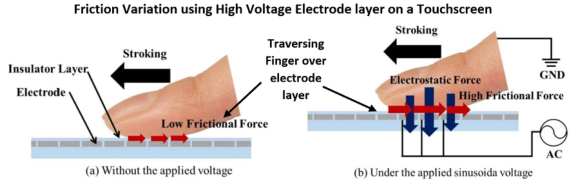
CREATING ELECTROVIBRATION FEEDBACK ON RIGID INTERACTIVE SURFACES Modulating friction as tactile feedback on various surfaces is not a new concept (Sirin et al., 2015). Several systems and customized devices have been developed to create electrostatic forces or electrovibration with varied success i.e., Tesla Touch (Bau et al., 2010), Senseg (Wijekoon et al., 2012), STIMTAC (Amberg et al., 2011) and LATPaD (Marchuk et al., 2010). As illustrated by Bau et al., (2010) electrovibration is created using electrostatic friction betw- een a surface and the user’s skin. By conducting an electrical charge between the finger and surface of interaction, it is possible to create a temporary attractive force when the user’s skin meets it. Modulating such forces on the surface of interaction it possible to generate a variety of sensations perceived similar to granular textures (Higashiyama and Rollman, 1991). The rendered textual properties may be perceived differently from those provided through conventional vibrotactile feedback and may in fact be supplementary form of stimulation. Therefore, electrovibration feedback may have the possibility to enhance and compliment conventional vibration-based output improving textural details of virtual surfaces and control mechanisms on the interaction surface (Wang et al., 2022).
However, all such systems require the user’s finger to traverse through a vir- tual interface (i.e., touchscreen) by continuously contacting the screen. This is necessary because friction variation is most effectively relayed through com- parative motion of the finger on the surface of interaction (Yan et al., 2019). Nevertheless, common touchscreen user interface controls (i.e., buttons sli- ders and knobs) are designed to be used for discrete interaction, where users only contact the touchscreen to trigger or manipulate these controls. This means that although electrostatic (through DC / AC) feedback (Nakamura and Yamamoto, 2017) can provide textual and tactile output for various
touchscreen controls, the UI mechanism may not ideally support users’ ability to explore or traverse these controls without triggering or selecting specific events (Liu et al., 2017). Therefore, certain touchscreen UI controls may be better suited to be supplemented by electrostatic / electrovibration feedback over others.
Graphical User Interface for In-Car Interaction According to the present trends the most popular method for information presentation inside cars is the visual display. This requires drivers to take their eyes off the road and look at the complicated user interface to be able to operate it, resulting in completely shifting the driver’s attention from the primary task (i.e., driving and traffic status) to a secondary task (e.g., naviga- tion via maps or traversing a music library). This can be extremely dangerous as Lu et al. (2017), show that focusing back onto the road may take at least 20 seconds. The use of haptics and touch-actuated or gesture-based inter- faces has often been considered as an option to overcome shortcomings of both visual and auditory-based information mediation (Spakov et al., 2022; Farooq et al., 2021). However, in some cases uncalibrated vibrotactile feed- back utilized for IVI systems may increase driver’s cognitive load and make touchscreen interaction unsafe while driving (Noubissie and Djouani, 2022). There is a need for understanding which type of onscreen GUI controls are most suitable for visual and or haptic interaction technologies and how ele- ctrostatic feedback and corresponding friction variation may be utilized for onscreen interaction in-car use.
EXPERIMENTAL SETUP The purpose of this research was to explore a wide range of common UI controls for touchscreen interaction by having user’s carryout specific tasks requiring both discrete contact as well as continuous contact on a touchscreen surface. This would aid researchers and UI designers to map which controls are suitable to virtualize on the touchscreen and identify how electrostatic and vibrotactile haptic feedback can improve interaction for each UI controls for in-vehicle interaction over visual only interaction.
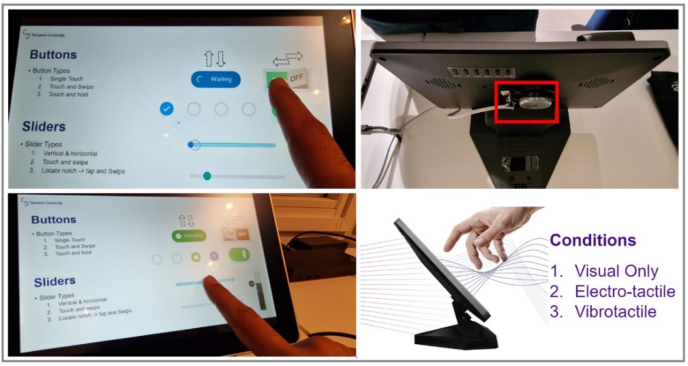
Electrostatic Feedback To create tactile feedback through friction modulation we utilized the Tanva- sTouch capacitive touchscreen development kit (Schmid and Maier, 2021). The device uses a dedicated touchscreen display layered with a high voltage capacitive interaction surface to relay electrostatic output to the user. The touchscreen surface is isolated from the display electronics to ensure interfe- rence between the capacitive layer and display assembly. TanvasTouch devkit connects directly to a Windows based PC as an external display and using the Tanvas API and TanvasTouch Engine it is possible to render a variety of tactile effects on the screen. For this study we modulated various frequency outputs by adjusting the Coulomb force between the isolated electrode under the touchscreen surface and the user’s finger (creating an air discharge of up
Comparing Electrostatic and Vibrotactile Feedback 69
Figure 1: Illustration of how electrostatic feedback on touchscreens can create friction variation using HV electrodes.Figure 2: Graphical User Interface controls and Tanvas development device with electrostatic and vibrotactile feedback.
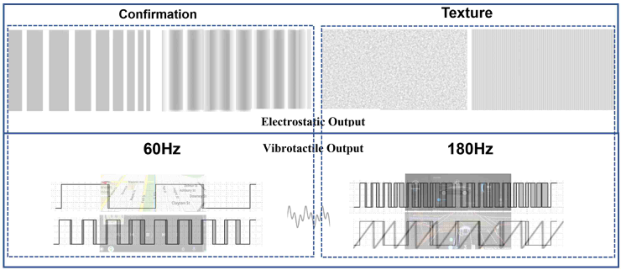
to +/−8 kV, @ 25uA RMS within the UL/IEC 62368 guidelines). The resul- ting output simulated a tactile output of 60Hz–180Hz feedback similar to vibration stimulation.
Vibrotactile Feedback Additionally, we also created conventional vibrotactile output on the Tanvas display using a Tectonic HIAX25C10-8/HS voice coil actuator powered by a D-class amplifier using square waves at 5Volts at 2amps. The amplitude (5V/2A) and frequency output (60Hz for confirmation and 180Hz for texture feedback) of the vibrotactile signals were calibrated through pilot testing to ensure both electrostatic and vibrotactile feedback yielded similar arousal.
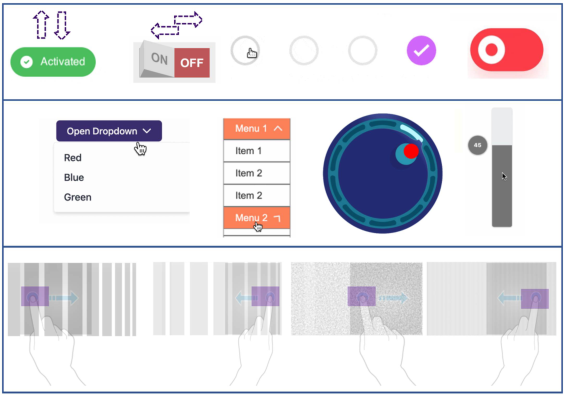
Setup Design In our study we compared 8 GUI controls including buttons, sliders, dials, knobs, gestures, lists, menus and moving an object over a tactile surface (Fig. 4), and instructed 23 participants to carry out simplified In-vehicle inte- raction System (IVIS) tasks in a laboratory setup using 3 conditions (visual
Figure 3: Illustration of actuation signals for vibrotactile feedback (bottom) and Electro- static feedback (top) for texture output (right) and discrete confirmation (left) for each of the 8 GUI controls on the Tanvas development device.Figure 4: Illustration of the 8 GUI controls (buttons, sliders, dials, knobs, gestures, lists, menus and moving an object over a tactile surface) and corresponding tasks associated with the 3 interaction conditions (Visual only, Vibrotactile and Electrostatic feedback).
only, electrostatic feedback, and vibrotactile feedback) where haptic output was provided as texture output and confirmation feedback (Fig. 3).
We measured task completion time, screen contact time, touch accuracy and screen pressure during the experiment and had participants fill out the NASA TLX load index questionnaire. Participants were also asked to rate the texture, selection process and overall experience of interacting with each UI control for the three conditions. And finally, a free form interview was conducted record any usability constraints experienced by the participants.
RESULTS AND DISCUSSION
Results show that for simplified touchscreen tasks, there was no statisti- cal significance between the three feedback conditions in errors or task
Comparing Electrostatic and Vibrotactile Feedback 71
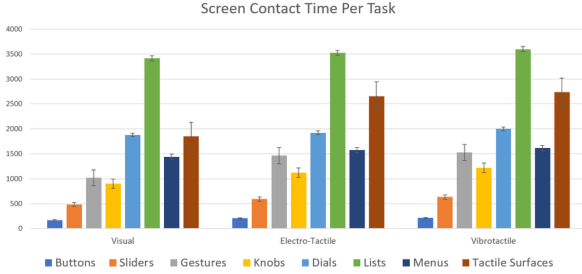
Figure 5: Screen contact time for all the 8 GUI controls across the 3 conditions visual (left), electrostatic (middle) and vibrotactile (right).
completion times, for common tasks (i.e., buttons, sliders gestures menus). However, as the tasks became more complex the participants clearly perfor- med better (fewer errors, lower screen contact time and faster task completion times, [Fig. 7]) when electrostatic or vibrotactile feedback was provided. If we look at GUI controls, such as knobs dials lists and textured surfaces (Fig. 5), we can see that accuracy for electrostatic feedback is much higher as compared to both visual and vibrotactile feedback conditions. This could be since electrostatic feedback provides more real time actuation whilst making the appropriate selection as compared to vibrotactile feedback which only yielded meaningful output as confirmation once the task is completed. This phenomenon is far more evident for the task involving dragging a cube across a textured surface, as both accuracy and pressure exerted on the touchscreen is higher in the condition with electrostatic feedback, compared to visual and vibrotactile conditions (Fig. 5 and Fig. 6).
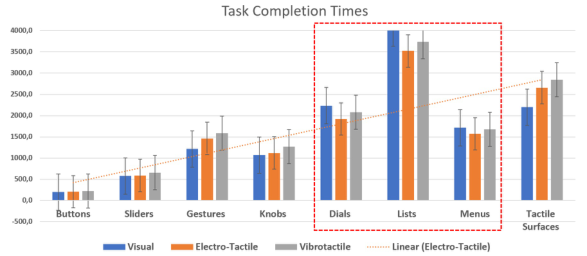
Measuring screen contact time (Fig. 5) for each of the task showed that GUI controls may require continuous and discrete sub-interaction. For exam- ple, traversing through a list on a touchscreen would need multiple discrete touchpoints on the screen as compared a single swipe gesture for buttons or a slider. In fact, making a selection using the “list” GUI can be considered as multiple tasks on its own. Additionally, comparing the screen contact time with task completion times (Fig. 6), we can see that the “list, dial, menu” tasks all required more attention and took longer to complete. Results show a statistically significant difference between electrostatic feedback condition and the visual feedback condition. Thus, in complex task such as these, it is useful to include real-time textural feedback to complement GUI interaction and reduce errors as well as task completion times.
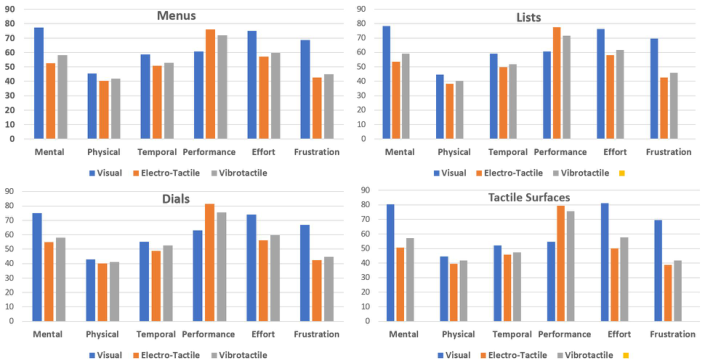
Similar results were seen in the subjective evaluations. UI controls that required multiple interaction steps (i.e., lists, menus dials and tactile surface) were rated highest on the NASA TLX load index (Fig. 7) for visual only and lowest on the electrostatic haptic conditions. Participants rated these tasks as more complex and considering these GUI controls are not com- monly utilized especially for in-car interaction, the results are in-line with expectations.
Figure 6: Task Completion Times (TCTs) for all the 8 GUI controls across the 3 conditions.Figure 7: NASA TLX task load index results for each GUI task w.r.t the 3 conditions.
On the other hand, augmenting the interaction using electrostatic feedback shows that these tasks can be made less complex bringing down the man- tal demand. However, simpler tasks such as buttons, sliders, gestures, and
Comparing Electrostatic and Vibrotactile Feedback 73
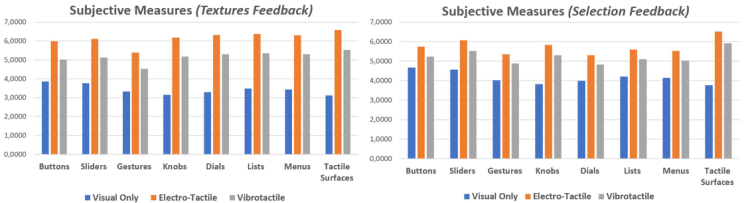
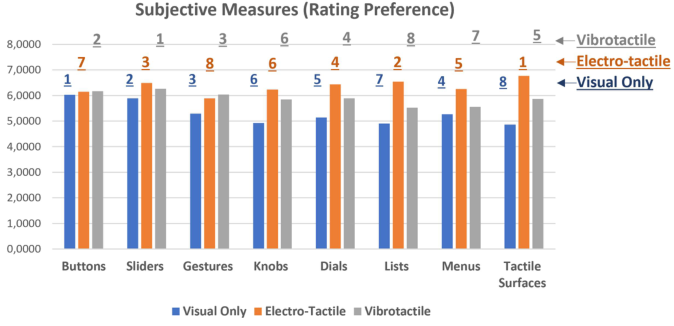
Figure 8: Subjective evaluation of all the 3 conditions for their ability to relay mea- ningful textural (left) and confirmational (right) feedback while performing the 8 GUI tasks.Figure 9: Participants rating of the 8 GUI controls w.r.t the three interaction conditions (visual only [in blue], vibrotactile [in grey] and electrostatic [in orange] feedback).
knobs can also benefit from supplementary tactile output to reduce cogni- tive demand, albeit, to a lesser extent as illustrated by task completion times, accuracy, and errors as well as screen input pressure.
Furthermore, when participants were asked to rate which of the two haptic technologies were more useful in relaying textural feedback (Fig. 8 left) while interacting with the 8 GUI controls, we can clearly see that electrostatic feedback was preferred. Conversely, for selection confirmation feedback, participants rated all three conditions similarly for simplified tasks, such as button selection, sliders, and gestures (Fig. 8 right). But for more com- plex tasks, participants preferred electrostatic haptic feedback for most of the GUI controls, followed by vibrotactile feedback. Overall, the combina- tions of visual and electrostatic feedback were rated as least intrusive, most pleasurable, and informative modality, especially for in-vehicle interaction systems (IVIS).
And lastly, participants were asked to rate each GUI control with refe- rence to the three feedback conditions. This was done to understand how information should be supplemented for multimodal interaction especially in scenarios where visual or auditory modalities are otherwise engaged or cannot be utilized extensively (in-car context [Fig. 9]).
Interestingly participants rated the most used GUI controls on touchscre- ens (buttons, sliders, and gestures) as the top three, for visual only and vibrotactile interaction, albeit in slightly varied order (Fig. 10). This was not the case for electrostatic feedback (ESF), as participants found tasks involving tactile surfaces, onscreen lists, and sliders to be the most efficient for electro- static output. This means that although these GUI controls are more complex and require additional cognitive demand, they can be made less intricate by augmenting them with ESF.
CONCLUSION
As touchscreen interaction becomes more widely adopted for in-car inter- faces it is important to research which GUI controls may be most suitable for specific use cases. This research explores eight most utilized GUI con- trols and evaluates their usability (Farooq et al., 2021; Liu et al., 2017; Wang et al., 2022; Zhang et al., 2015) with reference to three conditions: visual only, vibrotactile and electrostatic output. Results show that for simpli- fied touchscreen tasks (buttons, sliders and gestures), there was no statistical significance between the three feedback conditions w.r.t errors and task com- pletion times. However, as the tasks became more complex (i.e., lists, menus, tactile surfaces) participants performed better (fewer errors and faster com- pletion times) when electrostatic or vibrotactile feedback was provided as compared to visual only condition. Moreover, participants rated GUI con- trols which required multiple interaction steps (i.e., lists, menus) higher on the NASA TLX load index especially for visual only as compared to electro- static haptic conditions. Overall participants preferred electrostatic haptic feedback for most of the UI controls and rated it as least intrusive, most ple- asurable, and informative modality. Authors plan to utilize these results and develop customized IVIS interaction software and validate these findings in a moving vehicle where the driver’s primary task is monitored.
ACKNOWLEDGMENT
This research is part of the Adaptive Multimodal In-Car Interaction (AMICI) Project funded by Business Finland (decision # 1316/31/2021) and conducted at Tampere Unit of Computer Human Interaction (TAUCHI).
REFERENCES
Amberg M., Giraud F., Semail B., Olivo P., Casiez G., Roussel N.(2011). STIMTAC: a tactile input device with programmable friction. In Proceedings of the 24th annual ACM symposium adjunct on User interface software and technology (UIST ‘11 Adjunct). pp. 7–8. Ayyildiz M, Scaraggi M, Sirin O, Basdogan C, Persson B.N.J. (2018) Contact mech-
anics between the humanfinger and a touchscreen under electroadhesion. Proc. Natl Acad. Sci. USA115, 12 668–12 673. Basdogan C, Giraud F, Levesque V, Choi S. (2020) A review of surface haptics: enabling tactile effects on touch surfaces. IEEE Trans. Haptic13, 450–470.
Comparing Electrostatic and Vibrotactile Feedback 75
Bau O, Poupyrev I, Israr A, Harrison C. 2010 TeslaTouch: electrovibration for touch surfaces. InProc. UIST010: Proc. of the 23rd Annual ACM Symp. on User Interface Software and Technology, New York, NY, 3–6October, pp. 283–292. Farooq, A. (2017). Developing technologies to provide haptic feedback for surface
based interaction in mobile devices, PhD Thesis, University of Tampere, Faculty of Communication Sciences. Farooq, A., Venesvirta, H., Sinivaara, H., Laaksonen, M., Hippula, A., Surakka, V., Raisamo, R. (2021) Origo Steering Wheel: Improving Tactile Feedback for Steering Wheel IVIS Interaction using Embedded Haptic Wave Guides and Con- structive Wave Interference. In Proceedings of the 13th Automotive UI Conference (AUI ‘21). Higashiyama, A., Rollman, G.: Perceived locus and intensity of electrocutaneous
stimulation. IEEE Transactions on Biomedical Engineering 38(7), 679–686 (1991) Liu G. Xiaoying S., Dangxiao W., Yue L., Yuru Z. (2017). Effect of Electrostatic Tactile Feedback on Accuracy and Efficiency of Pan Gestures on Touch Screens. IEEE Transactions on Haptics. pp. 1–1. Lu, Z., Coster, X., & de Winter, J. (2017). How much time do drivers need to obtain
situation awareness? A laboratory-based study of automated driving. Applied ergonomics, 60, 293–304. Marchuk N., Colgate J., & Peshkin M. (2010). Friction measurements on a Large Area TPaD. 2010 IEEE Haptics Symposium, HAPTICS 2010. 317 - 320. Nakamura T, Yamamoto A. (2017) Modeling and control of electro-adhesion force
in DC voltage.Robomech. J.4, 18. Noubissie T., Du S., Djouani, K. Review on Haptic Assistive Driving Systems Based on Drivers’ Steering-Wheel Operating Behaviour. Electronics 2022, 11, 2102. Sato M, Poupyrev I, Harrison C. (2012) Touché: enhancing touch interaction on
humans, screens, liquids, and everyday objects. InCHI012: Proc. SIGCHI Conf. on Human Factors in ComputingSystems, Austin, TX, 5–10 May, pp. 483–492. Schmid, P., Maier, T. (2021). Electro-Tactile Feedback to Provide Assistance to Touchscreen Interaction of the Elderly. In: Kalra, J., Lightner, N.J., Taiar, R. (eds) Advances in Human Factors and Ergonomics in Healthcare and Medical Devices. AHFE 2021. Lecture Notes in Networks and Systems, vol 263. Springer, Cham. Sirin O, Barrea A, Lefevre P, Thonnard J-L, Basdogan C. (2019). Fingerpad contact
evolution under electrovibration.J. R. Soc. Interface16, 20190166. Shultz C.D, Peshkin M.A, Colgate J.E. (2018) The application of tactile, audible, and ultrasonic forces tohuman fingertips using broadband electro-adhesion. IEEE Trans. Haptics11,279–290. Spakov, O., Farooq, A., Venesvirta, H., Hippula, A., Surakka, V., Raisamo, R.
(2022). Ultrasound Feedback for Mid-air Gesture Interaction in Vibrating Envi- ronment. In: Tareq Ahram and Redha Taiar (eds) Human Interaction & Emerging Technologies (IHIET-AI 2022): AI & Future Applications. AHFE (2022), vol 23. AHFE. Vardar Y, Kuchenbecker K.J. (2021) Finger motion and contact by a second finger influence the tactile perception of electrovibration.J. R. Soc. Inter- face18:20200783. Wang Q., Sun X., Cao D., Liu G. (2022) Enhanced Interactive Performance of
Zoom-In/Out Gestures Using Electrostatic Tactile Feedback on Touchscreens, The Computer Journal, Volume 65, Issue 2, February 2022, Pages 261–274. Wijekoon D., Cecchinato M.E, Hoggan E., Linjama J. (2012). Electrostatic Modulated Friction as Tactile Feedback: Intensity Perception. Haptics: Perception, Devices, Mobility, and Communication, 2012, Volume 7282.
Yan X., Li R., Sun X., Liu G. (2019) Effects of Touch Force Profiles and Waveforms of Electrostatic Tactile Feedback on Touchscreen Pan Operation, The Computer Journal, Volume 62, Issue 7, July 2019, Pages 1016–1035. Zhang Y., and Harrison C. (2015). Quantifying the Targeting Performance Benefit of
Electrostatic Haptic Feedback on Touchscreens. In Proceedings of the ACM Inter- national Conference on Interactive Tabletops and Surfaces (Madeira, Portugal, November 15 - 18, 2015). ITS ‘15. pp. 43–46.
LISTED IN THE AHFE DIGITAL BOOKSTORE CATALOGUE
Explore the complete digital volume
Intelligent Human Systems Integration (IHSI 2023): Integrating People and Intelligent Systems
Read this individual research paper free through the original publisher, or explore the full digital proceedings book.
ISBN 978-1-958651-45-2
Explore this ISBN in the AHFE Bookstore ↗Listed in the July 2026 bookstore catalogue; search by ISBN to confirm current availability · Digital book purchase optional