Joelle Zimmermann, Karen Bredenkamp, John Hwong, Ketki Jadhav (2022). Human Interface Guidelines for Interaction Zones in AR. In: Human Interaction & Emerging Technologies (IHIET 2022): Artificial Intelligence & Future Applications. AHFE Open Access, vol. 68, pp. 270–275. https://doi.org/10.54941/ahfe1002742
In Augmented, Virtual and Mixed Reality, users interact with content in 3D space. Currently, surprisingly little is known about where these user interfaces should be placed in 3D space for optimal comfort and productivity. In this presentation, we will discuss factors that affect content placement and put forward a set of best practices for interaction zones in 3D. The output of the project is a set of Human Interface Guidelines (HIG) for Interaction Zones in AR. The Guidelines can be thought of as an AR version of the original Human Interface Guidelines put forward by Macintosh in 1995. The purpose of the Guidelines is to help application designers and developers in AR to design user-centric content in AR. Given the limited research that exists on the range of factors affecting interaction zones in AR, this document will contribute towards growing shared knowledge on this topic. This project combined knowledge of human physiological capabilities and limitations, Anthropometric ranges of the American target population, and current ergonomics guidelines and principles, as well as functional capabilities of Magic Leap 2 mixed reality device in the establishment of the HIG. Specific focus areas of the Human Interface Guidelines (HIG) for Interaction Zones in AR include: Ergonomics and Visual Comfort, Direct vs Indirect Interactions (gesture, gaze, controller), Field of View, and UI Behavior. In Ergonomics and Visual Comfort, we provide recommendations on content placement based on natural human line of sight, ergonomically comfortable head movement, and natural range of eye rotation. In Direct vs Indirect Interactions, we describe that where content is presented relative to the user depends on the way in which the user is expected to interact with the content. For example, content placement for direct (i.e. touch) interactions may be dictated by arm length anthropometry, as well as the field of view of the gesture-perceiving cameras. In Field of View, we review the relationship between field of view and viewing distance, and provide some techniques that designers can use to mitigate the noticeability of cut-off content due to limited FOV. In UI Behavior, we put forward best practices for how the UI moves with the user to prevent discomfort. The methodology to create the Human Interface Guidelines for Interaction Zones in AR is a literature review of existing research and guidelines on ergonomics as well as primary research in AR. The Guidelines will provide functional instructions for Developers and Designers of Augmented, Virtual and Mixed Reality applications, informing the design of content that is comfortable, convenient and optimally placed for the user.
When personal computers first came out, MacIntosh proposed a set of Human Interface Guidelines (HIG) to create products that optimize the inte- raction between users and computers (Apple Computers, Inc, 1992). The document was critical in developing a design language for the PC. Today, we are in a similar position - AR/VR/MR is a new medium where very few best practices exist.
The Human Interface Guidelines for Interaction Zones in AR will provide best practices for UI placement and behavior based on human physiology, anthropometrics and ergonomics research, and testing on the Magic Leap 2 AR device. Given the limited research that exists on the range of factors affecting interaction zones in headworn AR, this document will contribute towards growing shared knowledge on this topic.
HUMAN INTERFACE GUIDELINES Ergonomic and Visual Comfort
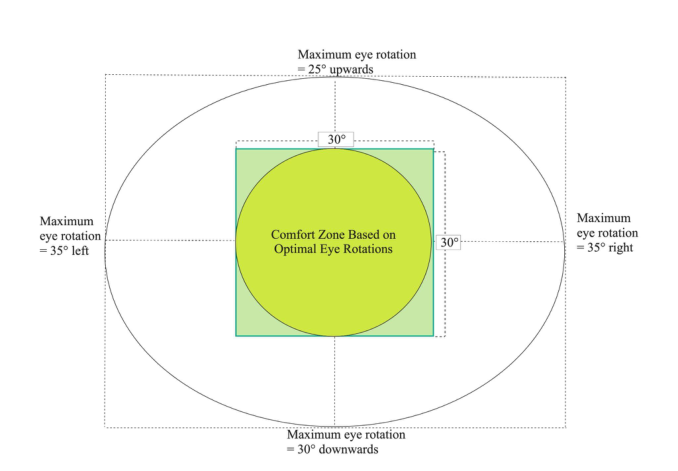
In headworn AR/VR/MR, consider head movement and eye rotations for placement of content that is comfortable for the user. Place most important content in a 30x30° area centered around the line of sight and avoid placing
Human Interface Guidelines for Interaction Zones in AR 271
Figure 1: Content placement based on eye rotations.
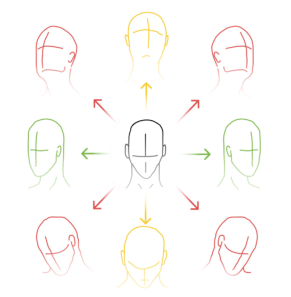
content that is frequently interacted with in the corners and edges of the FOV (See Figure 1). This is because optimal eye rotations are 15° in each direction from the center of the line of sight, after which larger eye rotation might be more uncomfortable. If content extends past the part of the display visible to the user, users will be required to turn their heads to view the content. Frequ- ent diagonal, and upward vertical head movements may be uncomfortable - and so corners and top of FOV in particular are a less optimal location for content that is frequently interacted with (See Figure 2, Left). Moreover, visi- bility of outer edges of the FOV will depend on the unique fit of the headset on each user. Also, edges of the FOV may experience dropoff in image quality (See Figure 2, Right).
Note that a person’s natural line of sight slopes slightly downwards, appro- ximately 10-15° below the horizontal (MIL-STD-1472G, 2012; Panero & Zelnik, 1979). Center the FOV at, or slightly below, the natural line of sight. Some headworn devices may tilt (pitch) downwards to account for the downwards line of sight.
For optimal visual comfort under most circumstances, it is recommended to keep the content close to the focal plane. Placing content too close to the user for extended viewing will be uncomfortable and should be avoided.
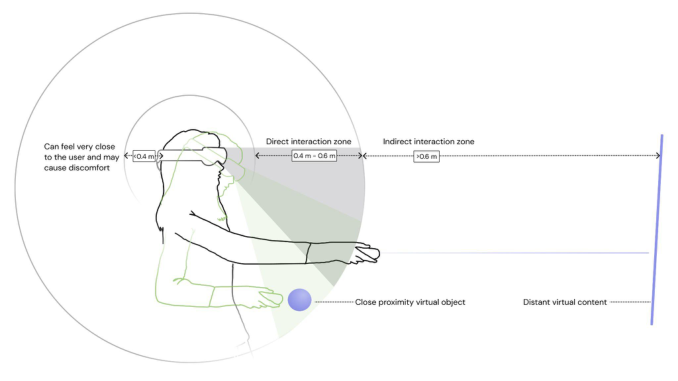
Interaction Ergonomics Where the content is presented relative to the user depends on the way in which the user is expected to interact with the content - directly or indirectly (Figure 3).
Figure 2: Frequent diagonal, and upward vertical head movements may be uncom- fortable, therefore, limit content placement in the top and corners of the FOV (Left). Image quality may also drop off around the edges and corners of the FOV (Right).Figure 3: Comfort zones for direct and indirect interactions.
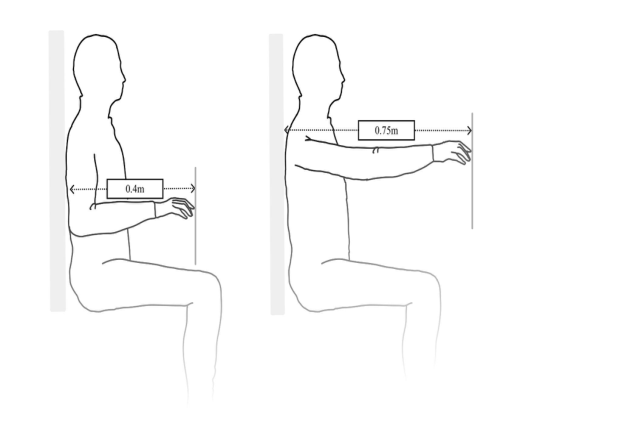
Direct Inputs For direct inputs, such as touch, place content within arms reach, between 0.4-0.6m, with the most comfortable being at the lower end of this range (Figure 3). The elbow should remain relaxed (i.e. forearm at a 90° angle from the body, not extending backwards), and shoulders unflexed. Users should not need to raise their arms up for frequent or long interactions with con- tent. Users with the smallest arm reach dimension should be accommodated; accordingly, 5th percentile data should be utilized (MIL-STD-1472, 2012). Note that anthropometry varies by gender and ethnicity. Below, we present numbers based on a North American population (See Figure 4). In all cases, content position should be adjustable by the user to ensure comfort.
Human Interface Guidelines for Interaction Zones in AR 273
Figure 4: Reach distance for unflexed shoulders, for 5th percentile of females is 0.40m (Left), By no means should content that users are interacting with directly be placed further than the fully stretched arm for the 5th percentile of females at 0.73m (Right) (MIL-STD-1472, 2012).
Gestures Indirect gestures, where the user can interact with content at a distance, may be more comfortable than direct gestures, because users do not need to hold their arms out to touch the content. Users can keep their arms down and rela- xed, and move only their fingers and hands. Moreover, consider the gesture cameras’ field of view, when designing for gesture interactions. Be cautious of unintentionally invoked events when hands are at rest or gesticulating in areas users think hands are not being tracked.
Gaze When gaze is the input modality, place content where eye-tracking will work best. Users will rotate their eyes to view content 15° away, and rotate their heads to view content further out.
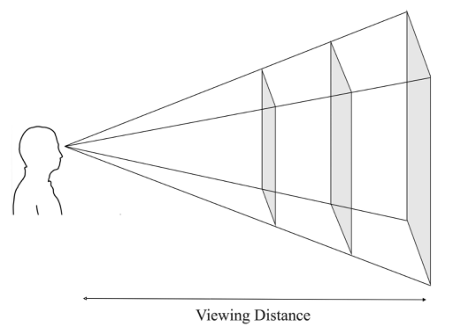
Field of View Size content to fit within the Field of View (FOV). Content size may require adjustment based on viewing distance, being larger when the user is viewing from far away (Figure 5). Content size can be calculated from the angular degrees of the FOV, and the viewing distance (i.e. how far the user is from the display), using the following formula.
Size = 2 * ViewingDistance * tan (Angle/2) Note that the formula holds true under the assumption that the line of sight is in the center of the display.
Figure 5: Sizing content to FOV, by viewing distance.
If large content does need to extend beyond the FOV, there are some tech- niques that designers can use to mitigate noticing the FOV. For example: blurring or fading content on the edge of the FOV where it is clipped, or using angular or square objects, as users tend to notice more when round or circular objects are clipped. In some cases, designers may wish to draw the user’s attention to content outside the FOV. Use visual and audio cues such as arrows at the edges of the FOV, wayfinding paths, or spatial audio cues to direct the user’s attention to a place outside their immediate view.
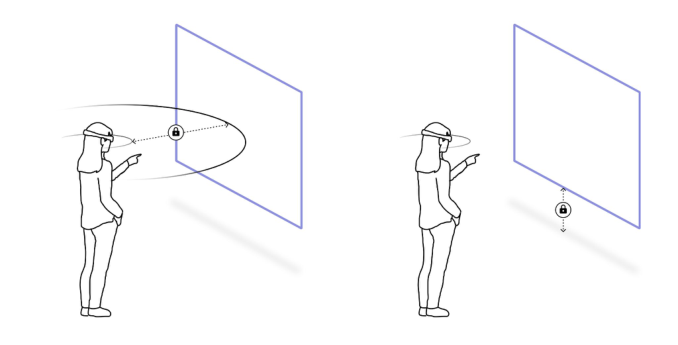
UI Behavior UI may be locked to the user (head-locked), stationed in place (world-locked) or even locked to the hand-held controller (controller-locked) (Figure 6). UI behavior should take into account whether the user is moving around or stationary, and the size of the content. If content is large, do not head-lock, as this will obstruct the user’s view of the environment in AR/MR, or of other content. Head-locking long blocks of text will create an awkward reading experience, as we naturally turn to read text. Similarly, reading small blocks of text locked to the controller will be uncomfortable, as the user must steady their head and hand to read it.
Provide the user the option to hide the UI, or pin the UI in place. In AR/MR, be mindful of using world occlusion intentionally. When world occlusion is turned on, important interactable content can get hidden by the user’s environment when they are moving around, making it hard to retrieve, and contributing to a lot of frustration.
Do not rigidly head-lock content - translations and rotations should not be 1:1 with the user’s head movements as this may cause discomfort. We recom- mend the content to translate with (i.e. follow) the user as they move, and only loosely rotate with the user’s head movements i.e. content only rotates after a user’s head rotation exceeds a particular angle. Headlocked content should not have spatial audio, as it may disorient the user.
When users move between sitting and standing up, we recommend height adjusting the content by implementing a vertical lazy follow adjustment. The
Human Interface Guidelines for Interaction Zones in AR 275
Figure 6: Head-locked (Left) and World-locked (Right) content.
level of follow adjustment will differ depending on the size of the content and spawning distance from the user.
CONCLUSION
The Human Interface Guidelines (HIG) for Interaction Zones in AR will ena- ble designers and developers to design user interface placement and behavior informed by human physiology, anthropometrics and ergonomics research. Future versions of HIG for AR will include continued development of best practices for Interaction Zones, as well as other topics, such as Visual and Audio UX elements, Spatial Mapping, Privacy, Accessibility, and Multi-User experiences.
ACKNOWLEDGEMENT
The authors would like to acknowledge the Magic Leap Design teams for their contributions to this document.
REFERENCES
Apple Computer, Inc. Macintosh Human Interface Guidelines (1992) Addison- Wesley Publishing Company, United States. MIL-STD-1472G Department of Defense Design Criteria Standard: Human Engine-
ering (2012). Panero, J., Zelnik, M. (1979). Human Dimension and Interior Space: A Source Book of Design Reference Standards. Whitney Library of Design: an imprint of Watson- Guptill Publications. New York.
Read this individual research paper free through the original publisher, or explore the full digital proceedings book.
ISBN 978-1-958651-44-5
Explore this ISBN in the AHFE Bookstore ↗Listed in the July 2026 bookstore catalogue; search by ISBN to confirm current availability · Digital book purchase optional