Susan Labude, Dominik Breck, Max Schlosser, Alexander Marbach, Christian Roschke (2022). Development of a usability-optimised design concept in the context of an e-learning application for students in the field of data science. In: Human Interaction & Emerging Technologies (IHIET 2022): Artificial Intelligence & Future Applications. AHFE Open Access, vol. 68, pp. 1–8. https://doi.org/10.54941/ahfe1002706
This paper is situated in the field of human-machine interaction and particularly deals with the user-centred development of a design concept for an e-learning solution in the domain of data science. The focus of the development lies on usability.Over the last few years there has been a shift from traditional teaching-learning scenarios to software-based e-learning solutions. This transformation has resulted in different challenges in a wide range of subject domains. One of the most difficult challenges is to keep students motivated in using these systems. Especially the area of human-machine interaction offers versatile approaches for improving student motivation.At the Institute for Computer Science and Media in Research and Transfer (CSMRT) at the University of Applied Sciences Mittweida, it is planned to implement an e-learning solution that will enable students to independently acquire knowledge in the field of data science. In order to ensure a high level of acceptance regarding the platform, the design should aim for the best possible usability.In recent years, a wide range of research has been conducted on increasing student motivation in e-learning applications. However, a generalised solution to the problem cannot be found, as students from different disciplines have varying requirements concerning this type of system. Therefore, teaching-learning scenarios need to be specified for the purpose of the research in order to be able to investigate specific requirements for the given designs. In this paper, the target group of the application is limited to students at University of Applied Sciences Mittweida from STEM-related fields of study. Specifically, the domain of data science will be considered. The aim is the student-oriented development of a design concept for the implementation of an e-learning tool aimed at imparting knowledge in the field of data science. In doing so, precise design requirements will be defined, which have not yet been investigated in the context of data science.The development of the design concept will be carried out in a user-centred way and on the basis of standardised specifications and norms in the field of human-machine interaction and usability. Consideration of the students' needs is of particular relevance here. Therefore, students should be involved in the entire development process and help to shape it. This student-oriented development is intended to contribute to the highest possible adaptation of the design to the later user group. The aim is to create a design that is as user-friendly as possible. This should increase the motivation towards using the application.As part of the paper, an evaluation concept will be developed to assess the usability of the resulting design. Just like the development process, the evaluation focuses on students. Since the project is currently in the conceptual phase, the evaluation will be carried out using a paper prototype. The results will serve as a base for an iterative process of implementing and evaluating the application.
In recent years, it could be observed that classical teaching and learning methods were intersecting with digital elements or were being offered in a completely digital form. The Covid-19 pandemic has abruptly driven the change and shown that corresponding offerings have become indispensable and that their use in established structures simultaneously brings new chal- lenges (Naqvi and Sahu, 2020). Not least because of the ongoing process of digitization the need for learning offerings that can be used digitally conti- nues to grow. This process was already developing strong momentum before the outbreak of the pandemic and is constantly changing the requirements for such services (Kalimullina, Tarman and Stepanova, 2021). As digitization continues to advance in the future, the requirements for e-learning are con- stantly changing (Ally, 2019). The relevance of digital learning scenarios can thus be classified as promising for the future. For new or existing e-learning offerings, an intensive examination of methods to make applications more user-friendly would therefore appear to be useful.
In contrast to analogue teaching methods, digital offerings require direct interaction from the learner in order to use a platform. The feedback that a platform provides through its interactivity is a core component of the effe- ctiveness of any digital learning experience (Erhel and Jamet, 2013). From these characteristics, it can be deduced that extensive requirements must be placed on the usability of the digital offering to maximize accessibility. Many basic ideas for optimizing usability can be traced back to approaches of user- cantered design that prioritize students’ needs. Analysis and case studies that evaluate, for instance, semiotic, technical, and didactic criteria of a platform can provide insight into accessibility and usability in this context. At the same time, they can help to find approaches for the sustainable optimization of a digital service (Valtolina et al., 2012).
To evaluate or compare the usability of learning platforms, different metrics are necessary. These are usually not immediately definable, since the usability of an e-learning service often cannot be determined based on single, universally applicable criteria due to the large variety of existing approaches (Costabile et al., 2005). Instead, a framework individually tailored to the target audience and content often becomes necessary for the creation and evaluation of a new e-learning service. In addition to the influence of a plat- form’s cognitive characteristics, students’ motivation to learn is also related to the usability (Zaharias and Poylymenakou, 2009). In the past, numerous scientific approaches have been developed to evaluate the usability of learning services and underlying frameworks. Several studies have analysed existing offerings according to predefined criteria (Kiget, Wanyembi and Peters, 2014) (Rupere and Jakovljevic, 2021) and have attempted to draw general conclu- sions from specific issues. Due to the diversity of existing methods and the differences in content between services, such an approach is usually not feasible.
In contrast, the needs of a specific learning group are captured here using established metrics. Based on the data collection, a paper prototype is desi- gned that incorporates identified needs of the target group to achieve the
Development of a Usability-Optimised Design Concept in the Context 3
Figure 1: Process diagram of the iterative development process.
Figure available in the original PDF paper.
highest possible degree of usability. Students from the field of data science at the UAS Mittweida who use the prototype should thereby experience a signi- ficantly higher motivation to use the service and thus increase their learning success simultaneously. To achieve this, an iterative development process as seen in figure 1 is followed. First a target group analysis is conducted, which serves as the basis for a UI concept. The created concept is then evaluated with the help of a focus group interview and revised based on the results. The steps described are explained in more detail below.
DEVELOPMENT OF A UI CONCEPT To allow for orientation in the creation of an initial design, information and data are needed to map the requirements of the target group. Therefore, an online questionnaire is used, which provides an initial view on the target group’s requirements based on predefined questions and answer options. For the collection of initial information, ten participants are interviewed. At the time of the survey, the volunteers are all students of the MINT-related study program of media informatics at the UAS Mittweida, and thus have a con- nection to the field of data science. All subjects were aged between 18 and 33 years at the time of the survey, with an overall average age of 22 years. Eight of the ten participating respondents are male while two respondents are female. The survey is carried out unsupervised and without a fixed time frame.
The first part of the survey dealt with the learning platforms already used by students. Since the most frequently used learning platforms in the STEM- related courses of study at the UAS Mittweida are Moodle and Opal, the students were asked what they like and dislike about these platforms. The evaluation of the questions indicated that students often have problems with navigation in Moodle. They mentioned long navigation paths, unclear menu navigation, problems finding courses, and difficult familiarization with the software. The appealing design, the clarity of the individual courses through subdivision into segments, and interactive assignments were highlighted as positive features. In Opal, on the other hand, students were less satisfied with the visual design. Students found the structure confusing and the visual appe- arance inconsistent. The most frequently cited problem was the presentation of continuous text. The font was described as too small, which made reading the texts difficult. The dashboard was frequently mentioned as a positive aspect for Opal. Portlets such as “Courses I am attending” make navigation much easier and finding courses can be done very quickly.
In the second part of the survey, the respondents were asked whether cer- tain aspects of a learning platform increase or decrease their motivation to use it. The results showed that applications with a dark mode motivated the test
respondents to a greater extent. The subjects even found applications with a light mode to be demotivating in some cases. According to the participants, motivation was most strongly increased by a visually appealing and clearly arranged user interface as well as good readability of texts. The possibility of using the learning system on a PC was more relevant to the subjects in terms of motivation than the possibility of using the system on a mobile device.
The conception of the first digital paper prototype is created based on the previously conducted survey as well as the criteria for usability. The crite- ria for usability are defined in the DIN standard DIN EN ISO 9241-110 “Interaction principles”. They include suitability for the user’s task, self- descriptiveness, conformity with user expectations, learnability, controllabi- lity, use error robustness and user engagement (International Organization for Standardization, 2008).
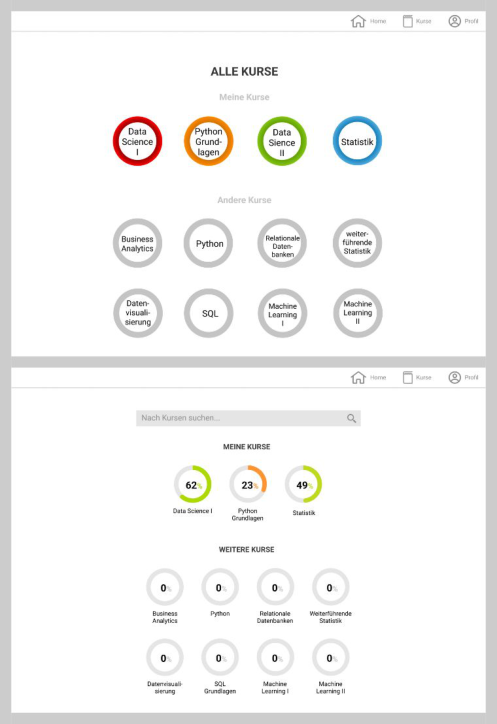
The central anchor point of the design is the home page. Starting from here, the user can navigate to all important areas of the system. Based on the results of the survey, the navigation of the application should be as clear and intuitive as possible to increase user motivation. Therefore, the number of navigation elements is kept low. The header simply allows the user to navigate to the home page, courses and their own profile. On the homepage itself, the user is shown his current level and a progress bar as well as a button to navigate to the courses he is enrolled in. The design uses simple shapes to improve clarity. Therefore, the courses are displayed as circles in the course overview, which only contain the respective course title. When the user selects one of the courses, an overview of the course is displayed. A course consists of different sections, which in turn contain articles. At the end of each article, the user fills out a short quiz to test his knowledge. If he answers all questions correctly, he unlocks the next article. Each of the sections are assigned a colour and in the course overview the articles of each section are displayed in the corresponding colour. A navigation bar is displayed at the top of the screen, which contains each section included in the course. This way the user knows at any time in which part of the course he currently works. Articles that have not yet been unlocked are displayed in grey in the course overview, while articles that have already been completed are displayed in full colour.
REVISION OF THE UI CONCEPT To follow the user-centred approach, the paper prototype is evaluated in a focus group interview. This interview is also conducted with students of media informatics at the UAS Mittweida. Four students between the ages of 20 and 24 are invited to the interview. Their average age is 22 years. In preparation an interview guideline was developed. Among other things, it defines the topics to be discussed. The results of the survey are discussed again with the participants to clarify open questions. Furthermore, the prototype is shown to the subjects and they have the opportunity to evaluate it and provide feedback. The interview focuses on aspects of usability such as self- descriptiveness and conformity with user expectations, i.e. the interviewer asks whether the respondents find the interface self-explanatory and whether they are able to orientate themselves within the application. The focus group
Development of a Usability-Optimised Design Concept in the Context 5
interview is conducted online using the videoconferencing tool Zoom. The online collaboration platform Miro is used for comments and suggestions.
First, the focus group interview addressed the results of the survey. The interview participants were unanimously in favour of using a dark mode and thus agreed with the results of the survey. They also agreed with the survey participants regarding mobile use which was not desired. Since the partici- pants in the survey had indicated that they did not find a comparison with other students very motivating and even demotivating, this question was also discussed with the participants in the focus group interview. Initially, the par- ticipants also indicated that they perceived a comparison as demotivating. However, upon further inquiry, it became apparent that this view resulted from a fear of being seen as the bottom performer when compared to all fel- low students. The participants then indicated that an anonymous comparison with the average student or an award for only the best three students would in turn help to improve motivation.
In the second part of the interview, the prototype of the application was discussed. The participants were largely positive about the prototype. They found the design visually appealing and appreciated the clarity. Overall, how- ever, the students wished for more feedback for learning successes as well as more interactive elements and gamification. Specifically, participants wanted their own courses to be moved to the home page so they could navigate more quickly. They also noted that a progress bar for courses would provide good orientation. For the display of all courses, interview participants wished for a way to search for courses. They also expressed a desire to receive more infor- mation about a course before enrolling. Participants further stated that they thought a progress indicator within a course would be useful. In addition, there should be the possibility for course instructors to include pictures and videos in the courses to make them more appealing.
The results of the focus group interview are used to refine the prototype and further adapt it to the needs of the students. Some aspects of the pro- totype may be retained based on the interview. For example, the prototype is continued to be developed with a focus on the desktop application and includes both a Dark Mode and a Light Mode. The general design concept is also retained, as it was perceived by the interview participants to be visually appealing.
The structure of the application is also essentially retained. There are only two changes to the structure. First, the user’s own courses are moved to the homepage, as requested by the participants in the focus group interview. Fur- thermore, the enrolment process is revised. After clicking on the course, the user now first receives an overview of the course with a brief course descri- ption and can then decide to enrol in the course. Since the subjects of the survey indicated that they did not find a comparison with others motivating, no opportunity to compare was created. Based on the findings of the focus group interview however, a top three list is now added to the course overview. This will allow for comparison without demotivating certain students.
The course list is also slightly revised as seen in figure 2. First, a sea- rch function is integrated into the list, allowing users to search for specific
Figure 2: Comparison of the initial (top) and revised (bottom) design concept of the course overview.
courses. Furthermore, a progress indicator for each course is integrated, allo- wing students to keep track of their progress. In addition, the interview participants wanted more gamification and progress visualizations. There- fore, it is now planned to display an animated progress bar after each passed quiz, which visualizes the increasing experience points of the user. Further- more, it is planned to integrate Achievements, which the user can unlock through certain actions, such as studying a certain number of days in a row.
RESULTS AND DISCUSSION
The conceptualization process of the design draft and paper prototype was accompanied by various evaluation steps. Specific criteria were used to determine which components had a relevant impact on the usability of the application. With the help of the provisional results, it was possible to incor- porate criteria that have a more positive effect on usability with a higher focus in the design of the application. By embedding such intermediate steps
Development of a Usability-Optimised Design Concept in the Context 7
in the iterative process of development, it was ensured that features that do not decisively influence or even diminish usability do not enter the further development process.
The digital paper prototype created on the basis of a target group analysis could be subjected to an initial evaluation in a focus group interview. In this way, it was examined whether the prototype meets the requirements of the target group and the UI was further adapted to the needs of the users.
CONCLUSION
In order to test the validity of the resulting design, an evaluation is essential in the further development. For this purpose, an evaluation concept must be developed. The evaluation of an e-learning application is to be understood as a multi-layered process, which usually cannot be carried out under generali- zable, homogeneous criteria. Instead, it is recommended that the elaboration of properties to be evaluated is based on superordinate dimensions such as presentation, hypermediality, application proactivity and user activity of an application (Costabile, 2005). While the evaluation steps conducted up to this point primarily served as a feedback loop for iterating the prototype, further, more extensive studies will be necessary in the future to be able to make statements about the increase in usability. It should be possible to con- firm the validity of introduced changes in the context of usability through further evaluations.
For such a measurement of the usability within a platform, versatile, stan- dardized metrics already exist, the use of which is recommended under certain aspects in each case. A large number of studies conducted mainly use the core methods of questionnaires, interviews, or direct observation of test sub- jects (Abuhlfaia and Quincey, 2018). For this reason, primarily established methods from these areas will be considered for further evaluations in the future.
One possible method is the System Usability Scale (SUS). This uses a stan- dardized questionnaire to determine a score for the usability quality achieved by a platform (Assistant Secretary for Public Affairs, 2013). The use of the SUS score has already been validated with evaluations of various sizes (Orfa- nou, Tselios and Katsanos, 2015). The Software Usability Measurement Inventory method uses a similar approach for software products. Through a likewise generic questionnaire, comparison to competing products or dif- ferent iterations becomes possible by determining user satisfaction with the software (Arh and Blažiˇc, 2008).
The described evaluation method can be used in the further course of the project to assess whether the changes made to the UI and design concept contribute to an improvement in usability.
REFERENCES
Abuhlfaia, K. and Quincey, E.de (2018). The usability of e-learning platforms in Higher Education: A systematic mapping study, Electronic Workshops in Computing Volume 32, pp. 1–13.
Assistant Secretary for Public Affairs (2013). System usability scale (SUS). Usability.gov.: https://www.usability.gov/how-to-and-tools/methods/system-usability- scale.html [Accessed March 28, 2022]. Ally, M. (2019). Competency profile of the digital and online teacher in future edu-
cation, The International Review of Research in Open and Distributed Learning Volume 20 No. 2, pp. 302–318. Arh, T. and Blažiˇc, B. J. (2008). A case study of usability testing–the SUMI evaluation approach of the EducaNext portal, WSEAS transactions on information science and applications Volume 5 No 2. pp. 175–181. Costabile, M. F. De Marsico, M. Lanzilotti, R. Plantamura, V. L. and Roselli, T.
(2005). “On the usability evaluation of e-learning applications”, in: Proceedings of the 38th Annual Hawaii International Conference on System Sciences, pp. 6b- 6b. Erhel, S. and Jamet, E. (2013). Digital game-based learning: Impact of instructions and feedback on motivation and learning effectiveness, Computers & Education Volume 67, pp. 156–167. International Organization for Standardization (2008). Ergonomie der Mensch-
System-Interaktion – Teil 110: Grundsätze der Dialoggestaltung. ISO DIN EN ISO 9241–110. Kalimullina, O. Tarman, B. and Stepanova, I. (2021). Education in the context of digitalization and culture: Evolution of the teacher’s role, pre-pandemic overview, Journal of Ethnic and Cultural Studies Volume 8 No 1, pp. 226–238. Kipkurui, N., G., P. and Ikoha, A. (2014). Evaluating usability of e-learning
systems in universities, International Journal of Advanced Computer Science and Applications Volume 5 No. 8, pp. 97–102. Naqvi, W.M. and Sahu, A. (2020). Paradigmatic shift in the education system in a time of COVID 19, Journal of Evolution of Medical and Dental Sciences Volume 9 No. 27, pp. 1974–1976. Orfanou, K., Tselios, N. and Katsanos, C. (2015). Perceived usability evaluation of
learning management systems: Empirical evaluation of the system usability scale, The International Review of Research in Open and Distributed Learning Volume 16 No. 2, pp. 227–246. Rupere, T. and Jakovljevic, M. (2021). Usability and user evaluation of an Integrated Multimedia e-learning management system, Knowledge Management & E-Learning: An International Journal Volume 13 No. 3, pp. 334-366. Valtolina, S. Barricelli, B. R. Mesiti, M. and Ribaudo, M. (2012). User-centered design
of e-learning tools for users with special needs: The visualpedia case study. Zaharias, P. & Poylymenakou, A. (2009). Developing a usability evaluation method for e-learning applications: Beyond functional usability, International Journal of Human-Computer Interaction Volume 25 No. 1, pp. 75–98.
Read this individual research paper free through the original publisher, or explore the full digital proceedings book.
ISBN 978-1-958651-44-5
Explore this ISBN in the AHFE Bookstore ↗Listed in the July 2026 bookstore catalogue; search by ISBN to confirm current availability · Digital book purchase optional