Jan Neuhöfer, Sabine Hansen, Tim Wöllenstein (2022). User Interface Assessment of a Tool for Digital Learning in Nursing. In: Healthcare and Medical Devices. AHFE Open Access, vol. 51, pp. 144–150. https://doi.org/10.54941/ahfe1002110
Digital Learning has gained importance for vocational training in a broad range of professions. In times of uncertainty, like experienced with the COVID-19 pandemic, this is especially true for the healthcare sector, as classrooms and training facilities may not be accessible or even available. At this point, tools for digital prequalification and learning can generate a decisive benefit, as they allow individual, self-paced transfer of knowledge independently from physical facilities, and as part of on-site or online classroom teaching. Web-based trainings (WBTs) are a good example of appropriate, proven technology, which makes interactive, multi-lingual learning content available on a broad range of mobile devices, like laptops, tablet PCs and smartphones. As WBTs offer manifold possibilities to accommodate information, an adequate user inface is crucial to make this information accessible, but also to reduce the on-screen information where reasonable. In our paper, we present a learning module for nursing training and its user interface. We outline the interaction concept behind it and describe all its interactive elements, such as tabs, buttons, and pop-up boxes. We also show the results of an empirical study featuring eye tracking in which we assess perception, comprehensibility, and motivation.
Contemporary Vocational Training in Nursing Like in many professions, nursing teachers and instructors primarily transfer knowledge to students via courses in class, with inclusion of and reference to professional literature and other common learning material such as videos. As there is a large share of functional capabilities to be taught, classroom instructions are accompanied by supervised sessions in so-called “skills labs” (Kirwa and Gakere, 2016), where students can safely train their practical skills in a realistic but simulated nursing environment. In these skills labs, manikins with integrated technology to simulate physical limitations, injuries and handicaps can help to increase realism. As access to skills labs is usually limited, students need to prepare well, to get the most out of these practical sessions, and rely on information they have received from classes and the above-mentioned material.
User Interface Assessment of a Tool for Digital Learning in Nursing 145
Digital Learning Tool Design Challenges As digitalization proceeds on a global scale, so does the need for more advanced, adequate tools for vocational training. This is also the case in nursing education, and the 21st century has brought along digital learning tools, like web-based trainings (WBTs) (Washer, 2001), and more recen- tly mobile apps (Calinici, 2017) and virtual reality training (Elliman et al. 2016). Although there is no international standardization on procedures, equipment, durations or examinations, these tools do have to fulfill certain criteria to be successful as a learning medium next and in addition to the well- established classroom instructions. For instance, web-based training units should be structured and guided, so that learners can use modules individu- ally and independently. Additionally, their appearance, especially colors and layout, should communicate a certain connection with the domain of nur- sing. Finally, animations, interactivity and short quizzes can help to increase motivation and support the learning process. However, gamification ele- ments should be deployed with consideration, to match the seriousness of the content, which should ideally run properly on different kinds of devices, e. g. laptops, smart phones, and tablets. A module should also remember where the user has stopped last time, to ensure a seamless learning experie- nce. Finally, as many nursing procedures are critical to the patients’ health, instructions must be unambiguous: clear wording and terminology, appro- priate illustrations, and – if multilingual – professional translations ideally accompanied by speech output can help to reach this goal. Nevertheless, the right balance between information density and lucidity remains a challenge. Smart user interface design with deliberate use of information nesting helps to find that balance. In the following chapters, we describe our multilingual, web-based solution for nursing trainees and results as well as conclusions we draw from an empirical assessment on perception, comprehensibility, and motivation.
DIGITAL LEARNING TOOL DESIGN
Background
As focus of a research project started in 2020 and funded by the German Ministry of Health, we implement and evaluate a comprehensive learning solution, covering an expert selection of essential nursing procedures as a collection of interactive, multilingual WBT modules. With German as the primary language, each module includes translations of text and speech into English, Spanish, Portuguese, and Vietnamese, to support non-native lear- ners on demand. In our previous paper (Neuhöfer et al. 2021), we described the solution’s production pipeline and outlined its general design features. Results of a preliminary study with a module on aseptic change of wound dressing indicated a gain in knowledge of terminology and processes as well as a positive rating on the module’s general usability and a high level of user acceptance. Nevertheless, participants were left unsupervised while using the module, so there has been no insight yet on how they worked through the module and if its user interface was entirely comprehensible.
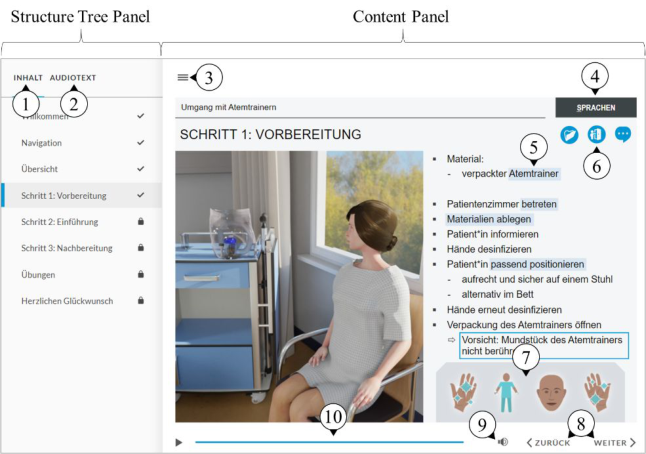
Learning Module User Interface The modules are created with the authoring tool Articulate Storyline 360 (Ash, 2015) and formatted into interactive, responsive HTML5. The layout follows classic guidelines, where the content panel is accompanied by a structure tree panel (see Figure 1).
Figure 1: Learning module user interface. (1) Structure Tree Tab. All the module’s content is listed on this tab of the sidebar with a structure tree. A step may contain sub-steps and thus can be expanded. The first time a user accesses the module, they must go through the whole content, page by page. Nevertheless, going back to a previous page is possible anytime.
(2) Audio Text Tab. Each page of the module is accompanied by pro- fessional human audio narration. The audio narration often expands more thoroughly on what is shown on the content panel. This tab contains the transcript to read along for better comprehension and as a reference.
(3) Sidebar Toggle. The sidebar containing the content and audio text tabs can be hidden on demand, to increase space available for the learning content on the right. This allows to use the screen space on mobile devices more efficiently.
(4) Languages Selection Drop-Down. On each page, you can switch from German to a different language: Englisch, Spanish, Portuguese, or Vietna- mese. All text and audio narration will then be available in that language. To proceed within the process, users always must return to German.
(5) Additional Information Overlays. After the narration on a page has ended, users can access additional information by clicking or touching on transparent, blue rectangles overlayed on certain keywords. This brings up a pop-up box, which can contain explanatory text, multiple interactive pages or even videos showcasing procedures and thus should not be missed.
User Interface Assessment of a Tool for Digital Learning in Nursing 147
(6) Special Information Icons. Some pages contain icons in the upper right corner which, when clicked or touched upon, reveal specific information, e.g. details about hygiene measures or communication tips. Like the additional information overlays, the information icons only appear after the narration of the page has ended.
(7) Personal Protective Equipment Panel. The symbols on this panel indi- cate which items of personal protective equipment (PPE) the user is supposed to be wearing. Their states change according to the described process. The hand symbols can additionally tell whether the user must disinfect their hands.
(8) Navigation Buttons. The user can use these buttons to go back and forth the pages of the module. Proceeding is only possible once all content of the page is displayed, and narration has ended. On mobile devices, users may also swipe left to proceed or right to go back.
(9) Volume Control. This button reveals a slider to adjust the volume of the voice-over, and a single click or touch mutes the audio narration entirely. This control works independently from the volume controls of the device the module is running on.
(10) Playback Controls. Pages usually start automatically. Nevertheless, they may be paused or resumed via a dedicated button. Additionally, the seek bar allows users to navigate to specific sections of a page, e. g. to view them again.
EMPIRICAL STUDY To get the most from the module, it is important that users understand the interface to access and consume all information available. For more insi- ght into the extend of this requirement, we conducted an empirical study in November 2021. With the aid of image capturing and eye tracking, we observed the visual behavior of learners while they worked through one module on an iPad Pro. Additionally, we captured the users’ ratings on comprehensibility and motivation at the end of each run.
Research Questions
1. Do participants perceive interactive elements as soon as they appear? 2. Do participants use interactive elements after the have appeared? 3. How do participants evaluate the user interface design?
Test Design and Procedure The study took place on November 12, 2021, at the Knappschaft Kliniken nursing school in Bochum, Germany. The sample comprised 6 nursing stu- dents (all female, ages between 17 and 25). None of the participants had prior experience with our learning modules. The module for this study was provided on an iPad Pro 11” (2nd generation). The learning content featured the general application of respiratory exercisers and German was used as the only language. The iPad was additionally equipped with a Tobii Nano Pro eye tracking system (Tobii, 2021) and screen capturing device, both conne- cted to a laptop running Tobii Pro Lab, for gaze recording and analysis. All
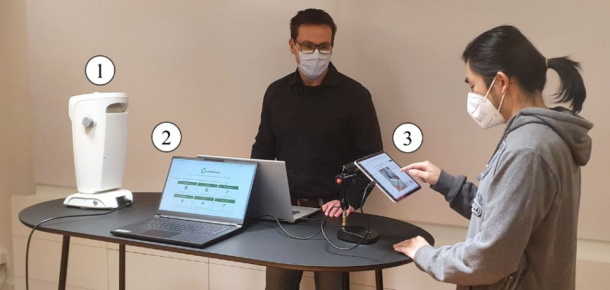
participants followed the same procedure, starting with a questionnaire on personal data, followed by an eye test for workstations (VBG, 2015) to ensure a minimal acuity of 80% with both eyes, utilization of the learning module on the iPad and a final questionnaire on comprehensibility and motivation (see Figure 2). The procedure took approximately 30 minutes per participant.
Figure 2: Test installation, comprising an eye test for visual acuity (1), a laptop for questionnaires (2) and an iPad Pro with eye tracking and screen capturing (3).
Results
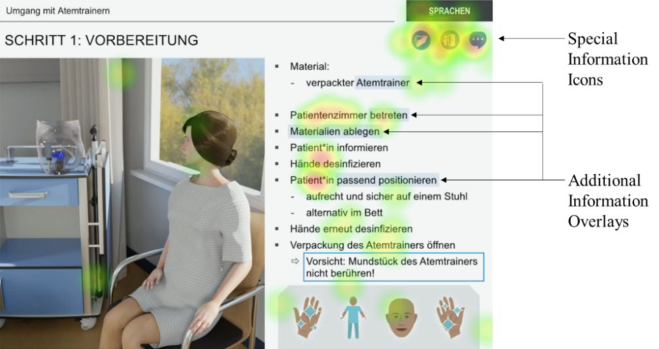
Perception and Use of Interactive Elements In this study, we focused on the module page “Step 1: Preparation”, with particular interest in perception of additional information overlays and spe- cial information icons, as they are essential for access to detail and a deep learning experience. Retention times on the page after the overlays and icons have superimposed varied between 2 and 31 seconds (M = 11.8, SD = 12.4). The accumulated heat map of fixations (see Figure 3) reveals
Figure 3: Accumulated heat map of fixations (absolute duration).
User Interface Assessment of a Tool for Digital Learning in Nursing 149
that participants focused distinctively stronger on the special information icons than on any of the additional information overlays, which have been overlooked widely. Nevertheless, only two of six participants tap- ped on the first (very left) special icon and only one on all three icons. None of the participants tapped on any of the additional information overlays.
Questionnaire on Comprehensibility and Motivation Each participant rated the module’s quality regarding comprehensibility and motivation. The scale was based on the International Telecommunication Union’s Absolute Category Rating (ACR) scale (ITU, 2021) and comprised five levels1 (bad), 2 (poor), 3 (fair), 4 (good) and 5 (excellent). Results (see Table 1) and show that both comprehension as well as motivation received an average rating between 4 and 5.
Table 1. Means and standard deviations of ratings on comprehensibility and moti- vation. Participants rated on a scale from 1 (bad) to 5 (excellent).
Table available in the original PDF paper.
Comprehensibility Motivation Mean 4.3 5.0 SD 0.82 0.0
CONCLUSION
Ratings on comprehensibility and motivation between 4 (good) and 5 (excel- lent) indicate that the general design of the learning module is appropriate and should be continued. Nevertheless, the fact that the additional infor- mation overlays have been missed out by all participants requires higher attention. Oral feedbacks indicate that they have not been identified as active elements, but rather as text markups. Consequently, a brief but obligatory explanation within a dedicated introduction module could raise awareness. Alternatively, a visual effect like pulsation or flashing could help to incre- ase conspicuity of these elements. More unexpectedly, the access rate on the special information icons stays clearly behind expectations. Additional studies with larger samples sizes are needed to investigate the obviously low incentive to tap on the icons, as it seems to contradict the outstan- ding ratings on motivation the participants concordantly indicated in the questionnaire.
ACKNOWLEDGMENT
This project is funded by the German Ministry of Health.
REFERENCES
Ash, A. (2015). Delivering E-Learning in a Mobile World. Whitepaper. https://articulate-downloads.s3.amazonaws.com/Delivering%20E-Learnin g%20in%20a%20Mobile%20World.pdf (Accessed: 8 February 2022) Calinici, T. (2017). Nursing Apps for Education and Practice. Journal of Health & Medical Informatics. 8. 10.4172/2157-7420.1000262. Elliman, J., Loizou, M. and Loizides, F. (2016). Virtual Reality Simulation Training
for Student Nurse Education. 1–2. 10.1109/VS-GAMES.2016.7590377. ITU (2021). International Telecommunications Union. Recommendation P.910. Kirwa, L. and Gakere, Z. (2016). Clinical skills competence of nursing students.
Bachelor Thesis at the Lahti University of Applied Sciences, Finland. Neuhöfer, J., Wöllenstein, T. and Hansen, S. (2021). Evolution of an Approach for Digital Learning and Training in Nursing. 10.1007/978-3-030-80000-0_8. Subjective Video Quality Assessment Methods for Multimedia Applications https:
//www.itu.int/rec/T-REC-P.910/en (Accessed: 8 February 2022) Tobii (2021). Pro Nano Product Description. https://www.tobiipro.com/siteasset s/tobii-pro/product-descriptions/tobii-pro-nano-product-description.pdf (Acces- sed: 8 February 2022) VBG (2015). German Institution for Statutory Accident Insurance and Preven-
tion in the Administrative Sector): Convention for occupational medical care “G37”. https://publikationen.dguv.de/widgets/pdf/download/article/543 (Acces- sed: 8 February 2022) Washer, P. (2001). Barriers to the use of web-based learning in nurse education. Nurse education today. 21. 455–60. 10.1054/nedt.2001.0583.
LISTED IN THE AHFE DIGITAL BOOKSTORE CATALOGUE
Explore the complete digital volume
Healthcare and Medical Devices
Read this individual research paper free through the original publisher, or explore the full digital proceedings book.
ISBN 978-1-958651-27-8
Explore this ISBN in the AHFE Bookstore ↗Listed in the July 2026 bookstore catalogue; search by ISBN to confirm current availability · Digital book purchase optional