Shelley Kelsey, Chantal Trudel, Samantha Astles (2022). Evaluating XR Techniques in Air Travel Design for Early Technology Readiness Levels. In: Interdisciplinary Practice in Industrial Design. AHFE Open Access, vol. 48, pp. 41–52. https://doi.org/10.54941/ahfe1002014
Extended Reality (XR) is an emerging technology and potential tool to support the creation of design concept sketches for remote review and evaluation. Design and engineering for air travel can be a lengthy and expensive process, interfering with rapid innovation. In the field of air travel design, researchers, designers, and engineers have been studying the use of XR (e.g., Virtual Reality and Augmented Reality) to support design workflows and comparing this technique to traditional industrial design methods. Early steps in aerospace design, i.e. research and brainstorming, have largely employed traditional methods, including sketching concepts and eliciting user feedback on early development work. In recent years, XR tools have been adopted to augment the design process and help drive innovative solutions, such as using virtual (VR) and augmented reality (AR) for simulated architecture design. However, XR development has primarily focused on simulating experiences; comparatively fewer resources are available to support the implementation of XR in the early phases of the design workflow. In response, this study investigated the application of XR techniques to support the early stages of the air travel design workflow with a focus on the industrial design contribution to the process. Specifically, the study evaluated the use of XR techniques to support the early stages of design within the Technology Readiness Levels (TRL) framework. The study used VR as a tool for 3D sketching and VR/AR hardware and software to engage users in evaluating the 3D design sketches generated using VR. The concepts generated were related to aircraft cabin concepts focused on a timely event, namely, creating concepts to support air travel during the COVID-19 pandemic.The study consisted of two phases: (1) comparing sketching in VR to traditional sketching methods from the researcher’s first-hand experience; and (2) the distribution of traditional 2D versus 3D VR developed sketches for design and evaluation. In Phase 1, we compared the use of VR versus traditional methods for design sketching by way of journaling first–person experience. In Phase 2, 2D and 3D sketches developed were shared in an online survey with two user groups: designers and non-designers (general population). These groups reviewed the sketches remotely via an online survey, and their experience was evaluated using the System Usability Scale to evaluate the system (traditional 2D illustrations versus VR/AR simulation). The designers completed an additional questionnaire (Technology Acceptance Model) to evaluate the ease and usability of the use of XR techniques in designer workflow. This paper presents initial results of Phase 1: A comparison of VR vs traditional sketching. An analysis of Phase 2, with a focus on the sharing of completed designs as traditional sketches vs VR/AR simulation is underway. The findings will support the development of best practices for embedding XR within the aerospace design and evaluation process.
Designing for air travel can be a lengthy and expensive process, which interfe- res with rapid innovation (De Crescenzio et al., 2019; Haocheng et al., 2010; Moerland-Masic et al., 2020). Extended Reality (XR) is an emerging techno- logy and a potential tool to support the creation of design concept sketches for remote review and evaluation (Nemire, 1998; Felip et al., 2020). In the field of air travel design, researchers, designers, and engineers have studied the use of XR (e.g., Virtual Reality, Augmented Reality) to support the design workflow by comparing XR techniques to traditional industrial design meth- ods. Early steps in aerospace design, such as research and brainstorming, have largely employed traditional methods, including sketching concepts and elici- ting user feedback on early development work (Moerland-Masic et al., 2020; Ban & Hyun, 2020). In recent years, XR tools have been adopted to augment the design process and help drive innovative solutions; such as using virtual
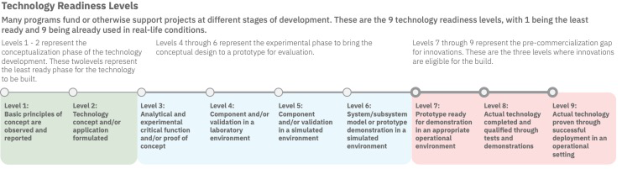
Figure 1: The technology readiness levels (TRL) with description of the design task.
(VR) and augmented reality (AR) for simulated architecture design (Milo- vanovic et al., 2012). To date, XR development has primarily focused on simulating experiences, and comparatively fewer resources are available to support the implementation of XR in the early phases of the design workflow.
In response to this gap, the present study investigated the application of XR techniques to support the early stages of the aircraft design workflow with a focus on the industrial design contribution to the process. Specifically, the study evaluated the use of XR techniques to support the early stages of design within the Technology Readiness Levels (TRL) framework (Fahimian & Behdinan, 2017). The study used VR as a tool for three-dimensional (3D) sketching and VR/AR hardware and software to engage users in evaluating the 3D design sketches generated using VR. The concepts generated were related to aircraft cabin concepts focused on a timely event—namely, creating design to support air travel during the COVID-19 pandemic.
BACKGROUND
The aircraft design process typically follows the Technology Readiness Levels (TRL) as a guideline for the development process and early design develo- pment task (Fahimian & Behdinan, 2017; Tschimmel, 2012). The TRL is a linear representation of the stages of development for design and engineering projects, where Level 1 is the least ready and Level 9 is ready to be used in real- life conditions. More specifically, Levels 1 and 2 (green section in Figure 1) indicate the preliminary phases of development, including design research and concept pitching. Levels 3 to 6 (blue section in Figure 1) refer to when the design brief is more defined and concepts are put into sketches or pro- totypes for analysis. The final phases, Levels 7 to 9 (red section in Figure 1), describe the final steps when a concept has been developed to a near-final product and is ready for actual real-world use. In the TRL model (Figure 1), 40% to 60% of the design development time is spent on Level 3 to 4, where the tasks consist of brainstorming concepts, sketching, 3D modelling (with software), and prototype testing before entering an onsite simulation testing phase (Clergeaud et al., 2017; De Crescenzio et al., 2019).
The aircraft design process can be time-consuming and expensive, even before concepts are evaluated in real physical or high fidelity simulated envi- ronments. Some of the limitations of these methods include: the difficulties of collaborating remotely with team members to develop preliminary concepts (Haocheng et al., 2010), the prohibitive cost of conducting early evaluations
Evaluating XR Techniques in Air Travel Design for Early Technology Readiness Level 43
or usability testing with participants (De Crescenzio et al., 2019), and the inability to conduct remote participatory design sessions (Clergeaud et al., 2017). These limitations were acceptable until the COVID-19 pandemic pre- sented conditions that accelerated interest in new processes to support remote design across interdisciplinary teams and evaluation by end-users.
XR is a promising technology to help address some of the current issues in aircraft design. Given recent improvements in computer-aided design (CAD) for VR, sketching software now has the potential to enhance the early deve- lopment phase of air travel design and 3D modelling by increasing cohesion and efficiency (Israel et al., 2009; Rahimian & Ibrahim, 2011; Ban & Hyun, 2020). For instance, 3D concepts can be realized early in the design process, and the designers can be more immersed at the conceptual stage of design. As opposed to passively viewing static 2D drawn concepts or rendered ima- ges, 3D images can be manipulated by the designers in real time (Israel et al., 2009; Rahimian & Ibrahim, 2011). The immersive aspect of virtual environ- ments (VEs) can enhance the sketching experience for the designer. Using VR, designers can import existing 3D models that meet the context for which the objects are designed for e.g., importing a classroom (Israel et al., 2009) or aircraft cabin environment in which a particular concept (i.e. a seat) being developed will most likely be placed.
Another advantage of XR technology is that it can support enhanced par- ticipation by designers and end-users during testing by providing an active conceptual model earlier in the design process. As part of obtaining user feed- back, designers traditionally develop a prototype to present the idea to the participant to help them visualize, interact with, and think about the concepts (Israel et al., 2009; Ban & Hyun, 2020). Prototypes can facilitate and stre- amline conversation between the designer and users, but they can also take significant time to create, depending on the spectrum of the fidelity required. A higher-fidelity prototype might give a more polished idea for the user to visualize, but it comes with the trade-off of an increased time and cost inve- stments to produce it. With XR, there is a potential for a reduction in both, the time it takes to develop a concept and the cost accrued due to the develo- pment process (Haocheng et al., 2010; Nemire, 1998; Rahimian & Ibrahim, 2011). Apart from the above benefits, physical distancing measures due to the COVID-19 pandemic halted in-person collaboration and user evaluation stu- dies, which made XR a more attractive option. Among other things, XR has the potential to support virtual collaboration, remote product reviews, and remote usability and participatory design studies. As XR technology evolves and becomes more mainstream, accessibility to remote XR 3D simulations may benefit design teams to help them reach or diversify user participation to provide insight during the early stages of design development.
PHASE 1 - METHODOLOGY The study was designed to mimic a typical design task in the TRL Level 3 to 4 of a designer working independently (i.e., not in a team-based environment) using traditional design practices and XR technology. The designer was the
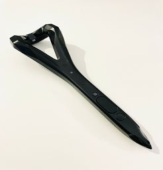
Figure 2: The VR appartus: Logitech VR ink pen, HTC cosmos, and valve index Pro.
lead researcher (henceforth, “the researcher”) who assessed and reflected on their own experience of using VR as a tool for design sketching.
The data collected from phase one consisted of the researcher’s journal entries about their first-hand account with VR sketching versus traditional 2D sketching techniques. The design sketching brief was to generate aircraft cabin concepts with partitions between seats to physically separate passengers during the COVID-19 pandemic.
Independent Design Sketching Experience The researcher developed a test set up and recorded their experience of sketching concepts in two mediums: traditional 2D drawing and 3D VR ske- tching. The researcher identified traditional sketching techniques and tools used to develop 2D medium drawings and new VR techniques for developing 3D medium concept drawings. The sketching task was assigned a 130-hour time restriction for each medium (total of 260 hours).
Apparatus Traditional 2D sketches were created using an iPad Pro (Model A1876, ver. 2019) with an Apple Pencil (ver. 2019). The sketches were drawn using the application ProCreate (ver. 5X five build 9c9698bade). Touch-ups and renderings of sketches were completed in Adobe Photoshop (ver. 2021).
The VR sketching was conducted using a 3.9 GHz Intel Core i7 PC laptop running Windows 10 with a memory of 16GB RAM (model: ASUS ROG Strix Scar II GL504GW-DS74). The graphics card used for the system ren- dering was an NVIDIA GeForce RTX 2070 GPU. The VR head-mounted display (HMD) was an HTC Cosmos headset with 1440 × 1700 pixels per eye (2880 × 1700 pixels combined), a 90Hz refresh rate, and a 110- degree field of view (developed by HP Inc. model number 99HART000-00) (shown in Figure 2). The controller was a single Valve Index Pro that was used as an eraser tool (or undo/redo actions) and acted as a secondary pointing device for navigating the user interface throughout the study (shown in Figure 2). Sketches were drawn using a working prototype of a Logitech VR Ink Pen sty- lus (PN 814-000044) with the same features as the product intended for the final release (date TBA) (shown in Figure 2). Four Lighthouse 2.0 base stati- ons tracked the HMD, controller, and VR Ink. The software used to simulate a sketching environment ran on SteamVR Beta (1.17.1) and the Logitech SDK Demo software (version 1.16 released in 2020), and the sketching software used was Gravity Sketch (ver. 2021).
Evaluating XR Techniques in Air Travel Design for Early Technology Readiness Level 45
Procedure and Analysis The researcher kept a document to record memos about their experience throughout the sketching process. The memos were time-stamped and wrote the detailed the event-code that occurred while sketching (e.g., technical issues), the activity-code completed while drawing (e.g., free drawing, tra- cing, rendering, etc.), and the think-code about what the researcher was doing and/or thinking during the task. The memos provided insight on the advantages and disadvantages of using VR versus traditional sketching methods.
The memo of the activity provided a first-hand recording of elements that influenced the researcher’s experience of using VR techniques in contrast to traditional methods in the design workflow. Using qualitative research sof- tware NVivo (version 2020), themes and patterns in the memos were first uncovered using the word frequency query tool to identify reoccurring keyw- ords. The researcher then organised the common keywords and summarised the time and event themes illustrated in an infographic.
RESULTS
This study explored the user experience of design sketching in VR com- pared to traditional methods. The following sections present preliminary results based on the researcher’s memos about their sketching experience. Findings include identification of factors that contributed to a productive and unproductive sketching session for both traditional 2D sketching and VR sketching.
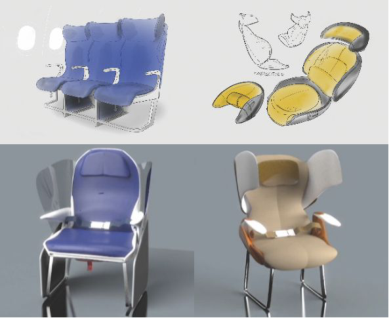
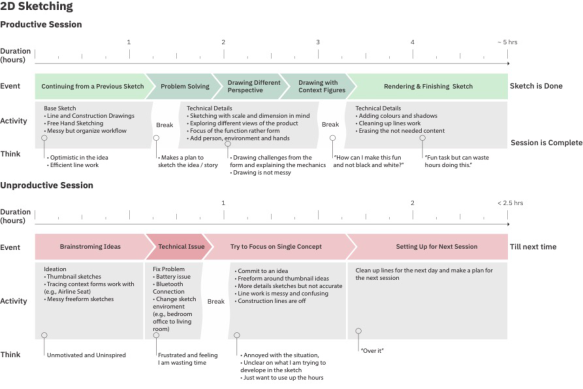
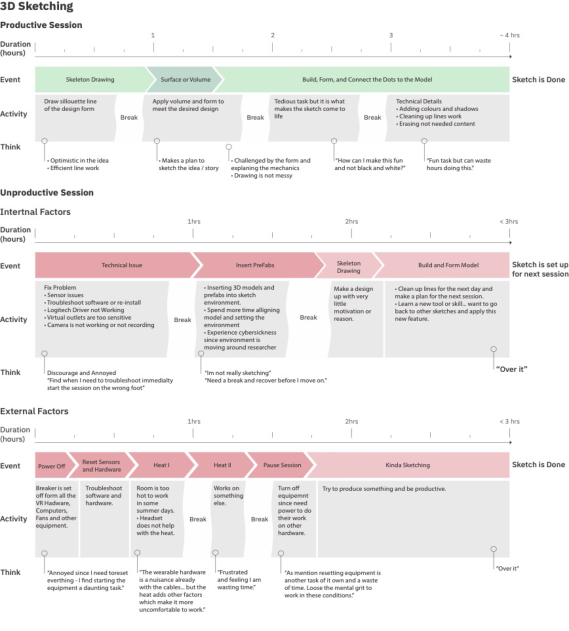
Sketching Outcomes A total of four concept sketches, two 2D sketches and two 3D sketches (shown in Figure 3), were deemed by the researcher to be of acceptable qua- lity for use in the following phase of the study, discussed later in this paper. The researcher had memos documenting their sketching experience through- out the various segments of the sketching workflow as well as factors that impacted it. The 2D sketching experience was divided into two linear info- graphics representing a Productive session versus an Unproductive session (Figure 4). The same procedure was followed for the 3D sketching expe- rience, though the experience was summarized in three infographics; one Productive sketching session and two Unproductive sketching sessions.
One Unproductive session related to Internal Factors (e.g., dilemmas in the simulation) and the other to External Factors (e.g., hardware issues) that influenced the sketching session (Figure 5). These infographics identify and explain some of the advantages and disadvantages the researcher identified with the various drawing tasks and stages of the sketching workflow.
Traditional 2D Sketching Experience A Productive 2D sketching session ran for roughly five hours, as shown in Figure 4. There were small breaks during the session, lasting 15-30 minutes, during which the researcher planned next steps to take after they returned
Figure 3: Final selected sketches used for phase two of the study.
from the break. Most Productive days of sketching were spent working on an existing idea or working on ideas from a previous sketching session. Nearly half of a Productive session, usually 2.5 hours, was spent not developing the idea but rather refining the sketch to better communicate the design. This entailed problem-solving and decision-making regarding how the sketch would tell the story of the design without the need for text. This aspect of sketching consisted of several tasks, including: creating drawings in different perspectives and views, focusing on the functional features of the design, and adding contextual images to make sense of the scenario (e.g., a human figure for scale or airline cabin fuselage to clarify the environmental setting). These tasks were often challenging since they made the image more complicated to draw. On a Productive day of sketching, these dilemmas did not consume too much of the researcher’s time and the workflow remained efficient. The remaining two or more hours of a Productive session was spent rendering and finishing the sketch by applying colour and shading.
An Unproductive 2D sketching session lasted on average 2.5 hours or less. These sessions were shorter, as the researcher did not want to spend too much time sketching non-creative solutions. Half of the session was spent brainstor- ming ideas by sketching small, rough sketches of concepts (i.e., thumbnail sketches) and freeform drawings of ideas that resulted in disorganized or messy line drawings from the construction of perspective lines1. During this time, there were some external disruptions to the workflow, such as power issues with the iPad, issues with the pens’ Bluetooth connection, and software issues with the sketching application. Resolving these issues took anywh- ere from one minute to half an hour each time, and the trend was that the researcher took a break afterwards before resuming sketching Overall, sketching time in 2D environment was largely spent ensuring that the drawings were clean and represented the ideas the researcher was trying to communicate. Most of the time was spent trying to communicate the story rather produce design ideas.
1Drawing construction perspective lines helps the designer to construct the volume and form to match the perspective vanishing points.
Evaluating XR Techniques in Air Travel Design for Early Technology Readiness Level 47
Figure 4: Infographic displaying the summary of the 2D sketching workflow xperience.
VR 3D Sketching Experience The second half of this exploration involved recreating the design described above, this time using VR sketching. There was an initial learning curve invo- lved in sketching in VR compared to traditional methods—namely, using the software and 3D sketching techniques. The researcher had several years of experience prior to this study developing drawings using 2D techniques, but VR sketching was a new experience and required an ‘onboarding’ stage. Ske- tching in VR posed limitations similar to those a designer might face when learning how to develop CAD in a 3D modeling program for the first time. In the early stages of the researcher’s VR sketching, while they were still learning the basic tools of the Gravity Sketch software, they created multiple designs that appeared very robust and featured hard edges.
As shown in Figure 5, a Productive 3D sketching session in VR was one that had few interferences to the workflow. The session started with deve- loping a skeleton sketch and the silhouette of the design. This task typically lasted an average of one hour. It should be noted that the researcher took a 15-minute break every 45 minutes since VR headsets are known to cause eye strain and neck pain if worn for long periods (Paes & Irizarry, 2018). These breaks were considered important to avoid fatigue or injuries since the rese- archer was anticipating sketching sessions of 4+ hours each. The next step of a Productive 3D sketching session was inserting the surface and volumes into the sketch to make a near final form of the design. This was done by laying out 3D parts (either as a solid or surface), where its silhouette closely matched the desired form of the final design (e.g., a solid rectangle cube 3D part for the bottom seat cushion).
Once a rough form of the design in the 3D sketch was made, the final task involved manipulating the surface and solid parts to complete the design. This task was done by sculpting the volume and manipulating the edges of the parts to create the final desired curvature. The goal of this phase was
Figure 5: Infographic displaying the summary of the VR sketching workflow experience.
to make the final design more life-like and avoid robust or flat forms in the design. This task was the most time consuming and tedious to complete since it required manipulating 3D model polygons, edges, points, and solids volume to appear as the desired shape and form.
An Unproductive 3D sketching session due to Internal Factors was one where the researcher’s sketching was interrupted by software issues. The rese- archer’s memos indicate that these sessions had immediate technical issues, such as the software needing to be updated, cameras not recording the VR sketching simulation, sensors not detecting the hardware, Logitech VR Ink pen not being recognized in the VE, and the Logitech Ink pen driver not responding to the VIVE software.
Additional dilemmas caused by Internal Factors arose in some sketching sessions where the researcher inserted a prefabricated CAD model. Setting up the models in the VE presented challenges with aligning the CAD parts since there were no planes in the VE. Constantly moving the prefabricated CAD parts and sketching with their presence in the VE caused the researcher to experience cybersickness due to vection, a motion sickness that occurs when a person’s perceived environment is moving around them while they are sitting in place (similar to the motion sickness experienced in a vehicle; Keshavarz et al., 2015). While sketching with the prefabricated set-up in the
Evaluating XR Techniques in Air Travel Design for Early Technology Readiness Level 49
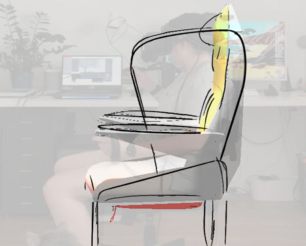
Figure 6: Example of researcher drawing an anthropometric sketch.
VE, the researcher was constantly moving the prefabricated parts to be able to sketch in specific areas, thus creating the illusion that the environment was moving while the researcher was sitting still. When the researcher became too nauseous to keep sketching, they took a 15-minute break.
Some Unproductive sessions were interrupted by External Factors, such as those related to the location in which the VR sketching occurred. VR sketching was done in the researcher’s apartment due to physical distancing protocols related to COVID-19. An External Factor was the environment’s ambient temperature. The researcher completed the 3D sketching between June and early September 2021. The summer heat caused issues with wea- ring the VR HDM because the working environment was too hot to work in for a session of 120 minutes or longer. The researcher thus sketched for shorter time periods, taking many breaks, or postponing the session to a day when the ambient temperature was more tolerable.
DISCUSSION
This paper discuss the procedure and the researcher first-hand account of developing early concept for aircraft design using VR compared to traditio- nal 2D methods. Based on the researcher’s experience, VR sketching has the potential to support designers to brainstorm concepts that facilitates more human-centered needs in the early stage of the TRL model using more intui- tive techniques compared to traditional 2D sketching methods. While first learning the VR sketching techniques to draw the chair, the researcher applied the dimension of their own office chair into their drawing (Figure 6). Outli- ning their office chair created a skeleton form of the seat to the approximate scale of an air cabin seat size and dimensions. This technique allowed the rese- archer to draw in 3D an orthogonal layout of the seat height and width based on accurate measurements and proportions. Drawing an orthogonal layout by referencing a real source object as an ‘underlay’ allowed the researcher to create more anthropometric appropriate skeleton sketches.
This discovery suggests that VR sketching could benefit from using mixed reality to create an outline or skeleton of sketch dimensions referencing ergonomic dimensions and proportions while drawing. Designers could then sketch concepts around anthropometric requirements for a product design,
revealing future potential to introduce human factor procedures, such as including anthropometric requirements, earlier in the brainstorming stage of the design workflow (De Crescenzio et al., 2019).
The 3D skeleton sketch demonstrated perhaps the most valuable aspect of VR sketching: creating anthropometrics sketches for human-centered design.2 Anthropometric data is used to design products to meet ergonomic and other human factors requirements. Therefore, a potential benefit of VR sketching for human-centered design, in the scenario where a user is in a VR simulated testing set-up, is that they have the ability to draw around their own body and add their design criteria to meet anthropometric require- ments. The work of Crescenzago et al. (2019) identified that a more efficient human-centered design testing medium is needed, one that affords the user to “foresee the capability of a specific cabin interior design of meeting the user’s expectations, including the needs related to comfort and well-being” (pp. 772; De Crescenzio et al., 2019).
Using VR as a tool is becoming more accessible for users to attain, with additional accessories that can be paired via Bluetooth™with an HMD as substitute input devices depending on the task. During the researcher’s expe- rience, the main disruption to their workflow was the pairing issues with the Logitech VR Ink Bluetooth. Although the device interrupted the overall workflow, the use of the pen made the sketching experience more intuitive while drawing the orthogonal forms around them.
The Pham and Stuerzlinger (2017) comment that new pairing devices and continuous innovation in VR/AR “not only deliver a comfortable experience but also pave the way for professional applications” (p.1) (Pham & Stuerz- linger, 2019). Developing 3D drawings in a VE allows the user to sketch in free space compared to 2D sketching, where the user relies on a stylus for digital sketching to draw on a surface (e.g., paper, tablet, etc.).
VR software and hardware are designed to have natural affordances so that the user will feel immersed in the simulation (Ban & Hyun, 2020). To make drawing a more immersive experience, the Logitech developed the VR Ink Pen is designed like a pen for users to sketch in VR. Currently, there is little information available on the ergonomic benefits of using this device for drawing in VR. Most input devices have been examined to which designs have the best pointing capabilities or are the most immersive in terms of interaction. Pham and Stuerzlinger (2017) examined various VR apparatus to identify their capabilities in performing a pointing task (i.e., Fitt’s Law) in AR and VR but also explored the ergonomic benefits of using either design (i.e., controller versus mouse versus stylus) (Pham & Stuerzlinger, 2019). Based off this evidence from Pham and Stuerzlinger a pen like input device, such has the Logitech VR Ink, may be the solution to make interaction in VR more usable and provide a more natural drawing experience compared to current VR hardware.
2Anthropometry is the systematic measurement of the physical properties of the human body .
Evaluating XR Techniques in Air Travel Design for Early Technology Readiness Level 51
Next Steps – Phase 2 The sketches developed in Phase 1 of this study, shown in Figure 3 were implemented into a second phase of the study, where a remote end-user reviewed the 2D and 3D design sketches. The next step involved compa- ring feedback from two participant groups, designers and non-designers, who viewed and evaluated both the traditional 2D illustrations and the 3D sketches independently and asynchronously. All participants reviewed the sketches remotely, and their evaluations of the designs were obtained via an online survey using the System Usability Scale (SUS) (Brooke, 1986). The designers completed an additional questionnaire called the Technology Acce- ptance Model (TAM) (Davis, 1989) to assess their experience with the ease and usability of embedding XR techniques in the design workflow. The par- ticipants used their personal computer, their own VR HMD to view the VR simulation, and/or their smartphone to view the AR option of the 3D sketches.
The second phase of this study is still ongoing and the next step will be the analysis of the collected data. From these data we aim to further vali- date the acceptability and usability of the XR techniques as a drawing tool for sketching. In particular, the designer group results will help to identify if XR can be used to share 3D drawn concepts remotely and if XR has a place in the design workflow. The non-designer group results will help to identify if XR can provide a more accessible usability testing method and whether users can be involved in the earlier design stages by reviewing XR concepts that avoid the need to have them onsite for user testing. The fin- dings from the second phase of this study will be described in follow up paper. The results of both phase 1 and 2 may provide insight into best practi- ces for embedding XR techniques within the aircraft design and evaluation process.
REFERENCES
Ban, S., & Hyun, K. H. (2020). 3D computational sketch synthesis framework: Assisting design exploration through generating variations of user input sketch and interactive 3D model reconstruction. Computer-Aided Design(120). Brooke, J. (1986). System usability scale (SUS): a quick-and-dirty method of system
evaluation user information. Brooke J. System usability scale (SUS): a quick- and-dirty method of system evaluation user information. Reading, UK: Digital Equipment Co Ltd, 43, 1–7. Clergeaud, D., Roo, J. S., Hachet, M., & Guitton, P. (2017). Towards Seamless Interaction between Physical and Virtual Locations for Asymmetric Collabora- tion. Proceedings of the 23rd ACM Symposium on Virtual Reality Software and Technology, 17. Gothenburg, Sweden. Davis, F. D. (1989). Perceived usefulness, perceived ease of use, and user acceptance
of information technology. MIS quarterly(Sept 1), 319-340. De Crescenzio, F., Bagassi, S., Asfaux, S., & Lawson, N. (2019). Human centred design and evaluation of cabin interiors for business jet aircraft in virtual reality. International Journal on Interactive Design and Manufacturing (IJIDeM), 13(2), 761–772.
Fahimian, M., & Behdinan, K. (2017). On characterization of technology readiness level coefficients for design. DS 87-2 Proceedings of the 21st International Confe- rence on Engineering Design (ICED 17). 2. Vancouver, Canada: Design Processes & Design Organisation and Management. Felip, F., Galán, J., García-García, C., & Mulet, E. (2020). Influence of presentation
means on industrial product evaluations with potential users: a first study by com- paring tangible virtual reality and presenting a product in a real setting. Virtual Reality, 24(3), 439-451. Haocheng, F., Hu, L., Xudong, W., & Zhe, W. (2010). A Prototype System for Evaluating Civil Airplane’s Airport Compatibility based on Virtual Reality. 48th AIAA Aerospace Sciences Meeting Including the New Horizons Forum and Aerospace Exposition. Orlando, Florida. Israel, J. H., Wiese, E., Mateescu, M., Zöllner, C., & Stark, R. (2009). Investiga-
ting three-dimensional sketching for early conceptual design—Results from expert discussions and user studies. In. Computers & Graphics, 33(4), 462–473. Keshavarz, B., Riecke, B. E., Hettinger, L. J., & Campos, J. L. (2015). Vection and visually induced motion sickness: how are they related? Frontiers in psychology, 6, 472. Milovanovic, J., Moreau, G., & Siret, D. (2012). Virtual and augmented reality
in architectural design and education. Istanbul: 17th International Conference, CAAD Futures 2017. Moerland-Masic, I., Bock, T.-M., Reimer, F., Meller, F., & Nagel, B. (2020).
Application of VR Technology in the aircraft cabin design process. DLRK2020. Nemire, K. (1998). Enhancing cockpit design with an immersive virtual environment rapid prototyping and simulation system. In Cockpit Displays V: Displays for Defense Applications (pp. 112–123). International Society for Optics and Photonics. Paes, D., & Irizarry, J. (2018). A usability study of an immersive virtual reality
platform for building design review: Considerations on human factors and user interface. Construction Research Congress. New Orleans, Louisiana. Rahimian, F. P., & Ibrahim, R. (2011, May). Impacts of VR 3D Sketching on Novice Designers’ Spatial Cognition in Collaborative Conceptual Architectural Design. Design Studies , 32(3), 255–291. Tschimmel, K. (2012). Design Thinking as an effective Toolkit for Innovation.
Barcelona: The International Society for Professional Innovation Management (ISPIM). Wilson, J. R., & Corlett, N. (2005). Evaluation of human work. CRC press.
LISTED IN THE AHFE DIGITAL BOOKSTORE CATALOGUE
Explore the complete digital volume
Interdisciplinary Practice in Industrial Design
Read this individual research paper free through the original publisher, or explore the full digital proceedings book.
ISBN 978-1-958651-24-7
Explore this ISBN in the AHFE Bookstore ↗Listed in the July 2026 bookstore catalogue; search by ISBN to confirm current availability · Digital book purchase optional