Li-Chieh Chen, Po-Ying Chu, Yun-Maw Cheng (2018). The Ergonomics of Interactive and Stereoscopic 3D Product Models for Design Education. In: Advances in Physical Ergonomics and Human Factors: Part I. AHFE Open Access, vol. 1. https://doi.org/10.54941/1009
Recently, some research groups had tried to use the technologies of stereoscopic 3D displays to present teaching materials for product design education. However, the issue of visual discomfort for viewing stereoscopic 3D contents was not considered. To conduct experiments, representative 3D virtual models of office furniture were constructed with simple shapes and textures. These models were displayed on a 50-inch stereoscopic 3D TV and viewed through passive polarizing glasses. The task was to walk through a virtual office and identify the design problems of furniture. Thirty students, majored in Industrial Design, were invited to participate in these experiments. The number of design problems identified was considered as the major performance measure. In addition, total time spent in stereoscopic 3D mode or traditional 3D mode, degree of discomfort, and self-reported symptoms were collected. The result showed that although stereoscopic 3D images had advantages over traditional 3D images for the task of dimension and distance estimations, the degree of visual discomfort increased significantly while the participants were interacting with the virtual product components intensively. The result indicated that adaptive adjustments of binocular and monocular depth cues were necessary for highly interactive tasks to ensure visual comfort and depth cue integration.
In the processes of product design education, the teaching materials and sample cases for demonstration, explanation, and discussion are always presented using 3D graphics with monocular depth cues. The depth cues of these graphics are identified based on the relative attributes of objects and heavily relied on the experiences and complicated cognition processes of the observers. For freshman and sophomore students of universities, their capabilities of drawing, observation, and spatial imagination are still under construction. If the capabilities of observation and spatial imagination are not well developed, teaching professional knowledge with these 3D graphics would lead to communication gaps between instructors and students. The more complex the product, the greater the gap exists. Therefore, in order to reduce the gap, some research groups have tried to use technologies of stereoscopic
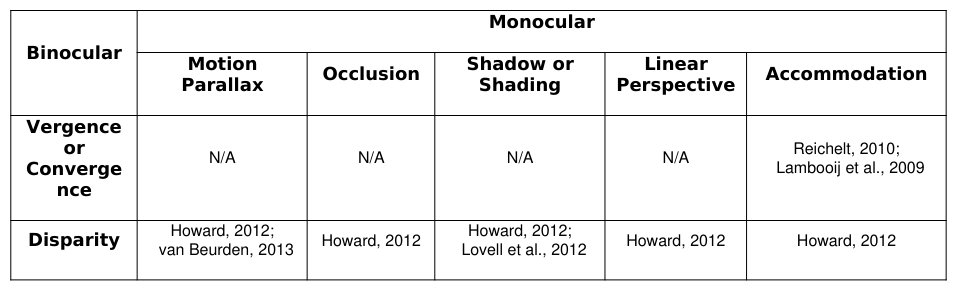
3D displays, with binocular depth cues, to present teaching materials for product design (Petkov, 2010; Mukai et al. , 2011; Guedes et al., 2012; De Araújo et al., 2013). These examples included the systems for learning descriptive geometry through stereoscopic vision (Kaufmann, 2009; Guedes et al., 2012), a multi-touch collaboration system with telepresence for car design (Edelmann et al., 2012), a system for displaying the elements of a DVD device (Petkov, 2010), and displaying the process of learning to build a handmade PC (Mukai et al., 2011). Although various stereoscopic 3D technologies contributed to depth cues in different ways (Reichelt et al., 2010), stereoscopic displays did improve the performance of depth-related tasks, such as judging absolute and relative distances, finding and identifying objects, performing spatial manipulations of objects, and spatial navigating (Gîrbacia et al., 2012; McIntire et al., 2012; McIntire et al., 2014). With these advantages, existing exhibition systems did not consider the effects of interactions between monocular and binocular depth cues on information communication and visual comfort. It was reported that depth cue interactions should not be neglected (Howard, 2012; Mikkola et al., 2012; Lovell et al., 2012; van Beurden, 2013). For instance, there were interactions among disparity and monocular depth cues, such as motion parallax, occlusion, shadow (or shading), linear perspective, and accommodation (Table 1). The interactions could contribute to depth cue integrations. However, the degree of depth cue integration depended on the source, the prior knowledge of viewers, tasks, and contexts (Mikkola et al., 2012). On the other hand, if the interactions were not consistent, it caused visual discomfort or visual fatigue (IJsselsteijn et al., 2005; Inoue et al., 2008; Lambooij et al., 2009; Patterson, 2012). For instance, the difference between focus distance and depth usually resulted in the situation of vergence-accommodation mismatch. In the case of interactive system, the viewing angle and digital contents were changed dynamically. Adjusting the distance of images between right and left eyes adaptively could reduce the problems caused by disparity (Oskam et al., 2011).
Given the advantages of stereoscopic 3D displays, the opportunities for applying such technologies to product design education might be promising. However, the problems of visual discomfort and fatigue have to be resolved, or at least reduced, before constructing systems for educational purpose. To address this issue, the authors conducted preliminary experiments to identify potential opportunities.
Table 1: Interactions of binocular and monocular depth cues reported by literature
EXPERIMENT DESIGN Interactive and Stereoscopic 3D Furniture Models
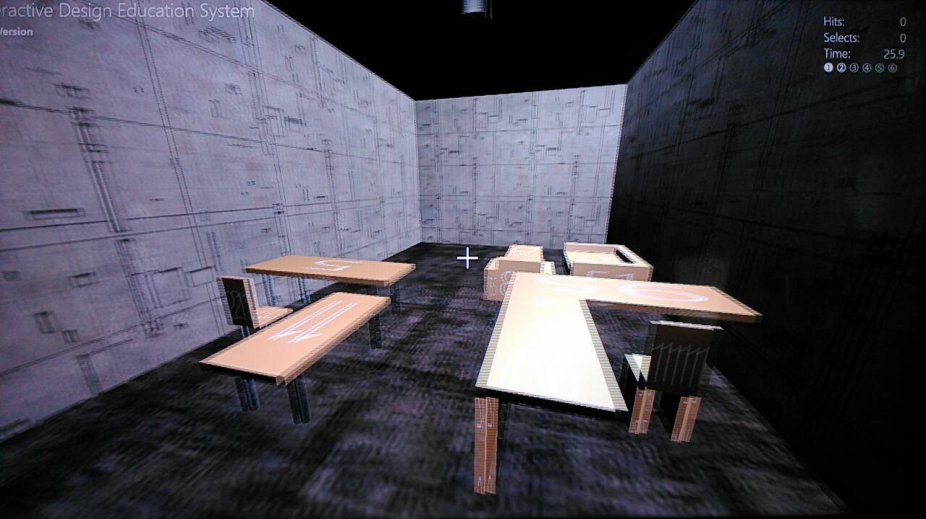
To conduct experiments, representative 3D virtual models of office furniture were constructed with simple shapes and textures. These models included three sets of office furniture (Figure 1). The first set consisted of two-seat sofa, one-seat sofa and one table. The second set consisted of two desks with different heights and one chair. The third set consisted of an angled desk and a chair. The components of desks and chairs are different in the second and third sets. For the purpose of design education, the instructors deliberately introduced some problems into the models. Therefore, each piece of furniture may have problems in dimensions from the viewpoints of ergonomics or industrial design. The relationship of two pieces of furniture may have problems in distances as well. These models were randomly numbered and compiled in an XAML DirectX 3D sample program with a virtual room. The digital contents were displayed on a 50-inch stereoscopic 3D TV (120 Hz) and viewed through passive polarizing glasses. While interacting with the experiment system, the user may perceive several visual depth cues, such as disparity, motion parallax, occlusion, shading, and linear perspective.
(a) The screen shot taking from the right-front corner of the virtual office
(b) The screen shot taking from the right-rear corner of the virtual office
Figure 1: Interactive and Stereoscopic 3D Furniture Models with Images for Left and Right Eyes
Tasks and Procedures The task of each participant was to walk through the virtual office and to identify as many design problems as possible within 6 minutes, i.e. 360 seconds. Participants seated in front of the display at a viewing distance of 240cm. The input device for manipulating the camera was a set of remote keyboard (for changing the location and altitude) and mouse (for changing the viewing angle). Participants were asked to start the experiment with the stereoscopic 3D mode. However, if they were not comfortable, they could stop the experiment or switch to the traditional 3D mode to continue the experiment. If anyone could continue to stay in the stereoscopic 3D mode, he/she was encouraged to spend extra 3 minutes, i.e. 180 seconds, to locate more design problems. Once a design problem was found, the participant should right-click the mouse button to pause the countdown clock. After writing down the furniture number and corresponding design problems, the participant should double-click the left mouse button to resume the countdown.
Measurements In the experiment, the number of design problems identified was considered as the major performance measure. In order to study the effects of stereoscopic 3D on visual comfort, total time spent in the stereoscopic 3D mode or the traditional 3D mode, degree of discomfort, and self-reported symptoms were collected. The degree of discomfort was reported on a 9-point scale, with 1 indicating slightly discomfort and 9 indicating extremely discomfort.
Participants Thirty students, 17 male and 13 female, were invited to participate in these experiments. They majored in Industrial Design and enrolled as graduate students. All had normal or corrected-to-normal vision and none reported stereopsis problems in prior experiences. They all had the basic training of drawing and the experiences of using 3D modeling software, such as Pro/E, Alias, Rhino, 3ds Max, or Maya.
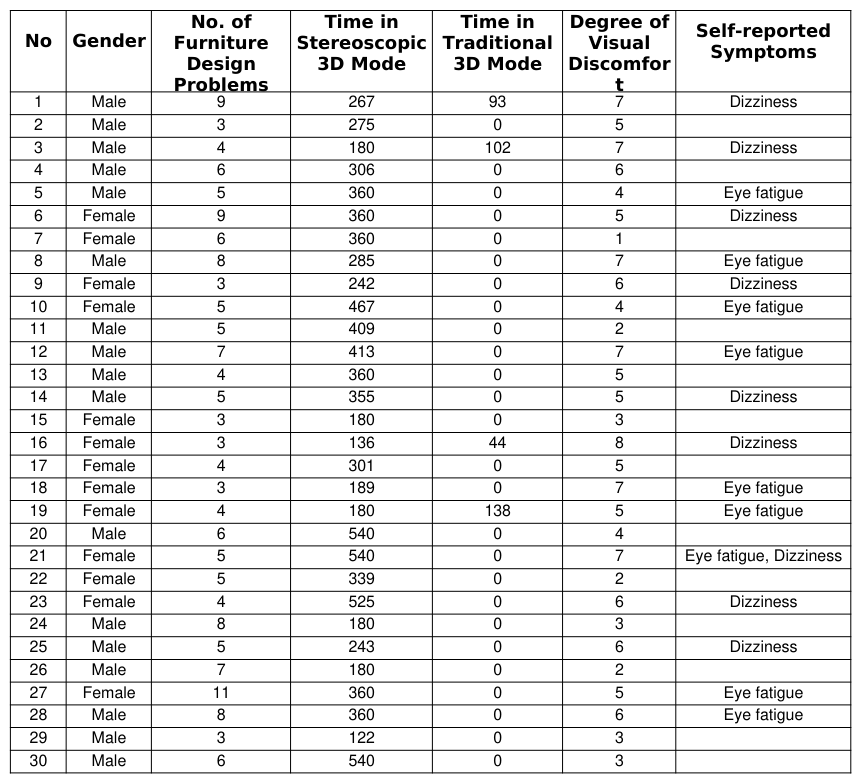
RESULTS AND DISCUSSIONS Among 30 participants, 26 participants, about 87%, were able to complete the task in the stereoscopic 3D mode (Table 2). However, only seven participants, about 23%, were willing to use the stereoscopic 3D mode for more than 360 seconds. The average time of using stereoscopic mode was 318 seconds, with standard deviation 124 seconds. Some participants even stopped the experiment earlier before the time limit due to visual discomfort or no more furniture design problems were identified. In fact, four participants had to switch to the traditional mode after navigating in the stereoscopic 3D mode for certain time periods. This result indicated that adaptive disparity adjustment of binocular depth cues was necessary for highly interactive tasks to ensure visual comfort and depth cue integration.
The time spent in the stereoscopic 3D mode and the number of design problems identified were not correlated, with correlation coefficient 0.24. This indicated that the time spent in the stereoscopic 3D mode did not contribute to the identification of design problems. The prior knowledge or experiences of different participants might influence their judgments.
The time spent in the stereoscopic 3D mode and the degree of visual discomfort were not correlated, with correlation coefficient -0.08. This indicated that the degree of visual discomfort was not necessary due to the time spent in the stereoscopic 3D mode. Based on the observations, the ways people interacted with the systems varied significantly. Some participants controlled the camera movement slowly with the keyboard, while others always made a quick viewing angle adjustment through the mouse.
As for the self-reported symptoms, 17 participants, about 57%, experienced eye fatigue or dizziness. The degree of visual discomfort was related to these symptoms. Participants with low degree of visual discomfort reported few symptoms. However, neither eye fatigue nor dizziness was correlated to the duration of staying in the stereoscopic 3D mode. For example, subjects 20 and 30 used the stereoscopic 3D mode for 540 seconds, but reported no symptoms. While subjects 5, 6, 27, 28 reported eye fatigue or dizziness within 360 seconds.
Furthermore, there was no gender difference in the number of design problems identified, total time spent in the stereoscopic 3D mode or the traditional 3D mode, degree of discomfort, and self-reported symptoms.
Table 2: Performance measure and self-reported discomfort of each participant Degree of Self-reported
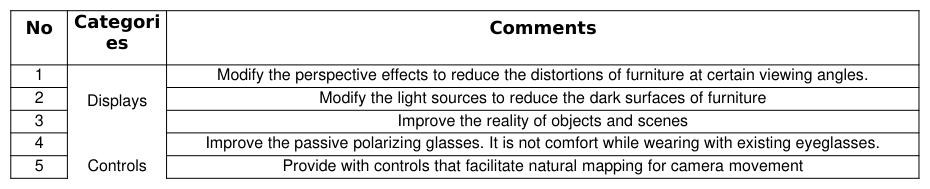
In order to identify the directions for system development, general comments for system improvement were collected from the participants. The comments included (1) modify the perspective effects to reduce the distortions of furniture at certain viewing angles; (2) modify the light sources to reduce the dark surfaces of furniture; (3) improve the reality of objects and scenes; (4) improve the passive polarizing glasses while wearing with existing eyeglasses; (5) provide with controls that facilitate natural mapping for camera movement; and (6) modify the sensitivity of mouse controls to reduce dizziness due to quick changing viewing angles. These comments were grouped into displays and controls and listed in Table 3.
Table 3: General comments for system improvement offered by the participants No Categori
6 Modify the sensitivity of mouse controls to reduce dizziness due to quick changing viewing angles
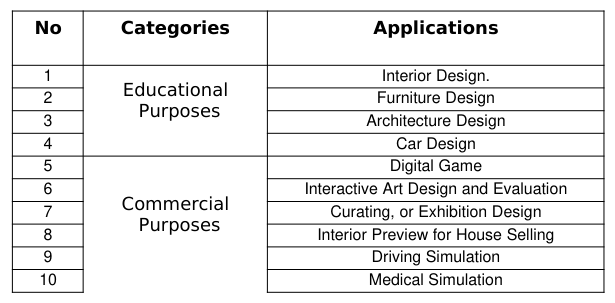
Based on the experiences of using the experiment system, the participants were encouraged to imagine potential applications of such a system. Surprisingly, at least ten applications were proposed (Table 4). The applications for educational purposes included Interior Design, Furniture Design, Architecture Design, and Car Design. The applications for commercial purposes include Digital Game, Interactive Art Design and Evaluation, Curating (or Exhibition Design), Interior Preview for House Selling, Driving Simulation, and Medical Simulation. Given these opportunities, the requirements of displays and controls may vary for different domains.
Table 4: Potential applications of the stereoscopic 3D system proposed by the participants No Categories Applications
CONCLUSIONS
To identify the problems and opportunities of interactive and stereoscopic 3D product models for design education, a prototype system was constructed for experiments. The result of experiment indicated that adaptive adjustments of binocular and monocular depth cues were necessary for highly interactive tasks to ensure visual comfort and depth cue integration. Furthermore, according to the comments from participants, if the quality of displays and control devices can be improved to facilitate interactions with natural mapping, a great number of applications could benefit from stereoscopic 3D technologies. To develop successful applications for design education, the adaptive mechanism of adjusting depth cues should be constructed based on detailed analysis of learning contexts. Understanding the perception and cognition limitations of target students are of great importance as well. The issue of adaptive mechanisms deserves in-depth studies.
ACKNOWLEDGMENTS
The authors would like to express our gratitude to the National Science Council of the Republic of China for financially supporting this research under Grant No. NSC 102-2221-E-036-027.
REFERENCES
De Araújo, B.R., Casiez, G., Jorge, J.A., Hachet, M. (2013). Mockup Builder: 3D modeling on and above the surface. Computers & Graphics, 37(3), 165-178. Edelmann, J., Gerjets, P., Mock, P., Schilling, A., Strasser, W. (2012). Face2Face — A system for multi-touch collaboration
with telepresence. 2012 IEEE International Conference on Emerging Signal Processing Applications (ESPA), 12-14 Jan. 2012, 159-162. Gîrbacia, F., Beraru, A., Talabă, D., Mogan, G. (2012). Visual Depth Perception of 3D CAD Models in Desktop and Immersive Virtual Environments. International Journal of Computers, Communications & Control, Dec2012, 7(5), 840-848. Guedes, K.B., Guimarães, M., Méxas, J.G. (2012). Virtual Reality Using Stereoscopic Vision for Teaching/Learning of
Descriptive Geometry. eLmL 2012: The Fourth International Conference on Mobile, Hybrid, and On-line Learning, pp 24 – 30. Howard, Ian P. (2012). Interactions between visual depth cues. Perceiving in Depth: Volume 3 Other Mechanisms of Depth Perception, Published to Oxford Scholarship Online: May 2012. IJsselsteijn, W.A., Seuntiens, P.J.H. & Meesters, L.M.J. (2005). Human factors of 3D displays. In Schreer, O., Kauff, P. &
Sikora, T. (Eds.), 3D videocommunication: algorithms, concepts and real-time systems in human centred communication, 219-233, New Jersey: John Wiley & Sons. Inoue, T., Uehira, K., Komiya, K., Suzuki, M. (2008). Human Factors of 3-D Displays for Virtual Reality. IEEE Industry Applications Society Annual Meeting, 2008. IAS '08, 5-9 Oct. 2008, pp. 1-4. Kaufmann, H. (2009). Virtual Environments for Mathematics and Geometry Education. Themes in Science and Technology
Education, Special Issue: Virtual Reality in Education, 2(1-2), 131 – 152. Lambooij, M., Fortuin, M., Heynderickx, I., IJsselsteijn, W., (2009). Visual Discomfort and Visual Fatigue of Stereoscopic Displays: A Review. Journal of Imaging Science and Technology, 53(3), 1-14. Lovell, P.G., Bloj, M., Harris, J.M. (2012). Optimal integration of shading and binocular disparity for depth perception. Journal
of Vision, January 3, 2012, 12(1), 1-18. McIntire, J.P., Havig, P.R., Geiselman, E.E. (2012). What is 3D good for? A review of human performance on stereoscopic 3D displays. Proc. SPIE 8383, Head- and Helmet-Mounted Displays XVII; and Display Technologies and Applications for Defense, Security, and Avionics VI, 83830X (May 1, 2012). McIntire, J.P., Havig, P.R., Geiselman, E.E. (2014). Stereoscopic 3D displays and human performance: A comprehensive review.
Displays, 35(1), January 2014, 18-26. Mikkola, M., Jumisko-Pyykko, S., Strohmeier, D., Boev, A., Gotchev, A. (2012). Stereoscopic Depth Cues Outperform Monocular Ones on Autostereoscopic Display. IEEE Journal of Selected Topics in Signal Processing, 6(6), 698-709 . Mukai, A., Yamagishi, Y., Hirayama, M.J., Tsuruoka, T., Yamamoto, T. (2011). Effects of Stereoscopic 3D Contents on the
Process of Learning to Build a Handmade PC. Knowledge Management & E-Learning: An International Journal, 3(3), 491-505. Oskam, T., Hornung, A., Bowles, H., Mitchell, K., Gross, M. (2011). OSCAM - Optimized Stereoscopic Camera Control for Interactive 3D. Proceedings of ACM SIGGRAPH Asia (Hong Kong, China, December 12-15, 2011), ACM Transactions on Graphics, 30(6), 189:1-189:8. Patterson, R.E. (2012). Human Factors of 3D Displays. in: Handbook of Visual Display Technology, 1815-1822 Petkov, E.G. (2010). Educational Virtual Reality through a Multiview Autostereoscopic 3D Display. Innovations in Computing
Sciences and Software Engineering, 2010, 505-508. Reichelt, S., Häussler, R., Fütterer, G., and Leister, N. (2010). Depth cues in human visual perception and their realization in 3D displays. Three-Dimensional Imaging, Visualization, and Display 2010, Bahram Javidi and Jung-Young Son, Editors, Proc. SPIE 7690, 76900B. van Beurden, M.H.P.H. (2013). Interaction in Depth, Thesis, Interaction group, Eindhoven University of Technology, the
Netherlands.
LISTED IN THE AHFE DIGITAL BOOKSTORE CATALOGUE
Explore the complete digital volume
Advances in Physical Ergonomics and Human Factors: Part I
Read this individual research paper free through the original publisher, or explore the full digital proceedings book.
ISBN 978-1-4951-2104-3
Explore this ISBN in the AHFE Bookstore ↗Listed in the July 2026 bookstore catalogue; search by ISBN to confirm current availability · Digital book purchase optional