Hsieh-Ching Chena, Yu-Wen Chena, Yung-Ping Liub, Yi-Tsong Pan (2018). Quantitative Assessment of Computer Inputs and Musculoskeletal Complaints among Three Workgroups. In: Advances in Physical Ergonomics and Human Factors: Part I. AHFE Open Access, vol. 1. https://doi.org/10.54941/10045
Musculoskeletal disorders associated with computer use are closely related to the level of computer exposure. Various studies have been conducted for recording and evaluating long-term use of mouse and keyboard in computer workers. However, keyboard exposure is distributed over two hands and different fingers and mouse workload is mainly borne by the dominant hand which is with significantly higher musculoskeletal risk. This study utilizes an external logger for onsite measurements of computer activities in three professional groups over 6 months. All subjects include twelve university administrators, eight computer-aided design (CAD) draftsmen, and eight software programmers. Individual participant’s typing pattern was determined by a novel hardware and software developed in this study to separate keyboarding workload in the dominant hand from that in the nondominant hand. Each participant’s daily computer exposures, number of keystroke typing and mouse clicking, in one’s dominant and nondominant hand were then predicted by individual typing pattern and the logged computer activities. Estimated computer exposures of participants’ dominant and nondominant hand were then correlated with the musculoskeletal complaints collected by a questionnaire of body part discomfort rating. Regression analysis show participants’ average daily computer exposure was only moderately correlated with their hand discomfort. Research finding suggests computer associated discomfort may be affected by factors other than keyboard and mouse exposures.
Prolonged computer use is positively correlated with work-related upper extremity disorders. Video display terminal (VDT) users have reported pain in their hands, wrists and arms that exceeds pain in other body parts. Szabo (1998) determined that 21% of work-related carpal tunnel syndrome (CTS) cases were attributed to repetitive data entry. Nevertheless, Jensen et al. (1998) demonstrated that musculoskeletal symptoms are more prevalent for the arm and hand operating a mouse than for the other arm or hand.
Computer exposure includes mouse and keyboard operations. Different computer tasks may have different times spent typing, mouse clicking, and mouse dragging. Determining computer exposure only by total computer use may be insufficient for discovering differences in physical workload between one occupation and another. Several studies measured subjects overall computer exposures in use period, keystrokes, and mouse clicks, without separating exposure into dominant and nondominant hand. However, using a mouse is different from typing a keyboard. The keyboard exposure is distributed over two hands and different fingers. Mouse workload is mainly borne by the dominant hand which is with significantly higher musculoskeletal risk. Therefore, we need to know the distribution of keyboard workload in one’s each hand and finger before estimating the workload in one’s dominant hand, i.e.
keyboard + mouse use.
METHOD
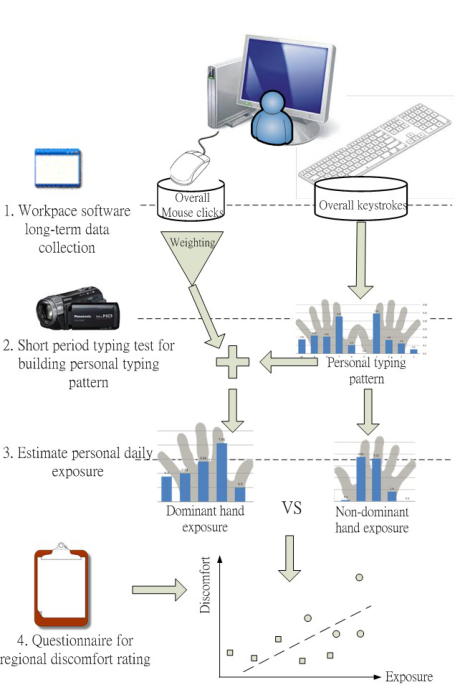
The aim of this study is to discover the relationship between computer workload and musculoskeletal complaints. To achieve this goal, a participant’s typing pattern must be determined before separating his or her keyboarding workload in dominant from nondominant hand. We assumes that personal keyboard typing habits is invariant, i.e. individual will keep using the same finger to type the same key. Under such assumption, onsite collecting keyboard typing for a short period of time can establish individual worker’s typing pattern. Each participant’s daily computer exposures, number of keystroke typing in his or her dominant and nondominant hand can then be predicted by individual typing pattern and the long-term logged computer activities. Estimated computer daily exposures in participants’ dominant and nondominant hand are then correlated with the musculoskeletal complaints collected by a questionnaire of body part discomfort rating to determine the relationship between computer workload and musculoskeletal complaints. Figure 1 demonstrates the research framework, in which the collection of experimental data is divided into three parts:
1. Invite computer workers of 3 professional groups to joint this study. Participant’s computer activities, keystrokes and mouse clicks, were onsite measured over a 6-month period by using WorkPace software (Wellnomics Ltd, New Zealand).
2. Develop a keystroke recognizing system and conduct a typing task to determine a participant’s typing pattern for estimating keyboarding workload in his or her dominant and nondominant hands.
3. Collect participants’ discomfort rating of body parts by using a questionnaire.
Major contents of each data collection procedure were described in the following paragraphs.
Figure 1. Research framework
Subjects Twelve university administrators, 8 computer-aided design (CAD) draftsmen, and 8 software programmers were recruited as participants. All subjects were right-handed and used a desktop personal computer (PC) at work. Each subject self-reported using only the test PC during work and had a regular work-rest schedule and consistent work content (i.e., routine or similar computer tasks). According to an informal survey, university administrators executed regular document processing tasks comprising data entry, document editing, accounting, and Internet browsing. The predominant computer environments of the administrators were Microsoft Office and an information system for accounting, purchasing, and student affairs. Draftsmen design tasks comprised computer graphing and document editing. The predominant computer environments of draftsmen were Microsoft Office, SolidWorks and CATIA (Dassault Systemes).
All participants agree to join this study for at least 6 months. During the 6-month period, daily worksite computer activities of each participant was recorded consecutively by using WorkPace software. At the end of data collecting period, each participant receives a short period (around 40 min) keyboard typing test and a questionnaire interview about discomfort rating of body parts. In the typing test, a predesigned typing sheet was provided for each participant. Each participant was asked to retype the sheet content with his or her natural typing speed. The sheet content was designed to ensure every key on a standard keyboard was typed.
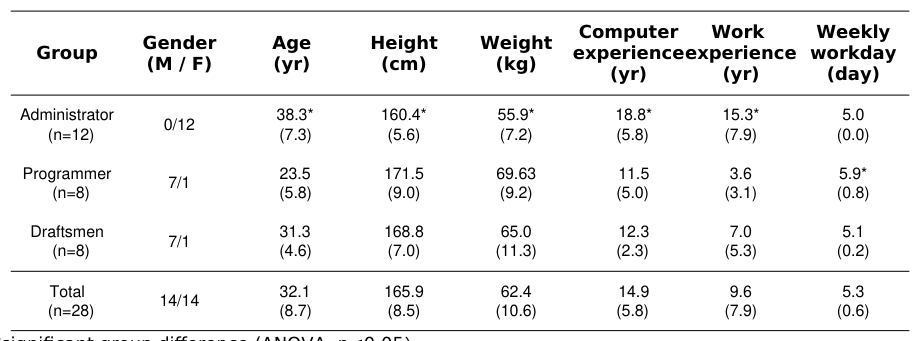
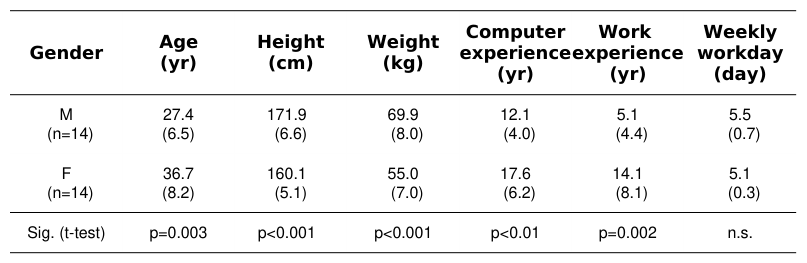
Significant differences in sex and age composition were found between participant groups (Table 1). Administrators are all female and have a mean age of 38.3 yrs., while programmers and draftsmen are mostly male. Significant gender differences were found in age, stature, and experience (Table 2).
Table 1: Basic information of three participant groups (mean ± s.d.)
*significant group difference (ANOVA, p<0.05)
Table 2: Gender differences in participants' (mean ± s.d.)
Keystroke recognizing and typing pattern
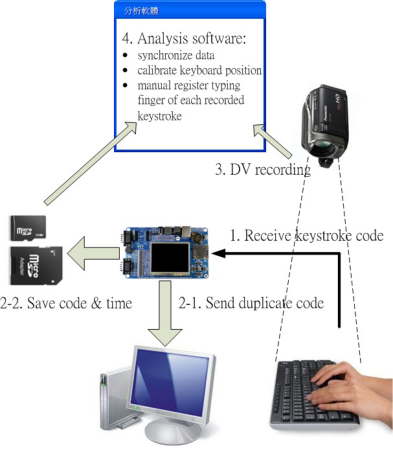
This study builds a keystroke recognizing system to detect a keystroke and recognizing its typing finger. The architecture of recognizing system is showed in Fig. 2a. The system consists of a data logger, a digital camcorder, a keyboard and mouse set (Logitech K260), a mirror, and an adjustable aluminum arm (Fig. 2b). The data logger receives keystroke signals sending from the keyboard and saves the code together with instant time on an SD memory card for later analysis. During typing, the camcorder records hand and finger movements of a participant. A mirror was suited slant to allow the camcorder simultaneously filming hand-finger movement from two different viewing angles. A mirror located in front of the keyboard, with a slant angle, allows the camcorder to film simultaneously hand-finger movement from two different viewing angles.
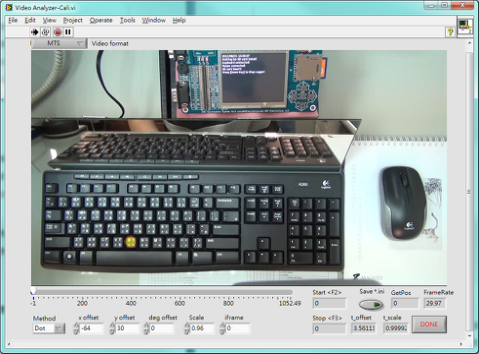
Analysis software, programmed by using LabVIEW 2011 (National Instruments, USA) and ActiveX objects of Movie Player Pro (Viscom Software Co., USA), was developed to facilitate analyzing the experimental data. The software integrates keystroke information and video image for an experimenter to recognize and register manually the typing finger of each keystroke. The software has a calibration module to synchronize recorded keystroke information and video image, and to determine each keyboard button location (Fig. 3a). After a calibration procedure, the software automatically reads in the logged data, open the corresponding video file, sequentially display video image of each keystroke typing timeframe, and overlay a yellow marker on the video image (Fig. 3b). Therefore, researchers can judge the typing finger easily according to the video image and used number keys to register the typing finger. The image in the mirror can assist the image taken from top view for an experimenter to identify the typing finger correctly.
(a) (b)
Figure 2. Architecture (a) and hardware (b) of the keystroke recognizing system
(a) (b)
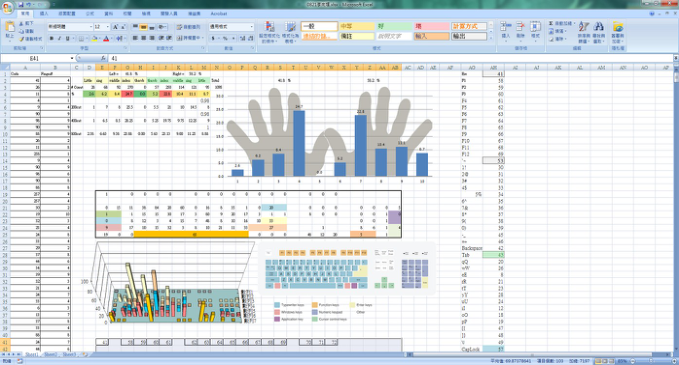
Figure 3. Calibration module (a) and main screen (b) of the analysis software Analyzed result is stored automatically in an MS Excel report (Fig. 4). The main contents of the report presents the number and proportion of keystrokes in each finger and hand, the distribution of keystrokes on the keyboard, the consistency of each key and associated typing fingers, and typing pattern of the participant. A typical typing pattern is set up with a mapping matrix of keyboard key codes and typing fingers.Figure 4. A typical report output of typing pattern
Musculoskeletal complaints After a short test for typing pattern, each participant filled out a short questionnaire, modified from a previous study of Yun et al. (2001). The survey collected data on personal characteristics, computer use, and subjective feelings about regional pain during the past year. Discomfort and pain in the neck, shoulders, arms, wrists and hands, and upper and lower back areas were recorded. Response categories were “no pain,” “mild pain,” “discomforting,” “distressing,” and “intense” scored on a Borg CR-10 scale. Accompanying questionnaire interview, the experimenter used a span style dynamometer to measure the maximum grip force in participant's dominant and nondominant hands.
RESULTS
No significant group difference exists in the number of workdays that WorkPace recorded. The average recording of a participant is about 100 workdays (Table 3). According to the WorkPace records of computer activities, different workgroups exhibit different computer exposure. Figure 5a shows the distribution of participants’ mean daily keystrokes and mouse clicks. Most administrators perform more keystrokes than mouse clicks. On the contrary, the most CAD draftsmen perform more mouse clicks than keystrokes and few programmers have significant amount of keystrokes or mouse clicks. Such result indicates performing different computer task can result in significant difference in keyboard and mouse exposure, therefore highlights the need for quantifying dominant and nondominant hand exposure of a computer worker in this study.
Figure 5b presents average daily keystrokes in dominant and nondominant hands of all participants. The administrators’ dominant hands perform significantly more keystroke counts than their nondominant hands do. Nevertheless, nondominant hands of the CAD draftsmen type significantly more keystrokes than that their dominant hands do. Experimental results show that administrators type more keystrokes daily than the CAD draftsmen do.
Table 3: Gender differences in participants' (mean ± s.d.)
Table available in the original PDF paper.
One-
a. Daministrat
b. Programme
c. Draftsma
Post-
Equations and mathematical formulas are available in the original paper PDF.
way ANOV
hoc
Group Parameter
Measured workdays
102±47 [37,205]
90±65 [47,247]
125±77 [37,212]
105±61 [37,247] n.s.
1404±534 [674,2093]
2780±1298 [1373,4840]
1303±538 [482,2125]
Non-dominant hand keystrokes (keystroke/day) 2443±1029 [629,3692]
2408±1094 [1039,4025]
756±480 [227,1531]
Dominant hand keystrokes (keystroke/day) 3847±1539 [1303,5620]
5187±2002 [2767,7896]
2059±639 [709,2926]
Total keystrokes (keystroke/day) 2760±1172 [651,5106]
5723±3896 [3012,14119]
3778±2090 [690,6061]
3897±2682 [651,14119] p<0.05 §b>a
Dominant hand mouse clicks (click/day) ns: non-significant, §p<0.05, *p<0.01, **p<0.001
(a) (b)
Figure 5. Participants' average daily keystroke and mouse click (a) and estimated daily keystrokes in dominant and non-dominant hands (b) in 3 workgroups
Figure available in the original PDF paper.
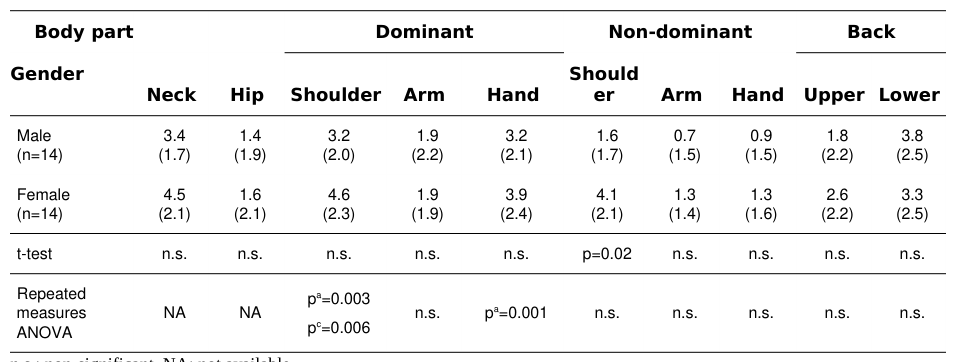
Statistical result of questionnaire survey shows all participants feel the highest discomfort in their dominant shoulders, followed by necks and dominant hands (include finger, hand, and wrist). Besides arms, participants have significant higher discomfort rating in their dominant wrist (p<0.001, Table 4) and shoulder (p=0.003, Table 4) than in their nondominant wrist and shoulder. The female participants show higher discomfort than the male participants in nondominant shoulder (p=0.02, t-test). However, no significant gender difference in the extent of complaining to other body parts is found (Table 4).
Pearson correlation analysis shows the extent of discomfort on neck correlates significantly with that on bilateral shoulders (p=0.02-0.005). Slightly weak positive correlations also exist between upper limb parts (p<0.05, not showed in table). Nevertheless, participant work experience is not significantly correlated with discomfort on any body part. Therefore, this study further explore how computer exposure affects participants' body discomfort by using only averaged daily computer activities as the indices of computer exposure. The effect of work experience on body discomfort is not considered in this study.
Table 4: Subjective soreness in participants’ body parts (CR-10 score (s.d.))
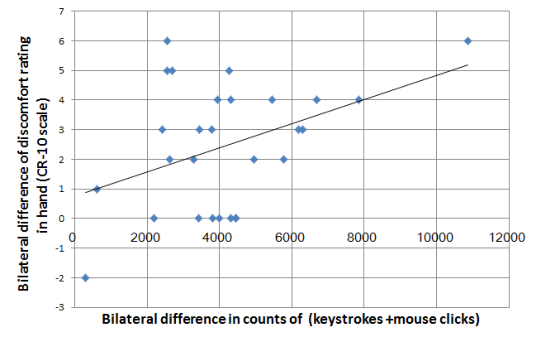
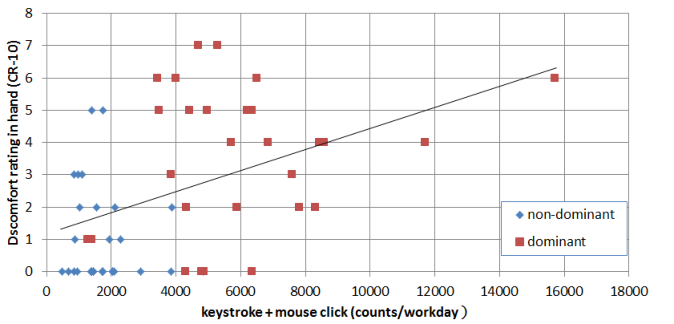
The extent of participants discomfort on each body part was then correlated individually with the average daily keystrokes of their both hands and of each hand, and with the daily number of keystrokes + mouse clicks in their dominant hand. Correlation analysis showed that above daily exposure indices were not significantly correlated with any discomfort rating of body part. Thus, this study further conducted correlation analysis on the bilateral difference (dominant subtracts nondominant) of each exposure index and the bilateral difference of discomfort rating in hands, arms, and shoulders. The result showed the correlation between discomfort rating and computer exposure is weak in shoulder and arm. Only the bilateral difference in numbers of keystrokes + mouse clicks and the bilateral difference of discomfort rating in hand have a significant positive correlation (r=0.41; p=0.02, Fig. 6). It is worth noting the computer exposure in dominant hand includes numbers of keystrokes + mouse clicks, while exposure in nondominant hand includes only the amount of keystroke typed. Moreover, the daily count of every participant’s keystrokes + mouse clicks is greater in his or her dominant hand than in nondominant hand. Figure 7 shows the distribution and significant relationship (r=0.46; p<0.001) of the daily keystroke + mouse click counts and participants discomfort ratings in hands.
Figure 6. Distribution of bilateral difference in numbers of keystrokes + mouse clicks and the bilateral difference of hand discomfort rating (r=0.41; p=0.02)Figure 7. Distribution of participants daily counts in keystroke + mouse click and their discomfort ratings in hands (r=0.46; F=12.9, p<0.001)
According to analytical results of the short-period typing test, administrators achieve a significant higher typing speed (2-8 fold) than that of programmers and CAD draftsmen (p<0.001, one-way ANOVA, not showed in table). Nevertheless, according to WorkPace records, the average counts of daily keystroke and mouse click between 3 work groups were not significantly different. This result indicates the daily duration of computer operation is significantly higher in the CAD draftsmen than in the administrators (p=0.035, one-way ANOVA, not showed in table). However, participants typing speed and their estimated daily operation duration were not well correlated with their regional discomforts. Only mild positive correlation was found between typing speed and discomfort rating of nondominant shoulder (r=0.487, p=0.013). This finding suggests that discomfort caused by computer use is not solely affected by typing speed or computer using time.
DISCUSSIONS Gerr et al. (1996) identified many studies on computer associated hazards have methodological limitations, inconsistent results and limited conclusions. Gerr et al. suggested that objective methods should be adopted when assessing computer exposure and health outcomes. This study builds a keystroke recognizing system and conducts a short period typing test to establish personal typing pattern. The individual typing pattern was then used to separate personal daily typing keystrokes into that of dominant and nondominant hands. Such quantitative measure allows researchers to further explore the relationship between computer use and computer associated regional discomfort.
The quantitative result of keystroke achieved in this study represents receptiveness of participants’ hand movement, which is an integration of typing speed and operation duration. However, combining all 3 different workgroups, analytical result indicates that work experience, typing speed, and estimated daily operation duration were not well correlated with regional discomforts. Only exposure in dominant (keystrokes + clicks) and nondominant (only keystrokes) hand have a satisfactory interpretation power for hand discomfort. Such result justifies the need for quantifying dominant and nondominant hand exposure of a computer worker in this study.
Participants performing 3 different computer tasks were recruited in this study to cover a variety of computer operations to provide a general research conclusion. Research finding showed significant difference in computer exposure among individual participants and among workgroups. Despite that all participants don’t have consistent data entry habit in their dominant and nondominant hands, while combining the number of keystrokes and mouse clicks, all participants have a higher exposure in their dominant hands than in their nondominant hand. Such quantitative result may explain why only 2 out of 28 participants had higher discomfort rating in their nondominant arms, shoulders, and hands. Although, the arm and shoulder were not correlated with computer exposure significantly.
According to this research finding, the number of keystroke typing and mouse clicking contribute more to participant’s hand discomfort than other investigated factors. Research finding shows that quantitative keyboard and mouse use can explain nearly 50% variance of hand discomfort, however, the number of keystroke typing and mouse clicking is not well associated with the discomfort in other body regions. Such observation indicates computer associated discomfort may be affected by other factors such as high force, awkward posture, intense mental stress, etc. (Fagarasanu and Kumar, 2003; Gerr et al., 2004).
REFERENCES
Blatter, B.M., Bongers, P.M. (2002). Duration of computer use and mouse use in relation to musculoskeletal disorders of neck or upper limb. Int. J. Ind. Ergon., 30, 295-306. Chang, C.H., Amick III, B.C., Menendez, C.C., Katz, J.N., Johnson, P.W., Robertson, M., Dennerlein, J.T. (2007). Daily
computer usage correlated with undergraduate students' musculoskeletal symptoms. Am. J. Ind. Med., 50, 481-488. Fagarasanu, M., Kumar, S. (2003). Carpal tunnel syndrome due to keyboarding and mouse tasks: a review. Int. J. Ind. Ergon., 31, 119-136. Gerr, F., Marcus, M., Ortiz, D. (1996). Methodological limitations in the study of video display terminal use and upper extremity
musculoskeletal disorders. Am. J. Ind. Med., 29, 649-656. Gerr, F., Marcus, M., Monteilh, C. (2004). Epidemiology of musculoskeletal disorders among computer users: Lesson learned from the role of posture and keyboard use. J. Electromyogr. Kines., 14, 25-31. Jensen, C., Finsen, L., Søgaard, K., Christensen, H. (2002). Musculoskeletal symptoms and duration of computer and mouse use.
Int. J. Ind. Ergon., 30, 265-275. Mikkelsen, S., Vilstrup, I., Lassen, C.F., Kryger, A.I., Thomsen, F.J., Andersen, J.H. (2007). Validity of questionnaire selfreports on computer, mouse and keyboard usage during a four-week period. Occup. Environ. Med., 64, 541-547. Rempel, D.R., Tittiranonda, P., Burasteno, S., Hudes, M., So, Y. (1999). Effect of keyboard key switch design on hand pain. J.
Occup. Environ. Med., 41, 111-119. Sauter, S.L., Schleifer, M., Knutson, S. (1991). Work posture, work station design, and musculoskeletal discomfort in a VDT data entry task. Hum Factors, 33, 151-167. Szabo, R.M. (1998). Carpal tunnel syndrome as a repetitive motion disorder. Clin. Orthop. Relat. Res., 351, 78-89. Szeto, G.P.Y., Straker, L.M., O'Sullivan, P.B. (2005). The effect of typing speed and force on motor control in symptomatic and
asymptomatic office workers. Int. J. Ind. Ergon., 35, 779-795. Wu, H.C., Liu, Y.P., Chen, H.C. (2010). Differences in computer exposures between university administrators and CAD draftsmen. Applied Ergonomics, 41(6), 849-856. Yun, M.H., Lee, Y.G., Eoh, H.J., Lim, S.H. (2001). Results of a survey on the awareness and severity assessment of upper-limb
work-related musculoskeletal disorders among female bank tellers in Korea. Int. J. Ind. Ergon., 27, 347-357.
LISTED IN THE AHFE DIGITAL BOOKSTORE CATALOGUE
Explore the complete digital volume
Advances in Physical Ergonomics and Human Factors: Part I
Read this individual research paper free through the original publisher, or explore the full digital proceedings book.
ISBN 978-1-4951-2104-3
Explore this ISBN in the AHFE Bookstore ↗Listed in the July 2026 bookstore catalogue; search by ISBN to confirm current availability · Digital book purchase optional