Antje Heinicke, Christina Bröhl, Jennifer Bützler, Christopher M. Schlick (2018). Usability of Document Management Systems Considering Users' Level of Experience: A Survey. In: Advances in Human Factors, Software, and Systems Engineering. AHFE Open Access, vol. 4. https://doi.org/10.54941/ahfe100130
Through the use of Document Management Systems (DMS) companies can enhance the automation of processes within documents’ registration, classification, processing, archiving and distribution. However, the usability aspect in current selection processes of DMS is inadequately represented. The reason for this neglect is the fact that although functional criteria can be easily formulated for the evaluation and selection of DMS, it is very difficult to specify criteria concerning usability. Objective criteria need to be developed, which can be used a priori for the evaluation and selection of DMS. The criteria have to be developed in a way that they (referring to usability) are applicable to non-specialist users in SMEs. In order to develop these criteria, the existing usability weaknesses of DMS have to be identified as well as the users’ skills, tasks and requirements. In this paper results of a survey are presented.
As the overload of digital information in small and medium enterprises (SMEs) requires an adequate management, DMSs increasingly gain importance (Sontow et al. 2012). Due to its cross-process functionality DMS are applied in SMEs across all departments and disciplines. The current scientific methods for system selection are not capable of representing the differences in the usability of the DMSs. The methods largely consider functional system requirements (Naß & Scheibmayer 2011). The actual added value of the DMS, i.e. finding documents fast and interdepartmental by entering descriptive information (metadata), initially means extra effort for the individual user in document capture. Not usable or for the target unsuitable systems lead to the avoiding of such additional work and, thus, the real added value of the DMS will be missed. In system tests usability is not taken into account until the end of a selection process. At this time a pre-selection already has been made.
Scientific publications describe an urgent need for usability criteria and case studies demonstrating their economic added value concerning software applications for SMEs. Woywode et al. (2012) derive from different capability maturity models one comprehensive capability maturity model for the usability in software applications, which applies particularly for SMEs. This model covers the entire use of software and software design process but does not include requirements for the design of document management systems (DMS). Woywode et al. (2012) focus on various studies dealing with usability, the awareness of usability at enterprises and the integration of usability in the management. They also show in their analysis of 160 software products that there is a discrepancy between the required and the offered usability. Furthermore, they show that increased usability is an important differentiating characteristic in the software market which contributes to an immediate increase in competitiveness.
So far there are no scientific studies or DMS specific ergonomic recommendations validated with experimental data, based on which a selection of a DMS could be made according to usability aspects. The necessary work is carried out within the framework of the project uSelect DMS funded by the German Federal Ministry for Economic Affairs. The goal of “uSelect DMS” is to make usability in DMS describable and integrate it into the software selection process in SMEs (Heinicke, 2013).
Aim of the first analysis phase presented in this paper was to identify the context of use and the weaknesses in the usability of existing DMSs. For this purpose as a first step, an online survey was carried out with persons from the area of document management. The paper focuses on the results of the survey regarding the determination of user groups, user tasks as well as revealing usability weaknesses of the used DMS. In order to develop user-friendly systems without having to consider individual users, it is useful to divide users into classes of similar experience levels (Herczeg, 2005). Hence, the users were classified based on their information regarding their experience on the system and the results of the weakness analysis could be differentiated for different user groups. In this way it can be examined whether different criteria are relevant for the different experience groups and whether the subjective usability evaluation of the DMS differs between them.
METHOD
An online survey with 57 participants from various industrial sectors was conducted. The survey includes questions regarding objectives of the participants when managing their documents as well as their specific work tasks. The group of persons questioned contains both users of DMS (n=32) and persons who manage their documents without the support of a DMS (n=25). The survey contained questions regarding demographic data, company-related data and data about the document management with and without the support of a DMS. Based on the data of all participants, the most frequently performed document management tasks were determined. These tasks are considered for the experimental design regarding the subsequent on-site analysis, where users have to process different tasks on various DMS. For this purpose a reference process has been developed, which includes all the identified tasks. In addition, the questionnaire contained questions about software ergonomic weaknesses of the DMS. These questions have been answered by the DMS users only.
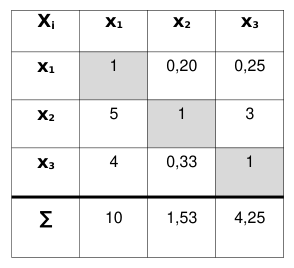
User grouping considering users' level of DMS experience Considering the given information about the DMS-users’ intensity and duration of DMS usage, the participants could be divided into groups concerning their experience with the DMS. The variable ‘DMS experience level’ was calculated based on the variables ‘duration of use’, ‘number of different tasks per day’ and ‘total number of tasks per day’. Depending on their effect on the level of experience, the variables were evaluated based on the AHP Method (Saaty, 1980). The first step is to evaluate the criteria pairwise according to their importance. Result of the comparison is an integer for each pair of criteria which reflects the evaluation of importance (from 1 criteria are of equal importance to 9 one criterion is extremely more important). For the more important criterion, the integer value is entered in the pair-wise comparison matrix. The less important criterion receives the reciprocal value as entry. Weights are calculated based on the resulting pair-wise comparison matrix (see Table 1). The matrix is normalized and the weighting vector is calculated by averaging the values of the rows. The level of experience for each participant results from the calculation of the weighted average (see Table 2). The evaluation of the criteria importance was done by a group of four experts from the project consortium.
Table 1: Pair-wise comparison matrix: Weighting of variables regarding the experience level Xi x1 x2 x3 gi Variables x1 1 0,20 0,25 0,10 x1 Total duration of use x2 5 1 3 0,62 x2 Number of different tasks per day
Table 2 Calculation of DMS experience level Experience level Number
Usability weaknesses To identify weaknesses in the usability of the DMS, items from the questionnaire ErgoNorm (Dzida et al. 2000) were included in the survey. The ErgoNorm questionnaire is part of a process to evaluate the ergonomics of software based on the ISO 9241 part 10 (currently replaced by 110) and 11 (ISO 9241 1999). It consists of 28 questions relating to the presence or absence of a dialog system’s positive characteristics according to the seven principles. There are three possible answers concerning the target state of the system: There is no problem (positive response respectively criteria fulfilled), there is a problem (negative response respectively criteria not fulfilled), and there is a particular problem (negative response with weighting respectively disturbing). In addition, there is also the possibility to mark a question as "not applicable". This response option is selected, if the participant does not work with certain functions of the system nor has tried them out yet. When evaluating the ErgoNorm standard questionnaire, the detection of particularly serious deficiencies of the systems is the focus. A deficiency is considered to be particularly serious if more than 10% of respondents recognize this deficiency or at least one participant perceives the deficiency as particularly disturbing. This part of the survey was completed by 27 DMS users (age 26-61 years, mean = 42.48, SD = 11.1).
Usability weaknesses considering users’ level of DMS experience As the independent variable the users’ level of DMS experience was considered. As dependent variables the evaluation of weaknesses (positive, negative and not applicable) and the identification of disturbing deficiencies were analyzed. The statistical analysis in this work was calculated using the statistical software package IBM SPSS Version 21.0. As the dependent variables were measured on a nominal scale level, the [Equation or mathematical symbol available in the original paper PDF]²-test was used for the statistical analysis of significance. As significance level α = 0.05 was chosen.
RESULTS
Identified Tasks To determine frequently performed tasks, all participants were asked about the documents, which they edit most frequently with or without the help of a DMS. Here, multiple answers were allowed. This resulted in emails, letters, reports, presentations and invoices as the most commonly used documents for all users. The DMS users could also specify the menu items which they use most frequently as free text. Here, multiple answers were allowed as well. Figure 1 shows the grouping of the most frequently mentioned menu items.
Search Store/save
View Release
Edit Workflow/Tasks
Scan Administration
Other
8.00%
6.00%
4.00%
2.00%
0.00%
20.00%
18.00%
16.00%
14.00%
12.00%
10.00%
Figure 1. Most frequently used menu items
Figure available in the original PDF paper.
As reference process the processing of incoming invoices has been selected, which includes both the editing of the most used document types as well as the use of the named menu items. This decision was verified within a workshop with users and manufacturers of DMS.
Identified weaknesses of current document management systems Based on the methodology for evaluating the ErgoNorm questionnaire referred to above there are particularly serious deficiencies in five of the seven criteria, since the number of participants which have named the criteria as not being fulfilled exceeds 10% (See Figure 2).
suitability for individualisation
not fulfilled fulfilled not applicable
suitability for the task controllability
error tolerance conformity with user expectations
self descriptiveness suitability for learning
0% 10% 20% 30% 40% 50% 60% 70% 80% 90% 100%
Figure 2. Evaluation of ErgoNorm questionnaire over all categories for all users
Figure available in the original PDF paper.
In summary, all document management systems used by the participants of the survey have serious deficiencies in the categories suitability for the task, Controllability, conformity with user expectations, error tolerance and suitability for individualization. There are no serious deficiencies within the criteria self-descriptiveness and suitability for learning. The analysis of the concrete answers to the questions of ErgoNorm has shown that specific deficiencies exist within the criteria for individual sub items. The weaknesses are considered in more detail hereinafter regarding the level of experience on the DMS.
Weaknesses considering users’ level of DMS experience Here, the software ergonomic weaknesses were evaluated differentiated by experience groups. Novice users (n = 11) and expert users (n = 7) have identified criteria as not being fulfilled more frequently compared to advanced users (n = 9). These variations in the responses are significantly different between the groups of novice users and advanced users ([Equation or mathematical symbol available in the original paper PDF]² = 13.93, p = 0.002) as well as the groups of expert users and advanced users ([Equation or mathematical symbol available in the original paper PDF]² = 6.16, p = 0.013).
Novice users Users with limited experience have rated deficiencies significantly more frequent as disturbing ([Equation or mathematical symbol available in the original paper PDF]² = 18.64, p = 0.001). For novice users, the systems are deficient regarding all criteria, with the exception of the suitability for learning (see Figure 3). Suitability for learning had the highest proportion of the answer "not applicable" (45%) because trial and error was not performed on the system. Foremost among the other criteria there are serious deficiencies regarding suitability for individualization (18%), suitability for the task (17%) and conformity with user expectations (15%). Moreover, serious deficiencies in the area of self-descriptiveness were named (12%) exclusively within this group of experience. One reason for this could be that fulfilling this criterion is particularly relevant for users with limited experience, as a self-descriptive system can facilitate the learning. Concretely mentioned deficiencies within the criteria are for example "The effort required for the work result is not appropriate" (36%) and "The messages of the system are not understandable" (27%). Table 3 shows an excerpt of specific deficiencies and associated comments named by the novice users. The frequency of the deficiencies listed by this user group can be explained by the fact that users who are not well acquainted with the system or apply it only occasionally, have a greater awareness of weaknesses, as they are prevented by them to an easy access into the system.
suitability for individualisation
not fulfilled fulfilled
suitability for the task error tolerance
conformity with user expectations controllability
self descriptiveness suitability for learning
0% 10% 20% 30% 40% 50% 60% 70% 80% 90% 100%
Figure 3. Evaluation of ErgoNorm questionnaire over all categories for novice DMS users
Figure available in the original PDF paper.
Participants with limited experience at the DMS have given the answer option "not applicable" significantly more frequent ([Equation or mathematical symbol available in the original paper PDF]² = 54.48, p = 0.00).
Table 3 Deficiencies within the criteria for exemplarily sub items and associated comments from
novice DMS users (excerpt) Comments Criteria Number of negative respons es Number of ratings disturbi ng
Advanced users Users with advanced experience (n = 9) have named least deficiencies. Only in the area suitability for individualization serious deficiencies were recognized by 22% of the associated participants (see Figure 4). Concrete deficiency in this context is "On the computer not everything is adjustable so that reading and working is easier." (22%). Table 4 shows an excerpt of specific deficiencies and associated comments named by the advanced users. Advanced users have been working for some time with the system and dealing with similar tasks. This could explain that they noticed fewer weaknesses.
suitability for individualisation
not fulfilled fulfilled not applicable
controllability suitability for the task
error tolerance conformity with user expectations
self descriptiveness suitability for learning
0% 10% 20% 30% 40% 50% 60% 70% 80% 90% 100%
Figure 4. Evaluation of ErgoNorm questionnaire over all categories for advanced DMS users
Figure available in the original PDF paper.
Table 4 Deficiencies within the criteria for exemplarily sub items and associated comments from
advanced DMS users (excerpt) Comments
Expert users For participants with broad experience (n = 7) the systems are deficient regarding all criteria, except for the self- descriptiveness (see Figure 5). Most deficiencies have been named in the area of Controllability (20%). Regarding controllability a frequently named deficiency was "A step cannot be taken back if it is appropriate for the task completion" with 29%. Table 5 shows an excerpt of specific deficiencies and associated comments named by the expert users. The increased naming of deficiencies by this user group can be explained by the fact that users who make intensive use of the system and perform many different tasks with it, have a strong awareness of weaknesses, since they deal in detail with the system.
controllability
not fulfilled fulfilled not applicable
error tolerance suitability for the task
suitability for learning suitability for individualisation
conformity with user expectations self descriptiveness
0% 10% 20% 30% 40% 50% 60% 70% 80% 90% 100%
Figure 5. Evaluation of ErgoNorm questionnaire over all categories for expert DMS users
Figure available in the original PDF paper.
Table 5 Deficiencies within the criteria for exemplarily sub items and associated comments from
expert DMS users (excerpt) Comments Criteria Number of negative respons es Number of ratings disturbi ng
CONCLUSIONS
According to the survey results, the DMS are not usable, particularly for novice users and expert users. These two user groups have identified criteria which are fulfilled deficient more frequently compared to advanced users. A possible interpretation of the results would be that users, who are not well acquainted with the system or apply it only occasionally, have a greater awareness of weaknesses, as they are prevented by them to an easy access into the system. User with advanced experience have been working for some time with the system and dealing with similar tasks. This could explain that they noticed fewer weaknesses. Users, who make intensive use of the system and perform many different tasks with it, have a strong awareness of weaknesses, since they deal in detail with the system.
By the DMS manufacturers themselves a training course is mentioned as basic requirement for the use of their systems. It can be concluded that the systems are neither self-descriptive nor suitable for learning, which is also confirmed partially by the survey results. The need for action is therefore more than justified. Although only a basic overview of existing usability weaknesses could be given in this paper, deficits in de-facto standard could be identified. These will be principles-based analyzed in the subsequent research. The results indicate that different criteria are relevant for different experience groups. This is to be used for the subsequent user tests and the related development of a selection methodology which takes into account the occurring user groups in the user companies. In the comments of the DMS users the structure of the DMS user interface was often described as deficient. In further research, alternative representation options for the visualization of the data structures of the DMS will be developed and tested regarding usability and user acceptance. Here, the factor joy of use will also be considered in the development and testing of the visualizations.
ACKNOWLEDGEMENTS
The joint research project uSelect DMS (01MU12018A) is supported by the Federal Ministry of Economics and Technology within the framework of the research program "SME-Digital" initiative "Simply intuitive - usability for SMEs" program.
REFERENCES
Dzida W, Hofmann B, Freitag R, Redtenbacher W, Baggen R, Geis T, Beimel J, Zurheiden C, Hampe-Neteler W, Hartwig R, & Peters H (2000). Gebrauchstauglichkeit von Software: ErgoNorm: Ein Verfahren zur Konformitätsprüfung von Software auf der Grundlage von DIN EN ISO 9241 Teile 10 und 11. Schriftenreihe der Bundesanstalt für Arbeitschutz und Arbeitsmedizin. Dortmund, Germany: Bundesanstalt für Arbeitschutz und Arbeitsmedizin. Heinicke, A.; Bröhl, C.; Mayer, M.; Dornberg, J.; Schlick, C.: Entwicklung von Usability-Kriterien zur Optimierung des
Auswahlprozesses von Dokumentenmanagementsystemen in KMU, In: Chancen durch Arbeits-, Produkt- und Systemgestaltung für Produktions- und Dienstleistungsunternehmen, Hrsg.: GFA, GFA-Press, Dortmund 2013, S. 673-676 Herczeg, M.; Software-Ergonomie. Grundlagen der Mensch-Computer-Kommunikation, 2. Auflage, München: Oldenbourg 2005 ISO 9241 1999 – 2011, Ergonomics of human-system interaction, Part 8, Part 110, Part 129, Parts 11-17, Part 171, Part 210, Beuth Verlag, Berlin 1999 – 2011 Naß E, Scheibmayer M, 2011 3-Phasen-Modell zur DMS-Auswahl, Unternehmen der Zukunft, FIR−Zeitschrift für Organisation
und Arbeit in Produktion und Dienstleistung, Schwerpunkt "Informationsmanagement", 12 Jg. Ausgabe 2/2011 Sontow K, Treutlein P, Sontow R (2012), ERP in der Praxis - Anwenderzufriedenheit, Nutzen & Perspektiven. Trovarit AG,
2012. Saaty T, 1980 The Analytic Hierarchy Process: Planning, Priority Setting, Resource Allocation, McGraw-Hill 1980 Woywode et al. 2012, Woywode, M., Mädche, A., Wallach, D., Plach, M., „Gebrauchstauglichkeit von Anwendungssoftware als Wettbewerbsfaktor für kleine und mittlere Unternehmen (KMU)“, http://www.usability-in-germany.de/ergebnis, letzter Aufruf 7.2.2012, 2012
LISTED IN THE AHFE DIGITAL BOOKSTORE CATALOGUE
Explore the complete digital volume
Advances in Human Factors, Software, and Systems Engineering
Read this individual research paper free through the original publisher, or explore the full digital proceedings book.
ISBN 978-1-4951-2096-1
Explore this ISBN in the AHFE Bookstore ↗Listed in the July 2026 bookstore catalogue; search by ISBN to confirm current availability · Digital book purchase optional