This study investigates the impact of raised character sizes on typing performance, providing insights into optimizing keyboard accessibility. Using customized keyboards with varying raised character sizes, we measured the touch-typing speed and accuracy and evaluated the user experience of 32 non-professional typists under strictly controlled conditions. The participants used four different keyboards: a standard mechanical keyboard (X group), a keyboard with raised characters smaller than standard Braille (A group), a keyboard with raised characters equal to standard Braille (B group), and a keyboard with raised characters larger than standard Braille (C group). Typing speed (WPM), typing accuracy (%), and usage experience scores (five-point Likert scale) obtained from the experimental measurements were analyzed using one-way ANOVA. The results indicate that more prominent raised characters significantly enhance typing accuracy and overall user satisfaction. Specifically, Product Group B (6.5mm) achieves higher accuracy compared to other groups, while Product Group C (8.5mm) provides the best user experience among all groups, with typing speeds comparable to the standard keyboard. This demonstrates the role of enhanced tactile feedback in improving typing performance to varying degrees. These findings suggest that incorporating more prominent raised characters into keyboard design can improve tactile feedback, thereby enhancing both typing performance and user experience.
Historically, keyboard design has been focused on general usability, and in recent years a trend towards trendiness and customization has begun to emerge (MacKenzie and Tanaka-Ishii, 2007), often ignoring the specific needs of visually impaired users (Khan and Khusro, 2021a; Wang et al., 2023). The lack of adequate tactile feedback in standard keyboard designs poses difficulties in critical recognition and typing efficiency, seriously affecting their full participation and productivity in the digital world. Haptic feedback provides immediate and accurate confirmation of critical positions, serving as an essential alternative to visual feedback (Lauwrens, 2019).
This reduces the cognitive load in human-computer interaction and enhances the independence of visually impaired individuals when using computers (Haghighi et al., 2020; Kim and Dey, 2016).
In light of the significant role that tactile feedback plays in enhancing typing performance, this study aims to explore the under-researched area of raised character recognition on keyboards. We hypothesize that keyboards designed with distinctively raised characters can improve typing speed and accuracy for sighted and visually impaired users by enhancing the tactile feedback provided during typing, and the user experience will also be optimized. The primary research questions guiding this study are: How does the size of the raised characters on the keyboard keys affect the user’s typing speed (RQ1)? How does the size of the raised characters on the keyboard keys affect the user’s typing accuracy (RQ2), and does the design of raised characters improve the user’s typing experience (RQ3)?
The study examined typing speed, accuracy, and user experience across varying raised character sizes, revealing that larger characters significantly enhance performance and satisfaction. It concludes by outlining contributions to keyboard accessibility optimization and proposing future research in haptic feedback and ergonomic design.
RELATED WORK
Recent discussions on text input methods for blind people have highlighted several approaches and innovations. Kane et al. conducted experiments demonstrating significant differences in gesture preferences between blind and sighted users. Furthermore, while there is increasing awareness of the accessibility issues blind people face with touchscreens, adaptations like raised braille on traditional keyboards have been suggested (Kane et al., 2011). However, such modifications can reduce the universality of conventional keyboards.
Research on keyboard design and text entry has explored the needs of various special populations, particularly the elderly and individuals with developmental disabilities (DD). Rodrigues et al. (2014) developed and tested five virtual QWERTY keyboard variants to improve text entry speed and accuracy for elderly users on tablet devices, finding that soft keyboards without visual changes were the most effective for young adults and showing potential for elderly users. The studies collectively underscore the importance of ergonomic and accessible keyboard designs tailored to the needs of special populations to improve their typing performance and user experience.
Weigelt Marom et al. found that touch-typing improved typing speed and accuracy in non-blind beginners, with speeds matching handwriting. However, they didn’t explore factors affecting touch-typing proficiency. In their research on haptic feedback, Crump and Logan (2010) examined the impacts of various types of haptic feedback by deconstructing a traditional keyboard and progressively removing key components such as the keycaps and key shafts. Their findings indicated that the removal of the tactile feel and resistance of the keys significantly impaired typing performance.
Optimizing Keyboard Accessibility: Effects of Raised Character Size 149
However, the study has not yet explored how these factors influence typing performance.
Some studies have expanded research on keyboard design by considering various human factors, with keyboard layout having a significant impact on typing performance and user experience. Pereira et al. (2012) examined key spacing’s effects on typing productivity, usability, and biomechanics, finding that optimized key spacing can enhance typing speed and accuracy while reducing muscle activity and wrist deviation for users with larger hands. Klein (2021) proposed a systematic approach to optimizing keyboard layout by analyzing user typing data to design ergonomically superior keyboards, improving typing efficiency and comfort. Despite these insights, contemporary research on haptic feedback has primarily focused on exploring the effects of various factors on typing performance. Research has yet to explore methods to enhance typing abilities through raised character recognition. Investigating these factors could improve tactile feedback, benefiting both special groups and sighted beginners, and enhancing keying accuracy and touch-typing skills.
METHODS
Materials
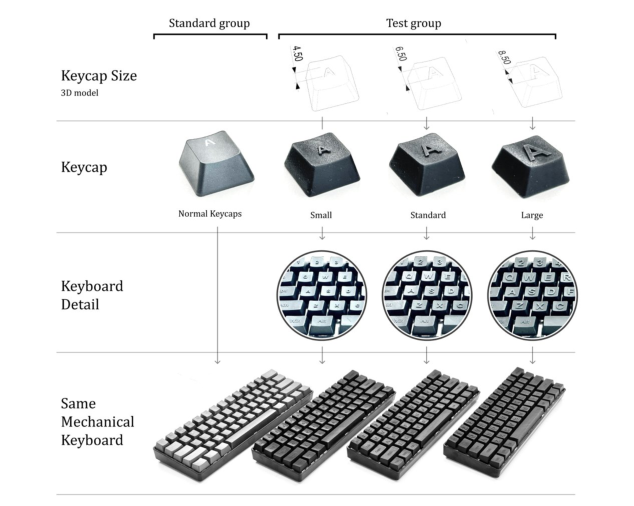
To explore the impact of tactile feedback on typing performance, three custom keyboards were designed and fabricated with varying sizes of raised characters on the keycaps. These raised characters were modeled and 3D printed to ensure uniformity and precision across all keys and keyboards (Fig. 1). The raised height of each keyboard character is a uniform 0.5mm, concerning national Braille standards (National Information Standards Organization, n.d.). A uniform height of 0.5mm was chosen to maintain consistency across all key designs and mimic the height of standard braille dots (Table 1). This uniformity ensures that the variable being tested is strictly the area of the character’s surface that is raised rather than the height, providing a controlled environment for assessing the impact of width and height on tactile feedback effectiveness.
Table 1: National Braille standard sizes.
Table available in the original PDF paper.
Country Dot Height Dot Diameter (mm) (mm)
Distance Between Dots
Vertical Spacing (mm) (mm) United States 0.48 1.44 2.34 10 Australia 0.6 1.5 2.4 11 United Kingdom 0.5 1.5 2.5 10 China 0.5 1.5 2.5 10
Figure 1: Keyboard design and dimensions used for the experiment.
The small size (4.5mm) was selected to test the lower threshold of tactile discrimination. The smaller size aimed to assess if minimal tactile cues enable effective typing, targeting users not reliant on braille but benefiting from subtle feedback. The standard size (6.5mm) was carefully selected based on the dimensions of standard Braille characters. Serving as the midpoint in our experimental range, this size establishes the baseline for comparative analysis with other tactile modifications. It was chosen to evaluate the foundational effects of typical Braille dimensions on enhancing typing performance (Fletcher et al., 2021; Nahar et al., 2021). The large size (8.5mm) tests the impact of more pronounced tactile feedback. More extensive tactile cues enhance the ease of identifying keys by touch, improving typing speed and accuracy for users who do not have acceptable tactile discrimination or are not proficient in braille.
These dimensions were selected after a thorough review of the literature on tactile perception and ergonomics, as well as preliminary feedback from user groups in early pilot studies (Bermejo et al., 2021; Kim and Kang, 2020; Nagendran et al., 2021). Each dimension is intended to test specific hypotheses about tactile feedback and its role in enhancing keyboard usability for visually impaired and sighted users.
Participants The participants in our study consisted of university students from various majors, totaling 17 males and 15 females, with an average age of 21.81 years and an age variance of 5.21. We administered a preliminary typing test to
Optimizing Keyboard Accessibility: Effects of Raised Character Size 151
assess proficiency. Participants were comfortable with the layout and could type without looking at the keys, but their speed and accuracy were below professional levels. This moderate proficiency reflects the typical abilities of everyday computer users.
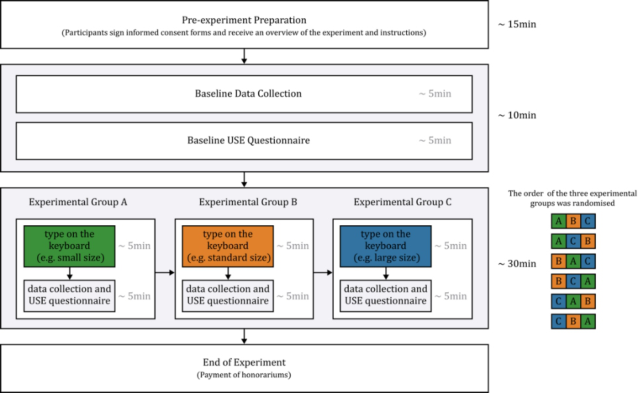
Data Collection Participants will sign informed consent forms pre-experiment and receive stipends post-completion to ensure engagement. During setup, they receive interface and rules briefings and chair adjustments to optimal positions. Baseline group members undergo touch-typing practice on standardized mechanical keyboards to acclimate to tactile feedback and facilitate adaptation.
Subsequently, participants will engage in five minutes of touch-typing on a standard mechanical keyboard to collect baseline data for speed and accuracy. The USE (Usability, Satisfaction, and Ease of use) questionnaire will be administered to gather baseline data on user experience (Lund, n.d.; O’Brien et al., 2018; O’Brien and Toms, 2013). The time allocated for completing the questionnaire and inter-group breaks will total five minutes. Once the baseline data collection is complete, participants will be instructed to perform touch-typing tasks in three experimental groups, and all experimental data will be recorded. Three types of experimental group keyboards will be assigned to them, following a Latin square design to eliminate the effects of group sequence on the data. After each experimental group session, participants will fill out the USE questionnaire again. The process of the experiment is shown in Fig. 2.
Figure 2: The process of experiment.
The experiment utilizes the Keybr website, which is designed explicitly for typing training. It standardizes typing conditions and content while accurately measuring participants’ typing data. Each session targets five
minutes of exercise, during which Keybr calculates the average typing speed (words per minute) for the designated duration and overall accuracy. It also collects data on the typing speed of each critical position frequency.
We will employ a one-way ANOVA to evaluate the differences in typing performance metrics across various keyboard configurations. Should the ANOVA results indicate substantial differences, we will proceed with post hoc testing to pinpoint which keyboard configurations differ. Furthermore, feedback gathered via the USE scale will be analyzed to identify common themes and sentiments expressed by participants concerning their experiences with the different keyboards. This qualitative analysis will provide deeper insights into user satisfaction and the practical usability of each keyboard configuration.
RESULTS
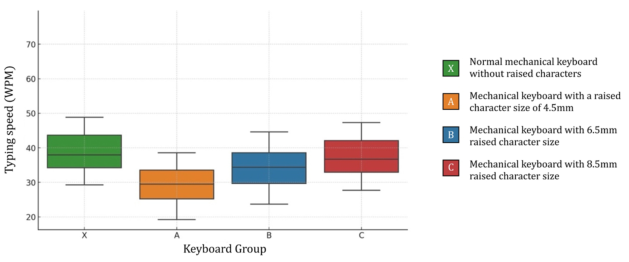
Typing Speed Analysis The analysis revealed a significant effect among the groups, F (3, 124) = 7.79, p <.001, indicating that at least one group’s mean speed significantly differed. Further posthoc comparisons using Tukey’s HSD test showed that Group A (M = 33.63, SD = 19.43) had a mean difference of 7.93 with Group C (M = 41.40, SD = 20.50), ?=0.0017; and a mean difference of 9.55 with Group X (M = 77.04, SD = 63.17), ?=0.0001. This indicates significant differences between Group A and Group C, as well as between Group A and Group X (Fig. 4). The differences between the other groups were not significant.
Figure 3: Statistical results of typing speed (words/minute) for groups X, A, B, and C.
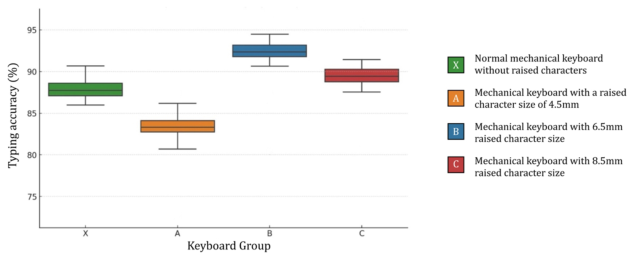
Typing Accuracy Analysis The analysis revealed a significant effect between groups, F (3, 156) = 39.11, p <. 001, indicating that at least one group’s mean accuracy significantly differed. Further posthoc comparisons using Tukey’s HSD test indicated that the mean difference between Group A (M = 87.30, SD = 7.18) and Group B (M = 96.32, SD = 4.70) was 9.25, p <.001, indicating a significant difference between these two groups. Similarly, the mean difference between
Optimizing Keyboard Accessibility: Effects of Raised Character Size 153
Group A (M = 87.30, SD = 7.18) and Group C (M = 95.78, SD = 5.36) was 6.59, p <.001, also indicating a significant difference. Additionally, Group A (M = 87.30, SD = 7.18) and Group X (M = 90.66, SD = 6.11) had a mean difference of 4.55, p <.001, showing a significant difference. There was also a significant difference between Group B (M = 96.32, SD = 4.70) and Group C (M = 95.78, SD = 5.36) with a mean difference of −2.66, p = .0008, and between Group B (M = 96.32, SD = 4.70) and Group X (M = 90.66, SD = 6.11) with a mean difference of −4.70, p < .001. Finally, the mean difference between Group C (M = 95.78, SD = 5.36) and Group X (M = 90.66, SD = 6.11) was −5.12, p = .0003, indicating a significant difference between these two groups. The results are shown in Figure 4.
Figure 4: Statistical results of typing accuracy in groups X, A, B, and C.
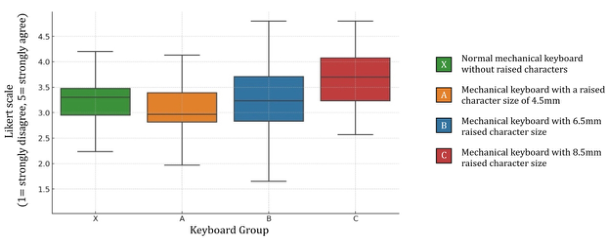
User Experience Scores The analysis revealed a significant effect among the groups, F (3, 116) = 7.89, p < .001, indicating that at least one group’s mean user experience significantly differed. Further posthoc comparisons using Tukey’s HSD test showed that the mean difference between Group A (M = 2.97, SD = 1.08) and Group B (M = 3.12, SD = 1.22) was 0.15, p = .7299, indicating no significant difference between these two groups. Similarly, the mean difference between Group A (M = 2.97, SD = 1.08) and Group C (M = 3.60, SD = 1.15) was 0.63, p = .0003, indicating a significant difference. Additionally, Group A (M = 2.97, SD = 1.08) and Group X (M = 3.11, SD = 1.12) had a mean difference of 0.14, p = .7838, showing no significant difference. There was a significant difference between Group B (M = 3.12, SD = 1.22) and Group C (M = 3.60, SD = 1.15) with a mean difference of 0.47, p = .0098, but no significant difference between Group B (M = 3.12, SD = 1.22) and Group X (M = 3.11, SD = 1.12) with a mean difference of −0.01, p = .9997. Finally, the mean difference between Group C (M = 3.60, SD = 1.15) and Group X (M = 3.11, SD = 1.12) was 0.49, p = .0033, indicating a significant difference. Overall, the results show significant differences between Group A and Group C, Group B and Group C, and Group C and Group X, while the other comparisons were not significant. The results are shown in Figure 5.
Figure 5: Statistical results of typing experience in groups X, A, B, and C.
DISCUSSION
Interpretation of Findings Typing speed varies significantly between product groups. Group A’s speed is notably slower than Groups C and X, likely due to the small raised characters, which may hinder finger positioning and reduce tactile feedback. This forces users to rely more on visual inspection, increasing typing time and fatigue. Additionally, smaller characters require finer finger movements, further decreasing efficiency. In contrast, the typing speed of Product Group C is close to that of a standard mechanical keyboard (Product Group X), indicating that more prominent raised characters have less impact on typing speed and may even contribute to better critical recognition. The larger raised characters provided more effective tactile feedback, enabling users to confirm critical positions quickly. These findings address RQ1 (How does the size of the raised characters on the keyboard keys affect the user’s typing speed).
Different from typing speed, there are significant differences in typing accuracy among each product group, indicating that the size of raised characters has a greater impact on typing accuracy. Product Group A performed significantly worse in typing accuracy compared to all other groups, suggesting that smaller raised characters may lead to difficulty in key recognition, thereby affecting typing accuracy. The accuracy of Product Groups B and C was higher than that of Product Group X (standard keyboard), indicating that Braille-sized raised characters are most beneficial for user perception and can most enhance typing accuracy. These findings address RQ2 (How does the size of the raised characters on the keyboard keys affect the user’s typing accuracy). Medium-sized (6.5mm) raised characters are the most beneficial for typing accuracy, while large (8.5mm) raised characters offer higher accuracy than standard keyboards.
In terms of user experience scores, Product Group C performed the best, significantly higher than the other groups. This is because larger raised characters offer better tactile feedback, making the keyboard easier and more comfortable to use. This improves recognition, reduces pressing difficulty, and enhances overall user satisfaction. This address RQ3 (Does the design of raised characters improve the user’s typing experience). Keyboards with large (8.5mm) raised characters provide the best user experience.
Optimizing Keyboard Accessibility: Effects of Raised Character Size 155
Combining the results from three aspects, we can see the performance of different keyboards in various areas, as shown in Table 2. In terms of typing speed, Group C (8.5mm) performed on par with the standard keyboard, both being faster than the other groups. Additionally, Group C also provided a better user experience. For accuracy, Group B (6.5mm) had the greatest advantage.
Table 2: Comprehensive comparison of keyboard performance.
Table available in the original PDF paper.
X (0mm) A (4.5mm) B (6.5mm) C (8.5mm) Typing speed √ √ Typing accuracy √
√
Typing experience
Practical Implications In this study, it was found that characters the same size as Braille (6.5mm) improved typing accuracy. Conversely, characters that were either too small or too large were difficult to recognize, leading to decreased accuracy. Experiments have shown that appropriate raised character sizes can effectively reduce the number of errors, supporting previous research findings that tactile feedback can provide immediate and accurate key confirmation, serving as an important supplement to visual feedback (Lauwrens, 2019). Additionally, tactile feedback helps reduce the dependence on visual interaction, thereby lowering cognitive load and fatigue (Haghighi et al., 2020), greater concentration also helps improve typing accuracy.
Raised characters improve typing performance and experience, making keyboards more suitable for beginners by aiding touch typing through tactile feedback. Our research found that this feedback helps users quickly learn the keyboard layout and improves typing efficiency. Unlike visual cues, tactile feedback supports muscle memory and operational proficiency. The study also shows that enhanced tactile feedback makes typing more intuitive and natural, highlighting the value of multi-sensory interaction in improving user experience.
Limitations The study’s sample size was small and limited to university students, which may not represent the broader population of visually impaired users. Future research should include a more extensive and diverse participant pool to enhance the generalizability of the findings. Future research should investigate the long-term effects of raised character keyboards through longitudinal studies and explore the combined effects of multimodal feedback mechanisms such as vibrations and auditory cues. Additionally, examining the practical applications in varied real-world settings and the potential of customized and adaptive designs will provide deeper insights into optimizing typing performance and user satisfaction.
CONCLUSION
This study investigated the effects of raised character sizes on touch- typing performance, providing valuable insights into optimizing keyboard accessibility. Our results demonstrated that appropriately sized raised characters significantly enhance typing accuracy and user satisfaction. Specifically, Product Group B (6.5mm) achieved the highest typing accuracy, while Product Group C (8.5mm) provided the best overall user experience without compromising typing speed.
The findings suggest that incorporating raised characters into keyboard design can greatly improve tactile feedback, benefiting both visually impaired users and touch-typing novices. Enhanced tactile cues help users accurately locate keys, reducing reliance on visual confirmation and decreasing typing errors. Additionally, the study confirmed that greater concentration facilitated by tactile feedback further improves typing accuracy.
Practical implications of this research emphasize the importance of ergonomic considerations in keyboard design. Keyboards with raised characters are more suitable for beginners, encouraging them to practice touch typing and quickly improve their typing skills through enhanced tactile feedback.
In conclusion, this study underscores the potential of raised character keyboards to improve typing performance and user experience. By addressing the specific needs of visually impaired users and touch-typing beginners, this research contributes to the development of more accessible and efficient keyboard designs.
REFERENCES
Bermejo, C., Lee, L. H., Chojecki, P., Przewozny, D., Hui, P., 2021. Exploring Button Designs for Mid-air Interaction in Virtual Reality: A Hexa-metric Evaluation of Key Representations and Multi-modal Cues. Proc. ACM Hum.-Comput. Interact. 5, 1–26. https://doi.org/10.1145/3457141 Crump, M. J. C., Logan, G. D., 2010. Warning: This keyboard will deconstruct—
The role of the keyboard in skilled typewriting. Psychon. Bull. Rev. 17, 394–399. https://doi.org/10.3758/PBR.17.3.394 Fletcher, A. M., Downs, J. S. P., Frost, W., Clarke, D., O’Grady, K., Hirohata, A.,
2021. Magnetic braille using ferrofluids. J. Phys. Appl. Phys. 54, 215001. https:// doi.org/10.1088/1361-6463/abe820 Haghighi, N., Vladis, N., Liu, Y., Satyanarayan, A., 2020. The Effectiveness of Haptic Properties Under Cognitive Load: An Exploratory Study. Kane, S. K., Wobbrock, J. O., Ladner, R. E., 2011. Usable gestures for blind people:
Understanding preference and performance. Khan, A., Khusro, S., 2021a. An insight into smartphone-based assistive solutions for visually impaired and blind people: Issues, challenges and opportunities. Univers. Access Inf. Soc. 20, 265–298. https://doi.org/10.1007/s10209-020-00733-8 Kim, J., Kang, P., 2020. Freely typed keystroke dynamics-based user authentication
for mobile devices based on heterogeneous features. Pattern Recognit. 108, 107556. https://doi.org/10.1016/j.patcog.2020.107556
Optimizing Keyboard Accessibility: Effects of Raised Character Size 157
Kim, S., Dey, A. K., 2016. Augmenting human senses to improve the user experience in cars: Applying augmented reality and haptics approaches to reduce cognitive distances. Multimed. Tools Appl. 75, 9587–9607. https://doi.org/ 10.1007/s11042-015-2712-4 Klein, A., 2021. Engram: A Systematic Approach to Optimize Keyboard Layouts for
Touch Typing, With Example for the English Language. https://doi.org/10.20944/ preprints202103.0287.v1 Lauwrens, J., 2019. Seeing touch and touching sight: A reflection on the tactility of vision. Senses Soc. 14, 297–312. https://doi.org/10.1080/ 17458927.2019.1663660 Lund, A. M., n.d. Measuring Usability with the USE Questionnaire 12. MacKenzie, I. S., Tanaka-Ishii, K., 2007. Text entry systems: Mobility, accessibility, universality, The Morgan Kaufmann series in interactive technologies. Boston Morgan Kaufmann, Amsterdam. Nagendran, G. A., Singh, H., Raj, R. J. S., Muthukumaran, N., 2021. Input Assistive Keyboards for People with Disabilities: A Survey, in: 2021 Third International Conference on Intelligent Communication Technologies and Virtual Mobile Networks (ICICV). Presented at the 2021 Third International Conference on Intelligent Communication Technologies and Virtual Mobile Networks (ICICV), IEEE, Tirunelveli, India, pp. 829–832. https://doi.org/ 10.1109/ICICV50876.2021.9388630 Nahar, L., Sulaiman, R., Jaafar, A., 2021. “Bangla Braille learning application”
in smartphones for visually impaired students in Bangladesh. Interact. Learn. Environ. 29, 821–834. https://doi.org/10.1080/10494820.2019.1619588 National Information Standards Organization, n.d. ANSI/NISO Z39.86–2005 (R2012), Specifications for the Digital Talking Book. https://doi.org/10.3789/ ansi.niso.z39.86- 2005R2012 O’Brien, H. L., Cairns, P., Hall, M., 2018. A practical approach to measuring
user engagement with the refined user engagement scale (UES) and new UES short form. Int. J. Hum.-Comput. Stud. 112, 28–39. https://doi.org/10.1016/ j.ijhcs.2018.01.004 O’Brien, H. L., Toms, E. G., 2013. Examining the generalizability of the User Engagement Scale (UES) in exploratory search. Inf. Process. Manag. 49, 1092–1107. https://doi.org/10.1016/j.ipm.2012.08.005 Pereira, A., Lee, D. L., Sadeeshkumar, H., Laroche, C., Odell, D., Rempel, D., 2012.
The Effect of Keyboard Key Spacing on Productivity, Usability, and Biomechanics in Touch Typists with Large Hands. Proc. Hum. Factors Ergon. Soc. Annu. Meet. 56, 1872–1876. https://doi.org/10.1177/1071181312561271 Rempel, D. M., Keir, P. J., Bach, J. M., 2008. Effect of wrist posture on carpal tunnel pressure while typing. J. Orthop. Res. 26, 1269–1273. https://doi.org/10.1002/ jor.20599 Rodrigues, É., Carreira, M., Gonçalves, D., 2014. Developing a Multimodal Interface
for the Elderly. Procedia Comput. Sci. 27, 359–368. https://doi.org/10.1016/ j.procs.2014.02.040 Wang, J., Wang, S., Zhang, Y., 2023. Artificial intelligence for visually impaired.
Accessibility, Assistive Technology and Digital Environments
Read this individual research paper free through the original publisher, or explore the full digital proceedings book.
ISBN 978-1-964867-38-0
Explore this ISBN in the AHFE Bookstore ↗Listed in the July 2026 bookstore catalogue; search by ISBN to confirm current availability · Digital book purchase optional