Kaj Helin, Andrea Alesani, Timo Kuula, Vladimir Goriachev (2024). Early-stage user experience design of the remote operation concept of the harbour’s reachstacker by exploiting eXtended Reality. In: Usability and User Experience. AHFE Open Access, vol. 156, pp. 21–30. https://doi.org/10.54941/ahfe1005411
The main objective of this abstract is to present a comprehensive approach involving user experience design, implementation, user testing, and iterative refinement of a Wizard-of-Oz interface via extended reality for remotely operating reach stackers, an off-highway type of vehicle used in logistic hubs. Proposed approach includes the main principles of the human centred design with several iteration loops. This abstract will present development and results of the first two iteration prototype.The use caseThe use case target is KALMAR’s remote controlled reachstacker, which is handling containers in a harbour. In the current setup, operators operate with their eyes on video screens and remotely control these machines. From the footage, they observe how the container approaches the landing point on e.g., a truck or another stack of containers and how it settles in place. Through such footage, it is extremely difficult to perceive depth, which is a must when positioning the container. Supporting the operator to perceive three-dimensionally and stay aware of items not visible in the cameras is a challenge when the machine must operate longer distance remotely. The first functional prototype and evaluationThe main approach of the prototype was to exploit the digital twin base XR prototype of the KALMAR’s reachstacker for the remote operation. The XR set-up was based on Varjo XR-3, which allows user to see the actual remote operation station and virtual representation of the reach stacker and harbour environment. The user controlled the reach stacker with a Logitech G29 steering wheel and a Logitech Extreme 3D joystick, and virtual environment with hand gestures. The first user evaluation was held at VTT’s XR lab with KALMAR personnel on 16.5.2023. There were four test subjects and they executed simple pick and place tasks. To assess the usability of the prototype, users were asked to fill in a System Usability Scale (SUS), observation and group discussion was also used. The first prototype achieved a SUS score of 59, which means usability was evaluated as marginal, but not acceptable, and following improvements were identified: (1) concept is working, but end-user is not willing to use head mounted display all the time, (2) more augmented information to actual screens and XR environment, and (3) controls should stay on physical device e.g., in tablet or in joystick’s buttons.The second functional prototype and evaluationThe second prototype focused on a simulated 360° camera view and embedded augmented content, which was highlighted several times during the first evaluation. Augmented reality content was based on several available sensor and other data. User was able to choose between four different camera views: 1) cabin view/driver’s perspective, 2) spreader top-down view, 3) rear view/counterweight, and 4) drone/bird’s eye view. Visualization was done with XR powerwall.The second user evaluation was held at VTT’s XR lab with KALMAR personnel on 30.11.2023. There were four test subjects and they executed simple pick and place tasks. The second prototype achieved a score of 70, which means usability was evaluated as acceptable.Based on two development cycles the XR environment combined with human- centric evaluation and design seems to be powerful method for the early-stage user experience design. In both sessions potential users are able to give valuable feedback to novel approaches for the remote operation concept. However, there are learning curve to exploit the novel XR UI and interaction concepts, especially gesture-based interaction.In the next phase, the most suitable features from the two iteration cycles will be selected and implemented to the third XR prototype. Also, some new features like haptics will be implemented. Based on the third human-centric iteration the first version of the actual remote operation station will be specified and implemented.
The off-highway domain encompasses various transportation systems and mobile machinery that do not operate on main roads, making them distinct from autonomous driving research. This domain also symbolizes machin- ery beyond the typical focus of eXtended Reality (XR) research, including methods for remote maintenance or assistance applied to stationary produc- tion systems in factories. Examples of such methods include one-size-fits-all audio-video telepresence systems designed to address failures. XR technolo- gies provide advanced capabilities for handling complex data, particularly during machine operation. However, they also pose challenges for opera- tors, introducing potential issues such as new forms of interaction distraction or information overload, as highlighted by Canito et al. (2020). Machine operators, being highly trained users of expert systems, have elevated expec- tations and requirements for Human-Machine Interfaces (HMI). It is crucial for new interaction concepts to meet these expectations for successful adop- tion. Efforts to enhance conventional HMI in the off-highway domain have been ongoing for decades, with a focus on integrating multimodal informa- tion and interaction technologies like VR/AR glasses, screen projections, and environment-projections (Palonen et al., 2017). Despite these discussions, a level of applicability, usability, and overall positive user experience that meets industry standards has not yet been achieved.
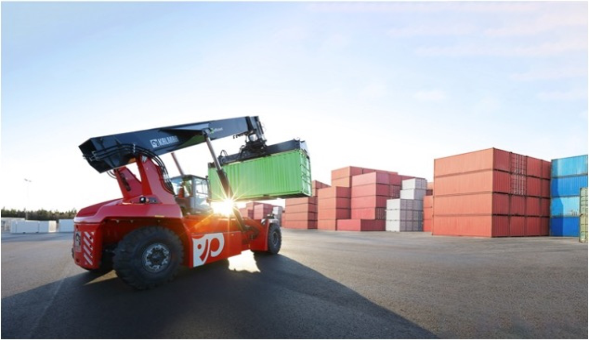
Within the use case, the focus will be on remotely controlling a reach stacker (Figure 1), while handling containers in a harbour. In the current oper- ational configuration, operators engage in the remote control of machines while monitoring the process through video screens. This setup is partic- ularly prevalent in scenarios where operators need to observe the precise positioning of a container, such as during its approach to a landing point on a truck or another stack of containers. However, a notable challenge arises from the inherent limitations of two-dimensional video footage, which makes it challenging for operators to accurately perceive depth, a critical factor when positioning the container. The difficulty in perceiving three- dimensional aspects becomes more pronounced, especially when the machine is required to operate over longer distances remotely. Ensuring safe remote operations requires operators to be fully informed about their surround- ings. This includes compensating for differences in sensory feedback between remote control and in-cabin operations, such as limited depth perception in video footage. Providing comprehensive information is essential for creating a safe and predictable operating environment, instilling confidence in operators to control the machine effectively in remote settings.
Figure 1: KALMAR’s reach stacker in operation.
DESCRIPTION OF THE FIRST PROTOTYPE The first prototype was based on the assumption of having a digital twin recreation of the reach stacker and the surrounding environment, in which to immerse the remote user with eXtended Reality. As outlined in a previ- ous study (Alesani, 2023), the XR set-up made use of Varjo’s XR-3 HMD, which allows user to see the actual remote operation station and virtual representation of the reach stacker and harbour environment.
Visualization The application can be run only on a normal monitor showing a digital twin of a harbour which a reach stacker and a container to grab. At any
Early-Stage User Experience Design of the Remote Operation Concept 23
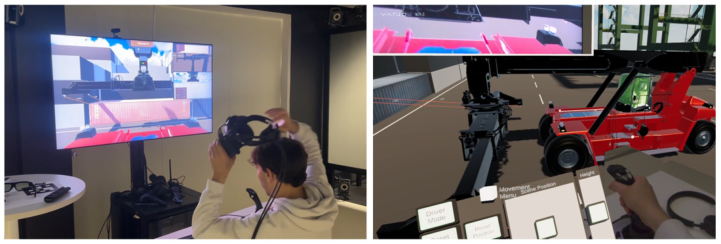
moment, the user can wear the Varjo XR-3 HMD to enter the virtual scene in first person, while still being able to see the real monitor and the phys- ical devices used to control the vehicle thanks to Mixed Reality features (see Figure 2).
Figure 2: The user can wear the HMD at any time. In the virtual scene, physical devices such as the monitor and the joystick are still visible.
On the monitor, three camera views are rendered: (i) one perspective cam- era facing the forward direction of the vehicle; (ii) one orthographic camera facing left side of the spreader; (iii) one orthographic camera facing down- wards towards the spreader and the ground. The first camera takes up most of the space on the monitor and is meant to give a general, broad view of what is happening on the front side of the vehicle, resembling what an oper- ator would see working on-site. The other cameras are meant to help the operator in very specific situations in which high preciseness is required. The orthographic cameras show a 2D projection of the scene, thus eliminating perspective-related issues. Because of their nature, they can only exist in a vir- tual world, and they highlight a significant benefit of digital twins compared to footage from physical cameras.
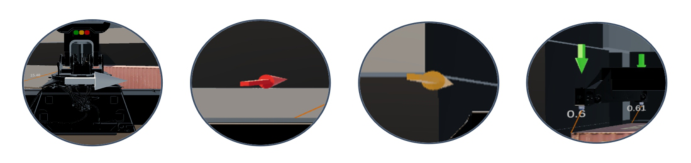
Since each twist lock has to fit into a specific corner casting, a line con- necting them is drawn to make the user aware of how distant and in which direction the spreader has to be moved and rotated. On top of each line, a text line is rendered showing the distance in meters between the two objects. As users also pointed out during the pilot test, the distance lines were often not helping enough. For this reason, four three-dimensional arrows are ren- dered on top of each twist lock. They point toward their assigned corner castings and present a color-coded mechanism, so that each arrow is col- ored red when they are very far from their target. The arrow becomes green when the twist lock is close enough to the casting corner for locking it. The arrows point towards the projection of the distance vector on a plane that is parallel to the ground, resembling a compass needle. When an arrow gets close enough to its target, it also starts pointing straight downwards. See Figure 3.
Figure 3: The white arrow is visible until the vehicle points in the right direction. Then, four arrows appear on top of the twist locks to align them to the container.
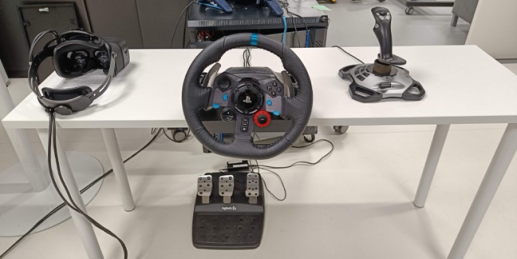
Interactions The operator controls the reach stacker with a Logitech G29 steering wheel and a Logitech Extreme 3D joystick, and virtual environment with hand gestures (see Figure 4).
Physical devices are used to give commands to real-world objects. The Extreme 3D is mapped the same way as the joystick inside a real reach stacker and is used to control the boom and spreader. The G29 allows to steer and drive, with the pedals mapped to throttle, brake and reverse throttle. Hand-tracking is used to adjust the scene visualization, for example, moving the user’s position inside the virtual scene or binding their movement to the vehicle when driving.
Figure 4: Setup of the first prototype. From the left, there are the Varjo XR-3, Logitech G29 steering wheel and pedals, and Logitech extreme 3D.
The separation between physical and virtual input is meant for the user to avoid making slips and unintentionally operating machinery instead of moving their position in the virtual scene. Moreover, physical controllers can provide more precise input than hand-tracked gestures, and they bet- ter resemble the real-life experience of operating a reach stacker, thus easing the shift from the traditional control system to a remote-control scenario.
DESCRIPTION OF THE SECOND PROTOTYPE The second prototype focused on the pick-and-place of containers, rather than driving, as it represents one of the most critical tasks for the operator,
Early-Stage User Experience Design of the Remote Operation Concept 25
and it is one of the hardest to delegate to an autonomous system. Pick-and- place operations include aligning each twist lock to its corner casting, locking and releasing the twist locks, placing the locked container in a safe position for travelling.
Visualization As users noted, several limitations of wearing an HMD during the first pro- totype, this version was built for VTT’s power wall display and for a 60-inch 4K Samsung display. Another major difference from the first prototype is the basic technological assumption on which the system is based. Instead of recreating a digital-twin recreation of the reach stacker and its surround- ings, the operator can view the scene through a few 360
cameras, placed in strategic positions both on the reach stacker and in other key locations in the surrounding area, such as on top of poles or, ideally, on flying drones that can position on-demand and offer the desired angle.
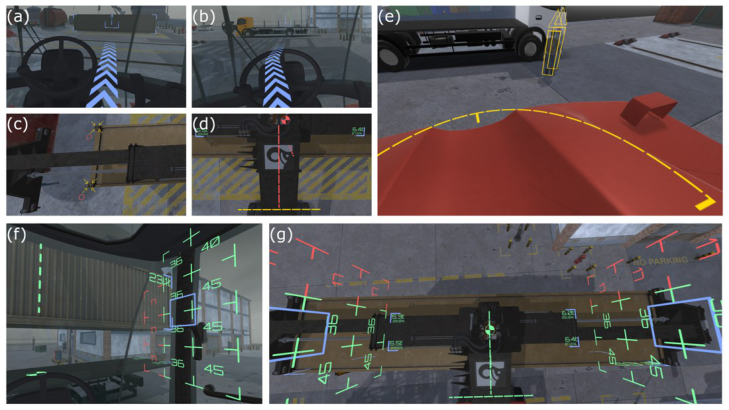
AR guidance system (Figure 5) consists of the following elements:
Vehicle: centre line, tipping axis, load chart, counterweight safety area;
Container: top face – corner castings and twist locks positions; front face – total weight, centre of mass line; ground projection – weight and percentage at the corners, centre of mass point;
Obstacles: people tracking.
Figure 5: AR guidance system elements: (a), (b) vehicle path and pick up/placement locations; (c), (d) twist lock/corner casting positions, centre line, and tipping axis; (e) counterweight safety area and obstacle tracking; (f) load chart, centre of mass, and total weight; (g) load chart, centre of mass, centre line, tipping axis, and ground projection.
The system UI was designed to make use of 5 different colours to pro- vide the user with different types of information: (i) amber for screen-space UI elements; (ii) blue for container highlight; (iii) green for safe operation conditions; (iv) yellow for potential dangers; (v) red for imminent danger.
The interactive elements of the guidance system only use green, yellow, or red colour. Those elements will change the colour depending on the opera- tor’s actions or the environmental conditions. For example, the container’s centre of mass will change colours from red to yellow and then to green as the operator moves it closer the vehicle’s centre line. Tracking boxes around people near the vehicle will change colours in the opposite way - red will demonstrate imminent danger, and then it will turn yellow and green as the distance increases.
Sound The sound system of the second prototype application includes background noise, which is expected to be heard by the operator in the harbour environ- ment. For example, there is constant sound of the sea waves hitting the pier, strong wind noise, and seagull cries. The vehicle’s engine emits sound as well, and it will change according to the speed or load. The vehicle produces a distinct low-frequency beeping sound when backing up to alert the harbour personnel.
The obstacle tracking system emits emitting high-frequency beeping sound, which could be easily distinguished from the vehicle’s backing sound. The beeping intervals are based on the distance to the obstacle and will become smaller as the obstacle gets closers. When an obstacle enters an imminent danger zone, the beeping is changed to a constant high-frequency tone.
Interactions The Logitech Extreme 3D joystick is mapped the same way as the joystick inside a real reach stacker and it is used to control the boom and spreader. No interactions were designed for driving, as the vehicle is assumed to go to the designated location on its autonomously.
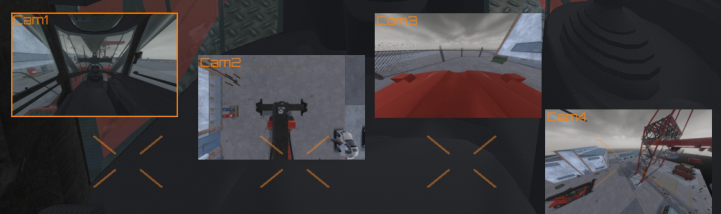
Figure 6: Camera system’s preview images and their docking positions.
The camera system (Figure 6) includes smaller preview images for each streaming camera. Those images could be rearranged with the mouse pointer so the operator can configure the screen space for specific tasks. Preview images can be dragged with a left mouse button and can be dropped anywhere
Early-Stage User Experience Design of the Remote Operation Concept 27
on the screen. There are predefined docking positions available, so previews will be docked when dropped there. A double click on the preview image will change the main camera view to the one that was clicked, and holding the right mouse button will enable changing camera direction by dragging the mouse pointer across the screen. Turning the scroll wheel back and forth will change the camera zoom level, and pressing the middle mouse button will reset the camera to its original pose.
The main camera view can be changed from the keyboard as well - each streaming camera has a specific key binging according to its name. The emer- gency stop feature is available to the operator as well – the vehicle can be immediately stopped by pressing the “Space” key. The emergency stop can be released with “Backspace”, and to proceed to the next step of the scenario operator can press “Enter.”
A few hand-tracking interactions were implemented as an alternative to the mouse interactions. The interactions are designed to be performed with the left hand, as the right hand is dedicated to handling the joystick. The user can pinch their thumb and index finger and then move their hand in any direction to make the camera rotate in the opposite direction, creating a “drag” effect that has the same effect as the mouse right-click-and-pan interaction. The user can also perform a “swipe” gesture to change the full-screen camera view to the previous one or next one. For this interaction, there is no direct mouse alternative; in that case, the user must click on one camera view to see its footage in full screen.
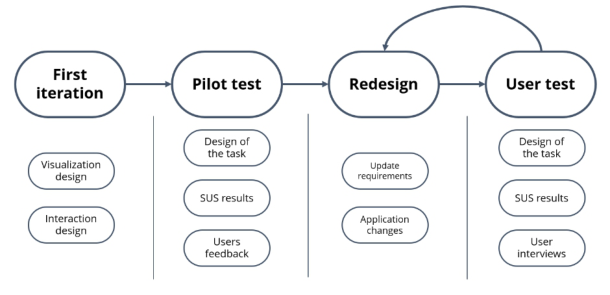
DESIGN METHOD The design process has been iterative and cyclical, and it followed as much as possible the best practices of human-centred design as described in ISO stan- dard (see Figure 7). The basic design cycle consists of the following phases: Understanding the context of use, specifying user requirements, producing design solutions, and evaluating the design (ISO 9241-210).
Figure 7: The project starts with an initial prototype and a pilot test. Then, a cyclical process of improvements and evaluations brings to the final version.
Users were questioned through the development process and their feed- back highly influenced the final design of the prototypes. “Plan to throw one
away; you will, anyhow”(Brooks, (1995). The Mythical Man-Month: Essays on Software Engineering. Addison-Wesley). The suggestion here is to plan a quick-and-dirty first iteration of the project instead of investing resources to get it right on the first try, as design flaws will always arise from the first version of a product.
The design process started by quickly analysing the most important fea- tures of reach stackers and their involvement to produce a quick-and-dirty prototype that users could try and evaluate in a first pilot test. From there, redesign phases were conducted, updating the initial requirements, improving existing solutions and developing new features. User feedback was collected both through a System Usability Scale (SUS) survey, and through group interviews.
EVALUATION METHOD Methods for collecting data from the test users were:
System Usability Scale (SUS) questionnaire
Semi-structured group interview, focusing on the usability and usefulness of the system
Observation by the evaluation organizers The SUS scores calculated from individual questionnaires represent the system usability (Brooke, 1996). According to validation studies (Bangor et al., 2009; Brooke, 2013), the SUS score starting from 68–70 represents the level of acceptable system usability. Furthermore, the suggested acceptability ranges are: 0–50 not acceptable; 50–70 marginal; 70– acceptable. The SUS questionnaire results do not have statistical significance due to limited num- ber of test users (N = 4) in this study, but they provide insights on usability combined with qualitative interview results.
The test users performed the tests individually according to instructions from the test organizers. After the test performance, the user filled in the questionnaire and then participated in a group interview including all the test users. The users also commented on the system during the test performance.
RESULTS
The First Prototype Test Results The first user evaluation was held at VTT’s XR lab with KALMAR personnel on May 16, 2023 and there were four test subjects. Regarding the first pro- totype, Mixed Reality was found to be useful for users in specific use cases, such as driving and checking from specific points of view, but it did not seem to help in high-precision tasks, such as aligning twist locks to casting cor- ners. Some users have expressed discomfort when using an HMD, finding it inconvenient to constantly put on and take off. Consequently, they pre- fer utilizing displays, particularly through AR visualization. Based on these findings, the main design choices for the next design cycle should prioritize AR-based visualization on the power wall.
Early-Stage User Experience Design of the Remote Operation Concept 29
SUS score average for the first prototype was 59 (N = 4). Based on the average, the system usability was evaluated as marginal, but not accept- able. The result indicates that system usability should be closely analysed and improved.
The Second Prototype Test Results The second test was organised on November 30, 2023 and there were four test subjects. The users were generally quite satisfied with the second proto- type. It was mentioned, that with this system the reach stacker could already be operated. Three of the four camera angles (cabin, top-down, rear) were seen as appropriate for remote operation, while the added value of the bird’s eye / drone view was more difficult to see for the users. However, for getting the overview of the surroundings it would be somewhat useful. The cabin view camera should be moved to a new position so that all the edges of the container are visible, some cabin corners were blocking the view. The rear view is necessary when the operator is driving the machine, but in the automated driving scenario it is less useful. It was suggested that the rear view could be wider. The most useful combination of camera angles and aug- mented information would be the cabin view (cam1) combined with more visible XR information from the top-down view (cam2). Even though the same XR information is displayed on every camera view, it is less visible and harder to perceive in cabin view than in top-down view. It was sug- gested that arrows and circles showing position and twist lock status (etc.) should be better displayed in cabin view. It was also pointed out that chang- ing the cameras during operation might be hard and thus cabin view with improved XR-information visibility would be the ideal solution. Further- more, the possibility to tailor the camera view combinations according to operator preferences was suggested. Single display view was seen as easier to use and more suitable for experienced operator, while the power wall visu- alisation could serve less experienced persons and training purposes because of the more authentic experience.
The XR features and elements were seen as suitable for the operation. Only minor design choices were selected based on users feedback to for the next iteration, such as, the load chart was experienced as having a lot of information and it was suggested that it could be made simpler or to pro- vide the option to remove it from the view. However, the overload alert sign should be visible all the time and it should be very clear. Some kind of simple indicator should tell the operator when the risk of overload is approaching. Furthermore, it was suggested that traffic light indicators (red-yellow-green) showing the status of twist locks (open / locked) and reach stacker grabber contact with the container should be added as an XR feature. This would be an important feature to add since it is already in use and would provide a familiar experience for the operators. Standard preset lengths (20 feet / 40 feet) for the reach stacker spreader should also be added, there is already a button for selecting the length and a light indicator on the panel showing the length.
SUS score average for the second prototype was 70 (N = 4). Based on the average, the system usability was evaluated as acceptable. Three of the individual test participants’ scores were in the acceptable range, while one participant evaluated the system usability as not acceptable.
CONCLUSION AND NEXT STEPS Based on two development cycles the XR environment combined with human- centric evaluation and design seems to be powerful method for the early-stage user experience design. In both sessions potential users are able to give valuable feedback to novel approaches for the remote operation concept. However, there are learning curve to exploit the novel XR UI and interaction concepts, especially gesture-based interaction.
The second developed XR prototype was already considered quite suitable for remote operation of a harbour reach stacker. In the next phase, the most suitable features from the two iteration cycles will be selected and imple- mented to the third XR prototype. Also, some new features like haptics will be implemented. Based on the third human-centric iteration the first version of the actual remote operation station will be specified and implemented.
ACKNOWLEDGMENT
This project has received funding from the European Union Horizon Europe research and innovation programme under grant agreement No 101092861. Views and opinions expressed are however those of the author(s) only and do not necessarily reflect those of the European union or the European Com- mission. Neither the European Union nor the granting authority can be held responsible for them.
REFERENCES
Alesani, A., 2023. XR application for remote operations. Politecnico di Milano.
https://hdl.handle.net/10589/210680 Bangor, A., Kortum, P. & Miller, J. (2009). Determining What Individual SUS Scores mean: Adding an Adjective Rating Scale. Journal of Usability Studies. Vol. 4, Issue 3, May 2009. pp. 114–123. Brooke, J. (1996). “SUS: a ‘quick and dirty’ usability scale,” in Usability evaluation in
industry. P. W. Jordan, B. Thomas, B. A. Weerdmeester and I. L. McLelland (Eds.) Taylor and Francis Ltd. London, UK. Brooke, J. (2013). SUS: A Retrospective. Journal of Usability Studies. Vol. 8, Issue 2, February 2013. pp. 29–40. Brooks, Frederick P., Jr. (1995). The mythical man-month (anniversary ed.). Addison-
Wesley Longman Publishing Co., Inc., USA. Canito, A., Mota, D., Marreiros, G., Crchado, J. M., & Martins, C. 2020. Contextual adaptative interfaces for industry 4.0. In International Symposium on Distributed Computing and Artificial Intelligence. pp. 149–157. Springer, Cham. https://doi. org/10.1007/978-3-030-53829-3_14 ISO 9241–210. (2019). Ergonomics of human-system interaction. Part 210: Human-
centred design for interactive systems. European Committee for Standardization. Palonen, T., Hyyti, H., & Visala, A. 2017. Augmented Reality in Forest Machine Cabin. Proceedings of the 20th World Congress of the International Federation of Automatic Control (IFAC 2017). IFAC-PapersOnLine. 50 (1), 5410–5417. ISSN 2405–8963 (electronic). https://doi.org/10.1016/j.ifacol.2017.08.1075
LISTED IN THE AHFE DIGITAL BOOKSTORE CATALOGUE
Explore the complete digital volume
Usability and User Experience
Read this individual research paper free through the original publisher, or explore the full digital proceedings book.
ISBN 978-1-964867-32-8
Explore this ISBN in the AHFE Bookstore ↗Listed in the July 2026 bookstore catalogue; search by ISBN to confirm current availability · Digital book purchase optional