Alireza Darvishy, Stefano Anzolut, Oriane Pierrès, Felix Schmitt-koopmann (2024). User Study: Generative AI-based scientific writing assistant for students with visual impairments. In: Accessibility, Assistive Technology and Digital Environments. AHFE Open Access, vol. 121, pp. 73–81. https://doi.org/10.54941/ahfe1004615
This paper investigates the potential of AI-based writing assistants to help students with visual impairments in writing scientific texts. In a user study, ten visually impaired students tested a prototype for a multimodal Writing Assistant application, built on GPT-4, which specifically aids in the scientific writing process by providing templates, answering questions about the text, and providing automated editing and formatting. Their interactions with the prototype were compared with their usual writing process to identify factors that facilitate the writing task of visually impaired users. Results indicate a unified tool was most beneficial to improve the writing process. Leaving the user in control of options and informed on changes was also identified as good practice. University support and guidance appear as conditional to the adoption of such tools.
About 285 million people are living with a visual impairment worldwide (World Health Organization, 2012). Despite ongoing progress in inclusion and accessibility, people with visual impairments continue to face significant educational as well as employment gaps compared to non-disabled people (McDonnall and Tatch, 2021).
An important element both in higher education and in the workforce is the ability to write digital texts and documents. In order to access digital con- tent, many people with visual impairments use assistive technologies such as screen readers. A screen reader is a software application that reads digital content aloud on a computer or smartphone. Screen readers work by provid- ing synthesized speech output of text and other information displayed on the screen, as well as allowing the user to interact with the device using keyboard commands or gestures.
Text editing and error correction can present significant barriers to visu- ally impaired users, particularly with regards to unstructured and inaccessible document formats. Adding structural elements such as heading tags can
be difficult with a screen reader as they require additional commands and switching from editing to writing mode. Moreover, formatting text has been identified as challenging with a screen reader due, for instance, to automatic formatting or the difficulty of noticing and implementing elements such as indents, font size, footers, or headers (Morales, Arteaga and Kurniawan, 2013). A few researchers have proposed solutions to facilitate the writing pro- cess of people with a visual impairment. For instance, Morales, Arteaga and Kurniawan (2013) developed guidelines to facilitate the development of a for- matting tool for visually-impaired users. Specifically, the authors emphasized the importance of “user control, customizability, minimizing memory load, real-time and intuitive presentation and flow of information” (p.35). Simi- larly, Darvishy et al. (2023) proposed to use of voice recognition to create and edit documents on mobile devices.
The release of ChatGPT brings much promise to improve writing effi- ciency and productivity in higher education (Imran and Almusharraf, 2023). With the rapid development of generative artificial intelligence (AI), many writing assistants have been released such as Grammarly Go (Grammarly, no date), Jenni.ai (Jenni.ai, no date), paragraphAI (ParagraphAI, no date), and Microsoft 365 Copilot (Spataro, 2023). Among other things, these tools promise to optimize the writing process by suggesting ways to shorten, refor- mulate, or adapt the tone of users’ texts or by providing feedback, ideas, or first drafts. AI-based writing assistants bring opportunities for people with visual impairments as it could make it easier to interact with computers using natural language. Unfortunately, mainstream tools are often not designed with accessibility in mind (Foley and Ferri, 2012). As a result, this study sought to identify elements required to ensure AI-based writing assistants are accessible and useful for those with visual impairments.
METHODS: USER STUDY We conducted a user study with ten students with visual impairments to inves- tigate how AI writing assistants could support the needs of visually impaired students.
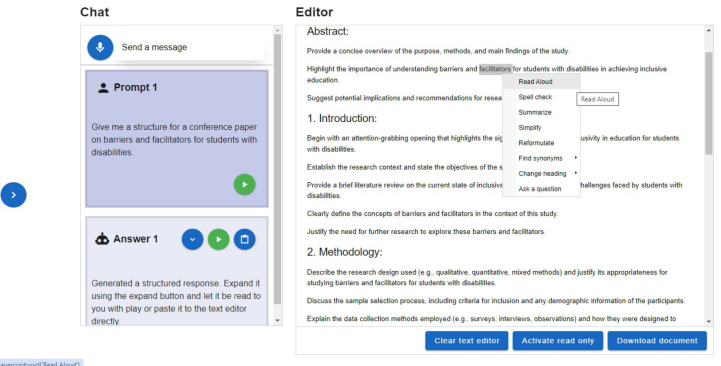
For this study, we developed a prototype called “Writing Assistant”. The prototype is a text editor with an integrated chatbot that helps users with their writing (Figure 1). Users can ask the chatbot via speech or text input for a document structure and paste the structured answer directly in the editor. The chatbot reads aloud the users’ questions and its own answers. The assistant also features editing support: users can right-click on a selected text and a menu appears, offering to find synonyms, reformulate, or shorten the text. Users can also ask custom questions about certain text sections.
The tool was developed iteratively in a team of four researchers, one of whom is an experienced screen-reader user. Additionally, three preliminary interviews were conducted with visually impaired students to understand their needs. This design process led to the implementation of features to increase the accessibility of the tool. For instance, an expandable chat his- tory shows the most recent request and hides the rest of the conversation to
User Study: Generative AI-Based Scientific Writing Assistant for Students 75
avoid long sequences of scrolling or navigation. Additionally, semantic struc- tures (e.g. landmark, heading structure) let screen-reader users jump between sections paragraphs.
Figure 1: Writing Assistant prototype with a generated structure in the text editor. In the text editor, the menu options are open.
Using a prototype for the user test had the advantage of letting users with a visual impairment experiment firsthand with how an AI writing assistant could be designed.
User Test Design The structure of the experiment is summarized in table 1. The user test con- sisted of two tasks which were completed once with familiar tools and once with the Writing Assistant. Before their first use of the Writing Assistant pro- totype, participants were allowed to try out the tool for 5 minutes. In the first task, participants were asked to create a structured template from scratch. In the second task, they were told to edit a scientific document. The order of the tasks was randomized to reduce order bias and minimize a learning effect. After completing the tasks, users were asked to compare their experience with and without the Writing Assistant.
Table 1. Structure of the user test.
Table available in the original PDF paper.
Activity Time limit Task 1(a) “Creating a document” with familiar tools 7 minutes Questions on task difficulty and used approach Exploring the Writing Assistant prototype 5 minutes Task 1(b) “Creating a document” with prototype 7 minutes Questions on task difficulty and used approach Comparative questions on difficulty, efficiency, usefulness, and reliability Task 2(a) “Editing a document” with familiar tools 7 minutes Questions on task difficulty and used approach Task 2(b) “Editing a document” with prototype 7 minutes Questions on task difficulty and used approach Comparative questions on difficulty, efficiency, usefulness, and reliability
Recruitment, Data Collection and Analysis Participants were recruited via e-mail sent through the network of the authors. Specifically, two university disability offices spread an invitation to participate in the study to registered students. Additionally, persons who pre- viously took part in other research projects were informed about this new test. The invitation stated that participants needed to be students with a visual impairment and speaking either English or German. It also indicated that interviews could be conducted remotely or in-person and would take about an hour to complete, adjusted to 90 mins after a pilot interview.
Ten students with a visual impairment were recruited in total. Of the ten user tests, four were carried out online and six in-person in Switzerland between January 23rd and February 8th, 2024. All of them were conducted in German. Due to technical issues, one online interview was set up in two sessions. The user tests took an average of 78 minutes (±15), with remote sessions taking slightly longer.
With the consent of participants, the user test was screen-recorded and transcribed. In two cases, only notes without transcripts were analyzed (one user declined the request for screen recording, and the other case was due to a technical issue). The transcripts and notes were coded to perform a thematic analysis following a six-phase approach, familiarizing with the data, gen- erating initial codes, searching for themes, reviewing themes, defining and naming themes, and producing a write-up (Braun and Clarke, 2012).
Sample Description Participants were aged between 22 and 50, with an average age of 31.3 years (±8.9). One participant chose not to give their age. Six participants identified as male, three participants identified as female, one participant did not reveal their gender. Participants studied eight different disciplines: law (2), psychol- ogy (2), computer science, biomedicine, history, philosophy, physiotherapy, and multilingual communication. The native language was German for nine participants and Georgian for one participant. Seven participants mentioned they used screen readers, but only five participants used JAWS (4) or Orca (1) during the user test. Two participants employed a refreshable braille device in addition to a screen reader. Five participants were not using additional software, relying only on operating system customizations on contrast, zoom and symbol size.
Before the user test, seven participants had previously used ChatGPT, two participants mentioned that they had not interacted with any artificial intel- ligence chatbots before and one participant was an experienced user and had integrated it into their writing workflow with ChatGPT plugins and custom GPTs.
To compare the utility of the Writing Assistant Prototype, participants used their familiar tools to write and edit a document. Nine out of ten participants were using Microsoft Word as a text editor and had very few accessibility issues with it. Only three participants used ChatGPT to create a document structure (task 1) while seven relied on ChatGPT as an addi- tional aid to edit a document (task 2). When using ChatGPT, participants mentioned accessibility concerns such as missing labels, lots of scrolling and a lack of overview.
User Study: Generative AI-Based Scientific Writing Assistant for Students 77
RESULTS AND DISCUSSION
The Writing Assistant was perceived to be beneficial by all participants except one, who shared concerns about necessary human oversight. However, inex- perience due to its novelty, uncertainty about academic integrity, its allowed use and result reliability were the most mentioned factors that limited their adoption.
The Benefit of a Unified Tool The most frequently mentioned benefit of the Writing Assistant was that it is a unified tool integrating a chat interface and a text editor into a single applica- tion. Seven participants mentioned that they appreciated being able to work directly with the text and retrieve writing assistance for specific sections and paragraphs. This eliminated the need to switch between different interfaces which would slow down the workflow and make the writing process more tedious.
Participants also mentioned that copy-pasting text from ChatGPT to Word resulted in a loss of formatting. Having to reformat text increases intermedi- ate writing steps and thus makes a continuous work process more difficult. As one participant explained: “With ChatGPT, it’s a bit more tedious to copy it out because you have to. You can’t just paste the text like with the Writing Assistant. [In Chat- GPT] you see a nice outline and when you copy it into Word, the outline is actually no longer there, so the whole formatting is gone and then you have to format it again.”
Familiarity of Existing Tools: Providing Training While Minimizing Its Cost Comparing a new tool to an existing one inevitably involves discrepancies in familiarity and learning. Participants frequently mentioned that they are familiar with the existing tools. Specifically, they described the process of working with Word as familiar and simple. In comparison, the prototype was a new tool, and four participants felt the need to explore the writing assistant more to be able to assess its utility. In particular, they asked for additional time to use the tool, a tutorial, and a training course for future use. For example, one participant explained that with a new tool “you have to get to grips with [it] intensively and then you’ll get the same benefit”.
The training cost is a recurring issue for students using assistive technolo- gies (Heiman et al., 2020). As a result, integration to existing software (e.g. add-ins) should be favoured. However, our participants remained open to new technologies and saw potential in writing assistant. This position is well summed up by a participant who said: “I think there’s a lot more to come and I think that will really help and simplify the processes for such work and that you’ll also be faster because I think there will be even more functions in Word, like this writing assistant now.”
Additionally, participants expressed concerns regarding AI reliability which could affect technology acceptance and adoption. Specifically, they felt uncer- tain about the changes and content produced by the generative AI assistants as they mentioned potential accuracy issues. In particular, an experienced par- ticipant explained: “That’s why I feel very insecure. I have experience with all these chatbots and I know that they sometimes do all sorts of things, but not what you want. […] What I have realised, however, is that you have to be very, very precise in what you do and you also have to be very care- ful that nothing is swallowed or forgotten or twisted or scrambled.” These concerns are only exacerbated by inexperience with the new tools about their capabilities. For example, another participant said “I couldn’t judge what skills I can expect and how to assess the quality of the results”. As a result, providing adequate training is conditional to the adoption of such new technology.
University Guidelines and Policies The role of university also appeared pivotal in the assessment of an AI writing tool. On the one hand, participants mentioned the importance to respect university- or field-specific guidelines. On the other hand, they were wary of whether their institutions would allow such a tool.
Submission guidelines: Four participants stated that the template provided by the Writing Assistant was a good start but needed improvements to comply with strict university submission guidelines (e.g. required page width, foot- notes, text size) before it could be used in a meaningful way. This could be very helpful, as creating a template from scratch was described as laborious and frustrating by a participant. Two participants mentioned that they would prefer starting with official templates.
Authorization use of generative AI: Participants have mentioned that they were unsure what tools were allowed, and to what extent. One participant stated: “If I’m allowed to use it, then I want to use it, but if I’m not allowed to use it then of course I won’t”. Another participant noted that the lack of transparency can be an issue: “The source of the AI-generated text is also unclear.”
Control Over the Tool Read aloud function: While some appreciated the possibility to have this alternative output, others experienced it as annoying. A majority of partici- pants indicated that the read aloud function should be a setting that can be opted out. The use of this function will depend on the severity of the visual impairments and personal preferences. Some users will prefer to interrupt their screen-readers to listen to the audio output while others would find the combination of audio and screen-reader difficult.
Error prevention: A different concern mentioned by a participant: “[…] the damage that could possibly be caused through incorrect usage is fairly limited in Word.” Another participant shared a similar view: “Safety. There are no big, unexpected surprises here.” Error prevention is Nielsen’s fifth usability
User Study: Generative AI-Based Scientific Writing Assistant for Students 79
heuristic that errors should be prevented from occurring in the first place, or by eliminating error-prone conditions or presenting a confirmation dialog (Nielsen, 1994).
Informing on changes and processing: Some participants also appreciated when the system informed them of changes and gave an acoustic signal during processing. A participant explained: “[…] it is interesting that the program tells me while I am making a change, it tells me that it has been made, and I have the option of hearing the source text, but also the change.”
Comparison Overview
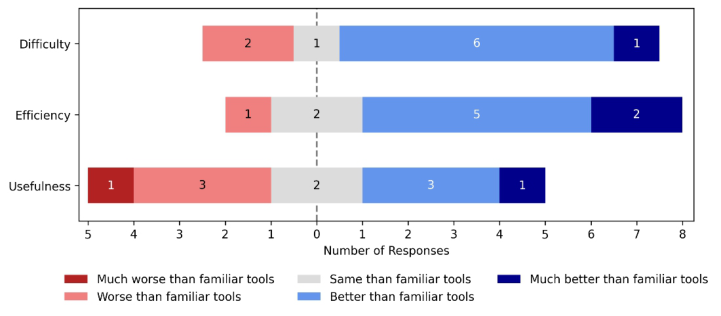
Figure 2 summarizes the results of the relative comparison of the prototype to the existing tools when creating a document. The majority considered the Writing Assistant to be rather easy to use because the tool was unified and maintained formatting information. The prototype was considered to be more efficient due to the possibility of creating a structure in only a few words. The perception of usefulness diverged among participants which can be explained by the fact that the tool was often perceived as a promising tool that needs improvements.
Figure 2: Evaluation of the Writing Assistant to create a structured document (task 1) compared to familiar tools. Participants perception on difficulty, efficiency and use- fulness was calculated by directly comparing Likert scale ratings for both processes. Indicating a slight preference in the number of responses in favour of the Writing Assistant.
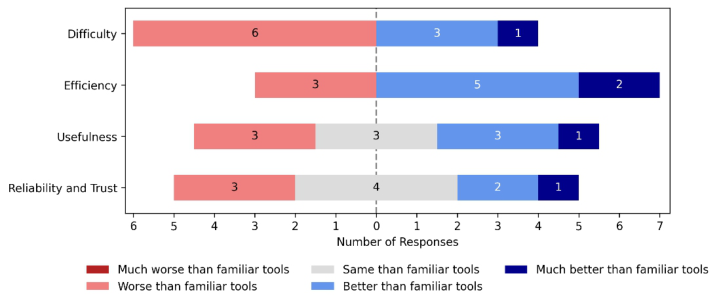
Figure 3 shows the results of the comparison for editing a document. The novelty of the Writing Assistant made it more difficult to use for participants. Yet, editing whole sections and paragraphs was mentioned as an efficiency gain for the Writing Assistant to reduce the amount of intermediate steps. On the other hand, concerns about its reliability and the need to re-read the output of the changes lowered the perceived usefulness. Further, it depended on the individuals’ perception of weighing familiarity with the existing pro- cess and maturity concerns of the prototype against the benefits of AI-based
writing assistance directly in the text. Participants mentioned not trusting AI-introduced changes in both processes.
Figure 3: Evaluation of the Writing Assistant to edit a document (task 2) compared to familiar tools. Participants perception on difficulty, efficiency, usefulness and reliability and trust was calculated by directly comparing Likert scale ratings for both processes. Illustrating no clear preference over both processes.
CONCLUSION
This user study highlighted the potential of AI writing assistants to create structured documents and facilitate the text editing experience for students with visual impairments. Specifically, it emphasized the need to provide a unified tool, implement AI assistants into existing tools to lower the costs of adoption, leave control to users, and that further improvements need to be made to create structured documents that comply with university or field- specific formatting guidelines. Universities have also a critical role to play by clarifying how generative AI can be used and by providing training to fully benefit from the Writing Assistant.
REFERENCES
Braun, V. and Clarke, V. (2012) Thematic analysis. American Psychological Association. Darvishy, A. et al. (2023) ‘A new conversational interaction concept for document
creation and editing on mobile devices for visually impaired users’, in 14th Inter- national Conference on Applied Human Factors and Ergonomics (AHFE 2023). Available at: https://doi.org/10.54941/ahfe1003651. Darvishy, A. and Hutter, H.-P. (2013) ‘Comparison of the Effectiveness of Different Accessibility Plugins Based on Important Accessibility Criteria’, in C. Stephanidis and M. Antona (eds) Universal Access in Human-Computer Interaction. Appli- cations and Services for Quality of Life. Berlin, Heidelberg: Springer Berlin Heidelberg (Lecture Notes in Computer Science), pp. 305–310. Available at: https://doi.org/10.1007/978-3-642-39194-1_36.
User Study: Generative AI-Based Scientific Writing Assistant for Students 81
Foley, A. and Ferri, B. A. (2012) ‘Technology for people, not disabilities: ensuring access and inclusion’, Journal of Research in Special Educational Needs, 12(4), pp. 192–200. Available at: https://doi.org/10.1111/j.1471-3802.2011.01230.x. Grammarly (no date) ‘Introducing generative AI assistance’, Grammarly. Available
at: https://support.grammarly.com/hc/en-us/articles/14528857014285-Introduc ing-generative-AI-assistance (Accessed: 14 February 2024). Heiman, T. et al. (2020) ‘New Designs or New Practices? Multiple Perspectives on the ICT and Accessibility Conundrum’, in J. Seale (ed.) Improving Acces- sible Digital Practices in Higher Education: Challenges and New Practices for Inclusion. Cham: Springer International Publishing, pp. 99–115. Available at: https://doi.org/10.1007/978-3-030-37125-8_5. Imran, M. and Almusharraf, N. (2023) ‘Analyzing the role of ChatGPT as a writ-
ing assistant at higher education level: A systematic review of the literature’, Contemporary Educational Technology, 15(4), p. ep464. Available at: https: //doi.org/10.30935/cedtech/13605. Jenni.ai (no date) ‘Jenni. AI: Supercharge Your Next Research Paper’. Available at: https://jenni.ai/ (Accessed: 14 February 2024). Morales, L., Arteaga, S. M. and Kurniawan, S. (2013) ‘Design guidelines of a tool
to help blind authors independently format their word documents’, in CHI ‘13 Extended Abstracts on Human Factors in Computing Systems. New York, NY, USA: Association for Computing Machinery (CHI EA ‘13), pp. 31–36. Available at: https://doi.org/10.1145/2468356.2468363. Nielsen, J. (1994). Enhancing the explanatory power of usability heuristics. In Proceedings of the SIGCHI conference on Human Factors in Computing Systems, pp. 152–158. Available at: https://doi.org/10.1145/191666.191729. ParagraphAI (no date) ‘ParagraphAI: Watch ParagraphAI product tutorial videos’.
Available at: https://paragraphai.com/tutorials/ (Accessed: 14 February 2024). Spataro, J. (2023) ‘Introducing Microsoft 365 Copilot – your copilot for work’, 16 March. Available at: https://blogs.microsoft.com/blog/2023/03/16/introducin g-microsoft-365-copilot-your-copilot-for-work/ (Accessed: 14 February 2024). World Health Organization (2012) ‘WHO releases new global estimates on visual
impairment’, 18 April. Available at: https://www.emro.who.int/control-and-pre ventions-of-blindness-and-deafness/announcements/global-estimates-on-visual- impairment.html (Accessed: 13 February 2024).
LISTED IN THE AHFE DIGITAL BOOKSTORE CATALOGUE
Explore the complete digital volume
Accessibility, Assistive Technology and Digital Environments
Read this individual research paper free through the original publisher, or explore the full digital proceedings book.
ISBN 978-1-958651-97-1
Explore this ISBN in the AHFE Bookstore ↗Listed in the July 2026 bookstore catalogue; search by ISBN to confirm current availability · Digital book purchase optional