Svenja Knothe, Thomas Hofmann (2023). How to design an HMI for users that do not exist yet. In: Ergonomics In Design. AHFE Open Access, vol. 77, pp. 414–421. https://doi.org/10.54941/ahfe1003399
How is an ergonomic user interface designed when the final users are not known yet? This is a challenge that designers and developers are increasingly facing due to various factors. Considering the ongoing and new development of technologies and the resulting operating options, new work fields and user groups arise. Even existing complex workflows can be rethought and adapted. As a result, many constraints, workflows and user groups are not known during development. The motivation for the adaptations can be an increase in production through a better use of given resources or to ease the working conditions of the users. An example of this is the use of industrial, automated drones to facilitate inspections and minimize and optimize transport routes and times, for example. In cooperation with HHLA Sky, the HMI for a control center was developed - with a focus on ergonomic user-friendly remote control and management of up to 200 drones. The concept of the Integrated control center (ICC) was to cover not only the flight, but the entire process chain, from generating and flying missions, to planning and managing resources, to documentation. Accordingly, professional users such as dispatchers, professional pilots and technicians are the target group. The system must differentiate between the individual roles and take into account the evolving needs and competencies. Therefore, new requirements arise for the design, which should enable a safe and intuitive interaction.Due to the fact that this is a new form of control center and no empirical data was available, the design of a user-centered interface was (and still is) a major challenge. This paper describes the methodical process, how unknown workflows and needs of users were determined, which possibilities for information generation were used and how expert knowledge from other industries could be transferred to the design of the control center. The problems of information representation and depth in the respective work processes are also considered and which approaches were used for forecasting. Finally, it is described why the final design could nevertheless be developed ergonomically suitable for the user group.
Considering the on-going and new development of technologies, many areas of industrial processes can be automated and/ or reorganized. However, these adaptations mean that existing complex work processes have to be rethou- ght, work areas restructured and new work fields developed. The change in constraints can be so fundamental that processes and user groups are unknown.
How to Design an HMI for Users That Do Not Exist Yet... 415
This creates new challenges not only for the employer, but also for the developers and designers of the products and interface design. New, complex electronic devices are often controlled using a digital display form known as a human machine interface (HMI). The more complex and powerful a system is, the more confusing its user-oriented operability can be. To avoid this, an attempt is made to display only the information that is relevant to the user, so that mistakes or misinterpretations caused by a flood of information are minimized. The goal is for the interface to support the user in his work in the best possible way, even without knowledge or understanding of the functions running in the background (Industrie-Wegweiser, 2018).
Another point is that the performance and satisfaction of the user has a significant impact on the overall user experience (UX) through an adapted and understandable representation of complex structures of the powerful software. The more confusing and impractical a graphical user interface of a system appears, the more confused and frustrated the user is. This leads to the impression that the system does not provide the desired support in the execution of the work steps and tends to be evaluated negatively, aggravating or hindering (DIN EN ISO 9241-210, 2020).
In addition, an economic advantage is that an individually tailored process system simplifies procedures to the essentials. This means that long fami- liarization periods and training courses can be avoided. Furthermore, the cost of providing services is lowered. This reduction in running costs means that customers are willing to pay a higher purchase price for user-friendly systems and products (DIN EN ISO 9241-210, 2020). The procedure for a user-centered interface is described in DIN EN ISO 9241–210 (2020) and consists of the following four phases: Phase 1: Understanding and defining the context of use. Phase 2: Specifying user requirements. Phase 3: Developing design solutions. Phase 4: Evaluation and design. The focus of the first two phases is on capturing and analyzing the user’s needs in order to take them into account during design and implementation, because only then can the HMI support users in their operations as well as possible. In addition, iterative loops ensure that the HMI can be increasingly fine-tuned to the user and that the user experience is improved.
Consequently, user questioning and feedback is essential in the design process and the question arises, how can the needs of users be asked and evaluated if they are not known or the operations have not been performed in the form yet. Many designers are regularly confronted with this question.
BACKGROUND
The use of automated vehicles and drones in industrial settings is increasing and poses new challenges for designers and software programmers. In coo- peration with HHLA Sky GmbH (HHLA), a control center for planning and remote control of up to 200 drones was designed and developed.
Especially at the beginning of the project, the question was which tasks should and can be done with a remotely controlled drone and which tasks can
416 Knothe and Hofmann
be coordinated from the control center. HHLA had the vision to support or replace some operations in the port with the use of drones. The control center, called Integrated Control Center (ICC), should map the whole process from creating and managing missions, scheduling the available resources, as well as controlling and maintaining drones. It was assumed that the control center would be used by a wide variety of professionals and as a result, different user groups and -roles would need to be provided for the different modules. Furthermore, the ICC had to be designed in such a way that other companies could also use the application for their own purposes and that features would not be limited to port logistics only.
The scope of such a process indicates that the design of a complex con- trol center, while taking into account the needs of diverse user groups, is a major challenge itself. Due to the lack of experience with remote manage- ment and planning of such a large number of drones and the consideration of different industries, processes for dispatchers, professional pilots and tech- nicians need to be anticipated and generalized. This example will be used to show how the lack of users changes the process and what methods were used in gathering and evaluating information to create a user-centered interface despite all of this.
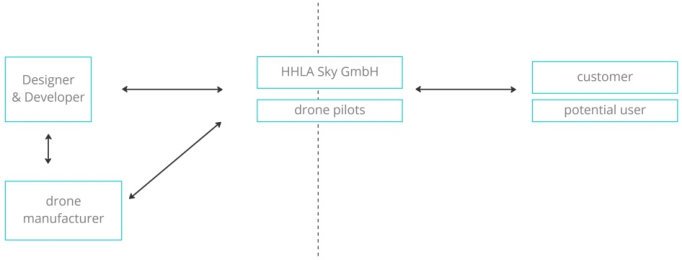
TEAM An interdisciplinary team of developers and designers was responsible for the development of the control center. In addition, own drones were developed, designed and built in parallel to the ICC. The evaluation and testing of the drones was supported by HHLA’s own drone pilots (Figure 1). For a succes- sful project, especially in a large interdisciplinary team, good communication and a fast response time are important. This was achieved with the help of Scrum (Gloger, B, 2016), an agile process management tool from the IT field.
Figure 1: Organization chart of the project (Knothe, 2023).
DESIGN PROCESS New feature requests were regularly made to the design and development team in the project. Often the team was not aware of who the originator was and what the exact use case or requirements were. After the theoretical
How to Design an HMI for Users That Do Not Exist Yet... 417
design process, the first step would be to analyze the context of use (phase 1 according to DIN EN ISO 9241-210). Usually, during the research, market analysis, user surveys are conducted or customer feedback from already exi- sting systems is determined. As there were no concrete requirements from the customer and no comparable systems could be analyzed or users interviewed, this information acquisition for the requirements criteria was a challenge. The presentation and design of the HMI interface was easier, because here the applicable guidelines for the design of visual display terminals (Butz, 2017), (Cubetech, 2022) and the principles of user-centered design (DIN EN ISO 9241-110, 2020), (DIN EN ISO 9241-220, 2020) were used.
WORKSHOPS First, a workshop was held with the client in order to concretize the wishes and define the requirements. The technical data and available interfaces of the hardware and software were also queried. It often turned out in the workshops that HHLA or even the customer was not able to provide spe- cific information, because the processes, hardware or interfaces were usually not finally defined. After the content-related and technical points had been clarified as far as possible, it was decided which classification or weighting the individual points would receive and which would have to be included in the first Minimum Viable Product (MVP).
By using design thinking (Gould, 1985), (Uebernickel, 2015) and use cases, the team discussed after the workshops how a logical flow could be. An attempt was also made to anticipate the user’s entry points and what the user’s individual requirements or preferred ways of working might look like. Furthermore, the question of which additional areas of application could be covered by the feature and for which user groups this feature would be interesting played a central role in the development of the structure. Since there was no own experience with controlling drones, it was only possible to draw on experience from previous projects. It should always be keep in mind that there is a risk of thinking in terms of old and proven procedures at any time and relying on well-known ways of presentation. There are situations in which this approach leads to success, because users feel comfortable with the well-known and an intuitive operation seems to be given. However, there are also problems that need to be completely rethought in order to generate a much more efficient solution. The use of new technologies also plays a deci- sive role here (Bensmann, 2021). Designers should therefore consciously leave these established paths again and again and check whether new, innovative solutions do not lead to a much better result.
Another helpful aspect is the deliberate step back from the specific use case to a more general level, so that the team does not lose sight of the purpose or the actual goal of the application. This was particularly important for new, large and complex features, as the team could otherwise quickly get lost in small sub-aspects.
Even if a good basic structure can be devised by an interdisciplinary team and expert surveys, testing and evaluation by users or at least experts in a related field is essential. In many cases, the approach and perspective on
418 Knothe and Hofmann
operations and data varies between different industries, and thus there are aspects of operations or weightings and representations of data that only an expert can definitively evaluate. Some clients need to be convinced that a direct consultation with customers and users adds a lot of value and is fundamental for a user-centered design.
FEEDBACK However, if there are no users who can be interviewed, other ways must be found to have the conceptualization and design evaluated. One possibility is to interview experts from similar industries in order to determine general work processes and user needs. It is important to ensure that the selected sectors have similar constraints to those of the planned project. In addition to determining the procedure, expert interviews also provide an opportu- nity to ask about experience with software and products that have already been used. Feedback can be used to draw conclusions about features and processes that are needed or desired. Satisfaction with the individual pro- gram steps and requested suggestions can also be transferred, if necessary. Finally, it must be evaluated where deviations from the operations are expe- cted and to what point the available data can be taken into account for implementation.
In the case of the ICC, there were two groups of experts who were involved in the decision-making process or who were consulted on complex technical issues throughout the entire process. The first group consisted of HHLA’s drone pilots and the second group of engineers from the drone manufacturer.
The drone pilots all have experience of manually controlling drones in the field. Their experience has been particularly helpful in planning missions and also in controlling and monitoring them.
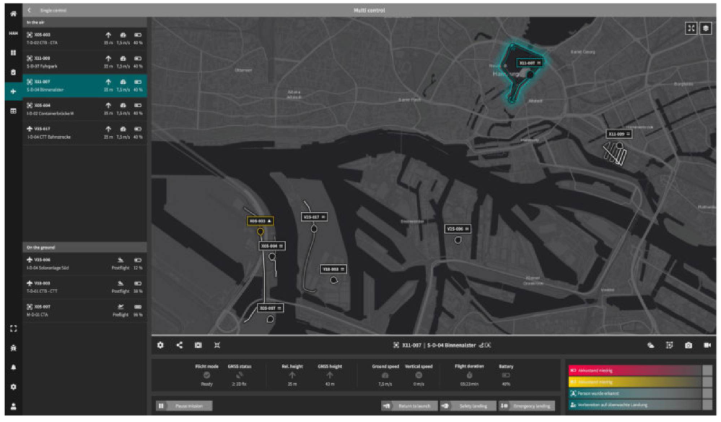
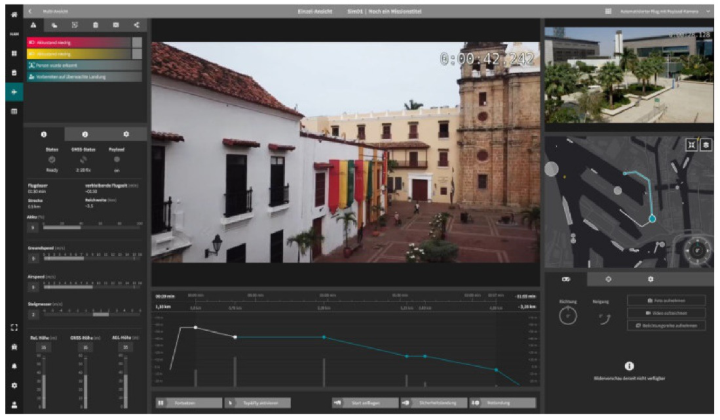
How a mission is planned depends very much on the objective of the job. For example, there is conducting an inspection flight or planning a transport flight. In both cases, there are different requirements for the drone and pay- load, the route and also the flight behavior. Accordingly, a distinction had to be made between the different mission types so that the mask could be customized to suit the needs of each circumstance. For the control and moni- toring module (Control), there was the challenge of differentiating between the multi-drone (Figure 2) and single-drone control (Figure 3) and of cluste- ring and prioritizing the large amount of telemetry data in a practical way. Especially when monitoring multiple drones at the same time, it is important to reduce the amount of data to what is essential so that the pilot can main- tain an overview and react quickly in an emergency. The situation is different with the single drone control. Here, the pilot focuses on a single drone and needs all important information and control options at a glance. To enable drone pilots to get a feel for the application, a trial instance was set up for them to test workflows. The disadvantage of these tests was that they were mainly carried out with the help of simulation drones, and unfortunately this made it difficult to depict critical use cases. Despite this, it was possible to define the processes more clearly and to specify and adapt the way in which the information is displayed in both modules.
How to Design an HMI for Users That Do Not Exist Yet... 419
Figure 2: Multi control (HHLA ICC, 2023).Figure 3: Single control (HHLA ICC, 2023).
The engineers were the primary contact for questions about the different flight behaviors of the drone types and what the gateway was between the control station and the drone. Information about the flight behavior of a drone already had an influence on the planning of a mission. There are drone types, so-called wingcopters that switch to wing mode at high speed, which saves energy and covers longer distances. These drones have different beha- vior from quadrocopters (vertical takeoff drones) during takeoff and landing. Wingcopters must take off and land against the wind, which means that at
420 Knothe and Hofmann
the last waypoint of a mission, the drone circles and determines the wind dire- ction and adjusting itself independently against the wind. This circling must be taken into account when setting the geofence. The geofence implements the requirement that drones can only fly in certain pre-designated areas.
The conception and design of features always involves the exchange of data between software and hardware. Many concepts failed at the beginning due to the transmission of data between the drone and the control center, because the gateway was limited. In these cases, a solution was elaborated in close cooperation with the drone manufacturer. Since the control center only works if the drone correctly interprets the data from the ICC and the control center displays the data provided by the drone.
CONCLUSION
Designers will regularly find themselves in the situation, due to ever new technologies and workflows, that no users are available for questioning or comparable applications for analysis. However, this is a mandatory require- ment for the design process according to DIN EN ISO 9241–210 (DIN EN ISO 9241, 2020). As shown in the example, a good general understanding of processes and user needs can be created with the help of different methods and the involvement of diverse experts (even if only from related disciplines).
A basic prerequisite for success was that the team was widely diversified. This made it possible to look at the application from as many different angles as possible and to take into consideration experiences from various previous projects. The resulting discussions ensured that the initial concepts were alre- ady well thought out. The regular presentation and questioning ensured that the developed concept was placed in an application-related context, so that the usability of the concept could be evaluated and adapted on a regular basis. Furthermore, it was shown that even if no “classic” users are availa- ble for feedback, expert groups can be used to further refine the design of a user-centered interface.
Another advantage in the development of the ICC is the timing of the deployment. By the fact that the use of a large number of drones in the indu- stry is just starting, there is a chance to adapt the already existing functions to customer feedback and to develop new features with the users. Indeed, as the development of the control center progresses and the individual modu- les become more complex, it is likely that different user groups will work with the control center and that requirements and needs may change. It will become apparent over time if the design of new workspaces follows a certain pattern or scheme, and generalized assumptions will be made for workflows to create a basic structure. Nevertheless, these elements will never replace user interviews, because in each new area of operation, the focus, the releva- nce of information and even the presentation will be determined individually and will differ from one another, even if only in nuances.
REFERENCES
Bensmann, Mandra ed. (2021). Collaborative Workspace – Concept Design of an Interactive System for Total Airport Management In: Advances in Physical, Social & Occupational Ergonomics. Los Angeles.
How to Design an HMI for Users That Do Not Exist Yet... 421
Butz, A. u. Krüger, A. (2017). Mensch-Maschine-Interaktion. 2. Auflage. De Gruyter Oldenbourg. Berlin/Boston. Cubetech:. Die 8 goldenen Regeln des Interface Design in der Praxis. https://www.cu
betech.ch/die-8-goldenen-regeln-des-interface-design/ Zugriff am 17.02.2022]. DIN EN ISO 9241–110 (2020). Ergonomische Anforderungen für Bürotätigkeiten mit Bildschirmgeräten - Tabelle 1: Interaktionsparadigmen. Beuth Verlag. Berlin. DIN EN ISO 9241–210 (2020). Ergonomische Anforderungen für Bürotätigkei-
ten mit Bildschirmgeräten - Teil 210: Menschzentrierte Gestaltung interaktiver Systeme. Beuth Verlag. Berlin. DIN EN ISO 9241–220 (2020). Ergonomische Anforderungen für Bürotätigkeiten mit Bildschirmgeräten - Teil 220: Prozesse zur Ermöglichung, Durchführung und Bewertung menschzentrierter Gestaltung für interaktive Systeme in Hersteller- und Betreiberorganisationen. Beuth Verlag. Berlin. Gloger, B. (2016). Scrum. Produkte zuverlässig und schnell Entwickeln. 5. Auflage,
Carl Hanser Verlag. München. Gould, J. D. u. Lewis, C. (2021) Designing for Usability. Key principles and what designers think, Communications of the ACM (1985). https://citeseerx.ist.psu. edu/viewdoc/download?doi=10.1.1.84.8860&rep=rep1&type=pdf [last accessed on 16.11.2021]. Industrie-Wegweiser. (2018). Human Machine Interface (HMI) - Definition und
Geschichte - Industrie-Wegweiser. https://industrie-wegweiser.de/human-machine -interface-hmi/ Uebernickel, F., Brenner, W., Neaf, T., Pukall, B., Schindlholzer, B. (2015). Design Thinking – Das Handbuch. Frankfurter Allgemeine Buch. Frankfurt am Main.
LISTED IN THE AHFE DIGITAL BOOKSTORE CATALOGUE
Explore the complete digital volume
Ergonomics In Design
Read this individual research paper free through the original publisher, or explore the full digital proceedings book.
ISBN 978-1-958651-53-7
Explore this ISBN in the AHFE Bookstore ↗Listed in the July 2026 bookstore catalogue; search by ISBN to confirm current availability · Digital book purchase optional