Weiyi Li, Sha Liu, Zichen Zhang (2022). The Influence Factors of Standby Sign on User Shutdown Behavior. In: Human Factors and Systems Interaction. AHFE Open Access, vol. 52, pp. 442–449. https://doi.org/10.54941/ahfe1002187
We observe that many users often don’t turn off their laptops after using it, so that the device stays in standby for a long time, which not only causes damage to the battery, but also causes energy waste. We tried to find a simple and effective way to prompt users to shut down timely. Therefore, we conducted following research:(1) Find the reasons why users don’t shut down timely; (2) Find cost-effective ways to let them to shut down in time. First, through a questionnaire survey of 50 users, we found that the main reasons for users not to shut down timely include forgetting to shut down, the second reason is unawareness of disadvantages of not shutting down, and the third reason is they think keeping laptop standby can improve work efficiency (return to work faster). Therefore, we suppose that a prominent standby sign may solve these problems.Then, we study the main factors of standby sign affecting user shutdown behavior through experiments, and then design standby sign according to experimental results to test its effect on user shutdown behavior. We first investigated about 50 college students through a hierarchical scale, analyzed the influence of sign shape, size, position, flashing and text prompt on users' shutdown behavior, and conducted data analysis, and came to the following conclusions:1. In terms of shape, triangle, ring, circle, diamond and square were taken as independent variables, and user awareness of signs was taken as dependent variables(p<0.05). Triangle has the highest awareness degree, followed by ring.2. In terms of size, we conducted a curve fitting between sign size and the user's awareness of sign, and found user's awareness of sign was the best when the proportion of the triangle sign size was 1/1200-1/600 of laptop screen size.3. In terms of position, when the sign is placed in different locations of the laptop computer, including the bottom center of the screen, the center of the keyboard and the left side of the keyboard, it is found that there is a significant difference in user awareness (p<0.05), the effect is best in the bottom center of the screen, and in the subjective question, most users suggest adding another sign on laptop’s back.4. We compared the user awareness of the flashing sign with a text prompt with that of the sign only(p<0.05), significant difference was found between two signs, and the flashing sign with text prompt had higher awareness.Finally, we designed according to these results the standby sign, and no standby sign laptop sample awareness of contrast experiment, found that 90% of users when there is the sign can be timely shutdown, far higher than situation without sign, prove the validity of results of the study, the standby sign, can effectively reduce users untimely shutdown behavior. The result of this experiment is beneficial to reduce the energy consumption and equipment damage caused by users' untimely shutdown behavior.
Electronic devices consume power in standby state, known as standby power, which is the power used by the electrical equipment in the lowest power mode (Chen and Lin, 2019). The standby power of a single electronic device is not much, but the sum will cause a significant expense: According to investi- gation of the International Energy Agency (IEA), in developed country, the typical standby power accounts for 3% to 11% of total annual electricity consumption (Solanki et al., 2013).
As a typical electronic device with standby function, laptop has become necessary for study and work. But for some reasons, some users do not shut down their laptops in time after use, which makes laptops standby for a long time and causes extra power consumption that cannot be negligible (Imai et al., 2012). In addition to forgetting to turn off laptops in time, some users do not turn off laptops after use because they hope to use laptops conveni- ently, but keeping standby is not conducive to battery maintenance although it is convenient to use (Zhang, 2010).
At present, there are two methods to improve the ineffective power con- sumption of household appliances: One is to strengthen the linkage between users’ behavior and energy consumption information (Han and Lim, 2010, Lee et al., 2014), which mainly adjusts electrical power consumption by
The Influence Factors of Standby Sign on User Shutdown Behavior 443
Figure 1: Subjective feeling test and results of preliminary experiment.
detecting user behavior; the other is to provide how the energy being used through power management method, and it uses active information to assist users in reducing the consumed power (Sung and Ko, 2015, Chen and Lin, 2016). The second method is applicable to some common household appli- ances, but whether it’s applicable to laptops remains to be studied. We will not explore it in this paper. The first method does not extend the “linkage” to using striking standby sign to remind users of standby of laptop and informa- tion of still consuming power. Besides, some users are not aware of standby power, or they often forget to shut down laptops in time. In preliminary expe- riment, we will discuss the reasons why users don’t shut down laptops in time and whether an enough striking standby sign can prompt users to shut down laptops in time.
We want to know the factors that influence the laptop standby sign stri- king degree(user awareness degree). For public sign, to take geometry graphic language such as circle, square, triangle, polygon, square can make the sign more striking, and the striking degree is also influenced by signs’ number and position (Lei and Song, 2013). For safety sign in underground coal mine, eye- movement research shows that the striking degree of triangular safety sign is greater than that of round, while rectangular safety sign is the worst, and the larger the safety sign is, the easier it is to identify it. However, when the safety sign is too large, we need more time to fully extract the information of the safety sign (Tan, 2021). Therefore, oversized safety sign is not the best. The above shows the influence factors (shape, position, size, etc.) of sign striking degree in some specific situations. However, whether the influence factors are the same for laptop standby sign striking degree remains to be explored, which will be studied in our formal experiment.
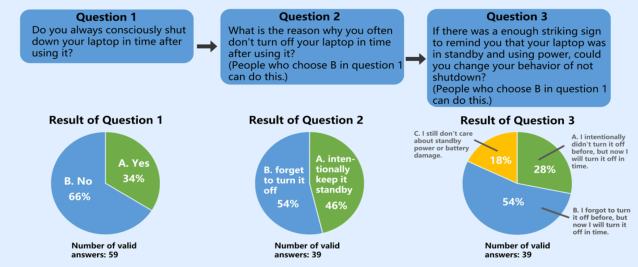
PRELIMINARY EXPERIMENT In order to explore the reasons why users keep their laptops in standby after use, and whether enough striking standby sign can reduce standby power, we set three subjective feeling test questions and got results from 59 users (see Figure 1).
Figure 2: Five commonly used shapes of laptop standby sign.
Figure available in the original PDF paper.
We made the following analysis: 1. More than 60% users keep their laptops in standby after use, and less than 40% shut down laptops timely after use; This shows that standby power is widespread. 2. Among those who leave their laptops standby, 54% users agree that they forget to shut it down, with some of them noting that they want to be reminded of shutdown. 46% users agree that they leave laptops standby intentionally, with some noting that they think it’s convenient and that they think it’s no harm to do so. 3. If there is an enough striking sign to remind users that “the laptop is still in standby and using power”, users who forget to shut down laptops agree that they will shut down laptops timely; And more than half of those who leave laptops standby intentionally agree that they will shut down laptops timely.
Therefore, we determined that most users will change the behavior of not shutting down laptops timely after use (whether they forget to shut down or leave it standby on purpose) if the standby sign is striking enough to users. In order to promote users to shut down laptops timely after use, we condu- cted the formal experiment on how to ensure that user awareness degree of standby sign is enough, that is, the striking degree influence factors of laptop standby sign.
FORMAL EXPERIMENT In the formal experiment, we studied striking degree (user awareness degree) influence factors of laptop standby sign, including shape, size, position, fla- shing and text prompt. We adopted progressive subjective feeling tests for some users, and conducted data analysis, and finally designed the best striking laptop standby sign.
Shape Test We chose five commonly used shapes of laptop standby sign to carry out the subjective feeling test of the 10-point scale, including triangle, ring, circle, diamond and square, so that users could rate striking degree of the five shapes (see Figure 2).
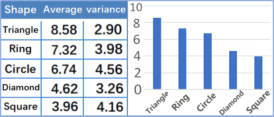
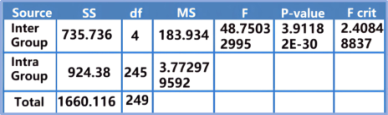
We received 50 valid answers. The triangle has the best striking degree, with an average score of 8.58, and it is followed by the ring at 7.32; The circle is 6.74, less than the ring; Diamond and square are lower at 4.62 and 3.96 respectively (see Figure 3). According to one-way anOVA, p-value =3.91182E-30 < 0.05, indicating that shape has significant influence on sign striking degree (see Figure 4).
Therefore, different shapes significantly influence laptop standby sign stri- king degree, and the triangle is the most striking. In the following experiment, we would test other influence factors with triangle as a fixed value.
The Influence Factors of Standby Sign on User Shutdown Behavior 445
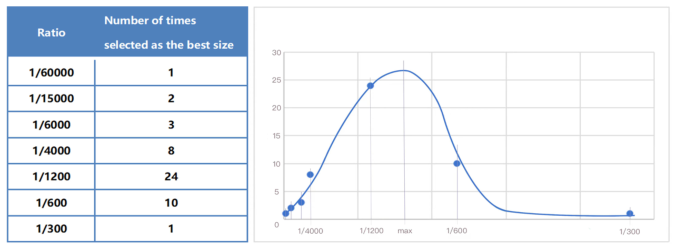
Figure 3: Shape test result.Figure 4: Shape test one-way anOVA.Figure 5: Images of laptop standby signs of seven sizes.Figure 6: Size test result and the curve fitting.
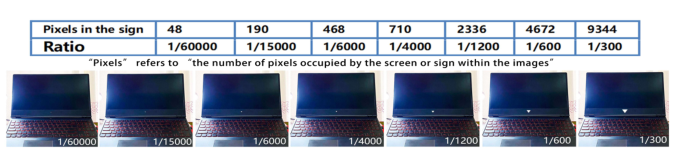
Size Test We used triangle to create images of laptop standby signs of seven sizes, and users were asked to subjectively choose sign of the best size that they happe- ned to be aware of in a short time (see Figure 5). In the images, seven sizes were set based on the ratio of the pixels in the sign to the pixels in the laptop screen, and the total number of pixels in the laptop screen is about 2839770.
We received 49 valid answers and the results showed that the largest num- ber of respondents thought 1/1200 was the best size, followed by 1/600, and we conducted a simple curve fitting and found that the extreme point of the best sign size ratio should be between 1/1200-1/600 (see Figure 6). That is to say, when the ratio of the triangle standby sign size to the size of the laptop screen is between 1/1200-1/600, the striking degree is just right.
Figure 7: Position one.
Figure available in the original PDF paper.
Figure 8: Position two.
Figure available in the original PDF paper.
Figure 9: Position three.
Figure available in the original PDF paper.
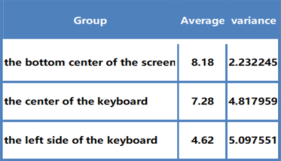
Figure 10: Position test result.
Therefore, in subsequent tests, the shape of laptop sign is triangle and the ratio of the sign size to the screen size of the laptop is 1/1200 as fixed values.
Position Test We have determined that the shape of laptop sign is triangle and that the ratio of the sign size to the screen size of the laptop is 1/1200. Based on this, we studied the influence of standby sign position on striking degree. We put the sign in three positions including “the bottom center of the screen” (see Figure 7), “the center of the keyboard” (see Figure 8) and “the left side of the keyboard” (see Figure 9), and then let 50 users answer the subjective feeling test question to give striking degree scores(scale of 10 points).
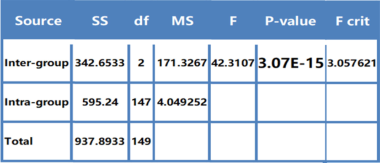
The striking degree of the sign at “the bottom center of the screen” is the best, scoring 8.18, followed by “the center of the keyboard”, scoring 7.28, and “the left side of the keyboard”, scoring 4.62 (see Figure 10). According to one-way anOVA, p-value =3.07E-15 < 0.05 (see Figure 11), indicating that position has significant influence on laptop standby sign striking degree. In addition, some users may close laptop to keep laptops standby. So we also asked the 50 users whether they thought it was necessary to add a standby sign on the back of the laptop to remind them. The results showed that 92% of users thought it was necessary to add a standby sign on the laptop back.
The Influence Factors of Standby Sign on User Shutdown Behavior 447
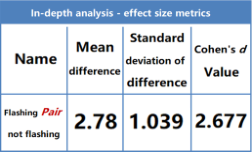
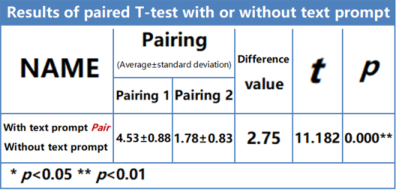
Figure 11: Position test one-way anOVA.Figure 12: Paired T test 1.Figure 13: In-depth analysis 1.
Therefore, position has significant influence on the striking degree of the sign, and the sign striking degree is best at the bottom center of the screen. In addition, adding a standby sign on the back of the laptop can effectively remind users to turn off the laptops in time. These would also be used as fixed values in subsequent tests.
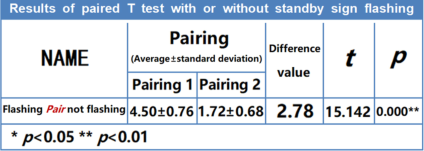
Flashing Test And Text Prompt Test Firstly, we studied the flashing of the standby sign on the striking degree based on the previous test results. We developed a five-point scale subjective feeling test, in which two scenes with standby signs were attached (one with flashing effect and one without flashing), and 41 users rated the striking degree of standby signs in the two situation. The results showed that the flashing standby sign had a score of 4.5, higher than the 1.72 score without flashing.
We conducted paired T test, and found that flashing or not has different influences on the striking degree of standby sign (P < 0.05) (see Figure 12). And the Cohen’s d value is greater than 0.80 (see Figure 13), which means that the difference is large. Therefore, we can determine that flashing or not has significant influence on the striking degree of standby sign.
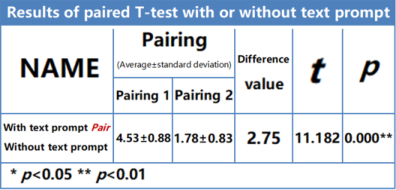
Secondly, We used the same method to test whether the standby sign is more striking with a text prompt near it (see Figure 14). It turns out that the text prompt makes the sign more striking (“with text prompt” scored 4.53
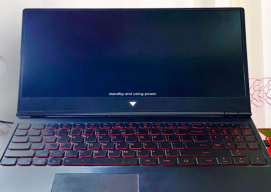
Figure 14: Text prompt.Figure 15: Paired T test 2.Figure 16: In-depth analysis 2.Figure 17: Optimal laptop standby sign design.
and “without text prompt” scored 1.78). And whether there is a text prompt has significant influence on the striking degree of standby sign (P < 0.05, Cohen’s d = 1.977 < 0.80) (see Figure 15 and Figure 16).
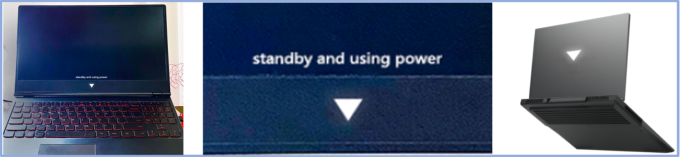
Optimal Laptop Standby Sign Design and Verification According to the tests result, the standby sign with the best striking degree should be shaped like a triangle, occupying about 1/1200-1/600 of the laptop screen size, located at the bottom center of the screen, capable of flashing, with text prompt nearby, and with another standby sign at the back of the laptop (see Figure 17).
Finally, we reviewed the 39 users of not shutting down timely in the pre- liminary experiment. 37 users (about 95%) think our result sign is striking
The Influence Factors of Standby Sign on User Shutdown Behavior 449
enough, and 35 users(about 90%) think they will change the behavior of not shutting down timely. This proved the accuracy of our experimental results.
CONCLUSION
Laptop standby sign can influence user shutdown behavior. When the laptop standby sign is striking enough to make the user aware that the laptop is still standby and is using power, the vast majority of users (whether they have for- gotten or intentionally left it standby) will change their behavior of leaving it standby after use. And influence factors (shape, size, position, flashing and text prompt) of laptop standby sign striking degree can significantly influe- nce user awareness of the sign and then change user shutdown behavior. And the standby sign with the best striking degree(user awareness degree) should be triangle, sized about 1/1200-1/600 of the laptop screen size, at the bot- tom center of the screen, with text prompt nearby, capable of flashing, and with another standby sign at the back of the laptop. Our conclusion can pro- vide some reference for standby sign design and a solution to standby power reduction.
REFERENCES
Chen, M., and Lin, C. (2016), “Development of a smart home energy saving system combining multiple smart devices.” 2016 IEEE International Conference on Consumer Electronics-Taiwan (ICCE-TW), 1–2. Chen, M., and Lin, C. (2019), “Standby Power Management of a Smart Home Appli-
ance by Using Energy Saving System With Active Loading Feature Identification.” IEEE Transactions on Consumer Electronics, 65(1), 11–17. Han, D., and Lim, J. (2010), “Smart home energy management system using IEEE 802.15.4 and zigbee.” IEEE Transactions on Consumer Electronics, 56(3), 1403–1410. Imai, T., Tsukamoto, Y., and Araki, N. (2012), “Automatic control of computer
standby state by predictive algorithm in computer usage.” The 1st IEEE Global Conference on Consumer Electronics 2012, 525–529. Lee, H., Park, W., and Lee, I. (2014), “A Home Energy Management System for Energy-Efficient Smart Homes.” 2014 International Conference on Computatio- nal Science and Computational Intelligence, 142–145. Lei, G., and Song, Z. Z. (2013), “How to improve the design eye-catching degree of
public sign recognition system.” Grand View of Fine Arts, (1), 135. Solanki, P. S., Mallela, V. S., and Zhou, C. (2013), “An investigation of standby energy losses in residential sector: Solutions and policies.” International Journal of Energy and Environment, 4(1), 117–126. Sung, M., and Ko, Y. (2015), “Machine-learning-integrated load scheduling for redu-
ced peak power demand.” IEEE Transactions on Consumer Electronics, 61(2), 167–174. Tan, H. S. (2021), “Study on Visual Recognition Eye-Movements of Safety Sign Design in underground Coal Mines.” Xi’an: Xi’an University of Science and Technology. Zhang, X. X. (2010), “Notebook battery use tips.” Science & Technology Informa-
tion, (34), 261.
LISTED IN THE AHFE DIGITAL BOOKSTORE CATALOGUE
Explore the complete digital volume
Human Factors and Systems Interaction
Read this individual research paper free through the original publisher, or explore the full digital proceedings book.
ISBN 978-1-958651-28-5
Explore this ISBN in the AHFE Bookstore ↗Listed in the July 2026 bookstore catalogue; search by ISBN to confirm current availability · Digital book purchase optional