Brisaac Johnson, Chris Crawford (2022). Leveraging the Kinect Sensor to Correct Improper Bowling Form. In: Human Factors and Systems Interaction. AHFE Open Access, vol. 52, pp. 80–88. https://doi.org/10.54941/ahfe1002142
When we go to bowling alleys, more often than not, we are often mesmerized by the one person who seems to get astrike with every swing. Is it the way they swing the ball? Or is it due to their feet placement? However, the answeris more straightforward than one might think; the form we use to bowl can make a massive difference betweengetting a strike and getting a gutter ball. Having poor performance at this sport can make playing it frustrating andembarrassing due to the constant gutter balls and inconsistent swings. To increase the chance of getting a strike,proper form is needed to do so. In this paper, we propose an application, Bowler Correcter, that will correct the formof a bowler in real-time. To improve the form of a poor bowler, the Xbox Kinect sensor V2 was used to provide thenecessary adjustments to correct a bowler's form. To train the sensor with proper form, proficient bowlers providedtraining data to the sensor. When selecting bowlers with poor form, the following was observed in non-proficientbowlers during a screening: tensed shoulders, an improper swing of the ball, not crouching in the follow-throughstage, and skipping the stance stage. We capture the skeleton of the bowler instead of the movement, which allowsus to assess the form of the bowler more clearly and accurately. Since this is a complex gesture, it had to be split upinto three gestures that would be later stored in the bowling database - Follow Through, Stance, and Swing ArmBack; breaking this gesture into parts makes it easier for the sensor to detect and to provide better feedback. TheKinect SDK, along with the Kinect library, was used to provide the necessary drivers for the Kinect sensor andprovide the needed libraries for creating the application. When gathering training data for the sensor, the applicationKinect Studio was used; this application and the Visual Gesture Builder can be found in the Kinect SDK. To trainthe Kinect sensor, clips recorded in the Visual Gesture Builder are loaded into Kinect Studio, where each clip istagged where the stance is present. To test the effectiveness of the application, Sports Champion 2 for PlayStation 3using the PlayStation Eye and Move controller was used as the increase in popularity in AR and VR allowedparticipants to experience bowling without needing to travel to a bowling alley. Additionally, with Covid concerns,this provided a way of ensuring cleanliness, comfort, and the safety of our participants as they bowled. The bowlerswith poor form were asked to play two games of bowling, one game without the corrector and the other with thecorrector, with the difficulty level set to championship; this increased the sensitivity of the Move controller andremoved all aides that prevented the ball from going into the gutter. It was found that this application provided thenecessary feedback needed for poor bowlers to correct their form and improve their performance.
When we go to bowling alleys, more often than not, we are often mesmerized by the one person who seems to get a strike with every swing. Is it the way they swing the ball? Or is it due to their feet placement? However, the answer is far more straightforward than one might think; the form we use to bowl can make a massive difference between getting a strike and getting a gutter ball.
Having poor performance at this sport can make playing it frustrating and embarrassing due to the constant gutter balls and inconsistent swings. To increase the chance of getting a strike, proper form is needed to do so. When bowling, people with proper form are more likely to bowl a strike than some- one who does not have proper form, as having proper form can increase performance and the chance of a strike.
To improve the form of a poor bowler, the Xbox Kinect senor V2 was used to provide the necessary adjustments to correct a bowler’s form. To train the sensor with proper form, proficient bowlers provided training data to the sensor. When selecting bowlers with poor form, the following was observed in non-proficient bowlers: tensed shoulders, an improper swing of the ball, not crouching in the follow-through stage, and skipping the stance stage. By using the sensor, we can capture and record the skeleton of a bowler and set up a virtual environment that provides the feedback needed to perfect their form.
Leveraging the Kinect Sensor to Correct Improper Bowling Form 81
In current practices, Virtual environments are created, and the Xbox Kinect sensor is used to capture the user’s movement by using software such as Pri- meSense OpenNI to interact with the Kinect sensor to calibrate it to detect the proper posture for a user (Taylor et al. 2013). Others have used a virtual envi- ronment and the Xbox Kinect to detect full-body movement instead of upper body parts (Torres et al. 2019). They prompt the user to follow each task and provide visual feedback on the necessary adjustments that need to be made to have the proper form when exercising (Conner and Gene, 2016). Auth- ors have also leveraged mobile cameras and the android platform to conduct performance monitoring of exercises as a way of increasing accuracy and exe- rcise motivation (Gharasuie et al. 2021) (Caulfield et al. 2011). Remaining along the lines of mobile applications, researchers have used Convolutional Neural Networks in a mobile application to provide the user with feedback in real-time. This application classifies images into correct, hips too low or high in static exercise such as squats and planks (Militaru et al. 2020).
The PlayStation Move and Eye have also been used to train users to become better golfers (Tanka et al. 2018). This process involves mapping a PlaySta- tion move controller to the golf club’s shaft and one to the user’s head. The PlayStation Eye is used to capture the movement, which is then passed to the computer using a software called Move.me (Tanka et al. 2018). Additionally, some work proposes using Virtual Reality (VR) to replicate the bowling expe- rience and provide the user with a virtual environment to simulate a bowling alley (Marsico et al. 2020). VR has been a prominent choice amongst resea- rchers as it promotes calmness of participants engaging in VR-related exercise and activities (Kim and Lee, 2018).
Some researchers use a more robust process to track the motion of users. The authors of (Ikeda et al. 2019) created a golf training system without video game sensors to provide visual and aural feedback. The approach involved fitting the user in a tracking suit, then projecting the user’s shadow onto the ground in real-time, which provided visual feedback to the user on their form, while the golf club provided audio feedback to the user based on the golf club’s orientation. This paper will present a bowling corrector that will leverage the Kinect sensor to improve bowling performance. The following sections discuss relevant previous work, details about our proposed method, and preliminary results.
BOWLER CORRECTOR The proposed method compromises of the following key features: 1) Skeleton Data Capture 2) Gesture Model Training 3) Application Development.
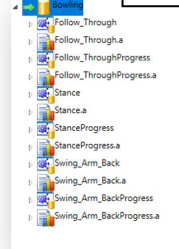
Skeleton Data Capture The proposed approach uses the Xbox Kinect sensor to capture the skeleton of a bowler from the sider. We capture the skeleton of the bowler instead of the movement, which allows us to assess the form of the bowler more clearly and accurately. Since this is a complex gesture, it had to be split up into three gestures that would be later stored in the bowling database - Follow Through, Stance, and Swing Arm Back (As shown in Figure 1). Breaking this
82 Johnson and Crawford
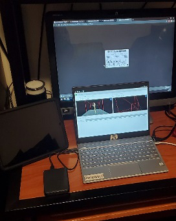
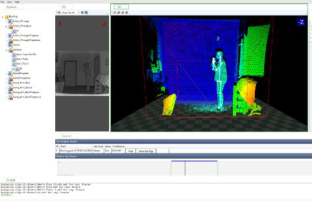
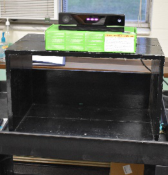
Figure 1: Gestures in database.Figure 2: Kinect training setup.Figure 3: Kinect studio.
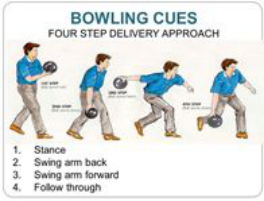
gesture into parts makes it easier for the sensor to detect. To make sure that the sensor can detect the gestures, training data needed to be provided. To do this, Kinect Studio was used to record the skeleton of a bowler with proper form. For example, to record the skeleton of the bowler, the Kinect Sensor was placed 14 feet away from the bowler to ensure that the entire skeleton was captured. (Figures 2 and 3). As shown in Figure 3, on the laptop, Kinect Studio is currently running, and the body index of the bowler is rendered. Once the skeleton is being tracked, the skeleton of the bowler is recorded. Finally, when recording the skeleton’s movements, the following cues shown in Figure 4 were executed. By following these cues, we can ensure that the bowlers execute each gesture to train the sensor to recognize them. In Kinect Studio, proficient bowlers were asked to bowl as they usually would and execute each cue three times; a total of 5 bowlers performed these cues.
Leveraging the Kinect Sensor to Correct Improper Bowling Form 83
Gesture Model Training Once all the data from the proficient bowlers were recorded and saved, the sensor application can be trained to recognize each gesture. In Visual Gesture Builder, each training clip recorded in Kinect Studio was loaded into Visual gesture Builder (Figure 5). A clip was loaded and tagged for each respected gesture, for example, the Stance gesture open in Figure 5, and a specific por- tion of the clip where the stance gesture is present is tagged. After each gesture has been tagged, different trial clips are then loaded (files ending in. a), where they are analyzed, and the AdaBoostTrigger algorithm is run against each clip to analyze and classify the gesture present in each clip. After this process, the program generates the bowling database file that is needed to create the application.
Application Development Once the database file was generated from the Visual Gesture Builder, the application could now be built. The application was created in C#, built off of the coding sample from the Kinect studio. After the application was com- plete, the effectiveness of the application needed to be tested. To evaluate the effectiveness of the application, Sports Champion 2 for PlayStation 3 using the PlayStation eye and move controller was used to test the given feedback from the application. After each frame, the bowler bowled, their score was recorded and compared to the previous frame they had bowled when the corrector was not in use. After the bowler had finished their frames, the data from their game was collected and later analyzed.
84 Johnson and Crawford
EXPERIMENTAL SETUPS AND EVALUATIONS When developing this application, the Kinect SDK was used to clarify the Kinect library for writing code to interact with the Kinect sensor. When gath- ering training data for the sensor, the application Kinect Studio was used. This application and the Visual Gesture Builder can be found in the Kinect SDK and coding samples. By installing the Kinect SDK, the drivers and necessary components for using the Kinect are also installed.
Training and Tagging The Xbox One Kinect Adapter for Windows Interactive APP Program Deve- lopment was used, which allowed commutation between the computer and the sensor. Once the sensor was connected to the computer, recording of the movements could begin. The sensor was placed 4 ½ ft off the ground (Figure 2), then a marker was placed 14 ft away from the sensor to ensure that the entire body was captured in the frame. To train the sensors with proper bowling form, the bowlers with good from were asked to stand on the marker and perform the cues previously mentioned, and they were also instructed to perform these cues facing forward to ensure the sensor captured the right side and not the front. After the bowlers had completed performing all the cues, the clips were saved and inserted into the Visual Gesture Builder. In Visual Gesture Builder, every clip that was recorded in Kinect Studio was loaded into the application. Once the clips had been loaded, each clip was tagged to mark where the stance existed in the clip. After tagging each clip, the database could be compiled, which generated the gesture database file (.gbd file) with all the gestures created in Visual Gesture Builder, the Stance, Swing Arm Back, and Follow Through gesture.
Gesture Recognition After the file is created, this file is then copied into the source folder of the code called Database. In this folder, we place the .gbd file here so we can access it. Once the file is in the folder, code can be written to interact with the sensor. When developing this application, Kinect SDK was used as a starting point to write the code to interact with the sensor. This helped in creating the KinectBodyView class that reads in the skeleton of a person entering the frame. Once the code for this application was complete, the application needed to be tested.
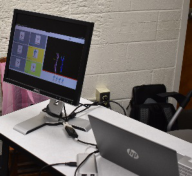
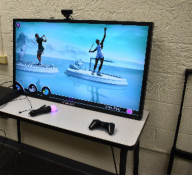
Testing When testing the effectiveness of the application, Sports Champion 2 for Play- Station 3 using the PlayStation eye and move controller was used. This game was chosen because it was the most realistic to actual bowling, and with covid concerns, this was the best way to ensure cleanliness. Bowlers with bad bowling forms were recruited to test this application based on their perfor- mance during a live demo. The testing environment was set up as follows, The Kinect sensor was placed four and a half feet off the ground (Figure 6), and a marker was placed 14 ft away from the Kinect sensor, which was placed to the right of the bowler. The game was placed on a table, and the bowlers
Leveraging the Kinect Sensor to Correct Improper Bowling Form 85
Figure 6: Kinetic testing setup.Figure 7: Corrector view to participants.Figure 8: Sport champion 2.
stood 3ft away from the PlayStation eye camera (Figure 8). The monitor was also set up beside the game so the bowlers could see their form and feedback in real-time (Figure 7). The bowlers with poor form were asked to play two games of bowling with the difficulty level set to championship; this increased the sensitivity of the move controller and removed all aides that prevented the ball from going into the gutter. The first game they played involved playing without the corrector to assess how they bowled without the corrector. The second game they played involved the corrector, during this game, they had to follow all of the cues the bowlers with good form followed, and the appli- cation provided feedback on what they needed to change. Finally, after the end of each second game frame, their scores were recorded and compared to how they did in the previous frame of the first game. Finally, once the second game concluded, the data was saved to analyze the scores further.
RESULTS
When testing the effectiveness of the application, two trial runs were attem- pted; in the first trial run, the bowlers were asked to play two games that consisted of 3 frames the results of these trials are listed in Tables 1–4. This
86 Johnson and Crawford
Table 1. Trial 1 without the corrector.
Table available in the original PDF paper.
Table 2. Trial 1 with the corrector.
Table available in the original PDF paper.
Table 3. Final trial without the corrector.
Table available in the original PDF paper.
Table 4. Final trial with the corrector.
Table available in the original PDF paper.
first trial consisted of 3 players all-male, whose ages ranged from 19 to 21. After the first game, these were the results.
From the scores recorded in Tables 1, no one in this first trial was able to get a strike, and they had a hard time getting a spare as well. However, there was a drastic change in these scores once the corrector was used in the second game. When testing the effectiveness of the application, two trial runs were attempted; in the first trial run, the bowlers were asked to play two games that consisted of 3 frames. This first trial consisted of 3 players all- male, whose ages ranged from 19 to 21. After the first game, these were the results.
In Table 2, we can see the players were able to get strikes in this second game using the corrector. Both players 1 and 3 improved their scores, thus concluding that the corrector improved their performance. However, this can- not be said about player 2. Player 2 was left-handed and asked to play both games using their right hand, their least dominant hand. This caused the outcome to be different for them because they were able to create a form that was comfortable for them to bowl in the first game. However, in the
Leveraging the Kinect Sensor to Correct Improper Bowling Form 87
second game, that form was being corrected, and they had to relearn how to bowl using their right hand, causing the outcome to be different from player 1 and player 3. To verify the results of the first trial, a second trial was con- ducted. This trial was conducted the same as the first trial, but the players had changed, and the number of frames. 2 players were asked to participate, one male (60) and one female (23). They were asked to play two games of bowling that consisted of 5 frames. After the first game had concluded, these were the results.
As seen in Table 4, we can see the players were able to get strikes and overall do well in the first game. However, similar to the first trial, once the corrector was introduced there was a divide in the results once again.
The scores in Table 4 are from the second game once the corrector was used. Based on the results, we can see that Player 1’s performance improved by seeing that they were able to knock down more pins from the feedback given. Player 2 was similar to the outcome of player 2 in the first trial; both were left-handed and struggled using their right hand to bowl. As a result, as they began getting feedback on their form in the second game, they had to relearn how to bowl and get accustomed to using their right hand.
DISCUSSION AND CONCLUSION An issue that affected the results of the left-handed players was the training data given to the sensor. All of the bowlers with good form were right-handed, and the sensor was recording them from their right side. So, when left-handed bowlers used the corrector, they got different results from other players. Left- handed players had to use their right hand to use the corrector because if they used their left-hand, the Swing Arm Back gesture was never detected. We can assume that if a second sensor were capturing the data from the left side while the other sensor was capturing from the right, the outcome for left- handers would have been different. Another limitation faced in this study was the amount of training data that the sensor had. With Covid, the number of participants had to be reduced to ensure the safety of the participants, which also affected the results of the study. Future studies of this work will need to have more participants, include proficient left-handed bowlers, and increase the number of bowling games to evaluate the correctors effectiveness better. To recap, the proposed application introduced in this paper utilized the Xbox Kinect sensor to capture the skeleton of a bowler, then provided feedback on their form to increase their performance. This was accomplished by utilizing the Kinect SDK to train the Kinect sensor to detect the bowling gestures, to provide feedback on a bowler’s form. This application was then tested by conducting two trials, where participants played Sports Champion 2 for PlayStation 3 using the PlayStation eye and move controller to perfect their form. The end result of this was an application that improved the form of a bowler with poor form and increased their performance.
REFERENCES
Ansari. (2017, August 8). Best ten pin bowling technique tips and tricks to throw the ball properly. Go Bowling Alley. Retrieved from https://gobowlingalley.com/best- bowling-technique-score-outstanding/
88 Johnson and Crawford
Caulfield, Brian. Blood, Jason. Smyth, Barry and Kelly, Daniel. 2011. Rehabilitation exercise feedback on Android platform. In Proceedings of the 2nd Conference on Wireless Health (WH ‘11). Association for Computing Machinery, New York, NY, USA, Article 18, 1–2. Conner, Caleb and Michael Poor, Gene. 2016. Correcting Exercise Form Using Body
Tracking. Proceedings of the 2016 CHI Conference Extended Abstracts on Human Factors in Computing Systems - CHI EA 16 (May 2016), 3028–3034. Gharasuie, Morteza Mohammady. Jennings, Noah and Jain, Shubham. 2021. Performance Monitoring for Exercise Movements using Mobile Cameras. In Proceedings of the Workshop on Body-Centric Computing Systems (BodySys’21). Association for Computing Machinery, New York, NY, USA, 1–6. Ikeda, Atsuki, Tanaka, Yuka, Hwang, Dong-Hyun, Kon,Homare, and Koike,Hideki.
2019. Golf training system using sonification and virtual shadow. ACM SIG- GRAPH 2019 Emerging Technologies on - SIGGRAPH 19 (July 2019). Kim, Taekyu and Lee, Sangwon. 2018. Restorative Effects of Exercise in Virtual Environments. In Proceedings of the 9th Augmented Human International Con- ference (AH ‘18). Association for Computing Machinery, New York, NY, USA, Article 33, 1–3. Marsico, Maria. Panizzi, Emanuele. Mattei, Francesca Romana. Musolino, Anto-
nio. Prandini, Manuel. Riso, Marzia and Sforza, Davide. 2020. Virtual bowling: launch as you all were there! In Proceedings of the International Conference on Advanced Visual Interfaces (AVI ‘20). Association for Computing Machinery, New York, NY, USA, Article 36, 1–9. Militaru, Cristian. Militaru, Maria-Denisa and Benta, Kuderna-Iulian. 2020. Physical Exercise Form Correction Using Neural Networks. In Companion Publi- cation of the 2020 International Conference on Multimodal Interaction (ICMI ‘20 Companion). Association for Computing Machinery, New York, NY, USA, 240–244. Tanaka, Yuka, Kon, Homare, and Koike, Hideki. 2018. A real-time golf-swing trai-
ning system using sonification and sound image localization. Proceedings of the 24th ACM Symposium on Virtual Reality Software and Technology - VRST 18 (2018). Taylor, Brett, Birk, Max, Mandryk, Regan L., and Ivkovic, Zenja. 2013. Posture training with real-time visual feedback. CHI 13 Extended Abstracts on Human Factors in Computing Systems on - CHI EA 13 (2013), 3135–3138. Torres, Aldrin John. Silubrico, Clowie. Torralba, Daniel. and Tomas, John Paul.
2019. Detection of Proper Form on Upper Limb Strength Training Using Extre- mely Randomized Trees for Joint Positions. In Proceedings of the 2nd Interna- tional Conference on Computing and Big Data (ICCBD 2019). Association for Computing Machinery, New York, NY, USA, 111–115.
LISTED IN THE AHFE DIGITAL BOOKSTORE CATALOGUE
Explore the complete digital volume
Human Factors and Systems Interaction
Read this individual research paper free through the original publisher, or explore the full digital proceedings book.
ISBN 978-1-958651-28-5
Explore this ISBN in the AHFE Bookstore ↗Listed in the July 2026 bookstore catalogue; search by ISBN to confirm current availability · Digital book purchase optional