Masahiro Miki, Munehiro Takimoto, Yasushi Kambayashi (2022). Smartphone based accurate touch operations on an AR desktop. In: Intelligent Human Systems Integration (IHSI 2022): Integrating People and Intelligent Systems. AHFE Open Access, vol. 22. https://doi.org/10.54941/ahfe100940
Recently, we have seen and used touch-based operations as a popular interface for smart phones and tablet PCs. As the interface, we interact with a device through touching the physical surface of the screen. The touch-based manner gives simple and intuitive interface for users but is not always convenient for several users to operate a single device cooperatively. Also, in some cases, manipulating a screen without direct touch is rather desirable. Because touchless operations prevent viruses from infecting the users. It is especially true in the current situation of COVID-19 pandemic. In order to implement such touchless interfaces, researchers have proposed augmented reality (AR) based desktops or keyboards. Most of such AR based interfaces, however, require interactions with virtual objects in the air, which are not accurate. Therefore, such interfaces are rarely used in practice. In this paper, we propose a new operation manner of AR based desktop. In our operation manner, the user can perform operations on his or her smartphone as an AR object displayed in the virtual space on the screen. The smartphone has its own AR marker, which specifies the coordinate of it, and gives the reference point for displaying the cursor. The cursor is always displayed at the center of the smartphone and represents the home position of fingers. Thus, even if the virtual screen is displayed with wide size such as one of a desktop PC, a user moves his or her fingers along with his or her smartphone to the location of a specific icon on the screen, and then can give any operations constituting of single touch or double touch, such as tapping, flicking, pinching or swiping. Notice here that the user physically operates the smartphone although he or she feels like operating the virtual screen through directly touching it. The physical operations on the smartphone contribute to intuitive manipulation and providing actual feelings. They also help the users perform accurate operations. In order to demonstrate the effectiveness of our manipulation manner, we have implemented a prototype system and have conducted numerical experiments on it. The prototype system recognizes an AR marker attached on the users’ smartphones by external web cameras and decides their locations, so that the user can apply any operations of fingertips to the AR objects on the virtual screen. In the experiment, the screen is displayed in front of each user, who can identify and synchronize movement of his or her smartphone with the cursor. Once the cursor reaches the target position, each user can apply one of the following six operations: tap to launch apps, double-tap/drag to move app icons, pinch-out/pinch-in to zoom in and out, and flick to create or switch screens. We focused how the users could grasp the touch operation intuitively and manipulate the system as they intended. As the results, we have confirmed that the users can feel as if they touch the actual screen in the virtual space and manipulate the prototype system as intended.
Recently, we have seen and used touch-based operations as a popular interface for smartphones and tablet PCs. In the interface, we interact with the devices through touching the physical surface of the screen. The manipulation of touch-based devices such as smartphones is usually simple and intuitive but not always convenient when multiple users operate a single device cooperatively. Allowing multiple users to operate the device enhances performance and collaboration on tasks (Nolte et al. 2015, Guo et al. 2019). On the other hand, participating multiple users requires a wide screen and correct responses for each user’s independent touching, which are weak points for devices with a small screen such as smartphones and tablets. Also, it is desirable for some users to operate the screen without physical contact. Because touchless operations prevent viruses from infecting other users. It is especially true in the current situation of COVID-19 pandemic. In order to implement the touchless interfaces, researchers have proposed augmented reality (AR) based desktops or keyboards. AR based interfaces can be helpful in navigation with visual aids (Zhao et al. 2019, Reyes et al. 2020) and in multitasking scenarios (Ren et al. 2020). Most of them require interactions with virtual objects in the air, which are not very accurate. Some works have proposed methods for increasing accuracy of the interactions, for example, through utilizing visual and audio feedback (Chan et al. 2010), combining taps in the air (Plasson et al. 2020), and utilizing natural pen and touch inputs enabled by the seamless integration of a screen and AR contents (Reipschläger et al. 2020).
These works, however, focused on how to improve the accuracy of touch interactions in the air, and lack of the operational feeling provided by direct touch. We propose a new operational manner of AR based desktop. In our operational manner, a user takes advantage of his or her smartphone to interact with an AR object on the screen displayed in the virtual space.
Our final goal is to realize a new AR based interface that provides a real touch feeling to AR objects through touch interactions with their smartphones. As a prototype, we implement a desktop system that satisfies the following three points: (i) Intuitiveness similar to physically operating a smartphone or a tablet, (ii) Accuracy that enables the user to complete desktop operations as intended, and (iii) Operational feeling of real existence of the virtual screen in touching it.
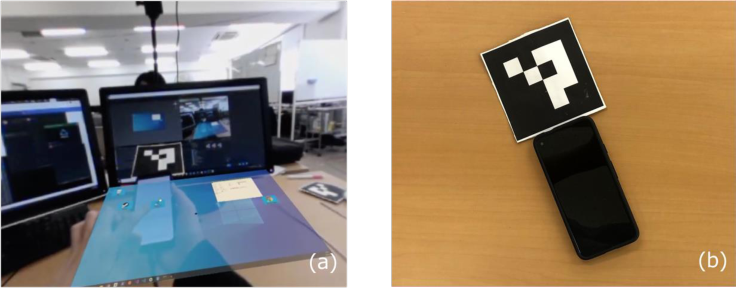
AR Desktop We have implemented a prototype system of the AR based desktop system. We call it “AR Desktop”, and Figure 1(a) shows it. We made the desktop be displayed in front of the user
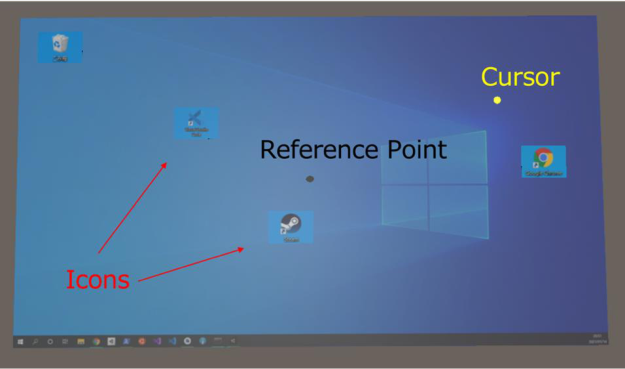
Intelligent Human Systems Integration (IHSI 2022): Integrating People and Intelligent Systems https://openaccess.cms-conferences.org/#/publications/book/978-1-7923-8988-7 and set the home position of fingers at the center of the smartphone. The location of the smartphone is recognized through an AR marker attached at the top of it, as shown in Figure 1(b). The AR Desktop screen consists of a cursor, an icon, and a reference point represented by a black dot at the center of the screen (Figure 2). The cursor follows the smartphone by referring to the coordinate of the smartphone, which is determined by recognizing the AR marker and adjusted to the home position of the finger. Once the cursor reaches the location where an icon of an application resides, the user can apply one of the following four operations: (i) tap to launch the application, (ii) double-tap or drag to move the icon, (iii) pinch-out to zoom in the application screen, and (iv) pinch-in to zoom out the application screen. Notice here that the drag operation means moving the smartphone with the icon while touching its screen, being toggled through the double-tap operation. The AR Desktop also supports the flick operation, which can be operated at any position and has the following two functions that: (i) creates a new screen in the flicking direction and switches to it automatically if there is no screen in that direction, and (ii) switches the current screen to the next screen in the flicking direction if there are two or more screens.
The reference point is used to hold the cursor corresponding to the user’s finger when the direction of user’s head changes. The correspondence should automatically be corrected depending on the difference between the reference point and a physical marker. In the current version, the users are supposed to align the reference point with the physical marker. We are planning to automate this feature.
Figure 1: (a) A prototype AR Desktop and operations on it, and (b) a smartphone and AR marker at the top of it
Intelligent Human Systems Integration (IHSI 2022): Integrating People and Intelligent Systems https://openaccess.cms-conferences.org/#/publications/book/978-1-7923-8988-7
Figure 2: Components of the AR Desktop
EVALUATION
IMPLEMENTATION OF AR In implementations of AR, there are roughly two kinds of approaches. One overlays virtual things represented by CG on the real world through a transparent screen, and the other one synthesizes a single image from the virtual things and the real world image using a head mount display (HMD) with a front camera. We adopted the implementation with an HMD and used VIVE Pro Eye as the HMD. Also, we utilized Google Pixel 4a as a smartphone that recognizes touch operations and indicates its location through an AR marker attached at the top of it.
SUBJECTS We had twelve students, who consist of ten males and two females, from our laboratory conduct experiments as subjects. Most of them had some experiences of AR; six subjects experienced it with a head mount display (HMD), and four subjects had some experiences of interaction with AR objects in some way. Eight subjects reported that they were familiar with manipulations of a smartphone or tablet, and the other ones reported that they knew only basic operations.
EXPERIMENTS Before the experiments, we gave them a brief introduction of this research and explanation
Intelligent Human Systems Integration (IHSI 2022): Integrating People and Intelligent Systems https://openaccess.cms-conferences.org/#/publications/book/978-1-7923-8988-7 of the purpose of the experiment, and then distribute smartphones. We utilize Google Pixel 4a with the AR marker for this purpose. We also make each subject wear an HMD, which is VIVE Pro Eye. In order to calibrate our system, we had each subject put his or her fingertip with the smartphone at the bottom-right and top-left corners in a rectangle region where a cursor is movable. Through the calibration, the location of each subject’s fingertip is synchronized with the one of the cursor. The calibration includes the purposes of not only initializing the AR Desktop, but also preventing the AR marker from accidentally going out of the range of view of a camera when the subject operates the AR Desktop.
RESULTS OF EXPERIMENT In order to demonstrate the effectiveness of our operational manner, we have conducted two numerical experiments on our prototype system. As requirements for the AR Desktop to satisfy, we first evaluated intuitiveness and accuracy through verifying the following two points in our experiments:
1. Subjects can intuitively understand touch operations without explanation. 2. Subjects can operate the AR Desktop as intended without a cursor.
In the following, we refer to these verifications as V1 and V2, respectively. After the experiments, we asked the subjects about their operational feeling and then evaluated the last requirement.
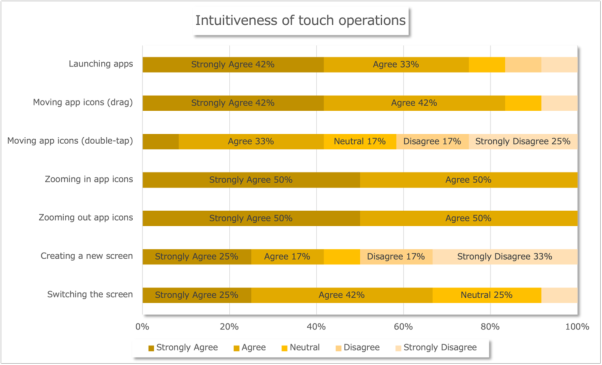
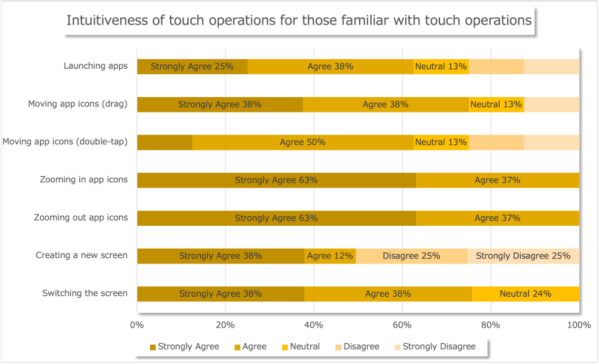
In Experiment 1, to verify V1, we had the subjects conduct the following seven tasks in order: (1) launching an application by tapping a corresponding icon, (2) moving an icon by double-tap, (3) moving an another icon by drag, (4) zooming in an application screen by pinch-out, (5) zooming out an another application screen by pinch-in, (6) creating a new screen by flick, and (7) switching the screen by flick. Figure 3 shows whether the subjects felt that each touch operation was intuitive or not. As shown in the figure, most of them felt that all touch operations were intuitive, except for the only two operations; double-tap to move icons and flick to create a new screen. As for the subjects who were familiar with touch operations were concerned, more than half of them answered that double-tapping to move icons and flicking to create a new screen were intuitive as shown in Figure 4.
Intelligent Human Systems Integration (IHSI 2022): Integrating People and Intelligent Systems https://openaccess.cms-conferences.org/#/publications/book/978-1-7923-8988-7
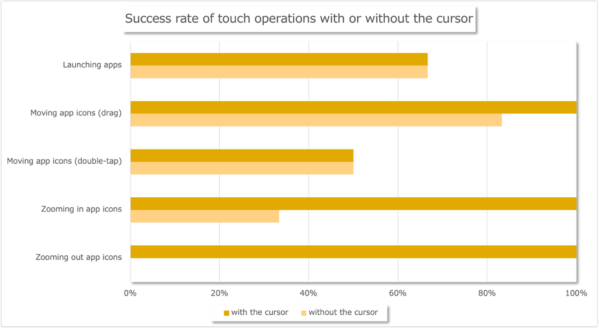
Figure 3: Intuitiveness of touch operations for all subjectsFigure 4: Intuitiveness of touch operations for those familiar with touch operations In Experiment 2, we had the subjects perform the tasks from (1) through (5) of Experiment 1 without cursor to check V2. As a result, half of the subjects who the position sync worked well successfully completed all tasks except the last one (5) as shown in Figure 5, even though they could not see the cursor. Regarding Task (5), most of the subjects failed to complete the operation without cursor, though all of them completed it with cursor.
Intelligent Human Systems Integration (IHSI 2022): Integrating People and Intelligent Systems https://openaccess.cms-conferences.org/#/publications/book/978-1-7923-8988-7
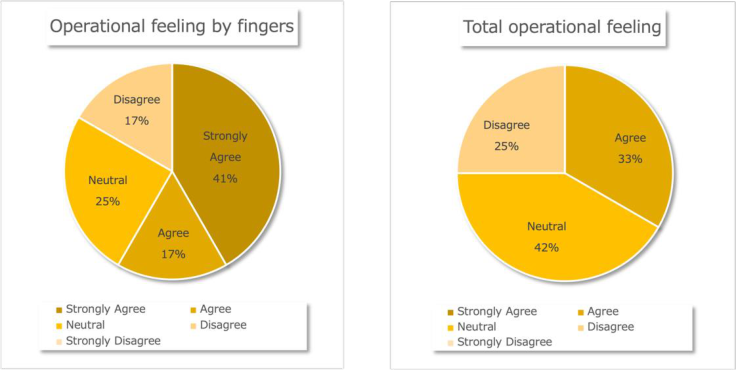
Figure 5: Success rate of touch operations with or without the cursor After the experiments, we asked the subjects some questions. Their answers, as shown in Figure 6(a), show that most of them felt like physically operating the AR Desktop screen with their fingers. They also said that the total operational feeling was not bad, as shown in Figure 6(b). Thus, we were convinced that our operational manner satisfies all the three requirements: intuitiveness, accuracy and operational feeling.
(a) Operational feeling by fingers (b) Total operational feeling
Figure 6: Answers to (a) operational feeling by fingers and (b) total operational feeling
Intelligent Human Systems Integration (IHSI 2022): Integrating People and Intelligent Systems https://openaccess.cms-conferences.org/#/publications/book/978-1-7923-8988-7
CONCLUSIONS
We have proposed an accurate and intuitive operational manner on the AR based desktops through touching the users’ own smartphones. This operational manner let us not only accurately perform touch interactions with desktop in 3D space, but also intuitively implement most touch operations such as launching, moving, and switching screens. We have also confirmed that it is possible to operate the system without the cursor assistance when the calibration is successfully done.
As future work, we are planning to add automatic correction of the correspondence between a cursor and user’s finger to our prototype system. In addition, we plan to extend our operational manner so that it enables multiple users to work collaboratively on the virtual large screen.
REFERENCES
Chan, L.-W., Kao, H.-S., Chen, M.Y., Lee, M.-S., Hsu, J. and Hung, Y.-P. (2010). Touching the void. Proceedings of the 28th international conference on Human factors in computing systems - CHI ’10 Guo, A., Canberk, I., Murphy, H., Monroy-Hernández, A. and Vaish, R. (2019). Blocks.
Proceedings of the ACM on Interactive, Mobile, Wearable and Ubiquitous Technologies, 3(3), pp.1–24. Nolte, A., Brown, R., Poppe, E. and Anslow, C. (2015). Towards Collaborative Modelling of Business Processes on Large Interactive Touch Display Walls. Proceedings of the 2015 International Conference on Interactive Tabletops & Surfaces - ITS ’15. Plasson, C., Cunin, D., Laurillau, Y. and Nigay, L. (2020). 3D Tabletop AR. Proceedings of
the International Conference on Advanced Visual Interfaces. Reipschläger, P., Engert, S. and Dachselt, R. (2020). Augmented Displays: Seamlessly Extending Interactive Surfaces With Head-Mounted Augmented Reality. Extended Abstracts of the 2020 CHI Conference on Human Factors in Computing Systems. Ren, J., Weng, Y., Zhou, C., Yu, C. and Shi, Y. (2020). Understanding Window Management
Interactions in AR Headset + Smartphone Interface. Extended Abstracts of the 2020 CHI Conference on Human Factors in Computing Systems. Reyes, A.C.C., Del Gallego, N.P.A. and Deja, J.A.P. (2020). Mixed Reality Guidance System for Motherboard Assembly Using Tangible Augmented Reality. Proceedings of the 2020 4th International Conference on Virtual and Augmented Reality Simulations. Zhao, Y., Kupferstein, E., Castro, B.V., Feiner, S. and Azenkot, S. (2019). Designing AR
Visualizations to Facilitate Stair Navigation for People with Low Vision. Proceedings of the 32nd Annual ACM Symposium on User Interface Software and Technology.
Intelligent Human Systems Integration (IHSI 2022): Integrating People and Intelligent Systems https://openaccess.cms-conferences.org/#/publications/book/978-1-7923-8988-7
LISTED IN THE AHFE DIGITAL BOOKSTORE CATALOGUE
Explore the complete digital volume
Intelligent Human Systems Integration (IHSI 2022): Integrating People and Intelligent Systems
Read this individual research paper free through the original publisher, or explore the full digital proceedings book.
ISBN 978-1-7923-8988-7
Explore this ISBN in the AHFE Bookstore ↗Listed in the July 2026 bookstore catalogue; search by ISBN to confirm current availability · Digital book purchase optional