Chiaki Kawanishi, Yoshiro Imai (2022). Development of e-Learning System for Network Education and Visualization. In: Advances in Ergonomics In Design, Usability & Special Populations: Part II. AHFE Open Access, vol. 19. https://doi.org/10.54941/ahfe1001247
Recently, as Internet becomes over ground and most effective for our lives, in higher education, especially information engineering, network and communication are ones of the most important and indispensable subjects for almost all the students to learn in a short period. There are many trials to teach and educate some theoretical and practical understanding of network and communication. In fact, however, network and communication, particularly a viewpoint of Internet, have a very huge scope and include a lot of themes to understand in a relatively short period. So we have developed a limited scope and self-learning oriented facility of application program for e-Learning tool for network/communication study. Our key topics are as follows: Web-based e-Learning tool, Focusing of IP(Internet Protocol), Easy-drawing network topology, Animation of Packet transmission, Illustration of routing mechanism, and so on. We have applied our e-Learning tool into real classroom lectures and had some questionnaires for technical course and beginning course after trial questionnaire for laboratory members. It is confirmed that our e-Learning tool has been significant for learning network/communication based on the above questionnaire.
As Internet and its usage become popular and popular, students of universities, especially students belonging to faculties of sciences and technologies, must study network- related subjects such as computer networks, Internet structures and organization, architectures of Internet protocols, and so on. There are some problems, however, that even such students suffer from difficulty of practical understanding and graphical comprehension, because of invisibility of behavior and structure of Internet. From our experiences, it is effective for students to understand the target subject by means of e-Learning tool with visualization facility. It is also useful for instructors to educate some invisible subjects, namely ones with abstractive concepts, with simplified and visualized models in relatively short period.
So we have decided to design and implement some kind of e-Learning tool prototype for rapid understanding of Internet introductory mechanism. The educational tool is designed and implemented as Web-based system for user convenience with easy manipulation and smart version-up. It is very much important for portability to implement it as Web-application which will work in many kinds of Web browsers, especially major browser such as Internet
Explorer, Google Chrome , FireFox and so on.
This paper presents the following sections for design, implementation and trial evaluation of our learner-centric graphical educational tool for network study, which has been developed and utilized to understand network-related subjects effectively and efficiently. The next (= second) section introduces the related works of Japan as well as other countries. The third one describes design concepts for our educational tool and illustrates the detail configuration of our graphical educational tool from internal procedures to user interface, namely structure and behavior of our tool. It also compares new facilities with their old versions for clear explanation of our system. The fourth one reports trial evaluations of our tool based on some questionnaires in our university and shows significance of our system for understanding of network- related subjects. And finally the last (= fifth) one concludes some summaries and future plans for our tool prototype.
RELATED WORKS OF OUR E-LEARNING SYSTEM Many Useful e-Learning System for Network or Internet-related Study
First of all, visualization is an absolutely necessary keyword and idea to improve the learner's understanding level. For example, when instructors educate their learners about computer network and Internet-related subjects, they want to use effective e-Learning tools. Such tools are expected to have some kind of function to visualize what is difficult to understand. With such e-Learning tools, many learners will understand Internet-related subjects in a relatively shorter period than other cases without using visualization tool.
We will remind readers to recognize that many useful e-Learning tools from Japanese journal and international one have been reported for real education in the past and now by means of the following introductory talks.
TCP/IP Protocol Learning Tools Arai et al. of Teikyo University (Japan) have reported in their paper (Arai et.al., 2003) "the design, an implementation and an evaluation of learning tools for TCP/IP protocols. TCP/IP protocols have grown to be fundamental technology for computer networks and the Internet. As a result communication and computer engineers have to learn the protocols. In this paper, we discuss the problems in the TCP/IP course and propose two tools to solve these problems. The first tool is to help with learning communication procedures and data formats of all TCP/IP protocols." It has a packet monitoring function and displays real communication data without special hardware. "The second tool is to help with learning control methods." It simulates control methods which rarely occur in the real communication and combinations of the control methods. The author evaluated their tools through practical use in actual classes. Their evaluation showed that such tools were effective for learning TCP/IP protocols.
Tateiwa et al. of Nagoya University (Japan) in their paper (Tateiwa et.al., 2007) have proposed "a System to Visualize Computer Network Behavior for Learning to Associate LAN Construction Skills with TCP/IP Theory, Based on Virtual Environment Software." Their paper described, "Lectures for training network administrators are being given in many universities and many vocational schools. It is important for beginners at network management to not only master both LAN construction skills and TCP/IP theory, but also to comprehend the relationship between them. Although current major teaching materials are excellent for mastering these two fields, they are not appropriate for comprehending the relations between them. Therefore, we have developed a system that can visualize the behavior of networks constructed by learners on one PC freely and virtually, in order to associate their behaviors with TCP/IP theory. Because one learner can learn with just one PC using virtual networks, learning with this system places a lighter burden on learners than learning with an actual network." The authors had implemented their system by applying the virtual environment software User-mode Linux. Their evaluation, based on results from 12 undergraduate and graduate university students studying informatics, indicated that their system satisfactorily supported learning via its functions." But it was reported that some problems had been remained with its user interfaces.
Internet Usages in Distance Education Thomas F. Stafford has proposed in his paper (Stafford, 2005) the following research paradigm. Namely, "Uses and Gratifications(U&G)" was his communications theory paradigm developed to understand media-use motivations. His research paradigm had been applied to understand motivations for Internet use. Internet U&G typically orient to distinct process-based, content-based, and socially based motivations for use of the network. His study applied U&G to examine the Internet usage motivations of technology students enrolled in an Internet-enabled distance education course and finds that digital content was sought after by students in Internet-supported distance education classes. Distance education students were also motivated to use Internet communication resources to offset the lack of social interaction found in normal classrooms. Students' Internet usage process motivations actually diverged into two distinct areas, related generally to searching versus browsing in the support of learning objectives.
Shyamala C. Sivakumar et al. have described in their paper (Sivakumar et.al., 2005) "A Web-based remote interactive laboratory (RIL)." That was developed to deliver Internetworking laboratory experience to geographically remote graduate students. They said, "The onsite Internetworking program employs hands-on laboratories in a group setting that correlates with the constructivist and collaborative pedagogical approach." Their paper discussed the pedagogical and technical considerations that influence the design and implementation of the remote laboratory environment given the constraints of the special hardware and learning outcomes of the program. For wide-ranging usability, the remote Internetworking (INWK) laboratory used de-facto networking standards and commercial and broad-band Internet connectivity to ensure real-time secure interaction with equipment. A four-tier role architecture consisting of faculty, local facilitators, remote facilitators, and students had been determined appropriate to maintain academic integrity and ensured some quality of interaction with their remote laboratory. A survey employing a five-point scale had been devised to measure the usability of the remote access INWK laboratory Charles Snow et al. have introduced an Open-Source Web-Based System for Synchronous Distance Education in their paper (Snow et.al., 2005). They called it "Network EducationWare". And they said, "Inexpensive computers and Internet connections can be used in teaching engineering and technology courses to make the classroom presentation of a lecture available anywhere with connectivity. With rapidly growing demand, particularly from working professionals who need courses to remain current or for advancement in their careers, and reductions in financial support, universities face increasing pressure to find solutions that are effective academically and fiscally." Their paper described an open-source distance-learning system that fulfilled both 'smart classroom' and distance- education roles and that their system was inexpensive, easy to use and operate, and highly effective, even when used over dial-up connections. Their software was available at no cost for academic use.
AN E-LEARNING SYSTEM FOR NETWORK EDUCATION AND VISUALIZATION Outline of our e-Learning system to Learn Network in university
It is important to recognize network topology and data flow between nodes in order to understand network-related subjects in universities. As you know, for the learners, a concept of 'Packet', tasks of each component and relation between many components (address or connectivity) must be understood approximately at the same time. Almost all the instructors should prepare some suitable materials or environment for learners to obtain not only structure but also behavior of network mechanism. The former means 2- or 3-dimensional relationship between network components, while the later specifies time-series packet transfer from one to another.
At the view point of IP-based network structure and behavior, 'IP Routing' can play the important role to specify the network structure and define packet transfer from one to another. We consider that IP routing is one of the most useful layers to learn the computer network. That is very much centered in the network-related subjects. And it is very much suitable to start learning structure and behavior of Network. We had focused this IP routing mechanism and began to design an e-Learning system to understand IP routing in a short period.
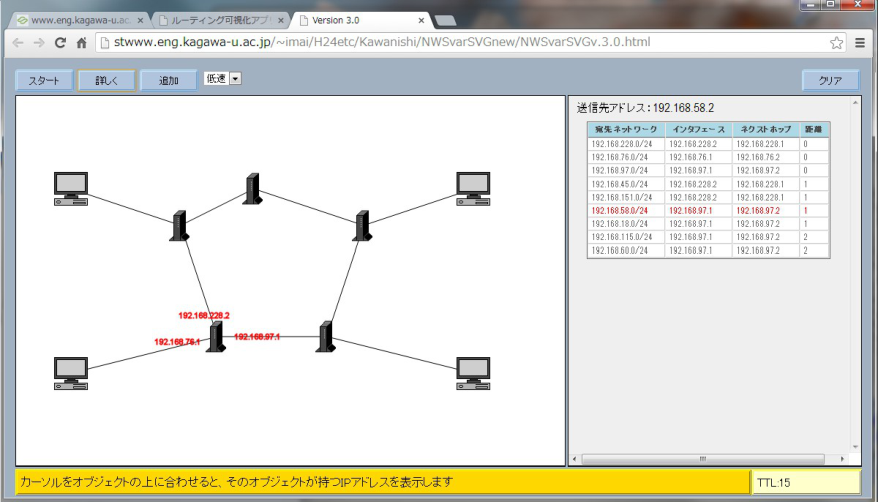
Figure 1 shows an overview of our developed e-Learning system for network learning. Our system is invoked on user's browser as Web application. Its user interface is organized to provide two major sub-windows for users. At the left-hand sub-window of this tool, users can specify the network topology by means of locating IP routers, source/destination nodes and mutual relation between them with drawing directly connected lines.
Figure 1. Overview of our e-Learning system for Network education
At the right-hand sub window, the system automatically generates an according table to define IP routing rules, namely IP-based packet transfer between IP routers and sources/destinations which have been specified by users (learners). Learner, especially beginners of network-related subjects, can recognize IP routing detail from the system in the above way. In other words, learners can understand behavior of IP routing without detail specification of the relevant IP routing rules.
Visualization Facility A major facility of our e-Learning system is visualization of internal structure and behavior of network. Visualization facility is designed with the following functions;
(1) Users can select a kind of node as network component, locate it on the left-hand sub-window and configure the target network by means of repeat of the above manipulations.
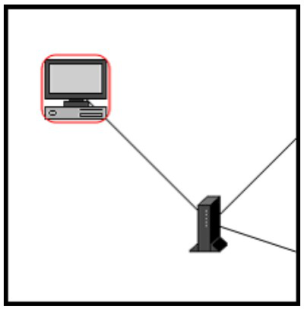
(2) Users can specify some node, i.e. PC or Server, as a source of packet and also specify other node as a destination. Figure 2 shows PC icon surrounded by red circle as a source of packet.
(3) Users can instruct the system to animate the flow of packet transfer from a node specified as a source to another node also specified as a destination through or within the network designed by users themselves.
(4) Users can obtain time-series visualized image for practical demonstration of packet transfer in the IP networking level with suitable animating speed and other useful information about IP routing mechanism.
An animation function of our e-Learning system is to demonstrate data flow in the network in order to show packet transfer from source component specified by user to destination one. Every packet starts from the source node specified by user where a node with packet is focused with surrounded by red circle in Figure 2(a) and propagation of packet is illustrated with red colored line between two nodes. That means that the relevant packet is now transferred from one node to another. Figure 2(b) illustrates the packet transfer from left-bottom cornered IP router to right-top cornered one with red-colored line. Figure 2 (a) and (b) show more detail structure of user-specified network topologies.
Figure 2. Detail of PCs/servers and Routers(& their connectivity) in the network components; (a) (b) With simple network allocation function by user and demonstrative animation one for packet transfer, our e- Learning system can provide visualization facility to learners of network-related subjects (= the users of our system). Based on visualization facility, therefore, our system can play an important role to allow learners to obtain suitable image of network with its practical structure and behavior in a relatively short period.
Program Flow and User Manipulation Flows Program structure of our e-Learning system has employed even-driven processing so that main loop is waiting for user interaction. And it can be approximately separated into two major parts, one is a main program flow for GUI and another is sub program flow for user manipulation. Users can specify some parameters to define network configuration and then instruct this system to begin animation of packet transfer according to the preset parameters. Each module has been designed to build loosely coupled structure and enable to configure easy maintaining and updating. Each module will be explained in the following ways:
Main program flow of our e-Learning system is realized with following sub procedures: (M-1) Initialize; (M-2) Display spreadsheet for canvas to specify the network; (M-3) Establish the relationship of network components located in canvas; (M-4) Define IP routing for user specified connectivity of each component; (M-5) Generate IP routing table; (M-6) Prepare animation with source node and destination one specified by user; (M-7) Perform demonstrative animation;
As described above, the main program flow accepts parameters to define configuration from user through user manipulation. Program code for user manipulation must be design to receive parameters such as allocation of nodes, their connectivity, source, destination and so on. Its program flow is realized with following sub procedures: (S-1) Select each component as node (computer or router); (S-2) Allocate it on canvas and establish connectivity between all the target components; (S-3) Select a source and a destination;
(S-4) Prepare for animation;
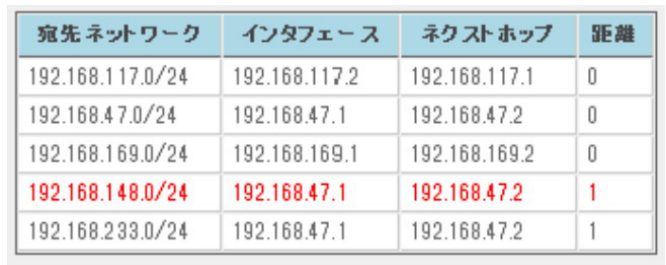
Animation-supported Visualization The educational tool performs animated packet transfer based on user-defined network configuration and source/ destination. Users can recognize how to realize IP routing for packet transfer with IP routing information described in Figure 7. When some packet transfer is being animated, IP routing information table can focus the relevant expression by means of red-colored changing. The second expression from bottom has been applied for IP routing in Figure7.
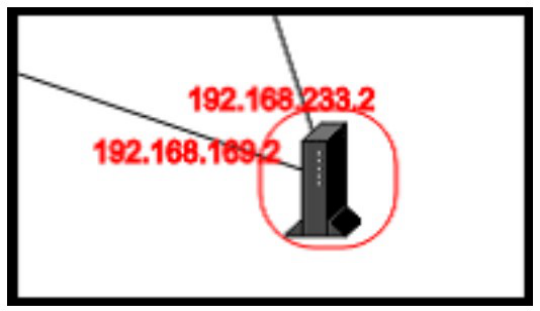
Figure 7. IP Routing Information Table showing some Specification in it to be applied with red-colored changing When users want to know what IP address each node has, they can only place their mouse icon on the relevant node. The tool will provide a view of the relevant IP addresses each node has in the target network configuration. Figure 8 shows that a mouse-icon placing node has two IP addresses, namely, for example, 192.168.169.2 and 192.168.233.2 in red-colored expression. Because such a node is IP routers and it can connect two different sub network with two different interfaces. With the above functions, our educational tool can capture users' attention on the animation performing. So these functions are ones of functional contributions to visualization facility and support users' learning relatively in a short period.Figure 8. Scheme of our Educational Tool showing IP Addresses of mouse-icon placing on the target node
TRIAL EVALUATION OF OUR E-LEARNING SYSTEM Content Definition of Questionnaire of Learners' Impression for our e-Learning system
As trial evaluation of our e-Learning system, we have prepared the following questionnaires of user's expression for our e-Learning system. The items of contents in the questionnaire have been defined in order to evaluate whether our system is suitable for learners to understand network-related subjects. They are as follows: (Q-1) Whether our e-Learning system can support your understanding packet transfer from some node to another or not ?
(Q-2) Whether our e-Learning system can support your recognition of relation between IP routing information and behavior of packet transfer or not ?
(Q-3) Whether our e-Learning system can promote you to define user-specified network topology or not ?
(Q-4) Whether the animation functions of our e-Learning system can contribute you to learn network structure and behavior or not ?
(Q-5) Is user manipulation about network definition suitable or difficult ? (suitable: good, difficult: bad) (Q-6) Is user manipulation about preparation for animation suitable or difficult ?
Especially, the last 2 items for the questionnaire are adopted to confirm user-customizing facilities to configure a whole network. User manipulation must be useful and sometimes dominate GUI services so that we want to obtain user impression about user manipulation of our e-Learning system.
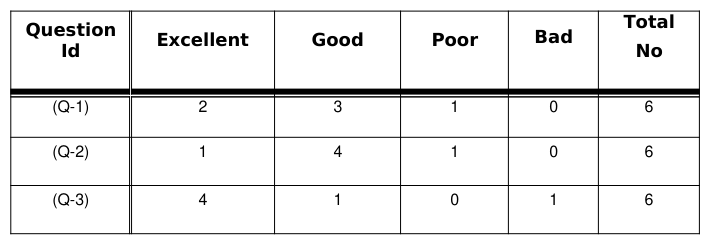
Results of Three-times Questionnaires from Learners after using our e-Learning system We have carried three-times questionnaires into execution for different groups in order to obtain various results of questionnaire. These would be very much useful and suggestive for system's improvement. At first, we have conducted our prototype questionnaire for members of our laboratory because of expectation to acquire some hints to brush up the contents of questionnaire. Strictly speaking, our laboratory has already contributed to define our questionnaire, so this conduction has no additional effects to modify our questionnaire prototype consequently. Table 1 shows a result of 1st trial questionnaire. And we have carried other two-times questionnaire into execution without modification even after 1st questionnaire.
Table 1: A Result of 1st Trial questionnaire of Learners' Impression for our e-Learning system (in our laboratory)
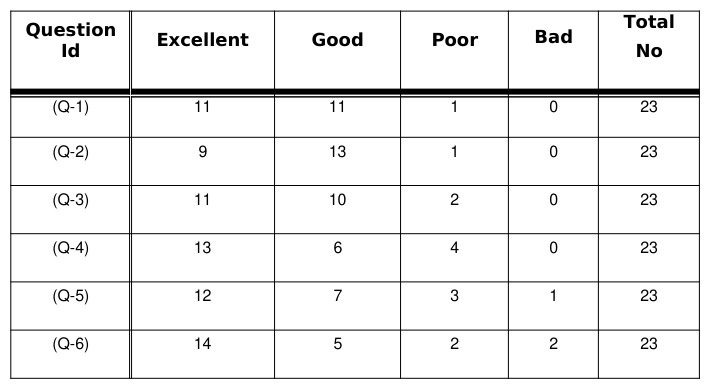
The second time is to carry the same questionnaire into execution for students of information engineering department in the second year. They have already begun to learn computer network, so that they are familiar with network-related subjects. The result of questionnaire is very good and their evaluation for our educational tool is the best of all the three times questionnaires. It is written in Table 2.
Table 2: A Result of 2nd official questionnaire of Learners' Impression for our e-Learning system (in a real classroom)
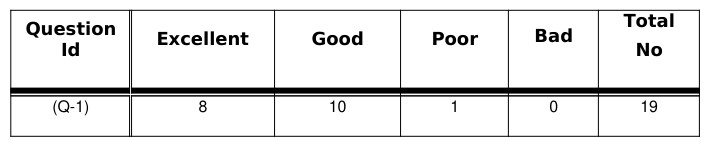
The last one is to carry the questionnaire into execution for students in the first year but they do not include members of engineering faculty. Such students are some sort of beginners of Internet and their knowledge and experience about computer network and Internet is not so much but they are interesting in Internet through their daily digital lives. The result of their questionnaire is in Table 3.
Table 3: A Result of 3rd official questionnaire of Learners' Impression for our e-Learning system (in a real classroom)
It is confirmed that the average of three results of questionnaires are good and evaluations from the relevant learners (= users of our e-Learning system) are almost excellent or good. Of course, our educational tool must be improved more and more in the future, but impression of users sound lime good and favorably-disposed toward our e-Learning system.
CONCLUSIONS
This paper describes summaries of several network- related researches, configuration of our educational tool for network study and its evaluation through the three-times questionnaires in our university. The tool has been designed and implemented as Web application and useful for users to learn several network-related subjects in university. We have obtained following evaluation from the above execution of questionnaires. Our conclusion is summarized as follows: (1) Our educational tool has been developed as one of Web applications and useful for users to learn network-
related subjects in university.
(2) Our tool is implemented with two-coupled modules to provide user defining network with some kinds of components such as node and connectivity and then perform demonstrative animation for visualization of internal structure and behaviour of the target network.
(3) It is confirmed that user impression about our tool is good and users evaluate our tool very well through the three-times questionnaires for many students with different expertise.
Acknowledgement
This research, especially part of evaluation for the e-Learning system, can be performed by kind supports and interests from all the students who have participated in the classroom lectures where 2nd and 3rd questionnaires were carried into execution. The Authors would like to express their great thanks to Professor Tetsuo Hattori, Graduate School of Engineering, Kagawa University and Dr. Yukio Hori of of Information Technology Center, Kagawa University for their constructive supports and useful discussion.
REFERENCES
Arai, M., Tamura, N., Watanabe, H., Ogiso, C. Takei, S. (2003), "Development and Evaluation of TCP/IP Protocol
Learning Tools", Journal of Information Processing Society Japan (JIPSJ), Vol.44, No.12, pp. 3242-3251(in Japanese). Sivakumar, S. C., Robertson, W., Artimy, M., Aslam, N. (2005), "A Web-Based Remote Interactive Laboratory for Internetworking Education", IEEE Transactions on Education, Vol.48, No.4, pp. 586-598. Snow, C., Pullen, J.M., McAndrews, P. (2005), "Network Education Ware: An Open-Source Web-Based System for
Synchronous Distance Education", IEEE Transactions on Education, Vol.48, No.4, pp. 705-712. Stafford, T., F. (2005), "Understanding Motivations for Internet Use in Distance Education", IEEE Transactions on Education (Vol.48, No.2, pp. 301-306. Tateiwa, Y. Yasuda, T., Yokoi, S. (2007), "Development of a System to Visualize Computer Network Behavior for
Learning to Associate LAN Construction Skills with TCP/IP Theory, Based on Virtual Environment Software", Journal of Information Processing Society Japan (JIPSJ), Vol.48, No.4, pp. 1684-1694(in Japanese).
LISTED IN THE AHFE DIGITAL BOOKSTORE CATALOGUE
Explore the complete digital volume
Advances in Ergonomics In Design, Usability & Special Populations: Part II
Read this individual research paper free through the original publisher, or explore the full digital proceedings book.
ISBN 978-1-4951-2107-4
Explore this ISBN in the AHFE Bookstore ↗Listed in the July 2026 bookstore catalogue; search by ISBN to confirm current availability · Digital book purchase optional